AUX RAM CHASSIS CAB 2021 Owner's Manual
[x] Cancel search | Manufacturer: RAM, Model Year: 2021, Model line: CHASSIS CAB, Model: RAM CHASSIS CAB 2021Pages: 463, PDF Size: 21.5 MB
Page 256 of 463
254MULTIMEDIA
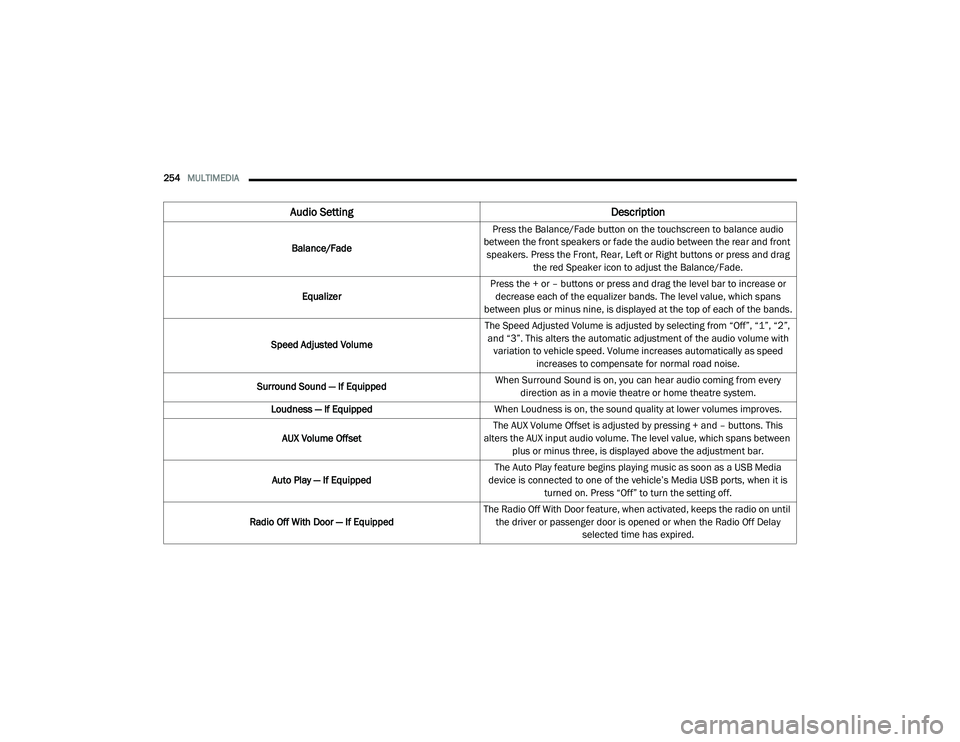
Audio Setting Description
Balance/FadePress the Balance/Fade button on the touchscreen to balance audio
between the front speakers or fade the audio between the rear and front speakers. Press the Front, Rear, Left or Right buttons or press and drag the red Speaker icon to adjust the Balance/Fade.
Equalizer Press the + or – buttons or press and drag the level bar to increase or
decrease each of the equalizer bands. The level value, which spans
between plus or minus nine, is displayed at the top of each of the bands.
Speed Adjusted Volume The Speed Adjusted Volume is adjusted by selecting from “Off”, “1”, “2”,
and “3”. This alters the automatic adjustment of the audio volume with variation to vehicle speed. Volume increases automatically as speed increases to compensate for normal road noise.
Surround Sound — If Equipped When Surround Sound is on, you can hear audio coming from every
direction as in a movie theatre or home theatre system.
Loudness — If Equipped When Loudness is on, the sound quality at lower volumes improves.
AUX Volume Offset The AUX Volume Offset is adjusted by pressing + and – buttons. This
alters the AUX input audio volume. The level value, which spans between plus or minus three, is displayed above the adjustment bar.
Auto Play — If Equipped The Auto Play feature begins playing music as soon as a USB Media
device is connected to one of the vehicle’s Media USB ports, when it is turned on. Press “Off” to turn the setting off.
Radio Off With Door — If Equipped The Radio Off With Door feature, when activated, keeps the radio on until
the driver or passenger door is opened or when the Radio Off Delay selected time has expired.
21_DPF_OM_EN_USC_t.book Page 254
Page 257 of 463
MULTIMEDIA255
MEDIA MODE
Operating Media Mode
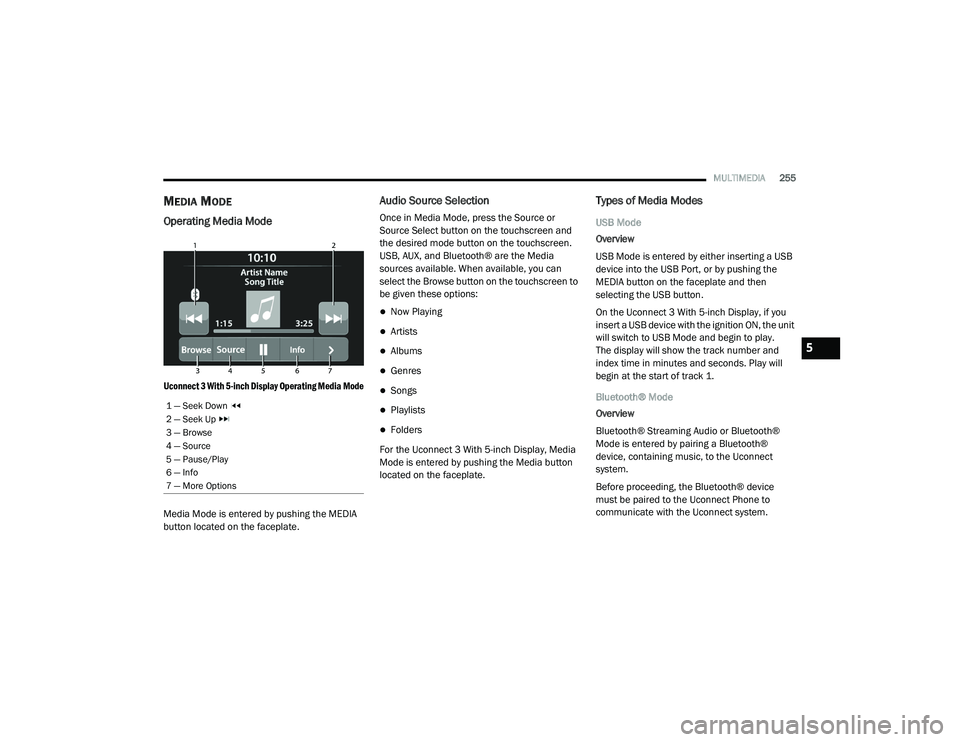
Uconnect 3 With 5-inch Display Operating Media Mode
Media Mode is entered by pushing the MEDIA
button located on the faceplate.
Audio Source Selection
Once in Media Mode, press the Source or
Source Select button on the touchscreen and
the desired mode button on the touchscreen.
USB, AUX, and Bluetooth® are the Media
sources available. When available, you can
select the Browse button on the touchscreen to
be given these options:
Now Playing
Artists
Albums
Genres
Songs
Playlists
Folders
For the Uconnect 3 With 5-inch Display, Media
Mode is entered by pushing the Media button
located on the faceplate.
Types of Media Modes
USB Mode
Overview
USB Mode is entered by either inserting a USB
device into the USB Port, or by pushing the
MEDIA button on the faceplate and then
selecting the USB button.
On the Uconnect 3 With 5-inch Display, if you
insert a USB device with the ignition ON, the unit
will switch to USB Mode and begin to play.
The display will show the track number and
index time in minutes and seconds. Play will
begin at the start of track 1.
Bluetooth® Mode
Overview
Bluetooth® Streaming Audio or Bluetooth®
Mode is entered by pairing a Bluetooth®
device, containing music, to the Uconnect
system.
Before proceeding, the Bluetooth® device
must be paired to the Uconnect Phone to
communicate with the Uconnect system.
1 — Seek Down
2 — Seek Up
3 — Browse
4 — Source
5 — Pause/Play
6 — Info
7 — More Options
5
21_DPF_OM_EN_USC_t.book Page 255
Page 258 of 463
256MULTIMEDIA
On the Uconnect 3 With 5-inch Display, push the
MEDIA button located on the faceplate. Once in
Media Mode, press the Source button on the
touchscreen and select the Bluetooth® button
Úpage 258.
To access Bluetooth® Mode, press the
Bluetooth® button on the left side of the
touchscreen or under the Source Select/Select
Source button (if equipped).
AUX Mode
Overview
Auxiliary Mode (AUX) is entered by inserting an
AUX device using a cable with a 3.5 mm audio
jack into the AUX port or pushing the MEDIA
button on the faceplate and then selecting the
Source button and then the AUX button.
To insert an Auxiliary device, gently insert the
Auxiliary device cable into the AUX Port. If you
insert an Auxiliary device with the ignition and
the radio on, the unit will switch to AUX Mode
and begin to play. Controlling The Auxiliary Device
The control of the Auxiliary device (e.g.,
selecting playlists, play, fast forward, etc.)
cannot be provided by the radio; use the device
controls instead. Adjust the volume with the
Volume button, Volume/Mute rotary knob, or
the On/Off rotary knob, or with the volume of
the attached device.
NOTE:
The radio unit is acting as the amplifier for audio
output from the Auxiliary device. Therefore, if
the volume control on the Auxiliary device is set
too low, there will be insufficient audio signal for
the radio unit to play the music on the device.
Seek Up /Seek Down
In USB Mode, press the Seek Up button on the
touchscreen for the next selection on the USB
device. Press and release the Seek Down
button on the touchscreen to return to the
beginning of the current selection, or to return
to the beginning of the previous selection if the
USB device is within the first three seconds of
the current selection.
In Bluetooth® Mode, press and release the
Seek Up button on the touchscreen for the next
selection on the Bluetooth® device. Press and release the Seek Down button on the
touchscreen to return to the beginning of the
current selection, or return to the beginning of
the previous selection if the Bluetooth® device
is within the first second of the current
selection.
Browse
In USB Mode, press the Browse button on the
touchscreen to display the browse window.
In USB Mode, the left side of the browse window
displays a list of ways you can browse through
the contents of the USB device. If supported by
the device, you can browse by Folder, Artist,
Playlist, Album, Song, etc. Press the desired
button on the touchscreen on the left side of the
screen. The center of the browse window shows
items and its sub-functions, which can be
scrolled through by pressing the Up and Down
buttons to the right. The Tune/Scroll knob can
also be used to scroll.
On the Uconnect 3 With 5-inch Display, rotate the
Browse button on the touchscreen to scroll
through and select a desired track on the device.
Press the Exit button on the touchscreen if you
wish to cancel the Browse function.
21_DPF_OM_EN_USC_t.book Page 256
Page 259 of 463
MULTIMEDIA257
Media Mode
In USB Mode, press the Media button on the
touchscreen to select the desired audio
source: USB.
In Bluetooth® Mode, press the Media button on
the touchscreen to select the desired audio
source: Bluetooth®.
In AUX Mode, press the Media button on
the touchscreen to select the desired audio
source: AUX.
Repeat
In USB Mode, press the Repeat button on the
touchscreen to toggle the repeat functionality.
The Repeat button on the touchscreen is
highlighted when active. The Radio will continue
to play the current track, repeatedly, as long as
the repeat is active. Press the Repeat button
again to enter Repeat All. The radio will continue
to play all the current tracks, repeatedly, as long
as the repeat function is active. To cancel
Repeat, press the Repeat button a third time. Shuffle
In USB Mode, press the Shuffle button on the
touchscreen to play the selections on the USB
device in random order to provide an interesting
change of pace. Press the Shuffle button on the
touchscreen a second time to turn this feature off.
Audio
Audio settings can be accessed by pressing the
Audio button Ú
page 247.
Info
In both Disc and USB Modes, press the Info
button on the touchscreen to display the
current track information. Press the Info or X
button on the touchscreen a second time to
cancel this feature.
Tracks
In both Disc and USB Modes, press the Tracks
button on the touchscreen to display a pop-up
with the Song List. The song currently playing is
indicated by an arrow and lines above and
below the song title. When in the Tracks List
screen you can rotate the Tune/Scroll knob to
highlight a track (indicated by the line above
and below the track name) and then push the
Enter/Browse knob to start playing that track. In Bluetooth® Mode, if the Bluetooth® device
supports this feature, press the Tracks button
on the touchscreen to display a pop-up with
the Song List. The currently playing song is
indicated by a red arrow and lines above and
below the song title.
Pressing the Tracks button on the touchscreen
while the pop-up is displayed will close the pop-up.
Media Voice Commands
Uconnect offers connections via USB,
Bluetooth®, and auxiliary (AUX) ports. Voice
operation is only available for connected USB
and AUX devices.
Push the VR button located on the steering
wheel. After the beep, say one of the following
commands and follow the prompts to switch
your media source or choose an artist.
“
Change source to Bluetooth®”
“Change source to AUX”
“Change source to USB”
“Play artist Beethoven”; “ Play album
Greatest Hits”; “ Play song Moonlight
Sonata”; “ Play genre Classical”
5
21_DPF_OM_EN_USC_t.book Page 257
Page 283 of 463

SAFETY281
Traction Control System (TCS)
TCS monitors the amount of wheel spin of each
of the driven wheels. If wheel spin is detected,
the TCS may apply brake pressure to the
spinning wheel(s) and/or reduce engine power
to provide enhanced acceleration and stability.
A feature of the TCS, Brake Limited Differential
(BLD), functions similarly to a limited slip
differential and controls the wheel spin across a
driven axle. If one wheel on a driven axle is
spinning faster than the other, the system will
apply the brake of the spinning wheel. This will
allow more engine power to be applied to the
wheel that is not spinning. BLD may remain
enabled even if TCS and Electronic Stability
Control (ESC) are in reduced modes.
Trailer Sway Control (TSC)
TSC uses sensors in the vehicle to recognize an
excessively swaying trailer and will take the
appropriate actions to attempt to stop the sway.
NOTE:
TSC cannot stop all trailers from swaying.
Always use caution when towing a trailer and
follow the trailer tongue weight recommenda -
tions Ú page 200.
When TSC is functioning, the ESC Activation/
Malfunction Indicator Light will flash, the engine
power may be reduced and you may feel the
brakes being applied to individual wheels to
attempt to stop the trailer from swaying. TSC is
disabled when the ESC system is in the “Partial
Off” or “Full Off” modes.
AUXILIARY DRIVING SYSTEMS
FORWARD COLLISION WARNING (FCW)
W
ITH MITIGATION — IF EQUIPPED
FCW with Mitigation provides the driver with
audible warnings, visual warnings (within the
instrument cluster display), and may apply a
brake jerk to warn the driver when it detects a
potential frontal collision. The warnings and
limited braking are intended to provide the
driver with enough time to react, avoid or
mitigate the potential collision.
NOTE:
FCW monitors the information from the forward
looking sensors as well as the Electronic Brake
Controller (EBC), to calculate the probability of a
forward collision. When the system determines
that a forward collision is probable, the driver
will be provided with audible and visual warn-
ings as well as a possible brake jerk warning.
If the driver does not take action based upon
these progressive warnings, then the system
will provide a limited level of active braking to
help slow the vehicle and mitigate the potential
forward collision. If the driver reacts to the warn -
ings by braking and the system determines that
HSA is not a parking brake. Always apply
the parking brake fully when exiting your
vehicle. Also, be certain to place the trans -
mission in PARK.
Failure to follow these warnings can result
in a collision or serious personal injury.
WARNING! (Continued)
WARNING!
If TSC activates while driving, slow the vehicle
down, stop at the nearest safe location, and
adjust the trailer load to eliminate trailer
sway.
6
21_DPF_OM_EN_USC_t.book Page 281
Page 401 of 463

SERVICING AND MAINTENANCE399
F74–10 Amp Red Backup Alarm – If Equipped
F75 –10 Amp Red ATMM / Coil-SCR Module RLY – If Equipped
F76 –10 Amp Red Electronic Stability Control — If Equipped
F77 –10 Amp Red Drivetrain Control Module / Front Axle Disconnect Module / TCM/ STOM
F78 –15 Amp BlueEngine Control Module / Powertrain Control Module / AEB RACM MOD /
Feed To AUX PDC Relay Coils/ HRLS
F79 –15 Amp Blue ID / Clearance Lights
F80 –10 Amp Red Overhead Console / Assist / 911 – If Equipped
F81 –20 Amp Yellow Trailer Tow Right Turn / Stop Lights - If Equipped
F82 –10 Amp Red Steering Column Control Module / Cruise Control
F83 – –Spare
F84 –15 Amp Blue ASBM / HVAC / ICS / Rear Heated Seat Switches
F85 –10 Amp Red Airbag Module
F86 –10 Amp Red Airbag Module
F87 –10 Amp RedAir Suspension / ITBM / Steering Column Control Module / MOD Gateway
CAN-C Trailer TPM
F88 –15 Amp Blue Instrument Panel Cluster
F90/F91 –20 Amp Yellow Power Outlet / Batt
Power Outlet / Acc
F92 – –Spare
F93 – –Spare
Cavity Cartridge Fuse Micro Fuse Description
8
21_DPF_OM_EN_USC_t.book Page 399
Page 451 of 463
CUSTOMER ASSISTANCE449
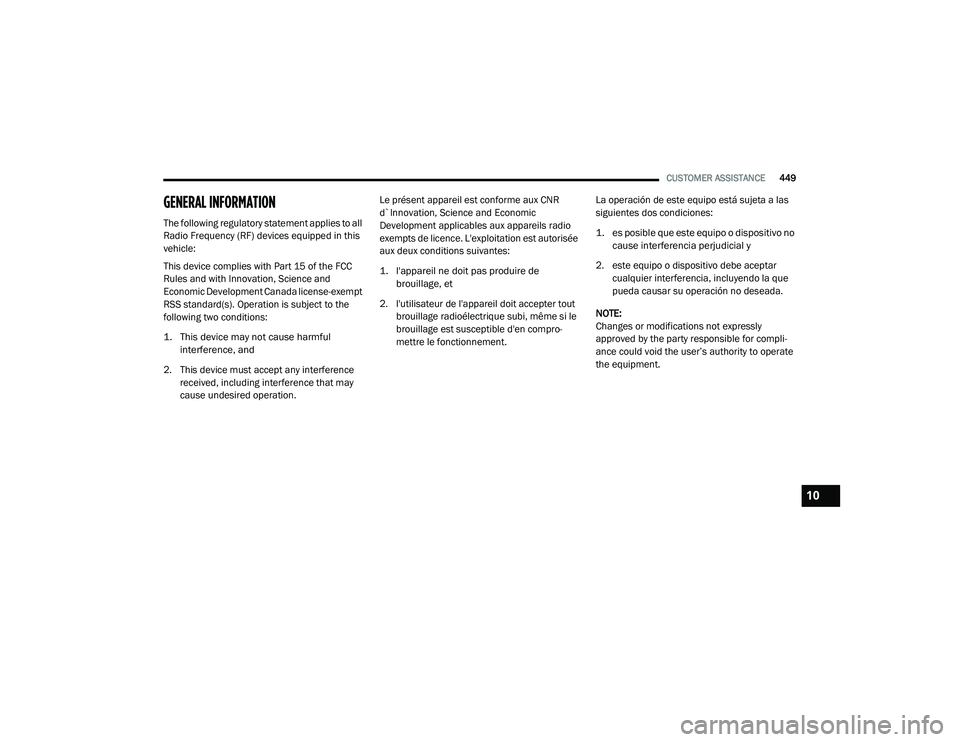
GENERAL INFORMATION
The following regulatory statement applies to all
Radio Frequency (RF) devices equipped in this
vehicle:
This device complies with Part 15 of the FCC
Rules and with Innovation, Science and
Economic Development Canada license-exempt
RSS standard(s). Operation is subject to the
following two conditions:
1. This device may not cause harmful
interference, and
2. This device must accept any interference received, including interference that may
cause undesired operation. Le présent appareil est conforme aux CNR
d`Innovation, Science and Economic
Development applicables aux appareils radio
exempts de licence. L'exploitation est autorisée
aux deux conditions suivantes:
1. l'appareil ne doit pas produire de
brouillage, et
2. l'utilisateur de l'appareil doit accepter tout brouillage radioélectrique subi, même si le
brouillage est susceptible d'en compro -
mettre le fonctionnement. La operación de este equipo está sujeta a las
siguientes dos condiciones:
1. es posible que este equipo o dispositivo no
cause interferencia perjudicial y
2. este equipo o dispositivo debe aceptar cualquier interferencia, incluyendo la que
pueda causar su operación no deseada.
NOTE:
Changes or modifications not expressly
approved by the party responsible for compli -
ance could void the user’s authority to operate
the equipment.
10
21_DPF_OM_EN_USC_t.book Page 449
Page 452 of 463
450
INDEX
Pair (Link) Uconnect Phone To A Mobile
Phone............................................................ 260 WARRANTY INFORMATION...................... 447
A
Adaptive Cruise Control (ACC)
(Cruise Control)
.................................... 164, 166Adding Engine Coolant (Antifreeze)............... 384Adding Fuel.................................................... 196Additives, Fuel............................................... 434Adjust Down........................................................... 35Forward....................................................... 35Rearward..................................................... 35Up................................................................ 35Adjustable Pedals............................................ 40Advance Phone Connectivity......................... 266Air BagAir Bag Operation...................................... 305Air Bag Warning Light................................ 303Enhanced Accident Response......... 310, 352Event Data Recorder (EDR)....................... 352If Deployment Occurs................................ 309Knee Impact Bolsters................................ 305Maintaining Your Air Bag System.............. 311Maintenance............................................. 311
Redundant Air Bag Warning Light............. 303Transporting Pets..................................... 330Air Bag Light................................ 107, 303, 331Air Cleaner, Engine (Engine Air Cleaner
Filter)................................................... 369, 391Air Conditioner Maintenance........................ 371Air Conditioner Refrigerant.................. 371, 372Air Conditioner System................................. 371Air Conditioning................................................ 62Air Conditioning Filter....................................... 65Air Conditioning System................................... 64Air Conditioning, Operating Tips....................... 65Air Filter........................................................ 369Air PressureTires......................................................... 415AlarmSecurity Alarm....................................23, 108Alterations/ModificationsVehicle......................................................... 10Antifreeze (Engine Coolant).......................... 384Capacities................................................. 439Disposal................................................... 385Anti-Lock Brake System (ABS)...................... 273Anti-Lock Warning Light................................ 113Assist, Hill Start............................................. 280Audio Settings............................................... 253Audio Systems (Radio).................................. 220
Auto Down Power Windows..............................77Automatic Door Locks......................................28Automatic Headlights.......................................52Automatic Temperature Control (ATC)..............64Automatic Transmission....................... 141, 389Adding Fluid.............................................. 389Fluid And Filter Change............................. 389Fluid Change............................................. 389Fluid Level Check............................. 387, 388Fluid Type........................................ 390, 444Shifting..................................................... 146Special Additives...................................... 387Automatic Transmission Limp Home Mode... 145AutoPark....................................................... 120AUX Camera......................................... 188, 194Auxiliary Driving Systems.............................. 281Axle Fluid.....................................390, 391, 444Axle Lubrication................................... 390, 391
B
Back-Up......................................................... 186Back-Up Camera........................................... 186Battery................................................. 108, 366Blanket..................................................... 130Charging System Light.............................. 108Keyless Key Fob Replacement....................16Battery Saver Feature......................................54
21_DPF_OM_EN_USC_t.book Page 450
Page 453 of 463
451
Belts, Seat
..................................................... 330Bluetooth Connecting To A Particular Mobile Phone Or Audio Device After Pairing
................262Body Builders Guide........................................ 10Body Mechanism Lubrication........................ 380B-Pillar Location............................................. 411Brake Assist System...................................... 274Brake Control System.................................... 274Brake Fluid.......................................... 387, 444Brake System...................................... 387, 431Fluid Check............................................... 387Master Cylinder......................................... 387Parking...................................................... 137Warning Light............................................ 107Brake/Transmission Interlock....................... 141Bulb Replacement......................................... 401Bulbs, Light.......................................... 332, 401
C
Cab Top Clearance Lights.............................. 405Camera.......................................................... 186Camera, AUX........................................ 188, 194Camera, Rear...................................... 186, 189Capacities, Antifreeze (Engine Coolant)......... 439Capacities, Fluid............................................ 439Caps, FillerOil (Engine)................................................ 364Power Steering.......................................... 163Radiator (Coolant Pressure)...................... 385
Car Washes................................................... 428Carbon Monoxide Warning............................ 333Cargo Light....................................................... 54CD................................................................. 255Cellular Phone.............................................. 269Center High Mounted Stop Light................... 405Center Seat Storage Compartment.................. 67Changing A Flat Tire...................................... 339Charge Air Cooler.......................................... 386Chart, Tire Sizing........................................... 407Check Engine Light (Malfunction
Indicator Light).............................................. 117Checking Your Vehicle For Safety................. 330Checks, Safety.............................................. 330Child Restraint.............................................. 312Child RestraintsBooster Seats........................................... 315Child Seat Installation..................... 323, 325How To Stow An unused ALR Seat Belt.... 322Infant And Child Restraints....................... 313Locating The LATCH Anchorages.............. 320Lower Anchors And Tethers For Children.. 317Older Children And Child Restraints......... 314Seating Positions...................................... 316Clean Air Gasoline......................................... 433CleaningWheels..................................................... 421Climate Control................................................ 58Automatic.................................................... 59Manual........................................................ 62
Cold Weather Operation................................ 122Compact Spare Tire...................................... 419Contract, Service........................................... 446Controls........................................................ 247Cooling Pressure Cap (Radiator Cap)............ 385Cooling System............................................. 383Adding Coolant (Antifreeze)...................... 384Coolant Level................................... 384, 386Cooling Capacity....................................... 439Disposal Of Used Coolant......................... 385Drain, Flush, And Refill............................. 384Inspection................................................. 386Points To Remember................................ 386Pressure Cap............................................ 385Radiator Cap............................................. 385Selection Of Coolant (Antifreeze)..... 384, 440Corrosion Protection..................................... 427Cruise Control (Speed Control)............. 164, 166Cruise Light................................................... 115Customer Assistance.................................... 445Cybersecurity................................................ 220
D
Daytime Running Lights...................................51Dealer Service............................................... 367Defroster, Rear Window...................................62Defroster, Windshield............................ 62, 331Delay (Intermittent) Wipers..............................57Deleting A Phone........................................... 262Diagnostic System, Onboard......................... 116
11
21_DPF_OM_EN_USC_t.book Page 451
Page 457 of 463
455
Manual Park Release
............................................. 348Service...................................................... 448Media Hub....................................................... 72Media Mode.................................................. 255Memory Seat................................................... 32Memory Settings............................................. 32Methanol....................................................... 434Mirrors............................................................. 41Electric Powered......................................... 44Heated........................................................ 46Memory....................................................... 32Outside........................................................ 44Rearview..................................... 41, 42, 335Trailer Towing.............................................. 46Modifications/AlterationsVehicle........................................................ 10Monitor, Tire Pressure System....................... 284Mopar Parts................................................... 447MP3 Control.................................................... 72Multi-Function Control Lever............................ 51
N
Navigation System (Uconnect GPS)............... 186New Vehicle Break-In Period................ 136, 137Noise ControlMaintenance............................................. 391Tampering Prohibited................................ 392Noise Emission Warranty..................... 391, 392
O
Occupant Restraints..................................... 292Octane Rating, Gasoline (Fuel)..................... 433Oil Change Indicator..................................... 357Oil Filter, Change.......................................... 369Oil Filter, Selection........................................ 369Oil Pressure Light.......................................... 108Oil Reset.......................................................... 91Oil, Engine............................................ 368, 440Capacity.................................................... 439Dipstick.................................................... 366Disposal................................................... 369Filter................................................ 369, 440Filter Disposal........................................... 369Identification Logo.................................... 368Materials Added To.................................. 368Pressure Warning Light............................ 108Recommendation..................................... 368Synthetic.................................................. 368Onboard Diagnostic System.......................... 116Operating Precautions.................................. 116Operator ManualOwner's Manual........................................ 448Outside Rearview Mirrors................................ 44Overdrive...................................................... 151Overdrive OFF Switch.................................... 151Overheating, Engine...................................... 346
P
Paint Care..................................................... 427Pair (Link) Uconnect Phone To A Mobile
Phone .................................................... 260Parking Brake............................................... 137ParkSense System, Rear............................... 177Passive Entry....................................................26Pedals, Adjustable...........................................40Pets............................................................... 330Phone Mode.................................................. 258Placard, Tire And Loading Information.......... 411Power
Distribution Center (Fuses)....................... 395Door Locks...................................................25Mirrors.........................................................44Outlet (Auxiliary Electrical Outlet)..........73, 74Seats...........................................................35Sliding Rear Window....................................78Steering............................................. 44, 163Take-Off Adapter....................................... 163Take-Off Operation.................................... 163Windows......................................................76Power SeatsDown...........................................................35Forward.......................................................35Rearward.....................................................35Recline.........................................................35Tilt................................................................35Up................................................................35
11
21_DPF_OM_EN_USC_t.book Page 455