instrument panel RAM PROMASTER 2021 User Guide
[x] Cancel search | Manufacturer: RAM, Model Year: 2021, Model line: PROMASTER, Model: RAM PROMASTER 2021Pages: 288, PDF Size: 15.22 MB
Page 39 of 288
GETTING TO KNOW YOUR VEHICLE37
USB/AUX CONTROL — IF EQUIPPED
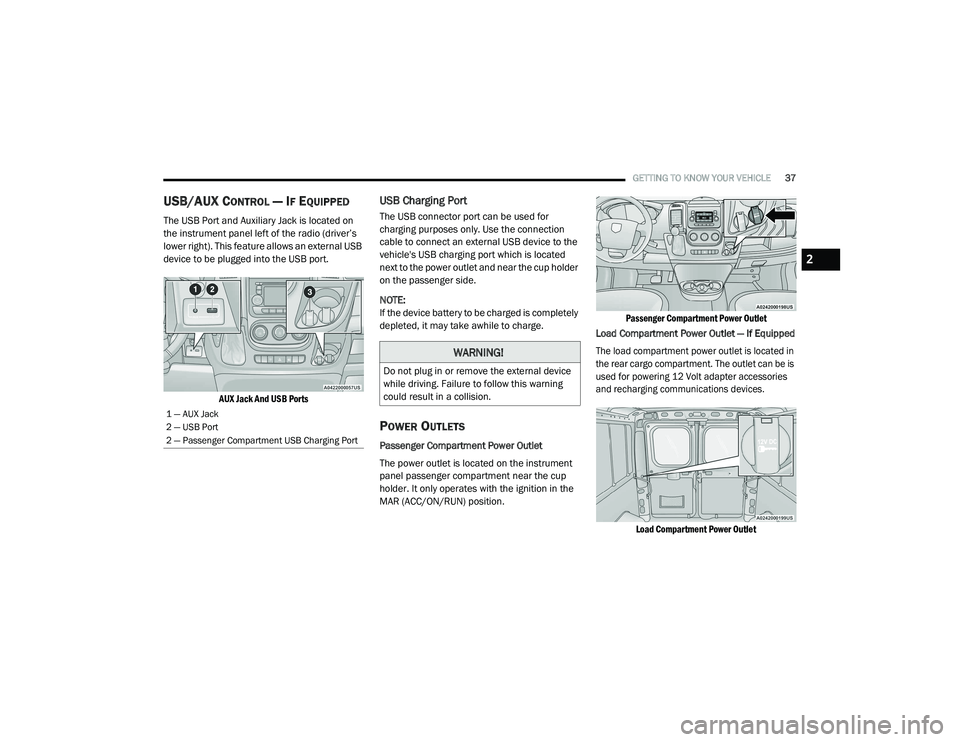
The USB Port and Auxiliary Jack is located on
the instrument panel left of the radio (driver’s
lower right). This feature allows an external USB
device to be plugged into the USB port.
AUX Jack And USB Ports
USB Charging Port
The USB connector port can be used for
charging purposes only. Use the connection
cable to connect an external USB device to the
vehicle's USB charging port which is located
next to the power outlet and near the cup holder
on the passenger side.
NOTE:
If the device battery to be charged is completely
depleted, it may take awhile to charge.
POWER OUTLETS
Passenger Compartment Power Outlet
The power outlet is located on the instrument
panel passenger compartment near the cup
holder. It only operates with the ignition in the
MAR (ACC/ON/RUN) position.
Passenger Compartment Power Outlet
Load Compartment Power Outlet — If Equipped
The load compartment power outlet is located in
the rear cargo compartment. The outlet can be is
used for powering 12 Volt adapter accessories
and recharging communications devices.
Load Compartment Power Outlet
1 — AUX Jack
2 — USB Port
2 — Passenger Compartment USB Charging Port
WARNING!
Do not plug in or remove the external device
while driving. Failure to follow this warning
could result in a collision.
2
21_VF_OM_EN_USC_t.book Page 37
Page 40 of 288

38GETTING TO KNOW YOUR VEHICLE
(Continued)
NOTE:
Do not connect devices with power higher than
180 W to the socket. Do not damage the socket
by using unsuitable adapters.
Power Outlet Fuses — Under Hood
AUXILIARY SWITCHES — IF EQUIPPED
Your vehicle may be equipped with two auxiliary
switches located on the instrument panel to the
left of the steering column which can be used to
power various electronic devices. Connections
to the switches are found in the right central
pillar fuse panel at the base of the passenger
side B-pillar.
Auxiliary Upfitter Switches
Auxiliary Switch 1 is configured to constant
battery feed, while Auxiliary Switch 2 is
configured to ignition feed.
For further information on using the auxiliary
switches, please refer to the Ram Body Builders
Guide by accessing www.rambodybuilder.com
and choosing the appropriate links.
1 — F14 Fuse 20 Amp Yellow Front Power Outlet
2 — F09 Fuse 15 Amp Blue Rear Power Outlet
WARNING!
To avoid serious injury or death:
Only devices designed for use in this type of
outlet should be inserted into any 12 Volt
outlet.
Do not touch with wet hands.
Close the lid when not in use and while
driving the vehicle.
If this outlet is mishandled, it may cause an
electric shock and failure.
CAUTION!
Many accessories that can be plugged in
draw power from the vehicle's battery, even
when not in use (i.e., cellular phones, etc.).
Eventually, if plugged in long enough, the
vehicle's battery will discharge sufficiently
to degrade battery life and/or prevent the
engine from starting.
Accessories that draw higher power (i.e.,
coolers, vacuum cleaners, lights, etc.) will
degrade the battery even more quickly.
Only use these intermittently and with
greater caution.
After the use of high power draw accesso -
ries, or long periods of the vehicle not being
started (with accessories still plugged in),
the vehicle must be driven a sufficient
length of time to allow the generator to
recharge the vehicle's battery.
WARNING! (Continued)
21_VF_OM_EN_USC_t.book Page 38
Page 42 of 288
40GETTING TO KNOW YOUR VEHICLE
WIND BUFFETING
Wind buffeting can be described as the
perception of pressure on the ears or a
helicopter-type sound in the ears. Your vehicle
may exhibit wind buffeting with the windows
down, or the sunroof (if equipped) in certain
open or partially open positions. This is a normal
occurrence and can be minimized. If the
buffeting occurs with the rear windows open,
open the front and rear windows together to
minimize the buffeting. If the buffeting occurs
with the sunroof open, adjust the sunroof
opening to minimize the buffeting or open any
window.
HOOD
OPENING
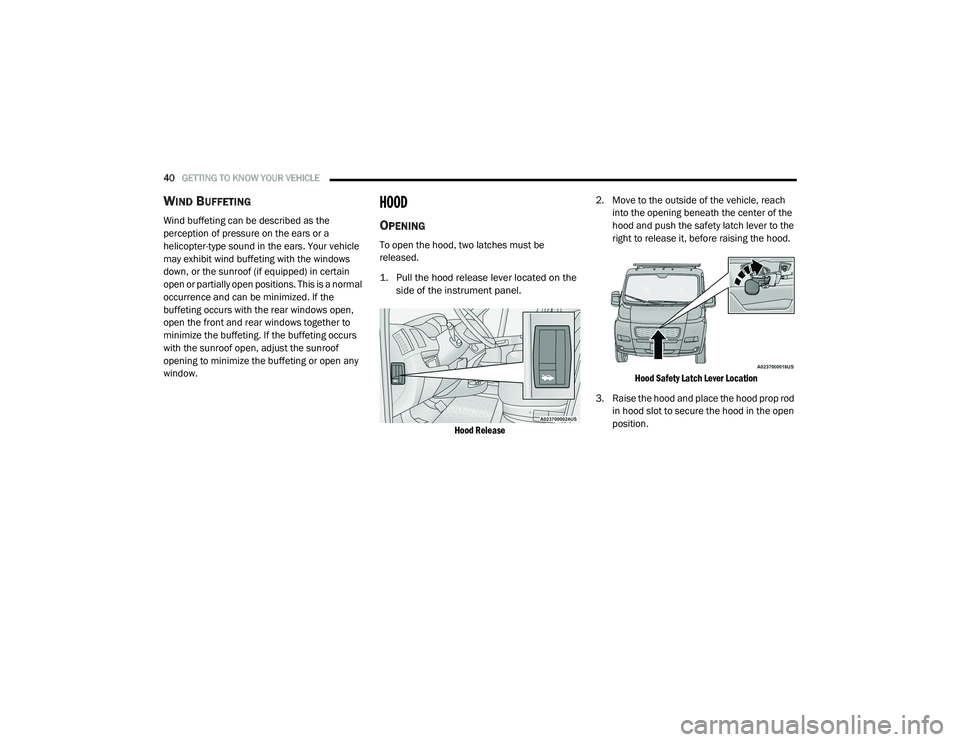
To open the hood, two latches must be
released.
1. Pull the hood release lever located on the
side of the instrument panel.
Hood Release
2. Move to the outside of the vehicle, reach
into the opening beneath the center of the
hood and push the safety latch lever to the
right to release it, before raising the hood.
Hood Safety Latch Lever Location
3. Raise the hood and place the hood prop rod in hood slot to secure the hood in the open
position.
21_VF_OM_EN_USC_t.book Page 40
Page 44 of 288
42
GETTING TO KNOW YOUR INSTRUMENT PANEL
INSTRUMENT CLUSTER
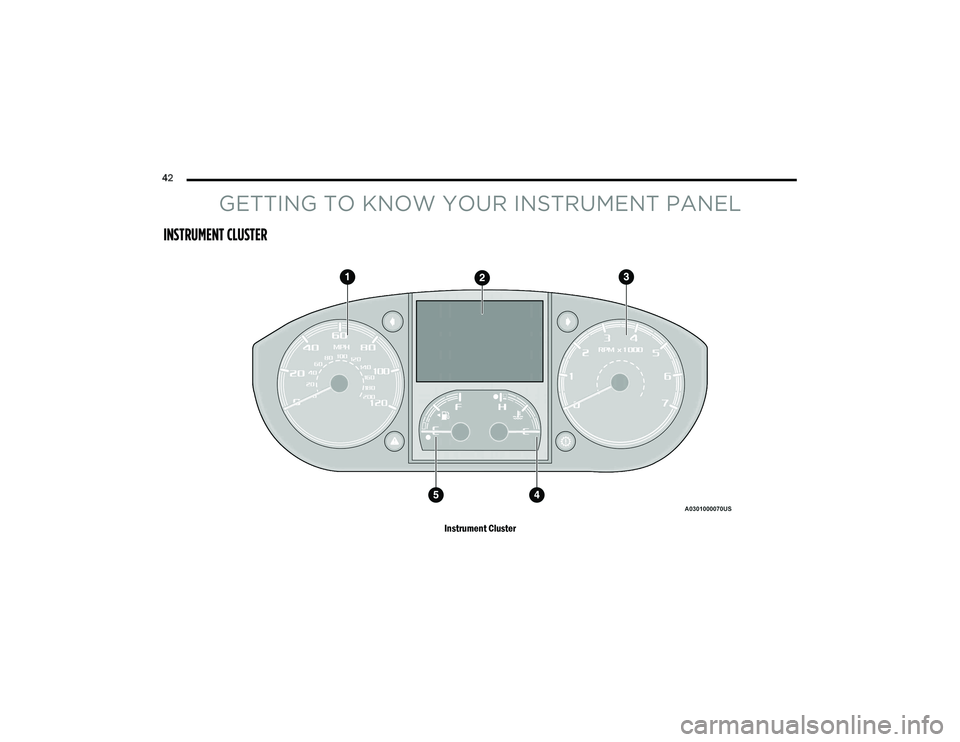
Instrument Cluster
21_VF_OM_EN_USC_t.book Page 42
Page 45 of 288

GETTING TO KNOW YOUR INSTRUMENT PANEL43
INSTRUMENT CLUSTER DESCRIPTIONS
1. Speedometer
Indicates vehicle speed.
2. Instrument Cluster Display
When the appropriate conditions exist,
this display shows instrument cluster
display messages Ú page 44.
Odometer/Trip Odometer Display Area
US Federal regulations require that upon
transfer of vehicle ownership, the seller
certify to the purchaser the correct mileage
that the vehicle has been driven. If your
odometer needs to be repaired or serviced,
the repair technician should leave the odom -
eter reading the same as it was before the
repair or service. If the technician cannot do
so, then the odometer must be set at zero,
and a sticker must be placed in the door
jamb stating what the mileage was before the
repair or service. It is a good idea for you to
make a record of the odometer reading before the repair/service, so that you can be
sure that it is properly reset, or that the door
jamb sticker is accurate if the odometer must
be reset at zero.
Gear Selector Status (PRND)
The gear selector status “P,R,N,D,1,2,3,4,5,
6” are displayed indicating the gear selector
position. Telltales “1,2,3,4,5,6” indicate the
manual mode has been engaged and the
gear selected is displayed Ú page 60.
Instrument Cluster Display Location
3. Tachometer
This gauge measures engine revolutions
per minute (RPM x 1000). Before the
pointer reaches the red area, ease up on
the accelerator to prevent engine
damage.
4. Temperature Gauge
The temperature gauge shows engine
coolant temperature. Any reading within
the normal range indicates that the engine
cooling system is operating satisfactorily.
The pointer will likely indicate a higher
temperature when driving in hot weather
or up mountain grades. It should not be
allowed to exceed the upper limits of the
normal operating range.
WARNING!
A hot engine cooling system is dangerous. You or
others could be badly burned by steam or boiling
coolant. You may want to call an authorized
dealer for service if your vehicle overheats.
3
21_VF_OM_EN_USC_t.book Page 43
Page 46 of 288

44GETTING TO KNOW YOUR INSTRUMENT PANEL
5. Fuel Gauge
The pointer shows the level of fuel in the
fuel tank when the ignition switch is in
the ON/RUN position.
The fuel pump symbol points
to the side of the vehicle where
the fuel door is located
Ú page 75.
INSTRUMENT CLUSTER DISPLAY
Your vehicle will be equipped with an
instrument cluster display, which offers useful
information to the driver. With the ignition in the
STOP (OFF/LOCK) mode, opening/closing of a
door will activate the display for viewing, and
display the total miles, or kilometers, in the
odometer. Your instrument cluster display is
designed to display important information
about your vehicle’s systems and features.
Using a driver interactive display located on the
instrument panel, your instrument cluster
display can show you how systems are working
and give you warnings when they are not. The
steering wheel mounted controls allow you to
scroll through the main menus and submenus.
You can access the specific information you
want and make selections and adjustments.
LOCATION AND CONTROLS
The instrument cluster display features a driver
interactive display that is located in the
instrument cluster.
Instrument Cluster Display
This system allows the driver to select a variety
of useful information by pushing the switches
mounted on the instrument panel. Examples of
menu items are:
Speed Beep
Buzzer Volume
Seat Belt Buzzer
Exit Menu
CAUTION!
Driving with a hot engine cooling system could
damage your vehicle. If the temperature gauge
reads “H,” pull over and stop the vehicle. Idle
the vehicle with the air conditioner turned off
until the pointer drops back into the normal
range. If the pointer remains on the “H,” turn
the engine off immediately and call an
authorized dealer for service.
21_VF_OM_EN_USC_t.book Page 44
Page 47 of 288
GETTING TO KNOW YOUR INSTRUMENT PANEL45
If equipped with a Uconnect system, some
customer programmable features will display in
the radio Úpage 89.
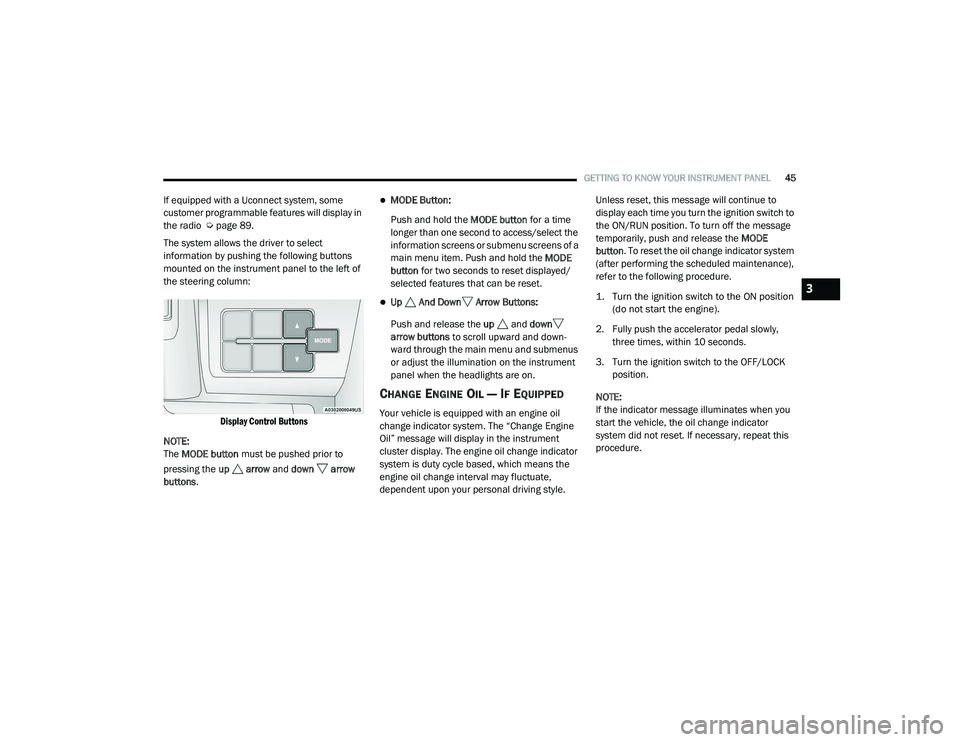
The system allows the driver to select
information by pushing the following buttons
mounted on the instrument panel to the left of
the steering column:
Display Control Buttons
NOTE:
The MODE button must be pushed prior to
pressing the up arrow and down arrow
buttons .MODE Button:
Push and hold the MODE button for a time
longer than one second to access/select the
information screens or submenu screens of a
main menu item. Push and hold the MODE
button for two seconds to reset displayed/
selected features that can be reset.
Up And Down Arrow Buttons:
Push and release the up and down
arrow buttons to scroll upward and down -
ward through the main menu and submenus
or adjust the illumination on the instrument
panel when the headlights are on.
CHANGE ENGINE OIL — IF EQUIPPED
Your vehicle is equipped with an engine oil
change indicator system. The “Change Engine
Oil” message will display in the instrument
cluster display. The engine oil change indicator
system is duty cycle based, which means the
engine oil change interval may fluctuate,
dependent upon your personal driving style. Unless reset, this message will continue to
display each time you turn the ignition switch to
the ON/RUN position. To turn off the message
temporarily, push and release the
MODE
button . To reset the oil change indicator system
(after performing the scheduled maintenance),
refer to the following procedure.
1. Turn the ignition switch to the ON position (do not start the engine).
2. Fully push the accelerator pedal slowly, three times, within 10 seconds.
3. Turn the ignition switch to the OFF/LOCK position.
NOTE:
If the indicator message illuminates when you
start the vehicle, the oil change indicator
system did not reset. If necessary, repeat this
procedure.
3
21_VF_OM_EN_USC_t.book Page 45
Page 48 of 288

46GETTING TO KNOW YOUR INSTRUMENT PANEL
DISPLAY SETUP MENU
The menu comprises a series of functions
arranged in a cycle. Push and release the up
or down arrow button to access the different
options and settings (setup).
The setup menu can be activated by pushing
the MODE button . Single pushes on the up or
down arrow button will scroll through the
setup menu options. The menu items include
the following functions:
Speed Beep
Buzzer Volume
Seat Belt Buzzer (Just Available After SBR
Disable Made By CHR Service)
Exit menu
NOTE:
If equipped, some customer programmable
features will display in the Uconnect system.
Refer to your Uconnect Owner’s Manual Supple -
ment for further information. Selecting An Option Of The Main Menu Without
Submenu
1. Briefly push and release the
MODE
button
to select the main menu option to set.
2. Push and release the up or down
arrow button (by single pushes) to select the
new setting.
3. Briefly push and release the MODE button
to store the new setting and go back to the
main menu option previously selected.
Selecting An Option Of The Main Menu With
Submenu
1. Briefly push and release the
MODE
button
to display the first submenu option.
2. Push and release the up or down
arrow button (by single pushes) to scroll
through all the submenu options.
3. Briefly push and release the MODE button
to select the displayed submenu option and
to open the relevant setup menu. 4. Push and release the
up or down
arrow button (by single pushes) to select the
new setting for this submenu option.
5. Briefly push and release the MODE button
to store the new setting and go back to the
previously selected submenu option.
6. Push and release and hold the MODE
button to return to the main menu (short
hold) or the main screen (longer hold).
VALUES DISPLAYED
NOTE:
All of the following items are accessed by
pressing the TRIP button.
Range
This indicates the distance which may be
traveled with the fuel remaining in the tank,
assuming that driving conditions will not
change. The message “----” will appear on the
display in the following cases:
Distance less than 30 miles (or 50 km).
The vehicle is parked for a long time with the
engine running.
21_VF_OM_EN_USC_t.book Page 46
Page 49 of 288

GETTING TO KNOW YOUR INSTRUMENT PANEL47
NOTE:
The range depends on several factors: driving
style, type of route (freeway, residential, moun-
tain roads, etc.), conditions of use of the vehicle
(load, tire pressure, etc.). Trip planning must
take into account the above notes.
Travel Distance
This value shows the distance covered since the
last reset.
Average Fuel Consumption
This value shows the approximate average
consumption since the last reset.
Current Fuel Consumption
This indicates the fuel consumption. The value
is constantly updated. The message “----” will
appear on the display if the vehicle is parked
with the engine running.
Average Speed
This value shows the vehicle's average speed as
a function of the overall time elapsed since the
last reset.
Travel Time
This value shows the time elapsed since the last
reset.
PERSONAL SETTINGS
(C
USTOMER-PROGRAMMABLE
F
EATURES)
Speed Beep
Buzzer Volume
Seat Belt Buzzer (Just Available After SBR
Disable Made By CHR Service)
Exit Menu
note:
If equipped, some customer programmable
features will display in the Uconnect system
Ú page 89.
TRIP COMPUTER
The Trip Computer is located in the instrument
cluster. It features a driver interactive display
(displays information such as trip information,
range, fuel consumption, average speed, and
travel time).
NOTE:
The Uconnect System also has a Trip Computer
display and menus to customize the informa -
tion displayed in the cluster Ú page 89.
TRIP BUTTON
The TRIP button , located on the right steering
column stalk, can be used to display and to
reset the previously described values.
A short button push displays the different
values.
A long button push resets the system and
then starts a new trip.
New Trip
To reset:
Push and hold the TRIP button to reset the
system manually.
When the “Trip distance” reaches
99999.9 miles or kilometers or when the
“Travel time” reaches 999.59 (999 hours and
59 minutes), the system is reset automatically.
Disconnecting/Reconnecting the battery
resets the system.
NOTE:
If the reset operation occurs in the presence of
the screens concerning Trip A or Trip B, only the
information associated with Trip A or Trip B
functions will be reset.
3
21_VF_OM_EN_USC_t.book Page 47
Page 50 of 288
48GETTING TO KNOW YOUR INSTRUMENT PANEL
Start Of Trip Procedure
With the ignition on, push and hold the TRIP
button for over two seconds to reset trip
information.
Exit Trip
To exit the Trip function, push the TRIP button
until all the trip menu items have been
displayed and the display returns to the main
menu.
TRIP FUNCTIONS
Both trip functions are resettable (reset — start
of new trip).
Trip A/Trip B
Trip Distance
Average Fuel Consumption
Average Speed
Travel Time (Driving Time)
NOTE:
“Trip B” functions may be excluded (see “Trip B
Data”). “Range” and “Instantaneous Fuel
Consumption” cannot be reset.
WARNING LIGHTS AND MESSAGES
The warning/indicator lights will illuminate in the
instrument panel together with a dedicated
message and/or acoustic signal when applicable.
These indications are indicative and precautionary
and as such must not be considered as exhaustive
and/or alternative to the information contained in
the Owner’s Manual, which you are advised to read
carefully in all cases. Always refer to the
information in this chapter in the event of a failure
indication. All active telltales will display first if
applicable. The system check menu may appear
different based upon equipment options and
current vehicle status. Some telltales are optional
and may not appear.
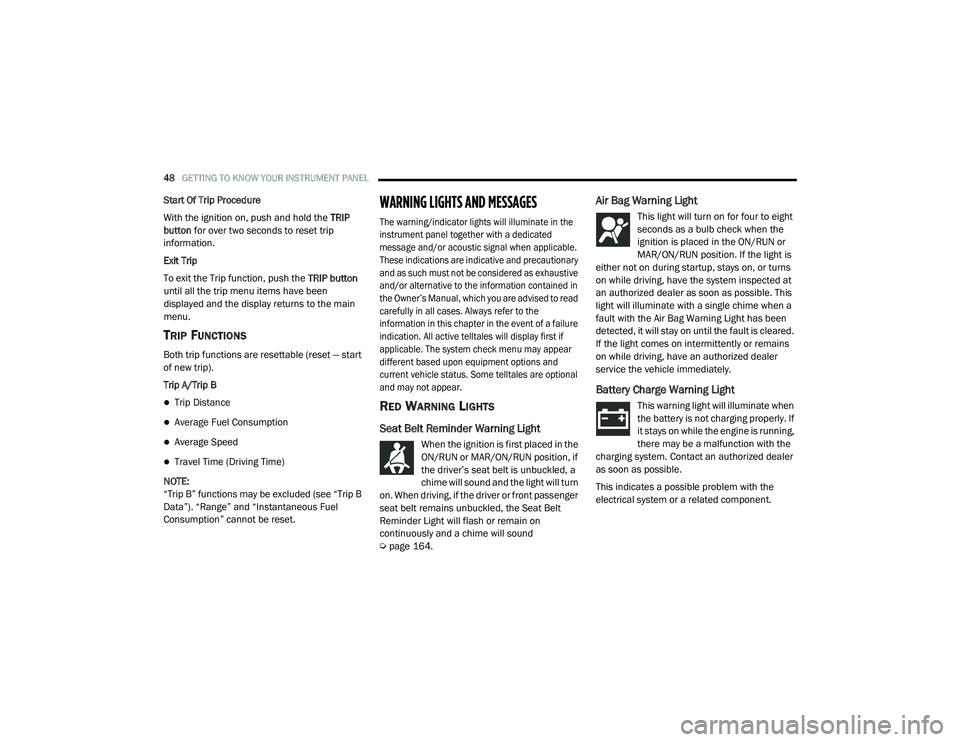
RED WARNING LIGHTS
Seat Belt Reminder Warning Light
When the ignition is first placed in the
ON/RUN or MAR/ON/RUN position, if
the driver’s seat belt is unbuckled, a
chime will sound and the light will turn
on. When driving, if the driver or front passenger
seat belt remains unbuckled, the Seat Belt
Reminder Light will flash or remain on
continuously and a chime will sound
Ú page 164.
Air Bag Warning Light
This light will turn on for four to eight
seconds as a bulb check when the
ignition is placed in the ON/RUN or
MAR/ON/RUN position. If the light is
either not on during startup, stays on, or turns
on while driving, have the system inspected at
an authorized dealer as soon as possible. This
light will illuminate with a single chime when a
fault with the Air Bag Warning Light has been
detected, it will stay on until the fault is cleared.
If the light comes on intermittently or remains
on while driving, have an authorized dealer
service the vehicle immediately.
Battery Charge Warning Light
This warning light will illuminate when
the battery is not charging properly. If
it stays on while the engine is running,
there may be a malfunction with the
charging system. Contact an authorized dealer
as soon as possible.
This indicates a possible problem with the
electrical system or a related component.
21_VF_OM_EN_USC_t.book Page 48