instrument panel RAM PROMASTER 2023 User Guide
[x] Cancel search | Manufacturer: RAM, Model Year: 2023, Model line: PROMASTER, Model: RAM PROMASTER 2023Pages: 296, PDF Size: 12.31 MB
Page 44 of 296
42GETTING TO KNOW YOUR VEHICLE
Temperature Control
Temperature Control regulates the temperature of
the air forced through the climate system.
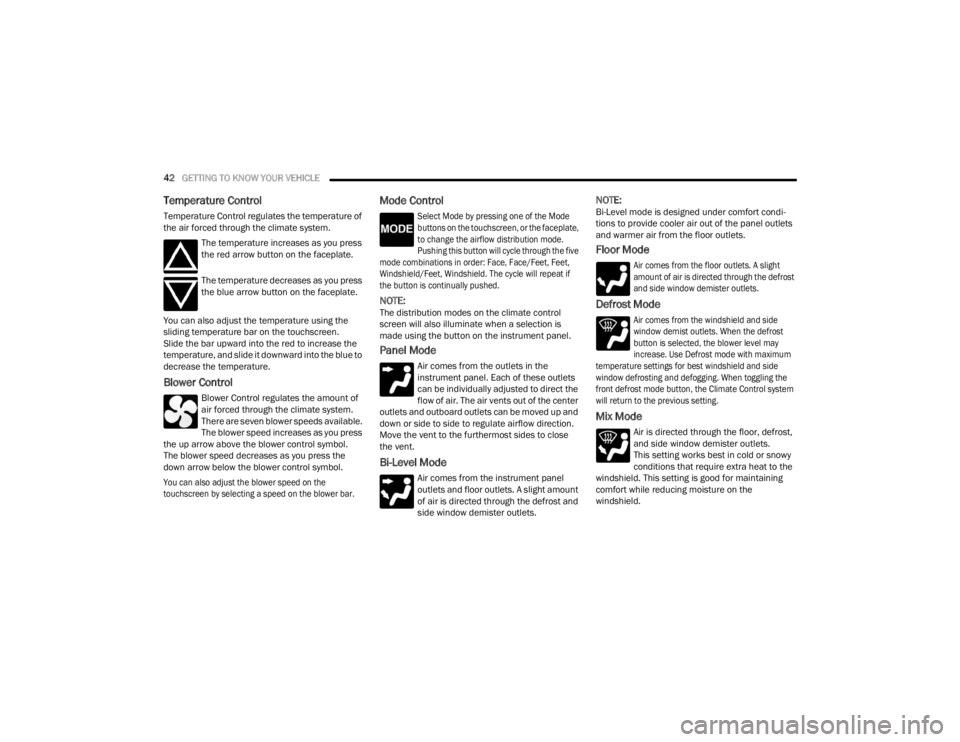
The temperature increases as you press
the red arrow button on the faceplate.
The temperature decreases as you press
the blue arrow button on the faceplate.
You can also adjust the temperature using the
sliding temperature bar on the touchscreen.
Slide the bar upward into the red to increase the
temperature, and slide it downward into the blue to
decrease the temperature.
Blower Control
Blower Control regulates the amount of
air forced through the climate system.
There are seven blower speeds available.
The blower speed increases as you press
the up arrow above the blower control symbol.
The blower speed decreases as you press the
down arrow below the blower control symbol.
You can also adjust the blower speed on the
touchscreen by selecting a speed on the blower bar.
Mode Control
Select Mode by pressing one of the Mode
buttons on the touchscreen, or the faceplate,
to change the airflow distribution mode.
Pushing this button will cycle through the five
mode combinations in order: Face, Face/Feet, Feet,
Windshield/Feet, Windshield. The cycle will repeat if
the button is continually pushed.
NOTE:The distribution modes on the climate control
screen will also illuminate when a selection is
made using the button on the instrument panel.
Panel Mode
Air comes from the outlets in the
instrument panel. Each of these outlets
can be individually adjusted to direct the
flow of air. The air vents out of the center
outlets and outboard outlets can be moved up and
down or side to side to regulate airflow direction.
Move the vent to the furthermost sides to close
the vent.
Bi-Level Mode
Air comes from the instrument panel
outlets and floor outlets. A slight amount
of air is directed through the defrost and
side window demister outlets.
NOTE:Bi-Level mode is designed under comfort condi -
tions to provide cooler air out of the panel outlets
and warmer air from the floor outlets.
Floor Mode
Air comes from the floor outlets. A slight
amount of air is directed through the defrost
and side window demister outlets.
Defrost Mode
Air comes from the windshield and side
window demist outlets. When the defrost
button is selected, the blower level may
increase. Use Defrost mode with maximum
temperature settings for best windshield and side
window defrosting and defogging. When toggling the
front defrost mode button, the Climate Control system
will return to the previous setting.
Mix Mode
Air is directed through the floor, defrost,
and side window demister outlets.
This setting works best in cold or snowy
conditions that require extra heat to the
windshield. This setting is good for maintaining
comfort while reducing moisture on the
windshield.
23_VF_OM_EN_USC_t.book Page 42
Page 45 of 296

GETTING TO KNOW YOUR VEHICLE43
Climate Control OFF Button
Press and release this button to turn the
Climate Control ON/OFF.
ADDITIONAL REAR CLIMATE CONTROL —
I
F EQUIPPED
These switches, mounted on the instrument panel
to the left of the steering column, activate the
additional rear heating/air conditioning system.
NOTE:These switches must be enabled for operation by
the Upfitter.
Additional Rear Climate Controls Switches
Rear Blower Control
Push this button to turn on the rear climate
controls. An indicator light will turn on when
the rear climate control is on.
OPERATING TIPS
Refer to the chart at the end of this section for
suggested control settings for various weather
conditions.
Summer Operation
The engine cooling system must be protected
with a high-quality antifreeze coolant to provide
proper corrosion protection and to protect against
engine overheating. OAT coolant (conforming to
MS.90032) is recommended.
Winter Operation
To ensure the best possible heater and defroster
performance, make sure the engine cooling
system is functioning properly and the proper
amount, type, and concentration of coolant is
used. Use of the Air Recirculation mode during
Winter months is not recommended, because it
may cause window fogging.
Vacation Storage
For information on maintaining the Climate Control
system when the vehicle is being stored for an
extended period of time, see Ú page 265.
Window Fogging
Vehicle windows tend to fog on the inside in mild, rainy,
and/or humid weather. To clear the windows, select
Defrost or Mix mode and increase the front blower
speed. Do not use the Recirculation mode without A/C
for long periods, as fogging may occur.
Outside Air Intake
Make sure the air intake, located directly in front of
the windshield, is free of obstructions, such as
leaves. Leaves collected in the air intake may
reduce airflow, and if they enter the air distribution
box, they could plug the water drains. In Winter
months, make sure the air intake is clear of ice,
slush, and snow.
Cabin Air Filter
The Climate Control system filters out dust and
pollen from the air. Contact an authorized dealer to
service your cabin air filter, and to have it replaced
when needed.
2
23_VF_OM_EN_USC_t.book Page 43
Page 46 of 296

44GETTING TO KNOW YOUR VEHICLE
Operating Tips ChartINTERIOR STORAGE AND EQUIPMENT
STORAGE
Glove Box Compartments
The glove box compartment is located on the
passenger side of the instrument panel and
features both an upper and lower storage area.
Glove Box Compartments
Dash Storage
The dash storage is located on the right side of the
instrument panel.
Dash Storage
Underseat Storage Tray (Driver Side Only) —
If Equipped
A storage tray is located under the driver’s seat.
To remove the tray, lift up on the tray to withdraw it
from the hooks on the support base, then slide the
tray out from under the seat.
Underseat Storage Tray
WEATHER CONTROL SETTINGS
Hot Weather And Vehicle Interior Is Very Hot Set the mode control to
(Panel mode), (A/C) on,
and blower on high. Roll down the windows for a minute to flush out the hot air. Adjust the controls as needed to achieve comfort.
Warm Weather Turn (A/C) on and set
the mode control to (Panel Mode).
Cool Sunny Operate in
(Bi-Level Mode).
Cool & Humid Conditions Set the mode control to
(Mix Mode) and turn (A/C) on to keep windows clear.
Cold Weather Set the mode control to
(Floor Mode). If windshield
fogging starts to occur, move
the control to (Mix Mode).
1 — Upper Glove Box Compartment
2 — Lower Glove Box Compartment
23_VF_OM_EN_USC_t.book Page 44
Page 47 of 296
GETTING TO KNOW YOUR VEHICLE45
USB CONTROL — IF EQUIPPED
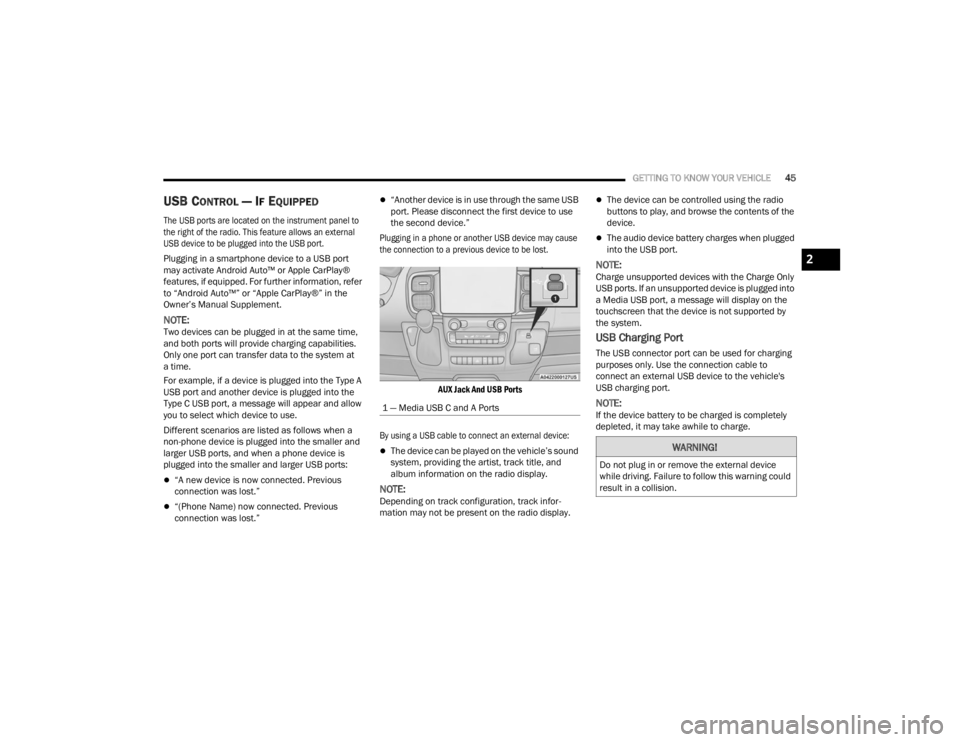
The USB ports are located on the instrument panel to
the right of the radio. This feature allows an external
USB device to be plugged into the USB port.
Plugging in a smartphone device to a USB port
may activate Android Auto™ or Apple CarPlay®
features, if equipped. For further information, refer
to “Android Auto™” or “Apple CarPlay®” in the
Owner’s Manual Supplement.
NOTE:Two devices can be plugged in at the same time,
and both ports will provide charging capabilities.
Only one port can transfer data to the system at
a time.
For example, if a device is plugged into the Type A
USB port and another device is plugged into the
Type C USB port, a message will appear and allow
you to select which device to use.
Different scenarios are listed as follows when a
non-phone device is plugged into the smaller and
larger USB ports, and when a phone device is
plugged into the smaller and larger USB ports:
“A new device is now connected. Previous
connection was lost.”
“(Phone Name) now connected. Previous
connection was lost.”
“Another device is in use through the same USB
port. Please disconnect the first device to use
the second device.”
Plugging in a phone or another USB device may cause
the connection to a previous device to be lost.
AUX Jack And USB Ports
By using a USB cable to connect an external device:
The device can be played on the vehicle’s sound
system, providing the artist, track title, and
album information on the radio display.
NOTE:Depending on track configuration, track infor -
mation may not be present on the radio display.
The device can be controlled using the radio
buttons to play, and browse the contents of the
device.
The audio device battery charges when plugged
into the USB port.
NOTE:Charge unsupported devices with the Charge Only
USB ports. If an unsupported device is plugged into
a Media USB port, a message will display on the
touchscreen that the device is not supported by
the system.
USB Charging Port
The USB connector port can be used for charging
purposes only. Use the connection cable to
connect an external USB device to the vehicle's
USB charging port.
NOTE:If the device battery to be charged is completely
depleted, it may take awhile to charge.
1 — Media USB C and A Ports
WARNING!
Do not plug in or remove the external device
while driving. Failure to follow this warning could
result in a collision.
2
23_VF_OM_EN_USC_t.book Page 45
Page 48 of 296

46GETTING TO KNOW YOUR VEHICLE
(Continued)
POWER OUTLETS
Passenger Compartment Power Outlet
The power outlet is located on the instrument
panel to the right of the radio. It only operates with
the ignition in the ON/RUN position.
Passenger Compartment Power Outlet
Load Compartment Power Outlet — If Equipped
The load compartment power outlet is located in
the rear cargo compartment. The outlet can be is
used for powering 12 Volt adapter accessories and
recharging communications devices.
Load Compartment Power Outlet
NOTE:Do not connect devices with power higher than
180 W to the socket. Do not damage the socket by
using unsuitable adapters.
Power Outlet Fuses — Under Hood
1 — F14 Fuse 20 Amp Yellow Front Power Outlet
2 — F09 Fuse 15 Amp Blue Rear Power Outlet
WARNING!
To avoid serious injury or death:
Only devices designed for use in this type of outlet
should be inserted into any 12 Volt outlet.
Do not touch with wet hands.
Close the lid when not in use and while driving
the vehicle.
If this outlet is mishandled, it may cause an
electric shock and failure.
CAUTION!
Many accessories that can be plugged in draw
power from the vehicle's battery, even when not in
use (i.e., cellular phones, etc.). Eventually, if
plugged in long enough, the vehicle's battery
will discharge sufficiently to degrade battery life
and/or prevent the engine from starting.
Accessories that draw higher power (i.e., coolers,
vacuum cleaners, lights, etc.) will degrade the
battery even more quickly. Only use these intermit -
tently and with greater caution.
23_VF_OM_EN_USC_t.book Page 46
Page 49 of 296

GETTING TO KNOW YOUR VEHICLE47
POWER INVERTER — IF EQUIPPED
There is a 115 Volt, 150 Watt inverter outlet
located on the instrument panel, to the right of
the radio, to convert DC current to AC current.
This outlet can power cellular phones, electronics
and other low power devices requiring power up to
150 Watts. Certain game consoles will exceed this
power limit, as will most power tools.
Power Inverter Location
To turn on the power inverter outlet, simply plug in
the device. The outlet automatically turns off when
the device is unplugged.
The power inverter is designed with built-in overload
protection. If the power rating of 150 Watts is
exceeded, the power inverter will automatically shut
down. Once the electrical device has been removed
from the outlet the inverter should automatically reset.
To avoid overloading the circuit, check the power
ratings on electrical devices prior to using the inverter.
AUXILIARY SWITCHES — IF EQUIPPED
Your vehicle may be equipped with two auxiliary
switches located on the instrument panel to the
left of the steering column which can be used to
power various electronic devices. Connections to
the switches are found in the right central pillar
fuse panel at the base of the passenger side
B-pillar.
Auxiliary Switches
Auxiliary Switch 1 is configured to constant battery
feed, while Auxiliary Switch 2 is configured to
ignition feed.
For further information on using the auxiliary
switches, please refer to the Ram Body Builder’s
Guide by accessing
www.rambodybuilder.com
and choosing the appropriate links.
After the use of high power draw accessories, or
long periods of the vehicle not being started (with
accessories still plugged in), the vehicle must be
driven a sufficient length of time to allow the
generator to recharge the vehicle's battery.
CAUTION!
WARNING!
To avoid serious injury or death:
Do not insert any objects into the receptacles.
Do not touch with wet hands.
Close the lid when not in use.
If this outlet is mishandled, it may cause an
electric shock and failure.
2
23_VF_OM_EN_USC_t.book Page 47
Page 52 of 296

50GETTING TO KNOW YOUR VEHICLE
WIND BUFFETING
Wind buffeting can be described as the perception of
pressure on the ears or a helicopter-type sound in the
ears. Your vehicle may exhibit wind buffeting with the
windows down, or the sunroof (if equipped) in certain
open or partially open positions. This is a normal
occurrence and can be minimized. If the buffeting
occurs with the rear windows open, open the front
and rear windows together to minimize the buffeting.
If the buffeting occurs with the sunroof open, adjust the
sunroof opening to minimize the buffeting or open
any window.
HOOD
OPENING
To open the hood, two latches must be released.
1. Pull the hood release lever located on the
side of the instrument panel.
Hood Release
2. Move to the outside of the vehicle, reach into
the opening beneath the center of the hood
and push the safety latch lever to the right to
release it, before raising the hood.
Hood Safety Latch Lever Location
WARNING!
The metal grates over the sliding door windows
are designed to protect you in the event of an
accident. Modification or removal of the grates
could lead to serious injury or death.
23_VF_OM_EN_USC_t.book Page 50
Page 54 of 296
52
GETTING TO KNOW YOUR INSTRUMENT PANEL
BASE / MIDLINE INSTRUMENT CLUSTER
23_VF_OM_EN_USC_t.book Page 52
Page 55 of 296
GETTING TO KNOW YOUR INSTRUMENT PANEL53
Use this QR code to access your
digital experience.
BASE / MIDLINE INSTRUMENT CLUSTER
D
ESCRIPTIONS
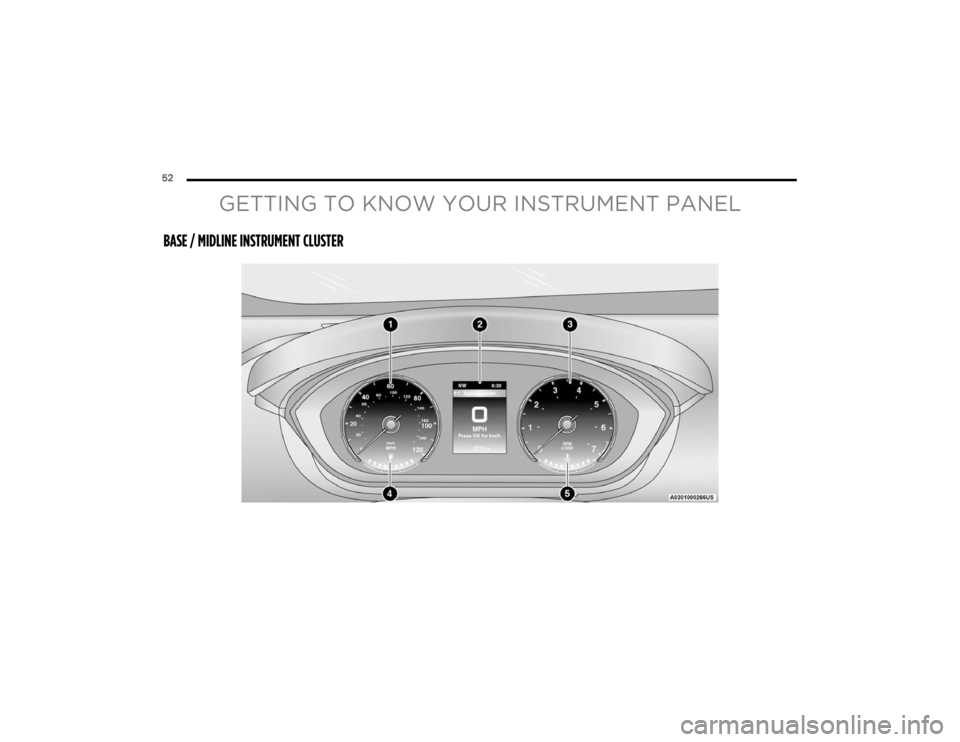
1. Speedometer
Indicates vehicle speed.
2. Instrument Cluster Display
The instrument cluster display features a
driver interactive display Ú page 56.
3. Tachometer
Indicates the engine speed in revolutions
per minute (RPM x 1000).
4. Fuel Gauge
The gauge shows the level of fuel in the
fuel tank when the ignition switch is in the
ON/RUN position.
The fuel pump symbol points to
the side of the vehicle where the
fuel door is located.
5. Temperature Gauge
The temperature gauge shows engine
coolant temperature. Any reading within the
normal range indicates that the engine
cooling system is operating satisfactorily.
The gauge pointer will likely indicate a
higher temperature when driving in hot
weather or up mountain grades. It should
not be allowed to exceed the upper limits of
the normal operating range.
NOTE:The hard telltales will illuminate for a bulb check
when the ignition is first cycled.
WARNING!
A hot engine cooling system is dangerous. You or
others could be badly burned by steam or boiling
coolant. It is recommended to call an authorized
dealer for service if your vehicle overheats
Ú page 233.
CAUTION!
Driving with a hot engine cooling system could
damage your vehicle. If the temperature gauge
reads “H” pull over and stop the vehicle. Idle the
vehicle with the air conditioner turned off until
the pointer drops back into the normal range.
If the pointer remains on the “H”, turn the
engine off immediately and call an authorized
dealer for service.
3
23_VF_OM_EN_USC_t.book Page 53
Page 56 of 296
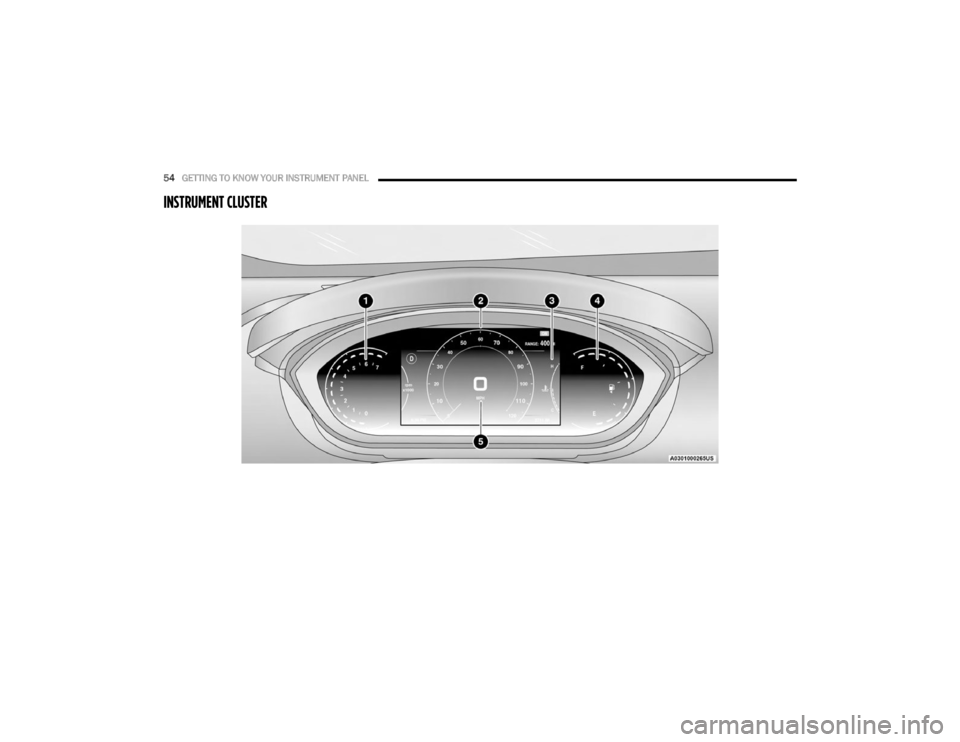
54GETTING TO KNOW YOUR INSTRUMENT PANEL
INSTRUMENT CLUSTER
23_VF_OM_EN_USC_t.book Page 54