steering RAM PROMASTER 2023 User Guide
[x] Cancel search | Manufacturer: RAM, Model Year: 2023, Model line: PROMASTER, Model: RAM PROMASTER 2023Pages: 296, PDF Size: 12.31 MB
Page 49 of 296

GETTING TO KNOW YOUR VEHICLE47
POWER INVERTER — IF EQUIPPED
There is a 115 Volt, 150 Watt inverter outlet
located on the instrument panel, to the right of
the radio, to convert DC current to AC current.
This outlet can power cellular phones, electronics
and other low power devices requiring power up to
150 Watts. Certain game consoles will exceed this
power limit, as will most power tools.
Power Inverter Location
To turn on the power inverter outlet, simply plug in
the device. The outlet automatically turns off when
the device is unplugged.
The power inverter is designed with built-in overload
protection. If the power rating of 150 Watts is
exceeded, the power inverter will automatically shut
down. Once the electrical device has been removed
from the outlet the inverter should automatically reset.
To avoid overloading the circuit, check the power
ratings on electrical devices prior to using the inverter.
AUXILIARY SWITCHES — IF EQUIPPED
Your vehicle may be equipped with two auxiliary
switches located on the instrument panel to the
left of the steering column which can be used to
power various electronic devices. Connections to
the switches are found in the right central pillar
fuse panel at the base of the passenger side
B-pillar.
Auxiliary Switches
Auxiliary Switch 1 is configured to constant battery
feed, while Auxiliary Switch 2 is configured to
ignition feed.
For further information on using the auxiliary
switches, please refer to the Ram Body Builder’s
Guide by accessing
www.rambodybuilder.com
and choosing the appropriate links.
After the use of high power draw accessories, or
long periods of the vehicle not being started (with
accessories still plugged in), the vehicle must be
driven a sufficient length of time to allow the
generator to recharge the vehicle's battery.
CAUTION!
WARNING!
To avoid serious injury or death:
Do not insert any objects into the receptacles.
Do not touch with wet hands.
Close the lid when not in use.
If this outlet is mishandled, it may cause an
electric shock and failure.
2
23_VF_OM_EN_USC_t.book Page 47
Page 58 of 296
56GETTING TO KNOW YOUR INSTRUMENT PANEL
INSTRUMENT CLUSTER DISPLAY
Your vehicle will be equipped with an instrument
cluster display, which offers useful information
to the driver. With the ignition in the OFF mode,
opening/closing of a door will activate the display
for viewing, and display the total miles, or
kilometers, in the odometer. Your instrument
cluster display is designed to display important
information about your vehicle’s systems and
features. Using a driver interactive display located
on the instrument panel, your instrument cluster
display can show you how systems are working and
give you warnings when they are not. The steering
wheel mounted controls allow you to scroll through
the main menus and submenus. You can access
the specific information you want and make
selections and adjustments.
LOCATION AND CONTROLS
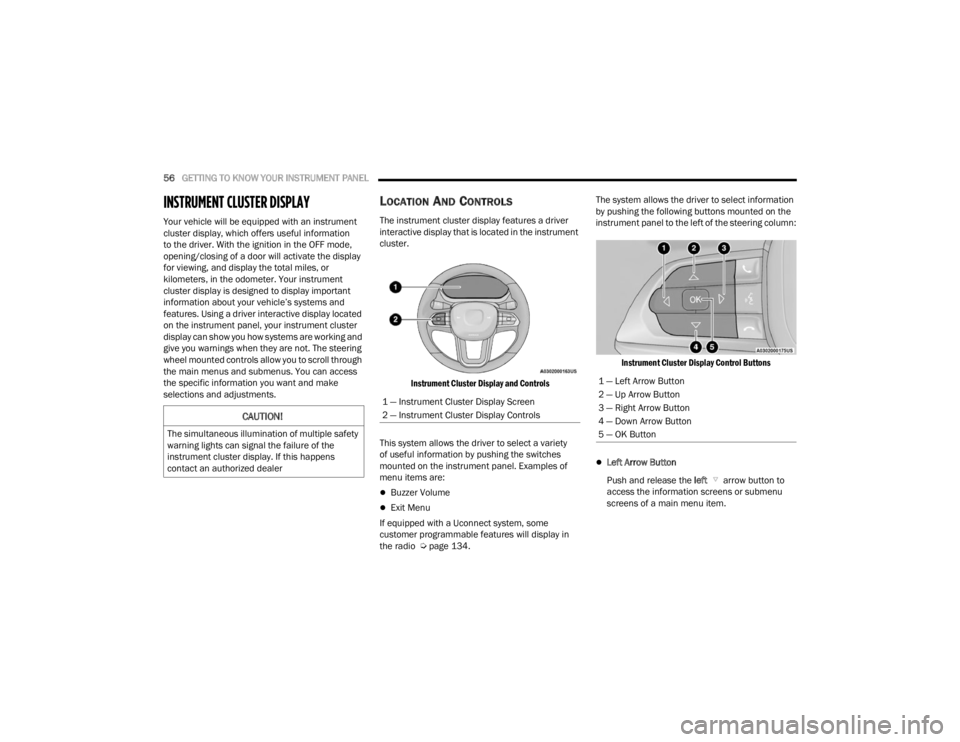
The instrument cluster display features a driver
interactive display that is located in the instrument
cluster.
Instrument Cluster Display and Controls
This system allows the driver to select a variety
of useful information by pushing the switches
mounted on the instrument panel. Examples of
menu items are:
Buzzer Volume
Exit Menu
If equipped with a Uconnect system, some
customer programmable features will display in
the radio Ú page 134. The system allows the driver to select information
by pushing the following buttons mounted on the
instrument panel to the left of the steering column:
Instrument Cluster Display Control Buttons
Left Arrow Button
Push and release the left arrow button to
access the information screens or submenu
screens of a main menu item.
CAUTION!
The simultaneous illumination of multiple safety
warning lights can signal the failure of the
instrument cluster display. If this happens
contact an authorized dealer
1 — Instrument Cluster Display Screen
2 — Instrument Cluster Display Controls
1 — Left Arrow Button
2 — Up Arrow Button
3 — Right Arrow Button
4 — Down Arrow Button
5 — OK Button
23_VF_OM_EN_USC_t.book Page 56
Page 69 of 296

GETTING TO KNOW YOUR INSTRUMENT PANEL67
Drowsy Driver Detected Warning Light —
If Equipped
Drowsy driver detection helps to avoid
crashes caused by fatigue by advising
drivers to take a break in time. Once a
Drowsy Driver is detected, A pop-up will
display continuously until the driver presses the
OK button to clear.
Once the pop-up message is cleared, it is stored
until the condition is no longer true.
Electric Power Steering (EPS) Fault
Warning Light
This warning light will turn on when
there's a fault with the EPS system
Ú page 85.
Electronic Throttle Control (ETC) Warning
Light
This warning light will illuminate to inform of
a problem with the ETC system. If a problem
is detected while the vehicle is running, the
light will either stay on or flash depending on
the nature of the problem. Cycle the ignition when
the vehicle is safely and completely stopped and the
transmission is placed in the PARK (P) position.
The light should turn off. If the light remains on with the
vehicle running, your vehicle will usually be drivable;
however, see an authorized dealer for service as soon
as possible.
If the light continues to flash when the vehicle is
running, immediate service is required and you may
experience reduced performance, an elevated/
rough idle, or engine stall and your vehicle may
require towing. The light will come on when the
ignition is placed in the ON/RUN or MAR/ON/RUN
position and remain on briefly as a bulb check. If the
light does not come on during starting, have the
system checked by an authorized dealer.
Engine Temperature Warning Light
This light warns of an overheated
engine condition. If the engine coolant
temperature is too high, this indicator will
illuminate and a single chime will sound.
If the light turns on while driving, safely pull over and
stop the vehicle. If the Air Conditioning (A/C) system is
on, turn it off. Also, shift the transmission into NEUTRAL
and idle the vehicle. If the temperature reading does
not return to normal, turn the engine off immediately
and call for service
Ú
page 216.
Generic Warning Light
The Generic Warning Light will illuminate
to signal the failure of one or more safety
warning lights with a corresponding
message. The safety systems that may
cause the Generic Warning Light to illuminate
include but are not limited too: Seat belt Reminder,
Electric Park Brake, Brakes, Air Bag, and Swivel
Seat failure.
The telltale will remain on in case of swivel seat
failure and will blink in case of Air Bag Warning
Light Failure. Contact an authorized dealer
immediately for service.
WARNING!
Continued operation with reduced assist could
pose a safety risk to yourself and others. Service
should be obtained as soon as possible.
3
23_VF_OM_EN_USC_t.book Page 67
Page 72 of 296
70GETTING TO KNOW YOUR INSTRUMENT PANEL
Service Active Lane Management Warning
Light — If Equipped
This warning light will illuminate when the
Active Lane Management system is not
operating and requires service. Please
see an authorized dealer.
Service Forward Collision Warning (FCW)
Light — If Equipped
This warning light will illuminate to
indicate a fault in the FCW System or an
external blockage on the frontal camera.
Contact an authorized dealer for service.
Service Required/Call For Service Warning
Light
This warning light will illuminate when
service is needed. A pop-up will appear in
the display to signal the need for service.
Contact an authorized dealer as soon as
possible.
Speed Limiter Fail Warning Light —
If Equipped
This light will illuminate when there is a
failure in the speed limiter system.
Swivel Seat (Driver or Passenger) Fail
Warning Light — If Equipped
This light will illuminate when the driver
or passenger swivel seat fails.
Tire Pressure Monitoring System (TPMS)
Warning Light
The warning light switches on and a
message is displayed to indicate that
the tire pressure is lower than the
recommended value and/or that slow
pressure loss is occurring. In these cases, optimal
tire duration and fuel consumption may not be
guaranteed.
Should one or more tires be in the condition
mentioned previously, the display will show the
indications corresponding to each tire.
Each tire, including the spare (if provided), should be
checked monthly when cold and inflated to the inflation
pressure recommended by the vehicle manufacturer
on the vehicle placard or tire inflation pressure label.
If your vehicle has tires of a different size than the size
indicated on the vehicle placard or tire inflation
pressure label, you should determine the proper tire
inflation pressure for those tires.
WARNING!
A malfunctioning catalytic converter can reach
higher temperatures than in normal operating
conditions. This can cause a fire if you drive
slowly or park over flammable substances such
as dry plants, wood, cardboard, etc. This could
result in death or serious injury to the driver,
occupants or others.
CAUTION!
Prolonged driving with the Malfunction Indicator
Light (MIL) on could cause damage to the
vehicle control system. It also could affect fuel
economy and driveability. If the MIL is flashing,
severe catalytic converter damage and power
loss will soon occur. Immediate service is
required.
WARNING!
Do not continue driving with one or more flat
tires as handling may be compromised. Stop the
vehicle, avoiding sharp braking and steering. If a
tire puncture occurs, repair immediately using
the dedicated tire repair kit and contact an
authorized dealer as soon as possible.
23_VF_OM_EN_USC_t.book Page 70
Page 80 of 296

78STARTING AND OPERATING
ENGINE BREAK-IN RECOMMENDATIONS
A long break-in period is not required for the engine and
drivetrain (transmission and axle) in your vehicle.
Drive moderately during the first 300 miles (500 km).
After the initial 60 miles (100 km), speeds up to 50 or
55 mph (80 or 90 km/h) are desirable.
While cruising, brief full-throttle acceleration within
the limits of local traffic laws contributes to a good
break-in. Wide-open throttle acceleration in low
gear can be detrimental and should be avoided.
The engine oil installed in the engine at the factory
is a high-quality energy conserving type lubricant.
Oil changes should be consistent with anticipated
climate conditions under which vehicle operations
will occur. For the recommended viscosity and
quality grades see Úpage 273.
NOTE:A new engine may consume some oil during its first
few thousand miles (kilometers) of operation. This
should be considered a normal part of the break-in
and not interpreted as a problem. Please check
your oil level with the engine oil indicator often
during the break-in period. Add oil as required.
PARKING BRAKE
ELECTRIC PARK BRAKE (EPB)
Your vehicle is equipped with an EPB that offers
simple operation, and some additional features
that make the parking brake more convenient and
useful.
The parking brake is primarily intended to prevent
the vehicle from rolling while parked. Before
leaving the vehicle, make sure that the parking
brake is applied. Also, be certain to leave the
transmission in PARK.
You can engage the parking brake in two ways:
Manually, by applying the parking brake switch.
Automatically, by enabling the Auto Park Brake
feature in the Customer Programmable
Features section of the Uconnect settings.
The parking brake switch is located on the
instrument panel to the left of the steering wheel
(below the headlamp switch).
Electric Park Brake Switch
To apply the parking brake manually, pull up on the
switch momentarily. You may hear a slight sound
from the back of the vehicle while the parking brake
engages. Once the park brake is fully engaged, the
Brake Warning Light in the instrument cluster and an
indicator on the switch will illuminate. If your foot is on
the brake pedal while you apply the parking brake, you
may notice a small amount of brake pedal movement.
The parking brake can be applied even when the
ignition switch is OFF but the Brake Warning Light will
not illuminate, however, it can only be released when
the ignition is in the ON/RUN position.
NOTE:The EPB Warning Light will illuminate if the EPB
switch is held for longer than 20 seconds in either
the released or applied position. The light will extin -
guish upon releasing the switch.
CAUTION!
Never use Non-Detergent Oil or Straight Mineral
Oil in the engine or damage may result.
23_VF_OM_EN_USC_t.book Page 78
Page 87 of 296

STARTING AND OPERATING85
NOTE:Even if the transmission can be reset, we
recommend that you visit an authorized dealer at
your earliest possible convenience. An authorized
dealer has diagnostic equipment to assess the
condition of your transmission. If the transmission
cannot be reset, authorized dealer service is
required.
Electronic Range Select (ERS) Operation
The ERS shift control allows the driver to select the max
gear limit. For example, if you set the transmission gear
limit to FOURTH gear, the transmission will not shift
above FOURTH gear, but will shift through the lower
gears normally.
You can switch between DRIVE and ERS mode at any
vehicle speed. When the gear selector is in the DRIVE
position, the transmission will operate automatically,
shifting between all available gears. Moving the gear
selector to the ERS position (beside DRIVE) will activate
ERS mode, display the current gear in the instrument
cluster, and set that gear as the max gear limit. Once in
ERS mode, moving the gear selector forward “-” or
rearward “+” will change the max gear limit.
NOTE:The transmission will still continue to use the
optimal highest gear, for the current driving condi -
tions, within the selected gear range limit.
To exit ERS mode, simply return the gear selector
to the DRIVE position.
NOTE:To select the proper gear position for maximum
deceleration (engine braking), move the gear
selector into the ERS position, then tap it forward
“-” repeatedly as the vehicle slows. The trans -
mission will shift to the range from which the
vehicle can best be slowed down.
When To Use TOW/HAUL Mode
When driving in hilly areas, towing a trailer, carrying a
heavy load, etc., and frequent transmission shifting
occurs, push the TOW/HAUL switch to activate
TOW/HAUL mode. This will improve performance and
reduce the potential for transmission overheating or
failure due to excessive shifting. When operating in
TOW/HAUL mode, transmission upshifts are delayed,
and the transmission will automatically downshift
(for engine braking) during steady braking maneuvers.
The TOW/HAUL Indicator Light will illuminate in the
instrument cluster to indicate that TOW/HAUL
mode has been activated. Pushing the switch a
second time restores normal operation. Normal operation is always the default at engine start-up.
If TOW/HAUL mode is desired, the switch must be
pushed each time the engine is started.
POWER STEERING
The electric power steering system will provide
increased vehicle response and ease of
maneuverability. The power steering system
adapts to different driving conditions.
If the steering icon is flashing, it indicates that the
vehicle needs to be taken to the dealer for service.
It is likely the vehicle has lost power steering
assistance.
If the steering icon is displayed and the
“POWER STEERING SYSTEM OVER TEMP”
message is displayed on the instrument cluster
screen, this indicates an over temperature
condition in the power steering system. Once
driving conditions are safe, pull over and let the
vehicle idle for a few moments until the icon and
message turn off Ú
page 56.
If the steering icon is displayed and the
“SERVICE POWER STEERING – ASSIST OFF”
message is displayed on the instrument cluster
screen, this indicates the vehicle needs to be
taken to the dealer for service Ú page 56.
WARNING!
Do not downshift for additional engine braking
on a slippery surface. The drive wheels could
lose their grip and the vehicle could skid,
causing a collision or personal injury.
4
23_VF_OM_EN_USC_t.book Page 85
Page 88 of 296

86STARTING AND OPERATING
NOTE:
Even if the power steering system is no longer oper -
ational, it is still possible to steer the vehicle. Under
these conditions there will be a substantial increase
in steering effort, especially at low speeds and
during parking maneuvers.
If the condition persists, see an authorized
dealer for service.
ACTIVE SPEED LIMITER — IF EQUIPPED
The Active Speed Limiter button is positioned on
the right side of the steering wheel.
Active Speed Limiter Button
This feature allows you to program the maximum
speed of travel for your vehicle.
NOTE:The Active Speed Limiter can be set with the
vehicle stationary or in motion.
ACTIVATION
To activate the feature, push the Active Speed
Limiter button located on the right side of the
steering wheel. A message will appear along with
an indicator light in the instrument cluster display
to signal that Active Speed Limiter has been
activated.
After the Active Speed Limiter on/off button has
been pushed, you must press the SET (+) or SET (–)
button to set the target speed (or RES button when
there is already a previously set target).
Push the SET (+) or SET (–) button to raise and
lower the target speed to the desired value.
Pushing and holding down the SET (+) or SET (–)
button will increase/decrease the speed value by
increments of 5 mph (5 km/h). Each time that Active Speed Limiter is activated, it
will be set to the last programmed value from the
previous activation.
NOTE:
The Cruise Control (if equipped) and Adaptive Cruise
Control (if equipped) systems will be unavailable while
the Active Speed Limiter is in use.
EXCEEDING THE SET SPEED
By fully pressing the accelerator pedal, the
programmed maximum speed can be exceeded
while the device is active.
In the event that the Active Speed Limiter set value
is exceeded manually with a driver acceleration, an
audible indicator will sound. The indicator light will
rapidly flash, and a message will appear in the
instrument cluster display.
The feature will remain disabled until the vehicle
speed drops below the set Active Speed Limiter
value, where it will reactivate automatically.
DEACTIVATION
To turn off Active Speed Limiter, push the Active Speed
Limiter button on the right side of the steering wheel.
A message will appear in the instrument cluster display
to confirm that the feature has been turned off. You can
also deactivate Active Speed Limiter by pressing the
CANC button. In this case, the system is not completely
turned off, and the driver can reactivate the Active
Speed Limiter by pressing the RES button.
23_VF_OM_EN_USC_t.book Page 86
Page 89 of 296

STARTING AND OPERATING87
INTELLIGENT SPEED ASSIST (ISA) —
IF EQUIPPED
The Intelligent Speed Assist (ISA) system
combines the Active Speed Limiter and
Traffic Sign Assist (TSA) systems to
automatically adjust the maximum speed
of the vehicle based on detected traffic signs.
ACTIVATION
To activate the feature, make sure the Traffic Sign
Assist (TSA) system is enabled within Uconnect
Settings Úpage 134, then push the Active Speed
Limiter button located on the right side of the
steering wheel. The message “Ready” will appear
along with a white indicator light in the instrument
cluster display to signal that the system has been
activated.
While the system is in the “Ready” state, the driver
must press the SET (+), SET (–), or RES button to
engage the system. When the system is fully engaged
and detects the current speed limit using the TSA
system, the message in the instrument cluster display
will indicate the new detected speed limit by suggesting
the driver to press "RES" to accept it.
If the detected speed sign is greater then the
current set speed, an up arrow will be displayed
too. If the detected speed sign is lower then the
current set speed, a down arrow will be displayed
instead. If the driver accepts the new suggested
speed sign, the indicator light will change to green.
Pushing the SET (+) or SET (–) button on the right
of the steering wheel will raise and lower the set
speed to a desired value above or below the set ISA
speed. Pushing and holding down the SET (+) or
SET (–) button will increase/decrease the speed
value by increments of 5 mph (5 km/h).
NOTE:The Cruise Control (if equipped) and Adaptive
Cruise Control (if equipped) systems will be
unavailable while the ISA system is in use.
EXCEEDING THE SET SPEED
By fully pressing the accelerator pedal, the
maximum set speed can be exceeded while the
system is active.
When the maximum set speed is exceeded, the
green indicator light will blink and the instrument
cluster display will show an override message for
five seconds, or until the accelerator pedal is
released.
DEACTIVATION
To turn off the Intelligent Speed Assist system,
push the Active Speed Limiter button on the right
side of the steering wheel. A message will appear
in the instrument cluster display to confirm that the
feature has been turned off. The Intelligent Speed
Assist system can also be deactivated by pressing
the CANC button. In this case, the ISA system is
not completely turned off, and the driver can
reactivate the system by pressing the RES button.
CRUISE CONTROL SYSTEMS — IF EQUIPPED
Your vehicle may be equipped with the Cruise
Control system, or the Adaptive Cruise Control
(ACC) system:
Cruise Control will keep your vehicle at a
constant preset speed.
Adaptive Cruise Control (ACC) will adjust the
vehicle speed up to the preset speed to main
-
tain a distance with the vehicle ahead.
4
23_VF_OM_EN_USC_t.book Page 87
Page 90 of 296
88STARTING AND OPERATING
NOTE:
In vehicles equipped with ACC, if ACC is not
enabled, Fixed Speed Cruise Control will not
detect vehicles directly ahead of you. Always be
aware of the feature selected.
Only one Cruise Control feature can operate at a
time. For example, if Fixed Speed Cruise Control
is enabled, Adaptive Cruise Control will be
unavailable, and vice versa.
CRUISE CONTROL
When engaged, the Cruise Control takes over
accelerator operations at speeds greater than
20 mph (32 km/h) up to the maximum speed of
100 mph (160 km/h).
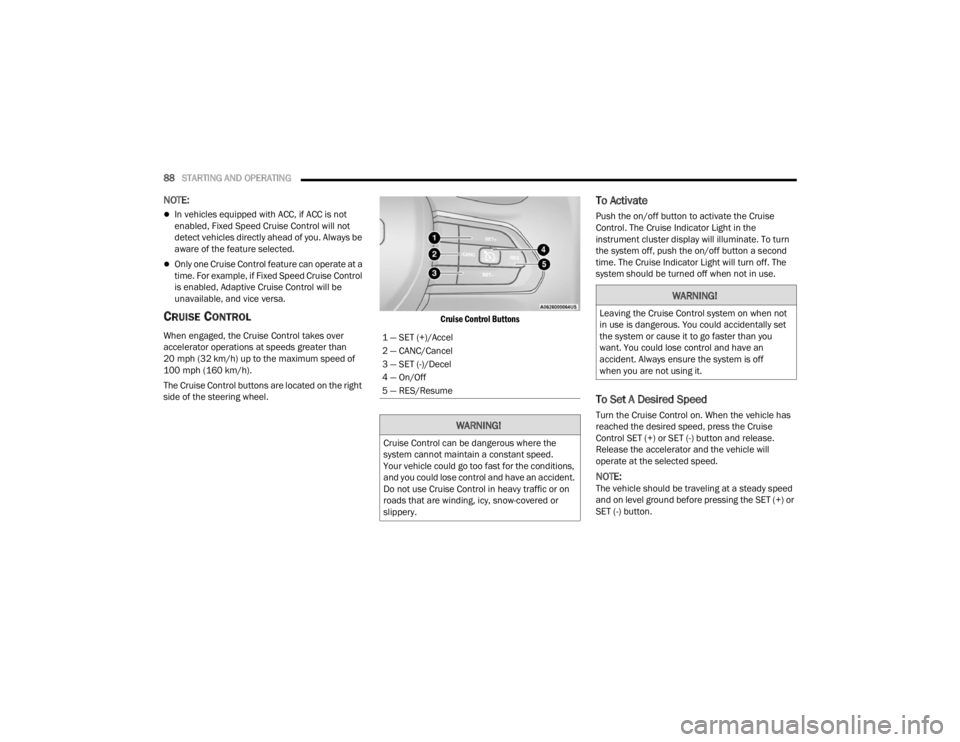
The Cruise Control buttons are located on the right
side of the steering wheel.
Cruise Control Buttons
To Activate
Push the on/off button to activate the Cruise
Control. The Cruise Indicator Light in the
instrument cluster display will illuminate. To turn
the system off, push the on/off button a second
time. The Cruise Indicator Light will turn off. The
system should be turned off when not in use.
To Set A Desired Speed
Turn the Cruise Control on. When the vehicle has
reached the desired speed, press the Cruise
Control SET (+) or SET (-) button and release.
Release the accelerator and the vehicle will
operate at the selected speed.
NOTE:The vehicle should be traveling at a steady speed
and on level ground before pressing the SET (+) or
SET (-) button.
1 — SET (+)/Accel
2 — CANC/Cancel
3 — SET (-)/Decel
4 — On/Off
5 — RES/Resume
WARNING!
Cruise Control can be dangerous where the
system cannot maintain a constant speed.
Your vehicle could go too fast for the conditions,
and you could lose control and have an accident.
Do not use Cruise Control in heavy traffic or on
roads that are winding, icy, snow-covered or
slippery.
WARNING!
Leaving the Cruise Control system on when not
in use is dangerous. You could accidentally set
the system or cause it to go faster than you
want. You could lose control and have an
accident. Always ensure the system is off
when you are not using it.
23_VF_OM_EN_USC_t.book Page 88
Page 92 of 296
90STARTING AND OPERATING
(Continued)
Adaptive Cruise Control (ACC) Operation
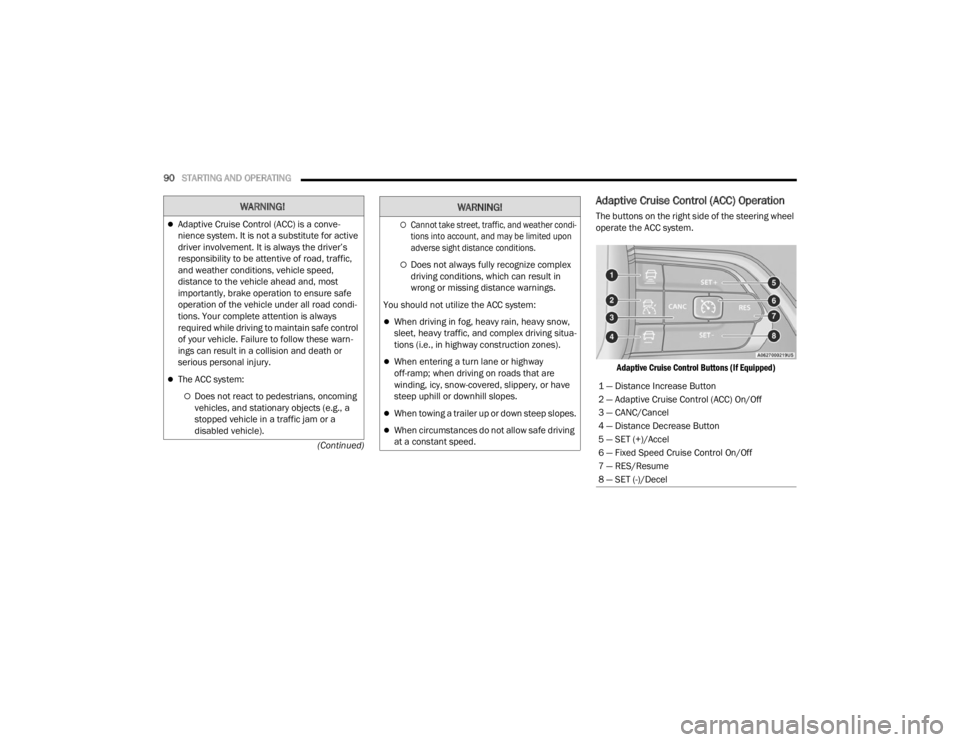
The buttons on the right side of the steering wheel
operate the ACC system.
Adaptive Cruise Control Buttons (If Equipped)
WARNING!
Adaptive Cruise Control (ACC) is a conve -
nience system. It is not a substitute for active
driver involvement. It is always the driver’s
responsibility to be attentive of road, traffic,
and weather conditions, vehicle speed,
distance to the vehicle ahead and, most
importantly, brake operation to ensure safe
operation of the vehicle under all road condi -
tions. Your complete attention is always
required while driving to maintain safe control
of your vehicle. Failure to follow these warn -
ings can result in a collision and death or
serious personal injury.
The ACC system:
Does not react to pedestrians, oncoming
vehicles, and stationary objects (e.g., a
stopped vehicle in a traffic jam or a
disabled vehicle).
Cannot take street, traffic, and weather condi -
tions into account, and may be limited upon
adverse sight distance conditions.
Does not always fully recognize complex
driving conditions, which can result in
wrong or missing distance warnings.
You should not utilize the ACC system:
When driving in fog, heavy rain, heavy snow,
sleet, heavy traffic, and complex driving situa -
tions (i.e., in highway construction zones).
When entering a turn lane or highway
off-ramp; when driving on roads that are
winding, icy, snow-covered, slippery, or have
steep uphill or downhill slopes.
When towing a trailer up or down steep slopes.
When circumstances do not allow safe driving
at a constant speed.
WARNING!
1 — Distance Increase Button
2 — Adaptive Cruise Control (ACC) On/Off
3 — CANC/Cancel
4 — Distance Decrease Button
5 — SET (+)/Accel
6 — Fixed Speed Cruise Control On/Off
7 — RES/Resume
8 — SET (-)/Decel
23_VF_OM_EN_USC_t.book Page 90