ignition RAM PROMASTER 2023 Workshop Manual
[x] Cancel search | Manufacturer: RAM, Model Year: 2023, Model line: PROMASTER, Model: RAM PROMASTER 2023Pages: 296, PDF Size: 12.31 MB
Page 119 of 296

STARTING AND OPERATING117
NOTE:
When operating conditions have been met, the
LaneSense system will monitor if the driver’s
hands are on the steering wheel and provide
an audible and visual warning to the driver if
removed. The system will cancel if the driver
does not return their hands to the wheel.
LaneSense is a driving assist system, not an
emergency system, and does not replace the
driver. The driver is always responsible for
controlling the vehicle and must intervene as
required. The LaneSense system is designed to
assist the driver and not to substitute the driver.
TURNING LANESENSE ON OR OFF
The LaneSense button is located on the
switch panel below the Uconnect display.
To turn the LaneSense system on, push the
LaneSense button (LED turns off). A “LaneSense
On” message is shown in the instrument cluster
display.
To turn the LaneSense system off, push the
LaneSense button twice (LED turns on).
NOTE:The LaneSense system will retain the last system
state on or off from the last ignition cycle when the
ignition is placed in the ON/RUN position.
LANESENSE WARNING MESSAGE
The LaneSense system will indicate the current
lane drift condition through the instrument cluster
display.
When the LaneSense system is on, the lane lines
are gray when both of the lane boundaries have
not been detected and the LaneSense telltale
is solid white.
System ON (Gray Lines) With White Telltale
Left Lane Departure — Only Left Lane Detected
When the LaneSense system is on, the Lane-
Sense Telltale is solid white when only the
left lane marking has been detected and the
system is ready to provide visual warnings in the
instrument cluster display if an unintentional
lane departure occurs on the left side.
When the LaneSense system senses the lane has
been approached and is in a lane departure situa -
tion, the visual warning in the instrument cluster
display will show the left lane line flashing yellow
(on/off). The LaneSense telltale changes from
solid white to flashing yellow.
Lane Approached (Flashing Yellow Lane Line) With Yellow Telltale
NOTE:The LaneSense system operates with similar
behavior for a right lane departure when only the
right lane marking has been detected.
4
23_VF_OM_EN_USC_t.book Page 117
Page 122 of 296

120STARTING AND OPERATING
NOTE:
If snow, ice, mud, or any foreign substance builds up
on the camera lens, clean the lens, rinse with water,
and dry with a soft cloth. Do not cover the lens.
SURROUND VIEW CAMERA SYSTEM —
IF EQUIPPED
Your vehicle may be equipped with the Surround View
Camera system that allows you to see an on-screen
image of the surroundings and Top View of your vehicle
whenever the gear selector is put into REVERSE or a
different view is selected through the touchscreen
buttons. The Top View of the vehicle will show which
doors are open. The image will be displayed on the
touchscreen display along with a caution note “Check
Entire Surroundings” across the top of the screen. After five seconds, this note will disappear. The Surround
View Camera system is comprised of four sequential
cameras located in the front grille, rear Center High
Mounted Stop Lamp (CHMSL), and side mirrors.
NOTE:The Surround View Camera system has program
-
mable settings that may be selected through the
Uconnect system Ú page 134.
When the vehicle is shifted into REVERSE, the Rear
View and Top View is the default view of the
system.
When the vehicle is shifted out of REVERSE with
camera delay turned on, the camera image will
continue to be displayed for up to 10 seconds unless
the vehicle speed exceeds 8 mph (13 km/h), the
vehicle is shifted into PARK, or the ignition is placed in
the OFF position. There is a touchscreen X button to
disable the display of the camera image.
When the vehicle is shifted out of REVERSE with
camera delay turned off, the Surround View system
is exited and the last known screen appears again.
Whenever the Rear View Camera image is
activated through the Back Up Camera button
in the Controls menu, and the vehicle speed is
greater than, or equal to, 8 mph (13 km/h), a
display timer for the image is initiated. The image
will continue to be displayed until the display timer
exceeds 10 seconds.
NOTE:
If the vehicle speed remains below 8 mph
(13 km/h), the Rear View Camera image will
be displayed continuously until deactivated via
the touchscreen X button, the transmission is
shifted into PARK, or the ignition is placed in the
OFF position.
The touchscreen X button to disable display of
the camera image is made available ONLY when
the vehicle is not in REVERSE.
When enabled, active guidelines are overlaid on
the image to illustrate the width of the vehicle,
including the side view mirrors and its projected
back up path based on the steering wheel position.
Different colored zones indicate the distance to
the rear of the vehicle.
The following table shows the approximate
distances for each zone:
CAUTION!
To avoid vehicle damage, ParkView should
only be used as a parking aid. The ParkView
camera is unable to view every obstacle or
object in your drive path.
To avoid vehicle damage, the vehicle must be
driven slowly when using ParkView to be able
to stop in time when an obstacle is seen. It is
recommended that the driver look frequently
over his/her shoulder when using ParkView.
Zone Distance To The Rear Of The
Vehicle
Red 0 - 1 ft (0 - 30 cm)
Yellow 1 ft - 6.5 ft (30 cm - 2 m) Green 6.5 ft or greater (2 m or greater)
23_VF_OM_EN_USC_t.book Page 120
Page 148 of 296

146MULTIMEDIA
Key Off Options
Sound Horn With Lock This setting will sound the horn when the Lock button is pushed on the key fob. The “Off” setting will
not sound the horn when the Lock button is pushed. The “1st Press” setting will sound the horn when
the Lock button is pushed once. The “2nd Press” setting will sound the horn when the Lock button is
pushed twice.
Sound Horn With Remote Start This setting will sound the horn when the remote start is activated from the key fob.
Remote Door Unlock, Door Lock/1st Press Of Key
Fob Unlocks This setting will change how many pushes of the Unlock button on the key fob are needed to unlock all
the doors. The “Driver Door” setting will only unlock the driver door on the first push on the Unlock
button. The “All Doors” setting will unlock all doors with only one push of the Unlock button.
Passive Entry This setting will allow you to turn the Passive Entry feature (Keyless Enter ‘n Go™) between “Off”, “All”,
and “Approach”.
Setting Name
Description
When the Key Off Options Options button is pressed on the touchscreen, the system displays the options related to vehicle shutoff. These settings will only
activate when the ignition is set to OFF.
NOTE:Depending on the vehicle’s options, feature settings may vary.
Setting NameDescription
Radio Off DelayThis setting will keep the radio on for the selected amount of time after vehicle shut off. The available
options are “0 min” and “20 min”.
Radio Off with Door This setting will keep the radio on when a door is opened or until the Radio Off Delay time is reached.
The available settings are “On” and “Off”.
23_VF_OM_EN_USC_t.book Page 146
Page 154 of 296
152 (Continued)
SAFETY
SAFETY FEATURES
ANTI-LOCK BRAKE SYSTEM (ABS)
The ABS is designed to aid the driver in maintaining
vehicle control under adverse braking conditions.
The system operates with a separate computer to
modulate hydraulic pressure, to prevent wheel lock-up
and to help avoid skidding on slippery surfaces.
The system's pump motor runs during an ABS stop
to provide regulated hydraulic pressure. The pump
motor makes a low humming noise during
operation, which is normal.
The ABS includes an yellow ABS Warning Light. When
the light is illuminated, the ABS is not functioning.
The system reverts to standard non-ABS. Placing the
ignition in the OFF mode and to the ON mode again may
reset the ABS if the fault detected was only momentary.
When you are in a severe braking condition
involving the use of the ABS, you will experience
some pedal drop as the vehicle comes to a stop.
This is the result of the system reverting to the
base brake system.
Engagement of the ABS may be accompanied by a
pulsing sensation. You may also hear a clicking
noise. These occurrences are normal and indicate
that the system is functioning properly.
WARNING!
The ABS contains sophisticated electronic equip
-
ment that may be susceptible to interference
caused by improperly installed or high output
radio transmitting equipment. This interference
can cause possible loss of anti-lock braking capa -
bility. Installation of such equipment should be
performed by qualified professionals.
Pumping of the Anti-Lock Brakes will diminish
their effectiveness and may lead to a collision.
Pumping makes the stopping distance longer.
Just press firmly on your brake pedal when you
need to slow down or stop.
The ABS cannot prevent the natural laws of
physics from acting on the vehicle, nor can it
increase braking or steering efficiency beyond
that afforded by the condition of the vehicle
brakes and tires or the traction afforded.
The ABS cannot prevent collisions, including
those resulting from excessive speed in turns,
following another vehicle too closely, or
hydroplaning.
The capabilities of an ABS equipped vehicle
must never be exploited in a reckless or
dangerous manner that could jeopardize the
user’s safety or the safety of others.
WARNING!
23_VF_OM_EN_USC_t.book Page 152
Page 157 of 296

SAFETY155
NOTE:To improve the vehicle's traction when driving with
snow chains, or starting off in deep snow, sand or
gravel, it may be desirable to switch to the “Partial
Off” mode by pushing the ESC OFF button. Once
the situation requiring ESC to be switched to the
“Partial Off” mode is overcome, turn ESC back
on by momentarily pushing the ESC OFF button.
This may be done while the vehicle is in motion.
ESC Activation/Malfunction Indicator Light
And ESC OFF Indicator Light
The ESC Activation/Malfunction Indicator
Light in the instrument cluster will come on
when the ignition is turned to the ON mode.
It should go out with the engine running. If
the ESC Activation/Malfunction Indicator Light comes
on continuously with the engine running, a malfunction
has been detected in the ESC system. If this light
remains on after several ignition cycles, and the vehicle
has been driven several miles (kilometers) at speeds
greater than 30 mph (48 km/h), see an authorized
dealer as soon as possible to have the problem
diagnosed and corrected.
The ESC Activation/Malfunction Indicator Light
starts to flash as soon as the tires lose traction and
the ESC system becomes active. The ESC Activation/
Malfunction Indicator Light also flashes when TCS is
active. If the ESC Activation/Malfunction Indicator Light
begins to flash during acceleration, ease up on the
accelerator and apply as little throttle as possible.
Be sure to adapt your speed and driving to the
prevailing road conditions.
The ESC OFF Indicator Light indicates
that the Electronic Stability Control (ESC)
is in a reduced mode.
NOTE:
The ESC Activation/Malfunction Indicator Light
and the ESC OFF Indicator Light come on
momentarily each time the ignition switch is
placed in the ON position.
Each time the ignition is placed in the ON posi -
tion, the ESC system will be on even if it was
turned off previously.
The ESC system will make buzzing or clicking
sounds when it is active. This is normal; the
sounds will stop when ESC becomes inactive
following the maneuver that caused the ESC
activation.
Hill Start Assist (HSA)
The HSA system is designed to assist the driver
when starting a vehicle from a stop on a hill. HSA
will maintain the level of brake pressure the driver
applied for a short period of time after the driver
takes their foot off of the brake pedal. If the driver
does not apply the throttle during this short period
of time, the system will release brake pressure and
the vehicle will roll down the hill. The system will
release brake pressure in proportion to the
amount of throttle applied as the vehicle starts
to move in the intended direction of travel.
WARNING!
When in “Partial Off” mode, the TCS function -
ality of ESC, except for the limited slip feature
described in the TCS section, has been
disabled and the ESC OFF Indicator Light will
be illuminated. When in “Partial Off” mode,
the engine power reduction feature of TCS is
disabled, and the enhanced vehicle stability
offered by the ESC system is reduced.
Trailer Sway Control (TSC) is disabled when
the ESC system is in the “Partial Off” mode.
6
23_VF_OM_EN_USC_t.book Page 155
Page 161 of 296
SAFETY159
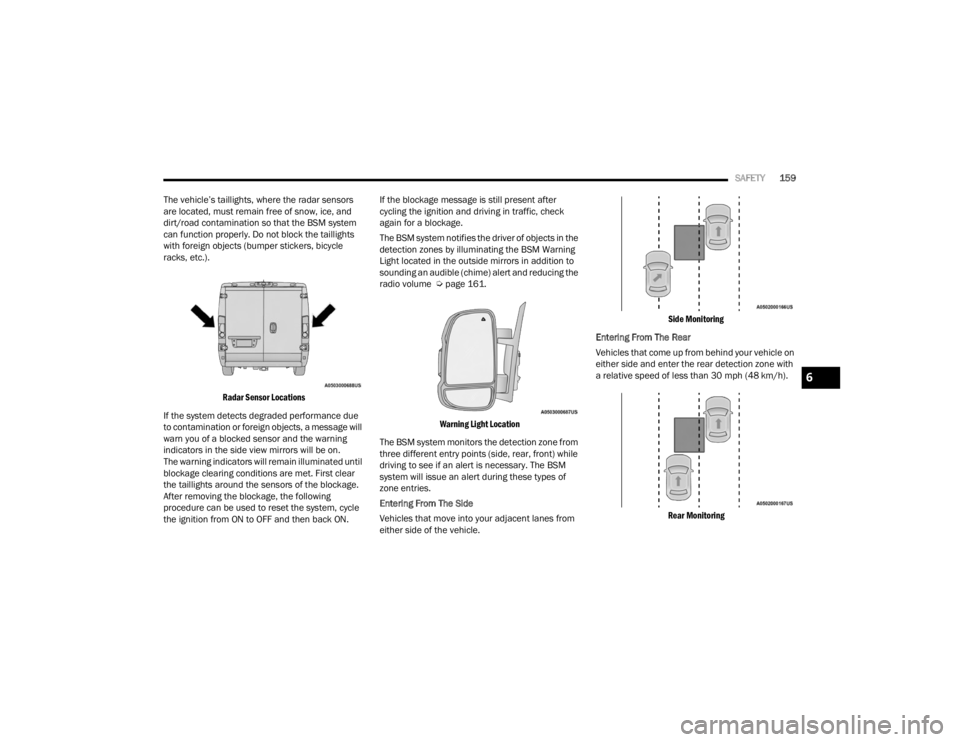
The vehicle’s taillights, where the radar sensors
are located, must remain free of snow, ice, and
dirt/road contamination so that the BSM system
can function properly. Do not block the taillights
with foreign objects (bumper stickers, bicycle
racks, etc.).
Radar Sensor Locations
If the system detects degraded performance due
to contamination or foreign objects, a message will
warn you of a blocked sensor and the warning
indicators in the side view mirrors will be on.
The warning indicators will remain illuminated until
blockage clearing conditions are met. First clear
the taillights around the sensors of the blockage.
After removing the blockage, the following
procedure can be used to reset the system, cycle
the ignition from ON to OFF and then back ON. If the blockage message is still present after
cycling the ignition and driving in traffic, check
again for a blockage.
The BSM system notifies the driver of objects in the
detection zones by illuminating the BSM Warning
Light located in the outside mirrors in addition to
sounding an audible (chime) alert and reducing the
radio volume Ú
page 161.
Warning Light Location
The BSM system monitors the detection zone from
three different entry points (side, rear, front) while
driving to see if an alert is necessary. The BSM
system will issue an alert during these types of
zone entries.
Entering From The Side
Vehicles that move into your adjacent lanes from
either side of the vehicle.
Side Monitoring
Entering From The Rear
Vehicles that come up from behind your vehicle on
either side and enter the rear detection zone with
a relative speed of less than 30 mph (48 km/h).
Rear Monitoring
6
23_VF_OM_EN_USC_t.book Page 159
Page 164 of 296
162SAFETY
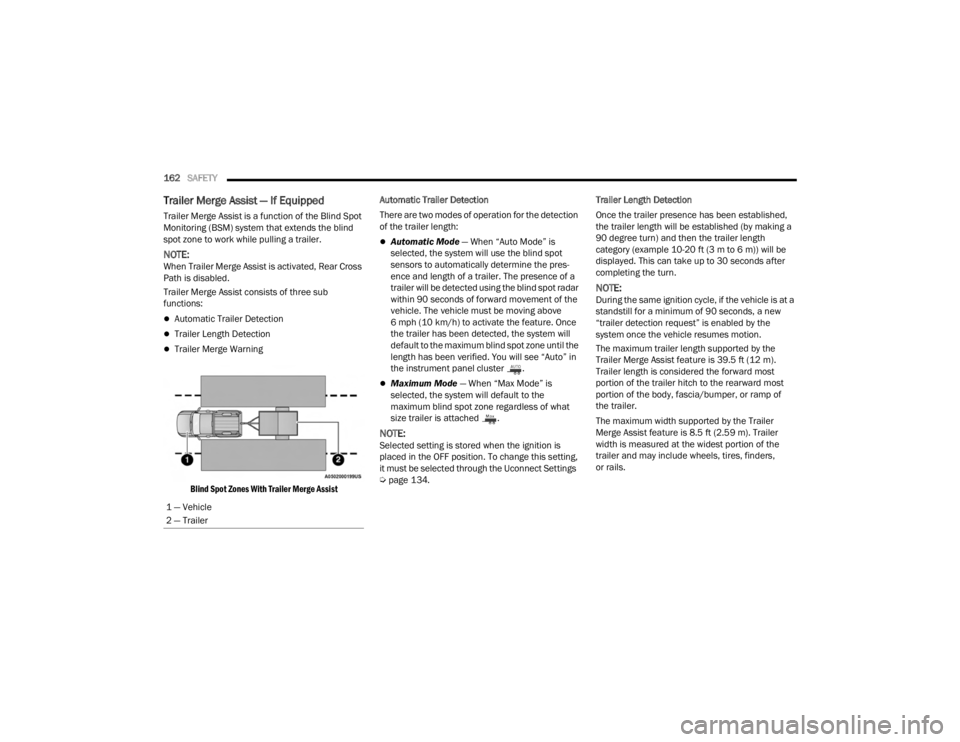
Trailer Merge Assist — If Equipped
Trailer Merge Assist is a function of the Blind Spot
Monitoring (BSM) system that extends the blind
spot zone to work while pulling a trailer.
NOTE:When Trailer Merge Assist is activated, Rear Cross
Path is disabled.
Trailer Merge Assist consists of three sub
functions:
Automatic Trailer Detection
Trailer Length Detection
Trailer Merge Warning
Blind Spot Zones With Trailer Merge Assist
Automatic Trailer Detection
There are two modes of operation for the detection
of the trailer length:
Automatic Mode
— When “Auto Mode” is
selected, the system will use the blind spot
sensors to automatically determine the pres -
ence and length of a trailer. The presence of a
trailer will be detected using the blind spot radar
within 90 seconds of forward movement of the
vehicle. The vehicle must be moving above
6 mph (10 km/h) to activate the feature. Once
the trailer has been detected, the system will
default to the maximum blind spot zone until the
length has been verified. You will see “Auto” in
the instrument panel cluster .
Maximum Mode — When “Max Mode” is
selected, the system will default to the
maximum blind spot zone regardless of what
size trailer is attached .
NOTE:Selected setting is stored when the ignition is
placed in the OFF position. To change this setting,
it must be selected through the Uconnect Settings
Ú page 134. Trailer Length Detection
Once the trailer presence has been established,
the trailer length will be established (by making a
90 degree turn) and then the trailer length
category (example 10-20 ft (3 m to 6 m)) will be
displayed. This can take up to 30 seconds after
completing the turn.
NOTE:During the same ignition cycle, if the vehicle is at a
standstill for a minimum of 90 seconds, a new
“trailer detection request” is enabled by the
system once the vehicle resumes motion.
The maximum trailer length supported by the
Trailer Merge Assist feature is 39.5 ft (12 m).
Trailer length is considered the forward most
portion of the trailer hitch to the rearward most
portion of the body, fascia/bumper, or ramp of
the trailer.
The maximum width supported by the Trailer
Merge Assist feature is 8.5 ft (2.59 m). Trailer
width is measured at the widest portion of the
trailer and may include wheels, tires, finders,
or rails.
1 — Vehicle
2 — Trailer
23_VF_OM_EN_USC_t.book Page 162
Page 165 of 296

SAFETY163
NOTE:The ability to detect a trailer may be degraded in
crowded or busy environments. Busy parking lots,
narrow areas surrounded with trees, or any other
crowded area may prevent the radar sensors from
being able to adequately detect the trailer. The
system will try to detect a trailer at every ignition
cycle or 90 seconds of standstill.
Trailer Length Detection
Trailer length will be identified and placed into one
of the following categories:
Trailer length up to 10 ft (3 m) — Blind spot zone
will be adjusted to 10 ft (3 m) .
Trailer length between 10 ft to 20 ft
(3 m to 6 m) — Blind spot zone will be adjusted
to 20 ft (6 m) .
Trailer length between 20 ft to 30 ft (6 m to 9 m) — Blind spot zone will be adjusted
to 30 ft (9 m) .
Trailer length between 30 ft and 39.5 ft (9 m to 12 m) — Blind spot zone will be adjusted to Max distance .
NOTE:Trailer length is determined within +/- 3 ft (1 m) of
actual length. Trailers that are the same size as the
category limit, 10/20/30 ft (3/6/9 m), could be
subject to being placed in the category above or
below the correct one.
Trailer Merge Warning
Trailer Merge Warning is the extension of the blind
spot function to cover the length of the trailer, plus
a safety margin, to warn the driver when there is a
vehicle in the adjacent lane. The driver is alerted by
the illumination of the BSM Warning Light located
in the outside mirror on the side the other vehicle
is detected on. In addition, an audible (chime) alert
will be heard and radio volume will be reduced
Ú page 161.
NOTE:
The Trailer Merge Alert system DOES NOT alert
the driver about rapidly approaching vehicles
that are outside the detection zones.
The Blind Spot Monitoring (BSM) system may
experience drop outs (blinking on and off) of the
side mirror warning indicator lamps when a
motorcycle or any small object remains at the
side of the vehicle for extended periods of time
(more than a couple of seconds).
Crowded areas such as parking lots, neighbor -
hoods, etc. may lead to an increased amount of
false alerts. This is normal operation.
1 — Trailer Length
2 — Trailer Hitch
3 — Trailer Width
WARNING!
The Blind Spot Monitoring system is only an aid
to help detect objects in the blind spot zones.
The BSM system is not designed to detect
pedestrians, bicyclists, or animals. Even if your
vehicle is equipped with the BSM system, always
check your vehicle’s mirrors, glance over your
shoulder, and use your turn signal before
changing lanes. Failure to do so can result in
serious injury or death.6
23_VF_OM_EN_USC_t.book Page 163
Page 167 of 296

SAFETY165
Turning FCW On Or Off
The FCW button is located in the Uconnect display
in the control settings Ú page 134.
To turn the FCW system on, press the forward
collision button once.
To turn the FCW system off, press the forward
collision button once.
NOTE:
Changing the FCW status to “Off” deactivates
the system, so no warning or active braking will
be available in case of a possible collision.
Changing the FCW status to “Only Warning”
prevents the system from providing limited
active braking, or additional brake support if the
driver is not braking adequately in the event of
a potential frontal collision, but maintains the
audible and visual warnings.
When FCW status is set to “Warning and
Braking”, this allows the system to warn the
driver of a possible collision with the vehicle
in front using audible/visual warnings and it
applies autonomous braking.
The FCW system state is kept in memory from
one ignition position to the next. If the system is
turned off, it will maintain its status in the next
key cycle.
FCW Braking Status And Sensitivity
The FCW Sensitivity and Active Braking status are
programmable through the Uconnect system
Úpage 134.
Far
When the sensitivity of FCW is set to the
“Far” setting and the system status is
“Only Warning”, this allows the system to
warn the driver of a possible more distant
collision with the vehicle in front using
audible/visual warnings.
More cautious drivers that do not mind
frequent warnings may prefer this setting.
NOTE:The “Far” setting may result in a greater number of
FCW possible collision warnings experienced.
Medium
When the sensitivity of FCW is set to the
“Medium” setting and the system status is
“Only Warning”, this allows the system to
warn the driver of a possible collision with
the vehicle in front using audible/visual
warnings.
Near
When the sensitivity of FCW is set to the
“Near” setting and the system status is
“Only Warning”, this allows the system to warn the driver of a possible closer collision
with the vehicle in front using audible/
visual warnings.
This setting provides less reaction time than the
“Far” and “Medium” settings, which allows for a
more dynamic driving experience.
More dynamic or aggressive drivers that
want to avoid frequent warnings may prefer
this setting.
NOTE:The “Near” setting may result in a lesser number of
FCW possible collision warnings experienced.
FCW Limited Warning
If the instrument cluster displays “FCW Limited
Functionality Clean Front Windshield” momentarily,
there may be a condition that limits FCW functionality.
Although the vehicle is still drivable under normal
conditions, the active braking may not be fully
available. Once the condition that limited the system
performance is no longer present, the system will
return to its full performance state. If the problem
persists, see an authorized dealer.
If the front camera is blocked due to external
environmental conditions (i.e. heavy rain, snow,
fog), the system will be deactivated and a warning
message will display in the instrument cluster.6
23_VF_OM_EN_USC_t.book Page 165
Page 172 of 296

170SAFETY
Check TPMS Warnings
The Tire Pressure Monitoring System Warning Light
will flash on and off for 75 seconds and remain on
solid when a system fault is detected, an audible
chime will be activated and the “Tire Pressure
Monitoring Unavailable” message will display.
If the ignition key is cycled, this sequence will
repeat providing the system fault still exists.
The TPMS Warning Light will turn off when the
fault condition no longer exists. A system fault can
occur with any of the following scenarios:
Jamming due to electronic devices or driving
next to facilities emitting the same radio
frequencies as the TPMS sensors
Installing some form of aftermarket window
tinting that affects radio wave signals
Snow or ice around the wheels or wheel
housings
Using tire chains on the vehicle
Using wheels/tires not equipped with TPMS
sensors
NOTE:Your vehicle is equipped with a regular size spare
wheel.
1. The spare tire does not have a TPMS sensor.
Therefore, the TPMS will not monitor the
pressure in the spare tire.
2. If a spare tire not equipped with the Tire
Pressure Monitoring System sensor is used,
the TPMS Warning Light will turn on, flashing
for 75 seconds and then remaining solid for
each subsequent ignition key cycle.
3. Once you repair or replace the original road tire and reinstall it on the vehicle in place of the
spare tire, the TPMS will update automatically
and the Tire Pressure Monitoring System
Warning Light will extinguish once the updated
tire pressures have been received. The vehicle
may need to be driven for up to 20 minutes
above 15 mph (24 km/h) to receive this
information.
NOTE:For correct Tire Pressure Monitoring System
behavior, please wait for about 20 minutes in
key-off during each tire substitution.
OCCUPANT RESTRAINT SYSTEMS
Some of the most important safety features in your
vehicle are the restraint systems:
OCCUPANT RESTRAINT SYSTEMS
F
EATURES
Seat Belt Systems
Supplemental Restraint Systems (SRS) Air Bags
Child Restraints Some of the safety features described in this
section may be standard equipment on some
models, or may be optional equipment on others.
If you are not sure, ask an authorized dealer.
IMPORTANT SAFETY PRECAUTIONS
Please pay close attention to the information in
this section. It tells you how to use your restraint
system properly, to keep you and your passengers
as safe as possible.
Here are some simple steps you can take to
minimize the risk of harm from a deploying air bag:
1. Children 12 years old and under should
always ride buckled up in the rear seat of a
vehicle with a rear seat.
2. A child who is not big enough to wear the vehicle seat belt properly must be secured in the
appropriate child restraint or belt-positioning
booster seat in a rear seating position
Ú
page 185.
3. If a child from 2 to 12 years old (not in a rear-facing child restraint) must ride in the
front passenger seat, move the seat as far
back as possible and use the proper child
restraint Ú page 185.
4. Never allow children to slide the shoulder belt behind them or under their arm.
23_VF_OM_EN_USC_t.book Page 170