instrument cluster RAM PROMASTER 2023 Workshop Manual
[x] Cancel search | Manufacturer: RAM, Model Year: 2023, Model line: PROMASTER, Model: RAM PROMASTER 2023Pages: 296, PDF Size: 12.31 MB
Page 113 of 296

STARTING AND OPERATING111
Use the ParkSense switch to turn the ParkSense
system and Side Distance Warning off if objects
such as bicycle carriers, etc. are placed within
12 inches (30 cm) from the rear fascia/bumper.
Failure to do so can result in the system misin -
terpreting a close object as a sensor problem,
causing the “PARKSENSE UNAVAILABLE
SERVICE REQUIRED” message to be displayed
in the instrument cluster display.
NOTE:If any objects are attached to the bumper within a
6.5 ft (2 m) field of view, they will interfere and
cause false alerts and possibly blockage.
There may be a delay in the object detection
rate if the object is moving.
The operation of the rear sensors is automati -
cally deactivated when the trailer's electric plug
is inserted in the vehicle's tow hook socket,
while the front sensors stay active and can
provide acoustic and visual warnings. The rear
sensors are automatically reactivated when the
trailer's cable plug is removed. If it is necessary to keep the ball mount and hitch
ball assembly mounted for a long period, it is
possible to filter out the ball mount and hitch
ball assembly presence in the sensor field of view.
The filtering operation must be performed only by
an authorized dealer.
WARNING!
Drivers must be careful when backing up even
when using Side Distance Warning. Always
check carefully behind your vehicle, look
behind you, and be sure to check for pedes
-
trians, animals, other vehicles, obstructions,
and blind spots before backing up. You are
responsible for safety and must continue to
pay attention to your surroundings. Failure to
do so can result in serious injury or death.
Before using Side Distance Warning, it is
strongly recommended that the ball mount and
hitch ball assembly be disconnected from the
vehicle when the vehicle is not used for towing.
Failure to do so can result in injury or damage to
vehicles or obstacles because the hitch ball will
be much closer to the obstacle than the rear
fascia when the vehicle sounds the continuous
tone. Also, the sensors could detect the ball
mount and hitch ball assembly, depending on
its size and shape, giving a false indication that
an obstacle is behind the vehicle.
CAUTION!
Side Distance Warning is only a parking aid
and it is unable to recognize every obstacle,
including small obstacles. Parking curbs might
be temporarily detected or not detected at all.
Obstacles located above or below the sensors
will not be detected when they are in close
proximity.
The vehicle must be driven slowly when using
Side Distance Warning in order to be able to
stop in time when an obstacle is detected.
It is recommended that the driver looks over
his/her shoulder when using ParkSense.4
23_VF_OM_EN_USC_t.book Page 111
Page 114 of 296

112STARTING AND OPERATING
PARKSENSE ACTIVE PARK ASSIST
SYSTEM — IF EQUIPPED
The ParkSense Active Park Assist system is intended to
assist the driver during parallel and perpendicular
parking maneuvers by identifying a proper parking
space, providing audible/visual instructions through
the instrument cluster display, and controlling the
steering wheel. The ParkSense Active Park Assist
system is defined as “semi-automatic” since the driver
maintains control of the accelerator, gear selector and
brakes. Depending on the driver's parking maneuver
selection, the system is capable of maneuvering a
vehicle into a parallel or a perpendicular parking space
on either side (i.e., driver side or passenger side).
NOTE:
The driver is always responsible for controlling
the vehicle, responsible for any surrounding
objects, and must intervene as required.
The system is provided to assist the driver and
not to substitute the driver.
During a semi-automatic maneuver, if the
driver touches the steering wheel after being
instructed to remove their hands from the
steering wheel, the system will cancel, and the
driver will be required to manually complete the
parking maneuver.
The system may not work in all conditions
(e.g. environmental conditions such as heavy
rain, snow, etc., or if searching for a parking
space that has surfaces that will absorb the
ultrasonic sensor waves).
It is important to keep the sensors clean in order for
the system to operate correctly. During cleaning
make sure not to scratch or damage them; avoid
using dry or rough cloths. The sensors should be
washed using clean water with addition of car
shampoo if necessary. In washing stations, clean
the sensors quickly, keeping the steam jet/high
pressure washing nozzles at least 4 in (10 cm) away
from the sensors.
New vehicles from the dealership must have at
least 31 miles (50 km) accumulated before the
ParkSense Active Park Assist system is fully cali -
brated and performs accurately. This is due to
the system’s dynamic vehicle calibration to
improve the performance of the feature.
The driver must control the vehicle’s brakes.
The automatic emergency braking feature is
NOT intended to substitute for the driver during
REVERSE maneuvers.
ENABLING AND DISABLING THE
P
ARKSENSE ACTIVE PARK ASSIST
S
YSTEM
The ParkSense Active Park Assist system
can be enabled and disabled with the
ParkSense Active Park Assist switch,
located on the switch panel below the
Uconnect display.
To enable or disable the system, push the
ParkSense Active Park Assist switch once
(LED turns on). Pushing the switch a second time
will disable the system (LED turns off).
The ParkSense Active Park Assist system will turn off
automatically for any of the following conditions:
Parking maneuver is completed.
Vehicle speed is greater than 18 mph (30 km/h)
when searching for a parking space.
Vehicle speed is greater than 5 mph (7 km/h) during active steering guidance into the parking
space.
Steering wheel is touched during active steering
guidance into the parking space.
If parking maneuver has not been completed
after 3 minutes.
ParkSense Front/Rear Park Assist switch is
pushed.
23_VF_OM_EN_USC_t.book Page 112
Page 115 of 296
STARTING AND OPERATING113
Driver's door is opened.
Load compartment door is opened.
Electronic Stability Control/Anti-Lock Braking
System intervention.
Vehicle is in 4WD Low.
Axle Locker is active.
Trailer is connected.
Trailer Reverse Steering Control (TRSC) is active.
Snowplow is connected.
NOTE:The ParkSense Active Park Assist system will allow
a maximum of eight shifts between DRIVE and
REVERSE. If the maneuver cannot be completed
within eight shifts, the system will cancel and the
instrument cluster display will instruct the driver to
complete the maneuver manually.
The ParkSense Active Park Assist system will only
operate and search for a parking space when the
following conditions are present:
Gear selector is in DRIVE.
The ignition is in the ON/RUN position.
The ParkSense Active Park Assist switch is activated.
Driver's door is closed.
Load compartment door is closed.
Vehicle speed is less than 15 mph (25 km/h).
The outer surface and the underside of the front
and rear fascias/bumpers are clean and clear
of snow, ice, mud, dirt or other obstruction.
NOTE:If the vehicle is driven above approximately
15 mph (25 km/h), the instrument cluster display
will instruct the driver to slow down. If the vehicle
is driven above approximately 18 mph (30 km/h),
the system will cancel. The driver must then reac -
tivate the system by pushing the ParkSense Active
Park Assist switch.
When pushed, the LED on the ParkSense Active
Park Assist switch will blink momentarily, and then
the LED will turn off if any of the preceding
conditions are not present.
PARALLEL/PERPENDICULAR PARKING
S
PACE ASSISTANCE OPERATION
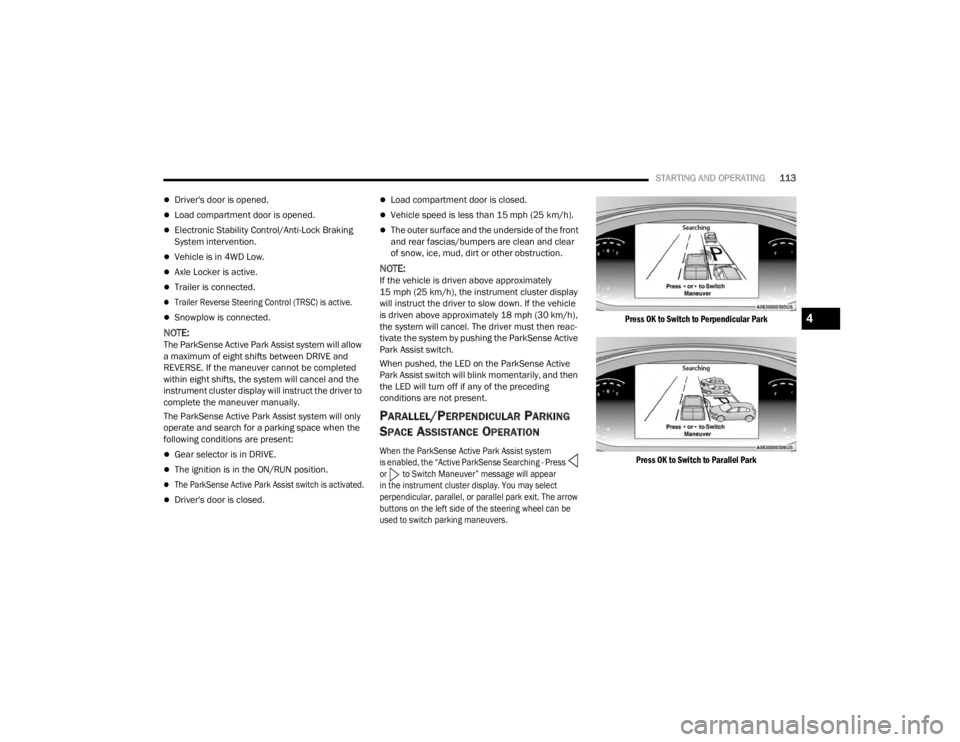
When the ParkSense Active Park Assist system
is enabled, the “Active ParkSense Searching - Press
or to Switch Maneuver” message will appear
in the instrument cluster display. You may select
perpendicular, parallel, or parallel park exit. The arrow
buttons on the left side of the steering wheel can be
used to switch parking maneuvers.
Press OK to Switch to Perpendicular Park
Press OK to Switch to Parallel Park
4
23_VF_OM_EN_USC_t.book Page 113
Page 117 of 296

STARTING AND OPERATING115
(Continued)
When the vehicle is in the parking position, the
maneuver is complete and the driver will be
instructed to check the vehicle's parking position,
then shift the vehicle into PARK. The message
"Active ParkSense Complete - Check Parking
Position" will be displayed momentarily.
NOTE:
It is the driver's responsibility to use the brake
and accelerator during the semi-automatic
parking maneuver.
It is the driver's responsibility to use the brake
and stop the vehicle. The driver should check
their surroundings and be prepared to stop the
vehicle either when instructed to, or when driver
intervention is required.
When the system instructs the driver to remove
their hands from the steering wheel, the driver
should check their surroundings and begin to
back up slowly.
The ParkSense Active Park Assist system will
allow a maximum of eight shifts between DRIVE
and REVERSE. If the maneuver cannot be
completed within eight shifts, the system will
cancel and the instrument cluster display will
instruct the driver to complete the maneuver
manually.
The system will cancel the maneuver if the
vehicle speed exceeds 5 mph (7 km/h) during
active steering guidance into the parking space.
The system will provide a warning to the driver
at 3 mph (5 km/h) that tells them to slow down.
The driver is then responsible for completing the
maneuver if the system is canceled.
If the system is canceled during the maneuver
for any reason, the driver must take control of
the vehicle.
WARNING!
Drivers must be careful when performing
parallel or perpendicular parking maneuvers
even when using the ParkSense Active Park
Assist system. Always check carefully behind
and in front of your vehicle, look behind and in
front of you, and be sure to check for pedes
-
trians, animals, other vehicles, obstructions,
and blind spots before backing up and moving
forward. You are responsible for safety and
must continue to pay attention to your
surroundings. Failure to do so can result in
serious injury or death.
Before using the ParkSense Active Park Assist
system, it is strongly recommended that the ball
mount and hitch ball assembly be disconnected
from the vehicle when the vehicle is not used for
towing. Failure to do so can result in injury or
damage to vehicles or obstacles because the hitch
ball will be much closer to the obstacle than the
rear fascia when the vehicle sounds the contin -
uous tone. Also, the sensors could detect the ball
mount and hitch ball assembly, depending on its
size and shape, giving a false indication that an
obstacle is behind the vehicle.
CAUTION!
The ParkSense Active Park Assist system is
only a parking aid and it is unable to recognize
every obstacle, including small obstacles.
Parking curbs might be temporarily detected
or not detected at all. Obstacles located above
or below the sensors’ field of view will not be
detected when they are in close proximity.
The vehicle must be driven slowly when using the
ParkSense Active Park Assist system in order to be
able to stop in time when an obstacle is detected.
It is recommended that the driver looks over
his/her shoulders when using the ParkSense
Active Park Assist system.
WARNING!
4
23_VF_OM_EN_USC_t.book Page 115
Page 118 of 296

116STARTING AND OPERATING
EXITING THE PARKING SPACE
NOTE:The function does not work for exiting a perpen -
dicular parking space, but only exiting parallel
parking spaces.
Activation
To activate this function, push the Active
ParkSense switch once. After selection, the system
activates and warns the driver on the instrument
cluster display about the operations that have to
be carried out to perform the maneuver correctly.
Selection Of The Maneuver Side
Use the direction indicators to choose the direction
that you want to perform the maneuver. Use the
right arrow indicator to perform the maneuver to
the right side and use the left arrow indicator to
perform the maneuver to the left.
During the maneuver, the system instructs the driver to
shift to REVERSE, and operate the turn signal in the
direction you want to exit. Let go of the steering wheel
and use the brake or accelerator pedals as instructed,
while the system handles the steering automatically for
exiting the parking space. If the driver continues to
carry out a voluntary or involuntary action on the
steering wheel during the exit maneuver (touching or
holding the steering wheel to prevent its movement),
the maneuver will be interrupted.
Shift To Reverse Then Move Backward
Shift To Drive Then Move Forward
End Of Maneuver
The semi-automatic maneuver ends when the
display shows the message of a completed
maneuver. At the end of the maneuver, the system
gives back the vehicle control to the driver.
LANESENSE — IF EQUIPPED
LANESENSE OPERATION
The LaneSense system is operational at speeds
above 37 mph (60 km/h) and below 112 mph
(180 km/h). The LaneSense system uses a
forward-facing camera to detect lane markings
and measure vehicle position within the lane
boundaries.
When both lane markings are detected and the
driver drifts out of the lane (no turn signal applied),
the LaneSense system provides a haptic warning
in the form of torque applied to the steering wheel,
as well as a visual warning in the instrument
cluster display, to prompt the driver to remain
within the lane boundaries.
The driver may manually override the haptic
warning by applying force to the steering wheel at
any time.
When only a single lane marking is detected and the
driver drifts across the lane marking (no turn signal
applied), the LaneSense system provides a visual
warning through the instrument cluster display to
prompt the driver to remain within the lane.
When only a single lane marking is detected, a
haptic or a torque warning will not be provided.
23_VF_OM_EN_USC_t.book Page 116
Page 119 of 296

STARTING AND OPERATING117
NOTE:
When operating conditions have been met, the
LaneSense system will monitor if the driver’s
hands are on the steering wheel and provide
an audible and visual warning to the driver if
removed. The system will cancel if the driver
does not return their hands to the wheel.
LaneSense is a driving assist system, not an
emergency system, and does not replace the
driver. The driver is always responsible for
controlling the vehicle and must intervene as
required. The LaneSense system is designed to
assist the driver and not to substitute the driver.
TURNING LANESENSE ON OR OFF
The LaneSense button is located on the
switch panel below the Uconnect display.
To turn the LaneSense system on, push the
LaneSense button (LED turns off). A “LaneSense
On” message is shown in the instrument cluster
display.
To turn the LaneSense system off, push the
LaneSense button twice (LED turns on).
NOTE:The LaneSense system will retain the last system
state on or off from the last ignition cycle when the
ignition is placed in the ON/RUN position.
LANESENSE WARNING MESSAGE
The LaneSense system will indicate the current
lane drift condition through the instrument cluster
display.
When the LaneSense system is on, the lane lines
are gray when both of the lane boundaries have
not been detected and the LaneSense telltale
is solid white.
System ON (Gray Lines) With White Telltale
Left Lane Departure — Only Left Lane Detected
When the LaneSense system is on, the Lane-
Sense Telltale is solid white when only the
left lane marking has been detected and the
system is ready to provide visual warnings in the
instrument cluster display if an unintentional
lane departure occurs on the left side.
When the LaneSense system senses the lane has
been approached and is in a lane departure situa -
tion, the visual warning in the instrument cluster
display will show the left lane line flashing yellow
(on/off). The LaneSense telltale changes from
solid white to flashing yellow.
Lane Approached (Flashing Yellow Lane Line) With Yellow Telltale
NOTE:The LaneSense system operates with similar
behavior for a right lane departure when only the
right lane marking has been detected.
4
23_VF_OM_EN_USC_t.book Page 117
Page 120 of 296

118STARTING AND OPERATING
Left Lane Departure — Both Lane Lines Detected
When the LaneSense system is on and both the lane
markings have been detected, the system is armed
to provide visual warnings in the instrument cluster
display and a torque warning in the steering wheel if
an unintentional lane departure occurs. The lane
lines turn from gray to white and the LaneSense tell-
tale is solid green.
Lanes Sensed (White Lines) With Green Telltale
When the LaneSense system senses a lane drift
situation, the left lane line turns solid yellow.
The LaneSense telltale changes from solid
green to solid yellow. At this time torque is
applied to the steering wheel in the opposite
direction of the lane boundary. For example: If approaching the left side of the
lane the steering wheel will turn to the right.
Lane Sensed (Solid Yellow Lane Line) With Solid Yellow Telltale
When the LaneSense system senses the lane
has been approached and is in a lane departure
situation, the left lane line flashes yellow
(on/off). The LaneSense telltale changes
from solid yellow to flashing yellow. At this time
torque is applied to the steering wheel in the
opposite direction of the lane boundary. For example: If approaching the left side of the
lane the steering wheel will turn to the right.
Lane Approached (Flashing Yellow Lane Line) With Flashing Yellow Telltale
NOTE:The LaneSense system operates with similar
behavior for a right lane departure.
23_VF_OM_EN_USC_t.book Page 118
Page 125 of 296

STARTING AND OPERATING123
NOTE:
Tighten the fuel filler cap until you hear a
“clicking” sound. This is an indication that the
fuel filler cap is properly tightened.
If the gas cap is not tightened properly, the MIL
may come on. Be sure the gas cap is tightened
every time the vehicle is refueled.
LOOSE FUEL FILLER CAP MESSAGE
If the vehicle diagnostic system determines that
the fuel filler cap is loose, improperly installed, or
damaged, a “Check Fuel Cap” message will be
displayed in the instrument cluster display
Ú
page 56.
Tighten the fuel filler cap until a “clicking” sound is
heard. This is an indication that the fuel filler cap is
properly tightened.
If the problem continues, the message will appear
the next time the vehicle is started. See an
authorized dealer as soon as possible.
VEHICLE LOADING
As required by National Highway Traffic Safety
Administration regulations, your vehicle has a
certification label affixed to the driver's side door
or B-pillar.
If seats are removed for carrying cargo, do not
exceed the specified GVWR and GAWR.
VEHICLE CERTIFICATION LABEL
Your vehicle has a Vehicle Certification Label
affixed to the driver’s side B-pillar or the rear of the
driver’s door.
The label contains the following information:
Name of manufacturer
Month and year of manufacture
Gross Vehicle Weight Rating (GVWR)
Gross Axle Weight Rating (GAWR) front and rear
Vehicle Identification Number (VIN)
Type of vehicle
Month, Day, and Hour (MDH) of manufacture
The bar code allows a computer scanner to read
the VIN.
GROSS VEHICLE WEIGHT RATING (GVWR)
The GVWR is the total allowable weight of your
vehicle. This includes driver, passengers, and
cargo. The total load must be limited so that you do
not exceed the GVWR.
GROSS AXLE WEIGHT RATING (GAWR)
The GAWR is the maximum capacity of the front
and rear axles. Distribute the load over the front
and rear axles evenly. Make sure that you do not
exceed either front or rear GAWR.
TIRE SIZE
The tire size on the Vehicle Certification Label
represents the actual tire size on your vehicle.
Replacement tires must be equal to the load
capacity of this tire size.
A poorly fitting fuel filler cap may cause the
Malfunction Indicator Light (MIL) to turn on.
To avoid fuel spillage and overfilling, do not
“top off” the fuel tank after filling. When the
fuel nozzle “clicks” or shuts off, the fuel tank
is full.
CAUTION!
WARNING!
Because the front wheels steer the vehicle,
it is important that you do not exceed the
maximum front or rear GAWR. A dangerous
driving condition can result if either rating is
exceeded. You could lose control of the vehicle
and have a collision.
4
23_VF_OM_EN_USC_t.book Page 123
Page 137 of 296

MULTIMEDIA135
My Profile
When the My Profile button is pressed on the touchscreen, the system displays options related to the vehicle’s profiles.
NOTE:Depending on the vehicle’s options, feature settings may vary.
Setting Name Description
LanguageThis setting will change the language of the Uconnect system and Instrument Cluster Display.
The available languages are English, French, and Spanish.
Display Mode This setting will adjust the display for the radio to “Auto” or “Manual”. “Manual” allows for more
customization with the radio display.
Display Brightness Headlights On This setting will allow you to set the brightness when the headlights are on. To access this setting,
Display Mode must be set to “Manual”. The “+” setting will increase the brightness; the “-” will
decrease the brightness.
Display Brightness Headlights Off This setting will allow you to set the brightness when the headlights are off. To access this setting,
Display Mode must be set to “Manual”. The “+” setting will increase the brightness; the “-” will
decrease the brightness.
Set Theme This setting will allow you to change the display theme.
Units This setting will allow you to change the units. The available options are “Speed” (MPH or km/h),
“Distance” (mi or km), “Fuel Consumption” (MPG [US], MPG [UK], L/100 km, or km/L), “Pressure”
(psi, kPa, or bar), and “Temperature” (°C or °F) units of measurement independently.
Theme Mode
This setting will allow you to adjust the brightness of your theme. Setting options are “Light”, “Dark” and “Auto”.
Select to show themes in Light or Dark mode. “Auto” changes the theme with the headlights.
Touchscreen Beep This setting will allow you to turn the touchscreen beep on or off.
Show Main Category Bar Labels This setting will allow the main category bar labels to be shown on or off.
Navigation Next Turn Pop-Ups Displayed in Cluster This setting will display Navigation prompts in the Instrument Cluster Display.
Phone Pop-Ups Displayed In Cluster This setting will display smartphone notifications and messages in the Instrument Cluster Display.
5
23_VF_OM_EN_USC_t.book Page 135
Page 139 of 296

MULTIMEDIA137
Display
Restore Settings to Default This setting will return all the previously changed settings to their factory defaults.
More Profile Options This setting will give access to more profile options.
Setting Name Description
When the Display button is pressed on the touchscreen, the system will display the options related to the theme (if equipped), brightness, and color of the
touchscreen. The available settings are:
NOTE:Depending on the vehicle’s options, feature settings may vary.
Setting NameDescription
LanguageThis setting will change the language of the Uconnect system and Instrument Cluster Display.
The available languages are English, French, and Spanish.
Display Mode This setting will allow you to set the brightness manually or have the system set it automatically.
The “Auto” setting has the system automatically adjust the display brightness. The “Manual” setting
will allow the user to adjust the brightness of the display.
Display Brightness With Headlights ON This setting will allow you to set the brightness when the headlights are on. To access this setting,
Display Mode must be set to Manual. The “+” setting will increase the brightness; the “-” will decrease
the brightness.
Display Brightness With Headlights OFF This setting will allow you to set the brightness when the headlights are off. To access this setting,
Display Mode must be set to Manual. The “+” setting will increase the brightness; the “-” will decrease
the brightness.
Set Theme This setting will allow you to change the display theme.
Units This setting will allow you to change the units. The available options are “Speed” (MPH or km/h),
“Distance” (mi or km), “Fuel Consumption” (MPG [US], MPG [UK], L/100 km, or km/L), “Pressure”
(psi, kPa, or bar) and “Temperature” (°C or °F) units of measurement independently.
5
23_VF_OM_EN_USC_t.book Page 137