AUX RENAULT ALASKAN 2017 User Guide
[x] Cancel search | Manufacturer: RENAULT, Model Year: 2017, Model line: ALASKAN, Model: RENAULT ALASKAN 2017Pages: 340, PDF Size: 6.93 MB
Page 184 of 340
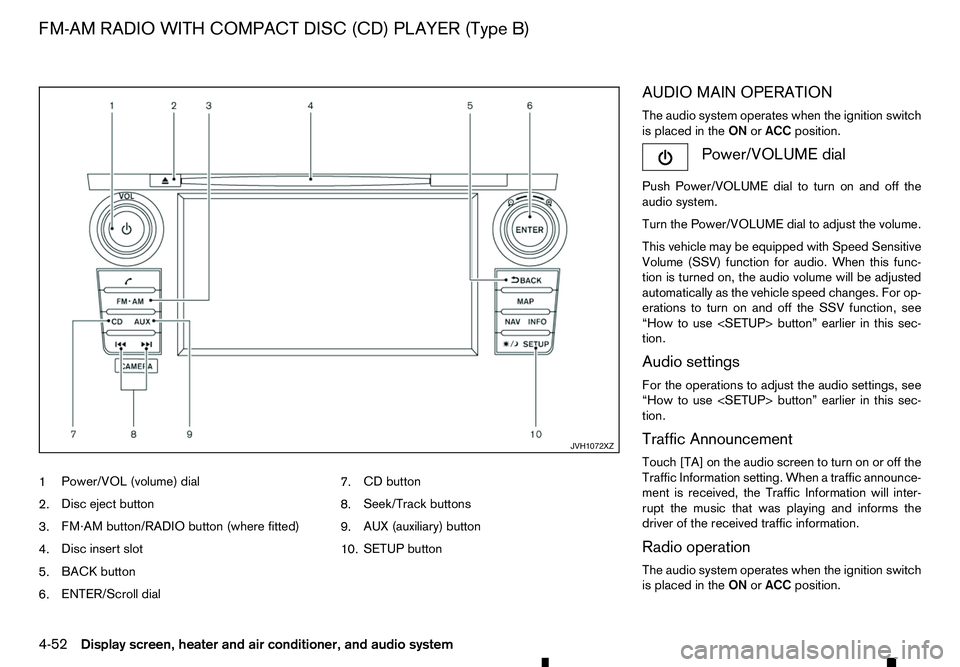
1
Power/VOL (volume) dial
2. Disc eject button
3. FM·AM button/RADIO button (where fitted)
4. Disc insert slot
5. BACK button
6. ENTER/Scroll dial 7.
CD button
8. Seek/Track buttons
9. AUX (auxiliary) button
10. SETUP button AUDIO MAIN OPERATION
The audio system operates when the ignition switch
is placed in the
ONorACC position. Power/VOLUME dial
Push Power/VOLUME dial to turn on and off the
audio system.
Turn the Power/VOLUME dial to adjust the volume.
This vehicle may be equipped with Speed Sensitive
Volume (SSV) function for audio. When this func-
tion is turned on, the audio volume will be adjusted
automatically as the vehicle speed changes. For op-
erations to turn on and off the SSV function, see
“How to use
tion.
Audio settings
For the operations to adjust the audio settings, see
“How to use
tion.
Traffic Announcement
Touch [TA] on the audio screen to turn on or off the
Traffic Information setting. When atraffic announce-
ment is received, the Traffic Information will inter-
rupt the music that was playing and informs the
driver of the received traffic information.
Radio operation
The audio system operates when the ignition switch is placed in the ONorACC position. JVH1072XZ
FM-AM RADIO WITH COMPACT DISC (CD) PLAYER (Type B)
4-52 Display screen, heater and air conditioner, and audio system
Page 187 of 340
General notes for USB use:
Refer to your device manufacturer’s owner informa-
tion regarding the proper use and care of the de-
vice.
The audio system operates when the ignition switch
is placed in the ONorACC position.
The USB port is located on the lower part of the
instrument panel. See “USB (Universal Serial Bus)
connection port” earlier in this section. Connect a
USB memory device into the connection port. The
USB memory device will be activated automatically.
USB main operation:
If another audio source is playing and aUSB memory
device is inserted, push the AUX button until the
screen on the display changes to the USB memory
mode.
If the system has been turned off while the USB
memory device was playing, push the Power/VOL-
UME dial to restart the USB memory device.
Touch the name of asong on the screen to begin
playing that song.
USB screen operation:
While files on aUSB memory device are playing,
the play pattern can be altered so that songs are
repeated or played randomly. Mix:
Touching the [Mix] key on the screen while aUSB
memory device is playing will alternate the random
play pattern as follows:
(Normal) →Random Folder →Random All →(Nor-
mal)
Repeat:
Touching the [Repeat] key on the screen while a
USB memory device is playing will alternate the re-
peat play pattern as follows:
(Normal) →Repeat Track →Repeat Folder →(Nor-
mal)
Browse:
Touch [Browse] key to display USB interface. Se-
lect the songs you wish to play by touching the item
on the screen. Seek/Track buttons:
Push the Seek/Track (rewind) button while an audio
file on the USB memory device is playing to return
to the beginning of the current track. Push the but-
ton several times to skip backward several tracks.
Push the Seek/Track (fast forward) button while an
audio file on the USB memory device is playing to
advance one track. Push the button several times to
skip forward several tracks. if the last track on the
USB memory device is skipped, the first track of the
next folder is played. iPod player operation
Connecting iPod:
Connect the iPod to the USB connection port using
the USB cable that came with your iPod.
The USB port is located on the lower part of the
instrument panel. See “USB (Universal Serial Bus)
connection port” earlier in this section.
If your iPod supports charging via
aUSB connec-
tion, its battery will be charged while connected to
the vehicle with the ignition switch placed in the ON
or ACC position.
Compatibility:
The following models are compatible:
• iPod 5th Generation (firmware version 1.2.3 or
later)
• iPod Classic (firmware version 1.1.1 or later)
• iPod Touch (firmware version 2.0.0 or later)*
• iPod nano
-1st generation (firmware version
1.3.1 or later)
• iPod nano
-2nd generation (firmware version
1.1.3 or later)
• iPod nano
-3rd generation (firmware version
1.1.3 or later)
• iPod nano
-4th generation (firmware version
1.0.4 or later)
• iPod nano
-5th generation (firmware version
1.0.1 or later)
Display screen, heater and air conditioner, and audio system 4-55
Page 188 of 340
*S
ome features of this iPod may not be fully func-
tional.
Make sure that your iPod firmware is updated to the
version indicated above.
iPod main operation:
If the system has been turned off while the iPod was
playing, pushing the Power/VOLUME dial will start
the iPod.
If another audio source is playing and aiPod is con-
nected, push the AUX button until the screen on the
display changes to the iPod mode.
Refer to your device manufacturer’s owner informa-
tion regarding the proper use and care of the de-
vice.
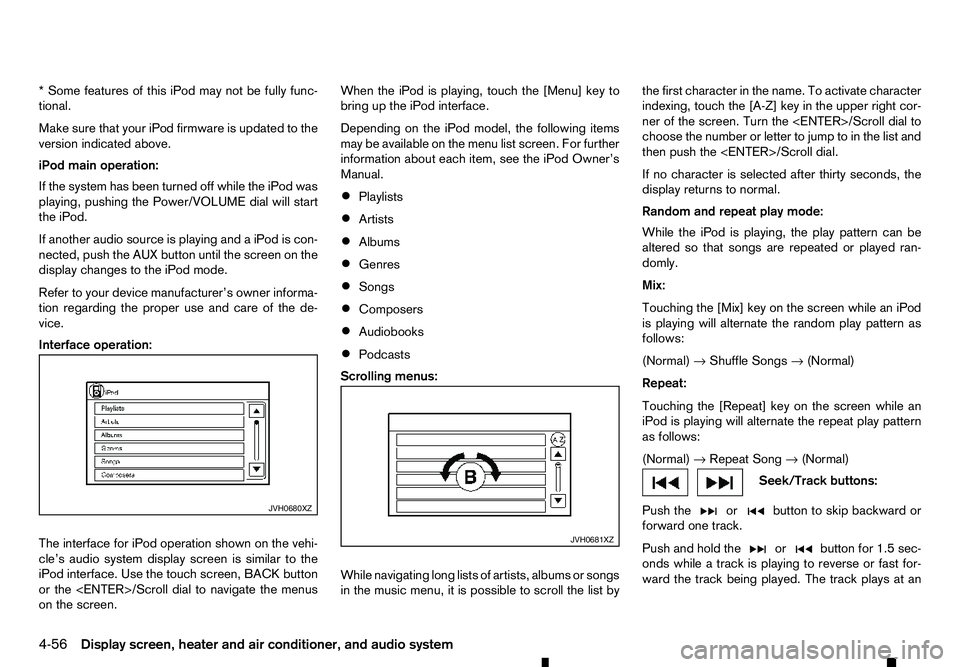
Interface operation:
The interface for iPod operation shown on the vehi-
cle’s audio system display screen is similar to the
iPod interface. Use the touch screen, BACK button
or the
on the screen. When the iPod is playing, touch the [Menu] key to
bring up the iPod interface.
Depending on the iPod model, the following items
may be available on the menu list screen. For further
information about each item, see the iPod Owner’s
Manual.
• Playlists
• Artists
• Albums
• Genres
• Songs
• Composers
• Audiobooks
• Podcasts
Scrolling menus:
While navigating long lists of artists, albums or songs
in the music menu, it is possible to scroll the list by the first character in the name. To activate character
indexing, touch the [A-Z] key in the upper right cor-
ner of the screen. Turn the
choose the number or letter to jump to in the list and
then push the
If no character is selected after thirty seconds, the
display returns to normal.
Random and repeat play mode:
While the iPod is playing, the play pattern can be
altered so that songs are repeated or played ran-
domly.
Mix:
Touching the [Mix] key on the screen while an iPod
is playing will alternate the random play pattern as
follows:
(Normal) →Shuffle Songs →(Normal)
Repeat:
Touching the [Repeat] key on the screen while an
iPod is playing will alternate the repeat play pattern
as follows:
(Normal) →Repeat Song →(Normal) Seek/Track buttons:
Push the or button to skip backward or
forward one track.
Push and hold the or button for 1.5 sec-
onds while at
rack is playing to reverse or fast for-
ward the track being played. The track plays at an JVH0680XZ
JVH0681XZ
4-56 Display screen, heater and air conditioner, and audio system
Page 189 of 340
increased speed while reversing or fast forwarding.
When the button is released, the track returns to
normal play speed.
Bluetooth® audio player operation
If you have acompatible Bluetooth® audio device
that is capable of playing audio files, the device can be connected to the vehicle’s audio system so that
the audio files on the device play through the vehi-
cle’s speakers
Bluetooth® trademark:
m Bluetooth®
is
at rademark
owned by Bluetooth SIG, Inc.
and licensed to Robert Bosch
GmbH.
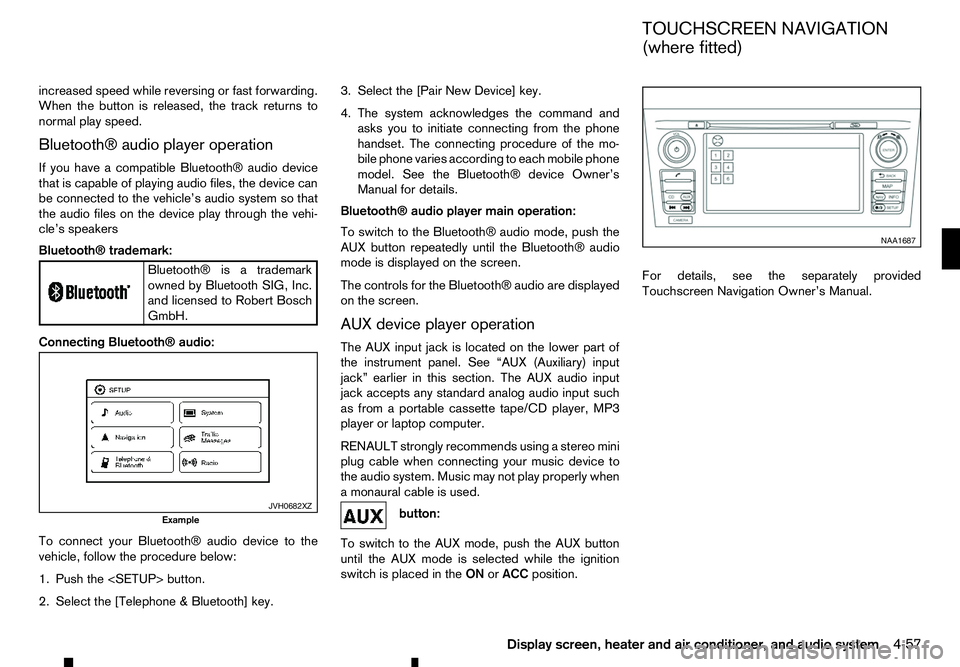
Connecting Bluetooth® audio:
To connect your Bluetooth® audio device to the
vehicle, follow the procedure below:
1. Push the
2. Select the [Telephone &Bluetooth] key. 3. Select the [Pair New Device] key.
4. The system acknowledges the command and
asks you to initiate connecting from the phone
handset. The connecting procedure of the mo-
bile phone varies according to each mobile phone
model. See the Bluetooth® device Owner’s
Manual for details.
Bluetooth® audio player main operation:
To switch to the Bluetooth® audio mode, push the
AUX button repeatedly until the Bluetooth® audio
mode is displayed on the screen.
The controls for the Bluetooth® audio are displayed on the screen.
AUX device player operation
The AUX input jack is located on the lower part of
the instrument panel. See “AUX (Auxiliary) input
jack” earlier in this section. The AUX audio input
jack accepts any standard analog audio input such
as from aportable cassette tape/CD player, MP3
player or laptop computer.
RENAULT strongly recommends using astereo mini
plug cable when connecting your music device to
the audio system. Music may not play properly when
am onaural cable is used. button:
To switch to the AUX mode, push the AUX button
until the AUX mode is selected while the ignition
switch is placed in the ONorACC position. For details, see the separately provided
Touchscreen Navigation Owner’s Manual.
JVH0682XZ
Example NAA1687
TOUCHSCREEN NAVIGATION
(where fitted)
Display screen, heater and air conditioner, and audio system 4-57
Page 191 of 340
•
Reject an incoming call by pressing the
< >
button during the incoming call.
• End an active call by pushing the
< >
button
once.
• Redial the last outgoing call by pressing the
< >
button for more than
2seconds. BLUETOOTH
®MOBILE PHONE
FEATURE WARNING
Whilst
driving, using the mobile phone is ex-
tremely dangerous because it significantly im-
pairs your concentration and diminishes your re-
action capabilities to sudden changes on the
road, and it may lead to afatal accident. This
applies to all phone call situations such as when
receiving an incoming call, during aphone con-
versation, when calling through the phone book
search, etc.
CAUTION
Certain country jurisdictions prohibit the use of
the mobile phone in the car without hands-free
support.
This chapter provides information about the hands-
free phone system using aBluetooth
®connection.
Bluetooth
®is aw ireless radio communication stan-
dard. This system offers ahands-free facility for your
mobile telephone to enhance driving comfort.
In order to use your mobile phone with the Blue-
tooth
®of the audio system, the mobile phone must
first be setup. For details, see “BLUETOOTH®
settings” later in this section. Once it has been
setup, the hands-free mode is automatically acti-
vated on the registered mobile phone (via Blue-
tooth
®)w hen it comes into range. An
otification message appears on the audio display
when the phone is connected, when an incoming
call is being received, as well as when acall is initi-
ated.
When acall is active, the audio system, microphone
(located in the ceiling in front of the rear view mir-
ror), and steering wheel switches enable hands-free
communication.
If the audio system is in use at the time, the radio,
CD, iPod, USB audio, Bluetooth audio or AUX
source mode will be muted and will stay muted until
the active call has ended.
The Bluetooth
®system may not be able to connect
with your mobile phone for the following reasons:
• The mobile phone is too far away from the ve-
hicle.
• The Bluetooth
®mode on your mobile phone has
not been activated.
• Your mobile phone has not been paired with the
Bluetooth
®system of the audio unit.
• The mobile phone does not support Bluetooth
®
technology (BT Core v2.0).
NOTE
• For models with Audio with Navigation sys-
tem see the separately provided Owner’s
Manual.
• For details, see your mobile phone’s Owner’s
Manual.
BLUETOOTH® HANDS-FREE PHONE SYSTEM (without navigation system
and colour display)
Display screen, heater and air conditioner, and audio system 4-59
Page 226 of 340
NOTE
When the Stop/Start System indicator illumi-
nates, the engine starts running automatically
under at least one of the following conditions:
• The battery voltage becomes low (due to elec-
trical load from other vehicle systems like
headlights, heaters, etc., or auxiliary devices
connected to the 12 volt socket inside the
vehicle).
• The vehicle speed is above about
2km/h (1
MPH).
• The front defogger is operated.
• When the temperature inside the vehicle is
too high or low. (When the air conditioner is
off, the Stop/Start System will operate.)
• When the front defogger is turned on. (The
engine may not start depending on the out-
side temperature.)
• When the battery capacity is low.
• When the power consumption is high.
• When the clutch pedal is depressed.
CAUTION
Only engage gear when the clutch pedal is fully
depressed. NOTE
The following conditions will prevent the Stop/
Start System from automatically restarting the
engine. Starting the engine with the ignition
switch operation is then necessary:
• The driver’s seat belt is unfastened, and driv-
er’s door is open.
• The bonnet is open.
Use this system while waiting at stoplight, etc. When
the vehicle is stopped for long periods of time, turn
off the engine.
When the engine is stopped by the Stop/Start Sys-
tem, heating, cooling and dehumidifying functions
will be deactivated. To avoid the air conditioning
functions from being deactivated, turn off the Idling
Stop mode by pressing the Stop/Start OFF switch.
STOP/START SYSTEM DISPLAY
Engine stop When the engine is stopped the information is dis-
played for
afew seconds.
Stop/Start System ON or OFF
If the Stop/Start System is activated or deactivated
using the Stop/Start System OFF switch, the mes-
sage is shown.
CO2 or fuel saved and engine stop time JVS0341XZ JVS0638XZ
JVS0430XZ
5-24 Starting and driving