heater RENAULT ALASKAN 2017 User Guide
[x] Cancel search | Manufacturer: RENAULT, Model Year: 2017, Model line: ALASKAN, Model: RENAULT ALASKAN 2017Pages: 340, PDF Size: 6.93 MB
Page 136 of 340
HOW TO USE BACK BUTTON
Push the
screen. Vehicle information can be checked and various set-
tings can be adjusted on the display.
NOTE
Designs and items displayed on the screen may
vary depending on the models and specifications.
HOW TO USE INFO BUTTON
Push the
menu items on the display screen.
Available items:
• [Traffic Messages]
• [Eco Score]
[Traffic Messages] (where fitted)
Traffic Messages can be displayed on the display
screen when available. Refer to the separate Navi-
gation System Owner’s Manual for details.
[Eco Score] (where fitted)
The [Eco Score] feature analyses driving behaviour
and provides an overall score. Refer to the separate
Navigation System Owner’s Manual for details. HOW TO USE BUTTON
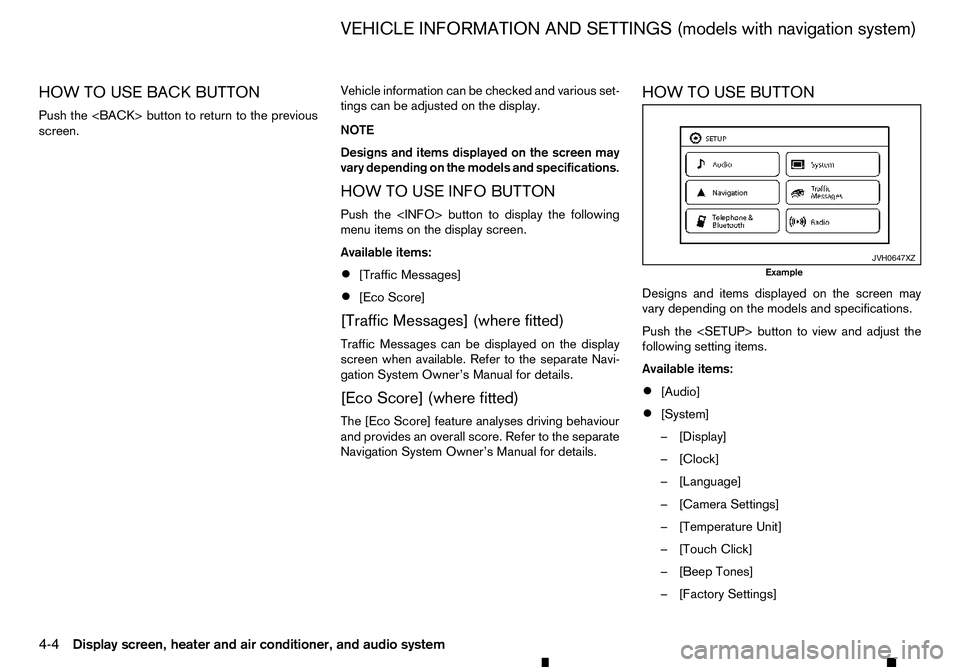
Designs and items displayed on the screen may
vary depending on the models and specifications.
Push the
following setting items.
Available items:
•
[Audio]
• [System]
–[
Display]
–[ Clock]
–[ Language]
–[ Camera Settings]
–[ Temperature Unit]
–[ Touch Click]
–[ Beep Tones]
–[ Factory Settings] JVH0647XZ
Example
VEHICLE INFORMATION AND SETTINGS (models with navigation system)
4-4 Display screen, heater and air conditioner, and audio system
Page 137 of 340
![RENAULT ALASKAN 2017 User Guide –[
Software Licenses]
• [Navigation]
• [Telephone
&Bluetooth]
• [Traffic Messages]
• [Radio]
[Audio] settings
Audio settings can be adjusted from the audio setup
screen.
This item is availab](/img/7/58394/w960_58394-136.png "RENAULT ALASKAN 2017 User Guide –[
Software Licenses]
• [Navigation]
• [Telephone
&Bluetooth]
• [Traffic Messages]
• [Radio]
[Audio] settings
Audio settings can be adjusted from the audio setup
screen.
This item is availab")
–[
Software Licenses]
• [Navigation]
• [Telephone
&Bluetooth]
• [Traffic Messages]
• [Radio]
[Audio] settings
Audio settings can be adjusted from the audio setup
screen.
This item is available only when the audio system is
turned on.
1. Push the
2. Touch the [Audio] key.
3. Select the item you wish to adjust.
[Bass]/[Treble]/[Balance]/[Fade]:
Touch the adjustment bar next to the corresponding
keys on the display to adjust the tone quality and
speaker balance.
The levels of these features can also be adjusted
with the
[Speed Sensitive Vol.]:
Speed sensitive volume function increases the vol-
ume of the audio system as the speed of the vehicle
increases. Choose the desired effect level from 0
(OFF) to 5. The higher the setting, the more the vol-
ume increases in relation to vehicle speed. [AUX Level]:
This feature controls the volume level of incoming
sound when an auxiliary device is connected to the
system. Select the level from [Quiet], [Medium], and
[Loud].
[System settings]
Various system settings can be adjusted from the
system settings.
1. Push the
2. Select the [System] key.
3. Select the item you wish to adjust.
[Display]:
Select the corresponding keys to adjust the set-
tings.
• [Brightness]:
Adjusts the brightness of the display.
• [Display Mode]:
Adjusts to fit the level of lighting in the vehicle.
Touch the [Display Mode] key to cycle through
options of the mode ([Day], [Night] and [Auto]).
• [Scroll Direction]:
Adjusts the direction of the menu scroll. Choose
either the up arrow or down arrow. [Clock]:
Select the corresponding keys to adjust the set-
tings.
• [Time Format]:
The time format setting can be selected from 12
hour and 24 hour formats.
• [Date Format]:
The day, month and year display can be selected
from five formats.
• [Clock Mode]:
Select the clock mode from [Manual], [Time
Zone] and [Auto].
When [Manual] is selected, you can set the clock
mode manually with the [Set Clock Manually]
key.
Select [Auto] to automatically maintain the time
using GPS.
• [Set Clock Manually]:
Mode (AM/PM) (where fitted), Hours, Minutes,
Day, Month and Year can be set manually if
“Manual” is selected in the Clock Mode setting.
• [Daylight Savings Time]:
Turns the daylight savings time ON or OFF.
• [Time Zone]:
Select the applicable time zone from the list.
Display screen, heater and air conditioner, and audio system 4-5
Page 138 of 340
![RENAULT ALASKAN 2017 User Guide [Language]:
Select
alanguage to be displayed on the screen.
[Camera Settings] (where fitted):
See “How to adjust the screen” later in this section
for details.
[Temperature Unit]:
Select the tempe](/img/7/58394/w960_58394-137.png "RENAULT ALASKAN 2017 User Guide [Language]:
Select
alanguage to be displayed on the screen.
[Camera Settings] (where fitted):
See “How to adjust the screen” later in this section
for details.
[Temperature Unit]:
Select the tempe")
[Language]:
Select
alanguage to be displayed on the screen.
[Camera Settings] (where fitted):
See “How to adjust the screen” later in this section
for details.
[Temperature Unit]:
Select the temperature unit from °C and °F.
[Touch Click]:
Turns the touch screen click feature on or off. When
turned on, aclick sound will be heard every time a
key on the screen is touched.
[Beep Tones]:
Turns the beep tones feature on or off. When turned
on, abeep sound will be heard as apop-up mes-
sage appears on the screen.
[Factory Settings]:
Select this key to return all settings to default.
[Software Licenses] (where fitted):
Select this key to view software licence information.
[System Software Version:]:
This key shows the current software version num-
ber.
[Navigation] settings
Navigation settings can be changed. See Naviga-
tion System Owner’s Manual for details. [Telephone
&Bluetooth] settings
Telephone &Bluetooth settings can be changed.
See “Bluetooth® Hands-Free Phone System (with
navigation system)” later in this section for details.
[Traffic Messages] settings
Traffic information guidance, announcement and
warning settings can be adjusted.
Traffic Announcement (TA) information can be re-
ceived only in areas where the service is available.
[Radio] settings
[RDS Reg]:
RDS messages can be turned ON or OFF. When
this item is turned ON, the received RDS informa-
tion will be shown on the audio screen.
RDS information can be received only in areas
where the service is available.
[Traffic Announcement]:
Traffic Announcement (TA) related messages can
be turned ON or OFF. When this item is turned ON,
the received traffic announcement information will
be tuned to automatically when received.
Traffic Announcement (TA) information can be re-
ceived only in areas where the service is available.
4-6 Display screen, heater and air conditioner, and audio system
Page 139 of 340
j
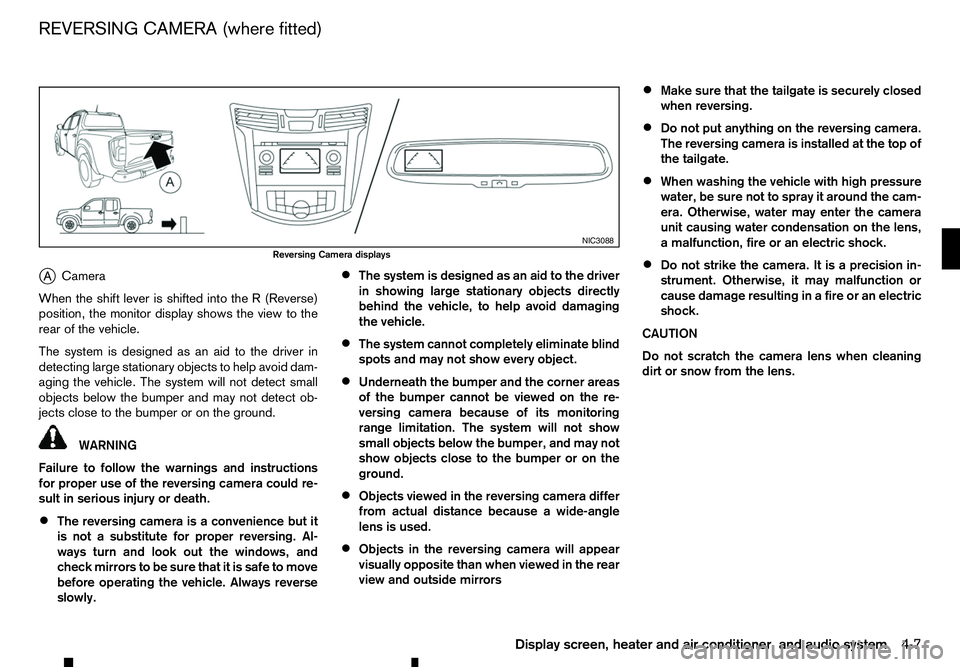
A Camera
When the shift lever is shifted into the
R(Reverse)
position, the monitor display shows the view to the
rear of the vehicle.
The system is designed as an aid to the driver in
detecting large stationary objects to help avoid dam-
aging the vehicle. The system will not detect small
objects below the bumper and may not detect ob-
jects close to the bumper or on the ground. WARNING
Failure to follow the warnings and instructions
for proper use of the reversing camera could re-
sult in serious injury or death.
• The reversing camera is
aconvenience but it
is not asubstitute for proper reversing. Al-
ways turn and look out the windows, and
check mirrors to be sure that it is safe to move
before operating the vehicle. Always reverse
slowly. •
The system is designed as an aid to the driver
in showing large stationary objects directly
behind the vehicle, to help avoid damaging
the vehicle.
• The system cannot completely eliminate blind
spots and may not show every object.
• Underneath the bumper and the corner areas
of the bumper cannot be viewed on the re-
versing camera because of its monitoring
range limitation. The system will not show
small objects below the bumper, and may not
show objects close to the bumper or on the
ground.
• Objects viewed in the reversing camera differ
from actual distance because
awide-angle
lens is used.
• Objects in the reversing camera will appear
visually opposite than when viewed in the rear
view and outside mirrors •
Make sure that the tailgate is securely closed
when reversing.
• Do not put anything on the reversing camera.
The reversing camera is installed at the top of
the tailgate.
• When washing the vehicle with high pressure
water, be sure not to spray it around the cam-
era. Otherwise, water may enter the camera
unit causing water condensation on the lens,
am
alfunction, fire or an electric shock.
• Do not strike the camera. It is
aprecision in-
strument. Otherwise, it may malfunction or
cause damage resulting in afire or an electric
shock.
CAUTION
Do not scratch the camera lens when cleaning
dirt or snow from the lens. NIC3088
Reversing Camera displays
REVERSING CAMERA (where fitted)
Display screen, heater and air conditioner, and audio system4-7
Page 140 of 340
HOW TO READ THE DISPLAYED
LINES
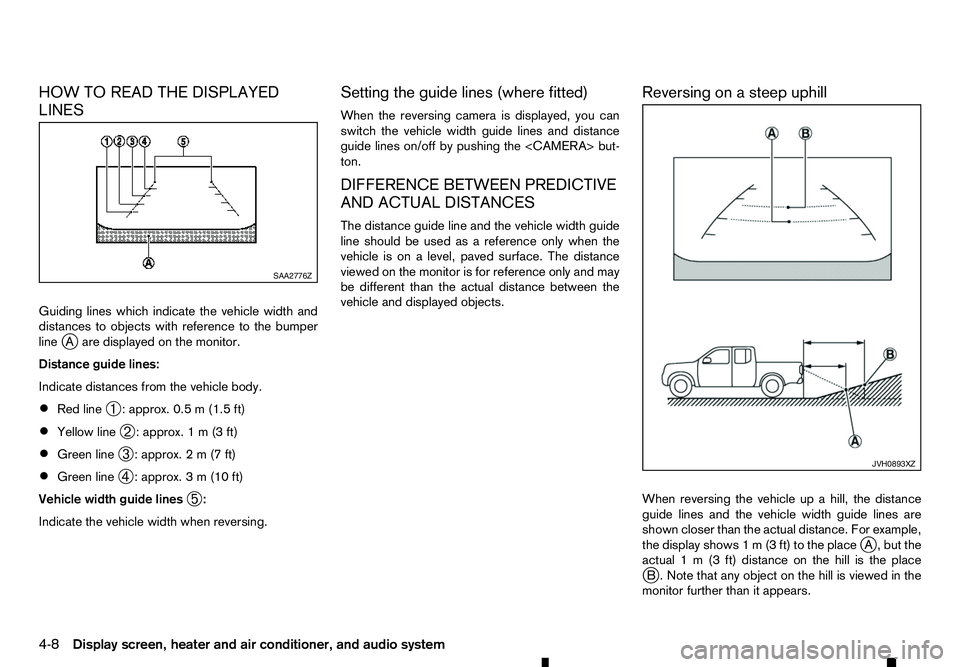
Guiding lines which indicate the vehicle width and
distances to objects with reference to the bumper
line j
Aa re displayed on the monitor.
Distance guide lines:
Indicate distances from the vehicle body.
• Red line
➀:a
pprox. 0.5 m(1.5 ft)
• Yellow line
➁:a
pprox. 1m(3f t)
• Green line
➂:a
pprox. 2m(7f t)
• Green line
➃:a
pprox. 3m(10 ft)
Vehicle width guide lines ➄:
Indicate the vehicle width when reversing. Setting the guide lines (where fitted)
When the reversing camera is displayed, you can
switch the vehicle width guide lines and distance
guide lines on/off by pushing the
ton.
DIFFERENCE BETWEEN PREDICTIVE
AND ACTUAL DISTANCES
The distance guide line and the vehicle width guide
line should be used as
areference only when the
vehicle is on alevel, paved surface. The distance
viewed on the monitor is for reference only and may
be different than the actual distance between the
vehicle and displayed objects. Reversing on
asteep uphill
When reversing the vehicle up ahill, the distance
guide lines and the vehicle width guide lines are
shown closer than the actual distance. For example,
the display shows 1m(3ft) to the place j
A, but the
actual 1m(3f t) distance on the hill is the place
j B. Note that any object on the hill is viewed in the
monitor further than it appears. SAA2776Z
JVH0893XZ
4-8 Display screen, heater and air conditioner, and audio system
Page 141 of 340
Reversing on
asteep downhill
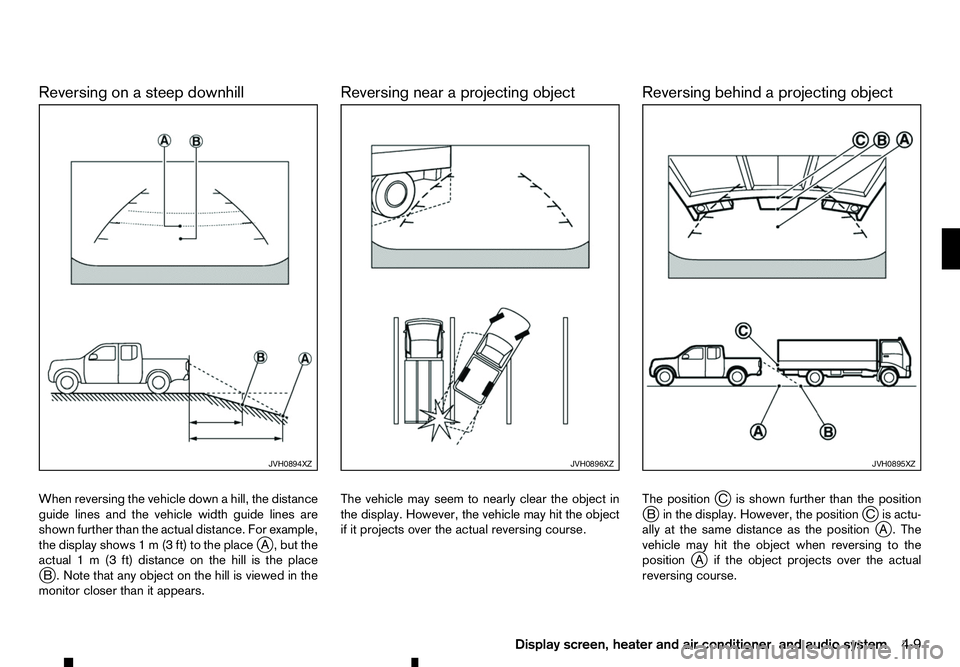
When reversing the vehicle down ahill, the distance
guide lines and the vehicle width guide lines are
shown further than the actual distance. For example,
the display shows 1m(3ft) to the place j
A, but the
actual 1m(3f t) distance on the hill is the place
j B. Note that any object on the hill is viewed in the
monitor closer than it appears. Reversing near
aprojecting object
The vehicle may seem to nearly clear the object in
the display. However, the vehicle may hit the object
if it projects over the actual reversing course. Reversing behind
aprojecting object
The position jCi sshown further than the position
j Bi nthe display. However, the position jCi sactu-
ally at the same distance as the position j
A. The
vehicle may hit the object when reversing to the
position j
Ai fthe object projects over the actual
reversing course. JVH0894XZ JVH0896XZ JVH0895XZ
Display screen, heater and air conditioner, and audio system
4-9
Page 142 of 340
![RENAULT ALASKAN 2017 User Guide HOW TO ADJUST THE SCREEN
Adjusting screen (for models with
navigation system)
1. Push the <SETUP> button.
2. Select the [System] key.
3. Select the [Camera Settings] key.
4. Select the item you wish t](/img/7/58394/w960_58394-141.png "RENAULT ALASKAN 2017 User Guide HOW TO ADJUST THE SCREEN
Adjusting screen (for models with
navigation system)
1. Push the <SETUP> button.
2. Select the [System] key.
3. Select the [Camera Settings] key.
4. Select the item you wish t")
HOW TO ADJUST THE SCREEN
Adjusting screen (for models with
navigation system)
1. Push the
2. Select the [System] key.
3. Select the [Camera Settings] key.
4. Select the item you wish to adjust.
• [Display Mode]:
Adjusts to fit the level of lighting in the vehicle.
Touch the [Display Mode] key to cycle through
options of the mode ([Day], [Night] and [Auto]).
• [Brightness]:
Adjusts the brightness of the display.
• [Contrast]:
Adjusts the level of contrast.
• [Colour]:
Adjusts the level of the colour.
When [Brightness], [Contrast], or [Colour] are se-
lected the system will change to the camera view to
modify the settings using the
navigation system)
1. Push the
➁.
2. Turn the
the [Brightness] or the [Contrast] key.
3. Push the
4. Adjust the level using the
ton ➁to apply the adjustment.
NOTE
Do not adjust the Brightness or Contrast of the
reversing camera while the vehicle is moving.
OPERATING TIPS
• When the shift lever is shifted to the
R(Reverse)
position, the monitor screen automatically
changes to the reversing camera mode. How-
ever, the radio can be heard. •
It may take some time until the reversing camera
or the normal screen is displayed after the shift
lever has been shifted to
R(Reverse) from an-
other position or to another position from R(Re-
verse). Objects may be distorted momentarily
until the reversing camera screen is displayed
completely.
• When the temperature is extremely high or low,
the screen may not clearly display objects. This
is not
amalfunction.
• When strong light directly enters the camera,
objects may not be displayed clearly. This is not
am
alfunction.
• Vertical lines may be seen in objects on the
screen. This is due to strong reflected light from
the bumper. This is not
amalfunction.
• The screen may flicker under fluorescent light.
This is not
amalfunction.
• The colours of objects displayed by the revers-
ing camera may differ somewhat from those of
the actual object.
• Objects on the monitor may not be clear in a
dark place or at night. This is not
amalfunction.
• If dirt, rain or snow attaches to the camera, the
reversing camera may not clearly display objects.
Clean the camera. JVH0653XZ
4-10 Display screen, heater and air conditioner, and audio system
Page 143 of 340
•
Do not use alcohol, benzine or thinner to clean
the camera. This will cause discoloration. To
clean the camera, wipe with acloth dampened
with diluted mild cleaning agent and then wipe
with adry cloth.
• Do not damage the camera as the monitor screen
may be adversely affected.
• Do not use wax on the camera window. Wipe off
any wax with
aclean cloth dampened with mild
detergent diluted with water.
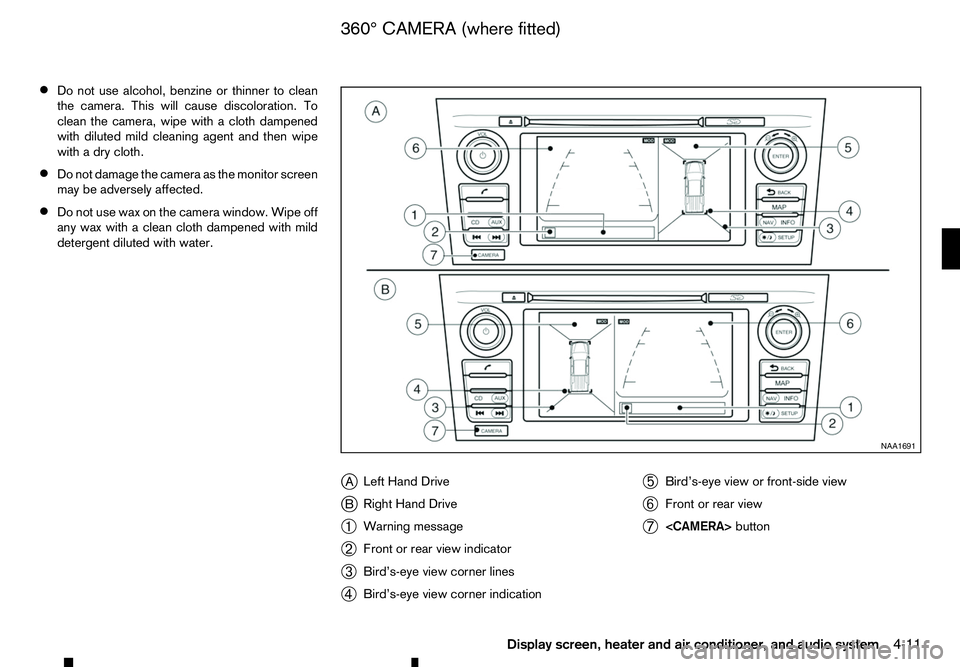
jA Left Hand Drive
j B Right Hand Drive
➀ Warning message
➁ Front or rear view indicator
➂ Bird’s-eye view corner lines
➃ Bird’s-eye view corner indication ➄
Bird’s-eye view or front-side view
➅ Front or rear view
➆
button NAA1691
360° CAMERA (where fitted)
Display screen, heater and air conditioner, and audio system 4-11
Page 144 of 340
With the ignition switch in the ON position, push the
(Reverse) position to operate the 360° Camera. The
monitor displays various views of the position of the
vehicle.
NOTE
At first operation, the corner lines are blinking
yellow for about 3seconds. This is not amalfunc-
tion but areminder to be cautious.
Available views:
• Bird’s-eye View
The surrounding view of the vehicle.
• Front-side View
The view around and ahead of the front passen-
ger’s side wheel.
• Front view
The view to the front of the vehicle.
• Rear view
The view to the rear of the vehicle.
The system is designed as an aid to the driver in
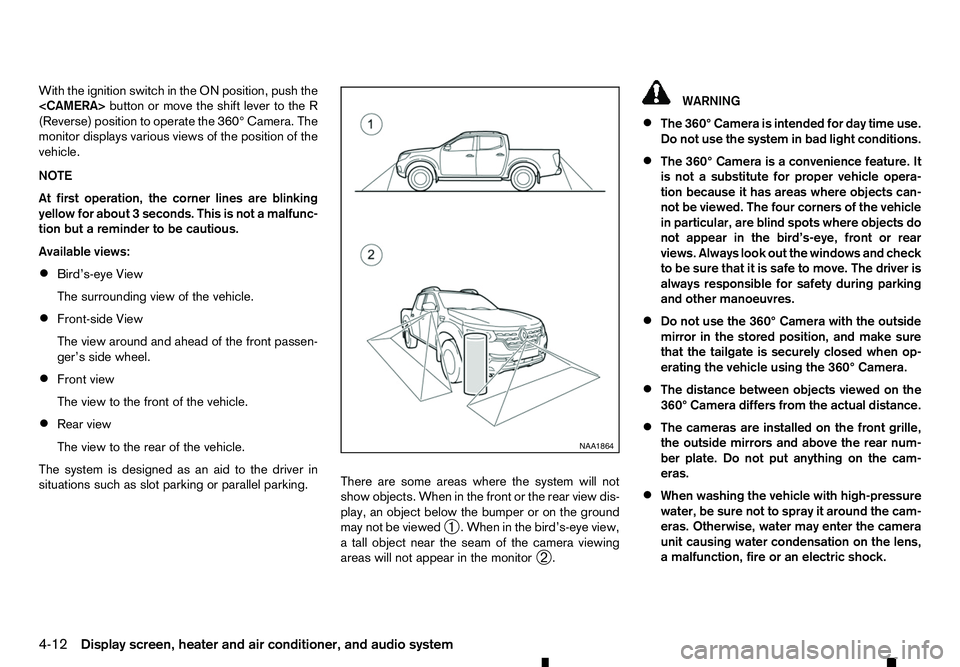
situations such as slot parking or parallel parking. There are some areas where the system will not
show objects. When in the front or the rear view dis-
play, an object below the bumper or on the ground
may not be viewed
➀.W
hen in the bird’s-eye view,
at all object near the seam of the camera viewing
areas will not appear in the monitor ➁. WARNING
• The 360° Camera is intended for day time use.
Do not use the system in bad light conditions.
• The 360° Camera is
aconvenience feature. It
is not asubstitute for proper vehicle opera-
tion because it has areas where objects can-
not be viewed. The four corners of the vehicle
in particular, are blind spots where objects do
not appear in the bird’s-eye, front or rear
views. Always look out the windows and check
to be sure that it is safe to move. The driver is
always responsible for safety during parking
and other manoeuvres.
• Do not use the 360° Camera with the outside
mirror in the stored position, and make sure
that the tailgate is securely closed when op-
erating the vehicle using the 360° Camera.
• The distance between objects viewed on the
360° Camera differs from the actual distance.
• The cameras are installed on the front grille,
the outside mirrors and above the rear num-
ber plate. Do not put anything on the cam-
eras.
• When washing the vehicle with high-pressure
water, be sure not to spray it around the cam-
eras. Otherwise, water may enter the camera
unit causing water condensation on the lens,
am alfunction, fire or an electric shock. NAA1864
4-12 Display screen, heater and air conditioner, and audio system
Page 145 of 340
•
Do not strike the cameras. They are precision
instruments. Doing so could cause amalfunc-
tion or cause damage resulting in afire or an
electric shock.
CAUTION
Do not scratch the lens when cleaning dirt or
snow from the front of the camera.
NOTE
The colour of the view on the 360° Camera dis-
play is different from the actual view because the
system uses infrared cameras.
Display screen, heater and air conditioner, and audio system4-13