steering wheel RENAULT ALASKAN 2017 User Guide
[x] Cancel search | Manufacturer: RENAULT, Model Year: 2017, Model line: ALASKAN, Model: RENAULT ALASKAN 2017Pages: 340, PDF Size: 6.93 MB
Page 83 of 340
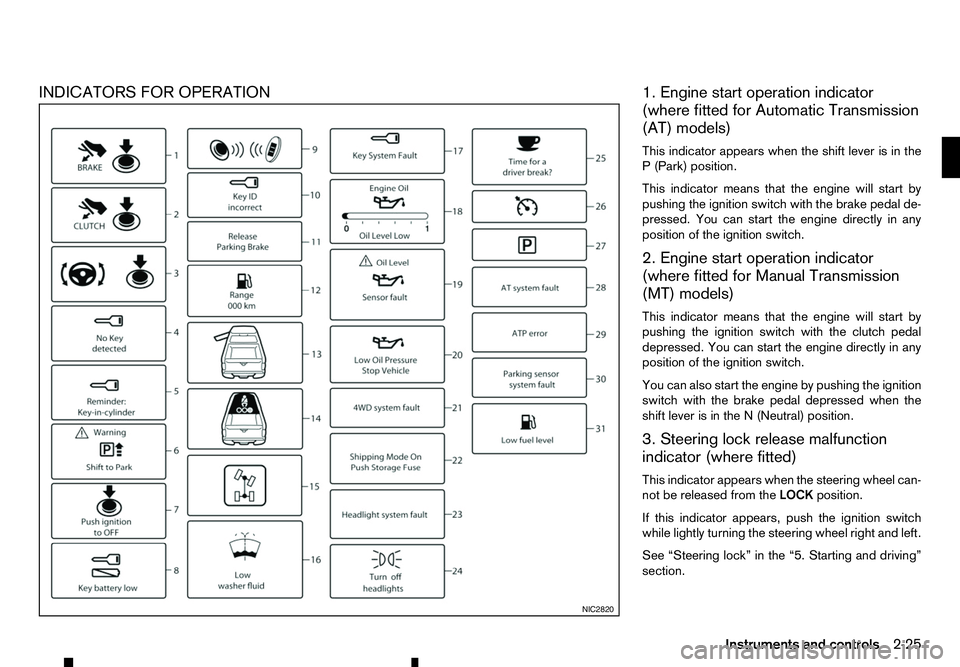
INDICATORS FOR OPERATION
1. Engine start operation indicator
(where fitted for Automatic Transmission
(AT) models)
This indicator appears when the shift lever is in the P( Park) position.
This indicator means that the engine will start by
pushing the ignition switch with the brake pedal de-
pressed. You can start the engine directly in any
position of the ignition switch.
2. Engine start operation indicator
(where fitted for Manual Transmission
(MT) models)
This indicator means that the engine will start by
pushing the ignition switch with the clutch pedal depressed. You can start the engine directly in any
position of the ignition switch.
You can also start the engine by pushing the ignition
switch with the brake pedal depressed when the
shift lever is in the N(Neutral) position.
3. Steering lock release malfunction
indicator (where fitted)
This indicator appears when the steering wheel can-
not be released from the LOCKposition.
If this indicator appears, push the ignition switch
while lightly turning the steering wheel right and left.
See “Steering lock” in the “5. Starting and driving”
section. NIC2820
Instruments and controls
2-25
Page 90 of 340
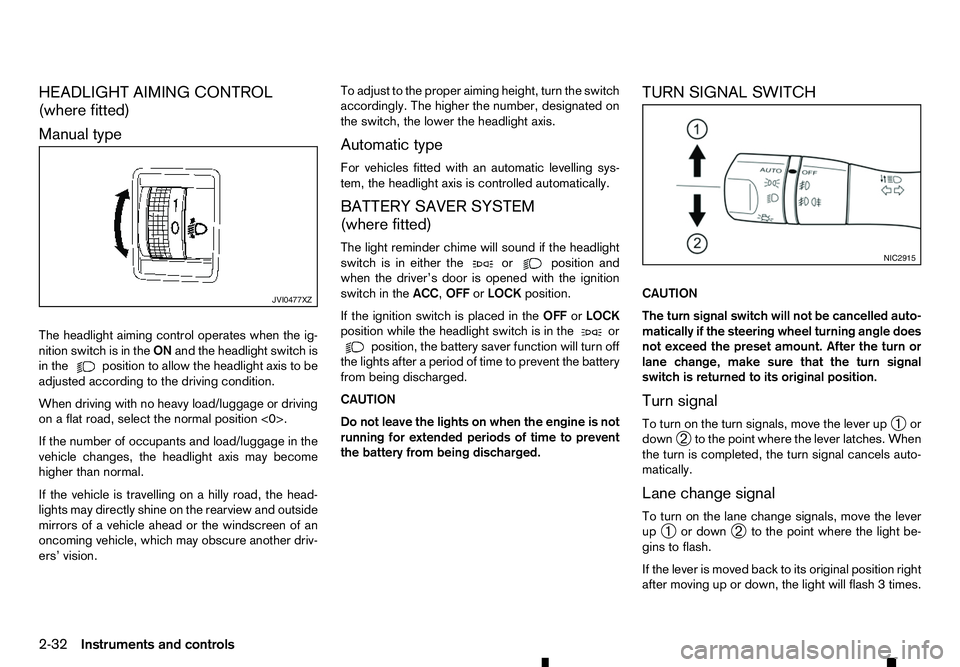
HEADLIGHT AIMING CONTROL
(where fitted)
Manual type
The headlight aiming control operates when the ig- nition switch is in the ONand the headlight switch is
in the position to allow the headlight axis to be
adjusted according to the driving condition.
When driving with no heavy load/luggage or driving
on aflat road, select the normal position <0>.
If the number of occupants and load/luggage in the
vehicle changes, the headlight axis may become
higher than normal.
If the vehicle is travelling on ahilly road, the head-
lights may directly shine on the rearview and outside mirrors of avehicle ahead or the windscreen of an
oncoming vehicle, which may obscure another driv-
ers’ vision. To adjust to the proper aiming height, turn the switch
accordingly. The higher the number, designated on
the switch, the lower the headlight axis.
Automatic type
For vehicles fitted with an automatic levelling sys-
tem, the headlight axis is controlled automatically.
BATTERY SAVER SYSTEM
(where fitted)
The light reminder chime will sound if the headlight
switch is in either the or position and
when the driver’s door is opened with the ignition
switch in the ACC,OFForLOCK position.
If the ignition switch is placed in the OFForLOCK
position while the headlight switch is in the or
position, the battery saver function will turn off
the lights after aperiod of time to prevent the battery
from being discharged.
CAUTION
Do not leave the lights on when the engine is not
running for extended periods of time to prevent
the battery from being discharged. TURN SIGNAL SWITCH
CAUTION
The turn signal switch will not be cancelled auto-
matically if the steering wheel turning angle does
not exceed the preset amount. After the turn or
lane change, make sure that the turn signal
switch is returned to its original position.
Turn signal
To turn on the turn signals, move the lever up
➀or
down ➁to the point where the lever latches. When
the turn is completed, the turn signal cancels auto-
matically.
Lane change signal
To turn on the lane change signals, move the lever
up ➀ or down
➁to the point where the light be-
gins to flash.
If the lever is moved back to its original position right
after moving up or down, the light will flash 3times. JVI0477XZ NIC2915
2-32 Instruments and controls
Page 105 of 340
3
Pre-driving checks and adjustments
Pre-driving checks and adjustments
Keys ........................................................................V
3-2 Key (where fitted) ............................................... 3-2
Anti-Theft System (ATS*) key (where fitted) ........ 3-2
Remote Control Key (where fitted) ...................... 3-2
Doors ...................................................................... 3-4 Locking with key ................................................. 3-4
Opening with inside door handle ......................... 3-4
Locking with power door lock switch .................. 3-4
Rear access doors (King Cab models)................ 3-5
Child safety rear door locks (Double Cab
models) .............................................................. 3-5
Remote keyless entry system (where fitted) .............. 3-6
Using remote keyless entry system ..................... 3-6
Remote Control Key system (where fitted) ............... 3-7
Remote Control Key operating range .................. 3-9
Using Remote Control Key system ...................... 3-9
Battery saver system........................................... 3-10
Warning and audible reminders .......................... 3-11
Troubleshooting guide ........................................ 3-12
Using remote keyless entry system ..................... 3-14
Hazard indicator and horn operation.................... 3-15
Security system (where fitted) .................................. 3-15
Theft warning system (where fitted)..................... 3-15 Anti-Theft System (ATS) ..................................... 3-16
Bonnet..................................................................V
... 3-17 Opening bonnet.................................................. 3-17
Closing bonnet ................................................... 3-17
Fuel filler lid and cap ................................................ 3-18
Opening fuel filler lid ........................................... 3-18
Fuel filler cap ...................................................... 3-18
AdBlue® filler lid and cap ........................................ 3-19 Opening AdBlue® filler lid .................................. 3-20
Locking AdBlue® filler lid ................................... 3-20
AdBlue® filler cap .............................................. 3-20
Cargo bed (where fitted).......................................... 3-20 Tailgate .............................................................. 3-20
Tie down hooks (where fitted) ............................. 3-21
C-Channel system (where fitted) ......................... 3-21
Steering wheel......................................................... 3-23 Steering wheel adjustment .................................. 3-23
Mirrors..................................................................... 3-23 Inside rearview mirror ......................................... 3-23
Outside rearview mirrors..................................... 3-25
Vanity mirror (where fitted) .................................. 3-26
Parking brake .......................................................... 3-26
Page 112 of 340
The Remote Control Key is always communicating
with the vehicle as it receives radio waves. The Re-
mote Control Key system transmits weak radio
waves. Environmental conditions may interfere with
the operation of the Remote Control Key system
under the following operating conditions.
• When operating near
alocation where strong
radio waves are transmitted, such as aTVtower,
power station and broadcasting station.
• When in possession of wireless equipment, such
as am obile telephone, transceiver, and CB ra-
dio.
• When the Remote Control Key is in contact with
or covered by metallic materials.
• When any type of radio wave remote control is
used nearby.
• When the Remote Control Key is placed near an
electric appliance such as
apersonal computer.
In such cases, correct the operating conditions be-
fore using the Remote Control Key function or use
the mechanical key.
Although the life of the battery varies depending on
the operating conditions, the battery’s life is approxi-
mately 2years. If the battery is discharged, replace
it with anew one.
For information regarding replacement of abattery,
see “Remote Control Key battery replacement” in
the “8. Maintenance and do-it-yourself” section.
Since the Remote Control Key is continuously re-
ceiving radio waves, if the key is left near equipment which transmits strong radio waves, such as signals
from
aTVa nd personal computer, the battery life
may become shorter.
Because the steering wheel is locked electrically,
unlocking the steering wheel with the ignition switch
in the LOCK position is impossible when the vehicle
battery is completely discharged. Pay special atten-
tion that the vehicle battery is not completely dis-
charged.
As many as 4Remote Control Keys can be regis-
tered and used with one vehicle. For information
about the purchase and use of additional Remote
Control Keys, contact an approved dealer or quali-
fied workshop.
CAUTION
• Do not allow the Remote Control Key, which
contains electrical components, to come into
contact with water or salt water. This could
affect the system function.
• Do not drop the Remote Control Key.
• Do not strike the Remote Control Key sharply
against another object.
• Do not change or modify the Remote Control
Key.
• Wetting may damage the Remote Control Key.
If the Remote Control Key gets wet, immedi-
ately wipe until it is completely dry.
• If the outside temperature is below −10°C
(14°F), the battery of the Remote Control Key
may not function properly. •
Do not place the Remote Control Key for an
extended period in an area where tempera-
tures exceed 60°C (140°F).
• Do not attach the Remote Control Key to a
key holder that contains
amagnet.
• Do not place the Remote Control Key near
equipment that produces
amagnetic field,
such as aTV, audio equipment and personal
computers.
If an Remote Control Key is lost or stolen, RENAULT
recommends erasing the ID code of that Remote
Control Key from the vehicle. This may prevent the
unauthorised use of the Remote Control Key to op-
erate the vehicle. For information regarding the eras-
ing procedure, contact an approved dealer or quali-
fied workshop.
The Remote Control Key function can be disabled.
For information about disabling the Remote Control
Key function, contact an approved dealer or quali-
fied workshop.
3-8 Pre-driving checks and adjustments
Page 127 of 340
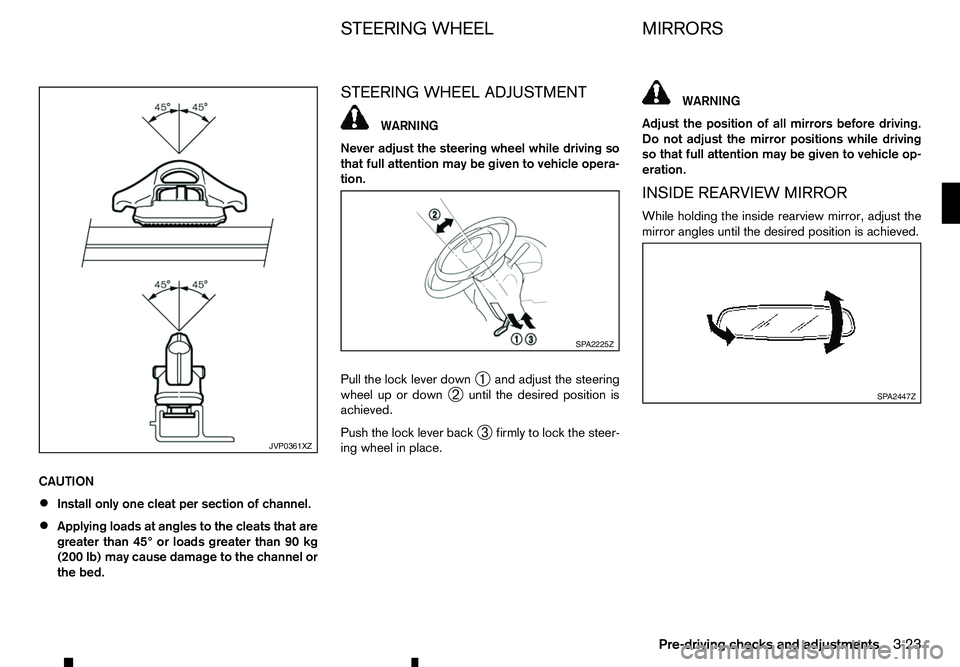
CAUTION
•
Install only one cleat per section of channel.
• Applying loads at angles to the cleats that are
greater than 45° or loads greater than 90 kg
(200 lb) may cause damage to the channel or
the bed. STEERING WHEEL ADJUSTMENT WARNING
Never adjust the steering wheel while driving so
that full attention may be given to vehicle opera-
tion.
Pull the lock lever down ➀and adjust the steering
wheel up or down ➁until the desired position is
achieved.
Push the lock lever back ➂firmly to lock the steer-
ing wheel in place. WARNING
Adjust the position of all mirrors before driving.
Do not adjust the mirror positions while driving
so that full attention may be given to vehicle op-
eration.
INSIDE REARVIEW MIRROR
While holding the inside rearview mirror, adjust the
mirror angles until the desired position is achieved. JVP0361XZ SP A2225Z
SP A2447Z
STEERING WHEEL
MIRRORS
Pre-driving checks and adjustments 3-23
Page 132 of 340
4
Display screen, heater and air conditioner,
and audio system Display screen, heater and air conditioner,
and audio system
Safety precautions ................................................... 4-2
Centre multi-function control panel (models with
navigation system) ................................................... 4-2 How to use touch screen display ........................ 4-3
How to use brightness control/display on·off
button ................................................................. 4-3
How to use
How to use BACK button ................................... 4-4
Vehicle information and settings (models with
navigation system) ................................................... 4-4 How to use INFO button..................................... 4-4
How to use
Reversing Camera (where fitted).............................. 4-7 How to read the displayed lines .......................... 4-8
Difference between predictive and actual
distances ............................................................ 4-8
How to adjust the screen .................................... 4-10
Operating tips..................................................... 4-10
360° Camera (where fitted) ..................................... 4-11 Operation ........................................................... 4-14
Guide lines ......................................................... 4-15
Difference between predictive and actual
distances ............................................................ 4-17
How to adjust the screen view ............................ 4-19
Operating tips..................................................... 4-19
Vents ....................................................................... 4-20
Centre vents ....................................................... 4-20
Side vents .......................................................... 4-20
Rear vents (where fitted) ..................................... 4-20
Heater and air conditioner ........................................ 4-21 Operating tips (models with automatic air
conditioner) ........................................................ 4-22
Manual air conditioner and heater (Type A) ......... 4-23
Manual air conditioner and heater (Type B) ......... 4-26
Automatic air conditioner .................................... 4-28
Servicing air conditioner ..................................... 4-30
Audio system (where fitted)...................................... 4-31 Audio operation precautions ............................... 4-31
Antenna .............................................................. 4-35
USB (Universal Serial Bus) connection port ........ 4-35
AUX (Auxiliary) input jack .................................... 4-36
CD/USB memory care and cleaning ................... 4-36
FM AM radio with compact disc (CD) player
(Type A) .................................................................. 4-37 Audio main operation .......................................... 4-38
Radio operation .................................................. 4-38
SETUP button .................................................... 4-39
Compact Disc (CD) operation ............................ 4-41
AUX (Auxiliary) socket......................................... 4-43
USB (Universal Serial Bus) connection port
(where fitted) ...................................................... 4-43
iPod player operation (where fitted)..................... 4-45
Bluetooth® operation.......................................... 4-46
FM-AM radio with compact disc (CD) player
(Type B) .................................................................. 4-52 Audio main operation .......................................... 4-52
Touchscreen Navigation (where fitted) ..................... 4-57
Steering wheel switch for audio control (where
fitted) ....................................................................... 4-58
Audio control ...................................................... 4-58
Page 133 of 340

Phone control buttons ......................................... 4-58
Bluetooth® Hands-Free Phone System (without
navigation system and colour display)....................... 4-59 Bluetooth® mobile phone feature ........................ 4-59
Hands-free telephone control .............................. 4-61Steering wheel switches (where fitted)................ 4-64
Bluetooth® Hands-Free Phone System (with
navigation system) ................................................... 4-65 Regulatory information ........................................ 4-65 Control buttons and microphone ......................... 4-66
Pairing procedure ............................................... 4-66
Phonebook ......................................................... 4-67
Making
acall ...................................................... 4-67
Receiving acall................................................... 4-67
During acall ....................................................... 4-67
Ending acall ....................................................... 4-67
Bluetooth® settings ............................................ 4-67
Telephone setup ................................................. 4-68
Page 148 of 340
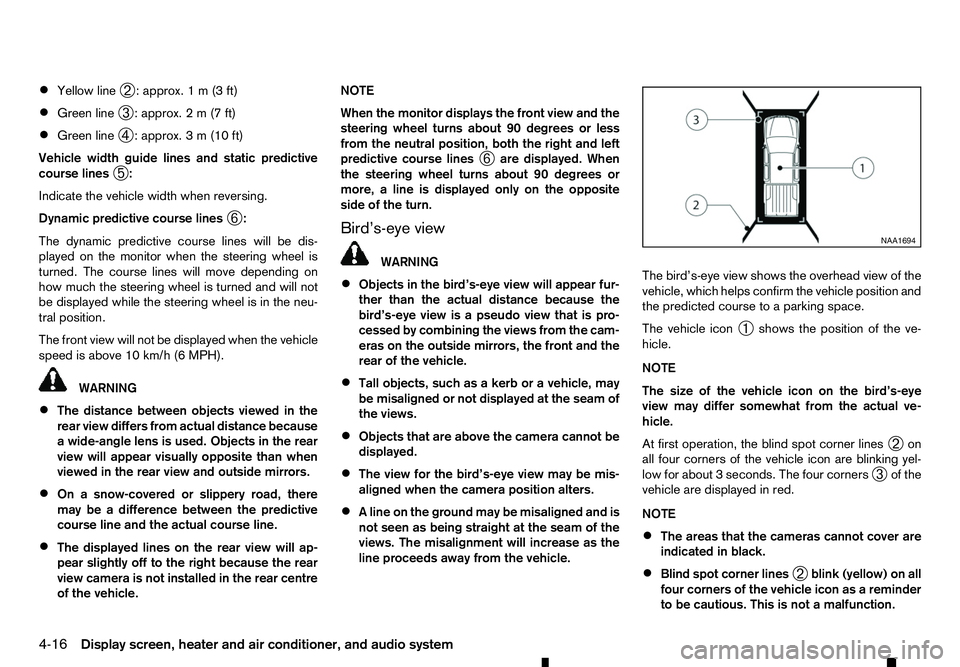
•
Yellow line
➁:a
pprox. 1m(3f t)
• Green line
➂:a
pprox. 2m(7f t)
• Green line
➃:a
pprox. 3m(10 ft)
Vehicle width guide lines and static predictive
course lines ➄:
Indicate the vehicle width when reversing.
Dynamic predictive course lines ➅:
The dynamic predictive course lines will be dis-
played on the monitor when the steering wheel is
turned. The course lines will move depending on
how much the steering wheel is turned and will not
be displayed while the steering wheel is in the neu-
tral position.
The front view will not be displayed when the vehicle
speed is above 10 km/h (6 MPH). WARNING
• The distance between objects viewed in the
rear view differs from actual distance because
aw ide-angle lens is used. Objects in the rear
view will appear visually opposite than when
viewed in the rear view and outside mirrors.
• On
asnow-covered or slippery road, there
may be adifference between the predictive
course line and the actual course line.
• The displayed lines on the rear view will ap-
pear slightly off to the right because the rear
view camera is not installed in the rear centre
of the vehicle. NOTE
When the monitor displays the front view and the
steering wheel turns about 90 degrees or less
from the neutral position, both the right and left
predictive course lines
➅are displayed. When
the steering wheel turns about 90 degrees or
more, aline is displayed only on the opposite
side of the turn.
Bird’s-eye view WARNING
• Objects in the bird’s-eye view will appear fur-
ther than the actual distance because the
bird’s-eye view is apseudo view that is pro-
cessed by combining the views from the cam-
eras on the outside mirrors, the front and the
rear of the vehicle.
• Tall objects, such as
akerb or avehicle, may
be misaligned or not displayed at the seam of
the views.
• Objects that are above the camera cannot be
displayed.
• The view for the bird’s-eye view may be mis-
aligned when the camera position alters.
• Al
ine on the ground may be misaligned and is
not seen as being straight at the seam of the
views. The misalignment will increase as the
line proceeds away from the vehicle. The bird’s-eye view shows the overhead view of the
vehicle, which helps confirm the vehicle position and
the predicted course to
aparking space.
The vehicle icon ➀shows the position of the ve-
hicle.
NOTE
The size of the vehicle icon on the bird’s-eye
view may differ somewhat from the actual ve-
hicle.
At first operation, the blind spot corner lines ➁on
all four corners of the vehicle icon are blinking yel-
low for about 3seconds. The four corners
➂of the
vehicle are displayed in red.
NOTE
• The areas that the cameras cannot cover are
indicated in black.
• Blind spot corner lines
➁blink (yellow) on all
four corners of the vehicle icon as areminder
to be cautious. This is not amalfunction. NAA1694
4-16 Display screen, heater and air conditioner, and audio system
Page 190 of 340
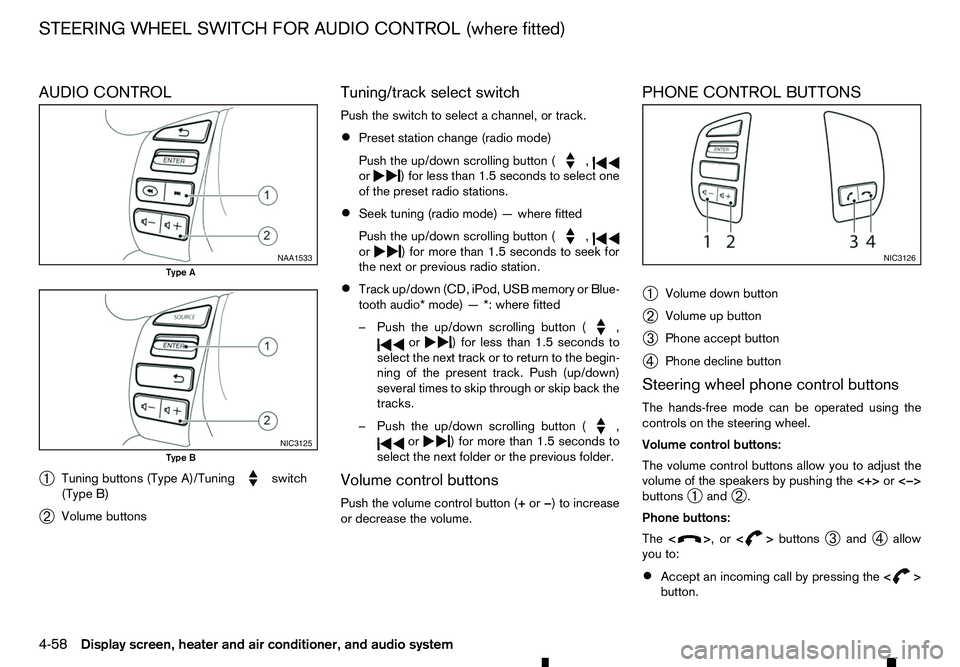
AUDIO CONTROL
➀ Tuning buttons (Type A)/Tuning switch
(Type B)
➁ Volume buttons Tuning/track select switch
Push the switch to select
achannel, or track.
• Preset station change (radio mode)
Push the up/down scrolling button ( ,
or )f
or less than 1.5 seconds to select one
of the preset radio stations.
• Seek tuning (radio mode)
—where fitted
Push the up/down scrolling button ( ,
or )f
or more than 1.5 seconds to seek for
the next or previous radio station.
• Track up/down (CD, iPod, USB memory or Blue-
tooth audio* mode)
—*:where fitted
–P ush the up/down scrolling button ( ,
or )f
or less than 1.5 seconds to
select the next track or to return to the begin-
ning of the present track. Push (up/down)
several times to skip through or skip back the
tracks.
–P ush the up/down scrolling button ( ,
or )f
or more than 1.5 seconds to
select the next folder or the previous folder.
Volume control buttons
Push the volume control button (+ or−)toi ncrease
or decrease the volume. PHONE CONTROL BUTTONS
➀
Volume down button
➁ Volume up button
➂ Phone accept button
➃ Phone decline button
Steering wheel phone control buttons
The hands-free mode can be operated using the
controls on the steering wheel.
Volume control buttons:
The volume control buttons allow you to adjust the
volume of the speakers by pushing the <+>or<−>
buttons ➀and
➁.
Phone buttons:
The < > ,or<
> buttons
➂and
➃allow
you to:
• Accept an incoming call by pressing the
< >
button. NAA1533
Type A
NIC3125
Type B NIC3126
STEERING WHEEL SWITCH FOR AUDIO CONTROL (where fitted)
4-58 Display screen, heater and air conditioner, and audio system
Page 191 of 340
•
Reject an incoming call by pressing the
< >
button during the incoming call.
• End an active call by pushing the
< >
button
once.
• Redial the last outgoing call by pressing the
< >
button for more than
2seconds. BLUETOOTH
®MOBILE PHONE
FEATURE WARNING
Whilst
driving, using the mobile phone is ex-
tremely dangerous because it significantly im-
pairs your concentration and diminishes your re-
action capabilities to sudden changes on the
road, and it may lead to afatal accident. This
applies to all phone call situations such as when
receiving an incoming call, during aphone con-
versation, when calling through the phone book
search, etc.
CAUTION
Certain country jurisdictions prohibit the use of
the mobile phone in the car without hands-free
support.
This chapter provides information about the hands-
free phone system using aBluetooth
®connection.
Bluetooth
®is aw ireless radio communication stan-
dard. This system offers ahands-free facility for your
mobile telephone to enhance driving comfort.
In order to use your mobile phone with the Blue-
tooth
®of the audio system, the mobile phone must
first be setup. For details, see “BLUETOOTH®
settings” later in this section. Once it has been
setup, the hands-free mode is automatically acti-
vated on the registered mobile phone (via Blue-
tooth
®)w hen it comes into range. An
otification message appears on the audio display
when the phone is connected, when an incoming
call is being received, as well as when acall is initi-
ated.
When acall is active, the audio system, microphone
(located in the ceiling in front of the rear view mir-
ror), and steering wheel switches enable hands-free
communication.
If the audio system is in use at the time, the radio,
CD, iPod, USB audio, Bluetooth audio or AUX
source mode will be muted and will stay muted until
the active call has ended.
The Bluetooth
®system may not be able to connect
with your mobile phone for the following reasons:
• The mobile phone is too far away from the ve-
hicle.
• The Bluetooth
®mode on your mobile phone has
not been activated.
• Your mobile phone has not been paired with the
Bluetooth
®system of the audio unit.
• The mobile phone does not support Bluetooth
®
technology (BT Core v2.0).
NOTE
• For models with Audio with Navigation sys-
tem see the separately provided Owner’s
Manual.
• For details, see your mobile phone’s Owner’s
Manual.
BLUETOOTH® HANDS-FREE PHONE SYSTEM (without navigation system
and colour display)
Display screen, heater and air conditioner, and audio system 4-59