steering wheel RENAULT ALASKAN 2017 Owner's Manual
[x] Cancel search | Manufacturer: RENAULT, Model Year: 2017, Model line: ALASKAN, Model: RENAULT ALASKAN 2017Pages: 340, PDF Size: 6.93 MB
Page 193 of 340
![RENAULT ALASKAN 2017 Owners Manual [Scan devices]:
1) Press the button. Select [Scan device]
The audio unit searches bluetooth devices and
shows all visible devices.
Pressing the button cancels the search.
2) Select the device to be pa](/img/7/58394/w960_58394-192.png "RENAULT ALASKAN 2017 Owners Manual [Scan devices]:
1) Press the button. Select [Scan device]
The audio unit searches bluetooth devices and
shows all visible devices.
Pressing the button cancels the search.
2) Select the device to be pa")
[Scan devices]:
1) Press the button. Select [Scan device]
The audio unit searches bluetooth devices and
shows all visible devices.
Pressing the button cancels the search.
2) Select the device to be paired. Use the
Page 196 of 340
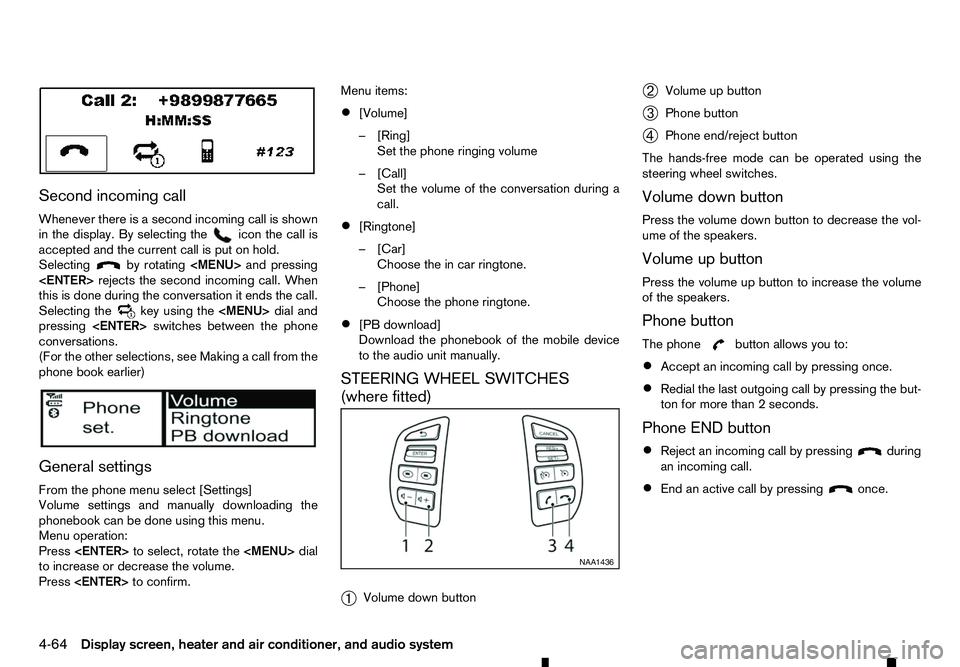
Second incoming call
Whenever there is asecond incoming call is shown
in the display. By selecting the icon the call is
accepted and the current call is put on hold.
Selecting by rotating
Page 198 of 340
EU RED Directive 2014/53/EU
Hereby, Robert Bosch Car Multimedia GmbH de-
clares that the radio equipment type LCN2K70A00/ LCN2K70A10 is in compliance with Directive 2014/
53/EU. The full text of the EU declaration of confor-
mity is available at the following internet address:
http://cert.bosch-carmultimedia.net
Any change of the radio equipment or usage with
other accessories, components or software as
specified will make are-assessment according com-
pliance to the legal approval necessary. Frequency Band
Radiated
Power
(EIRP) Hints/Restriction
2400 MHz –2480
MHz Bluetooth
<10 mW Internal not acces-
sible by user CONTROL BUTTONS AND
MICROPHONE
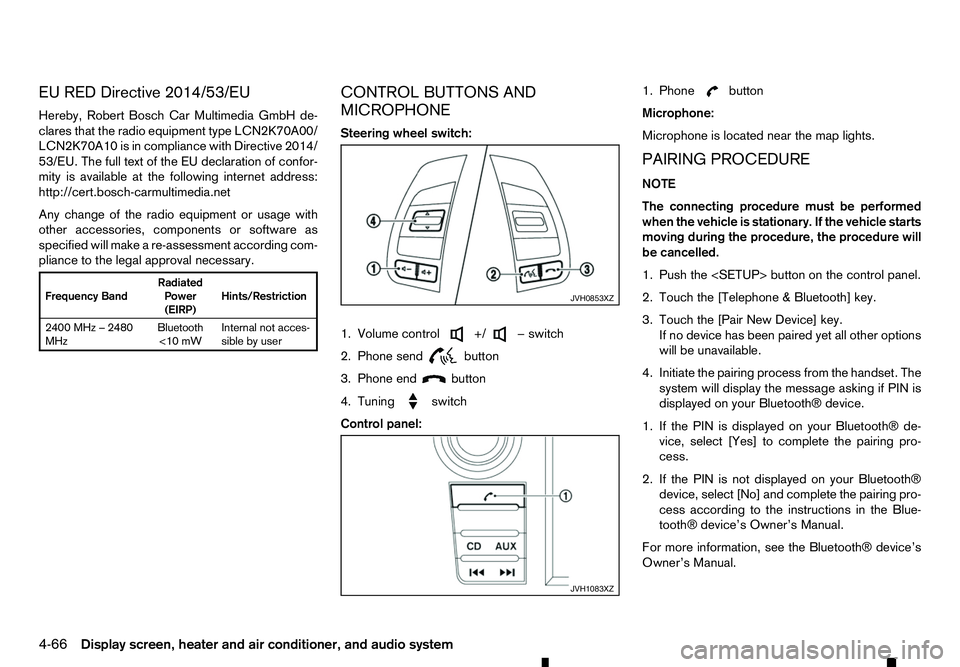
Steering wheel switch:
1. Volume control +/ −s
witch
2. Phone send
button
3. Phone end
button
4. Tuning
switch
Control panel:1. Phone button
Microphone:
Microphone is located near the map lights.
PAIRING PROCEDURE
NOTE
The connecting procedure must be performed
when the vehicle is stationary. If the vehicle starts
moving during the procedure, the procedure will
be cancelled.
1. Push the
2. Touch the [Telephone &Bluetooth] key.
3. Touch the [Pair New Device] key. If no device has been paired yet all other options
will be unavailable.
4. Initiate the pairing process from the handset. The system will display the message asking if PIN is
displayed on your Bluetooth® device.
1. If the PIN is displayed on your Bluetooth® de- vice, select [Yes] to complete the pairing pro-
cess.
2. If the PIN is not displayed on your Bluetooth® device, select [No] and complete the pairing pro-
cess according to the instructions in the Blue- tooth® device’s Owner’s Manual.
For more information, see the Bluetooth® device’s
Owner’s Manual. JVH0853XZ
JVH1083XZ
4-66 Display screen, heater and air conditioner, and audio system
Page 199 of 340
PHONEBOOK
To access the vehicle phonebook:
1. Push the button on the control panel.
2. Select the “Contacts” key.
3. Choose the desired entry from the displayed list.
4. The number of the entry will be displayed on the screen. Touch the number to initiate dialling.
NOTE
To scroll quickly through the list, touch the “A-Z”
key in the upper right corner of the screen. Turn
the ENTER/Scroll dial to choose aletter or num-
ber and then push the ENTER/Scroll dial. The list
will move to the first entry that begins with that
number or letter.
MAKING ACALL
To make acall, follow the procedure below:
1. Push the on the control panel. The “Phone”
screen will appear on the display.
2. Select one of the following options to make a call:
• “Contacts”: Select the name from an entry
stored in the vehicle phonebook.
• “Call Lists”: Select the name from the incom-
ing, outgoing or missed.
• “Redial”: Dial the last outgoing call from the
vehicle. •
“ ”: Input the phone number manually us-
ing akeypad displayed on the screen. For
information on how to use the touch screen,
see “How to use touch screen display” in this
section.
RECEIVING ACALL
When acall is placed to the connected phone, the
display will change to phone mode.
To accept the incoming call, take one of the follow-
ing actions.
• Push the button on the steering wheel.
• Touch the “ ”i
con on the screen.
To reject the incoming call, take one of the following
actions.
• Push the button on the steering wheel.
• Touch the red phone “ ”i
con on the screen.
DURING ACALL
While acall is active, the following options are avail-
able on the screen:
• “Handset”
Select this option to switch control of the phone
call over to the handset.
• “Mute Mic.”
Select this option to mute the microphone. Se-
lect again to reactivate the microphone. •
“ ”i
con
Select to end the phone call.
ENDING ACALL
To end aphone call, select the [ ]i
con on the
screen or push the < >b
utton on the steering
wheel.
BLUETOOTH® SETTINGS
To access the Bluetooth® settings screen:
1. Push the
2. Touch the [Telephone &Bluetooth] key.
Available setting items:
• [Telephone Setup]
See “Telephone setup” later in this section for
details.
• [Pair New Device]
Select to pair
anew Bluetooth® device to the
Bluetooth® Hands-Free Phone System.
• [Select Paired Device]
Select to choose
aBluetooth® device from alist
of those devices paired to the Bluetooth®
Hands-Free Phone System.
• [Delete Paired Device]
Select to delete
aBluetooth® device from alist
of those devices connected/paired to the
Bluetooth® Hands-Free Phone System.
Display screen, heater and air conditioner, and audio system 4-67
Page 202 of 340
5
Starting and driving
Starting and driving
Running-in schedule ................................................ 5-2
Before starting engine.............................................. 5-2
Precautions when starting and driving ...................... 5-3 Exhaust gas (carbon monoxide) .......................... 5-3
AdBlue® Selective Catalytic Reduction (SCR)
system (where fitted for diesel engine model) ...... 5-3
Diesel Particulate Filter (DPF) (where fitted) ............. 5-5 Automatic regeneration ....................................... 5-6
On-road and off-road driving precautions ................. 5-6 Driving safety precautions ................................... 5-6
Turbocharger system ............................................... 5-8
Care when driving ................................................... 5-8 Engine cold start period ...................................... 5-8
Loading luggage ................................................. 5-8
Driving in wet conditions ..................................... 5-8
Driving in winter conditions ................................. 5-8
Tyre Pressure Monitoring System (TPMS) (where
fitted) ....................................................................... 5-9 Meter information................................................ 5-12
Activation............................................................ 5-12
New and repositioned TPMS sensors
(including fitment of alternative wheels) ............... 5-12
Adjusting TPMS target pressure ......................... 5-13
Tyre pressure units ............................................. 5-13
[Check cold tyre] message ................................. 5-13
TPMS temperature calibration............................. 5-13
Ignition switch (models without Remote Control
Key system) ............................................................. 5-14
Manual Transmission (MT) .................................. 5-14
Key positions ...................................................... 5-14 Steering lock ...................................................... 5-14
Push-button ignition switch (models with Remote
Control Key system) ................................................ 5-15 Precautions on push-button ignition switch
operation ............................................................ 5-15
Remote Control Key system................................ 5-15
Automatic Transmission (AT) .............................. 5-16
Steering lock ...................................................... 5-16
Ignition switch positions ...................................... 5-16
Remote Control Key battery discharge ................ 5-17
Starting engine (models without Remote Control
Key system) ............................................................. 5-18
Starting engine (models with Remote Control Key
system).................................................................... 5-18
Driving the vehicle.................................................... 5-19 Driving with Automatic Transmission (AT) ........... 5-19
Driving with Manual Transmission (MT) ............... 5-22
Stop/Start System (where fitted) .............................. 5-23
Stop/Start System display................................... 5-24
Stop/Start OFF switch ....................................... 5-25
Four-Wheel Drive (4WD) (where fitted) .................... 5-26 Part time 4WD system ........................................ 5-26
4WD mode switch operation............................... 5-30
4WD mode indicator........................................... 5-30
4WD warning ..................................................... 5-31
Tyre recommendation for 4WD ........................... 5-32
Rear differential locking system (where fitted)........... 5-32
Electronic Stability Programme (ESP) system
(where fitted) ........................................................... 5-33
Page 209 of 340
•
Do not drive across steep slopes. Instead
drive either straight up or straight down the
slopes. Off-road vehicles can tip over side-
ways much more easily than they can forward
or backward.
• Many hills are too steep for any vehicle. If you
drive up them, you may stall. If you drive down
them, you may not be able to control your
speed. If you drive across them, you may roll
over.
• Do not shift ranges while driving on downhill
grades as this could cause loss of control of
the vehicle.
• Stay alert when driving to the top of
ahill. At
the top there could be adrop-off or other haz-
ard that could cause an accident.
• If your engine stalls or you cannot make it to
the top of
asteep hill, never attempt to turn
around. Your vehicle could tip or roll over.
Always back straight down in R(Reverse)
range. Never back down in N(Neutral) or with
the clutch pedal depressed (MT model) using
only the brake, as this could cause loss of
control.
• Heavy braking going down
ahill could cause
your brakes to overheat and fade, resulting in
loss of control and an accident. Apply brakes
lightly and use alow range to control your
speed.
• Unsecured cargo can be thrown around when
driving over rough terrain. Properly secure all cargo so it will not be thrown forward and
cause injury to you or your passengers.
• To avoid raising the centre of gravity exces-
sively, do not exceed the rated capacity of the
roof rail (where fitted) and evenly distribute
the load. Secure heavy loads in the cargo area
as far forward and as low as possible. Do not
equip the vehicle with tyres larger than speci-
fied in this manual. This could cause your ve-
hicle to roll over.
• Do not grip the inside or spokes of the steer-
ing wheel when driving off-road. The steering
wheel could move suddenly and injure your
hands. Instead drive with your fingers and
thumbs on the outside of the rim.
• Before operating the vehicle, ensure that the
driver and all passengers have their seat belts
fastened.
• Always drive with the floor mats in place as
the floor may became hot.
• Lower your speed when encountering strong
crosswinds. With
ahigher centre of gravity,
your vehicle is more affected by strong side
winds. Slower speeds ensure better vehicle
control.
• Do not drive beyond the performance capabil-
ity of the tyres, even with 4WD engaged.
• Do not attempt to raise two wheels off the
ground and shift the transmission to any drive
or reverse position with the engine running.
Doing so may result in drivetrain damage or unexpected vehicle movement which could
result in serious vehicle damage or personal
injury.
• Do not attempt to test
a4WD equipped ve-
hicle on a2-wheel dynamometer or similar
equipment even if the other two wheels are
raised off the ground. Make sure you inform
test facility personnel that your vehicle is
equipped with 4WD before it is placed on a dynamometer. Using the wrong test equip-
ment may result in drivetrain damage or unex-
pected vehicle movement which could result
in serious vehicle damage or personal injury.
• When
awheel is off the ground due to an
unlevel surface, do not spin the wheel exces-
sively.
• Accelerating quickly, sharp steering manoeu-
vres or sudden braking may cause loss of con-
trol.
• If at all possible, avoid sharp turning manoeu-
vres, particularly at high speeds. Your vehicle
has
ahigher centre of gravity than aconven-
tional passenger car. The vehicle is not de-
signed for cornering at the same speeds as
conventional passenger cars. Failure to oper- ate this vehicle correctly could result in loss
of control and/or arollover accident.
• Always use tyres of the same type, size, brand,
construction (bias, bias-belted or radial), and
tread pattern on all four wheels. Install tyre
chains on the rear wheels when driving on
slippery roads and drive carefully.
Starting and driving 5-7
Page 211 of 340
•
Avoid sudden steering.
• Avoid following too close to the vehicle in front.
ja TPMS indicator light
j b TPMS tyre location indicator
j A Tyre valve with sensor
The tyre pressure monitoring system monitors the
tyre pressure of the four wheels while the vehicle is
in motion. Following aloss in pressure, the system
will warn the driver using avisual warning. Each TPMS sensor
jAh asaregistered wheel location
and sends pressure and temperature data via radio
to ar eceiver inside the vehicle.
Each tyre, including the spare (where fitted), should
be checked monthly when cold and inflated to the
inflation pressure recommended by the vehicle
manufacturer on the vehicle placard or tyre inflation
pressure label. (If your vehicle has tyres of adiffer-
ent size than the size indicated on the vehicle plac-
ard or tyre inflation pressure label, you should deter-
mine the proper tyre inflation pressure for those
tyres.)
The Tyre Pressure Monitoring System (TPMS) con-
trols the TPMS indicator light j
a, which will illumi-
nate when one or more tyres are significantly under-
inflated. Awarning and tyre location indicator
j bw ill also appear in the vehicle information display
to identify the tyre or tyres with low pressure.
If you now press the
ing wheel, afurther screen is displayed to tell you
the tyre pressure of all four tyres. NIC2222
NCE373
NIC2223
TYRE PRESSURE MONITORING
SYSTEM (TPMS) (where fitted)
Starting and driving5-9
Page 212 of 340
Accordingly, when the TPMS indicator light illumi-
nates, safely stop the vehicle to check the tyres as
soon as possible and inflate the tyres to the proper
pressure. Driving on asignificantly under-inflated
tyre causes the tyre to overheat and can lead to tyre
failure. Under-inflation also reduces fuel efficiency
and tyre tread life which may affect the vehicle’s
handling and stopping ability.
NOTE
The TPMS is not asubstitute for proper tyre main-
tenance. It is the driver’s responsibility to main-
tain correct tyre pressure, even if under-inflation
has not reached the level to trigger the illumina-
tion of the TPMS indicator light j
a.
The TPMS indicator light flashes for ashort period
and then turns on continuously if the system is not
operating properly. This sequence will continue
upon subsequent vehicle start-ups as long as the
malfunction exists (missing or faulty TPMS sensor
or TPMS system malfunction). When the malfunc-
tion warning light is illuminated, the system may not be able to detect or signal low tyre pressure as
intended. TPMS malfunctions may occur for avari-
ety of reasons including the installation of replace-
ment or alternate tyres or wheels on the vehicle that
prevent the TPMS from functioning properly. Always
check the TPMS indicator light after replacing one
or more tyres or wheels on your vehicle to ensure
that the replacement or alternate tyres and wheels
allow the TPMS to continue to function properly.
• The TPMS does not monitor the tyre pressure of
the spare tyre.
• The TPMS will activate only when the vehicle is
driven at speeds above 25 km/h (16 MPH). Also,
this system may not detect
asudden drop in tyre
pressure (for example aflat tyre while driving).
• The TPMS indicator light may not automatically
turn off when the tyre pressure is adjusted.
After
the tyre is inflated to the recommended COLD
tyre pressure,d rive the vehicle at speeds above
25 km/h (16 MPH) to activate the TPMS. See
“Adjusting TPMS target pressure” later in this
section
• Following
achange in the outside temperature,
the TPMS indicator light may illuminate even if
the tyre pressure has been adjusted properly.
Adjust the tyre pressure to the recommended
COLD tyre pressure again when the tyres are
cold, and reset the TPMS.
For additional information, see “TPMS tempera-
ture calibration” later in this section. WARNING
• If the TPMS indicator light illuminates while
driving:
–a void sudden steering manoeuvres
–a void abrupt braking
–r educe vehicle speed
–p ull off the road to asafe location
–s top the vehicle as soon as possible
• Driving with under-inflated tyres may perma-
nently damage the tyres and increase the like-
lihood of tyre failure. Serious vehicle damage
could occur which may lead to an accident
and could result in serious personal injury.
• Check the tyre pressure for all four tyres. Ad-
just the tyre pressure to the recommended
COLD tyre pressure shown on the tyre plac-
ard to turn the TPMS indicator light “OFF”. In
case of
aflat tyre, replace it with aspare tyre
as soon as possible. (See “Flat tyre” in the
“6. In case of emergency” section for chang-
ing aflat tyre.)
• When
aspare tyre is mounted or awheel is
replaced, the TPMS will not function and the
TPMS indicator light will flash for approxi-
mately 1minute. The light will remain on after
1m inute. Be sure to follow all instructions for
wheel replacement and mount the TPMS sys-
tem correctly. NIC2225
5-10 Starting and driving
Page 215 of 340
•
Driving below 25 km/h (16 MPH)
• Driving above 100 km/h (64 MPH)
• High acceleration
• High deceleration
• In stop and go traffic or traffic waves
ADJUSTING TPMS TARGET
PRESSURE
j A Tyre pressure
j B Tyre pressure units
j C Front target pressure
j D Rear target pressure
If you are using your vehicle in aheavily laden condi-
tion, the tyre pressures should be inflated to the
‘Laden Pressure’ shown on the tyre placard.
The TPMS system can be adjusted in the vehicle
information display to set the target pressure to the
‘Laden Pressure’ shown on the tyre placard. See “Vehicle information display” in the “2. Instruments
and controls” section. To adjust the target pressure
use the steering wheel switches to select the [Set-
tings] menu, followed by [Tyre Pressures]. Select
[Target front] and [Target rear] and set the desired
tyre pressure.
The TPMS target pressures will be displayed in the centre of the front and rear axle on the TPMS screen
of the vehicle information display.
TYRE PRESSURE UNITS
The units displayed by the TPMS system can be
selected using the vehicle information display. Se-
lect the [Settings] menu, followed by [Tyre Pres-
sures]. Select [Tyre pressure unit] and choose the
unit that you want.
[CHECK COLD TYRE] MESSAGE
If the tyre pressure becomes higher than the target
pressure during alow tyre pressure condition, the
[Check Cold Tyre] message will be displayed in the vehicle information display (see “Vehicle information
display” in the “2. Instruments and controls” sec-
tion).
NOTE
Even if the pressure is above the preset target
pressure, the yellow colour in the tyre pressure
warning means that the tyre pressure is actually
too low. Tyre pressure is increasing during driv-
ing. Check the tyre pressure when the tyre is
cold.
TPMS TEMPERATURE CALIBRATION
The tyre pressure is affected by the temperature of
the tyre; the tyre temperature increases when the
car is driven. To be able to accurately monitor the
tyre air leakage and to prevent false TPMS warnings
due to reductions in temperature, the TPMS system
uses temperature sensors in the tyres to perform
temperature compensation calculations.
On rare occasions it may be necessary to recalibrate
the TPMS system reference temperature using the
vehicle information display. See “Vehicle informa-
tion display” in the “2. Instruments and controls”
section. This operation should only be performed
when the actual tyre pressure has been adjusted,
whilst the current ambient temperature is signifi-
cantly different to the current calibration tempera-
ture. NIC2227
NIC2224
Starting and driving
5-13
Page 216 of 340
![RENAULT ALASKAN 2017 Owners Manual To initiate TPMS temperature calibration use the
steering wheel switches to select the [Settings]
menu, followed by [Tyre Pressures]. Select [Cali-
brate] followed by [Start]. While the calibration pr](/img/7/58394/w960_58394-215.png "RENAULT ALASKAN 2017 Owners Manual To initiate TPMS temperature calibration use the
steering wheel switches to select the [Settings]
menu, followed by [Tyre Pressures]. Select [Cali-
brate] followed by [Start]. While the calibration pr")
To initiate TPMS temperature calibration use the
steering wheel switches to select the [Settings]
menu, followed by [Tyre Pressures]. Select [Cali-
brate] followed by [Start]. While the calibration pro-
cess is active, the message: [Resetting tyre pres-
sure system] will be displayed in the vehicle informa-
tion display. WARNING
Never remove the key or turn the ignition switch
to the
ing wheel will lock. This will cause the driver to
lose control of the vehicle and could result in
serious vehicle damage or personal injury.
MANUAL TRANSMISSION (MT)
The switch includes an anti-theft steering lock de-
vice.
The ignition key can only be removed when theswitch is in the
(0).
There is an “OFF” position ➀in between
and
cylinder.
To lock the steering wheel, remove the key. To
unlock the steering wheel, insert the key and turn
it gently while rotating the steering wheel slightly
right and left. KEY POSITIONS
LOCK (Normal parking position) (0):
The ignition key can only be removed at this posi-
tion.
OFF (1):
The engine can be turned off without locking the
steering wheel.
ACC (Accessories) (2):
This position activates electrical accessories such
as the radio when the engine is not running.
ON (Normal operating position) (3):
This position turns on the ignition system and elec-
trical accessories.
START (4):
This position starts the engine. As soon as the en-
gine has started, release the key immediately. It will
automatically return to the
STEERING LOCK
Locking the steering wheel
1) Place the ignition switch in the
tion.
2) Remove the key from the ignition switch.
3) Turn the steering wheel 1/6 of aturn clockwise
from the straight up position. SSD0392Z
IGNITION SWITCH (models without
Remote Control Key system)
5-14 Starting and driving