door lock RENAULT ALASKAN 2017 Owner's Manual
[x] Cancel search | Manufacturer: RENAULT, Model Year: 2017, Model line: ALASKAN, Model: RENAULT ALASKAN 2017Pages: 340, PDF Size: 6.93 MB
Page 111 of 340
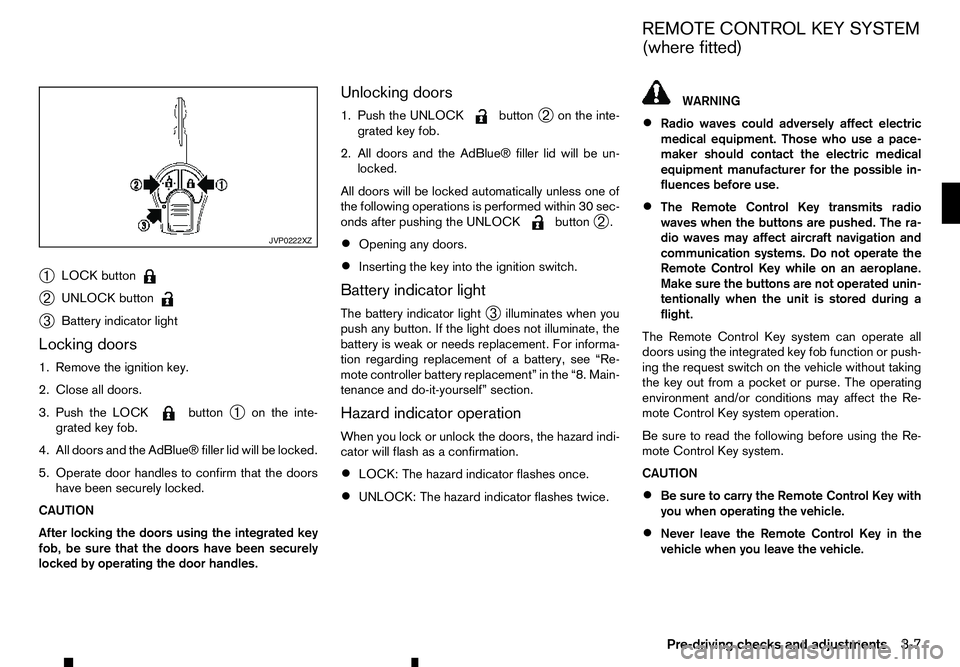
➀
LOCK button
➁
UNLOCK button
➂
Battery indicator light
Locking doors
1. Remove the ignition key.
2. Close all doors.
3. Push the LOCK button
➀on the inte-
grated key fob.
4. All doors and the AdBlue® filler lid will be locked.
5. Operate door handles to confirm that the doors have been securely locked.
CAUTION
After locking the doors using the integrated key
fob, be sure that the doors have been securely
locked by operating the door handles. Unlocking doors
1. Push the UNLOCK button
➁on the inte-
grated key fob.
2. All doors and the AdBlue® filler lid will be un- locked.
All doors will be locked automatically unless one of
the following operations is performed within 30 sec-
onds after pushing the UNLOCK button
➁.
• Opening any doors.
• Inserting the key into the ignition switch.
Battery indicator light
The battery indicator light ➂illuminates when you
push any button. If the light does not illuminate, the
battery is weak or needs replacement. For informa-
tion regarding replacement of abattery, see “Re-
mote controller battery replacement” in the “8. Main-
tenance and do-it-yourself” section.
Hazard indicator operation
When you lock or unlock the doors, the hazard indi-
cator will flash as aconfirmation.
• LOCK: The hazard indicator flashes once.
• UNLOCK: The hazard indicator flashes twice. WARNING
• Radio waves could adversely affect electric
medical equipment. Those who use apace-
maker should contact the electric medical
equipment manufacturer for the possible in-
fluences before use.
• The Remote Control Key transmits radio
waves when the buttons are pushed. The ra-
dio waves may affect aircraft navigation and
communication systems. Do not operate the
Remote Control Key while on an aeroplane.
Make sure the buttons are not operated unin-
tentionally when the unit is stored during a
flight.
The Remote Control Key system can operate all
doors using the integrated key fob function or push-
ing the request switch on the vehicle without taking
the key out from apocket or purse. The operating
environment and/or conditions may affect the Re-
mote Control Key system operation.
Be sure to read the following before using the Re-
mote Control Key system.
CAUTION
• Be sure to carry the Remote Control Key with
you when operating the vehicle.
• Never leave the Remote Control Key in the
vehicle when you leave the vehicle. JVP0222XZ
REMOTE CONTROL KEY SYSTEM
(where fitted)
Pre-driving checks and adjustments 3-7
Page 113 of 340
REMOTE CONTROL KEY
OPERATING RANGE
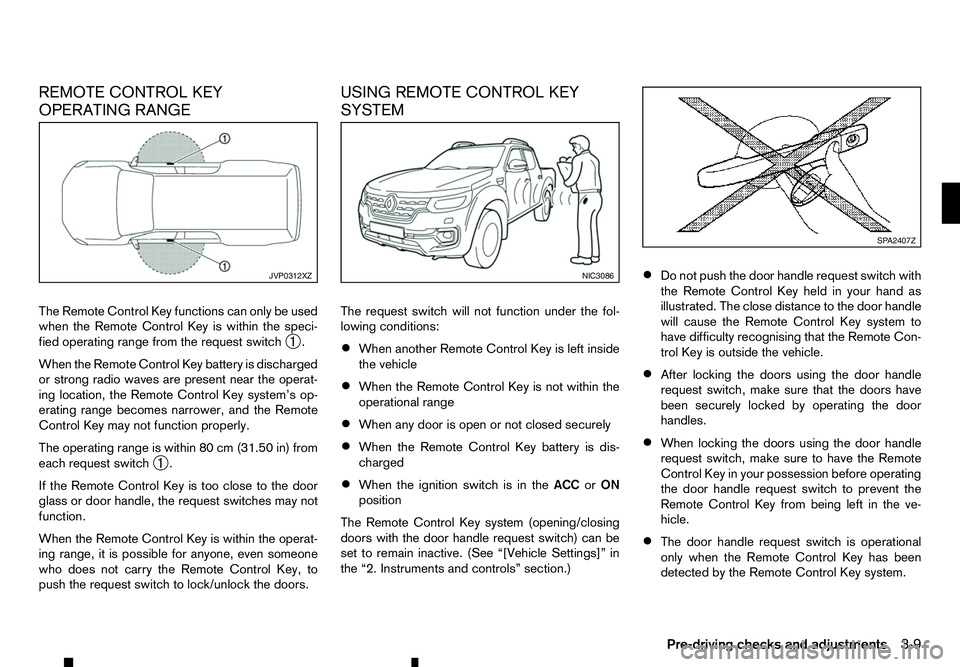
The Remote Control Key functions can only be used
when the Remote Control Key is within the speci-
fied operating range from the request switch ➀.
When the Remote Control Key battery is discharged
or strong radio waves are present near the operat-
ing location, the Remote Control Key system’s op-
erating range becomes narrower, and the Remote
Control Key may not function properly.
The operating range is within 80 cm (31.50 in) from
each request switch ➀.
If the Remote Control Key is too close to the door
glass or door handle, the request switches may not
function.
When the Remote Control Key is within the operat-
ing range, it is possible for anyone, even someone
who does not carry the Remote Control Key, to
push the request switch to lock/unlock the doors. USING REMOTE CONTROL KEY
SYSTEM
The request switch will not function under the fol-
lowing conditions:
•
When another Remote Control Key is left inside
the vehicle
• When the Remote Control Key is not within the
operational range
• When any door is open or not closed securely
• When the Remote Control Key battery is dis-
charged
• When the ignition switch is in the
ACCorON
position
The Remote Control Key system (opening/closing
doors with the door handle request switch) can be
set to remain inactive. (See “[Vehicle Settings]” in
the “2. Instruments and controls” section.) •
Do not push the door handle request switch with
the Remote Control Key held in your hand as
illustrated. The close distance to the door handle
will cause the Remote Control Key system to
have difficulty recognising that the Remote Con-
trol Key is outside the vehicle.
• After locking the doors using the door handle
request switch, make sure that the doors have
been securely locked by operating the door
handles.
• When locking the doors using the door handle
request switch, make sure to have the Remote
Control Key in your possession before operating
the door handle request switch to prevent the
Remote Control Key from being left in the ve-
hicle.
• The door handle request switch is operational
only when the Remote Control Key has been
detected by the Remote Control Key system. JVP0312XZ NIC3086 SP A2407Z
Pre-driving checks and adjustments 3-9
Page 114 of 340
•
Do not pull the door handle before pushing the
door handle request switch. The door will be
unlocked but will not open. Release the door
handle once and pull it again to open the door.
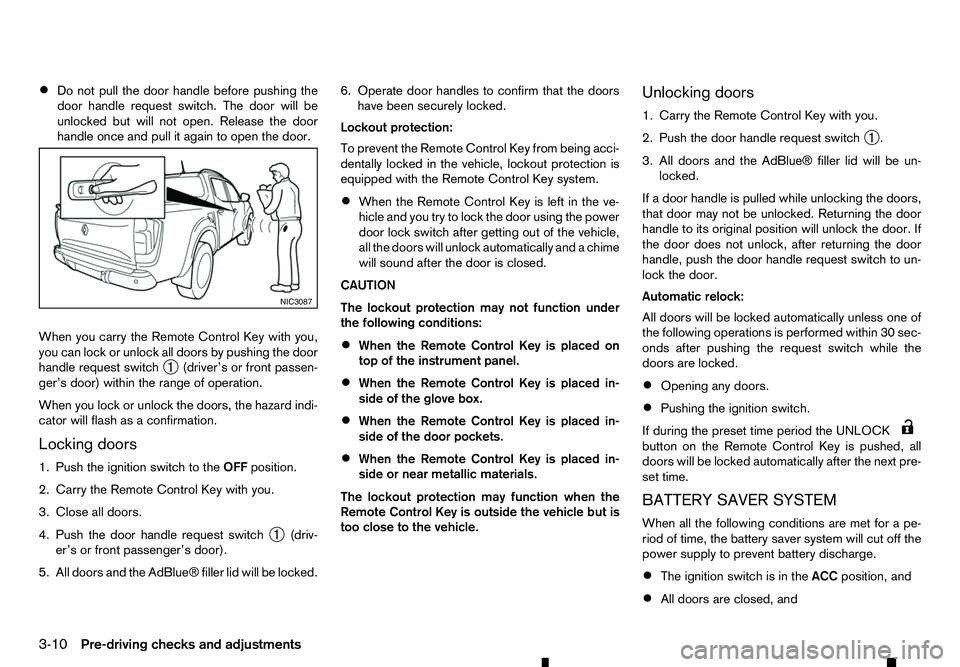
When you carry the Remote Control Key with you,
you can lock or unlock all doors by pushing the door
handle request switch ➀(driver’s or front passen-
ger’s door) within the range of operation.
When you lock or unlock the doors, the hazard indi-
cator will flash as aconfirmation.
Locking doors
1. Push the ignition switch to the OFFposition.
2. Carry the Remote Control Key with you.
3. Close all doors.
4. Push the door handle request switch ➀(driv-
er’s or front passenger’s door).
5. All doors and the AdBlue® filler lid will be locked. 6. Operate door handles to confirm that the doors
have been securely locked.
Lockout protection:
To prevent the Remote Control Key from being acci-
dentally locked in the vehicle, lockout protection is
equipped with the Remote Control Key system.
• When the Remote Control Key is left in the ve-
hicle and you try to lock the door using the power
door lock switch after getting out of the vehicle,
all the doors will unlock automatically and
achime
will sound after the door is closed.
CAUTION
The lockout protection may not function under
the following conditions:
• When the Remote Control Key is placed on
top of the instrument panel.
• When the Remote Control Key is placed in-
side of the glove box.
• When the Remote Control Key is placed in-
side of the door pockets.
• When the Remote Control Key is placed in-
side or near metallic materials.
The lockout protection may function when the
Remote Control Key is outside the vehicle but is
too close to the vehicle. Unlocking doors
1. Carry the Remote Control Key with you.
2. Push the door handle request switch
➀.
3. All doors and the AdBlue® filler lid will be un- locked.
If ad oor handle is pulled while unlocking the doors,
that door may not be unlocked. Returning the door
handle to its original position will unlock the door. If
the door does not unlock, after returning the door
handle, push the door handle request switch to un-
lock the door.
Automatic relock:
All doors will be locked automatically unless one of
the following operations is performed within 30 sec-
onds after pushing the request switch while the
doors are locked.
• Opening any doors.
• Pushing the ignition switch.
If during the preset time period the UNLOCK button on the Remote Control Key is pushed, all
doors will be locked automatically after the next pre-
set time.
BATTERY SAVER SYSTEM
When all the following conditions are met for ape-
riod of time, the battery saver system will cut off the
power supply to prevent battery discharge.
• The ignition switch is in the
ACCposition, and
• All doors are closed, and NIC3087
3-10 Pre-driving checks and adjustments
Page 116 of 340
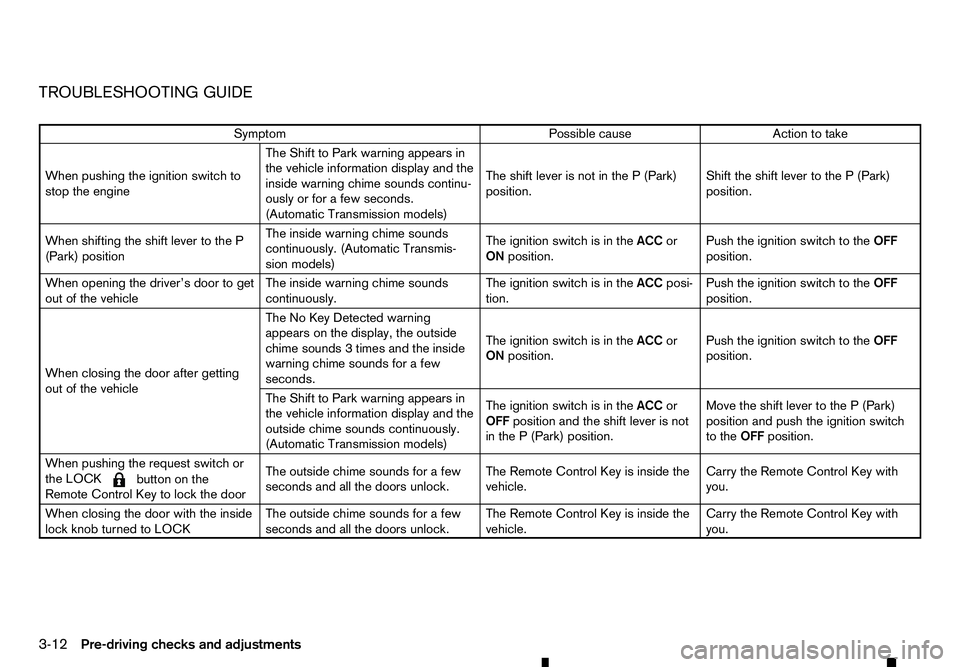
TROUBLESHOOTING GUIDE
Symptom
Possible cause
Action to take
When pushing the ignition switch to
stop the engine The Shift to Park warning appears in
the vehicle information display and the
inside warning chime sounds continu-
ously or for
afew seconds.
(Automatic Transmission models) The shift lever is not in the
P(Park)
position. Shift the shift lever to the
P(Park)
position.
When shifting the shift lever to the P
(Park) position The inside warning chime sounds
continuously. (Automatic Transmis-
sion models)
The ignition switch is in the
ACCor
ON position. Push the ignition switch to the
OFF
position.
When opening the driver’s door to get
out of the vehicle The inside warning chime sounds
continuously.The ignition switch is in the
ACCposi-
tion. Push the ignition switch to the
OFF
position.
When closing the door after getting
out of the vehicle The No Key Detected warning
appears on the display, the outside
chime sounds
3times and the inside
warning chime sounds for afew
seconds. The ignition switch is in the
ACCor
ON position. Push the ignition switch to the
OFF
position.
The Shift to Park warning appears in
the vehicle information display and the
outside chime sounds continuously.
(Automatic Transmission models) The ignition switch is in the
ACCor
OFF position and the shift lever is not
in the P(Park) position. Move the shift lever to the
P(Park)
position and push the ignition switch
to the OFFposition.
When pushing the request switch or
the LOCK
m button
on the
Remote Control Key to lock the door The outside chime sounds for
afew
seconds and all the doors unlock. The Remote Control Key is inside the
vehicle. Carry the Remote Control Key with
you.
When closing the door with the inside
lock knob turned to LOCK The outside chime sounds for
afew
seconds and all the doors unlock. The Remote Control Key is inside the
vehicle. Carry the Remote Control Key with
you.
3-12 Pre-driving checks and adjustments
Page 117 of 340
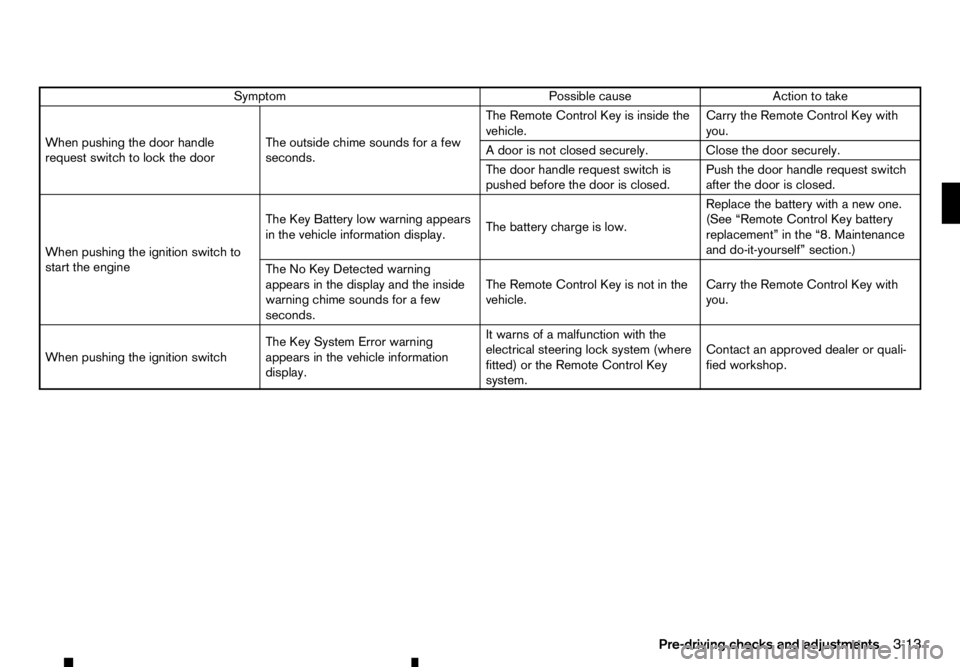
Symptom
Possible cause
Action to take
When pushing the door handle
request switch to lock the door The outside chime sounds for
afew
seconds. The Remote Control Key is inside the
vehicle.
Carry the Remote Control Key with
you.
Ad oor is not closed securely. Close the door securely.
The door handle request switch is
pushed before the door is closed. Push the door handle request switch
after the door is closed.
When pushing the ignition switch to
start the engine The Key Battery low warning appears
in the vehicle information display.
The battery charge is low.Replace the battery with
anew one.
(See “Remote Control Key battery
replacement” in the “8. Maintenance
and do-it-yourself” section.)
The No Key Detected warning
appears in the display and the inside
warning chime sounds for afew
seconds. The Remote Control Key is not in the
vehicle.
Carry the Remote Control Key with
you.
When pushing the ignition switch The Key System Error warning
appears in the vehicle information
display.It warns of
amalfunction with the
electrical steering lock system (where
fitted) or the Remote Control Key
system. Contact an approved dealer or quali-
fied workshop.
Pre-driving checks and adjustments 3-13
Page 118 of 340
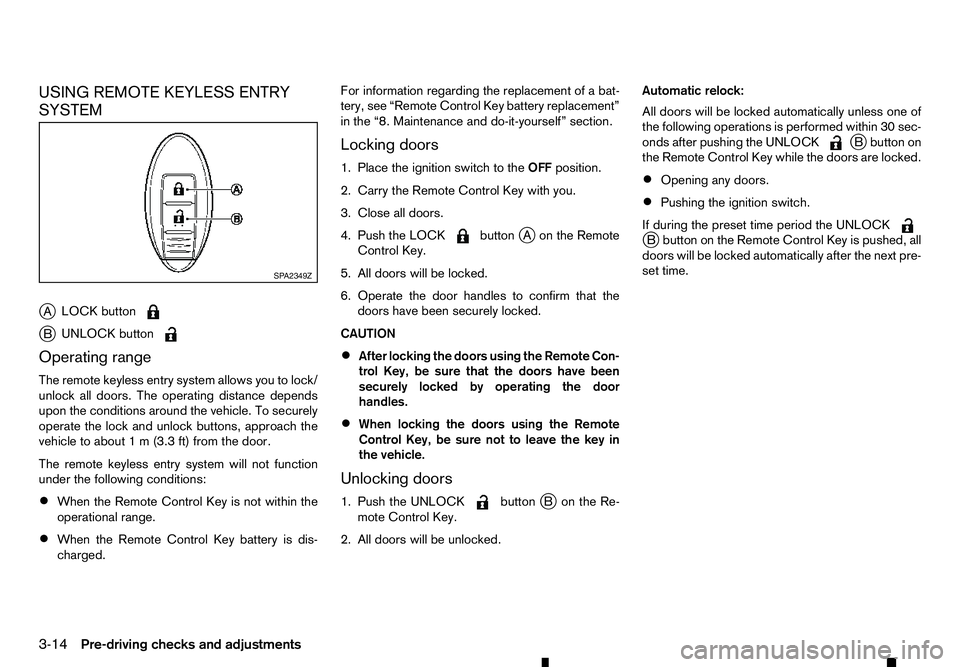
USING REMOTE KEYLESS ENTRY
SYSTEM
j A LOCK button j
B UNLOCK button
Operating range
The remote keyless entry system allows you to lock/
unlock all doors. The operating distance depends
upon the conditions around the vehicle. To securely
operate the lock and unlock buttons, approach the
vehicle to about 1m(3.3 ft) from the door.
The remote keyless entry system will not function
under the following conditions:
• When the Remote Control Key is not within the
operational range.
• When the Remote Control Key battery is dis-
charged. For information regarding the replacement of
abat-
tery, see “Remote Control Key battery replacement”
in the “8. Maintenance and do-it-yourself” section.
Locking doors
1. Place the ignition switch to the OFFposition.
2. Carry the Remote Control Key with you.
3. Close all doors.
4. Push the LOCK button
jAo nthe Remote
Control Key.
5. All doors will be locked.
6. Operate the door handles to confirm that the doors have been securely locked.
CAUTION
• After locking the doors using the Remote Con-
trol Key, be sure that the doors have been
securely locked by operating the door
handles.
• When locking the doors using the Remote
Control Key, be sure not to leave the key in
the vehicle.
Unlocking doors
1. Push the UNLOCK button
jBo nthe Re-
mote Control Key.
2. All doors will be unlocked. Automatic relock:
All doors will be locked automatically unless one of
the following operations is performed within 30 sec-
onds after pushing the UNLOCK j
Bb utton on
the Remote Control Key while the doors are locked.
• Opening any doors.
• Pushing the ignition switch.
If during the preset time period the UNLOCK j
Bb utton on the Remote Control Key is pushed, all
doors will be locked automatically after the next pre-
set time. SP A2349Z
3-14 Pre-driving checks and adjustments
Page 119 of 340
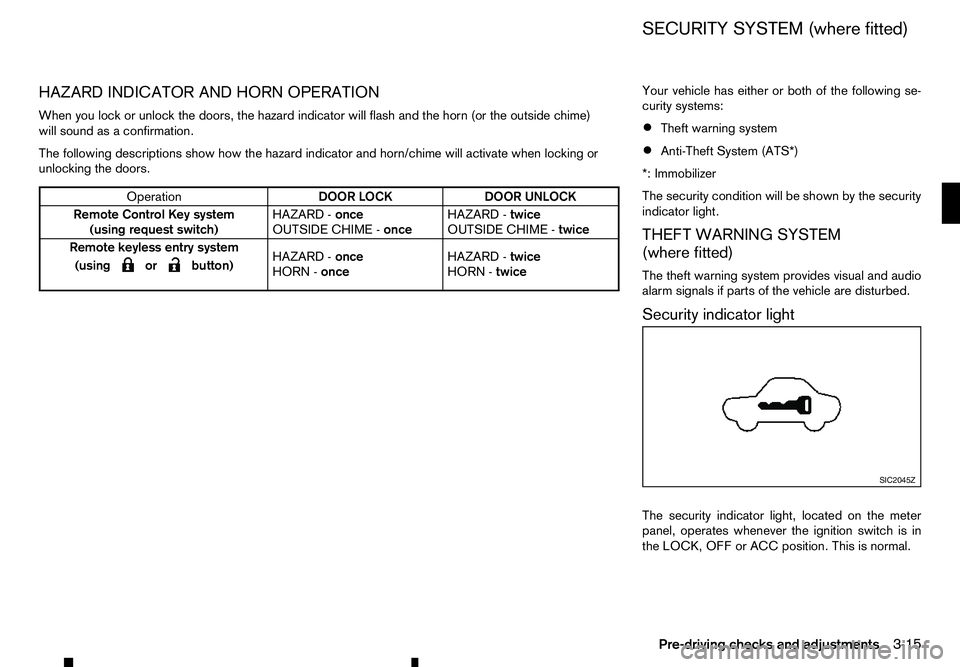
HAZARD INDICATOR AND HORN OPERATION
When you lock or unlock the doors, the hazard indicator will flash and the horn (or the outside chime) will sound as aconfirmation.
The following descriptions show how the hazard indicator and horn/chime will activate when locking or
unlocking the doors. Your vehicle has either or both of the following se-
curity systems:
• Theft warning system
• Anti-Theft System (ATS*)
*: Immobilizer
The security condition will be shown by the security
indicator light.
THEFT WARNING SYSTEM
(where fitted)
The theft warning system provides visual and audio
alarm signals if parts of the vehicle are disturbed.
Security indicator light
The security indicator light, located on the meter
panel, operates whenever the ignition switch is in
the LOCK, OFF or ACC position. This is normal. Operation
DOOR LOCK
DOOR UNLOCK
Remote Control Key system (using request switch) HAZARD -
once
OUTSIDE CHIME - onceHAZARD -
twice
OUTSIDE CHIME - twice
Remote keyless entry system
(using
m orm button)
HAZARD
-
once
HORN - once HAZARD -
twice
HORN - twice SIC2045Z
SECURITY SYSTEM (where fitted)
Pre-driving checks and adjustments 3-15
Page 120 of 340
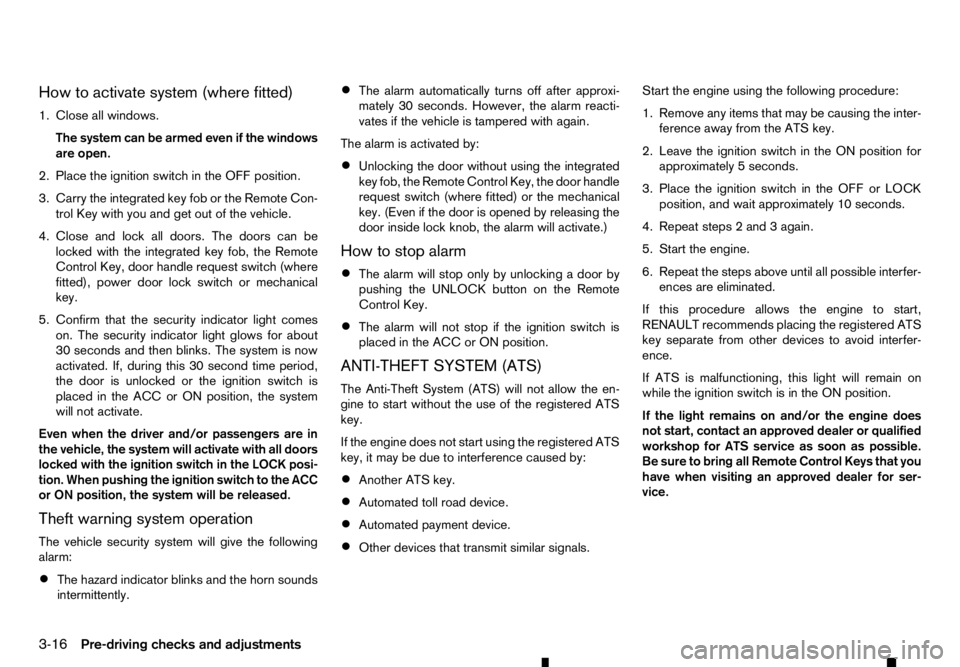
How to activate system (where fitted)
1. Close all windows.
The system can be armed even if the windows
are open.
2. Place the ignition switch in the OFF position.
3. Carry the integrated key fob or the Remote Con- trol Key with you and get out of the vehicle.
4. Close and lock all doors. The doors can be locked with the integrated key fob, the Remote
Control Key, door handle request switch (where
fitted), power door lock switch or mechanical
key.
5. Confirm that the security indicator light comes on. The security indicator light glows for about
30 seconds and then blinks. The system is now
activated. If, during this 30 second time period,
the door is unlocked or the ignition switch is
placed in the ACC or ON position, the system
will not activate.
Even when the driver and/or passengers are in
the vehicle, the system will activate with all doors
locked with the ignition switch in the LOCK posi-
tion. When pushing the ignition switch to the ACC
or ON position, the system will be released.
Theft warning system operation
The vehicle security system will give the following
alarm:
• The hazard indicator blinks and the horn sounds
intermittently. •
The alarm automatically turns off after approxi-
mately 30 seconds. However, the alarm reacti-
vates if the vehicle is tampered with again.
The alarm is activated by:
• Unlocking the door without using the integrated
key fob, the Remote Control Key, the door handle
request switch (where fitted) or the mechanical
key. (Even if the door is opened by releasing the
door inside lock knob, the alarm will activate.)
How to stop alarm
• The alarm will stop only by unlocking
adoor by
pushing the UNLOCK button on the Remote
Control Key.
• The alarm will not stop if the ignition switch is
placed in the ACC or ON position.
ANTI-THEFT SYSTEM (ATS)
The Anti-Theft System (ATS) will not allow the en-
gine to start without the use of the registered ATS
key.
If the engine does not start using the registered ATS
key, it may be due to interference caused by:
• Another ATS key.
• Automated toll road device.
• Automated payment device.
• Other devices that transmit similar signals. Start the engine using the following procedure:
1. Remove any items that may be causing the inter-
ference away from the ATS key.
2. Leave the ignition switch in the ON position for approximately 5seconds.
3. Place the ignition switch in the OFF or LOCK position, and wait approximately 10 seconds.
4. Repeat steps 2and 3again.
5. Start the engine.
6. Repeat the steps above until all possible interfer- ences are eliminated.
If this procedure allows the engine to start,
RENAULT recommends placing the registered ATS
key separate from other devices to avoid interfer-
ence.
If ATS is malfunctioning, this light will remain on
while the ignition switch is in the ON position.
If the light remains on and/or the engine does
not start, contact an approved dealer or qualified
workshop for ATS service as soon as possible.
Be sure to bring all Remote Control Keys that you
have when visiting an approved dealer for ser-
vice.
3-16 Pre-driving checks and adjustments
Page 218 of 340
range, it is possible for anyone, even someone who
does not carry the Remote Control Key, to push the
ignition switch to start the engine.
• The cargo bed area is not included in the operat-
ing range of the engine start function.
• If the Remote Control Key is placed on the in-
strument panel, inside the glove box, door pocket
or the corner of the interior compartment, the
Remote Control Key may not function.
• If the Remote Control Key is placed near the
door or window outside the vehicle, the Remote
Control Key may function.
AUTOMATIC TRANSMISSION (AT)
The ignition lock is designed so that the ignition
switch cannot be switched to the “LOCK” position
until the shift lever is moved to the P(Park) position.
When pushing the ignition switch to the “OFF” posi-
tion, make sure the shift lever is in the P(Park) posi-
tion.
When the ignition switch cannot be switched to the
“LOCK” position:
1. [Shift to Park] warning appears on the vehicle
information display and achime sounds.
2. Move the shift lever to the P(Park) position.
3. If the ignition switch is in the “ACC” position, [PUSH] warning appears on the vehicle informa-
tion display.
4. Push the ignition switch. The ignition switch is switched to the “OFF” position. 5. Open the door. The ignition switch turns to the
“LOCK” position.
For warnings and indicators on the vehicle informa-
tion display, see “Indicators for operation” in the
“2. Instruments and controls” section.
If the ignition switch is switched to the “LOCK”
position, the shift lever cannot be moved from the P
(Park) position. The shift lever can be moved if the
ignition switch is in the “ON” position with the foot-
brake pedal depressed.
STEERING LOCK
The ignition switch is equipped with an anti-theft
steering lock device.
To lock steering wheel
1. Place the ignition switch in the “OFF” position where the ignition switch position indicator will
not illuminate.
2. Open or close the door. The ignition switch turns to the “LOCK” position.
3. Turn the steering wheel 1/6 of aturn to the right
or left from the straight up position.
To unlock steering wheel
Push the ignition switch, and the steering wheel will
be automatically unlocked.
CAUTION
• If the battery of the vehicle is discharged, the
push-button ignition switch cannot be
switched from the “LOCK” position. •
If the steering lock release malfunction indi-
cator (where fitted) appears in the vehicle in-
formation display, push the ignition switch
again while rotating the steering wheel slightly
to the right and left. (See “Vehicle information
display” in the “2. Instruments and controls”
section.)
IGNITION SWITCH POSITIONS WARNING
Never place the ignition switch in the “OFF” posi-
tion while driving. The steering wheel may lock
and cause the driver to lose control of the ve-
hicle, resulting in serious vehicle damage or per-
sonal injury.
CAUTION
• Do not leave the vehicle for extended periods
of time when the ignition switch is in the “ON”
position and the engine is not running. This
can discharge the battery.
• Use electrical accessories with the engine
running to avoid discharging the vehicle bat-
tery. If you must use accessories while the
engine is not running, do not use them for
extended periods of time and do not use mul-
tiple electrical accessories at the same time.
5-16 Starting and driving
Page 219 of 340
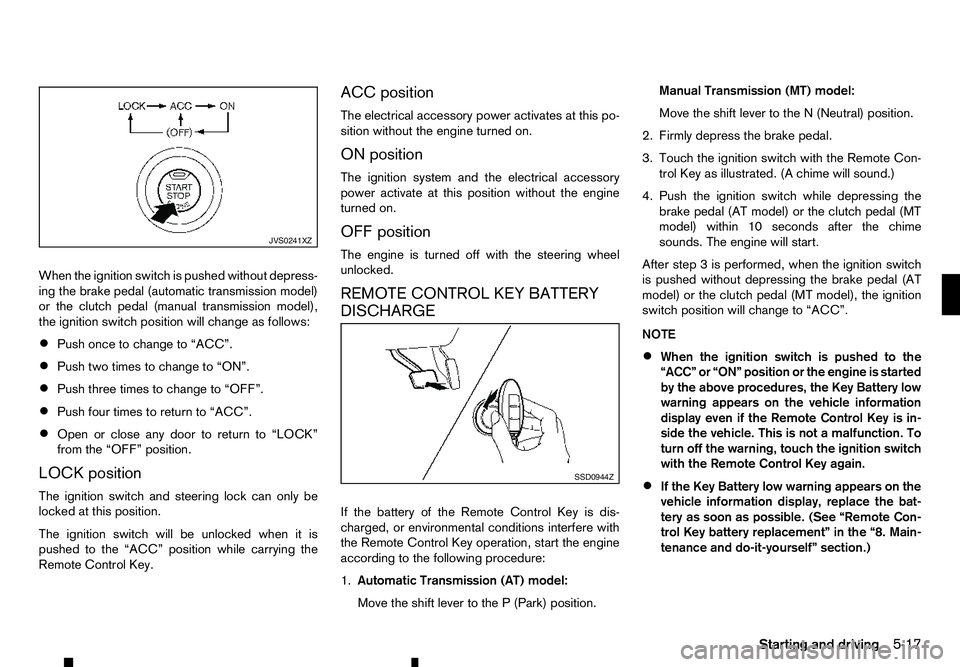
When the ignition switch is pushed without depress-
ing the brake pedal (automatic transmission model)
or the clutch pedal (manual transmission model),
the ignition switch position will change as follows:
• Push once to change to “ACC”.
• Push two times to change to “ON”.
• Push three times to change to “OFF”.
• Push four times to return to “ACC”.
• Open or close any door to return to “LOCK”
from the “OFF” position.
LOCK position
The ignition switch and steering lock can only be
locked at this position.
The ignition switch will be unlocked when it is
pushed to the “ACC” position while carrying the
Remote Control Key. ACC position
The electrical accessory power activates at this po-
sition without the engine turned on.
ON position
The ignition system and the electrical accessory
power activate at this position without the engine
turned on.
OFF position
The engine is turned off with the steering wheel
unlocked.
REMOTE CONTROL KEY BATTERY
DISCHARGE
If the battery of the Remote Control Key is dis-
charged, or environmental conditions interfere with
the Remote Control Key operation, start the engine
according to the following procedure:
1.
Automatic Transmission (AT) model:
Move the shift lever to the P(Park) position. Manual Transmission (MT) model:
Move the shift lever to the
N(Neutral) position.
2. Firmly depress the brake pedal.
3. Touch the ignition switch with the Remote Con- trol Key as illustrated. (A chime will sound.)
4. Push the ignition switch while depressing the brake pedal (AT model) or the clutch pedal (MT
model) within 10 seconds after the chime
sounds. The engine will start.
After step 3isperformed, when the ignition switch
is pushed without depressing the brake pedal (AT
model) or the clutch pedal (MT model), the ignition
switch position will change to “ACC”.
NOTE
• When the ignition switch is pushed to the
“ACC” or “ON” position or the engine is started
by the above procedures, the Key Battery low
warning appears on the vehicle information
display even if the Remote Control Key is in-
side the vehicle. This is not
amalfunction. To
turn off the warning, touch the ignition switch
with the Remote Control Key again.
• If the Key Battery low warning appears on the
vehicle information display, replace the bat-
tery as soon as possible. (See “Remote Con-
trol Key battery replacement” in the “8. Main-
tenance and do-it-yourself” section.) JVS0241XZ
SSD0944Z
Starting and driving
5-17