door lock RENAULT ALASKAN 2017 User Guide
[x] Cancel search | Manufacturer: RENAULT, Model Year: 2017, Model line: ALASKAN, Model: RENAULT ALASKAN 2017Pages: 340, PDF Size: 6.93 MB
Page 86 of 340
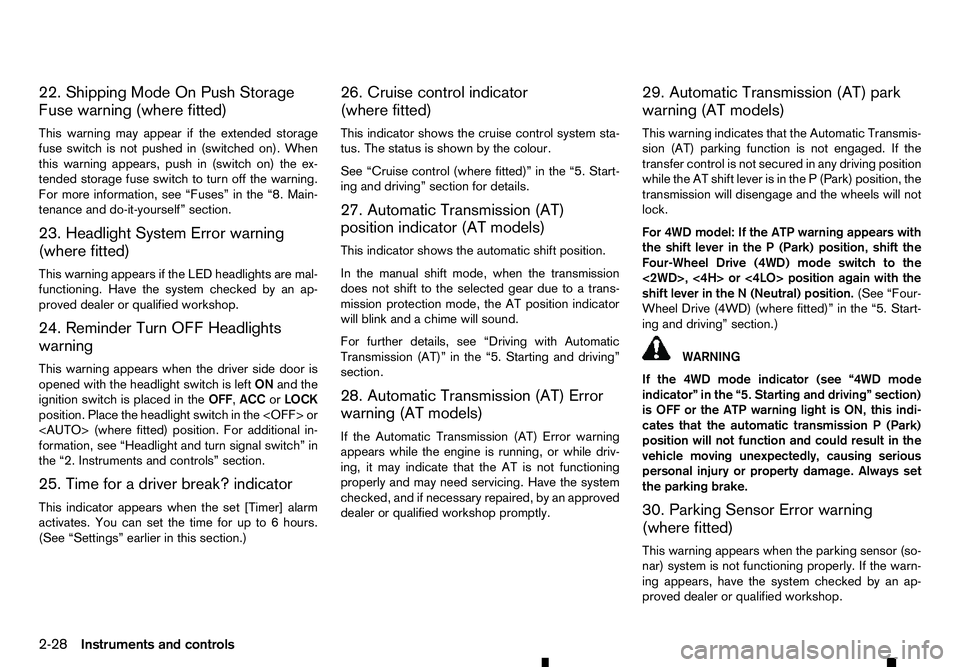
22. Shipping Mode On Push Storage
Fuse warning (where fitted)
This warning may appear if the extended storage
fuse switch is not pushed in (switched on). When
this warning appears, push in (switch on) the ex- tended storage fuse switch to turn off the warning.
For more information, see “Fuses” in the “8. Main-
tenance and do-it-yourself” section.
23. Headlight System Error warning
(where fitted)
This warning appears if the LED headlights are mal-
functioning. Have the system checked by an ap-
proved dealer or qualified workshop.
24. Reminder Turn OFF Headlights
warning
This warning appears when the driver side door is
opened with the headlight switch is left ONand the
ignition switch is placed in the OFF,ACCorLOCK
position. Place the headlight switch in the
formation, see “Headlight and turn signal switch” in
the “2. Instruments and controls” section.
25. Time for adriver break? indicator
This indicator appears when the set [Timer] alarm activates. You can set the time for up to 6hours.
(See “Settings” earlier in this section.) 26. Cruise control indicator
(where fitted)
This indicator shows the cruise control system sta-
tus. The status is shown by the colour.
See “Cruise control (where fitted)” in the “5. Start-
ing and driving” section for details.
27. Automatic Transmission (AT)
position indicator (AT models)
This indicator shows the automatic shift position.
In the manual shift mode, when the transmission
does not shift to the selected gear due to
atrans-
mission protection mode, the AT position indicator
will blink and achime will sound.
For further details, see “Driving with Automatic
Transmission (AT)” in the “5. Starting and driving”
section.
28. Automatic Transmission (AT) Error
warning (AT models)
If the Automatic Transmission (AT) Error warning
appears while the engine is running, or while driv-
ing, it may indicate that the AT is not functioning
properly and may need servicing. Have the system
checked, and if necessary repaired, by an approved
dealer or qualified workshop promptly. 29. Automatic Transmission (AT) park
warning (AT models)
This warning indicates that the Automatic Transmis-
sion (AT) parking function is not engaged. If the
transfer control is not secured in any driving position
while the AT shift lever is in the
P(Park) position, the
transmission will disengage and the wheels will not
lock.
For 4WD model: If the ATP warning appears with
the shift lever in the P(Park) position, shift the
Four-Wheel Drive (4WD) mode switch to the
<2WD>, <4H> or <4LO> position again with the
shift lever in the N(Neutral) position. (See “Four-
Wheel Drive (4WD) (where fitted)” in the “5. Start-
ing and driving” section.) WARNING
If the 4WD mode indicator (see “4WD mode
indicator” in the “5. Starting and driving” section)
is OFF or the ATP warning light is ON, this indi-
cates that the automatic transmission P(Park)
position will not function and could result in the
vehicle moving unexpectedly, causing serious
personal injury or property damage. Always set
the parking brake.
30. Parking Sensor Error warning
(where fitted)
This warning appears when the parking sensor (so-
nar) system is not functioning properly. If the warn-
ing appears, have the system checked by an ap-
proved dealer or qualified workshop.
2-28 Instruments and controls
Page 90 of 340
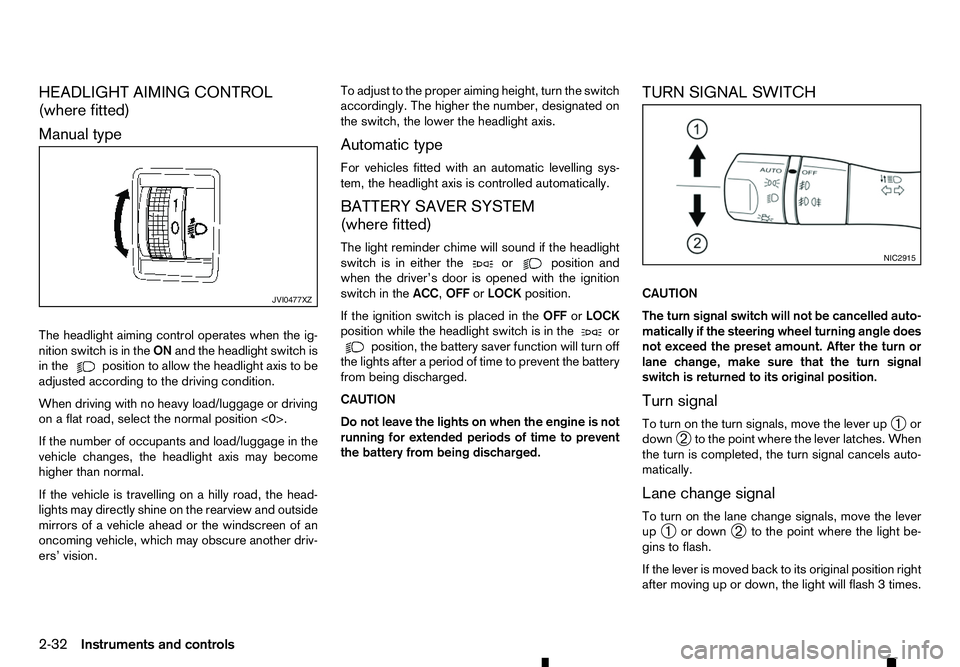
HEADLIGHT AIMING CONTROL
(where fitted)
Manual type
The headlight aiming control operates when the ig- nition switch is in the ONand the headlight switch is
in the position to allow the headlight axis to be
adjusted according to the driving condition.
When driving with no heavy load/luggage or driving
on aflat road, select the normal position <0>.
If the number of occupants and load/luggage in the
vehicle changes, the headlight axis may become
higher than normal.
If the vehicle is travelling on ahilly road, the head-
lights may directly shine on the rearview and outside mirrors of avehicle ahead or the windscreen of an
oncoming vehicle, which may obscure another driv-
ers’ vision. To adjust to the proper aiming height, turn the switch
accordingly. The higher the number, designated on
the switch, the lower the headlight axis.
Automatic type
For vehicles fitted with an automatic levelling sys-
tem, the headlight axis is controlled automatically.
BATTERY SAVER SYSTEM
(where fitted)
The light reminder chime will sound if the headlight
switch is in either the or position and
when the driver’s door is opened with the ignition
switch in the ACC,OFForLOCK position.
If the ignition switch is placed in the OFForLOCK
position while the headlight switch is in the or
position, the battery saver function will turn off
the lights after aperiod of time to prevent the battery
from being discharged.
CAUTION
Do not leave the lights on when the engine is not
running for extended periods of time to prevent
the battery from being discharged. TURN SIGNAL SWITCH
CAUTION
The turn signal switch will not be cancelled auto-
matically if the steering wheel turning angle does
not exceed the preset amount. After the turn or
lane change, make sure that the turn signal
switch is returned to its original position.
Turn signal
To turn on the turn signals, move the lever up
➀or
down ➁to the point where the lever latches. When
the turn is completed, the turn signal cancels auto-
matically.
Lane change signal
To turn on the lane change signals, move the lever
up ➀ or down
➁to the point where the light be-
gins to flash.
If the lever is moved back to its original position right
after moving up or down, the light will flash 3times. JVI0477XZ NIC2915
2-32 Instruments and controls
Page 98 of 340
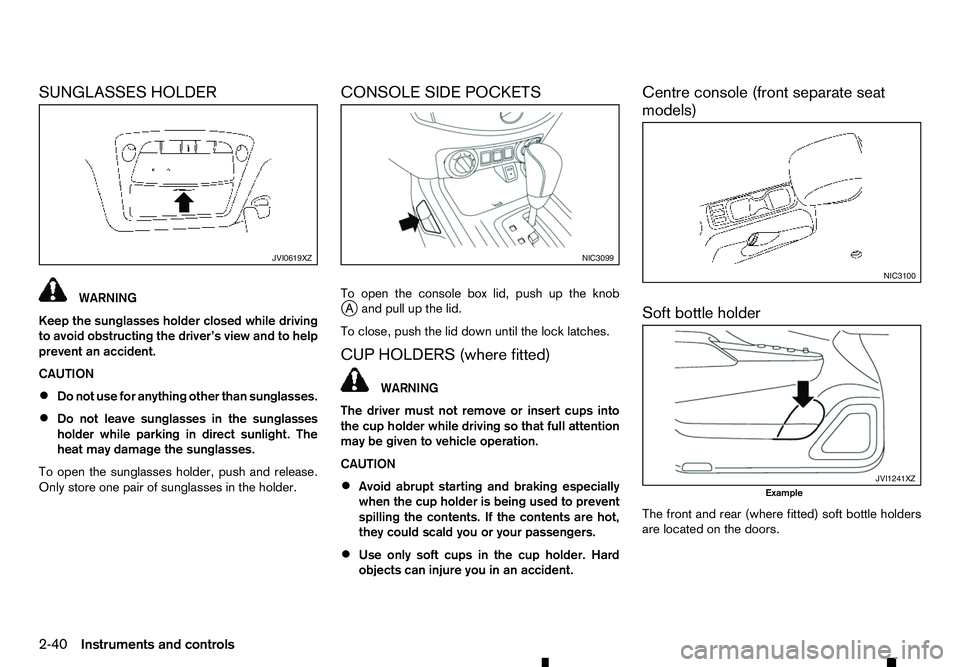
SUNGLASSES HOLDER
WARNING
Keep the sunglasses holder closed while driving
to avoid obstructing the driver’s view and to help
prevent an accident.
CAUTION
• Do not use for anything other than sunglasses.
• Do not leave sunglasses in the sunglasses
holder while parking in direct sunlight. The
heat may damage the sunglasses.
To open the sunglasses holder, push and release.
Only store one pair of sunglasses in the holder. CONSOLE SIDE POCKETS
To open the console box lid, push up the knob
j
Aa nd pull up the lid.
To close, push the lid down until the lock latches.
CUP HOLDERS (where fitted) WARNING
The driver must not remove or insert cups into
the cup holder while driving so that full attention
may be given to vehicle operation.
CAUTION
• Avoid abrupt starting and braking especially
when the cup holder is being used to prevent
spilling the contents. If the contents are hot,
they could scald you or your passengers.
• Use only soft cups in the cup holder. Hard
objects can injure you in an accident. Centre console (front separate seat
models)
Soft bottle holder
The front and rear (where fitted) soft bottle holders
are located on the doors.
JVI0619XZ NIC3099
NIC3100
JVI1241XZ
Example
2-40 Instruments and controls
Page 101 of 340
If the sunroof does not operate properly after per-
forming the procedure above, have your vehicle
checked by an approved dealer or qualified work-
shop. CAUTION
• Turn off the lights when you leave the vehicle.
• Do not use the lights for extended periods of
time with the engine stopped. This could re-
sult in
adischarged battery.
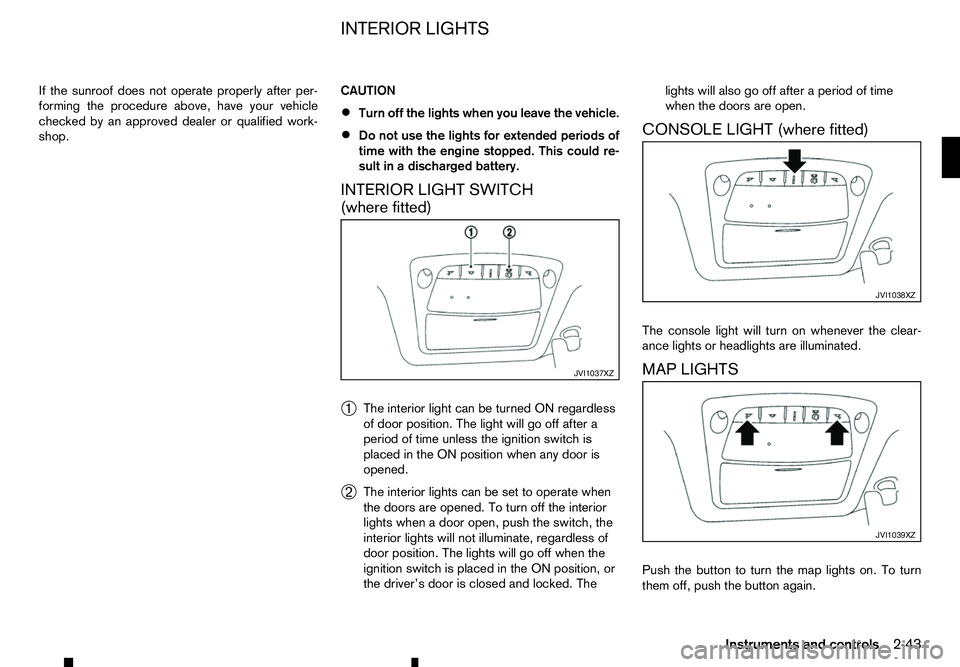
INTERIOR LIGHT SWITCH
(where fitted)
➀ The interior light can be turned ON regardless
of door position. The light will go off after a
period of time unless the ignition switch is
placed in the ON position when any door is
opened.
➁ The interior lights can be set to operate when
the doors are opened. To turn off the interior
lights when
adoor open, push the switch, the
interior lights will not illuminate, regardless of
door position. The lights will go off when the
ignition switch is placed in the ON position, or
the driver’s door is closed and locked. The lights will also go off after
aperiod of time
when the doors are open.
CONSOLE LIGHT (where fitted)
The console light will turn on whenever the clear-
ance lights or headlights are illuminated.
MAP LIGHTS
Push the button to turn the map lights on. To turn
them off, push the button again. JVI1037XZ JVI1038XZ
JVI1039XZ
INTERIOR LIGHTS
Instruments and controls2-43
Page 102 of 340
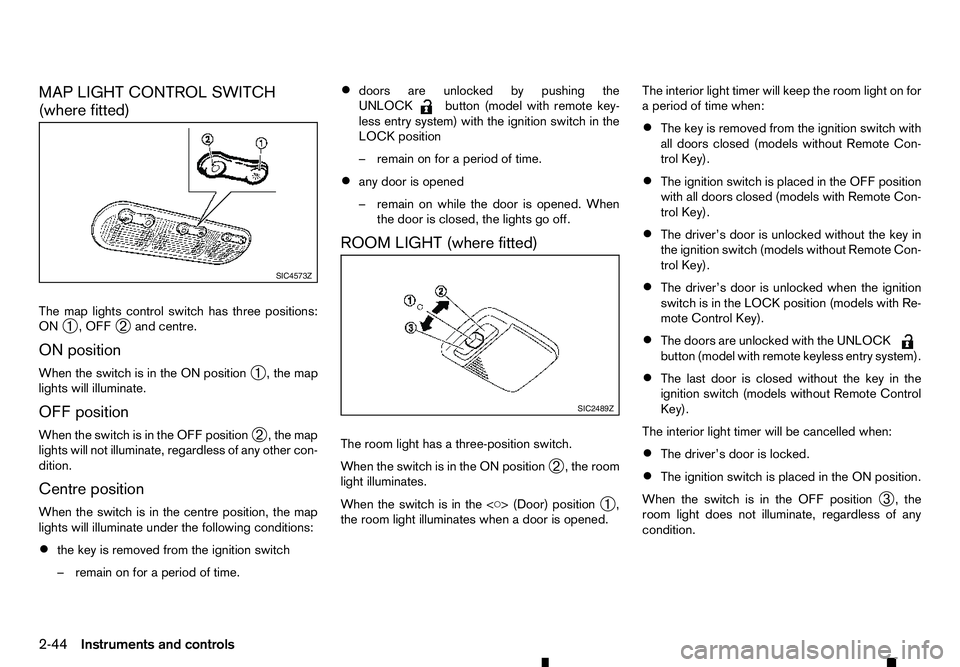
MAP LIGHT CONTROL SWITCH
(where fitted)
The map lights control switch has three positions:
ON ➀,O
FF
➁ and centre.
ON position
When the switch is in the ON position ➀,t
he map
lights will illuminate.
OFF position
When the switch is in the OFF position ➁,t
he map
lights will not illuminate, regardless of any other con-
dition.
Centre position
When the switch is in the centre position, the map
lights will illuminate under the following conditions:
• the key is removed from the ignition switch
–r emain on for aperiod of time. •
doors are unlocked by pushing the
UNLOCK button (model with remote key-
less entry system) with the ignition switch in the
LOCK position
–r emain on for aperiod of time.
• any door is opened
–r
emain on while the door is opened. When
the door is closed, the lights go off.
ROOM LIGHT (where fitted)
The room light has athree-position switch.
When the switch is in the ON position ➁,t
he room
light illuminates.
When the switch is in the
➀,
the room light illuminates when adoor is opened. The interior light timer will keep the room light on for
ap
eriod of time when:
• The key is removed from the ignition switch with
all doors closed (models without Remote Con-
trol Key).
• The ignition switch is placed in the OFF position
with all doors closed (models with Remote Con-
trol Key).
• The driver’s door is unlocked without the key in
the ignition switch (models without Remote Con-
trol Key).
• The driver’s door is unlocked when the ignition
switch is in the LOCK position (models with Re-
mote Control Key).
• The doors are unlocked with the UNLOCK button (model with remote keyless entry system).
• The last door is closed without the key in the
ignition switch (models without Remote Control
Key).
The interior light timer will be cancelled when:
• The driver’s door is locked.
• The ignition switch is placed in the ON position.
When the switch is in the OFF position ➂,t
he
room light does not illuminate, regardless of any
condition. SIC4573Z
SIC2489Z
2-44 Instruments and controls
Page 105 of 340
3
Pre-driving checks and adjustments
Pre-driving checks and adjustments
Keys ........................................................................V
3-2 Key (where fitted) ............................................... 3-2
Anti-Theft System (ATS*) key (where fitted) ........ 3-2
Remote Control Key (where fitted) ...................... 3-2
Doors ...................................................................... 3-4 Locking with key ................................................. 3-4
Opening with inside door handle ......................... 3-4
Locking with power door lock switch .................. 3-4
Rear access doors (King Cab models)................ 3-5
Child safety rear door locks (Double Cab
models) .............................................................. 3-5
Remote keyless entry system (where fitted) .............. 3-6
Using remote keyless entry system ..................... 3-6
Remote Control Key system (where fitted) ............... 3-7
Remote Control Key operating range .................. 3-9
Using Remote Control Key system ...................... 3-9
Battery saver system........................................... 3-10
Warning and audible reminders .......................... 3-11
Troubleshooting guide ........................................ 3-12
Using remote keyless entry system ..................... 3-14
Hazard indicator and horn operation.................... 3-15
Security system (where fitted) .................................. 3-15
Theft warning system (where fitted)..................... 3-15 Anti-Theft System (ATS) ..................................... 3-16
Bonnet..................................................................V
... 3-17 Opening bonnet.................................................. 3-17
Closing bonnet ................................................... 3-17
Fuel filler lid and cap ................................................ 3-18
Opening fuel filler lid ........................................... 3-18
Fuel filler cap ...................................................... 3-18
AdBlue® filler lid and cap ........................................ 3-19 Opening AdBlue® filler lid .................................. 3-20
Locking AdBlue® filler lid ................................... 3-20
AdBlue® filler cap .............................................. 3-20
Cargo bed (where fitted).......................................... 3-20 Tailgate .............................................................. 3-20
Tie down hooks (where fitted) ............................. 3-21
C-Channel system (where fitted) ......................... 3-21
Steering wheel......................................................... 3-23 Steering wheel adjustment .................................. 3-23
Mirrors..................................................................... 3-23 Inside rearview mirror ......................................... 3-23
Outside rearview mirrors..................................... 3-25
Vanity mirror (where fitted) .................................. 3-26
Parking brake .......................................................... 3-26
Page 107 of 340
2.
Mechanical key (inside Remote Control Key)
(2)
3. Key number plate (1) WARNING
• The Remote Control Key transmits radio
waves that can adversely affect medical elec-
tric equipment.
• If you have
apacemaker, you should contact
the medical equipment manufacturer to ask if
it will be affected by the Remote Control Key
signal.
Your vehicle can only be driven with the Remote
Control Keys which are registered to your vehicle’s
Remote Control Key system components and Anti-
Theft System (ATS*) components. As many as 4
Remote Control Keys can be registered and used
with one vehicle. The new keys must be registered
by an approved dealer or qualified workshop prior
to use with the Remote Control Key system and
ATS of your vehicle. Since the registration process
requires erasing all memory in the Remote Control
Key system components when registering new keys,
be sure to take all Remote Control Keys that you
have to an approved dealer or qualified workshop.
*: Immobilizer
CAUTION
• Be sure to carry the Remote Control Key with
you. Do not leave the vehicle with the Remote
Control Key inside. •
Be sure to carry the Remote Control Key with
you when driving. The Remote Control Key is
ap
recision device with abuilt-in transmitter.
To avoid damaging it, please note the follow-
ing.
–T he Remote Control Key is water resistant;
however, wetting may damage the Remote
Control Key. If the Remote Control Key
gets wet, immediately wipe until it is com-
pletely dry.
–D onot bend, drop or strike it against an-
other object.
–I fthe outside temperature is below -10°C
(14°F), the battery of the Remote Control
Key may not function properly.
–D onot place the Remote Control Key for
an extended period in aplace where tem-
peratures exceed 60°C (140°F).
–D onot change or modify the Remote Con-
trol Key.
–D onot use amagnet key holder.
–D onot place the Remote Control Key near
equipment that produces amagnetic field
such as aTV, audio equipment and per-
sonal computers.
–D onot allow the Remote Control Key to
come into contact with water or salt water,
and do not wash it in awashing machine.
This could affect the system function. •
If
aR emote Control Key is lost or stolen,
RENAULT recommends erasing the ID code
of that Remote Control Key. This will prevent
the Remote Control Key from unauthorised
use to unlock the vehicle. For information re-
garding the erasing procedure, please con-
tact an approved dealer or qualified work-
shop.
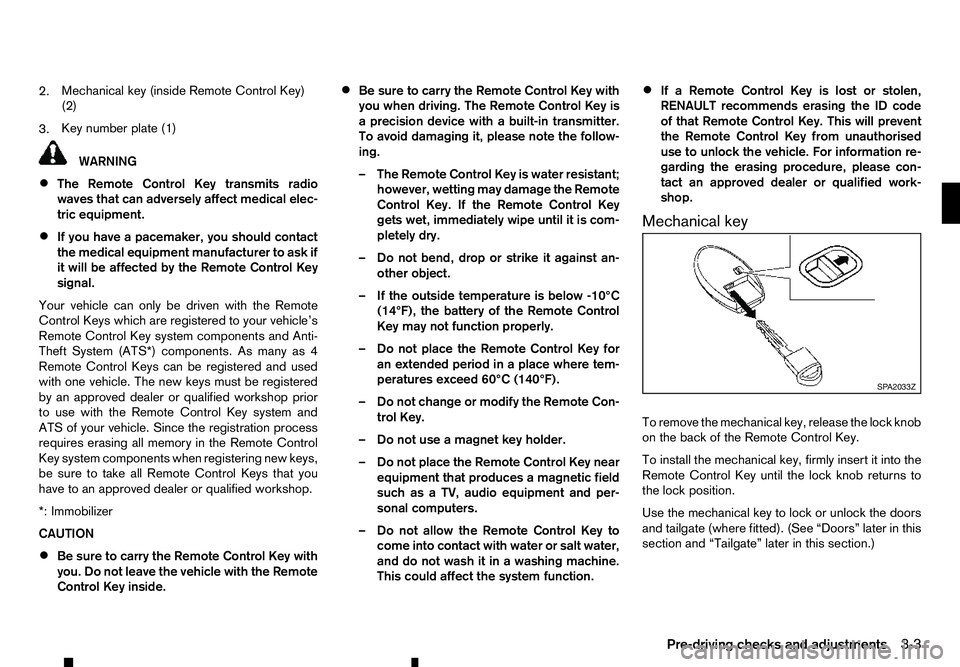
Mechanical key
To remove the mechanical key, release the lock knob
on the back of the Remote Control Key.
To install the mechanical key, firmly insert it into the
Remote Control Key until the lock knob returns to
the lock position.
Use the mechanical key to lock or unlock the doors
and tailgate (where fitted). (See “Doors” later in this
section and “Tailgate” later in this section.) SP A2033Z
Pre-driving checks and adjustments 3-3
Page 108 of 340
WARNING
• Always look before opening any doors, to
avoid an accident with oncoming traffic.
• To help avoid risk of injury or death through
unintended operation of the vehicle and/or its
systems, do not leave children, people who
require the assistance of others, or pets unat-
tended in your vehicle. Additionally, the tem-
perature inside
aclosed vehicle on awarm
day can quickly become high enough to cause
as ignificant risk of injury or death to people
and pets.
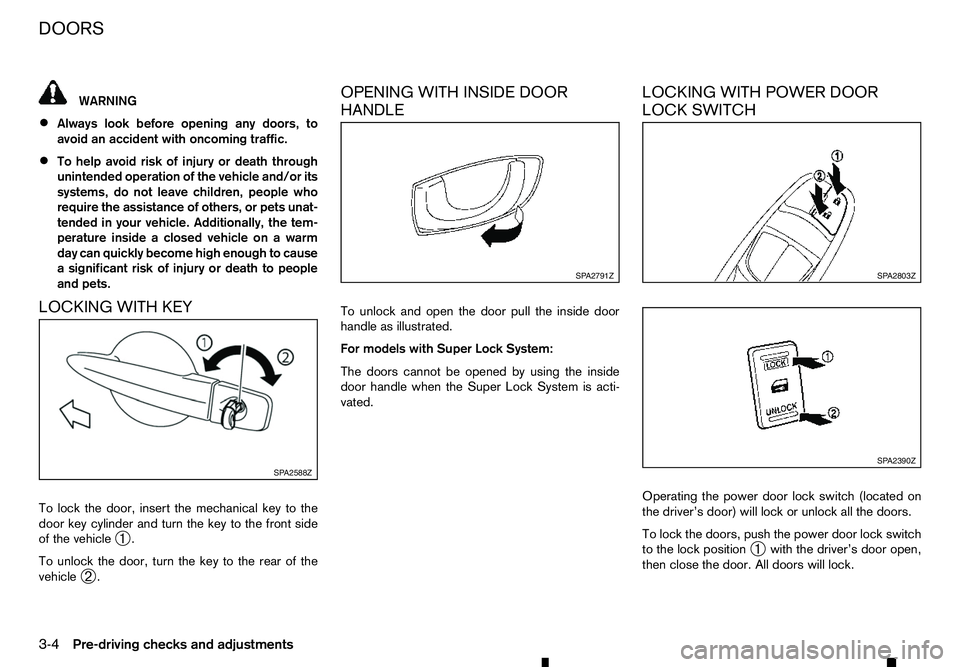
LOCKING WITH KEY
To lock the door, insert the mechanical key to the door key cylinder and turn the key to the front side
of the vehicle ➀.
To unlock the door, turn the key to the rear of the
vehicle ➁. OPENING WITH INSIDE DOOR
HANDLE
To unlock and open the door pull the inside door
handle as illustrated.
For models with Super Lock System:
The doors cannot be opened by using the inside
door handle when the Super Lock System is acti-
vated.
LOCKING WITH POWER DOOR
LOCK SWITCH
Operating the power door lock switch (located on
the driver’s door) will lock or unlock all the doors.
To lock the doors, push the power door lock switch
to the lock position
➀with the driver’s door open,
then close the door. All doors will lock. SP A2588Z SP A2791Z
SP A2803Z
SP A2390Z
DOORS
3-4
Pre-driving checks and adjustments
Page 109 of 340
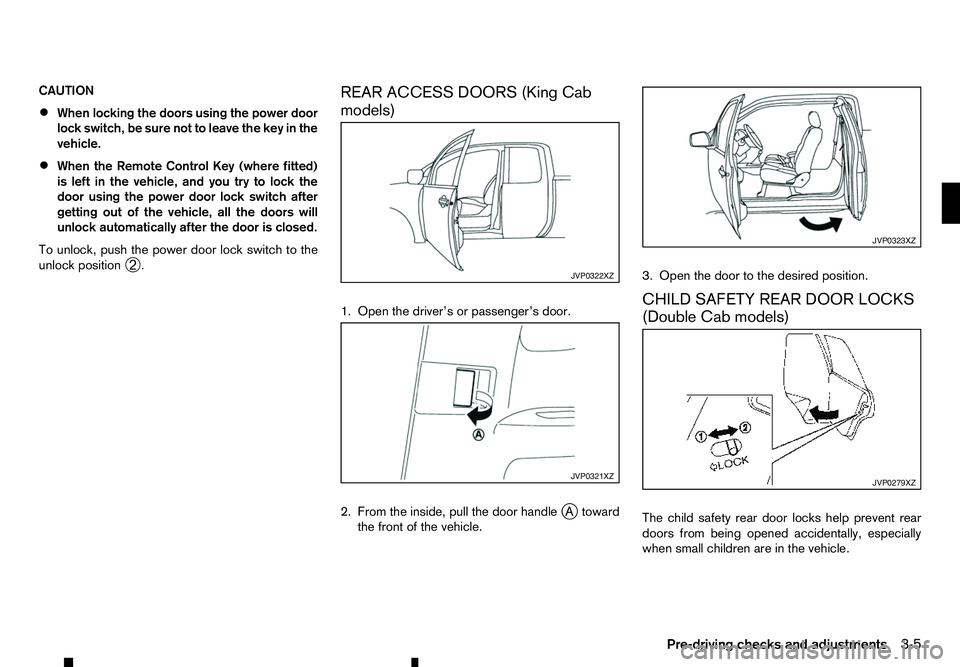
CAUTION
•
When locking the doors using the power door
lock switch, be sure not to leave the key in the
vehicle.
• When the Remote Control Key (where fitted)
is left in the vehicle, and you try to lock the
door using the power door lock switch after
getting out of the vehicle, all the doors will
unlock automatically after the door is closed.
To unlock, push the power door lock switch to the
unlock position ➁. REAR ACCESS DOORS (King Cab
models)
1. Open the driver’s or passenger’s door.
2. From the inside, pull the door handle
j
At oward
the front of the vehicle. 3. Open the door to the desired position.
CHILD SAFETY REAR DOOR LOCKS
(Double Cab models)
The child safety rear door locks help prevent rear
doors from being opened accidentally, especially
when small children are in the vehicle. JVP0322XZ
JVP0321XZ JVP0323XZ
JVP0279XZ
Pre-driving checks and adjustments
3-5
Page 110 of 340
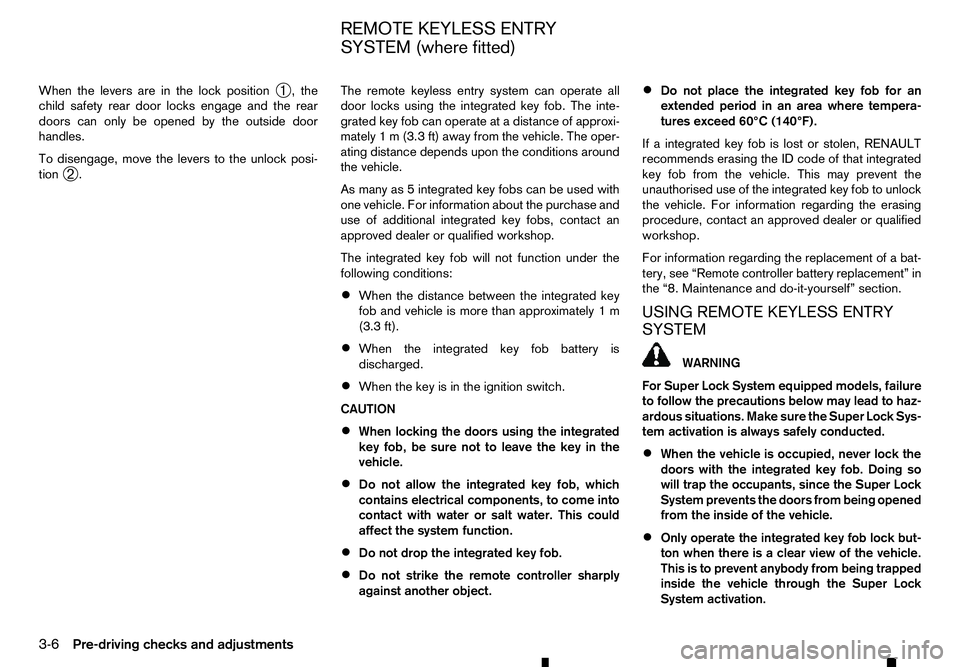
When the levers are in the lock position
➀,t
he
child safety rear door locks engage and the rear
doors can only be opened by the outside door
handles.
To disengage, move the levers to the unlock posi-
tion ➁. The remote keyless entry system can operate all
door locks using the integrated key fob. The inte-
grated key fob can operate at
adistance of approxi-
mately 1m(3.3 ft) away from the vehicle. The oper-
ating distance depends upon the conditions around
the vehicle.
As many as 5integrated key fobs can be used with
one vehicle. For information about the purchase and
use of additional integrated key fobs, contact an
approved dealer or qualified workshop.
The integrated key fob will not function under the
following conditions:
• When the distance between the integrated key
fob and vehicle is more than approximately 1m
(3.3 ft).
• When the integrated key fob battery is
discharged.
• When the key is in the ignition switch.
CAUTION
• When locking the doors using the integrated
key fob, be sure not to leave the key in the
vehicle.
• Do not allow the integrated key fob, which
contains electrical components, to come into
contact with water or salt water. This could
affect the system function.
• Do not drop the integrated key fob.
• Do not strike the remote controller sharply
against another object. •
Do not place the integrated key fob for an
extended period in an area where tempera-
tures exceed 60°C (140°F).
If ai ntegrated key fob is lost or stolen, RENAULT
recommends erasing the ID code of that integrated
key fob from the vehicle. This may prevent the
unauthorised use of the integrated key fob to unlock
the vehicle. For information regarding the erasing
procedure, contact an approved dealer or qualified
workshop.
For information regarding the replacement of abat-
tery, see “Remote controller battery replacement” in
the “8. Maintenance and do-it-yourself” section.
USING REMOTE KEYLESS ENTRY
SYSTEM WARNING
For Super Lock System equipped models, failure
to follow the precautions below may lead to haz-
ardous situations. Make sure the Super Lock Sys-
tem activation is always safely conducted.
• When the vehicle is occupied, never lock the
doors with the integrated key fob. Doing so
will trap the occupants, since the Super Lock
System prevents the doors from being opened
from the inside of the vehicle.
• Only operate the integrated key fob lock but-
ton when there is
aclear view of the vehicle.
This is to prevent anybody from being trapped
inside the vehicle through the Super Lock
System activation.
REMOTE KEYLESS ENTRY
SYSTEM (where fitted)
3-6 Pre-driving checks and adjustments