maintenance RENAULT ALASKAN 2017 Owner's Manual
[x] Cancel search | Manufacturer: RENAULT, Model Year: 2017, Model line: ALASKAN, Model: RENAULT ALASKAN 2017Pages: 340, PDF Size: 6.93 MB
Page 135 of 340
11.
HOW TO USE TOUCH SCREEN
DISPLAY WARNING
• The glass display screen may break if it is hit
with ahard or sharp object. If the glass screen
breaks, do not touch it. Doing so could result
in an injury.
• To clean the display, never use
arough cloth,
alcohol, benzine, thinner or any kind of sol-
vent or paper towel with achemical cleaning
agent. They will scratch or deteriorate the
panel.
• Do not splash any liquid such as water or car
fragrance on the display. Contact with liquid
will cause the system to malfunction.
To help ensure safe driving, some functions cannot
be operated while driving.
The on-screen functions that are not available while
driving will be “greyed out” or muted.
Park the vehicle in asafe location and then operate
the navigation system.
CAUTION
• ALWAYS give your full attention to driving.
• Avoid using vehicle features that could dis-
tract you. If distracted, you could lose control
of your vehicle and cause an accident. Touch screen operation
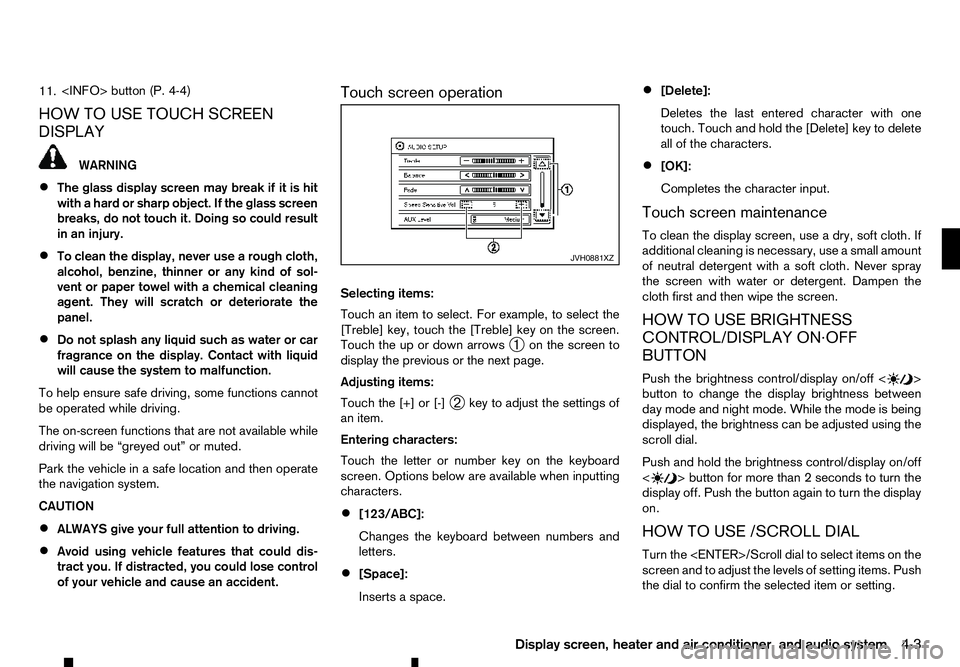
Selecting items:
Touch an item to select. For example, to select the
[Treble] key, touch the [Treble] key on the screen.
Touch the up or down arrows
➀on the screen to
display the previous or the next page.
Adjusting items:
Touch the [+] or [-] ➁key to adjust the settings of
an item.
Entering characters:
Touch the letter or number key on the keyboard
screen. Options below are available when inputting
characters.
• [123/ABC]:
Changes the keyboard between numbers and
letters.
• [Space]:
Inserts
aspace. •
[Delete]:
Deletes the last entered character with one
touch. Touch and hold the [Delete] key to delete
all of the characters.
• [OK]:
Completes the character input.
Touch screen maintenance
To clean the display screen, use adry, soft cloth. If
additional cleaning is necessary, use asmall amount
of neutral detergent with asoft cloth. Never spray
the screen with water or detergent. Dampen the
cloth first and then wipe the screen.
HOW TO USE BRIGHTNESS
CONTROL/DISPLAY ON·OFF
BUTTON
Push the brightness control/display on/off < >
button to change the display brightness between
day mode and night mode. While the mode is being
displayed, the brightness can be adjusted using the
scroll dial.
Push and hold the brightness control/display on/off
< >b
utton for more than
2seconds to turn the
display off. Push the button again to turn the display
on.
HOW TO USE /SCROLL DIAL
Turn the
screen and to adjust the levels of setting items. Push
the dial to confirm the selected item or setting. JVH0881XZ
Display screen, heater and air conditioner, and audio system
4-3
Page 163 of 340

Air conditioner filter
The air conditioner system is equipped with an air
conditioner filter which collects and neutralises dirt,
pollen, dust, etc. To make sure that the air condi-
tioner heats, defogs and ventilates efficiently, re-
place the filter in accordance with the specified
maintenance intervals listed in the separate mainte-
nance booklet. To replace the filter, contact an ap- proved dealer or qualified workshop.
The filter should be replaced if the air flow decreases
significantly or if windows fog up easily when oper-
ating the heater or air conditioner. AUDIO OPERATION PRECAUTIONS WARNING
Do not adjust the audio system while driving so
that full attention may be given to vehicle opera-
tion.
Radio
• Radio reception is affected by station signal
strength, distance from radio transmitter, build-
ings, bridges, mountains and other external influ-
ences. Intermittent changes in reception quality
normally are caused by these external influences.
• Using
amobile phone in or near the vehicle may
influence radio reception quality. Compact Disc (CD) player
•
During cold weather or rainy days, the player
may malfunction due to the humidity. If this oc-
curs, remove the CD from CD player and dehu-
midify or ventilate the player completely.
• The player may skip while driving on rough roads. SAA0480
AUDIO SYSTEM (where fitted)
Display screen, heater and air conditioner, and audio system 4-31
Page 204 of 340
During the first 1,600 km (1,000 miles), follow these
recommendations to obtain maximum engine per-
formance and ensure the future reliability and
economy of your new vehicle. Failure to follow these
recommendations may result in shortened engine
life and reduced engine performance.
• Do not drive at
aconstant speed, either fast or
slow, for long periods of time.
• Do not run the engine over 4,000 rpm.
• Do not accelerate at full throttle in any gear.
• Do not start quickly.
• Do not brake hard as much as possible.
• Do not tow
atrailer for at least the first 800 km
(500 miles). WARNING
The driving characteristics of your vehicle will
change remarkably by any additional load and its
distribution, as well as by adding optional equip-
ment (trailer coupling, roof rail, etc.). Your driv-
ing style and speed must be adjusted according
to the circumstances. Especially when carrying
heavy loads, your speed must be reduced ad-
equately.
• Make sure the area around the vehicle is clear.
• Check fluid levels such as engine oil, coolant,
brake (and clutch) fluid, window washer fluid as
frequently as possible, at least whenever you
refuel.
• Visually inspect tyres for their appearance and
condition. Measure and check the tyre pressure
for proper inflation.
• Check that all windows and lights are clean.
• Adjust the seat and head restraint positions.
• Adjust the inside and outside rearview mirror po-
sitions.
• Fasten your seat belt and ask all passengers to
do the same.
• Check that all doors are closed.
• Check the operation of the warning lights when
the ignition switch is placed in the “ON” position. •
Maintenance items in the “8. Maintenance and
do-it-yourself” section should be checked peri-
odically.
RUNNING-IN SCHEDULE
BEFORE STARTING ENGINE
5-2 Starting and driving
Page 206 of 340
AdBlue® warning display
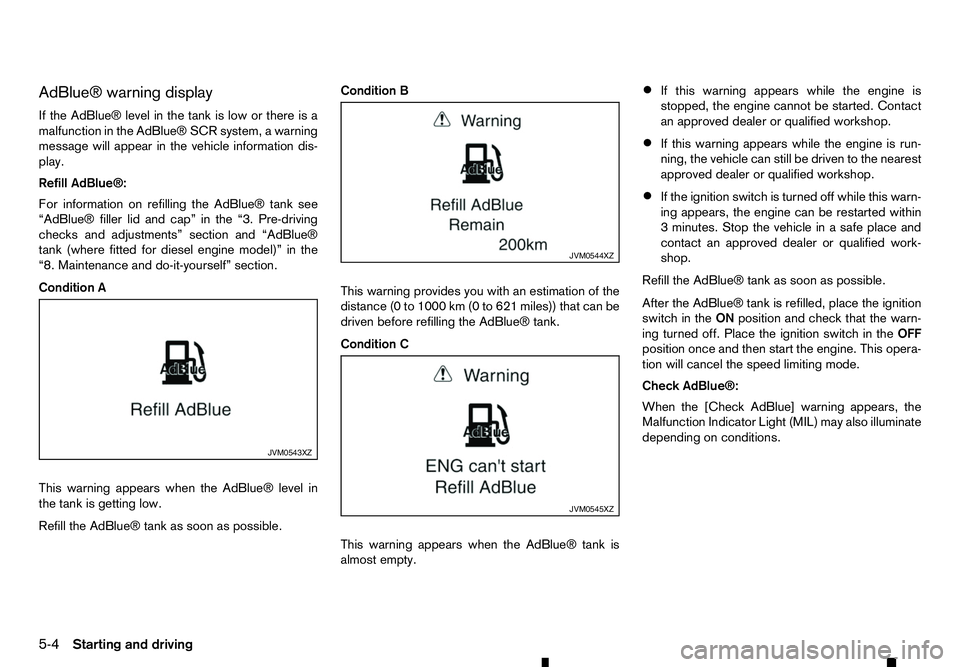
If the AdBlue® level in the tank is low or there is a malfunction in the AdBlue® SCR system, awarning
message will appear in the vehicle information dis- play.
Refill AdBlue®:
For information on refilling the AdBlue® tank see
“AdBlue® filler lid and cap” in the “3. Pre-driving
checks and adjustments” section and “AdBlue®
tank (where fitted for diesel engine model)” in the
“8. Maintenance and do-it-yourself” section.
Condition A
This warning appears when the AdBlue® level in
the tank is getting low.
Refill the AdBlue® tank as soon as possible. Condition B
This warning provides you with an estimation of the
distance (0 to 1000 km (0 to 621 miles)) that can be
driven before refilling the AdBlue® tank.
Condition C
This warning appears when the AdBlue® tank is
almost empty.•
If this warning appears while the engine is
stopped, the engine cannot be started. Contact
an approved dealer or qualified workshop.
• If this warning appears while the engine is run-
ning, the vehicle can still be driven to the nearest
approved dealer or qualified workshop.
• If the ignition switch is turned off while this warn-
ing appears, the engine can be restarted within
3m
inutes. Stop the vehicle in asafe place and
contact an approved dealer or qualified work-
shop.
Refill the AdBlue® tank as soon as possible.
After the AdBlue® tank is refilled, place the ignition
switch in the ONposition and check that the warn-
ing turned off. Place the ignition switch in the OFF
position once and then start the engine. This opera-
tion will cancel the speed limiting mode.
Check AdBlue®:
When the [Check AdBlue] warning appears, the
Malfunction Indicator Light (MIL) may also illuminate
depending on conditions. JVM0543XZ JVM0544XZ
JVM0545XZ
5-4 Starting and driving
Page 207 of 340
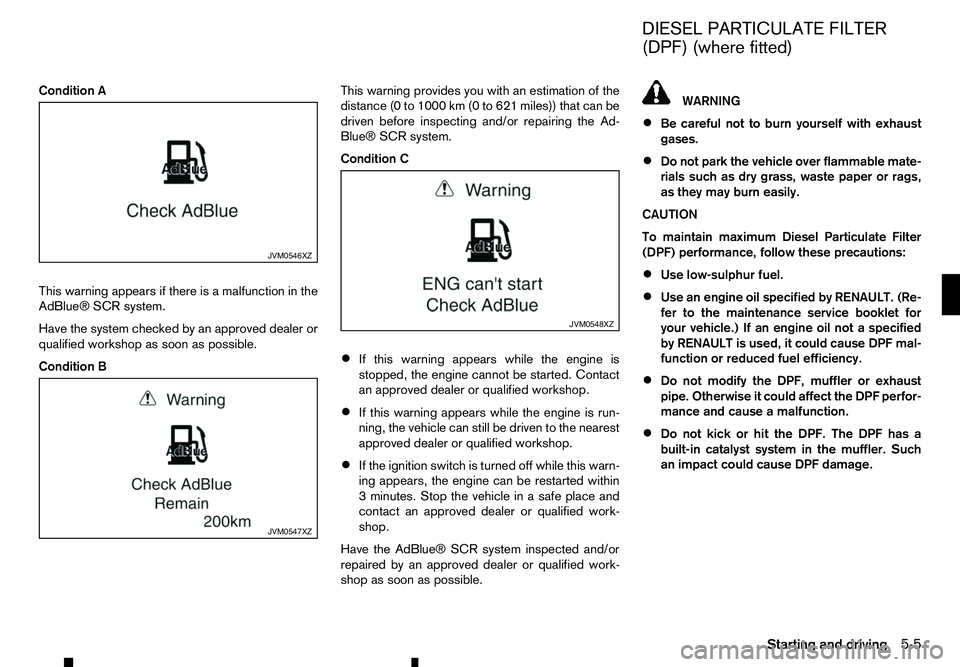
Condition A
This warning appears if there is amalfunction in the
AdBlue® SCR system.
Have the system checked by an approved dealer or
qualified workshop as soon as possible.
Condition B This warning provides you with an estimation of the
distance (0 to 1000 km (0 to 621 miles)) that can be
driven before inspecting and/or repairing the Ad-
Blue® SCR system.
Condition C
• If this warning appears while the engine is
stopped, the engine cannot be started. Contact
an approved dealer or qualified workshop.
• If this warning appears while the engine is run-
ning, the vehicle can still be driven to the nearest
approved dealer or qualified workshop.
• If the ignition switch is turned off while this warn-
ing appears, the engine can be restarted within
3m
inutes. Stop the vehicle in asafe place and
contact an approved dealer or qualified work-
shop.
Have the AdBlue® SCR system inspected and/or
repaired by an approved dealer or qualified work-
shop as soon as possible. WARNING
• Be careful not to burn yourself with exhaust
gases.
• Do not park the vehicle over flammable mate-
rials such as dry grass, waste paper or rags,
as they may burn easily.
CAUTION
To maintain maximum Diesel Particulate Filter
(DPF) performance, follow these precautions:
• Use low-sulphur fuel.
• Use an engine oil specified by RENAULT. (Re-
fer to the maintenance service booklet for
your vehicle.) If an engine oil not
aspecified
by RENAULT is used, it could cause DPF mal-
function or reduced fuel efficiency.
• Do not modify the DPF, muffler or exhaust
pipe. Otherwise it could affect the DPF perfor-
mance and cause
amalfunction.
• Do not kick or hit the DPF. The DPF has a
built-in catalyst system in the muffler. Such
an impact could cause DPF damage. JVM0546XZ
JVM0547XZ JVM0548XZ
DIESEL PARTICULATE FILTER
(DPF) (where fitted)
Starting and driving 5-5
Page 210 of 340
•
Be sure to check the brakes immediately af-
ter driving in mud or water. See “Brake
system” later in this section for wet brakes.
• Avoid parking your vehicle on steep hills. If
you get out of the vehicle and it rolls forward,
backward or sideways, you could be injured.
• Whenever you drive off-road through sand,
mud or water as deep as the wheel hub, more
frequent maintenance may be required. See
the maintenance information in
aseparate
maintenance booklet.
• Rinse the underside of the vehicle with fresh
water after driving through mud or sand. Re-
move any brush or sticks that are trapped. The turbocharger system uses engine oil for lubrica-
tion and cooling of its rotating components. The tur-
bocharger turbine turns at extremely high speeds
and it can reach an extremely high temperature. It is
essential to maintain
aflow of clean oil through the
turbocharger system. Asudden interruption to the
oil supply may cause amalfunction in the turbo-
charger.
To ensure prolonged life and performance of the
turbocharger, it is essential to comply with the fol-
lowing maintenance procedure:
CAUTION
• Change the engine oil of the turbo-charged
diesel engine as prescribed. See the sepa-
rately provided maintenance booklet for addi-
tional information.
• Use only the recommended engine oil. For
details, refer to the maintenance service
booklet for your vehicle.
• If the engine has been operating at high rpm
for an extended period of time, let it idle for a
few minutes prior to shutdown.
• Do not accelerate the engine to high rpm im-
mediately after starting it.
• When starting the engine at ambient tempera-
tures below −5°C (23°F), an engine protection
mode may be activated. During this time, the
engine output is reduced. The engine protec-
tion mode is switched off automatically after
am
aximum of 3minutes (provided the accel-
erator pedal is released completely). Driving your vehicle to fit the circumstances is es-
sential for your safety and comfort. As
adriver, you
should be the one who knows best how to drive in
the given circumstances.
ENGINE COLD START PERIOD
Due to the higher engine speeds, when the engine
is cold, extra caution must be exercised when se-
lecting agear during the engine warm-up period
after starting the engine.
LOADING LUGGAGE
Loads and their distribution and the attachment of
equipment (roof baggage carriers, etc.) will consid-
erably change the driving characteristics of the ve-
hicle. Your driving style and speed must be adjusted
according to the circumstances.
DRIVING IN WET CONDITIONS
• Avoid accelerating or stopping suddenly.
• Avoid sharp turning or lane changing suddenly.
• Avoid following too close to the vehicle in front.
When water covers the road surface with water
puddles, small water streams, etc., reduce speed to
prevent hydroplaning which can cause skidding and
loss of control. Worn tyres will increase this risk.
DRIVING IN WINTER CONDITIONS • Drive cautiously.
• Avoid accelerating or stopping suddenly.
• Avoid sharp turning or lane changing suddenly.
TURBOCHARGER SYSTEM CARE WHEN DRIVING
5-8 Starting and driving
Page 217 of 340
Unlocking the steering wheel
1) Insert the key into the ignition switch.
2) Gently turn the ignition switch while rotating the steering wheel left and right. PRECAUTIONS ON PUSH-BUTTON
IGNITION SWITCH OPERATION WARNING
Do not operate the push-button ignition switch
while driving the vehicle except in an emergency.
(The engine will stop when the ignition switch is
pushed 3consecutive times or the ignition switch
is pushed and held for more than 2seconds.)
The steering wheel may lock and could cause
the driver to lose control of the vehicle. This could
result in serious vehicle damage or personal in-
jury.
REMOTE CONTROL KEY SYSTEM
The Remote Control Key system can operate the
ignition switch without taking the key out from your
pocket or bag. The operating environment and/or
conditions may affect the Remote Control Key sys-
tem operation.
Some indicators and warnings for operation are dis-
played in the vehicle information display and/or in
the meter. (See “Warning lights, indicator lights and
audible reminders” in the “2. Instruments and
controls” section and “Vehicle information display”
in the “2. Instruments and controls” section.)
CAUTION
• Be sure to carry the Remote Control Key with
you when operating the vehicle.
• Never leave the Remote Control Key inside
the vehicle when you leave the vehicle. •
If the vehicle battery is discharged, the igni-
tion switch cannot be switched from the
“LOCK” position, and if the steering lock is
engaged, the steering wheel cannot be
moved. Charge the battery as soon as pos-
sible. (See “Remote Control Key battery
replacement” in the “8. Maintenance and
do-it-yourself” section.)
Operating range
The Remote Control Key can only be used for start-
ing the engine when the Remote Control Key is
within the specified operating range ➀as illus-
trated.
When the Remote Control Key battery is almost dis-
charged or strong radio waves are present near the
operating location, the Remote Control Key sys-
tem’s operating range becomes narrower and may
not function properly.
If the Remote Control Key is within the operating JVS0442XZ
PUSH-BUTTON IGNITION SWITCH (models with Remote Control Key
system)
Starting and driving5-15
Page 250 of 340
Your new vehicle was designed to be used primarily
to carry passengers and luggage.
Towing atrailer will place additional loads on your
vehicle’s engine, drive train, steering, braking and
other systems. The towing of atrailer will exagger-
ate other conditions such as sway caused by cross-
winds, rough road surfaces or passing trucks.
Your driving style and speed must be adjusted ac-
cording to the circumstances. Before towing a
trailer, see an approved dealer or qualified work-
shop for an explanation about the proper use of tow-
ing equipment.
OPERATING PRECAUTIONS
• Avoid towing
atrailer during the running-in pe-
riod.
• Before driving, make sure that the lighting sys-
tem of the trailer works properly.
• Observe the legal maximum speeds for trailer
operation.
• Avoid abrupt starts, accelerations and stops.
• Avoid sharp turns and lane changes.
• Always drive your vehicle at
amoderate speed.
• Follow the trailer manufacturer’s instructions.
• Choose proper coupling devices (trailer hitch,
safety chain, roof carrier, etc.) for your vehicle
and trailer. These devices are available from an
approved dealer or qualified workshop where
you can also obtain more detailed information
about trailer towing. •
Never allow the total trailer load (trailer weight
plus its cargo weight) to exceed the maximum
set for the vehicle and the coupling device. See
an approved dealer or qualified workshop for
more information.
• The trailer must be loaded so that heavy goods
are placed over the axle. The maximum allowable
vertical load on the trailer hitch must not be ex-
ceeded.
• Have your vehicle serviced more often than at
the intervals specified in
aseparate maintenance
booklet.
• Trailer towing requires more fuel than under nor-
mal circumstances because of
aconsiderable
increase in traction power and resistance.
While towing atrailer, check the engine coolant
temperature indicator to prevent the vehicle from
overheating.
TYRE PRESSURE
When towing atrailer, inflate the vehicle tyres to the
maximum recommended COLD tyre pressure (for
full loading) indicated on the tyre placard.
Do not tow atrailer when the vehicle is installed with
at emporary spare tyre or acompact spare tyre.
SAFETY CHAINS
Always use asuitable chain between the vehicle
and trailer. The chain should be crossed and should
be attached to the hitch, not to the vehicle bumper
or axle. Be sure to leave enough slack in the chain
to permit turning corners. TRAILER BRAKES
Ensure that trailer brakes are installed as required
by local regulations. Also check that all other trailer
equipment conforms to local regulations.
Always block the wheels on both the vehicle and
trailer when parking. Apply the hand brake on the
trailer where fitted. Parking on
asteep slope is not
recommended.
If parking on asteep slope is unavoidable, place the
shift lever in the P(Park) position (Automatic trans-
mission model), or in an appropriate position
(Manual transmission model), and turn the front
wheels towards the kerb.
TRAILER DETECTION (where fitted)
When towing atrailer with agenuine RENAULT tow
bar electrical kit and the turn signal switch is used,
the electrical system of the vehicle will detect the
additional electrical load of the trailer lighting. As a
result, the direction indicator tone will be different.
TRAILER TOWING
5-48
Starting and driving
Page 253 of 340
When the ABS senses that one or more wheels are
close to locking up, the actuator rapidly applies and
releases hydraulic pressure. This action is similar to
pumping the brakes very quickly. You may feel a
pulsation in the brake pedal and hear anoise from
under the bonnet or feel avibration from the actua-
tor when it is operating. This is normal and indicates
that the ABS is operating properly. However, the
pulsation may indicate that road conditions are haz-
ardous and extra care is required while driving.
When the differential lock (where fitted) is engaged,
the ABS warning light illuminates. This indicates that
the anti-lock function is not fully operating. (See
“Rear differential locking system (where fitted)” ear-
lier in this section for the rear differential lock func-
tion.) WARNING
• Whatever the condition, drive with caution.
Accelerate and decelerate with great care. If
accelerating or decelerating too fast, the drive
wheels will lose even more traction.
• Allow more stopping distance in cold weather
driving. Braking should be started sooner than
on dry pavement.
• Keep at
agreater distance from the vehicle in
front of you on slippery roads.
• Wet ice (0°C, 32°F and freezing rain), very cold
snow and ice can be slick and very difficult to
drive on. The vehicle will have
alot less trac-
tion or grip under these conditions. Try to
avoid driving on wet ice until the road is salted
or sanded.
• Watch for slippery spots (glaring ice). These
may appear on an otherwise clear road in
shaded areas. If
apatch of ice is seen ahead,
brake before reaching it. Try not to brake while
actually on the ice, and avoid any sudden
steering manoeuvres.
• Do not use cruise control on slippery roads.
• Snow can trap dangerous exhaust gas under
your vehicle. Keep snow clear of the exhaust
pipe and from around your vehicle. BATTERY
If the battery is not fully charged during extremely
cold weather conditions, the battery fluid may freeze
and damage the battery. To maintain maximum effi-
ciency, the battery should be checked regularly. For
details, see “Battery” in the “8. Maintenance and
do-it-yourself” section of this manual.
ENGINE COOLANT
If the vehicle is to be left outside without anti-freeze,
drain the cooling system, including the engine block.
Refill before operating the vehicle. For details, see
“Engine cooling system” in the “8. Maintenance and
do-it-yourself” section of this manual.
TYRE EQUIPMENT
1. If you have snow tyres installed on the front/rear
wheels of your vehicle, they should be of the
same size, loading range, construction and type
(bias, bias-belted or radial) as the rear/front tyres.
2. If the vehicle is to be operated in severe winter conditions, snow tyres should be installed on all
four wheels.
3. For additional traction on icy roads, studded tyres may be used. However, some countries, prov-
inces and states prohibit their use. Check local,
state and provincial laws before installing stud-
ded tyres.
Skid and traction capabilities of studded snow
tyres, on wet or dry surfaces, may be poorer
than that of non-studded snow tyres.
COLD WEATHER DRIVING
Starting and driving5-51
Page 277 of 340
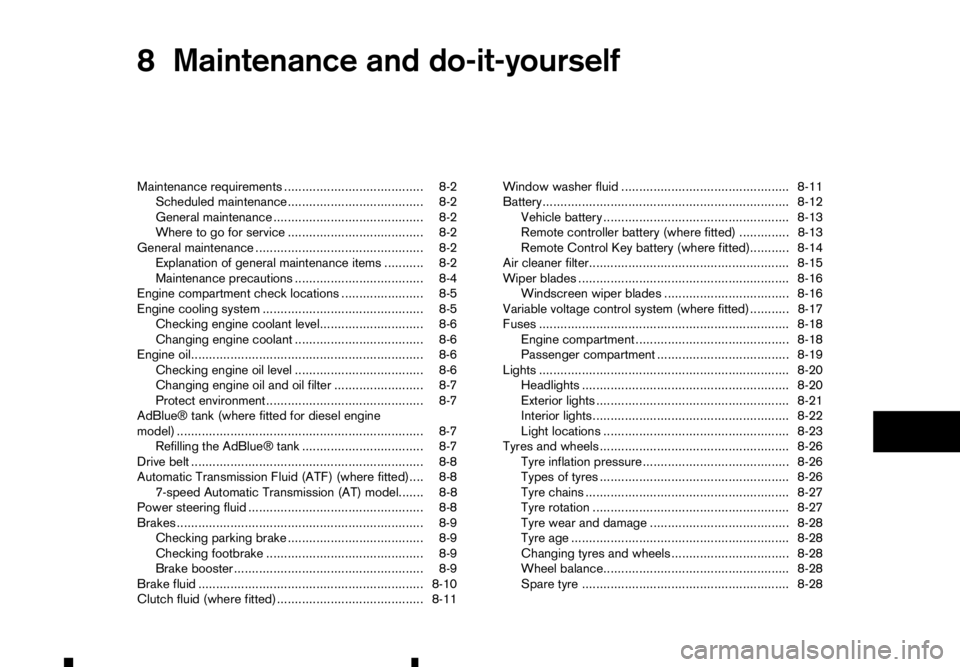
8
Maintenance and do-it-yourself
Maintenance and do-it-yourself
Maintenance requirements ....................................... 8-2 Scheduled maintenance...................................... 8-2
General maintenance .......................................... 8-2
Where to go for service ...................................... 8-2
General maintenance ............................................... 8-2 Explanation of general maintenance items ........... 8-2
Maintenance precautions .................................... 8-4
Engine compartment check locations ....................... 8-5
Engine cooling system ............................................. 8-5 Checking engine coolant level............................. 8-6
Changing engine coolant .................................... 8-6
Engine oil................................................................. 8-6
Checking engine oil level .................................... 8-6
Changing engine oil and oil filter ......................... 8-7
Protect environment ............................................ 8-7
AdBlue® tank (where fitted for diesel engine
model) ..................................................................... 8-7 Refilling the AdBlue® tank .................................. 8-7
Drive belt ................................................................. 8-8
Automatic Transmission Fluid (ATF) (where fitted).... 8-8 7-speed Automatic Transmission (AT) model....... 8-8
Power steering fluid ................................................. 8-8
Brakes ..................................................................... 8-9 Checking parking brake ...................................... 8-9
Checking footbrake ............................................ 8-9
Brake booster ..................................................... 8-9
Brake fluid ............................................................... 8-10
Clutch fluid (where fitted) ......................................... 8-11 Window washer fluid ............................................... 8-11
Battery..................................................................... 8-12
Vehicle battery .................................................... 8-13
Remote controller battery (where fitted) .............. 8-13
Remote Control Key battery (where fitted)........... 8-14
Air cleaner filter........................................................ 8-15
Wiper blades ........................................................... 8-16 Windscreen wiper blades ................................... 8-16
Variable voltage control system (where fitted) ........... 8-17
Fuses ...................................................................... 8-18 Engine compartment ........................................... 8-18
Passenger compartment ..................................... 8-19
Lights ...................................................................... 8-20
Headlights .......................................................... 8-20
Exterior lights ...................................................... 8-21
Interior lights....................................................... 8-22
Light locations .................................................... 8-23
Tyres and wheels ..................................................... 8-26 Tyre inflation pressure......................................... 8-26
Types of tyres ..................................................... 8-26
Tyre chains ......................................................... 8-27
Tyre rotation ....................................................... 8-27
Tyre wear and damage ....................................... 8-28
Tyre age ............................................................. 8-28
Changing tyres and wheels................................. 8-28
Wheel balance.................................................... 8-28
Spare tyre .......................................................... 8-28