key RENAULT ALASKAN 2017 Service Manual
[x] Cancel search | Manufacturer: RENAULT, Model Year: 2017, Model line: ALASKAN, Model: RENAULT ALASKAN 2017Pages: 340, PDF Size: 6.93 MB
Page 180 of 340
4) Enter the PIN code shown on the relevant
device with the device’s own keypad, and
press the confirmation key on the device it-
self.
Refer to the relevant Bluetooth® device own-
er’s manual for further details.
[Sel. device]:
The paired device list shows which Bluetooth® au-
dio or mobile phone devices have been paired or
registered with the Bluetooth® audio system. If the
list contains devices then select the appropriate de-
vice to connect to the Bluetooth® audio system.
The following symbols (where fitted) indicate the
capability of the registered device:
• :M
obile phone integration
• :A
udio streaming (A2DP
–Advanced Audio
Distribution Profile)
[Del. device]:
Ar egistered device can be removed from the Blue-
tooth audio system. Select aregistered device then
press
[Bluetooth]:
If Bluetooth® has been switched off anotification
message [ON/OFF] appears when you select [Blue-
tooth] from the phone menu (press ). To switch
the Bluetooth® signal on, press
follow up screen will appear. Then select [ON] and
press
menu screen. Bluetooth
®audio streaming main
operation
Turn the ignition switch to the ACC or ON position.
If the audio system was turned off while the Blue-
tooth® audio was playing, pressing the < >b
ut-
ton
will start the Bluetooth® audio streaming.
MEDIA button:
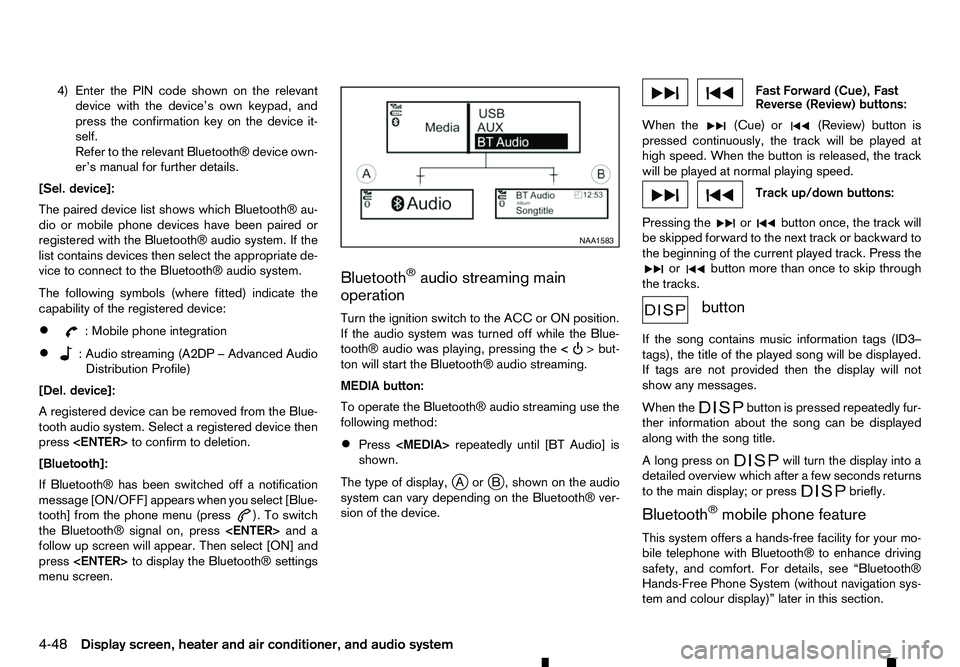
To operate the Bluetooth® audio streaming use the
following method:
• Press
shown.
The type of display, jAor jB, shown on the audio
system can vary depending on the Bluetooth® ver-
sion of the device. Fast Forward (Cue), Fast
Reverse (Review) buttons:
When the (Cue) or
(Review) button is
pressed continuously, the track will be played at
high speed. When the button is released, the track
will be played at normal playing speed. Track up/down buttons:
Pressing the or button once, the track will
be skipped forward to the next track or backward to
the beginning of the current played track. Press the or button more than once to skip through
the tracks. button
If the song contains music information tags (ID3–
tags), the title of the played song will be displayed.
If tags are not provided then the display will not
show any messages.
When the button is pressed repeatedly fur-
ther information about the song can be displayed
along with the song title.
Al ong press on will turn the display into a
detailed overview which after afew seconds returns
to the main display; or press briefly.
Bluetooth
®mobile phone feature
This system offers ahands-free facility for your mo-
bile telephone with Bluetooth® to enhance driving
safety, and comfort. For details, see “Bluetooth®
Hands-Free Phone System (without navigation sys-
tem and colour display)” later in this section. NAA1583
4-48 Display
screen, heater and air conditioner, and audio system
Page 185 of 340
Radio band select button:
Push the
follows:
AM →DAB →FM →AM
If another audio source is playing when the FM·AM
button is pushed, the audio source playing will auto-
matically be turned off and the last radio station
played will begin playing.
Radio tuning:
When in radio mode, the radio can be tuned using
the touch screen. To bring up the visual tuner, touch
the [Tune] key on the lower part of the screen. A
screen appears with abar running from low fre-
quencies on the left to high frequencies on the right.
One of the following operations can be used for tun-
ing.
• Touching the bar on the screen
• Touching [ ]/[ ]o nt
he screen
• Turning the
To return to the regular radio display screen, touch
the [OK] key.
Station List:
When in FM or DAB (where fitted) mode, touch [FM
List] or [DAB List] to display the station lists. Seek/Track buttons:
When in radio mode, push the Seek/Track buttons
to tune from low to high or high to low frequencies
and to stop at the next broadcasting station. Station memory keys:
Up to six stations can be stored for AM band, and
up to twelve stations can be stored for each of the
other bands.
1. Choose the radio band using the
ton.
2. Tune to the desired station using manual or seek tuning. Touch and hold any of the desired station
memory keys until abeep sound is heard.
For FM and DAB (where fitted), touch the [7-12]
key to display the 7-12memory keys.
3. The channel indicator will then come on and the sound will resume. Programming is now com-
plete.
DAB operation:
In the DAB mode, the following operation keys and
information are available.
• DAB List:
Touch to display the available station list.
• TA:
Touch this key to turn on and off the TA (Traffic
Announcement) mode. When turned on,
received TA will interrupt the audio source that is
playing. •
Extra chan.:
The [Extra chan.] key will allow access to extra
stations transmitted within the group of the cur-
rently selected station. If extra stations are not
available within the group, the key will not oper-
ate.
• Radio text:
Radio text is shown on the DAB main screen
underneath the DAB station name. This displays
radio programme and song information as deter-
mined by the DAB station.
EAS in EAS test (displayed on the screen as aPTY
name) is an abbreviation of Emergency Alert Sys-
tem.
Occasionally, in areas of poor DAB signal strength,
the full station name in the DAB List and DAB main
screen might be distorted. In this situation it may still
be possible to listen to the particular radio station, at
ar educed level of sound quality, but this is not al-
ways possible. This may also be shown in the ve-
hicle information display.
CD player operation
Loading disc:
Insert aCDi nto the slot with the label side facing
up. The CD will be guided automatically into the slot
and will start playing. If the radio is already playing,
it will automatically turn off, and the CD will start
playing.
Display screen, heater and air conditioner, and audio system 4-53
Page 186 of 340
CAUTION
Do not force the compact disc into the slot. This
could damage the player. CD button:
When the CD button is pushed with the system off
and the CD loaded, the system will turn on and the
CD will start to play.
When the CD button is pushed with aCDloaded
while the radio playing, the radio will turned off and
the CD will start to play. Seek/Track button:
When the or button is pushed for more
than 1.5 seconds while the CD is being played, the
CD will play while fast forwarding or rewinding.
When the button is released, the CD will return to
normal play speed.
When the or button is pushed for less
than 1.5 seconds while the CD is being played, the
next track or the beginning of the current track on
the CD will be played. Push the button several times
to skip through the tracks on the CD. If the last track
on aCDiss kipped, the first track on the disc will
play. If the last track in afolder of an MP3 CD is
skipped, the first track of the next folder will play.
CD/MP3/WMA display mode:
While listening to aCDoranMP3/WMA CD, cer-
tain text may be displayed (when aCDencoded
with text is being used). Depending on how the CD or MP3/WMA CD is encoded, the text is displayed
listing the artist, album and song title. Operation
keys are also displayed on the screen.
Mix:
Touching the [Mix] key while an CD or MP3 CD is
playing will alternate the random play pattern as fol-
lows:
(CD)
(Normal)
→Mix →(Normal)
(CD with compressed audio files)
(Normal) →Random Folder →Random All →(Nor-
mal)
Repeat:
Touching the [Repeat] key while an CD or MP3 CD
is playing will alternate the repeat play pattern as fol-
lows:
(CD)
(Normal) →Repeat →(Normal)
(CD with compressed audio files)
(Normal) →Repeat Track →Repeat Folder →(Nor-
mal)
Browse:
Touch the [Browse] key to display the titles on the
CD in list format. Touch the title of asong in the list
to begin playing that song. If an MP3 CD is playing,
touching the [Browse] key will also list the folders
on the disc. Touch the [Folder Up] key to view the lists in the upper layer. Follow the procedure for
selecting asong with the touch screen to choose a
folder. Disc eject button:
When the Disc eject button is pushed while aCDis
loaded, the CD will be ejected.
If the CD is not removed within 10 seconds, the CD
will be reloaded.
USB (Universal Serial Bus) Connection
Port WARNING
Do not connect, disconnect or operate the USB
device while driving. Doing so can be adistrac-
tion. If distracted you could lose control of your
vehicle and cause an accident or serious injury.
CAUTION
• Do not force the USB device into the USB
port. Inserting the USB device tilted or up-
side-down into the port may damage the port.
Make sure that the USB device is connected
correctly into the USB port.
• Do not grab the USB port cover (where fitted)
when pulling the USB device out of the port.
This could damage the port and the cover.
• Do not leave the USB cable in
aplace where
it can be pulled unintentionally. Pulling the
cable may damage the port.
4-54 Display screen, heater and air conditioner, and audio system
Page 187 of 340
General notes for USB use:
Refer to your device manufacturer’s owner informa-
tion regarding the proper use and care of the de-
vice.
The audio system operates when the ignition switch
is placed in the ONorACC position.
The USB port is located on the lower part of the
instrument panel. See “USB (Universal Serial Bus)
connection port” earlier in this section. Connect a
USB memory device into the connection port. The
USB memory device will be activated automatically.
USB main operation:
If another audio source is playing and aUSB memory
device is inserted, push the AUX button until the
screen on the display changes to the USB memory
mode.
If the system has been turned off while the USB
memory device was playing, push the Power/VOL-
UME dial to restart the USB memory device.
Touch the name of asong on the screen to begin
playing that song.
USB screen operation:
While files on aUSB memory device are playing,
the play pattern can be altered so that songs are
repeated or played randomly. Mix:
Touching the [Mix] key on the screen while aUSB
memory device is playing will alternate the random
play pattern as follows:
(Normal) →Random Folder →Random All →(Nor-
mal)
Repeat:
Touching the [Repeat] key on the screen while a
USB memory device is playing will alternate the re-
peat play pattern as follows:
(Normal) →Repeat Track →Repeat Folder →(Nor-
mal)
Browse:
Touch [Browse] key to display USB interface. Se-
lect the songs you wish to play by touching the item
on the screen. Seek/Track buttons:
Push the Seek/Track (rewind) button while an audio
file on the USB memory device is playing to return
to the beginning of the current track. Push the but-
ton several times to skip backward several tracks.
Push the Seek/Track (fast forward) button while an
audio file on the USB memory device is playing to
advance one track. Push the button several times to
skip forward several tracks. if the last track on the
USB memory device is skipped, the first track of the
next folder is played. iPod player operation
Connecting iPod:
Connect the iPod to the USB connection port using
the USB cable that came with your iPod.
The USB port is located on the lower part of the
instrument panel. See “USB (Universal Serial Bus)
connection port” earlier in this section.
If your iPod supports charging via
aUSB connec-
tion, its battery will be charged while connected to
the vehicle with the ignition switch placed in the ON
or ACC position.
Compatibility:
The following models are compatible:
• iPod 5th Generation (firmware version 1.2.3 or
later)
• iPod Classic (firmware version 1.1.1 or later)
• iPod Touch (firmware version 2.0.0 or later)*
• iPod nano
-1st generation (firmware version
1.3.1 or later)
• iPod nano
-2nd generation (firmware version
1.1.3 or later)
• iPod nano
-3rd generation (firmware version
1.1.3 or later)
• iPod nano
-4th generation (firmware version
1.0.4 or later)
• iPod nano
-5th generation (firmware version
1.0.1 or later)
Display screen, heater and air conditioner, and audio system 4-55
Page 188 of 340
*S
ome features of this iPod may not be fully func-
tional.
Make sure that your iPod firmware is updated to the
version indicated above.
iPod main operation:
If the system has been turned off while the iPod was
playing, pushing the Power/VOLUME dial will start
the iPod.
If another audio source is playing and aiPod is con-
nected, push the AUX button until the screen on the
display changes to the iPod mode.
Refer to your device manufacturer’s owner informa-
tion regarding the proper use and care of the de-
vice.
Interface operation:
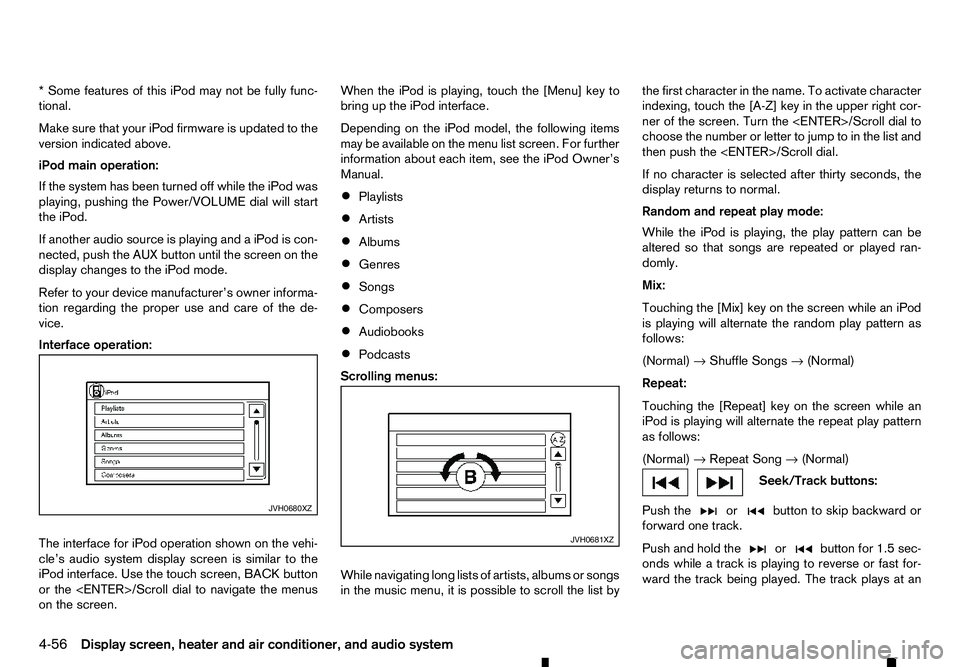
The interface for iPod operation shown on the vehi-
cle’s audio system display screen is similar to the
iPod interface. Use the touch screen, BACK button
or the
on the screen. When the iPod is playing, touch the [Menu] key to
bring up the iPod interface.
Depending on the iPod model, the following items
may be available on the menu list screen. For further
information about each item, see the iPod Owner’s
Manual.
• Playlists
• Artists
• Albums
• Genres
• Songs
• Composers
• Audiobooks
• Podcasts
Scrolling menus:
While navigating long lists of artists, albums or songs
in the music menu, it is possible to scroll the list by the first character in the name. To activate character
indexing, touch the [A-Z] key in the upper right cor-
ner of the screen. Turn the
choose the number or letter to jump to in the list and
then push the
If no character is selected after thirty seconds, the
display returns to normal.
Random and repeat play mode:
While the iPod is playing, the play pattern can be
altered so that songs are repeated or played ran-
domly.
Mix:
Touching the [Mix] key on the screen while an iPod
is playing will alternate the random play pattern as
follows:
(Normal) →Shuffle Songs →(Normal)
Repeat:
Touching the [Repeat] key on the screen while an
iPod is playing will alternate the repeat play pattern
as follows:
(Normal) →Repeat Song →(Normal) Seek/Track buttons:
Push the or button to skip backward or
forward one track.
Push and hold the or button for 1.5 sec-
onds while at
rack is playing to reverse or fast for-
ward the track being played. The track plays at an JVH0680XZ
JVH0681XZ
4-56 Display screen, heater and air conditioner, and audio system
Page 189 of 340
increased speed while reversing or fast forwarding.
When the button is released, the track returns to
normal play speed.
Bluetooth® audio player operation
If you have acompatible Bluetooth® audio device
that is capable of playing audio files, the device can be connected to the vehicle’s audio system so that
the audio files on the device play through the vehi-
cle’s speakers
Bluetooth® trademark:
m Bluetooth®
is
at rademark
owned by Bluetooth SIG, Inc.
and licensed to Robert Bosch
GmbH.
Connecting Bluetooth® audio:
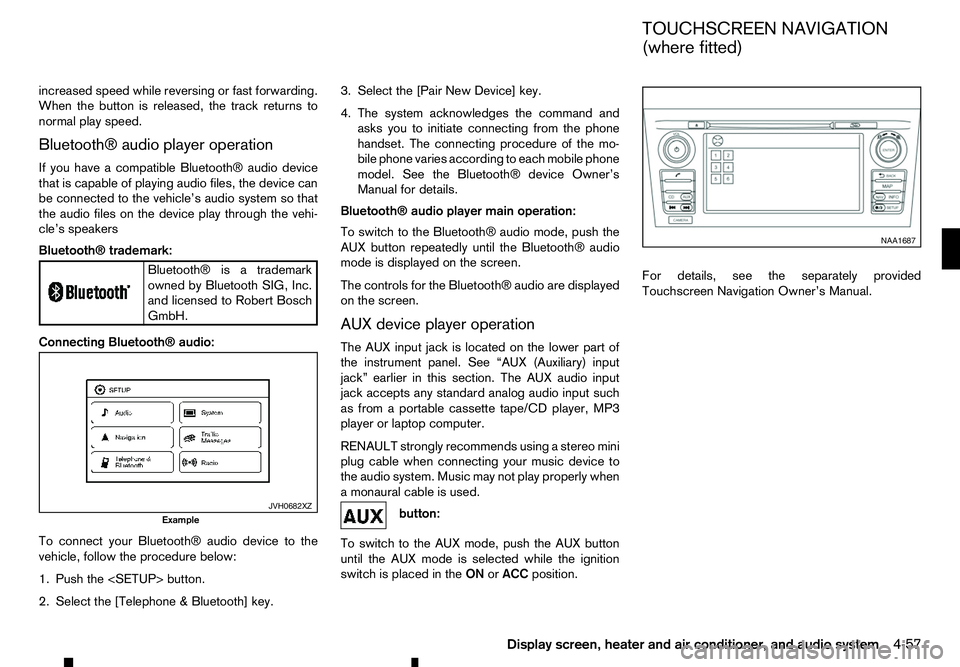
To connect your Bluetooth® audio device to the
vehicle, follow the procedure below:
1. Push the
2. Select the [Telephone &Bluetooth] key. 3. Select the [Pair New Device] key.
4. The system acknowledges the command and
asks you to initiate connecting from the phone
handset. The connecting procedure of the mo-
bile phone varies according to each mobile phone
model. See the Bluetooth® device Owner’s
Manual for details.
Bluetooth® audio player main operation:
To switch to the Bluetooth® audio mode, push the
AUX button repeatedly until the Bluetooth® audio
mode is displayed on the screen.
The controls for the Bluetooth® audio are displayed on the screen.
AUX device player operation
The AUX input jack is located on the lower part of
the instrument panel. See “AUX (Auxiliary) input
jack” earlier in this section. The AUX audio input
jack accepts any standard analog audio input such
as from aportable cassette tape/CD player, MP3
player or laptop computer.
RENAULT strongly recommends using astereo mini
plug cable when connecting your music device to
the audio system. Music may not play properly when
am onaural cable is used. button:
To switch to the AUX mode, push the AUX button
until the AUX mode is selected while the ignition
switch is placed in the ONorACC position. For details, see the separately provided
Touchscreen Navigation Owner’s Manual.
JVH0682XZ
Example NAA1687
TOUCHSCREEN NAVIGATION
(where fitted)
Display screen, heater and air conditioner, and audio system 4-57
Page 192 of 340
•
For assistance with your mobile phone inte-
gration, please visit your local approved
dealer.
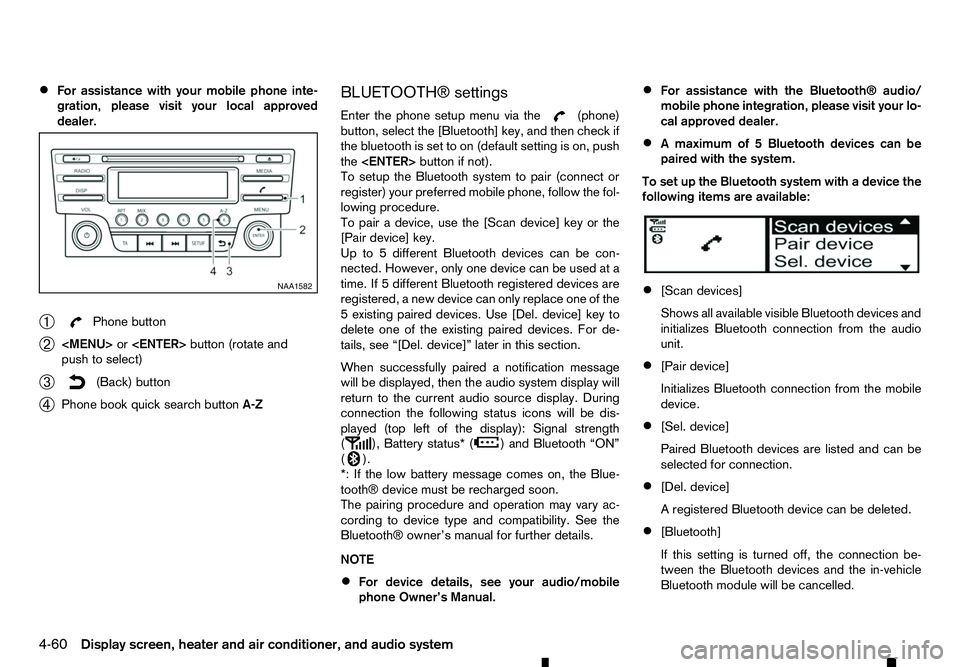
➀ Phone button
➁
Page 193 of 340
![RENAULT ALASKAN 2017 Service Manual [Scan devices]:
1) Press the button. Select [Scan device]
The audio unit searches bluetooth devices and
shows all visible devices.
Pressing the button cancels the search.
2) Select the device to be pa](/img/7/58394/w960_58394-192.png "RENAULT ALASKAN 2017 Service Manual [Scan devices]:
1) Press the button. Select [Scan device]
The audio unit searches bluetooth devices and
shows all visible devices.
Pressing the button cancels the search.
2) Select the device to be pa")
[Scan devices]:
1) Press the button. Select [Scan device]
The audio unit searches bluetooth devices and
shows all visible devices.
Pressing the button cancels the search.
2) Select the device to be paired. Use the
Page 195 of 340
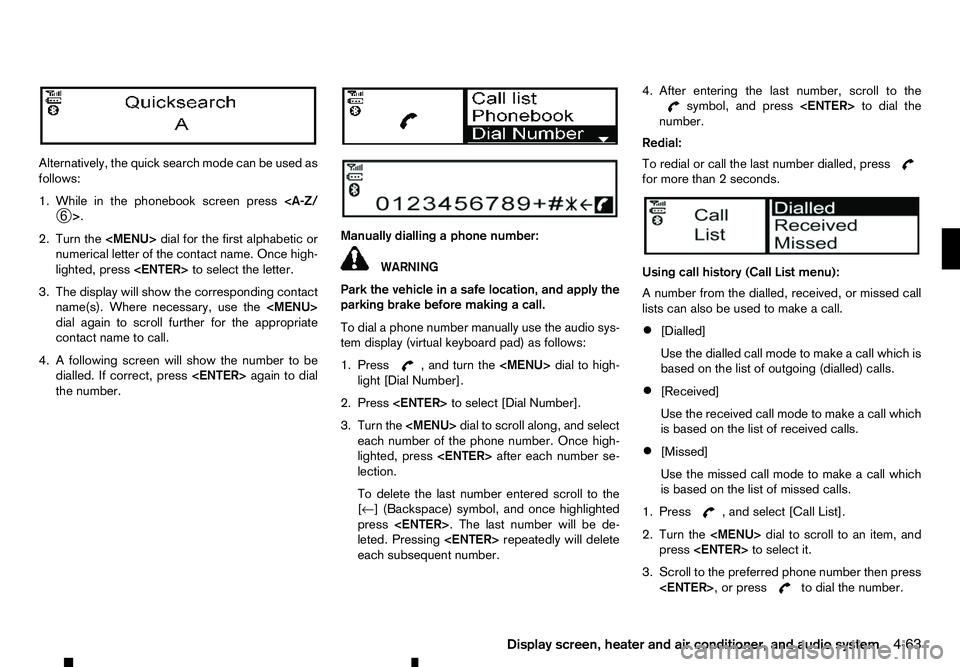
Alternatively, the quick search mode can be used as
follows:
1. While in the phonebook screen press
2. Turn the
Page 196 of 340
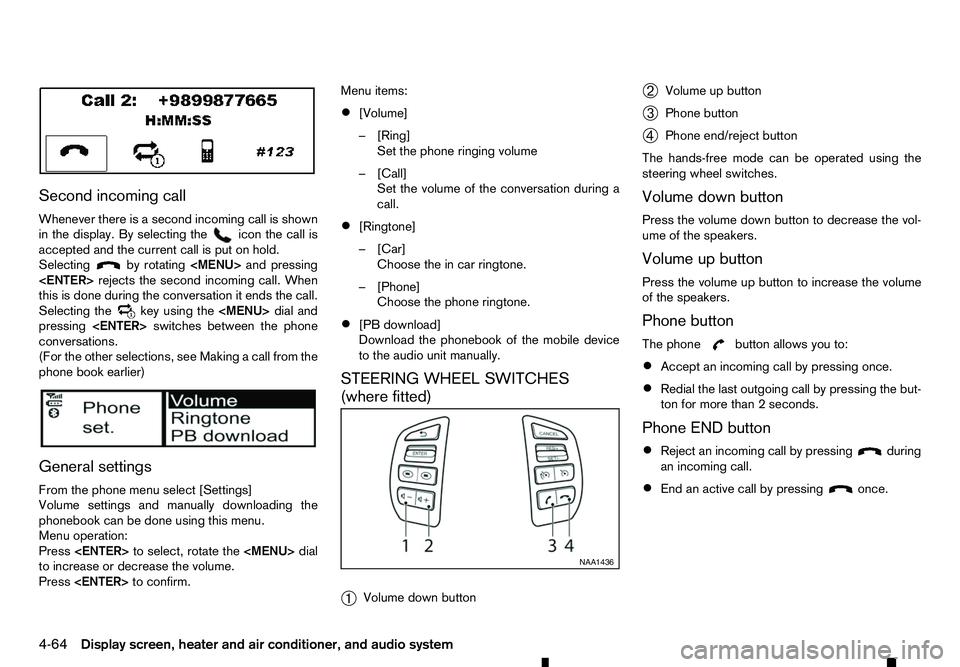
Second incoming call
Whenever there is asecond incoming call is shown
in the display. By selecting the icon the call is
accepted and the current call is put on hold.
Selecting by rotating