key RENAULT ALASKAN 2017 Repair Manual
[x] Cancel search | Manufacturer: RENAULT, Model Year: 2017, Model line: ALASKAN, Model: RENAULT ALASKAN 2017Pages: 340, PDF Size: 6.93 MB
Page 227 of 340
The CO2 or fuel saved and the engine stop time
mode shows the following items:
• The CO2 saved shows the estimated quantity of
CO2 exhaust emissions that were prevented by
the Stop/Start System every time the engine is
automatically stopped.
• The engine stop time shows the time that the
engine has been stopped for by the Stop/Start
System.
For more information, see “Stop/Start System
(where fitted)” earlier in this section.
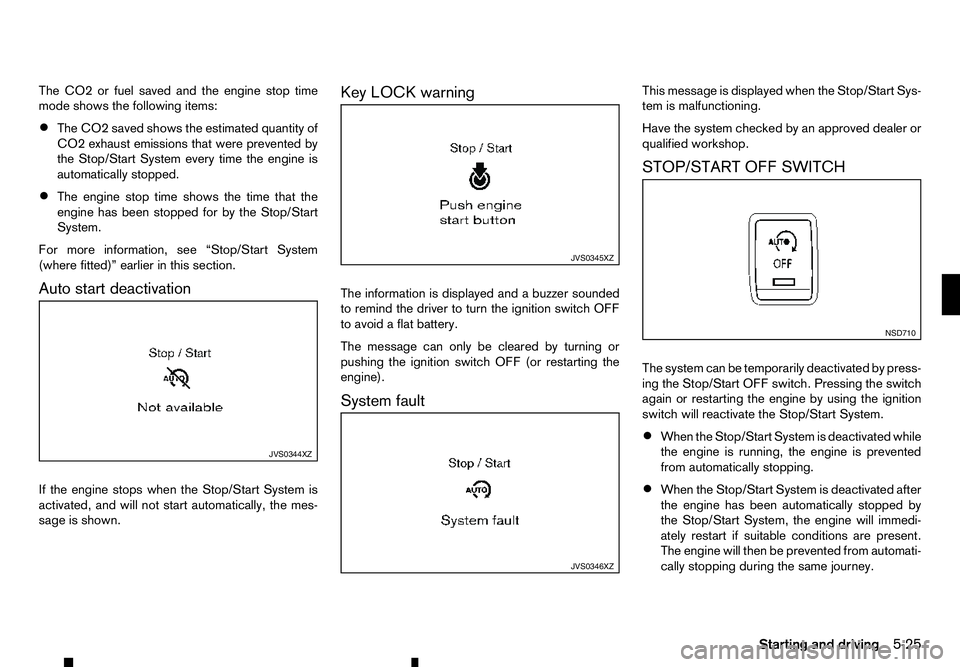
Auto start deactivation
If the engine stops when the Stop/Start System is
activated, and will not start automatically, the mes-
sage is shown. Key LOCK warning
The information is displayed and
abuzzer sounded
to remind the driver to turn the ignition switch OFF
to avoid aflat battery.
The message can only be cleared by turning or
pushing the ignition switch OFF (or restarting the
engine).
System fault This message is displayed when the Stop/Start Sys-
tem is malfunctioning.
Have the system checked by an approved dealer or
qualified workshop.
STOP/START OFF SWITCH
The system can be temporarily deactivated by press-
ing the Stop/Start OFF switch. Pressing the switch
again or restarting the engine by using the ignition
switch will reactivate the Stop/Start System.
•
When the Stop/Start System is deactivated while
the engine is running, the engine is prevented
from automatically stopping.
• When the Stop/Start System is deactivated after
the engine has been automatically stopped by
the Stop/Start System, the engine will immedi-
ately restart if suitable conditions are present.
The engine will then be prevented from automati-
cally stopping during the same journey. JVS0344XZ JVS0345XZ
JVS0346XZ NSD710
Starting and driving
5-25
Page 247 of 340
1. Firmly apply the parking brake.
2. Automatic Transmission (AT) model: Move the shift lever to the P(Park) position.
Manual Transmission (MT) model: Move the shift
lever to the R(Reverse) position. When parking
on an uphill grade, move the shift lever to the 1
(1st) position. 3. To help prevent the vehicle from moving into traf-
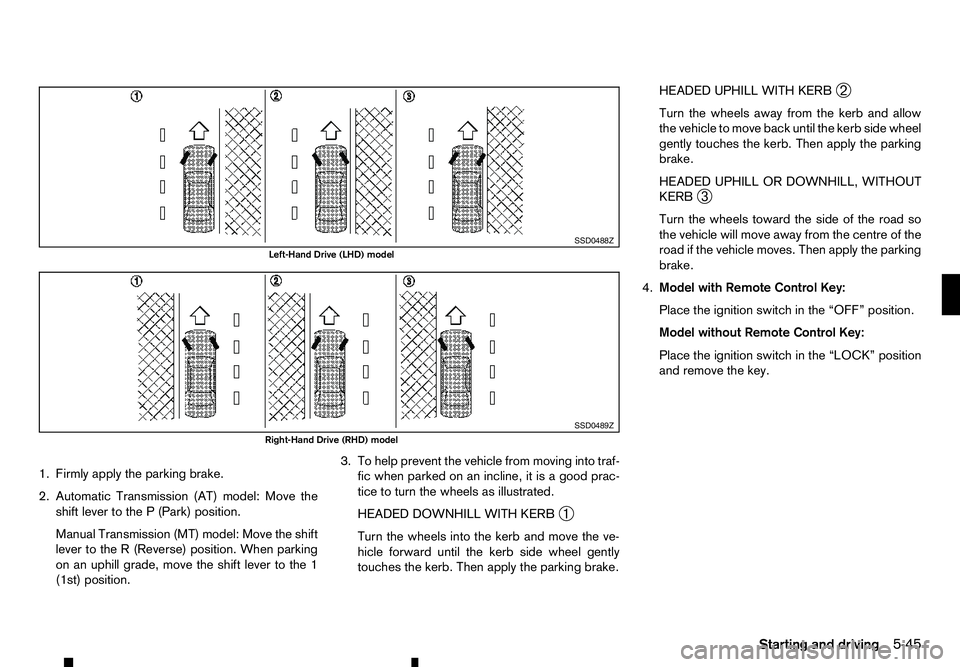
fic when parked on an incline, it is agood prac-
tice to turn the wheels as illustrated.
HEADED DOWNHILL WITH KERB ➀
Turn the wheels into the kerb and move the ve-
hicle forward until the kerb side wheel gently
touches the kerb. Then apply the parking brake. HEADED UPHILL WITH KERB
➁
Turn the wheels away from the kerb and allow
the vehicle to move back until the kerb side wheel
gently touches the kerb. Then apply the parking
brake.
HEADED UPHILL OR DOWNHILL, WITHOUT
KERB ➂
Turn the wheels toward the side of the road so
the vehicle will move away from the centre of the
road if the vehicle moves. Then apply the parking
brake.
4. Model with Remote Control Key:
Place the ignition switch in the “OFF” position.
Model without Remote Control Key:
Place the ignition switch in the “LOCK” position
and remove the key. SSD0488Z
Left-Hand Drive (LHD) model
SSD0489Z
Right-Hand Drive (RHD) model
Starting and driving5-45
Page 248 of 340
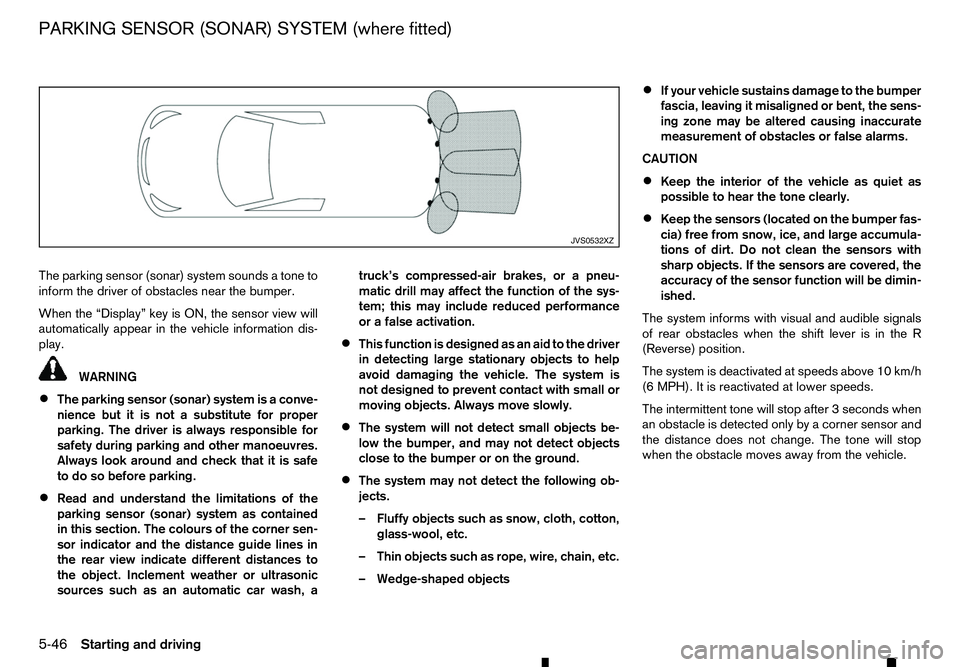
The parking sensor (sonar) system sounds
atone to
inform the driver of obstacles near the bumper.
When the “Display” key is ON, the sensor view will
automatically appear in the vehicle information dis-
play. WARNING
• The parking sensor (sonar) system is
aconve-
nience but it is not asubstitute for proper
parking. The driver is always responsible for
safety during parking and other manoeuvres.
Always look around and check that it is safe
to do so before parking.
• Read and understand the limitations of the
parking sensor (sonar) system as contained
in this section. The colours of the corner sen-
sor indicator and the distance guide lines in
the rear view indicate different distances to
the object. Inclement weather or ultrasonic
sources such as an automatic car wash, a truck’s compressed-air brakes, or
apneu-
matic drill may affect the function of the sys-
tem; this may include reduced performance
or afalse activation.
• This function is designed as an aid to the driver
in detecting large stationary objects to help
avoid damaging the vehicle. The system is
not designed to prevent contact with small or
moving objects. Always move slowly.
• The system will not detect small objects be-
low the bumper, and may not detect objects
close to the bumper or on the ground.
• The system may not detect the following ob-
jects.
–F
luffy objects such as snow, cloth, cotton,
glass-wool, etc.
–T hin objects such as rope, wire, chain, etc.
–W edge-shaped objects •
If your vehicle sustains damage to the bumper
fascia, leaving it misaligned or bent, the sens-
ing zone may be altered causing inaccurate
measurement of obstacles or false alarms.
CAUTION
• Keep the interior of the vehicle as quiet as
possible to hear the tone clearly.
• Keep the sensors (located on the bumper fas-
cia) free from snow, ice, and large accumula-
tions of dirt. Do not clean the sensors with
sharp objects. If the sensors are covered, the
accuracy of the sensor function will be dimin-
ished.
The system informs with visual and audible signals
of rear obstacles when the shift lever is in the R
(Reverse) position.
The system is deactivated at speeds above 10 km/h
(6 MPH). It is reactivated at lower speeds.
The intermittent tone will stop after 3seconds when
an obstacle is detected only by acorner sensor and
the distance does not change. The tone will stop
when the obstacle moves away from the vehicle. JVS0532XZ
PARKING SENSOR (SONAR) SYSTEM (where fitted)
5-46 Starting and driving
Page 249 of 340
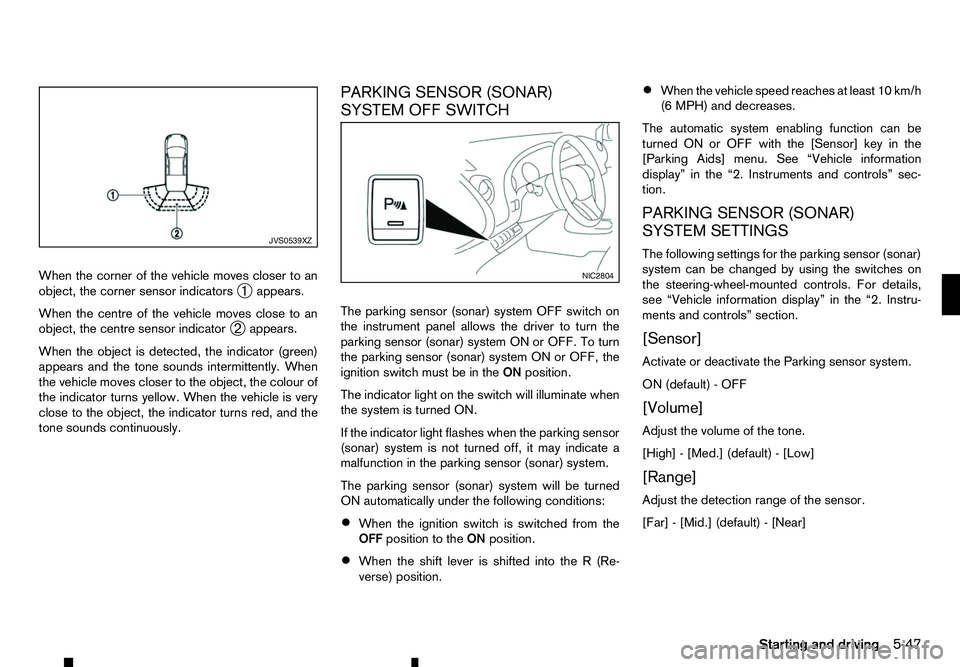
When the corner of the vehicle moves closer to an
object, the corner sensor indicators ➀appears.
When the centre of the vehicle moves close to an
object, the centre sensor indicator ➁appears.
When the object is detected, the indicator (green)
appears and the tone sounds intermittently. When
the vehicle moves closer to the object, the colour of
the indicator turns yellow. When the vehicle is very
close to the object, the indicator turns red, and the
tone sounds continuously. PARKING SENSOR (SONAR)
SYSTEM OFF SWITCH
The parking sensor (sonar) system OFF switch on
the instrument panel allows the driver to turn the
parking sensor (sonar) system ON or OFF. To turn
the parking sensor (sonar) system ON or OFF, the
ignition switch must be in the
ONposition.
The indicator light on the switch will illuminate when
the system is turned ON.
If the indicator light flashes when the parking sensor
(sonar) system is not turned off, it may indicate a
malfunction in the parking sensor (sonar) system.
The parking sensor (sonar) system will be turned
ON automatically under the following conditions:
• When the ignition switch is switched from the
OFF position to the ONposition.
• When the shift lever is shifted into the
R(Re-
verse) position. •
When the vehicle speed reaches at least 10 km/h
(6 MPH) and decreases.
The automatic system enabling function can be
turned ON or OFF with the [Sensor] key in the
[Parking Aids] menu. See “Vehicle information
display” in the “2. Instruments and controls” sec-
tion.
PARKING SENSOR (SONAR)
SYSTEM SETTINGS
The following settings for the parking sensor (sonar)
system can be changed by using the switches on
the steering-wheel-mounted controls. For details,
see “Vehicle information display” in the “2. Instru-
ments and controls” section.
[Sensor]
Activate or deactivate the Parking sensor system.
ON (default) -OFF
[Volume]
Adjust the volume of the tone.
[High] -[Med.] (default) -[Low]
[Range]
Adjust the detection range of the sensor.
[Far] -[Mid.] (default) -[Near] JVS0539XZ
NIC2804
Starting and driving
5-47
Page 251 of 340
When leaving your vehicle unoccupied:
• Always take the key with you
-even when leav-
ing the vehicle in your own garage.
• Close all windows completely and lock all doors.
• Always park your vehicle where it can be seen.
Park in
awell lit area during the night.
• If the security system is equipped, use it
-even
for ashort period.
• Never leave children or pets in the vehicle unat-
tended.
• Never leave valuables inside the vehicle. Always
take valuables with you.
• Never leave the vehicle documents in the ve-
hicle.
• Never leave articles on
aroof rail. Remove them
from the rack and keep and lock them inside the
vehicle.
• Never leave the spare key in the vehicle. WARNING
If the engine is not running or is turned off while
driving, the power assist for the steering will not
work. The steering will be much harder to oper-
ate.
The power assisted steering is designed to use a
hydraulic pump driven by the engine, to assist steer-
ing.
If the engine stops or the drive belt breaks, you will
still have control of the vehicle. However, greater
steering effort is needed, especially in sharp turns
and at low speeds. The brake system has two separate hydraulic cir-
cuits. If one circuit malfunctions, you will still have
braking ability at two wheels.
BRAKE PRECAUTIONS
Vacuum assisted brakes
The brake booster aids braking by using engine
vacuum. If the engine stops, you can stop the ve-
hicle by depressing the footbrake pedal. However,
greater foot pressure on the footbrake pedal will be
required to stop the vehicle. The stopping distance
will be longer.
If the engine is not running or is turned off while driv-
ing, the power assisted brakes will not function.
Braking will be harder. WARNING
Do not coast with the engine stopped.
Using brakes
Avoid resting your foot on the footbrake pedal while
driving. This will overheat the brakes, wear out the
brake linings/pads faster, and increase fuel con-
sumption.
To help reduce brake wear and to prevent the brakes
from overheating, reduce speed and downshift to a
lower gear before going down aslope or long grade.
Overheated brakes may reduce braking perfor-
mance and could result in loss of vehicle control.
VEHICLE SECURITY
POWER STEERING SYSTEM BRAKE SYSTEM
Starting and driving5-49
Page 265 of 340
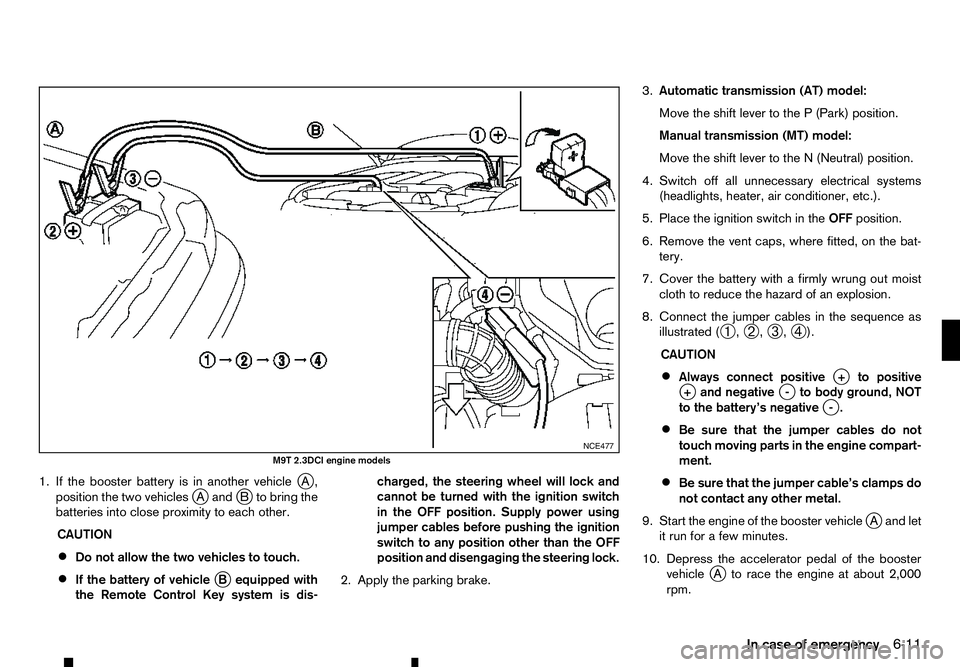
1. If the booster battery is in another vehicle
jA,
position the two vehicles j
Aa ndjBt obring the
batteries into close proximity to each other.
CAUTION
• Do not allow the two vehicles to touch.
• If the battery of vehicle
jBe quipped with
the Remote Control Key system is dis- charged, the steering wheel will lock and
cannot be turned with the ignition switch
in the OFF position. Supply power using
jumper cables before pushing the ignition
switch to any position other than the OFF
position and disengaging the steering lock.
2. Apply the parking brake. 3.
Automatic transmission (AT) model:
Move the shift lever to the P(Park) position.
Manual transmission (MT) model:
Move the shift lever to the N(Neutral) position.
4. Switch off all unnecessary electrical systems (headlights, heater, air conditioner, etc.).
5. Place the ignition switch in the OFFposition.
6. Remove the vent caps, where fitted, on the bat- tery.
7. Cover the battery with afirmly wrung out moist
cloth to reduce the hazard of an explosion.
8. Connect the jumper cables in the sequence as illustrated ( ➀,
➁ ,
➂ ,
➃ ).
CAUTION
• Always connect positive
j+t opositive
j +a nd negative j-t obody ground, NOT
to the battery’s negative j
-.
• Be sure that the jumper cables do not
touch moving parts in the engine compart-
ment.
• Be sure that the jumper cable’s clamps do
not contact any other metal.
9. Start the engine of the booster vehicle j
Aa nd let
it run for afew minutes.
10. Depress the accelerator pedal of the booster vehicle j
At orace the engine at about 2,000
rpm. NCE477
M9T 2.3DCI engine models
In case of emergency6-11
Page 277 of 340
8
Maintenance and do-it-yourself
Maintenance and do-it-yourself
Maintenance requirements ....................................... 8-2 Scheduled maintenance...................................... 8-2
General maintenance .......................................... 8-2
Where to go for service ...................................... 8-2
General maintenance ............................................... 8-2 Explanation of general maintenance items ........... 8-2
Maintenance precautions .................................... 8-4
Engine compartment check locations ....................... 8-5
Engine cooling system ............................................. 8-5 Checking engine coolant level............................. 8-6
Changing engine coolant .................................... 8-6
Engine oil................................................................. 8-6
Checking engine oil level .................................... 8-6
Changing engine oil and oil filter ......................... 8-7
Protect environment ............................................ 8-7
AdBlue® tank (where fitted for diesel engine
model) ..................................................................... 8-7 Refilling the AdBlue® tank .................................. 8-7
Drive belt ................................................................. 8-8
Automatic Transmission Fluid (ATF) (where fitted).... 8-8 7-speed Automatic Transmission (AT) model....... 8-8
Power steering fluid ................................................. 8-8
Brakes ..................................................................... 8-9 Checking parking brake ...................................... 8-9
Checking footbrake ............................................ 8-9
Brake booster ..................................................... 8-9
Brake fluid ............................................................... 8-10
Clutch fluid (where fitted) ......................................... 8-11 Window washer fluid ............................................... 8-11
Battery..................................................................... 8-12
Vehicle battery .................................................... 8-13
Remote controller battery (where fitted) .............. 8-13
Remote Control Key battery (where fitted)........... 8-14
Air cleaner filter........................................................ 8-15
Wiper blades ........................................................... 8-16 Windscreen wiper blades ................................... 8-16
Variable voltage control system (where fitted) ........... 8-17
Fuses ...................................................................... 8-18 Engine compartment ........................................... 8-18
Passenger compartment ..................................... 8-19
Lights ...................................................................... 8-20
Headlights .......................................................... 8-20
Exterior lights ...................................................... 8-21
Interior lights....................................................... 8-22
Light locations .................................................... 8-23
Tyres and wheels ..................................................... 8-26 Tyre inflation pressure......................................... 8-26
Types of tyres ..................................................... 8-26
Tyre chains ......................................................... 8-27
Tyre rotation ....................................................... 8-27
Tyre wear and damage ....................................... 8-28
Tyre age ............................................................. 8-28
Changing tyres and wheels................................. 8-28
Wheel balance.................................................... 8-28
Spare tyre .......................................................... 8-28
Page 290 of 340
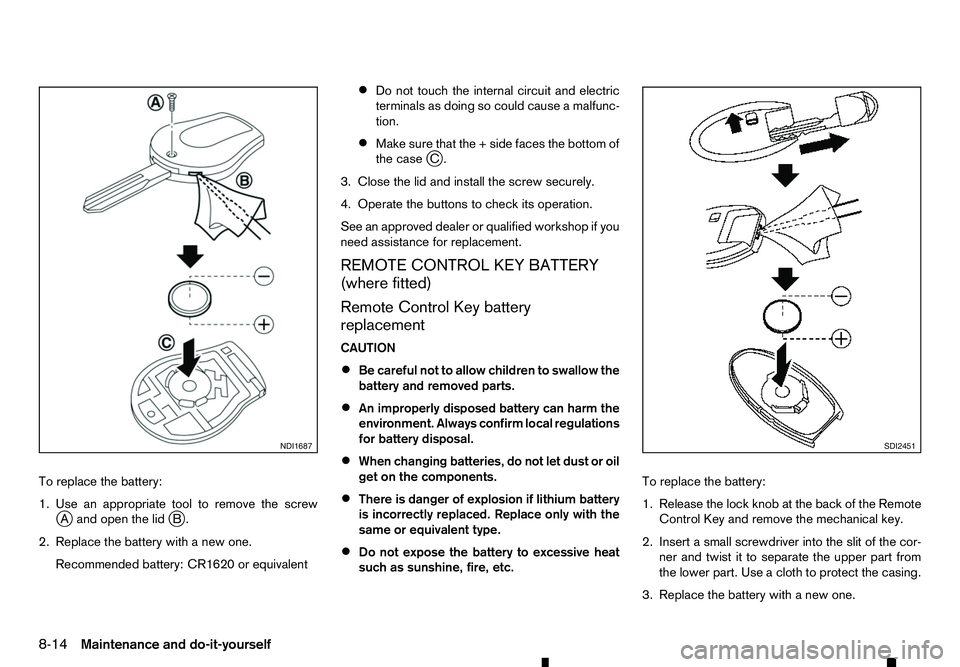
To replace the battery:
1. Use an appropriate tool to remove the screw jAa nd open the lid jB.
2. Replace the battery with anew one.
Recommended battery: CR1620 or equivalent •
Do not touch the internal circuit and electric
terminals as doing so could cause
amalfunc-
tion.
• Make sure that the
+side faces the bottom of
the case j
C.
3. Close the lid and install the screw securely.
4. Operate the buttons to check its operation.
See an approved dealer or qualified workshop if you
need assistance for replacement.
REMOTE CONTROL KEY BATTERY
(where fitted)
Remote Control Key battery replacement
CAUTION
• Be careful not to allow children to swallow the
battery and removed parts.
• An improperly disposed battery can harm the
environment. Always confirm local regulations
for battery disposal.
• When changing batteries, do not let dust or oil
get on the components.
• There is danger of explosion if lithium battery
is incorrectly replaced. Replace only with the
same or equivalent type.
• Do not expose the battery to excessive heat
such as sunshine, fire, etc. To replace the battery:
1. Release the lock knob at the back of the Remote
Control Key and remove the mechanical key.
2. Insert asmall screwdriver into the slit of the cor-
ner and twist it to separate the upper part from
the lower part. Use acloth to protect the casing.
3. Replace the battery with anew one. NDI1687 SDI2451
8-14 Maintenance and do-it-yourself
Page 307 of 340
9
Technical information
Technical information
Recommended fluids/lubricants and capacities ........ 9-2 Fuel information .................................................. 9-2
Automatic Transmission Fluid (ATF) .................... 9-2
Air conditioner system refrigerant and lubricant ... 9-2
Engine ..................................................................... 9-3
Tyres and wheels ..................................................... 9-4
Dimensions .............................................................. 9-5 Double Cab ........................................................ 9-5
King Cab ............................................................ 9-6
When travelling or registering in another country ...... 9-7
Vehicle identification ................................................ 9-7 Vehicle identification label ................................... 9-7
Vehicle Identification Number (VIN) plate ............ 9-7
Vehicle Identification Number (VIN) ..................... 9-7
Engine serial number .......................................... 9-7
Tyre placard ....................................................... 9-8
Air conditioner specification label ........................ 9-8
Installation of an RF transmitter ................................ 9-8
Radio approval number and information ................... 9-9 Anti-Theft System (ATS), Remote Control Key
or remote keyless system.................................... 9-9
Page 315 of 340
ANTI-THEFT SYSTEM (ATS), REMOTE
CONTROL KEY OR REMOTE
KEYLESS SYSTEM
Remote keyless entry system
(where fitted)
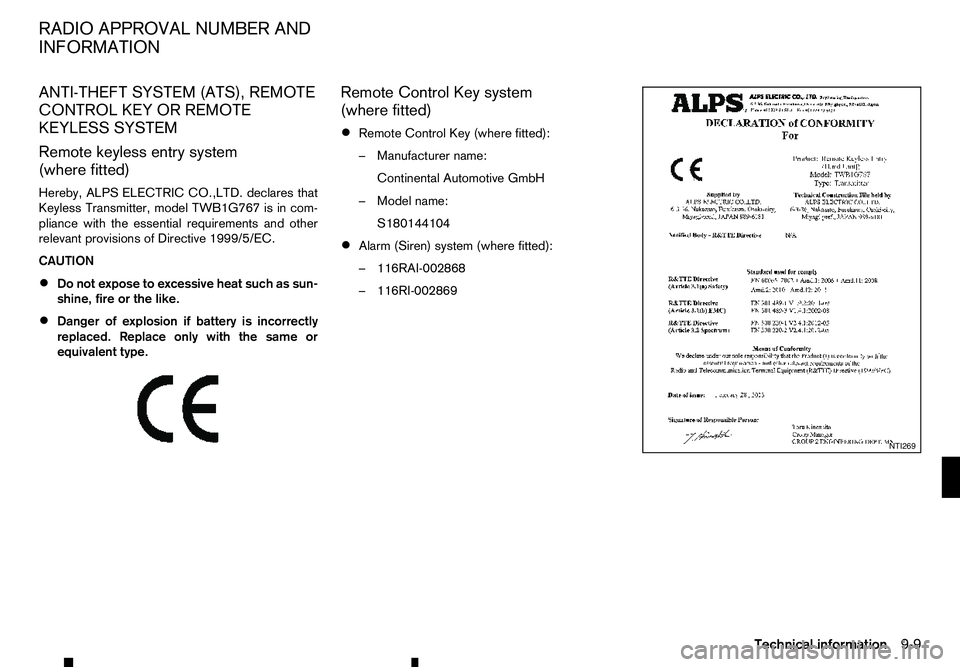
Hereby, ALPS ELECTRIC CO.,LTD. declares that
Keyless Transmitter, model TWB1G767 is in com-
pliance with the essential requirements and other
relevant provisions of Directive 1999/5/EC.
CAUTION
• Do not expose to excessive heat such as sun-
shine, fire or the like.
• Danger of explosion if battery is incorrectly
replaced. Replace only with the same or
equivalent type.
m Remote
Control Key system
(where fitted)
• Remote Control Key (where fitted):
–M
anufacturer name:
Continental Automotive GmbH
–M odel name:
S180144104
• Alarm (Siren) system (where fitted):
–1
16RAI-002868
–1 16RI-002869 NTI269
RADIO APPROVAL NUMBER AND
INFORMATION
Technical information9-9