steering RENAULT ALASKAN 2017 Service Manual
[x] Cancel search | Manufacturer: RENAULT, Model Year: 2017, Model line: ALASKAN, Model: RENAULT ALASKAN 2017Pages: 340, PDF Size: 6.93 MB
Page 225 of 340
The Stop/Start System is designed to prevent un-
necessary fuel consumption, exhaust emissions,
and noise during ajourney:
• When you stop the vehicle with the shift lever in
N(
Neutral) and clutch pedal released, the en-
gine is turned off automatically.
• When you push the clutch pedal, the engine is
automatically turned on.
CAUTION
At the end of the journey the engine must be
stopped and ignition turned off. Lock the vehicle
as normal. Turning the ignition switch OFF will
shut down all electrical systems. Failure to do
this may result in aflat battery.
NOTE
For model with Stop/Start System, use the spe-
cial battery that is enhanced in regard to the
charge-discharge capacity and life performance.
Avoid using anon-special battery for the Stop/
Start System, as this may cause early deteriora-
tion of the battery or amalfunction of the Stop/
Start System. For the battery, it is recommended
to use Genuine RENAULT parts. For more infor-
mation, contact an approved dealer or qualified
workshop.
NOTE
The Stop/Start System will not activate under
the following conditions:
• When the engine is kept idling without any
driving after the engine is turned on. •
When the engine coolant temperature is low.
• When the battery capacity is low.
• When the battery temperature is low.
• When the vehicle is moved.
• When the vacuum in the brake servo
decreases.
• When the engine bonnet is opened with the
engine running.
• When the engine is turned on with the engine
bonnet open.
• When the driver’s seat belt is not fastened.
• When the driver’s door is open.
• When the Stop/Start System indicator blinks
at
alow speed.
• When the fan speed control is in any position
other than OFF (0) while the air flow control is
in the front defogger position.
• When the front defogger switch is on.
• When the temperature inside the vehicle is
too high or low. (When the Auto air condition-
ing system is off, the Stop/Start System will
operate.)
• When the fan speed of the air conditioner is
set to the maximum speed.
• When the Stop/Start OFF switch is turned on.
• When the power consumption is large. •
When the vehicle is travelling at altitudes
higher than 2000
m(6562 ft) (MT model).
• For Manual Transmission (MT) models
• When the shift lever is in any position except
the
N(Neutral) position.
• When the clutch pedal is depressed.
• When the Remote Control Key is not in the
vehicle.
• When the steering wheel is turning or turned
more than 45 degrees.
NOTE
The engine will not restart even if the clutch pedal
is pressed while the Stop/Start System is acti-
vated under the following condition:
• When the engine bonnet is opened.
• When the driver seat belt is unfastened and
the driver’s door is opened.
• When the shift lever is not in the
N(Neutral)
position.
NOTE
It may take some time until the Stop/Start Sys-
tem activates under the following conditions:
• When the battery is discharged.
• When the outside temperature is low or high.
• When the battery is replaced or the battery
terminal is disconnected for extended peri-
ods and then reconnected.
STOP/START SYSTEM
(where fitted)
Starting and driving5-23
Page 235 of 340
After using the rear differential lock, or when resum-
ing normal driving, push the differential lock mode
switch to the OFF position. The differential lock indi-
cator light will turn off after the differential lock is
released.
NOTE
• The rear differential lock-up device operates
only when the engine is running.
• In 4H mode, the rear differential lock-up de-
vice does not operate when the differential
lock mode switch is turned to the “ON” posi-
tion. (The differential lock indicator light will
flash.) WARNING
• Use the rear differential lock only in an emer-
gency when it is not possible to free astuck
vehicle even using the 4LO position.
• When the differential lock is in operation, turn-
ing the vehicle becomes hard and, especially
at high speeds, is dangerous.
• While differential lock is on, the Anti-lock
Braking System (ABS) warning light and the
Electronic Stability Programme (ESP) off indi-
cator light illuminate. This indicates that anti-
lock function may not fully operate.
• Do not operate the differential lock when the
vehicle is turning or when one side wheel is
rotating. Otherwise the power train system
parts could be damaged. •
Avoid quick starts while the differential lock is
in operation. Otherwise the power train sys-
tem parts could be damaged.
Observe the above precautions. Otherwise, loss
of normal steering control may result. WARNING
• The Electronic Stability Programme (ESP) sys-
tem is designed to help the driver maintain
stability but does not prevent accidents due
to abrupt steering operation at high speeds or
by careless or dangerous driving techniques.
Reduce vehicle speed and be especially care-
ful when driving and cornering on slippery sur-
faces and always drive carefully.
• Do not modify the vehicle’s suspension. If
suspension parts such as shock absorbers,
struts, springs, stabiliser bars, bushings and
wheels are not recommended by RENAULT
for your vehicle or are extremely deteriorated,
the ESP system may not operate properly.
This could adversely affect vehicle handling
performance, and the ESP warning light may illuminate.
• If brake related parts such as brake pads, ro-
tors and callipers are not RENAULT-recom-
mended or are extremely deteriorated, the
ESP system may not operate properly and the
ESP warning light may illuminate.
• If engine control related parts are not
RENAULT recommended or are extremely de-
teriorated, the ESP warning light may illu-
minate.
ELECTRONIC STABILITY
PROGRAMME (ESP) SYSTEM
(where fitted)
Starting and driving 5-33
Page 236 of 340
•
When driving on extremely inclined surfaces
such as higher banked corners, the ESP sys-
tem may not operate properly and the ESP
warning light may illuminate. Do not drive
on these types of roads.
• When driving on an unstable surface such as
at urntable, ferry, elevator or ramp, the ESP
warning light may illuminate. This is not a
malfunction. Restart the engine after driving
onto astable surface.
• If wheels or tyres other than the RENAULT
recommended ones are used, the ESP sys-
tem may not operate properly and the ESP
warning light may illuminate.
• The ESP system is not
asubstitute for winter
tyres or tyre chains on asnow covered road.
The Electronic Stability Programme (ESP) system
uses various sensors to monitor driver inputs and
vehicle motion. Under certain driving conditions, the
ESP system performs the following functions:
• Controls brake pressure to reduce wheel slip on
one slipping drive wheel so power is transferred
to
an on slipping drive wheel on the same axle.
• Controls brake pressure and engine output to
reduce drive wheel slip based on vehicle speed
(traction control function). •
Controls brake pressure at individual wheels and
engine output to help the driver maintain control
of the vehicle in the following conditions:
–u
ndersteer (vehicle tends to not follow the
steered path despite increased steering in-
put)
–o versteer (vehicle tends to spin due to cer-
tain road or driving conditions).
The ESP system can help the driver to maintain con-
trol of the vehicle, but it cannot prevent loss of ve-
hicle control in all driving situations.
When the ESP system operates, the ESP warning
light in the instrument panel flashes so note the
following:
• The road may be slippery or the system may
determine some action is required to help the
vehicle on the steered path.
• You may feel
apulsation in the brake pedal and
hear anoise or vibration from under the bonnet.
This is normal and indicates that the ESP system
is working properly.
• Adjust your speed and driving to the road condi-
tions.
If am alfunction occurs in the system, the ESP warn-
ing light illuminates in the instrument panel. The
ESP system automatically turns off.
The ESP OFF switch is used to turn off the ESP
system. The ESP off indicator light illuminates
to indicate the ESP system is off. When the ESP
OFF switch is used to turn off the system, the ESP system still operates to prevent one drive wheel from
slipping by transferring power to
anon slipping drive
wheel. The ESP warning light flashes if this
occurs. All other ESP functions are off and the ESP
warning light will not flash. The ESP system is
automatically reset to on when the ignition switch is
placed in the OFFposition then back to the ONposi-
tion.
When the <4LO> position is selected with the Four-
Wheel Drive (4WD) mode switch, the ESP system
is disabled and the ESP OFF indicator light illumi-
nates.
See “Warning lights, indicator lights and audible
reminders” in the “2. Instruments and controls” sec-
tion and “Four-Wheel Drive (4WD) (where fitted)”
earlier in this section.
The computer has abuilt-in diagnostic feature that
tests the system each time you start the engine and
move the vehicle forward or in reverse at aslow
speed. When the self-test occurs, you may hear a
“clunk” noise and/or feel apulsation in the brake
pedal. This is normal and is not an indication of a
malfunction.
5-34 Starting and driving
Page 238 of 340
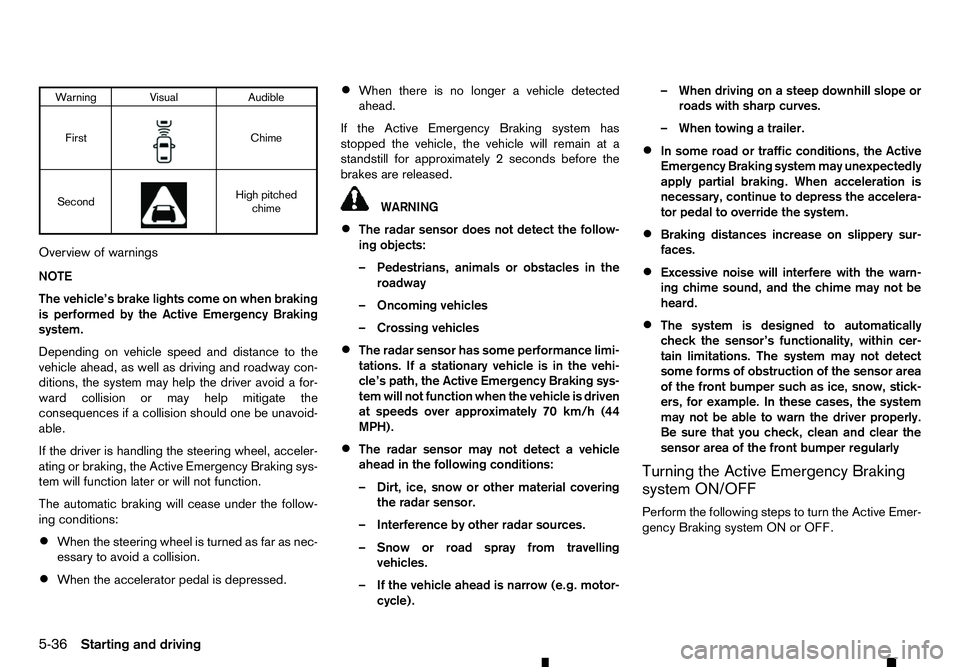
Warning Visual
Audible
First m Chime
Second m High pitched
chime
Overview of warnings
NOTE
The vehicle’s brake lights come on when braking
is performed by the Active Emergency Braking
system.
Depending on vehicle speed and distance to the
vehicle ahead, as well as driving and roadway con-
ditions, the system may help the driver avoid afor-
ward collision or may help mitigate the
consequences if acollision should one be unavoid-
able.
If the driver is handling the steering wheel, acceler-
ating or braking, the Active Emergency Braking sys-
tem will function later or will not function.
The automatic braking will cease under the follow-
ing conditions:
• When the steering wheel is turned as far as nec-
essary to avoid acollision.
• When the accelerator pedal is depressed. •
When there is no longer
avehicle detected
ahead.
If the Active Emergency Braking system has
stopped the vehicle, the vehicle will remain at a
standstill for approximately 2seconds before the
brakes are released. WARNING
• The radar sensor does not detect the follow-
ing objects:
–P edestrians, animals or obstacles in the
roadway
–O ncoming vehicles
–C rossing vehicles
• The radar sensor has some performance limi-
tations. If
astationary vehicle is in the vehi-
cle’s path, the Active Emergency Braking sys-
tem will not function when the vehicle is driven
at speeds over approximately 70 km/h (44
MPH).
• The radar sensor may not detect
avehicle
ahead in the following conditions:
–D irt, ice, snow or other material covering
the radar sensor.
–I nterference by other radar sources.
–S now or road spray from travelling
vehicles.
–I fthe vehicle ahead is narrow (e.g. motor-
cycle). –W
hen driving on asteep downhill slope or
roads with sharp curves.
–W hen towing atrailer.
• In some road or traffic conditions, the Active
Emergency Braking system may unexpectedly
apply partial braking. When acceleration is
necessary, continue to depress the accelera-
tor pedal to override the system.
• Braking distances increase on slippery sur-
faces.
• Excessive noise will interfere with the warn-
ing chime sound, and the chime may not be
heard.
• The system is designed to automatically
check the sensor’s functionality, within cer-
tain limitations. The system may not detect
some forms of obstruction of the sensor area
of the front bumper such as ice, snow, stick-
ers, for example. In these cases, the system
may not be able to warn the driver properly.
Be sure that you check, clean and clear the
sensor area of the front bumper regularly
Turning the Active Emergency Braking
system ON/OFF
Perform the following steps to turn the Active Emer-
gency Braking system ON or OFF.
5-36 Starting and driving
Page 239 of 340
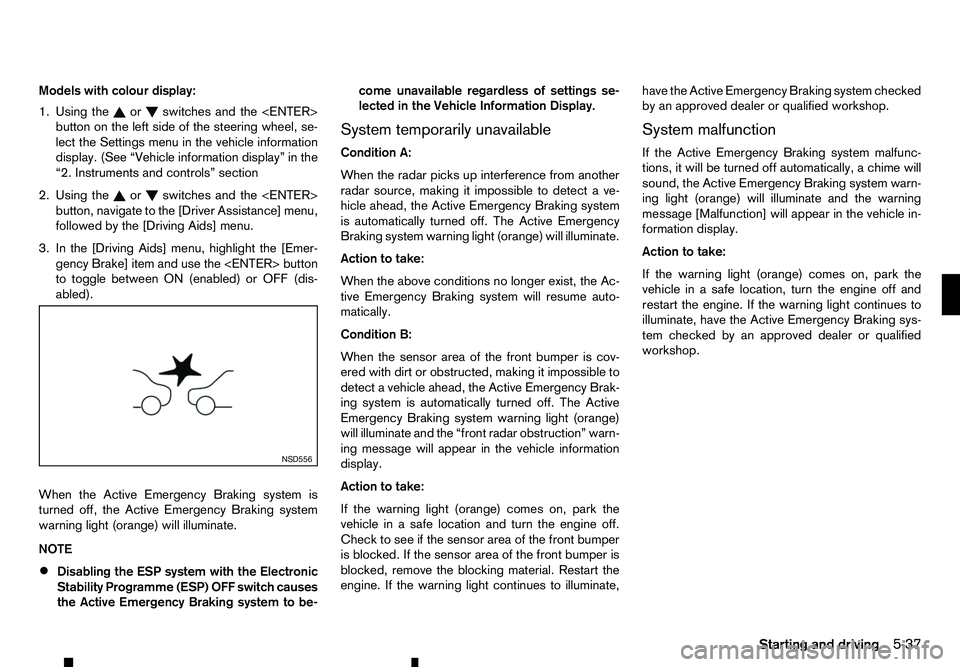
Models with colour display:
1. Using the or switches and the
button on the left side of the steering wheel, se-
lect the Settings menu in the vehicle information
display. (See “Vehicle information display” in the
“2. Instruments and controls” section
2. Using the or switches and the
button, navigate to the [Driver Assistance] menu,
followed by the [Driving Aids] menu.
3. In the [Driving Aids] menu, highlight the [Emer- gency Brake] item and use the
to toggle between ON (enabled) or OFF (dis-
abled).
When the Active Emergency Braking system is
turned off, the Active Emergency Braking system
warning light (orange) will illuminate.
NOTE • Disabling the ESP system with the Electronic
Stability Programme (ESP) OFF switch causes
the Active Emergency Braking system to be- come unavailable regardless of settings se-
lected in the Vehicle Information Display.
System temporarily unavailable
Condition A:
When the radar picks up interference from another
radar source, making it impossible to detect ave-
hicle ahead, the Active Emergency Braking system
is automatically turned off. The Active Emergency
Braking system warning light (orange) will illuminate.
Action to take:
When the above conditions no longer exist, the Ac-
tive Emergency Braking system will resume auto-
matically.
Condition B:
When the sensor area of the front bumper is cov-
ered with dirt or obstructed, making it impossible to
detect avehicle ahead, the Active Emergency Brak-
ing system is automatically turned off. The Active
Emergency Braking system warning light (orange)
will illuminate and the “front radar obstruction” warn-
ing message will appear in the vehicle information
display.
Action to take:
If the warning light (orange) comes on, park the
vehicle in asafe location and turn the engine off.
Check to see if the sensor area of the front bumper
is blocked. If the sensor area of the front bumper is
blocked, remove the blocking material. Restart the
engine. If the warning light continues to illuminate, have the Active Emergency Braking system checked
by an approved dealer or qualified workshop.
System malfunction
If the Active Emergency Braking system malfunc-
tions, it will be turned off automatically, achime will
sound, the Active Emergency Braking system warn-
ing light (orange) will illuminate and the warning
message [Malfunction] will appear in the vehicle in-
formation display.
Action to take:
If the warning light (orange) comes on, park the
vehicle in asafe location, turn the engine off and
restart the engine. If the warning light continues to
illuminate, have the Active Emergency Braking sys-
tem checked by an approved dealer or qualified
workshop. NSD556
Starting and driving
5-37
Page 242 of 340
ated. Should this occur, depress the clutch pedal
and turn the cruise control MAIN switch off im-
mediately. Failure to do so may cause engine
damage.
When the cruise control system is on the speed lim-
iter cannot be operated.
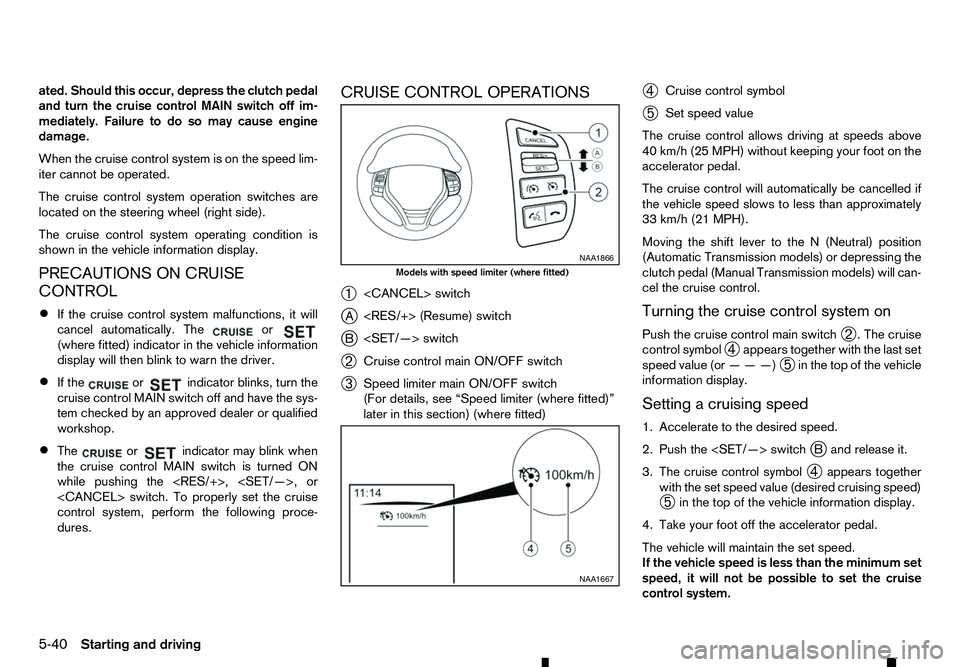
The cruise control system operation switches are
located on the steering wheel (right side).
The cruise control system operating condition is
shown in the vehicle information display.
PRECAUTIONS ON CRUISE
CONTROL
• If the cruise control system malfunctions, it will
cancel automatically. The or
(where fitted) indicator in the vehicle information
display will then blink to warn the driver.
• If the or indicator blinks, turn the
cruise control MAIN switch off and have the sys-
tem checked by an approved dealer or qualified
workshop.
• The or indicator may blink when
the cruise control MAIN switch is turned ON
while pushing the
control system, perform the following proce-
dures. CRUISE CONTROL OPERATIONS
➀
j A
j B
➁ Cruise control main ON/OFF switch
➂ Speed limiter main ON/OFF switch
(For details, see “Speed limiter (where fitted)”
later in this section) (where fitted) ➃
Cruise control symbol
➄ Set speed value
The cruise control allows driving at speeds above
40 km/h (25 MPH) without keeping your foot on the
accelerator pedal.
The cruise control will automatically be cancelled if
the vehicle speed slows to less than approximately
33 km/h (21 MPH).
Moving the shift lever to the N(Neutral) position
(Automatic Transmission models) or depressing the
clutch pedal (Manual Transmission models) will can-
cel the cruise control.
Turning the cruise control system on
Push the cruise control main switch ➁.T
he cruise
control symbol ➃appears together with the last set
speed value (or ———)
➄in the top of the vehicle
information display.
Setting acruising speed
1. Accelerate to the desired speed.
2. Push the
3. The cruise control symbol ➃appears together
with the set speed value (desired cruising speed)
➄ in the top of the vehicle information display.
4. Take your foot off the accelerator pedal.
The vehicle will maintain the set speed.
If the vehicle speed is less than the minimum set
speed, it will not be possible to set the cruise
control system. NAA1866
Models with speed limiter (where fitted)
NAA1667
5-40 Starting and driving
Page 244 of 340
The speed limiter allows you to set the desired ve-
hicle speed limit. While the speed limiter is acti-
vated, you can perform normal braking and accel-
eration, but the vehicle will not exceed the set speed.
When the vehicle reaches the set speed limit or if
the set speed limit is lower than the actual vehicle
speed, the accelerator pedal will not work until the
vehicle speed drops below the set speed limit.
When the actual vehicle speed exceeds the set
speed, an audible warning will be heard ashort time
after the set speed is exceeded and driver interven-
tion is not detected.
When the speed limiter is on the cruise control sys-
tem cannot be operated. WARNING
• The speed limiter will not automatically brake
the vehicle to the set speed limit.
• Always observe posted speed limits. Do not
set the speed above them.
• Always confirm the setting status of the speed
limiter in the vehicle information display.
• When the speed limiter is set, avoid hard ac-
celeration to reach the set limit to ensure that
the system can limit the speed of the vehicle
correctly.
• When additional floor mats are used, be sure
that they are correctly secured and that they
cannot interfere with the accelerator pedal. Mats not adapted to the vehicle may prevent
proper operation of the speed limiter.
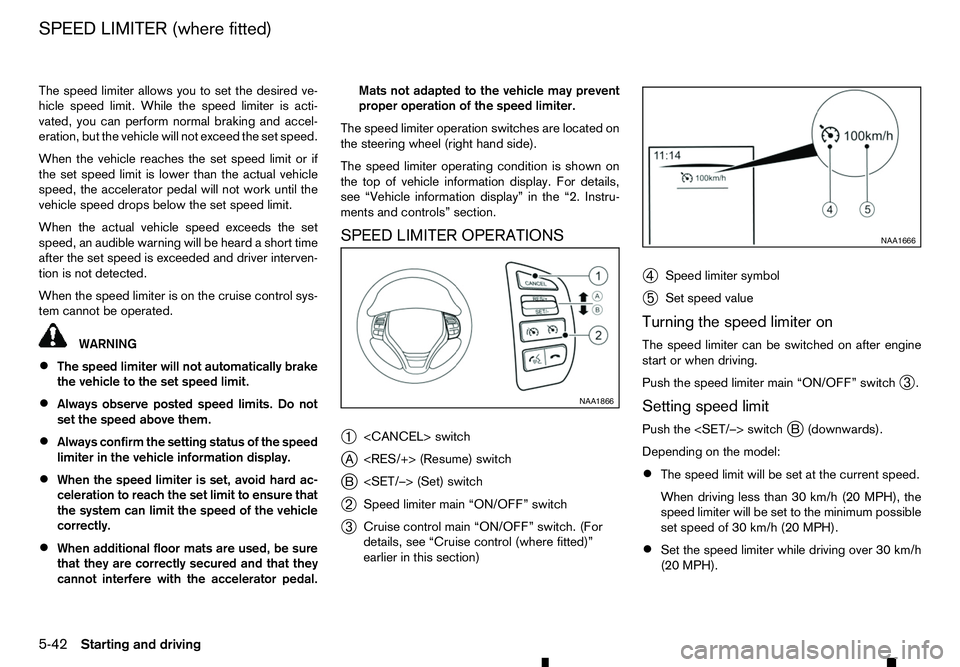
The speed limiter operation switches are located on
the steering wheel (right hand side).
The speed limiter operating condition is shown on
the top of vehicle information display. For details,
see “Vehicle information display” in the “2. Instru-
ments and controls” section.
SPEED LIMITER OPERATIONS
➀
j A
j B
➁ Speed limiter main “ON/OFF” switch
➂ Cruise control main “ON/OFF” switch. (For
details, see “Cruise control (where fitted)”
earlier in this section) ➃
Speed limiter symbol
➄ Set speed value
Turning the speed limiter on
The speed limiter can be switched on after engine
start or when driving.
Push the speed limiter main “ON/OFF” switch ➂.
Setting speed limit
Push the
Depending on the model:
• The speed limit will be set at the current speed.
When driving less than 30 km/h (20 MPH), the
speed limiter will be set to the minimum possible
set speed of 30 km/h (20 MPH).
• Set the speed limiter while driving over 30 km/h
(20 MPH). NAA1866 NAA1666
SPEED LIMITER (where fitted)
5-42 Starting and driving
Page 249 of 340
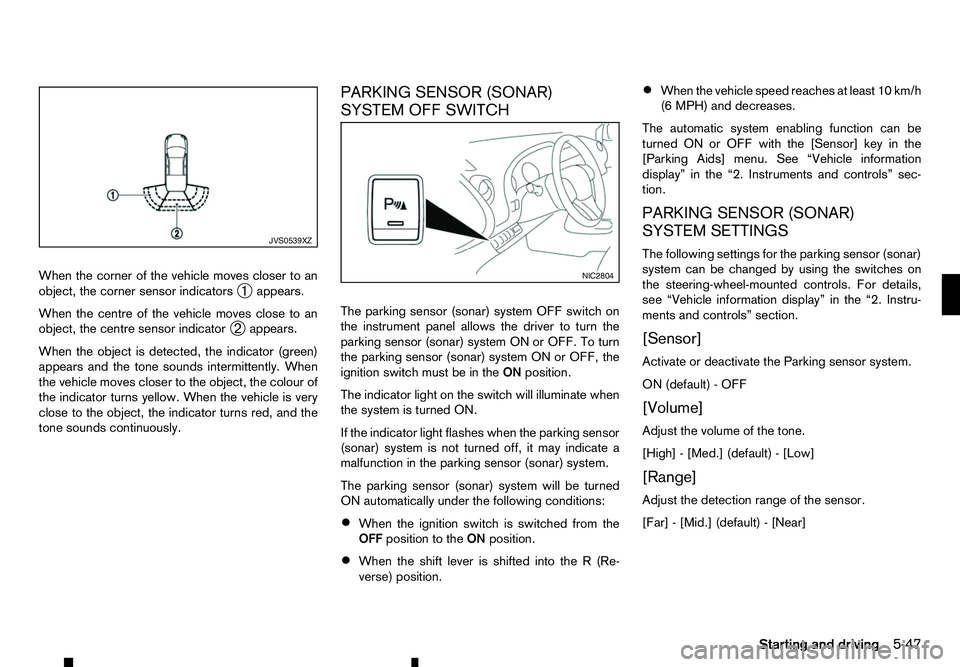
When the corner of the vehicle moves closer to an
object, the corner sensor indicators ➀appears.
When the centre of the vehicle moves close to an
object, the centre sensor indicator ➁appears.
When the object is detected, the indicator (green)
appears and the tone sounds intermittently. When
the vehicle moves closer to the object, the colour of
the indicator turns yellow. When the vehicle is very
close to the object, the indicator turns red, and the
tone sounds continuously. PARKING SENSOR (SONAR)
SYSTEM OFF SWITCH
The parking sensor (sonar) system OFF switch on
the instrument panel allows the driver to turn the
parking sensor (sonar) system ON or OFF. To turn
the parking sensor (sonar) system ON or OFF, the
ignition switch must be in the
ONposition.
The indicator light on the switch will illuminate when
the system is turned ON.
If the indicator light flashes when the parking sensor
(sonar) system is not turned off, it may indicate a
malfunction in the parking sensor (sonar) system.
The parking sensor (sonar) system will be turned
ON automatically under the following conditions:
• When the ignition switch is switched from the
OFF position to the ONposition.
• When the shift lever is shifted into the
R(Re-
verse) position. •
When the vehicle speed reaches at least 10 km/h
(6 MPH) and decreases.
The automatic system enabling function can be
turned ON or OFF with the [Sensor] key in the
[Parking Aids] menu. See “Vehicle information
display” in the “2. Instruments and controls” sec-
tion.
PARKING SENSOR (SONAR)
SYSTEM SETTINGS
The following settings for the parking sensor (sonar)
system can be changed by using the switches on
the steering-wheel-mounted controls. For details,
see “Vehicle information display” in the “2. Instru-
ments and controls” section.
[Sensor]
Activate or deactivate the Parking sensor system.
ON (default) -OFF
[Volume]
Adjust the volume of the tone.
[High] -[Med.] (default) -[Low]
[Range]
Adjust the detection range of the sensor.
[Far] -[Mid.] (default) -[Near] JVS0539XZ
NIC2804
Starting and driving
5-47
Page 250 of 340
Your new vehicle was designed to be used primarily
to carry passengers and luggage.
Towing atrailer will place additional loads on your
vehicle’s engine, drive train, steering, braking and
other systems. The towing of atrailer will exagger-
ate other conditions such as sway caused by cross-
winds, rough road surfaces or passing trucks.
Your driving style and speed must be adjusted ac-
cording to the circumstances. Before towing a
trailer, see an approved dealer or qualified work-
shop for an explanation about the proper use of tow-
ing equipment.
OPERATING PRECAUTIONS
• Avoid towing
atrailer during the running-in pe-
riod.
• Before driving, make sure that the lighting sys-
tem of the trailer works properly.
• Observe the legal maximum speeds for trailer
operation.
• Avoid abrupt starts, accelerations and stops.
• Avoid sharp turns and lane changes.
• Always drive your vehicle at
amoderate speed.
• Follow the trailer manufacturer’s instructions.
• Choose proper coupling devices (trailer hitch,
safety chain, roof carrier, etc.) for your vehicle
and trailer. These devices are available from an
approved dealer or qualified workshop where
you can also obtain more detailed information
about trailer towing. •
Never allow the total trailer load (trailer weight
plus its cargo weight) to exceed the maximum
set for the vehicle and the coupling device. See
an approved dealer or qualified workshop for
more information.
• The trailer must be loaded so that heavy goods
are placed over the axle. The maximum allowable
vertical load on the trailer hitch must not be ex-
ceeded.
• Have your vehicle serviced more often than at
the intervals specified in
aseparate maintenance
booklet.
• Trailer towing requires more fuel than under nor-
mal circumstances because of
aconsiderable
increase in traction power and resistance.
While towing atrailer, check the engine coolant
temperature indicator to prevent the vehicle from
overheating.
TYRE PRESSURE
When towing atrailer, inflate the vehicle tyres to the
maximum recommended COLD tyre pressure (for
full loading) indicated on the tyre placard.
Do not tow atrailer when the vehicle is installed with
at emporary spare tyre or acompact spare tyre.
SAFETY CHAINS
Always use asuitable chain between the vehicle
and trailer. The chain should be crossed and should
be attached to the hitch, not to the vehicle bumper
or axle. Be sure to leave enough slack in the chain
to permit turning corners. TRAILER BRAKES
Ensure that trailer brakes are installed as required
by local regulations. Also check that all other trailer
equipment conforms to local regulations.
Always block the wheels on both the vehicle and
trailer when parking. Apply the hand brake on the
trailer where fitted. Parking on
asteep slope is not
recommended.
If parking on asteep slope is unavoidable, place the
shift lever in the P(Park) position (Automatic trans-
mission model), or in an appropriate position
(Manual transmission model), and turn the front
wheels towards the kerb.
TRAILER DETECTION (where fitted)
When towing atrailer with agenuine RENAULT tow
bar electrical kit and the turn signal switch is used,
the electrical system of the vehicle will detect the
additional electrical load of the trailer lighting. As a
result, the direction indicator tone will be different.
TRAILER TOWING
5-48
Starting and driving
Page 251 of 340
When leaving your vehicle unoccupied:
• Always take the key with you
-even when leav-
ing the vehicle in your own garage.
• Close all windows completely and lock all doors.
• Always park your vehicle where it can be seen.
Park in
awell lit area during the night.
• If the security system is equipped, use it
-even
for ashort period.
• Never leave children or pets in the vehicle unat-
tended.
• Never leave valuables inside the vehicle. Always
take valuables with you.
• Never leave the vehicle documents in the ve-
hicle.
• Never leave articles on
aroof rail. Remove them
from the rack and keep and lock them inside the
vehicle.
• Never leave the spare key in the vehicle. WARNING
If the engine is not running or is turned off while
driving, the power assist for the steering will not
work. The steering will be much harder to oper-
ate.
The power assisted steering is designed to use a
hydraulic pump driven by the engine, to assist steer-
ing.
If the engine stops or the drive belt breaks, you will
still have control of the vehicle. However, greater
steering effort is needed, especially in sharp turns
and at low speeds. The brake system has two separate hydraulic cir-
cuits. If one circuit malfunctions, you will still have
braking ability at two wheels.
BRAKE PRECAUTIONS
Vacuum assisted brakes
The brake booster aids braking by using engine
vacuum. If the engine stops, you can stop the ve-
hicle by depressing the footbrake pedal. However,
greater foot pressure on the footbrake pedal will be
required to stop the vehicle. The stopping distance
will be longer.
If the engine is not running or is turned off while driv-
ing, the power assisted brakes will not function.
Braking will be harder. WARNING
Do not coast with the engine stopped.
Using brakes
Avoid resting your foot on the footbrake pedal while
driving. This will overheat the brakes, wear out the
brake linings/pads faster, and increase fuel con-
sumption.
To help reduce brake wear and to prevent the brakes
from overheating, reduce speed and downshift to a
lower gear before going down aslope or long grade.
Overheated brakes may reduce braking perfor-
mance and could result in loss of vehicle control.
VEHICLE SECURITY
POWER STEERING SYSTEM BRAKE SYSTEM
Starting and driving5-49