steering RENAULT ALASKAN 2017 User Guide
[x] Cancel search | Manufacturer: RENAULT, Model Year: 2017, Model line: ALASKAN, Model: RENAULT ALASKAN 2017Pages: 340, PDF Size: 6.93 MB
Page 68 of 340
When the low tyre pressure warning light illuminates,
you should stop and adjust the tyre pressure of all 4
tyres to the recommended COLD tyre pressure
shown on the tyre placard located on the driver side
centre pillar see “Tyre placard” in the “9. Technical information” section. The low tyre pressure warning
light does not automatically turn off when the tyre pressure is adjusted. After the tyre is inflated to the
recommended pressure, the vehicle must be driven
at speeds above 25 km/h (16 MPH) to activate the
TPMS and turn off the low tyre pressure warning light. Use atyre pressure gauge to check the tyre
pressure.
The low tyre pressure (e.g., [Low tyre pressure])
warning appears each time the ignition switch is
placed in the ON position as long as the low tyre
pressure warning light remains illuminated.
For additional information, see “Vehicle information
display” later in this section and “Tyre Pressure
Monitoring System (TPMS) (where fitted)” later in
this section.
TPMS resetting must be also performed after atyre
or aw heel is replaced, or the tyres are rotated.
Depending on achange in the outside temperature,
the low tyre pressure warning light may illuminate
even if the tyre pressure has been adjusted prop-
erly. Adjust the tyre pressure to the recommended
COLD tyre pressure again when the tyres are cold,
and reset the TPMS. If the low tyre pressure warning light still continues
to illuminate after the resetting operation, it may indi-
cate that the TPMS is not functioning properly. Have
the system checked by an approved dealer or quali-
fied workshop.
For additional information, see “Tyre Pressure Moni-
toring System (TPMS) (where fitted)” in the “5. Start-
ing and driving” section and “Vehicle information
display” later in this section.
TPMS malfunction:
If the TPMS is not functioning properly, the low tyre
pressure warning light will flash for approximately 1
minute when the ignition switch is placed in the ON
position. The light will remain on after
1minute. Have
the system checked by an approved dealer or quali-
fied workshop. The low tyre pressure warning does
not appear if the low tyre pressure warning light illu-
minates to indicate aTPMS malfunction.
For additional information, see “Tyre Pressure Moni-
toring System (TPMS) (where fitted)” in the “5. Start-
ing and driving” section. WARNING
• Radio waves could adversely affect electric
medical equipment. Those who use apace-
maker should contact the electric medical
equipment manufacturer for the possible in-
fluences before use. •
If the light does not illuminate with the igni-
tion switch pushed ON, have the vehicle
checked by an approved dealer or qualified
workshop as soon as possible.
• If the low tyre pressure warning light illumi-
nates while driving, avoid sudden steering
manoeuvres or abrupt braking, reduce vehicle
speed, pull off the road to
asafe location and
stop the vehicle as soon as possible. Driving
with under-inflated tyres may permanently
damage the tyres and increase the likelihood
of tyre failure. Serious vehicle damage could
occur and may lead to an accident and could
result in serious personal injury. Check the
tyre pressure for all four tyres. Adjust the tyre
pressure to the recommended COLD tyre
pressure shown on the tyre placard, located
on the driver side centre pillar, to turn the low
tyre pressure warning light off. If the light still
illuminates while driving after adjusting the
tyre pressure, atyre may be flat. If you have a
flat tyre, repair it with the emergency tyre
puncture repair kit (where fitted) or replace it
with aspare tyre (where fitted) as soon as
possible.
• After adjusting the tyre pressure, be sure to
reset the TPMS. Unless the resetting is per-
formed, the TPMS will not warn of the low tyre
pressure correctly.
2-10 Instruments and controls
Page 73 of 340
•
Remote Control Key system (where fitted)
—“ Push-button ignition switch (models with Re-
mote Control Key system)” in the “5. Starting
and driving” section
• Oil control system (where fitted)
—“
Oil control system (where fitted for diesel
engine model)” later in this section
• Tyre Pressure information (where fitted)
—“
Tyre Pressure Monitoring System (TPMS)
(where fitted)” in the “5. Starting and driving”
section HOW TO USE THE VEHICLE
INFORMATION DISPLAY
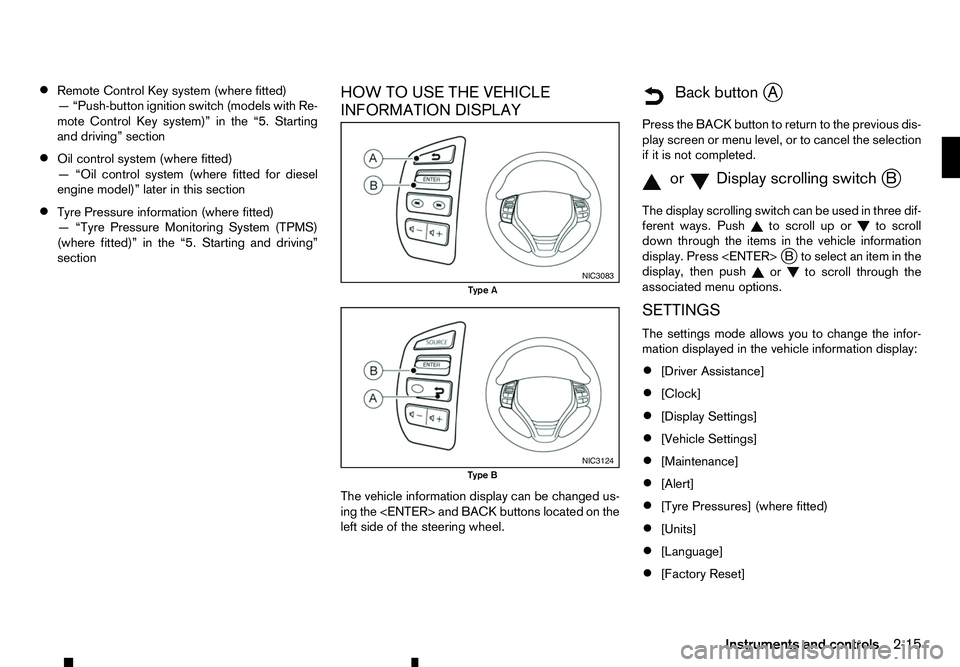
The vehicle information display can be changed us-
ing the
left side of the steering wheel.
m Back
button
jA
Press the BACK button to return to the previous dis-
play screen or menu level, or to cancel the selection if it is not completed.
m orm Display
scrolling switch
jB
The display scrolling switch can be used in three dif-
ferent ways. Push to scroll up or
to scroll
down through the items in the vehicle information
display. Press
display, then push or to scroll through the
associated menu options.
SETTINGS
The settings mode allows you to change the infor-
mation displayed in the vehicle information display:
• [Driver Assistance]
• [Clock]
• [Display Settings]
• [Vehicle Settings]
• [Maintenance]
• [Alert]
• [Tyre Pressures] (where fitted)
• [Units]
• [Language]
• [Factory Reset] NIC3083
Type A
NIC3124
Type B
Instruments and controls2-15
Page 78 of 340
See “Tyre Pressure Monitoring System (TPMS)
(where fitted)” in the “5. Starting and driving” sec-
tion.
Use the or and the
or cancel the calibration process. While the calibra-
tion process is active, the message: [Resetting tyre
pressure system] will be displayed.
[Units]
The following items are available under the [Units]
menu.
• [Distance/Fuel]
• [Tyre Pressures] (where fitted)
• [Temperature]
[Distance/Fuel]:
The unit for the distance and fuel consumption that
displays in the vehicle information display can be
changed to:
• [km, l/100km]
• [km, km/l]
• [miles, MPG]
[Tyre Pressures] (where fitted):
The unit for tyre pressure that displays in the vehicle
information display can be changed to:
• psi
• bar
• kPa •
Kgf/cm
2
Use the or and
the
and change the unit.
[Temperature]:
The temperature that displays in the vehicle informa-
tion display can be changed from:
• °C (Celsius)
• °F (Fahrenheit)
[Language]
The language of the vehicle information display can
be changed to:
• English
• French
• German
• Italian
• Portuguese
• Dutch
• Spanish
• Turkish
• Russian
Use the or and the
and change the language of the vehicle information
display. [Factory Reset]
The settings in the vehicle information display can
be reset back to the factory default. To reset the
vehicle information display:
1. Use the or buttons to select [Settings], and
press the
2. Select [Factory Reset] using the or buttons
and press the
3. Select [Yes] to return all settings back to default by pressing the
To cancel the reset operation select [No] or press
the BACK button located on the left side of the
steering wheel.
2-20 Instruments and controls
Page 80 of 340
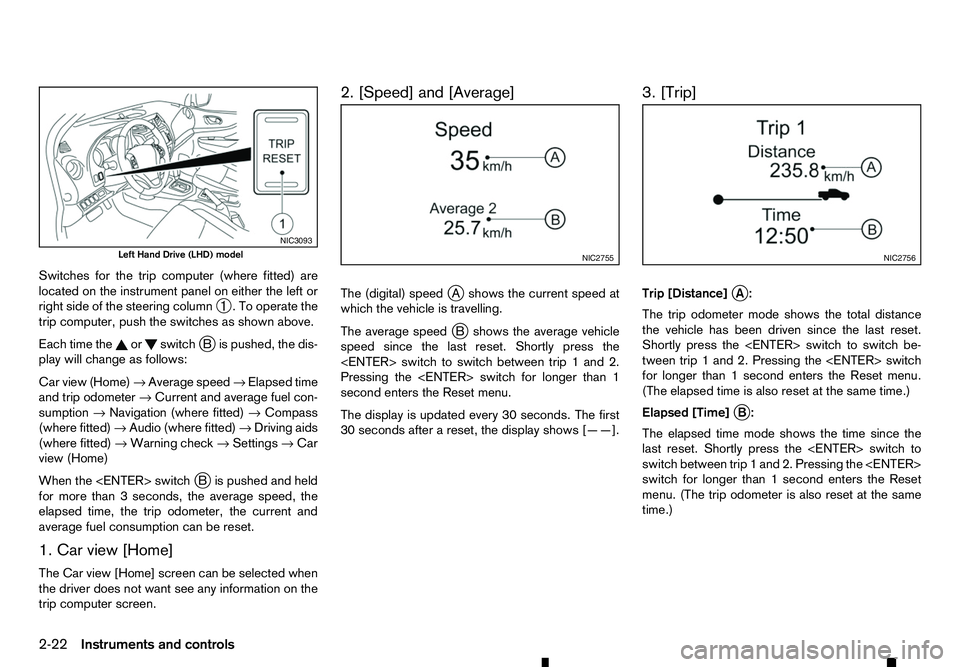
Switches for the trip computer (where fitted) are
located on the instrument panel on either the left or
right side of the steering column ➀.Too
perate the
trip computer, push the switches as shown above.
Each time the or switch
jBi spushed, the dis-
play will change as follows:
Car view (Home) →Average speed →Elapsed time
and trip odometer →Current and average fuel con-
sumption →Navigation (where fitted) →Compass
(where fitted) →Audio (where fitted) →Driving aids
(where fitted) →Warning check →Settings →Car
view (Home)
When the
Bi spushed and held
for more than 3seconds, the average speed, the
elapsed time, the trip odometer, the current and
average fuel consumption can be reset.
1. Car view [Home]
The Car view [Home] screen can be selected when
the driver does not want see any information on the
trip computer screen. 2. [Speed] and [Average]
The (digital) speed
jAs hows the current speed at
which the vehicle is travelling.
The average speed j
Bs hows the average vehicle
speed since the last reset. Shortly press the
Pressing the
second enters the Reset menu.
The display is updated every 30 seconds. The first
30 seconds after areset, the display shows [——]. 3. [Trip]
Trip [Distance]
jA:
The trip odometer mode shows the total distance
the vehicle has been driven since the last reset.
Shortly press the
tween trip 1and 2. Pressing the
for longer than 1second enters the Reset menu.
(The elapsed time is also reset at the same time.)
Elapsed [Time] j
B:
The elapsed time mode shows the time since the
last reset. Shortly press the
switch between trip 1and 2. Pressing the
switch for longer than 1second enters the Reset
menu. (The trip odometer is also reset at the same
time.) NIC3093
Left Hand Drive (LHD) model
NIC2755 NIC2756
2-22 Instruments and controls
Page 83 of 340
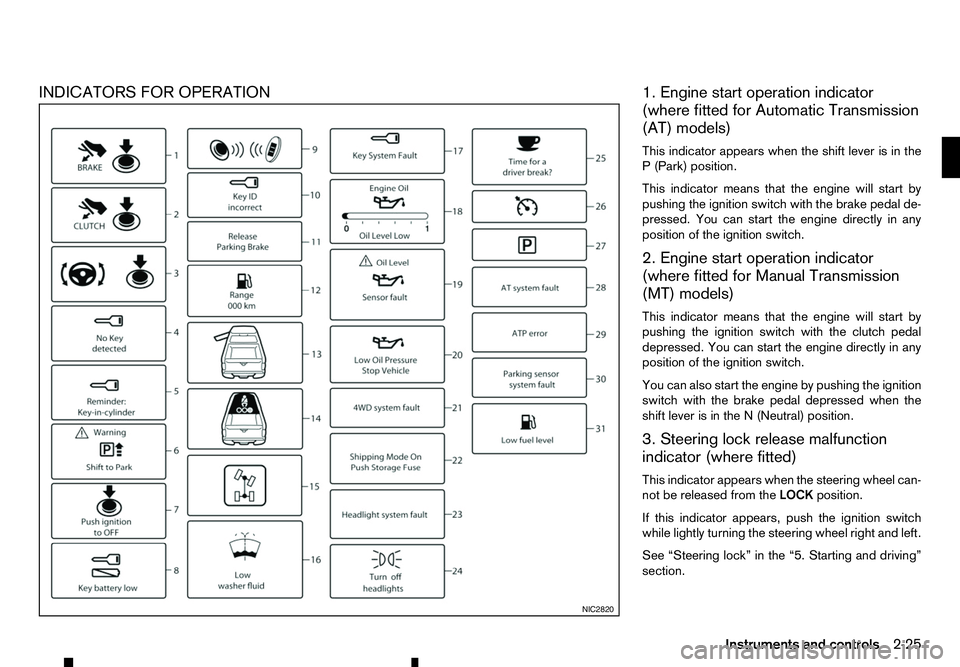
INDICATORS FOR OPERATION
1. Engine start operation indicator
(where fitted for Automatic Transmission
(AT) models)
This indicator appears when the shift lever is in the P( Park) position.
This indicator means that the engine will start by
pushing the ignition switch with the brake pedal de-
pressed. You can start the engine directly in any
position of the ignition switch.
2. Engine start operation indicator
(where fitted for Manual Transmission
(MT) models)
This indicator means that the engine will start by
pushing the ignition switch with the clutch pedal depressed. You can start the engine directly in any
position of the ignition switch.
You can also start the engine by pushing the ignition
switch with the brake pedal depressed when the
shift lever is in the N(Neutral) position.
3. Steering lock release malfunction
indicator (where fitted)
This indicator appears when the steering wheel can-
not be released from the LOCKposition.
If this indicator appears, push the ignition switch
while lightly turning the steering wheel right and left.
See “Steering lock” in the “5. Starting and driving”
section. NIC2820
Instruments and controls
2-25
Page 90 of 340
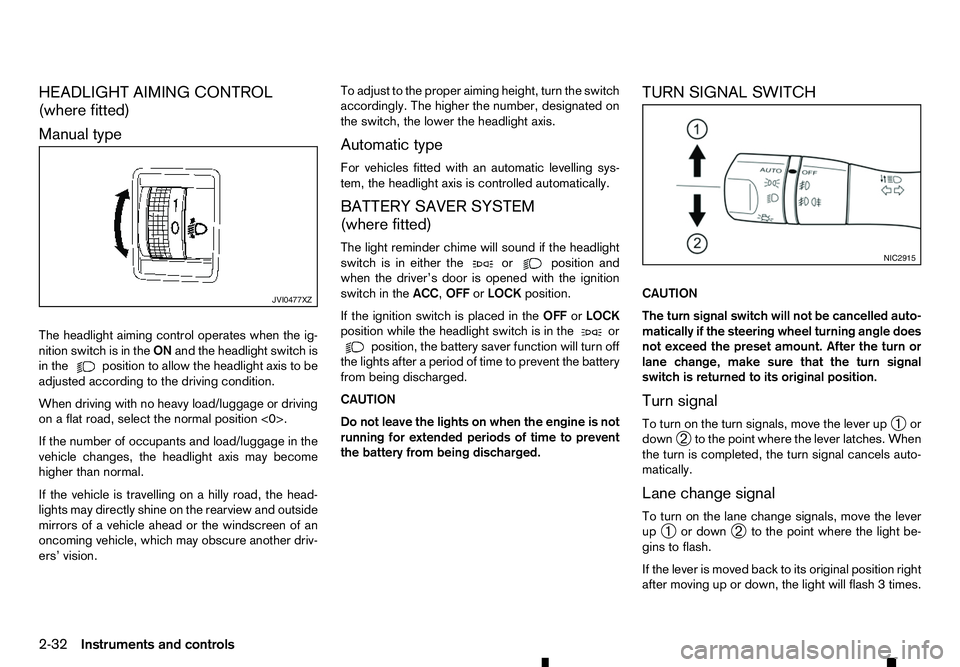
HEADLIGHT AIMING CONTROL
(where fitted)
Manual type
The headlight aiming control operates when the ig- nition switch is in the ONand the headlight switch is
in the position to allow the headlight axis to be
adjusted according to the driving condition.
When driving with no heavy load/luggage or driving
on aflat road, select the normal position <0>.
If the number of occupants and load/luggage in the
vehicle changes, the headlight axis may become
higher than normal.
If the vehicle is travelling on ahilly road, the head-
lights may directly shine on the rearview and outside mirrors of avehicle ahead or the windscreen of an
oncoming vehicle, which may obscure another driv-
ers’ vision. To adjust to the proper aiming height, turn the switch
accordingly. The higher the number, designated on
the switch, the lower the headlight axis.
Automatic type
For vehicles fitted with an automatic levelling sys-
tem, the headlight axis is controlled automatically.
BATTERY SAVER SYSTEM
(where fitted)
The light reminder chime will sound if the headlight
switch is in either the or position and
when the driver’s door is opened with the ignition
switch in the ACC,OFForLOCK position.
If the ignition switch is placed in the OFForLOCK
position while the headlight switch is in the or
position, the battery saver function will turn off
the lights after aperiod of time to prevent the battery
from being discharged.
CAUTION
Do not leave the lights on when the engine is not
running for extended periods of time to prevent
the battery from being discharged. TURN SIGNAL SWITCH
CAUTION
The turn signal switch will not be cancelled auto-
matically if the steering wheel turning angle does
not exceed the preset amount. After the turn or
lane change, make sure that the turn signal
switch is returned to its original position.
Turn signal
To turn on the turn signals, move the lever up
➀or
down ➁to the point where the lever latches. When
the turn is completed, the turn signal cancels auto-
matically.
Lane change signal
To turn on the lane change signals, move the lever
up ➀ or down
➁to the point where the light be-
gins to flash.
If the lever is moved back to its original position right
after moving up or down, the light will flash 3times. JVI0477XZ NIC2915
2-32 Instruments and controls
Page 105 of 340
3
Pre-driving checks and adjustments
Pre-driving checks and adjustments
Keys ........................................................................V
3-2 Key (where fitted) ............................................... 3-2
Anti-Theft System (ATS*) key (where fitted) ........ 3-2
Remote Control Key (where fitted) ...................... 3-2
Doors ...................................................................... 3-4 Locking with key ................................................. 3-4
Opening with inside door handle ......................... 3-4
Locking with power door lock switch .................. 3-4
Rear access doors (King Cab models)................ 3-5
Child safety rear door locks (Double Cab
models) .............................................................. 3-5
Remote keyless entry system (where fitted) .............. 3-6
Using remote keyless entry system ..................... 3-6
Remote Control Key system (where fitted) ............... 3-7
Remote Control Key operating range .................. 3-9
Using Remote Control Key system ...................... 3-9
Battery saver system........................................... 3-10
Warning and audible reminders .......................... 3-11
Troubleshooting guide ........................................ 3-12
Using remote keyless entry system ..................... 3-14
Hazard indicator and horn operation.................... 3-15
Security system (where fitted) .................................. 3-15
Theft warning system (where fitted)..................... 3-15 Anti-Theft System (ATS) ..................................... 3-16
Bonnet..................................................................V
... 3-17 Opening bonnet.................................................. 3-17
Closing bonnet ................................................... 3-17
Fuel filler lid and cap ................................................ 3-18
Opening fuel filler lid ........................................... 3-18
Fuel filler cap ...................................................... 3-18
AdBlue® filler lid and cap ........................................ 3-19 Opening AdBlue® filler lid .................................. 3-20
Locking AdBlue® filler lid ................................... 3-20
AdBlue® filler cap .............................................. 3-20
Cargo bed (where fitted).......................................... 3-20 Tailgate .............................................................. 3-20
Tie down hooks (where fitted) ............................. 3-21
C-Channel system (where fitted) ......................... 3-21
Steering wheel......................................................... 3-23 Steering wheel adjustment .................................. 3-23
Mirrors..................................................................... 3-23 Inside rearview mirror ......................................... 3-23
Outside rearview mirrors..................................... 3-25
Vanity mirror (where fitted) .................................. 3-26
Parking brake .......................................................... 3-26
Page 112 of 340
The Remote Control Key is always communicating
with the vehicle as it receives radio waves. The Re-
mote Control Key system transmits weak radio
waves. Environmental conditions may interfere with
the operation of the Remote Control Key system
under the following operating conditions.
• When operating near
alocation where strong
radio waves are transmitted, such as aTVtower,
power station and broadcasting station.
• When in possession of wireless equipment, such
as am obile telephone, transceiver, and CB ra-
dio.
• When the Remote Control Key is in contact with
or covered by metallic materials.
• When any type of radio wave remote control is
used nearby.
• When the Remote Control Key is placed near an
electric appliance such as
apersonal computer.
In such cases, correct the operating conditions be-
fore using the Remote Control Key function or use
the mechanical key.
Although the life of the battery varies depending on
the operating conditions, the battery’s life is approxi-
mately 2years. If the battery is discharged, replace
it with anew one.
For information regarding replacement of abattery,
see “Remote Control Key battery replacement” in
the “8. Maintenance and do-it-yourself” section.
Since the Remote Control Key is continuously re-
ceiving radio waves, if the key is left near equipment which transmits strong radio waves, such as signals
from
aTVa nd personal computer, the battery life
may become shorter.
Because the steering wheel is locked electrically,
unlocking the steering wheel with the ignition switch
in the LOCK position is impossible when the vehicle
battery is completely discharged. Pay special atten-
tion that the vehicle battery is not completely dis-
charged.
As many as 4Remote Control Keys can be regis-
tered and used with one vehicle. For information
about the purchase and use of additional Remote
Control Keys, contact an approved dealer or quali-
fied workshop.
CAUTION
• Do not allow the Remote Control Key, which
contains electrical components, to come into
contact with water or salt water. This could
affect the system function.
• Do not drop the Remote Control Key.
• Do not strike the Remote Control Key sharply
against another object.
• Do not change or modify the Remote Control
Key.
• Wetting may damage the Remote Control Key.
If the Remote Control Key gets wet, immedi-
ately wipe until it is completely dry.
• If the outside temperature is below −10°C
(14°F), the battery of the Remote Control Key
may not function properly. •
Do not place the Remote Control Key for an
extended period in an area where tempera-
tures exceed 60°C (140°F).
• Do not attach the Remote Control Key to a
key holder that contains
amagnet.
• Do not place the Remote Control Key near
equipment that produces
amagnetic field,
such as aTV, audio equipment and personal
computers.
If an Remote Control Key is lost or stolen, RENAULT
recommends erasing the ID code of that Remote
Control Key from the vehicle. This may prevent the
unauthorised use of the Remote Control Key to op-
erate the vehicle. For information regarding the eras-
ing procedure, contact an approved dealer or quali-
fied workshop.
The Remote Control Key function can be disabled.
For information about disabling the Remote Control
Key function, contact an approved dealer or quali-
fied workshop.
3-8 Pre-driving checks and adjustments
Page 117 of 340
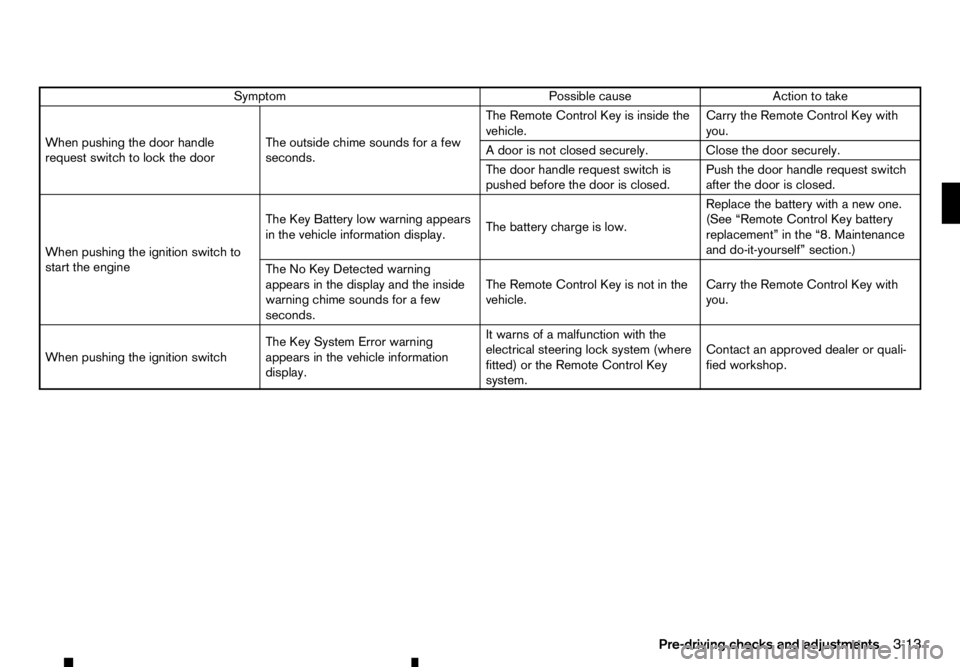
Symptom
Possible cause
Action to take
When pushing the door handle
request switch to lock the door The outside chime sounds for
afew
seconds. The Remote Control Key is inside the
vehicle.
Carry the Remote Control Key with
you.
Ad oor is not closed securely. Close the door securely.
The door handle request switch is
pushed before the door is closed. Push the door handle request switch
after the door is closed.
When pushing the ignition switch to
start the engine The Key Battery low warning appears
in the vehicle information display.
The battery charge is low.Replace the battery with
anew one.
(See “Remote Control Key battery
replacement” in the “8. Maintenance
and do-it-yourself” section.)
The No Key Detected warning
appears in the display and the inside
warning chime sounds for afew
seconds. The Remote Control Key is not in the
vehicle.
Carry the Remote Control Key with
you.
When pushing the ignition switch The Key System Error warning
appears in the vehicle information
display.It warns of
amalfunction with the
electrical steering lock system (where
fitted) or the Remote Control Key
system. Contact an approved dealer or quali-
fied workshop.
Pre-driving checks and adjustments 3-13
Page 127 of 340
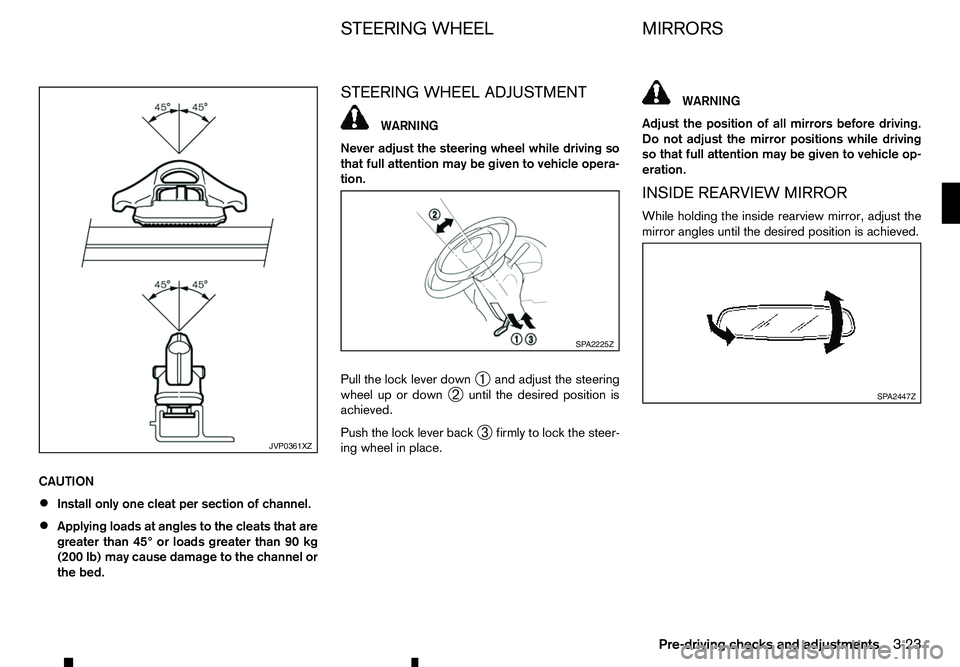
CAUTION
•
Install only one cleat per section of channel.
• Applying loads at angles to the cleats that are
greater than 45° or loads greater than 90 kg
(200 lb) may cause damage to the channel or
the bed. STEERING WHEEL ADJUSTMENT WARNING
Never adjust the steering wheel while driving so
that full attention may be given to vehicle opera-
tion.
Pull the lock lever down ➀and adjust the steering
wheel up or down ➁until the desired position is
achieved.
Push the lock lever back ➂firmly to lock the steer-
ing wheel in place. WARNING
Adjust the position of all mirrors before driving.
Do not adjust the mirror positions while driving
so that full attention may be given to vehicle op-
eration.
INSIDE REARVIEW MIRROR
While holding the inside rearview mirror, adjust the
mirror angles until the desired position is achieved. JVP0361XZ SP A2225Z
SP A2447Z
STEERING WHEEL
MIRRORS
Pre-driving checks and adjustments 3-23