air condition RENAULT ALASKAN 2017 Manual PDF
[x] Cancel search | Manufacturer: RENAULT, Model Year: 2017, Model line: ALASKAN, Model: RENAULT ALASKAN 2017Pages: 340, PDF Size: 6.93 MB
Page 188 of 340
*S
ome features of this iPod may not be fully func-
tional.
Make sure that your iPod firmware is updated to the
version indicated above.
iPod main operation:
If the system has been turned off while the iPod was
playing, pushing the Power/VOLUME dial will start
the iPod.
If another audio source is playing and aiPod is con-
nected, push the AUX button until the screen on the
display changes to the iPod mode.
Refer to your device manufacturer’s owner informa-
tion regarding the proper use and care of the de-
vice.
Interface operation:
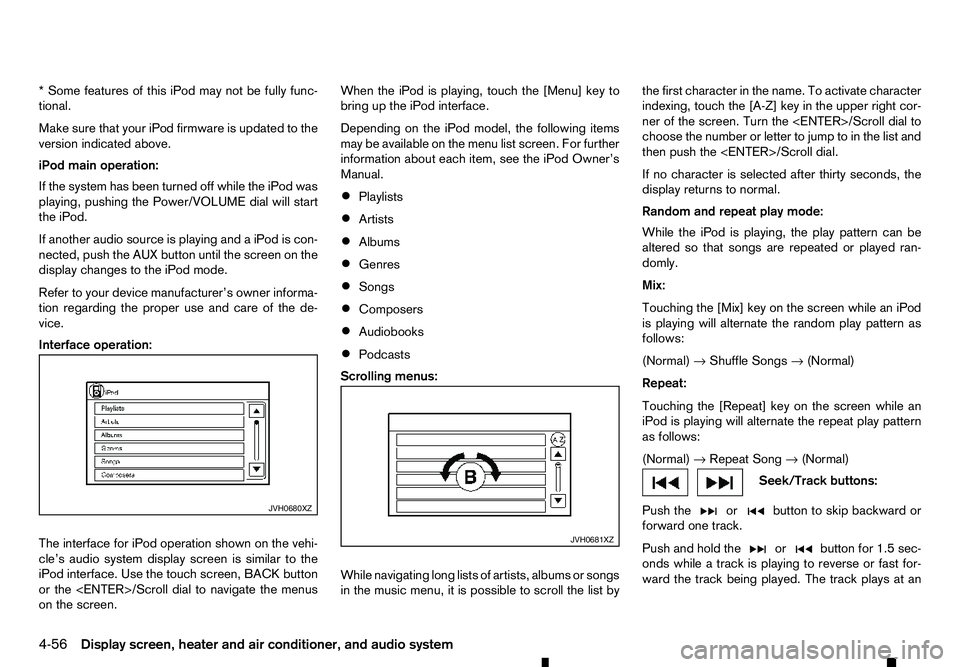
The interface for iPod operation shown on the vehi-
cle’s audio system display screen is similar to the
iPod interface. Use the touch screen, BACK button
or the
on the screen. When the iPod is playing, touch the [Menu] key to
bring up the iPod interface.
Depending on the iPod model, the following items
may be available on the menu list screen. For further
information about each item, see the iPod Owner’s
Manual.
• Playlists
• Artists
• Albums
• Genres
• Songs
• Composers
• Audiobooks
• Podcasts
Scrolling menus:
While navigating long lists of artists, albums or songs
in the music menu, it is possible to scroll the list by the first character in the name. To activate character
indexing, touch the [A-Z] key in the upper right cor-
ner of the screen. Turn the
choose the number or letter to jump to in the list and
then push the
If no character is selected after thirty seconds, the
display returns to normal.
Random and repeat play mode:
While the iPod is playing, the play pattern can be
altered so that songs are repeated or played ran-
domly.
Mix:
Touching the [Mix] key on the screen while an iPod
is playing will alternate the random play pattern as
follows:
(Normal) →Shuffle Songs →(Normal)
Repeat:
Touching the [Repeat] key on the screen while an
iPod is playing will alternate the repeat play pattern
as follows:
(Normal) →Repeat Song →(Normal) Seek/Track buttons:
Push the or button to skip backward or
forward one track.
Push and hold the or button for 1.5 sec-
onds while at
rack is playing to reverse or fast for-
ward the track being played. The track plays at an JVH0680XZ
JVH0681XZ
4-56 Display screen, heater and air conditioner, and audio system
Page 189 of 340
increased speed while reversing or fast forwarding.
When the button is released, the track returns to
normal play speed.
Bluetooth® audio player operation
If you have acompatible Bluetooth® audio device
that is capable of playing audio files, the device can be connected to the vehicle’s audio system so that
the audio files on the device play through the vehi-
cle’s speakers
Bluetooth® trademark:
m Bluetooth®
is
at rademark
owned by Bluetooth SIG, Inc.
and licensed to Robert Bosch
GmbH.
Connecting Bluetooth® audio:
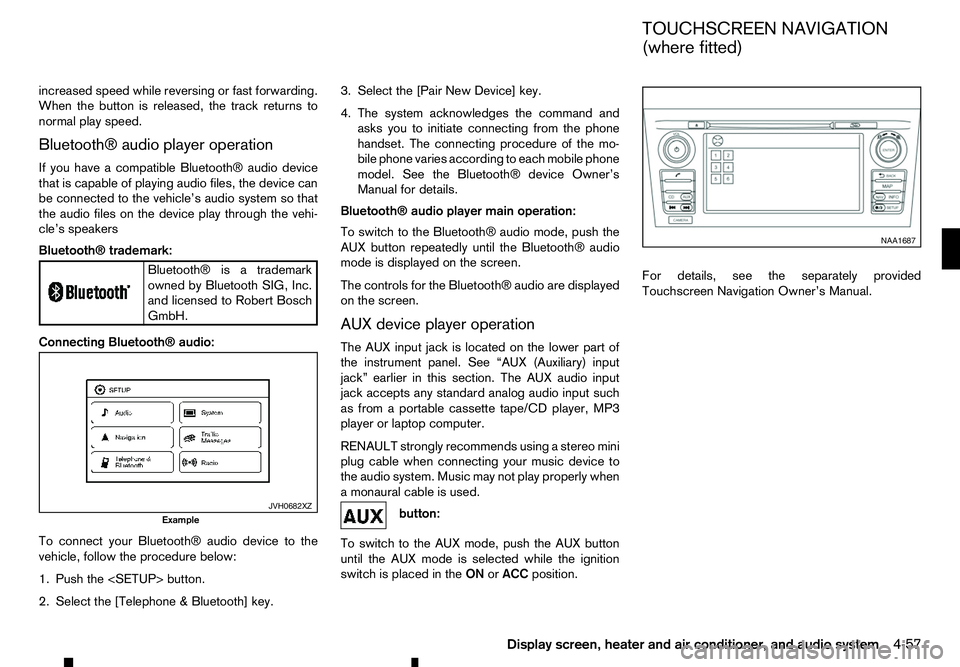
To connect your Bluetooth® audio device to the
vehicle, follow the procedure below:
1. Push the
2. Select the [Telephone &Bluetooth] key. 3. Select the [Pair New Device] key.
4. The system acknowledges the command and
asks you to initiate connecting from the phone
handset. The connecting procedure of the mo-
bile phone varies according to each mobile phone
model. See the Bluetooth® device Owner’s
Manual for details.
Bluetooth® audio player main operation:
To switch to the Bluetooth® audio mode, push the
AUX button repeatedly until the Bluetooth® audio
mode is displayed on the screen.
The controls for the Bluetooth® audio are displayed on the screen.
AUX device player operation
The AUX input jack is located on the lower part of
the instrument panel. See “AUX (Auxiliary) input
jack” earlier in this section. The AUX audio input
jack accepts any standard analog audio input such
as from aportable cassette tape/CD player, MP3
player or laptop computer.
RENAULT strongly recommends using astereo mini
plug cable when connecting your music device to
the audio system. Music may not play properly when
am onaural cable is used. button:
To switch to the AUX mode, push the AUX button
until the AUX mode is selected while the ignition
switch is placed in the ONorACC position. For details, see the separately provided
Touchscreen Navigation Owner’s Manual.
JVH0682XZ
Example NAA1687
TOUCHSCREEN NAVIGATION
(where fitted)
Display screen, heater and air conditioner, and audio system 4-57
Page 190 of 340
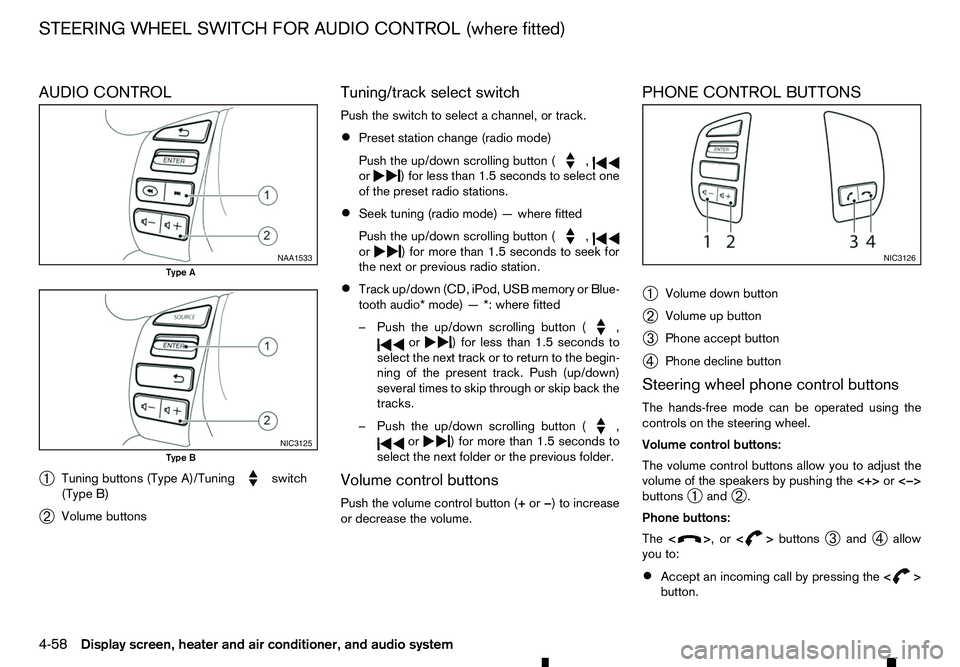
AUDIO CONTROL
➀ Tuning buttons (Type A)/Tuning switch
(Type B)
➁ Volume buttons Tuning/track select switch
Push the switch to select
achannel, or track.
• Preset station change (radio mode)
Push the up/down scrolling button ( ,
or )f
or less than 1.5 seconds to select one
of the preset radio stations.
• Seek tuning (radio mode)
—where fitted
Push the up/down scrolling button ( ,
or )f
or more than 1.5 seconds to seek for
the next or previous radio station.
• Track up/down (CD, iPod, USB memory or Blue-
tooth audio* mode)
—*:where fitted
–P ush the up/down scrolling button ( ,
or )f
or less than 1.5 seconds to
select the next track or to return to the begin-
ning of the present track. Push (up/down)
several times to skip through or skip back the
tracks.
–P ush the up/down scrolling button ( ,
or )f
or more than 1.5 seconds to
select the next folder or the previous folder.
Volume control buttons
Push the volume control button (+ or−)toi ncrease
or decrease the volume. PHONE CONTROL BUTTONS
➀
Volume down button
➁ Volume up button
➂ Phone accept button
➃ Phone decline button
Steering wheel phone control buttons
The hands-free mode can be operated using the
controls on the steering wheel.
Volume control buttons:
The volume control buttons allow you to adjust the
volume of the speakers by pushing the <+>or<−>
buttons ➀and
➁.
Phone buttons:
The < > ,or<
> buttons
➂and
➃allow
you to:
• Accept an incoming call by pressing the
< >
button. NAA1533
Type A
NIC3125
Type B NIC3126
STEERING WHEEL SWITCH FOR AUDIO CONTROL (where fitted)
4-58 Display screen, heater and air conditioner, and audio system
Page 191 of 340
•
Reject an incoming call by pressing the
< >
button during the incoming call.
• End an active call by pushing the
< >
button
once.
• Redial the last outgoing call by pressing the
< >
button for more than
2seconds. BLUETOOTH
®MOBILE PHONE
FEATURE WARNING
Whilst
driving, using the mobile phone is ex-
tremely dangerous because it significantly im-
pairs your concentration and diminishes your re-
action capabilities to sudden changes on the
road, and it may lead to afatal accident. This
applies to all phone call situations such as when
receiving an incoming call, during aphone con-
versation, when calling through the phone book
search, etc.
CAUTION
Certain country jurisdictions prohibit the use of
the mobile phone in the car without hands-free
support.
This chapter provides information about the hands-
free phone system using aBluetooth
®connection.
Bluetooth
®is aw ireless radio communication stan-
dard. This system offers ahands-free facility for your
mobile telephone to enhance driving comfort.
In order to use your mobile phone with the Blue-
tooth
®of the audio system, the mobile phone must
first be setup. For details, see “BLUETOOTH®
settings” later in this section. Once it has been
setup, the hands-free mode is automatically acti-
vated on the registered mobile phone (via Blue-
tooth
®)w hen it comes into range. An
otification message appears on the audio display
when the phone is connected, when an incoming
call is being received, as well as when acall is initi-
ated.
When acall is active, the audio system, microphone
(located in the ceiling in front of the rear view mir-
ror), and steering wheel switches enable hands-free
communication.
If the audio system is in use at the time, the radio,
CD, iPod, USB audio, Bluetooth audio or AUX
source mode will be muted and will stay muted until
the active call has ended.
The Bluetooth
®system may not be able to connect
with your mobile phone for the following reasons:
• The mobile phone is too far away from the ve-
hicle.
• The Bluetooth
®mode on your mobile phone has
not been activated.
• Your mobile phone has not been paired with the
Bluetooth
®system of the audio unit.
• The mobile phone does not support Bluetooth
®
technology (BT Core v2.0).
NOTE
• For models with Audio with Navigation sys-
tem see the separately provided Owner’s
Manual.
• For details, see your mobile phone’s Owner’s
Manual.
BLUETOOTH® HANDS-FREE PHONE SYSTEM (without navigation system
and colour display)
Display screen, heater and air conditioner, and audio system 4-59
Page 192 of 340
•
For assistance with your mobile phone inte-
gration, please visit your local approved
dealer.
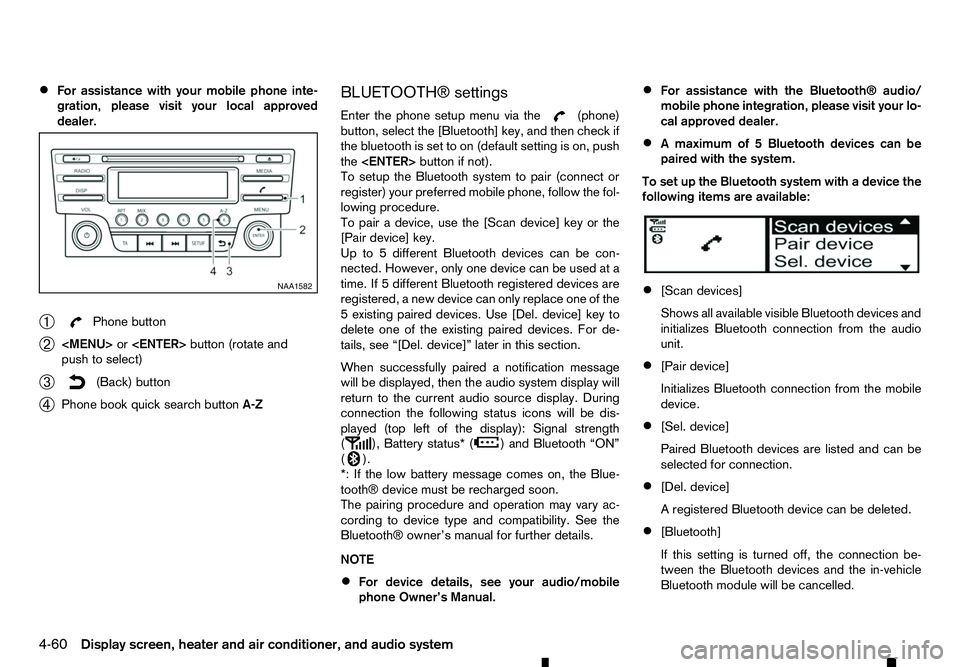
➀ Phone button
➁
Page 193 of 340
![RENAULT ALASKAN 2017 Manual PDF [Scan devices]:
1) Press the button. Select [Scan device]
The audio unit searches bluetooth devices and
shows all visible devices.
Pressing the button cancels the search.
2) Select the device to be pa](/img/7/58394/w960_58394-192.png "RENAULT ALASKAN 2017 Manual PDF [Scan devices]:
1) Press the button. Select [Scan device]
The audio unit searches bluetooth devices and
shows all visible devices.
Pressing the button cancels the search.
2) Select the device to be pa")
[Scan devices]:
1) Press the button. Select [Scan device]
The audio unit searches bluetooth devices and
shows all visible devices.
Pressing the button cancels the search.
2) Select the device to be paired. Use the
Page 194 of 340
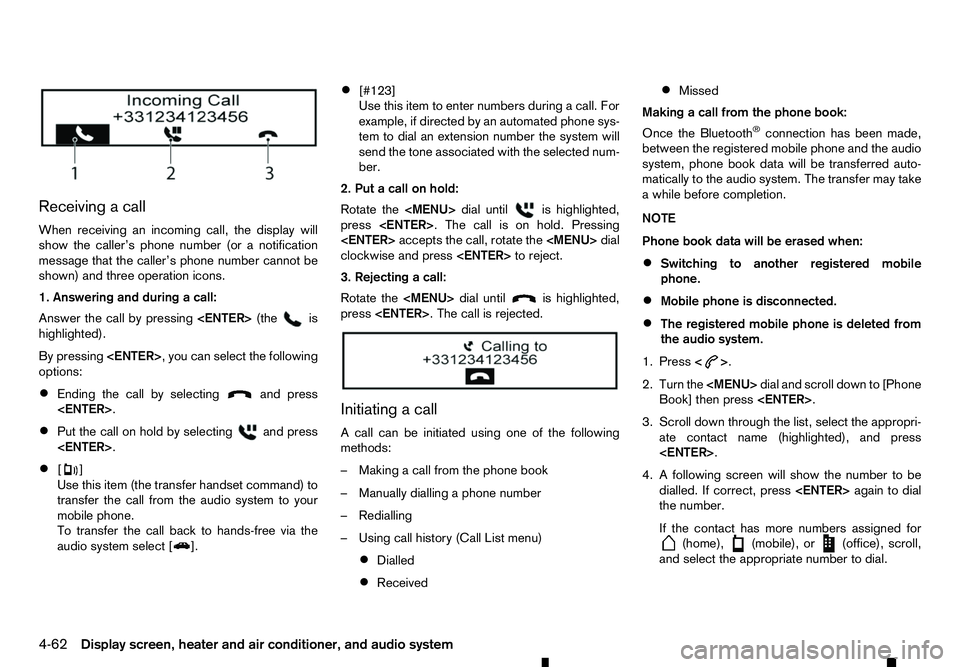
Receiving
acall
When receiving an incoming call, the display will
show the caller’s phone number (or anotification
message that the caller’s phone number cannot be
shown) and three operation icons.
1. Answering and during acall:
Answer the call by pressing
highlighted).
By pressing
options:
• Ending the call by selecting and press
• Put the call on hold by selecting and press
• [ ]
Use this item (the transfer handset command) to
transfer the call from the audio system to your
mobile phone.
To transfer the call back to hands-free via the
audio system select [ ].•
[#123]
Use this item to enter numbers during
acall. For
example, if directed by an automated phone sys-
tem to dial an extension number the system will
send the tone associated with the selected num-
ber.
2. Put acall on hold:
Rotate the
Page 195 of 340
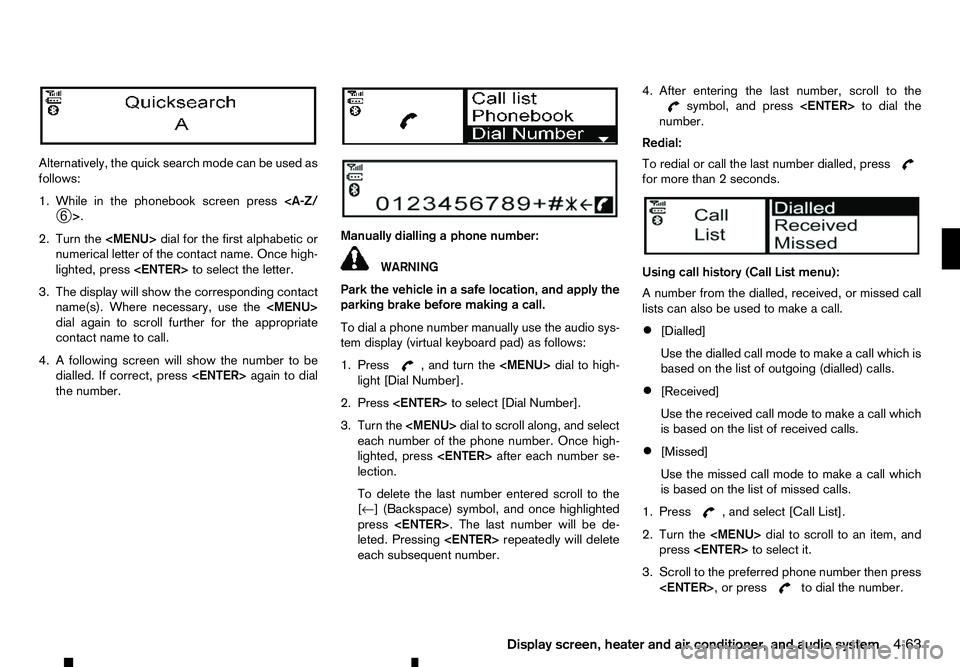
Alternatively, the quick search mode can be used as
follows:
1. While in the phonebook screen press
2. Turn the
Page 196 of 340
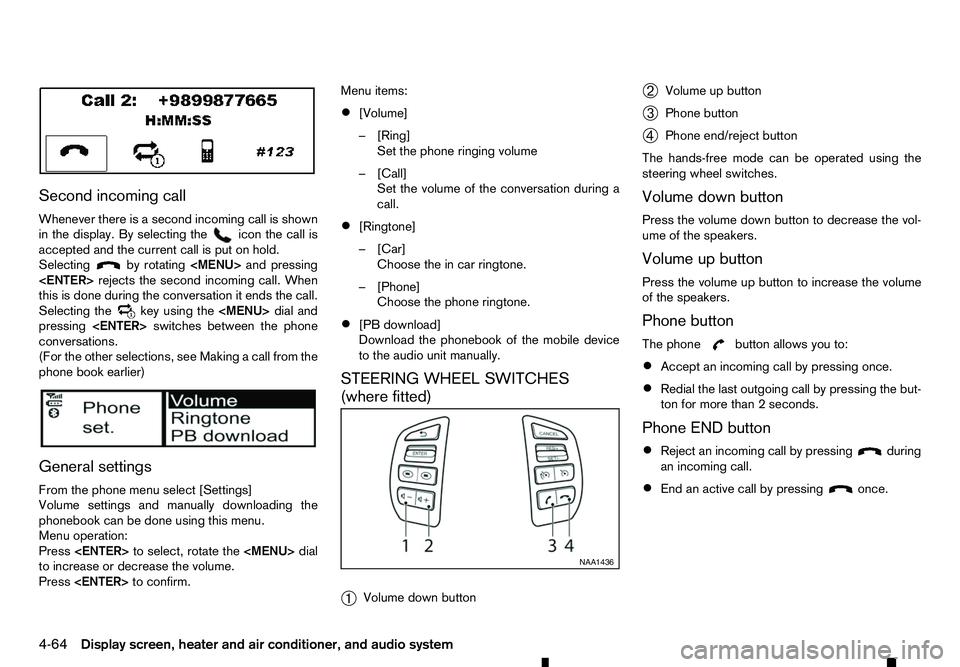
Second incoming call
Whenever there is asecond incoming call is shown
in the display. By selecting the icon the call is
accepted and the current call is put on hold.
Selecting by rotating
Page 197 of 340
WARNING
• Use
aphone after stopping your vehicle in a
safe location. If you have to use aphone while
driving, exercise extreme caution at all times
so full attention may be given to vehicle op-
eration.
• If you are unable to devote full attention to
vehicle operation while talking on the phone,
pull off the road to
asafe location and stop
your vehicle.
CAUTION
To avoid discharging the vehicle battery, use a
phone after starting the engine.
Your vehicle is equipped with the Bluetooth®
Hands-Free Phone System. If you have acompat-
ible Bluetooth® enabled mobile phone, you can set
up the wireless connection between your mobile
phone and the in-vehicle phone module. With Blue-
tooth® wireless technology, you can make or re-
ceive ahands-free telephone call with your mobile
phone in the vehicle.
Once your mobile phone is connected to the in-ve-
hicle phone module, no other phone connecting pro-
cedure is required. Your phone is automatically re-
connected with the in-vehicle phone module when
the ignition switch is placed in the ON position with
the connected mobile phone turned on and carried
in the vehicle. You can register up to
5different Bluetooth® mo-
bile phones to the in-vehicle phone module. How-
ever, you can talk on only one mobile phone at a
time.
Before using the Bluetooth® Hands-Free Phone
System, refer to the following notes.
• Set up the wireless connection between
amo-
bile phone and the in-vehicle phone module be-
fore using the Bluetooth® Hands-Free Phone
System.
• Some Bluetooth® enabled mobile phones may
not be recognised by the in-vehicle phone mod-
ule.
• You will not be able to use
ahands-free phone
under the following conditions:
–Y our vehicle is outside of the mobile service
area.
–Y our vehicle is in an area where it is difficult
to receive mobile signal; such as in atunnel,
in an underground parking garage, near atall
building or in amountainous area.
–Y our mobile phone is locked to prevent it
from being dialled.
• When the radio wave condition is not ideal or
ambient sound is too loud, it may be difficult to
hear the other person’s voice during
acall.
• Immediately after the ignition switch is placed in
the ON position, it may be impossible to receive
ac
all for ashort period of time. •
Do not place the mobile phone in an area sur-
rounded by metal or far away from the in-vehicle
phone module to prevent tone quality degrada-
tion and wireless connection disruption.
• While
amobile phone is connected through the
Bluetooth® wireless connection, the battery
power of the mobile phone may discharge quicker than usual. The Bluetooth® Hands-Free
Phone System cannot charge mobile phones.
• Some mobile phones or other devices may cause
interference or
abuzzing noise to come from the
audio system speakers. Storing the device in a
different location may reduce or eliminate the
noise.
• Refer to the mobile phone owner’s manual re-
garding the telephone charges, mobile phone
antenna and body, etc.
• The signal strength display on the monitor will
not coincide with the signal strength display of
some mobile phones.
REGULATORY INFORMATION
Bluetooth® trademark
m Bluetooth®
is
at rademark
owned by Bluetooth SIG, Inc.
and licensed to Robert Bosch
GmbH.
BLUETOOTH® HANDS-FREE PHONE SYSTEM (with navigation system)
Display screen, heater and air conditioner, and audio system4-65