uch RENAULT KOLEOS 2012 1.G Owner's Manual
[x] Cancel search | Manufacturer: RENAULT, Model Year: 2012, Model line: KOLEOS, Model: RENAULT KOLEOS 2012 1.GPages: 233, PDF Size: 7.81 MB
Page 113 of 233
JauneNoirNoir texte
2.35
ENG_UD23498_5
Régulateur-limiteur de vitesse : fonction régulateur (X45 - H45 - Renault)
ENG_NU_977-2_H45_Ph2_Renault_2
CRUISE CONTROL, SPEED LIMITER: cruise control function (4/4)
Putting the function on
standby
The function is suspended when you:
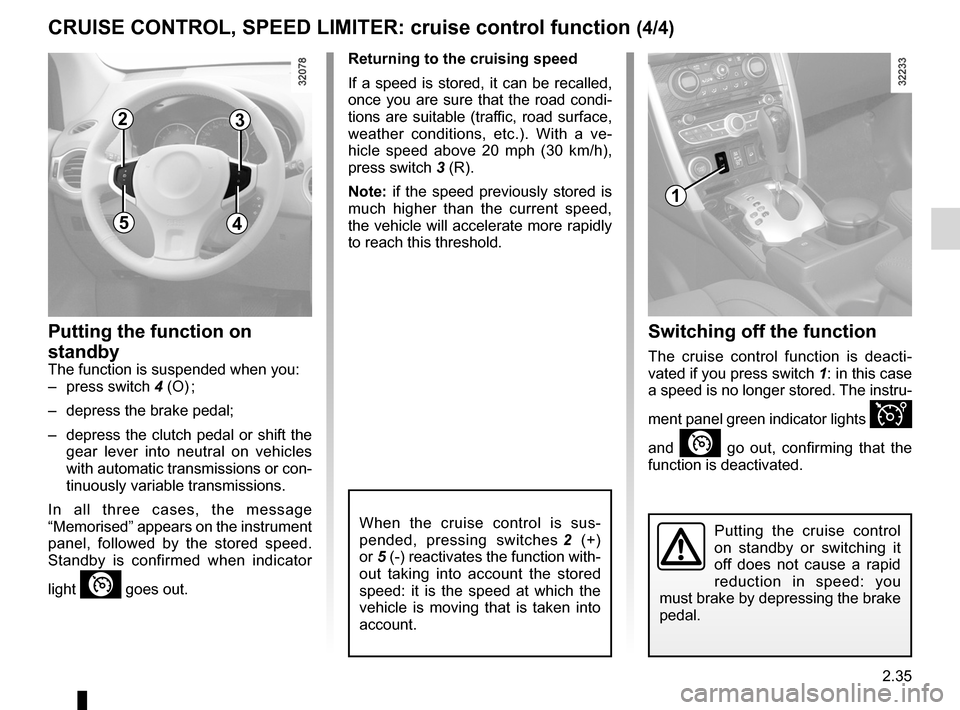
– press switch 4 (O) ;
– depress the brake pedal;
– depress the clutch pedal or shift the
gear lever into neutral on vehicles
with automatic transmissions or con-
tinuously variable transmissions.
In all three cases, the message
“Memorised ” appears on the instrument
panel, followed by the stored speed.
Standby is confirmed when indicator
light
” goes out.
Returning to the cruising speed
If a speed is stored, it can be recalled,
once you are sure that the road condi -
tions are suitable (traffic, road surface,
weather conditions, etc.). With a ve -
hicle speed above 20 mph (30 km/h),
press switch 3 (R).
Note: if the speed previously stored is
much higher than the current speed,
the vehicle will accelerate more rapidly
to reach this threshold.
When the cruise control is sus -
pended, pressing switches 2 (+)
or 5 (-) reactivates the function with-
out taking into account the stored
speed: it is the speed at which the
vehicle is moving that is taken into
account.
Switching off the function
The cruise control function is deacti -
vated if you press switch 1: in this case
a speed is no longer stored. The instru-
ment panel green indicator lights
Î
and
” go out, confirming that the
function is deactivated.
Putting the cruise control
on standby or switching it
off does not cause a rapid
reduction in speed: you
must brake by depressing the brake
pedal.
1
23
45
Page 114 of 233

parking distance control........................(up to the end of the DU)
driving ................................................... (up to the end of the DU)
reversing sensor ................................... (up to the end of the DU)
2.36
ENG_UD27281_8
Aide au parking (X45 - H45 - Renault)
ENG_NU_977-2_H45_Ph2_Renault_2
Jaune NoirNoir texte
Parking sensor
Operating principle
On equipped vehicles, ultrasonic sen -
sors fitted in the vehicle’s rear and/or
front bumper measure the distance
between the vehicle and an obstacle
when reversing.
This measurement is indicated by
beeps which become more frequent the
closer you come to the obstacle, until
they become a continuous beep when
the vehicle is approximately 25 centi -
metres from the obstacle.
Special features
Ensure that the ultrasonic sensors are
not obscured (by dirt, mud, snow, etc.).
This function is an additional aid that indicates the distance between the
vehicle and an obstacle whilst reversing, using sound signals.
Under no circumstances should it replace the driver’s care or responsibil -
ity whilst reversing.
The driver should always look out for sudden hazards during driving: always
ensure that there are no moving obstacles (such as a child, animal, pram or bi-
cycle, etc.) or small, narrow objects such as stones or posts in your path when
manoeuvring.
PARKING DISTANCE CONTROL (1/3)
Front parking distance
control
(Depending on the vehicle)
Operation
when moving forwards at less than
7 mph (12 km/h), when any object
is detected less than approximately
1 metre from the front of the vehicle: a
beep sounds.
Automatic activation/deactivation of
front parking distance control
The system deactivates:
– when the vehicle speed is above ap-
proximately 7 mph (12 km/h);
– When the vehicle is stationary for
more than three seconds: only in the
case that the vehicle speed dropped
from above approximately 7 mph
(12 km/h) and an obstacle is more
than 30 centimetres away from the
vehicle (e.g., traffic jam);
– when the vehicle is in neutral or
when the gear lever has been shifted
to N or P for automatic gearboxes.
Page 116 of 233
2.38
ENG_UD27281_8
Aide au parking (X45 - H45 - Renault)
ENG_NU_977-2_H45_Ph2_Renault_2
Temporary activation/deactivation
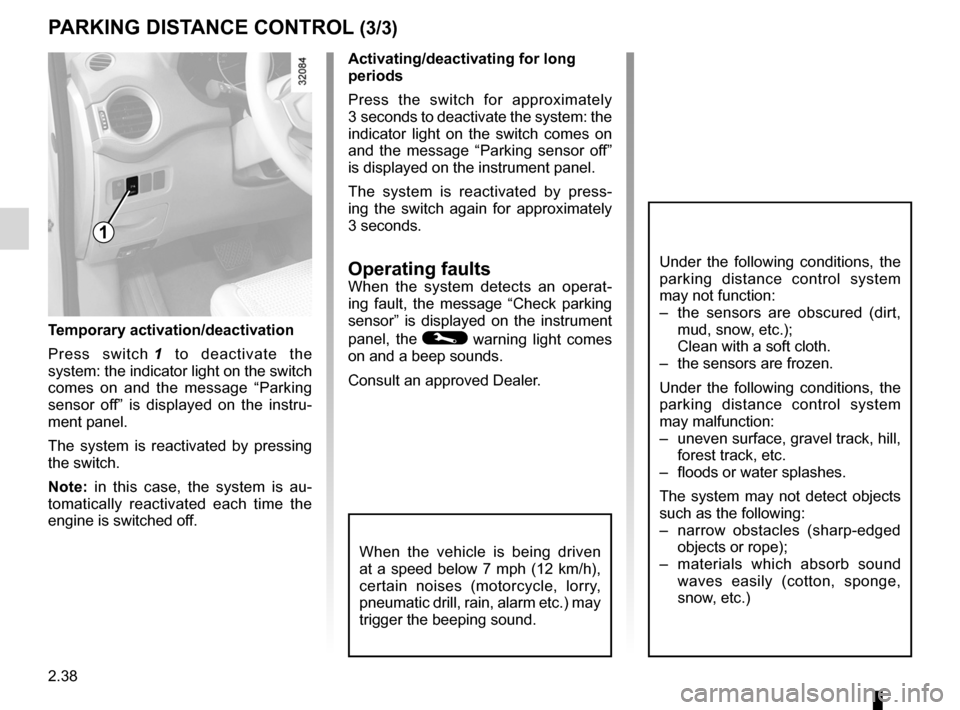
Press switch 1 to deactivate the
system: the indicator light on the switch
comes on and the message “ Parking
sensor off ” is displayed on the instru -
ment panel.
The system is reactivated by pressing
the switch.
Note: in this case, the system is au -
tomatically reactivated each time the
engine is switched off.
1
Activating/deactivating for long
periods
Press the switch for approximately
3 seconds to deactivate the system: the
indicator light on the switch comes on
and the message “ Parking sensor off”
is displayed on the instrument panel.
The system is reactivated by press -
ing the switch again for approximately
3 seconds.
Operating faultsWhen the system detects an operat -
ing fault, the message “ Check parking
sensor ” is displayed on the instrument
panel, the
© warning light comes
on and a beep sounds.
Consult an approved Dealer.
When the vehicle is being driven
at a speed below 7 mph (12 km/h),
certain noises (motorcycle, lorry,
pneumatic drill, rain, alarm etc.) may
trigger the beeping sound.
PARKING DISTANCE CONTROL (3/3)
Under the following conditions, the
parking distance control system
may not function:
– the sensors are obscured (dirt,
mud, snow, etc.);
Clean with a soft cloth.
– the sensors are frozen.
Under the following conditions, the
parking distance control system
may malfunction:
– uneven surface, gravel track, hill,
forest track, etc.
– floods or water splashes.
The system may not detect objects
such as the following:
– narrow obstacles (sharp-edged
objects or rope);
– materials which absorb sound
waves easily (cotton, sponge,
snow, etc.)
Page 117 of 233

automatic gearbox (use) ....................... (up to the end of the DU)
automatic gearbox selector lever ..........(up to the end of the DU)
driving ................................................... (up to the end of the DU)
reverse gear selecting .......................................... (up to the end of the DU)
changing gear ....................................... (up to the end of the DU)
continuous variation ..............................(up to the end of the DU)
continuously variable transmission ....... (up to the end of the DU)
2.39
ENG_UD27292_7
Bo tes de vitesses automatiques ou variation continue (X45 - H45 - Renault)
ENG_NU_977-2_H45_Ph2_Renault_2
Automatic or continuously variable transmission
AUTOMATIC OR CONTINUOUSLY vARIABLE TRANSMISSION (1/3)
Depending on the vehicle, the vehicle is
either fitted with an automatic transmis-
sion, or a continuously variable trans -
mission.
Selector lever 2
Display A on the instrument panel
shows the mode and gear selected.
3: P: park
4: R: reverse gear
5: N: neutral
6: D: automatic mode
7: manual mode
8: zone displaying gearbox mode or
gear engaged in manual mode
1
2
8
3
6
5
4
7
Operation
N With the gear lever 2 in position P,
switch on the ignition.
To move out of position P, you must de-
press the brake pedal before pressing
the unlocking button 1.
With the foot on the brake pedal (warn-
ing light
c on display A goes out),
move the lever out of position P.
Only engage D or R when the vehi -
cle is stopped, with your foot on the
brake and the accelerator pedal re -
leased.
A
Driving in automatic mode
Select position D. In most traffic con -
ditions, you will not have to touch the
gear selector lever again: the gears will
change automatically at the right time
and at the most suitable engine speed
because the automatic system takes
into account the vehicle load and road
contour and adjusts itself to the particu-
lar driving style you have chosen.
Economical driving
When driving, always leave the lever
in position D, keeping the accelerator
pedal lightly depressed to ensure auto-
matic gear changes at a lower engine
speed.
Accelerating and overtaking
Depress the accelerator pedal firmly
and fully (so that it goes beyond the
kickdown point).
This will enable you to change down
to the optimum gear within the
engine range.
Page 134 of 233
windows ................................................ (up to the end of the DU)
electric windows ................................... (up to the end of the DU)
child safety ............................................ (up to the end of the DU)
children (safety) .................................... (up to the end of the DU)
3.14
ENG_UD20985_3
L ves-vitres lectriques (X45 - H45 - Renault)
ENG_NU_977-2_H45_Ph2_Renault_3
Jaune NoirNoir texte
Electric windows
ElEcTRIc wINDowS (1/2)
with the ignition on, press the switch
to lower the window to the required
level;
Lift the switch to raise the window to the
desired height.
From the driver’s seat
Operate the switches as follows:
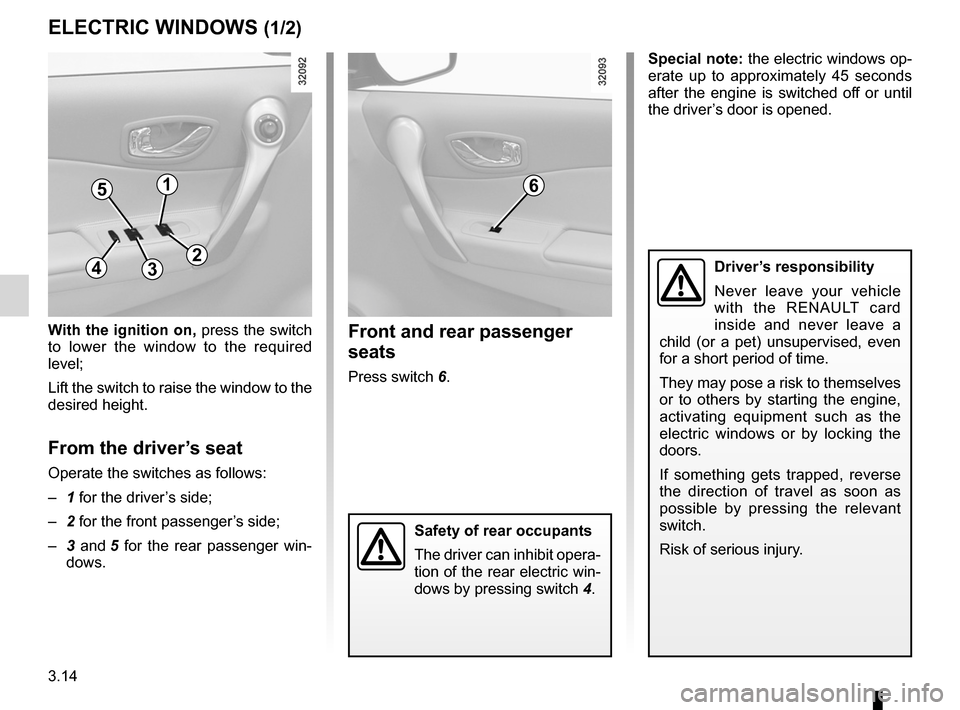
– 1 for the driver’s side;
– 2 for the front passenger’s side;
– 3 and 5 for the rear passenger win-
dows.
Front and rear passenger
seats
Press switch 6. Special note: the electric windows op-
erate up to approximately 45 seconds
after the engine is switched off or until
the driver’s door is opened.
Driver’s responsibility
Never leave your vehicle
with the RENAULT card
inside and never leave a
child (or a pet) unsupervised, even
for a short period of time.
They may pose a risk to themselves
or to others by starting the engine,
activating equipment such as the
electric windows or by locking the
doors.
If something gets trapped, reverse
the direction of travel as soon as
possible by pressing the relevant
switch.
Risk of serious injury.
Safety of rear occupants
The driver can inhibit opera -
tion of the rear electric win-
dows by pressing switch 4.
51
432
6
Page 135 of 233
JauneNoirNoir texte
3.15
ENG_UD20985_3
L ves-vitres lectriques (X45 - H45 - Renault)
ENG_NU_977-2_H45_Ph2_Renault_3
ElEcTRIc wINDowS (2/2)
one-touch windows
When the vehicle is equipped with this
function, the one-touch mode works in
addition to the operation of the electric
windows described previously.
– Fully and briefly press down on the
relevant switch down: the window
will open completely.
– Fully and briefly lift the relevant
switch: the window will close com -
pletely.
Pressing the switch again while the
window is moving will stop its move -
ment.
This mode can be fitted to the driver’s
window only or to all of the windows:
press switches 1, 2, 3, 5, or 6.
Special features
If the window detects resistance when
closing (e.g.: fingers, branch of a tree,
etc.) it stops and then lowers again by a
few centimetres.
If you use the switch while the window
is moving, it stops working.
Remote control window
closing
(for vehicles with one-touch windows
on all windows).
When you lock the doors from the out-
side, press the locking button on
the RENA ulT card or , in hands-free
mode, the door or tailgate button,
twice in quick succession , and the
windows will close automatically.
It is recommended that the user only
operates the system when the vehi -
cle can be seen clearly and no one is
inside.
Special note: for vehicles fitted with
the deadlocking function, refer to infor-
mation on the “RENAULT card: dead -
locking" in section 1.
Note: closing the windows with the
RENAULT card deactivates hands-free
mode.
operating faults
In case of a fault when closing a window,
the system reverts to normal mode: pull
the switch concerned up to fully close
the window, then hold the switch (still
on the closure side) for three seconds
then lower and raise the window fully to
reinitialise the system.
If necessary, contact an approved
Dealer.
Closing windows can cause
serious injury.
Avoid resting any objects against
a half-open window: there is a risk
that the electric window could be
damaged.
Page 136 of 233
sunroof.................................................. (up to the end of the DU)
child safety ............................................ (up to the end of the DU)
children (safety) .................................... (up to the end of the DU)
3.16
ENG_UD20986_3
Toit ouvrant à commande électrique (X45 - H45 - Renault)
ENG_NU_977-2_H45_Ph2_Renault_3
Jaune NoirNoir texte
Electric sunroof
ElEcTRIc SuNRooF (1/2)
The system operates:
– when the ignition is switched on,
– when the ignition is switched off until
the driver ’s door is opened/closed
(limited to approximately 45 sec -
onds).
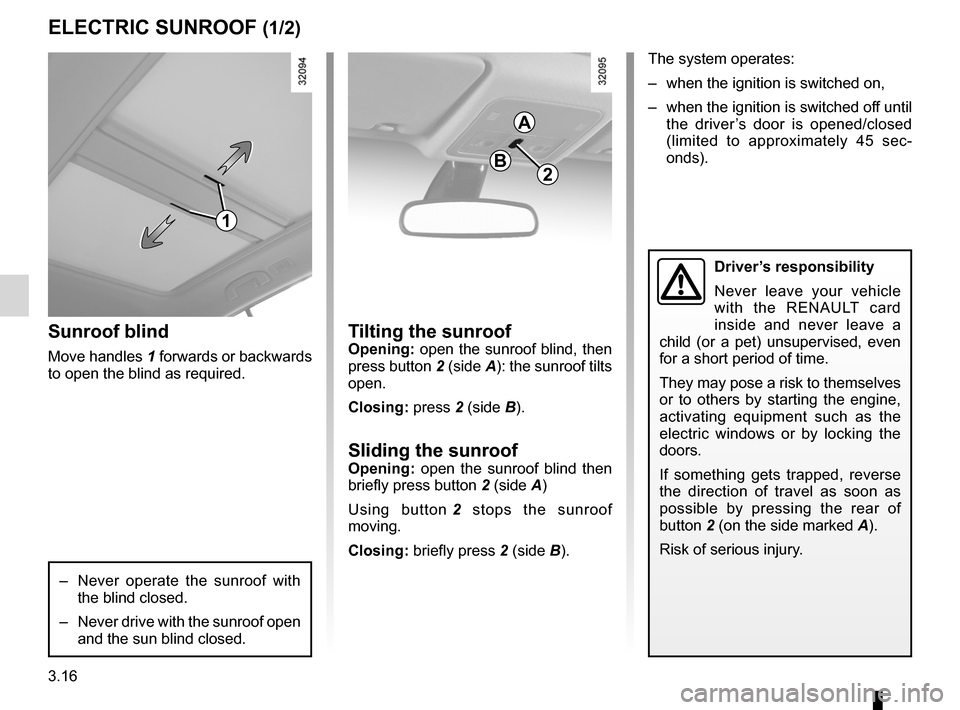
Tilting the sunroofopening: open the sunroof blind, then
press button 2 (side A): the sunroof tilts
open.
closing: press 2 (side B).
Sliding the sunroofopening: open the sunroof blind then
briefly press button 2 (side A)
Using button 2 stops the sunroof
moving.
closing: briefly press 2 (side B).
Sunroof blind
Move handles 1 forwards or backwards
to open the blind as required.
– Never operate the sunroof with
the blind closed.
– Never drive with the sunroof open
and the sun blind closed.
2
A
B
Driver’s responsibility
Never leave your vehicle
with the RENAULT card
inside and never leave a
child (or a pet) unsupervised, even
for a short period of time.
They may pose a risk to themselves
or to others by starting the engine,
activating equipment such as the
electric windows or by locking the
doors.
If something gets trapped, reverse
the direction of travel as soon as
possible by pressing the rear of
button 2 (on the side marked A).
Risk of serious injury.
1
Page 137 of 233
JauneNoirNoir texte
3.17
ENG_UD20986_3
Toit ouvrant à commande électrique (X45 - H45 - Renault)
ENG_NU_977-2_H45_Ph2_Renault_3
ElEcTRIc SuNRooF (2/2)
closing the sunroof by
remote control
(for vehicles equipped with one-touch
windows on all windows).
When you lock the doors from the out-
side, press the locking button on
the RENAul T card or, in hands-free
mode, the door or tailgate button
twice in quick succession and the
windows and sunroof will close auto -
matically.
Special note
Your vehicle is equipped with an anti -
pinch facility: when the sunroof encoun -
ters resistance whilst closing, (some -
body’s fingers, etc.) it stops and then
moves back several centimetres.
It is recommended that the user only
operates the system when the vehi -
cle can be seen clearly and no one is
inside.
Note: for vehicles fitted with the dead -
locking function, refer to information on
the “RENAULT card: deadlocking" in
section 1.
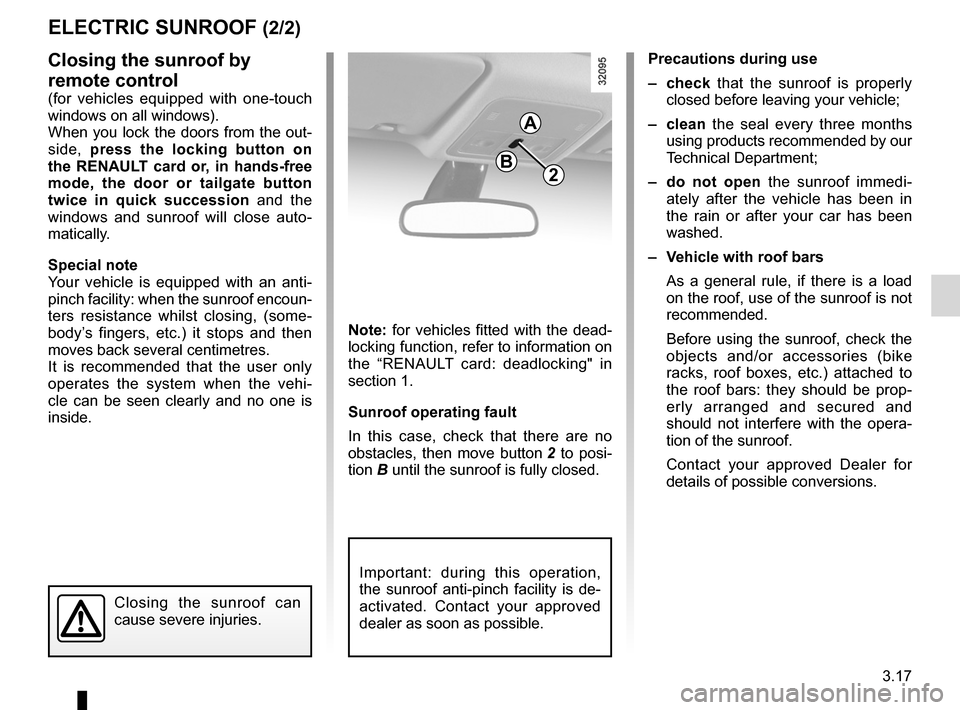
Sunroof operating fault
In this case, check that there are no
obstacles, then move button 2 to posi-
tion B until the sunroof is fully closed.
Precautions during use
– check that the sunroof is properly
closed before leaving your vehicle;
– clean the seal every three months
using products recommended by our
Technical Department;
– do not open the sunroof immedi -
ately after the vehicle has been in
the rain or after your car has been
washed.
– Vehicle with roof bars
As a general rule, if there is a load
on the roof, use of the sunroof is not
recommended.
Before using the sunroof, check the
objects and/or accessories (bike
racks, roof boxes, etc.) attached to
the roof bars: they should be prop -
erly arranged and secured and
should not interfere with the opera -
tion of the sunroof.
Contact your approved Dealer for
details of possible conversions.
Closing the sunroof can
cause severe injuries.
2
A
B
Important: during this operation,
the sunroof anti-pinch facility is de-
activated. Contact your approved
dealer as soon as possible.
Page 142 of 233
glove box ............................................................... (current page)
storage compartments .......................... (up to the end of the DU)
storage compartment ............................(up to the end of the DU)
fittings ................................................... (up to the end of the DU)
3.22
ENG_UD23672_6
Rangements, aménagements habitacle (X45 - H45 - Renault)
ENG_NU_977-2_H45_Ph2_Renault_3
Jaune NoirNoir texte
Passenger compartment storage/fittings
PASSENgER coMPARTMENT ST oRAgE, FITTINgS (1/6)
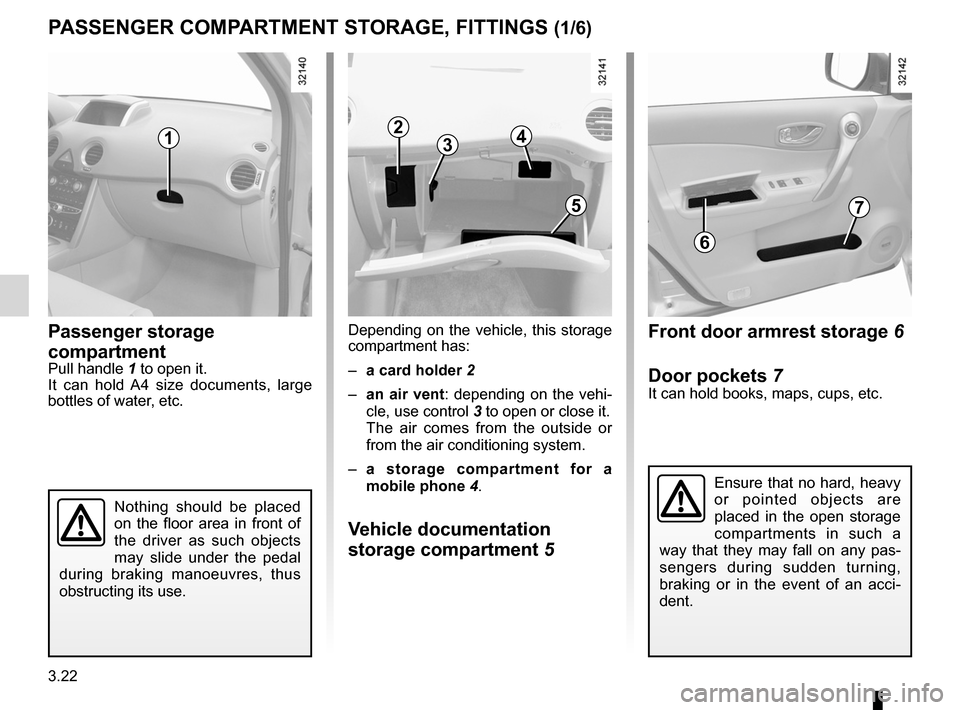
Passenger storage
compartment
Pull handle 1 to open it.
It can hold A4 size documents, large
bottles of water, etc. Depending on the vehicle, this storage
compartment has:
–
a card holder 2
– an air vent: depending on the vehi-
cle, use control 3 to open or close it.
The air comes from the outside or
from the air conditioning system.
– a storage compartment for a
mobile phone 4.
Vehicle documentation
storage compartment 5
Front door armrest storage 6
Door pockets 7
It can hold books, maps, cups, etc.
Ensure that no hard, heavy
or pointed objects are
placed in the open storage
compartments in such a
way that they may fall on any pas -
sengers during sudden turning,
braking or in the event of an acci -
dent.
12
34
5
6
7
Nothing should be placed
on the floor area in front of
the driver as such objects
may slide under the pedal
during braking manoeuvres, thus
obstructing its use.
Page 145 of 233
JauneNoirNoir texte
3.25
ENG_UD23672_6
Rangements, aménagements habitacle (X45 - H45 - Renault)
ENG_NU_977-2_H45_Ph2_Renault_3
PASSENgER coMPARTMENT ST oRAgE, FITTINgS (4/6)
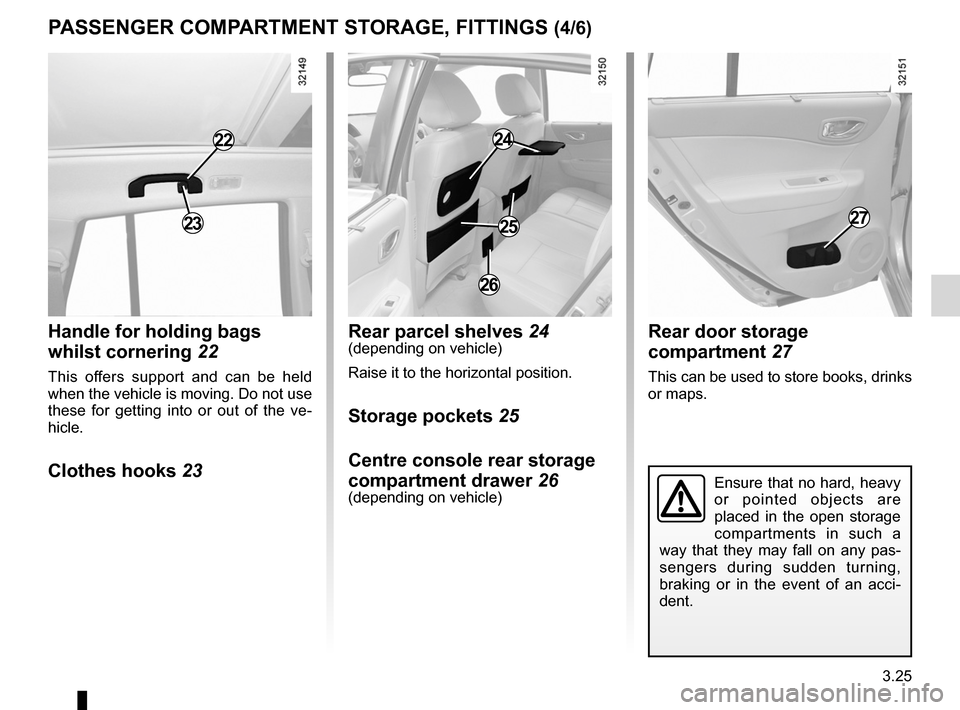
handle for holding bags
whilst cornering 22
This offers support and can be held
when the vehicle is moving. Do not use
these for getting into or out of the ve -
hicle.
clothes hooks 23 Rear parcel shelves
24
(depending on vehicle)
Raise it to the horizontal position.
Storage pockets 25
centre console rear storage
compartment drawer 26
(depending on vehicle)
Rear door storage
compartment 27
This can be used to store books, drinks
or maps.
23
22
26
27
24
25
Ensure that no hard, heavy
or pointed objects are
placed in the open storage
compartments in such a
way that they may fall on any pas -
sengers during sudden turning,
braking or in the event of an acci -
dent.