scr RENAULT MASTER 2017 X62 / 2.G Owner's Manual
[x] Cancel search | Manufacturer: RENAULT, Model Year: 2017, Model line: MASTER, Model: RENAULT MASTER 2017 X62 / 2.GPages: 286, PDF Size: 6.97 MB
Page 140 of 286

2.26
This function is an additional driving aid. This function is not under any circumstances intended to replace the due\
care
and attention of the driver, who should at all times be in control of the vehicle.
System servicing/repairs
– In the event of an impact, the camera alignment may be changed, and its \
operation may consequently be affected. Deactivate the function, then consult an authorised dealer.
– Any work in the area where the camera is located (repairs, replacements\
, windscreen modifications etc.) must be carried out by a qualified professional.
Only an authorised dealer is qualified to service the system.
In the event of system disturbance
Some conditions can disturb or damage the operation of the system, such \
as:
– a complex environment (tunnel etc.);
– poor weather conditions (snow, hail, black ice etc.);
– poor visibility (night, fog etc.);
– road markings which are worn, lacking in contrast or very widely spaced \
from one another (lines partially erased etc);
– being dazzled (glaring sun, lights of vehicles travelling in the opposi\
te direction etc.);
– the road is narrow, winding or undulating (tight bends etc.);
– closely following a vehicle travelling in the same lane.
Risk of false alarms or absence of warnings
LANE DEPARTURE WARNING (3/3)
Page 152 of 286
2.38
REVERSING CAMERA (2/2)
The screen shows a reverse image.
The frames are a representation
projected on a flat surface. This in-
formation is to not be taken into ac-
count when superimposed on a
vertical object or an object on the
ground.
Objects which appear on the edge
of the screen may be deformed.
In very bright light (snow, vehicle in
sunshine etc.), the camera vision
may be adversely affected.
If the rear doors are open or poorly
closed, the camera display disap-
pears and, depending on the ve-
hicle, the message “BOOT OPEN”
appears.
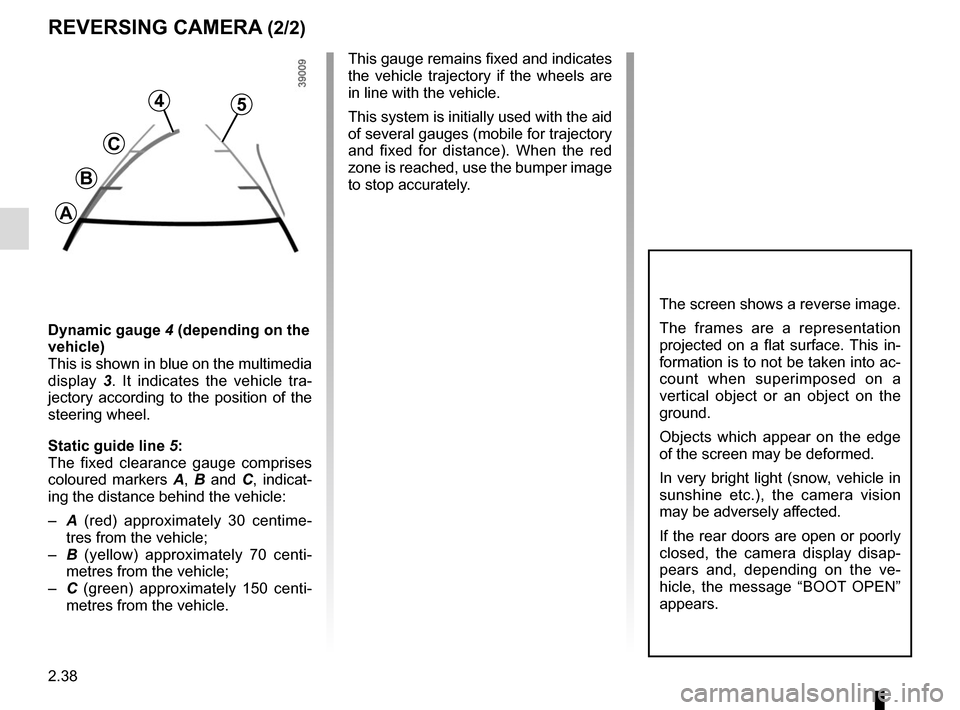
Dynamic gauge 4 (depending on the
vehicle)
This is shown in blue on the multimedia
display 3. It indicates the vehicle tra-
jectory according to the position of the
steering wheel.
Static guide line 5:
The fixed clearance gauge comprises
coloured markers A, B and C , indicat-
ing the distance behind the vehicle:
– A (red) approximately 30 centime-
tres from the vehicle;
– B (yellow) approximately 70 centi-
metres from the vehicle;
– C (green) approximately 150 centi-
metres from the vehicle. This gauge remains fixed and indicates
the vehicle trajectory if the wheels are
in line with the vehicle.
This system is initially used with the aid
of several gauges (mobile for trajectory
and fixed for distance). When the red
zone is reached, use the bumper image
to stop accurately.
4
C
B
A
5
Page 164 of 286
3.2
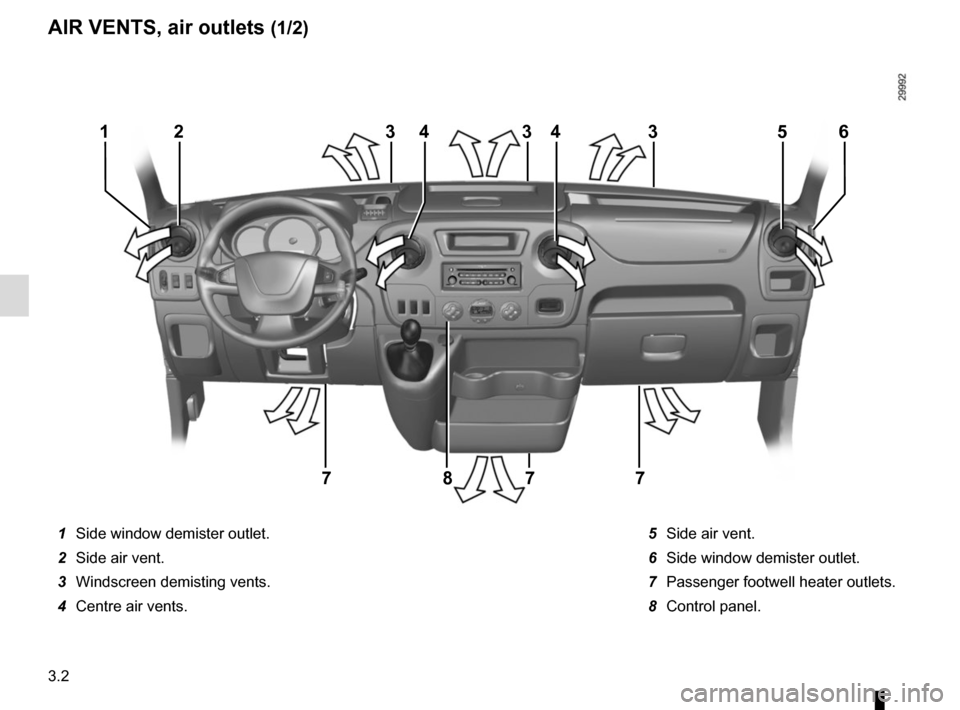
1 Side window demister outlet.
2 Side air vent.
3 Windscreen demisting vents.
4 Centre air vents. 5 Side air vent.
6 Side window demister outlet.
7 Passenger footwell heater outlets.
8 Control panel.
233354
7778
164
AIR VENTS, air outlets (1/2)
Page 166 of 286
3.4
MANUAL AIR CONDITIONING/HEATING SYSTEM (1/3)
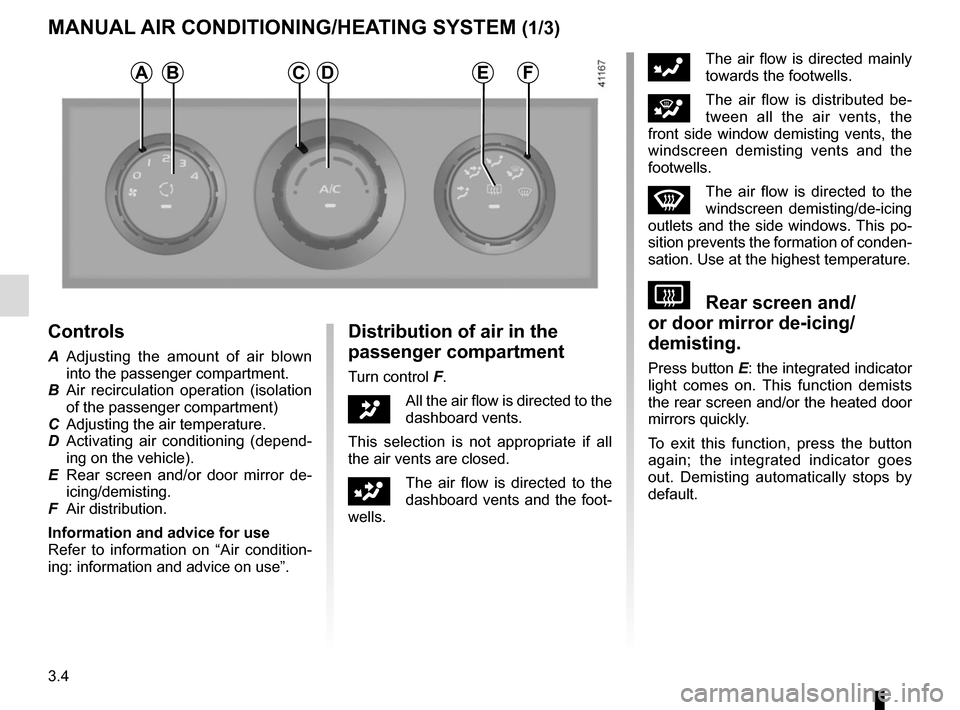
Controls
A Adjusting the amount of air blown into the passenger compartment.
B Air recirculation operation (isolation of the passenger compartment)
C Adjusting the air temperature.
D Activating air conditioning (depend- ing on the vehicle).
E Rear screen and/or door mirror de- icing/demisting.
F Air distribution.
Information and advice for use
Refer to information on “Air condition-
ing: information and advice on use”.
Distribution of air in the
passenger compartment
Turn control F.
JAll the air flow is directed to the
dashboard vents.
This selection is not appropriate if all
the air vents are closed.
GThe air flow is directed to the
dashboard vents and the foot-
wells.
FThe air flow is directed mainly
towards the footwells.
iThe air flow is distributed be-
tween all the air vents, the
front side window demisting vents, the
windscreen demisting vents and the
footwells.
WThe air flow is directed to the
windscreen demisting/de-icing
outlets and the side windows. This po-
sition prevents the formation of conden-
sation. Use at the highest temperature.
VRear screen and/
or door mirror de-icing/
demisting.
Press button E: the integrated indicator
light comes on. This function demists
the rear screen and/or the heated door
mirrors quickly.
To exit this function, press the button
again; the integrated indicator goes
out. Demisting automatically stops by
default.
ABDFCE
Page 167 of 286
3.5
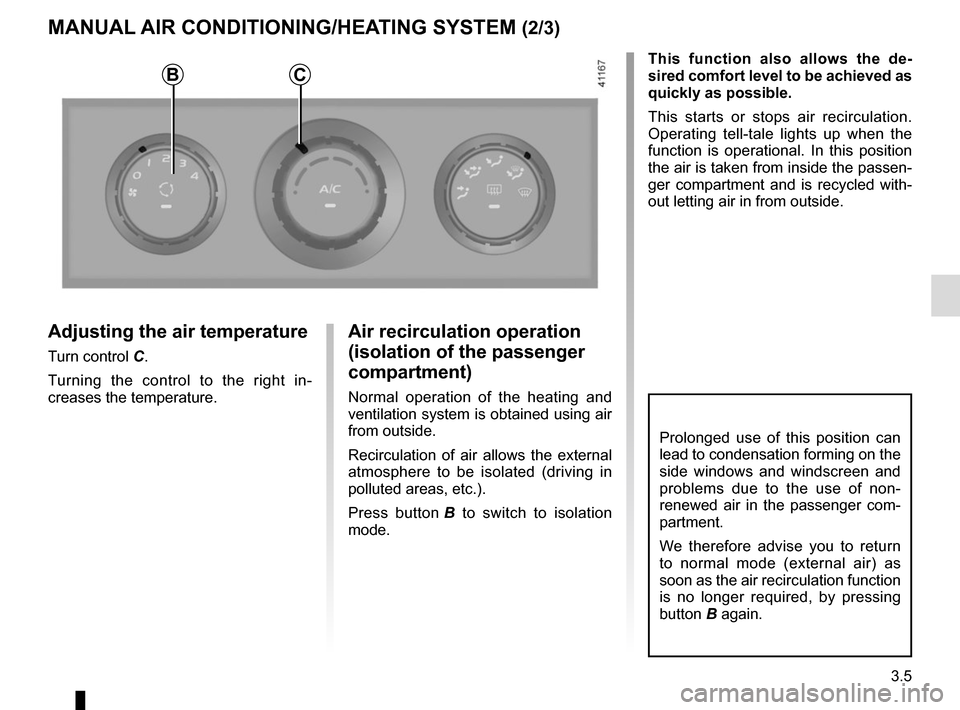
Adjusting the air temperature
Turn control C.Turning the control to the right in-
creases the temperature.
MANUAL AIR CONDITIONING/HEATING SYSTEM (2/3)
Air recirculation operation
(isolation of the passenger
compartment)
Normal operation of the heating and
ventilation system is obtained using air
from outside.
Recirculation of air allows the external
atmosphere to be isolated (driving in
polluted areas, etc.).
Press button B to switch to isolation
mode. This function also allows the de-
sired comfort level to be achieved as
quickly as possible.
This starts or stops air recirculation.
Operating tell-tale lights up when the
function is operational. In this position
the air is taken from inside the passen-
ger compartment and is recycled with-
out letting air in from outside.
Prolonged use of this position can
lead to condensation forming on the
side windows and windscreen and
problems due to the use of non-
renewed air in the passenger com-
partment.
We therefore advise you to return
to normal mode (external air) as
soon as the air recirculation function
is no longer required, by pressing
button B again.
BC
Page 169 of 286
3.7
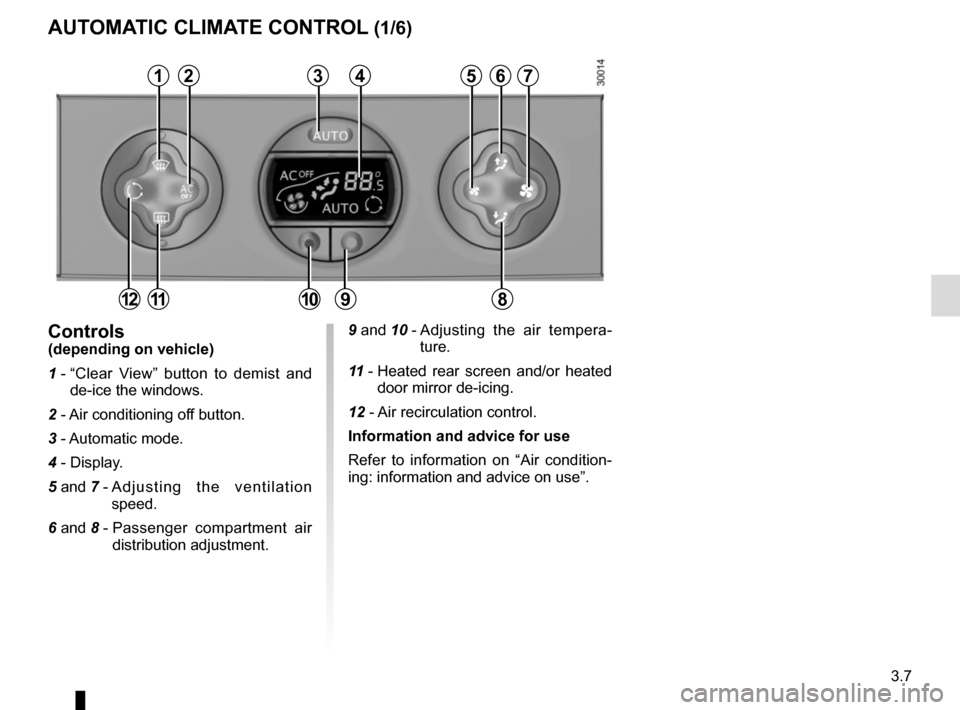
9 and 10 - Adjusting the air tempera-
ture.
11 - Heated rear screen and/or heated
door mirror de-icing.
12 - Air recirculation control.
Information and advice for use
Refer to information on “Air condition-
ing: information and advice on use”.Controls(depending on vehicle)
1 - “Clear View” button to demist and
de-ice the windows.
2 - Air conditioning off button.
3 - Automatic mode.
4 - Display.
5 and 7 - Adjusting the ventilation
speed.
6 and 8 - Passenger compartment air
distribution adjustment.
AUTOMATIC CLIMATE CONTROL (1/6)
23456
891112
17
10
Page 171 of 286
3.9
Adjusting automatic mode
The system normally operates in auto-
matic mode but you can alter the stand-
ard settings used by the system (air
distribution, etc.). These options are
explained on the following pages.
Automatic mode is the recom-
mended mode of use
In most cases, the automatic cli-
mate control system ensures a com-
fortable temperature in the passen-
ger compartment, while maintaining
good visibility and optimising fuel
consumption.
The types of adjustments that can
be made are described in the follow-
ing pages.
Return to automatic mode as soon
as possible.
The displayed temperature values
show a comfort level.
When starting the engine, increas-
ing or decreasing the value dis-
played will not allow the com-
fort level to be reached any more
quickly. The system will always op-
timise the temperature increase or
decrease (the ventilation system
does not start instantly at maximum
speed: it gradually increases). This
may take several minutes.
Generally speaking, unless there is
a particular reason not to, the dash-
board air vents should remain open.
AUTOMATIC CLIMATE CONTROL (3/6)
Page 172 of 286
3.10
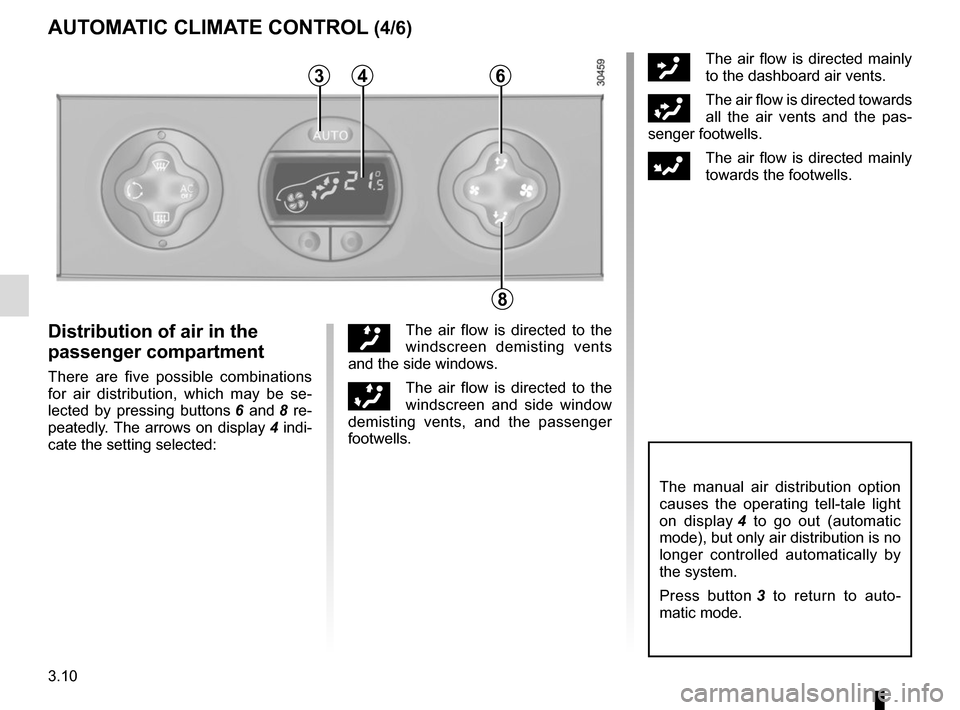
ôThe air flow is directed mainly
to the dashboard air vents.
öThe air flow is directed towards
all the air vents and the pas-
senger footwells.
FThe air flow is directed mainly
towards the footwells.
The manual air distribution option
causes the operating tell-tale light
on display 4 to go out (automatic
mode), but only air distribution is no
longer controlled automatically by
the system.
Press button 3 to return to auto-
matic mode.
Distribution of air in the
passenger compartment
There are five possible combinations
for air distribution, which may be se-
lected by pressing buttons 6 and 8 re-
peatedly. The arrows on display 4 indi-
cate the setting selected:
õThe air flow is directed to the
windscreen demisting vents
and the side windows.
÷The air flow is directed to the
windscreen and side window
demisting vents, and the passenger
footwells.
AUTOMATIC CLIMATE CONTROL (4/6)
346
8
Page 173 of 286
3.11
In automatic mode, depending on
the outside air conditions, the ven-
tilation may not start immediately at
maximum power but will increase
progressively until the engine tem-
perature is warm enough to heat the
passenger compartment air. This
may take from a few seconds to
several minutes.
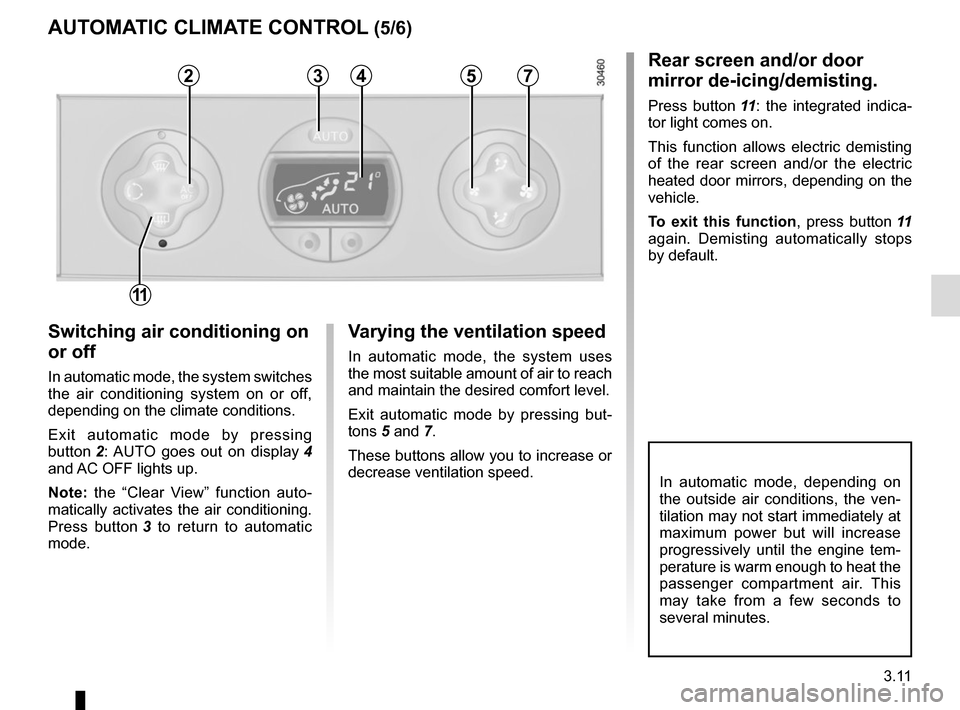
Switching air conditioning on
or off
In automatic mode, the system switches
the air conditioning system on or off,
depending on the climate conditions.
Exit automatic mode by pressing
button 2: AUTO goes out on display 4
and AC OFF lights up.
Note: the “Clear View” function auto-
matically activates the air conditioning.
Press button 3 to return to automatic
mode.
Varying the ventilation speed
In automatic mode, the system uses
the most suitable amount of air to reach
and maintain the desired comfort level.
Exit automatic mode by pressing but-
tons 5 and 7.
These buttons allow you to increase or
decrease ventilation speed.
Rear screen and/or door
mirror de-icing/demisting.
Press button 11: the integrated indica-
tor light comes on.
This function allows electric demisting
of the rear screen and/or the electric
heated door mirrors, depending on the
vehicle.
To exit this function , press button 11
again. Demisting automatically stops
by default.
AUTOMATIC CLIMATE CONTROL (5/6)
23457
11
Page 174 of 286
3.12
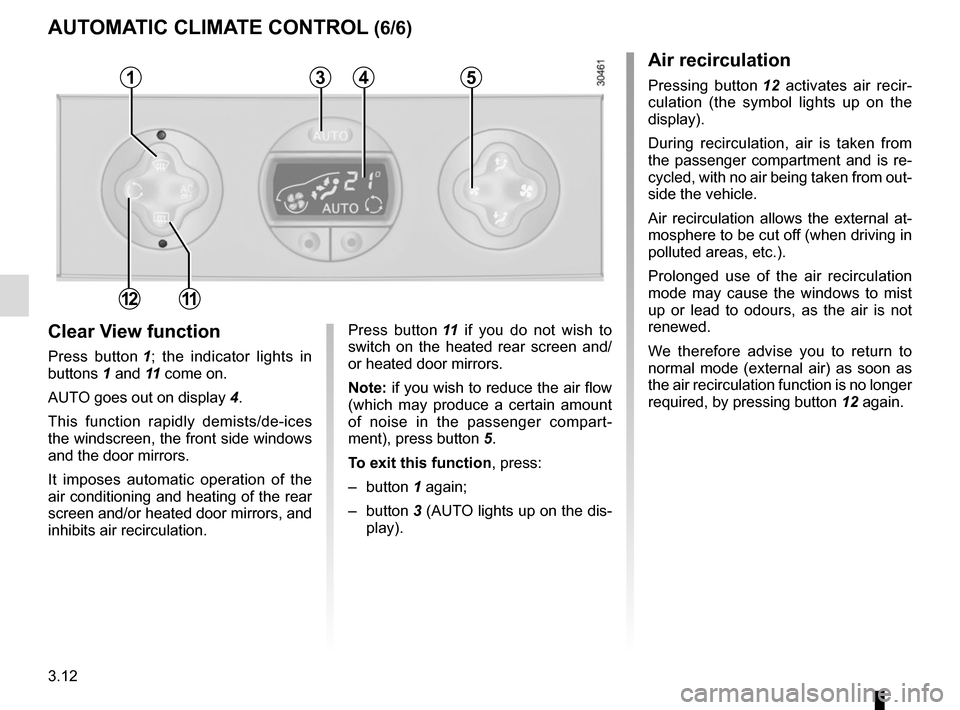
Clear View function
Press button 1; the indicator lights in
buttons 1 and 11 come on.
AUTO goes out on display 4.
This function rapidly demists/de-ices
the windscreen, the front side windows
and the door mirrors.
It imposes automatic operation of the
air conditioning and heating of the rear
screen and/or heated door mirrors, and
inhibits air recirculation. Press button
11 if you do not wish to
switch on the heated rear screen and/
or heated door mirrors.
Note: if you wish to reduce the air flow
(which may produce a certain amount
of noise in the passenger compart-
ment), press button 5.
To exit this function , press:
– button 1 again;
– button 3 (AUTO lights up on the dis-
play).
Air recirculation
Pressing button 12 activates air recir-
culation (the symbol lights up on the
display).
During recirculation, air is taken from
the passenger compartment and is re-
cycled, with no air being taken from out-
side the vehicle.
Air recirculation allows the external at-
mosphere to be cut off (when driving in
polluted areas, etc.).
Prolonged use of the air recirculation
mode may cause the windows to mist
up or lead to odours, as the air is not
renewed.
We therefore advise you to return to
normal mode (external air) as soon as
the air recirculation function is no longer
required, by pressing button 12 again.
AUTOMATIC CLIMATE CONTROL (6/6)
35
12
4
11
1