engine SAAB 9-3 2004 User Guide
[x] Cancel search | Manufacturer: SAAB, Model Year: 2004, Model line: 9-3, Model: SAAB 9-3 2004Pages: 288, PDF Size: 23.54 MB
Page 76 of 288

76 Instruments and controlsThis light shows when the high beam is on
(see page 92).
This light indicates when the front fog lights
are on (see page 93).
The front fog lights are switched off auto-
matically when the engine is switched off.
When the fog lights are next needed, they
will have to be switched on manually.This light should come on briefly when you
turn the ignition key to ON. If it doesn´t come
on, have it fixed so it will be ready to warn
you if there is a problem. This light indicates
when the brake fluid level is too low (see
page 200).
The following message is shown on the
Saab Information Display (SID):For safety reasons, stop the car and check
the level of the brake fluid (see page 200).
If the level is normal, depress the brake
pedal firmly two or three times. Now check
the level again. If the level is still normal, you
may drive the car, with considerable cau-
tion, to the nearest Saab dealer to have the
brake system checked.
The brake system provides Electronic
Brakeforce Distribution (EBD). This distrib-
utes the brake pressure between the front
and rear wheels, in such a way as to achieve
optimum braking performance irrespective
of the car’s load.
If a fault arises in the EBD function, the ,
and lights will come on. Also, the fol-
lowing message will appear on the Saab
Information Display (SID):
If this is the case, drive carefully and contact
a Saab dealer as soon as possible. Refer to
Brake warning light on page 76, Antilock
braking warning on page 74 and TCS OFF
or ESP OFF indicator (certain variants only)
on page 82.
High beam Indicator
Front fog lights (option)
Brake warning lightBrake fluid level low.
Make a safe stop.
Contact Saab dealer.
WARNING
Never drive the car if these two lights
are on at the same time. Danger of
brake failure!
If the level of brake fluid in the reser-
voir is below the MIN mark, the vehicle
should be transported on a recovery
vehicle.
Have the brake system checked
immediately at a Saab dealer.
Brake malfunction.
Make a safe stop.
Contact Saab dealer.
ProCarManuals.com
Page 78 of 288

78 Instruments and controlsThis light comes on when there is less than
about 2.5 gallons (10 litre) of fuel left in the
tank.
This light indicates that the headlights or
parking lights are on.
This light comes on when the system is
engaged.
Autochecking of lights, main
instrument panelThe warning and indicator lights shown
above should come on when the ignition
switch is turned to ON. They should go out
after about 4 seconds once the engine has
started or after the fault-free self-diagnosis
of each system or function.
InstrumentsTachometerThe tachometer displays the engine speed
in thousands of revolutions per minute.
A protective function (interruption of the fuel
supply) limits the engine speed within the
red zone.
Indicator, fuel
NOTICE
If the car runs out of fuel, air can be drawn
in with the fuel, which, in turn, can cause
the catalytic converter to be damaged by
overheating.
Headlight and parking
light indicator
Cruise control indicator
light
ProCarManuals.com
Page 80 of 288

80 Instruments and controlsTemperature gaugeThe temperature gauge shows the temper-
ature of the coolant. The needle should be
in the middle of the scale when the engine
is at normal operating temperature.
If the needle goes into the red zone (which
can occur at high outside air temperatures
or under heavy engine loads), choose the
highest possible gear ratio and the lowest
possible engine speed, and avoid shifting
down.If the needle repeatedly enters the red zone,
stop the car as soon as it is safe to do so and
check the coolant level (see page 199).
Turbo gaugeThe turbo gauge indicates the air volume
used for combustion, which is equivalent to
the engine load.
At low loads and when the engine is used for
braking, the needle will move within the
white zone.
Under certain barometric conditions the
needle may enter the first part of the red
zone without necessarily indicating that a
fault has arisen.
NOTICEIf the needle, despite the above action,
enters the red zone, stop the car in a suit-
able place and allow the engine to idle. If
the needle continues to rise, switch off the
engine.
WARNING
Never open the cap of the expansion tank
completely when the engine is hot, open
with care. The pressure in the cooling-
system can cause hot coolant and steam
to be released. Failure to heed this warn-
ing may result in personal injury.
ProCarManuals.com
Page 81 of 288
81 Instruments and controls
If the needle repeatedly enters the red zone
and the engine at the same time loses
power, because the monitoring system is
limiting the boost pressure, you should
contact a Saab dealer as soon as possible.
When the speed of the car exceeds
143 mph (230 km/h), acceleration is limited
by reducing the boost pressure. The pres-
sure gauge then moves towards the middle
of the white field, indicating a drop in engine
power and consequently the car’s speed.
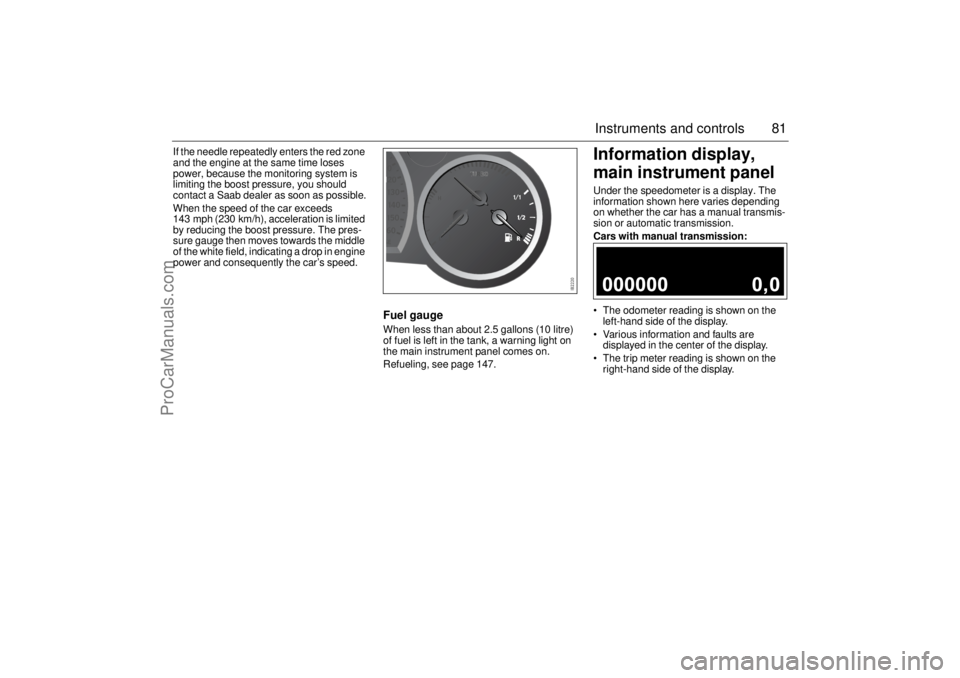
Fuel gaugeWhen less than about 2.5 gallons (10 litre)
of fuel is left in the tank, a warning light on
the main instrument panel comes on.
Refueling, see page 147.
Information display,
main instrument panelUnder the speedometer is a display. The
information shown here varies depending
on whether the car has a manual transmis-
sion or automatic transmission.
Cars with manual transmission:
The odometer reading is shown on the
left-hand side of the display.
Various information and faults are
displayed in the center of the display.
The trip meter reading is shown on the
right-hand side of the display.
ProCarManuals.com
Page 83 of 288

83 Instruments and controls
The following message is shown on the
Saab Information Display (SID):
or
If so, have the system checked at a Saab
dealer.
See also Traction Control System (TCS) on
page 163 and Electronic Stability Program
(ESP) on page 165.
Saab Information
Display (SID)Various types of information are shown on
the SID: warnings, indications, trip com-
puter information and information from the
car’s Infotainment System.
The warnings and indications that can be
shown on the SID are listed on page 281.
When the engine is switched off, the current
warnings and indications are displayed.
If there is more than one message on the
SID, a plus sign will be displayed to the left
of the first message. Each message will be
displayed for 10 seconds.
Press the CLEAR button to acknowledge
a SID message. If you acknowledge a mes-
sage but do nothing about it, the message
will be displayed again the next time you
start the car.
You can adjust the settings of several of the
car’s systems, such as the clock, alarm and
climate control system. These are known as
Profiler.
ProfilerAdjustments can be made with the control
unit situated between the main instrument
panel and the audio system. This is called
Profiler.
1 Activate Profiler by pressing the
CUSTOMIZE button.
2 Turn the INFO dial until the appropriate
system is selected.
3 Confirm selection by pressing the
INFO dial.
Select Exit once you have made the desired
settings. Traction control failure.
Contact Saab dealer.
Stability control failure.
Contact Saab dealer.SID, control unit and display
ProCarManuals.com
Page 85 of 288
85 Instruments and controls
When the engine is started, the function that
was selected when the engine was
switched off is displayed, with the following
exceptions:
Te m p is displayed if the outside tempera-
ture is between 26 and 38°F (–3 and
+3°C).
D.T.E is displayed if less than or equal to
30 miles (50 km).
Outdoor temperature
The Temp function is always activated
(even in NIGHTPANEL mode) if the outdoor
temperature rises or falls to between 26 and
38°F (–3 and +3°C).Setting values
1 Select one of the functions using the
INFO dial.
Speed W (preset to 55 mph (90 km/h)
Dist (preset to 100 miles (100 km) if not
previously set)
Speed Ø
Arriv
Date
2 Press and hold the INFO dial until given
audible confirmation.
3 Turn the INFO dial to change the value.
(Press CLEAR to reset the value.)
4 Press the INFO dial to finish setup.
Using DIST as a trip meter
1 Select Dist using the INFO dial.
2 Press and hold the CLEAR button for
approx. 1 second.
An arrow will now appear on the right-hand
side of the display, indicating that the trip
meter is running.Resetting a single function
1 Select the function you wish to reset with
the INFO dial.
Fuel Ø
Speed Ø
Tr i p (Dist used as trip meter)
2 Press and hold the CLEAR button for
approx. 1 second.
The selected function will now be reset.
Resetting the trip computer
1 Select one of the functions using the
INFO dial.
Fuel Ø
Speed Ø
D.T.E.
Arriv
Tr i p (Dist used as trip meter)
2 Press and hold the CLEAR button
(approx. 3 seconds) until audible confir-
mation is given.
WARNING
Remember that roads can be icy even at
temperatures of above 38°F (+3°C),
especially on bridges and stretches of
road that are sheltered from the sun.
ProCarManuals.com
Page 90 of 288
90 Instruments and controls
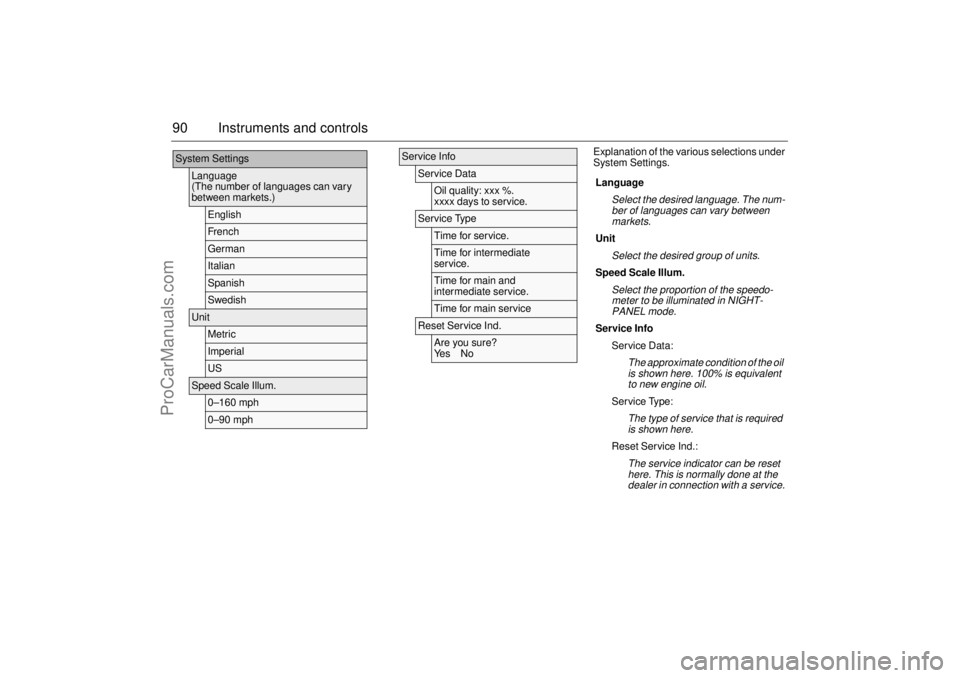
Explanation of the various selections under
System Settings.
System Settings
Language
(The number of languages can vary
between markets.)
EnglishFr e nc hGermanItalianSpanishSwedish
Unit
MetricImperialUS
Speed Scale Illum.
0–160 mph0–90 mph
Service Info
Service Data
Oil quality: xxx %.
xxxx days to service.
Service Type
Time for service.Time for intermediate
service.Time for main and
intermediate service.Time for main service
Reset Service Ind.
Are you sure?
Ye s N o
Language
Select the desired language. The num-
ber of languages can vary between
markets.
Unit
Select the desired group of units.
Speed Scale Illum.
Select the proportion of the speedo-
meter to be illuminated in NIGHT-
PANEL mode.
Service Info
Service Data:
The approximate condition of the oil
is shown here. 100% is equivalent
to new engine oil.
Service Type:
The type of service that is required
is shown here.
Reset Service Ind.:
The service indicator can be reset
here. This is normally done at the
dealer in connection with a service.
ProCarManuals.com
Page 91 of 288

91 Instruments and controls
SwitchesThe parking lights and daytime running
lights come on automatically when the igni-
tion switch is in the ON position.
High beam can not be activated in this posi-
tion but headlight flasher can.
The parking lights can be turned on irre-
spective of the position of the ignition
switch. If the parking lights are on and the
driver’s door is opened, a reminder to turn
them off will sound.
Do not use the parking lights alone while
driving.
The parking lights may be used in combina-
tion with the front fog lights (see page 93).
Low beam headlights are turned on when
the ignition switch is turned to ON and
turned off when the switch is turned back to
LOCK.
Headlight levelling(cars with Bi-Xenon headlights)
Cars with Bi-Xenon headlights are
equipped with an automatic headlight level-
ling system, with self-calibrates each time
the vehicle is started.
If a fault arises in the automatic headlight
levelling system, the headlights will be
angled down to avoid dazzling drivers in
oncoming traffic. Adjust your speed accord-
ingly as the range of the headlights will be
reduced. Check fuse 20 in the engine bay
fuse box (see page 227).
A fault in the system will produce the follow-
ing message on the Saab Information Dis-
play (SID):
Special equipment is required for adjusting
the basic headlight alignment.
Daytime Running Lights
Parking lights
Headlights
Headlight levelling
malfunction.
Contact Saab dealer.
Light switches
ProCarManuals.com
Page 92 of 288
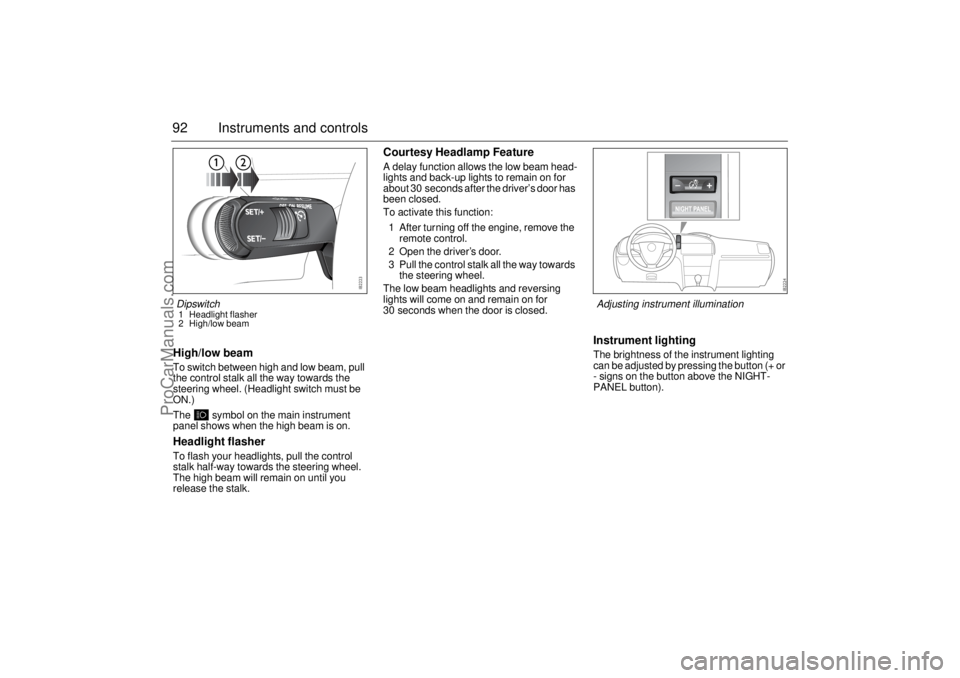
92 Instruments and controlsHigh/low beamTo switch between high and low beam, pull
the control stalk all the way towards the
steering wheel. (Headlight switch must be
ON.)
The symbol on the main instrument
panel shows when the high beam is on.Headlight flasherTo flash your headlights, pull the control
stalk half-way towards the steering wheel.
The high beam will remain on until you
release the stalk.
Courtesy Headlamp FeatureA delay function allows the low beam head-
lights and back-up lights to remain on for
about 30 seconds after the driver’s door has
been closed.
To activate this function:
1 After turning off the engine, remove the
remote control.
2 Open the driver’s door.
3 Pull the control stalk all the way towards
the steering wheel.
The low beam headlights and reversing
lights will come on and remain on for
30 seconds when the door is closed.
Instrument lightingThe brightness of the instrument lighting
can be adjusted by pressing the button (+ or
- signs on the button above the NIGHT-
PANEL button).
Dipswitch1 Headlight flasher
2 High/low beam
Adjusting instrument illumination
ProCarManuals.com
Page 93 of 288
93 Instruments and controls
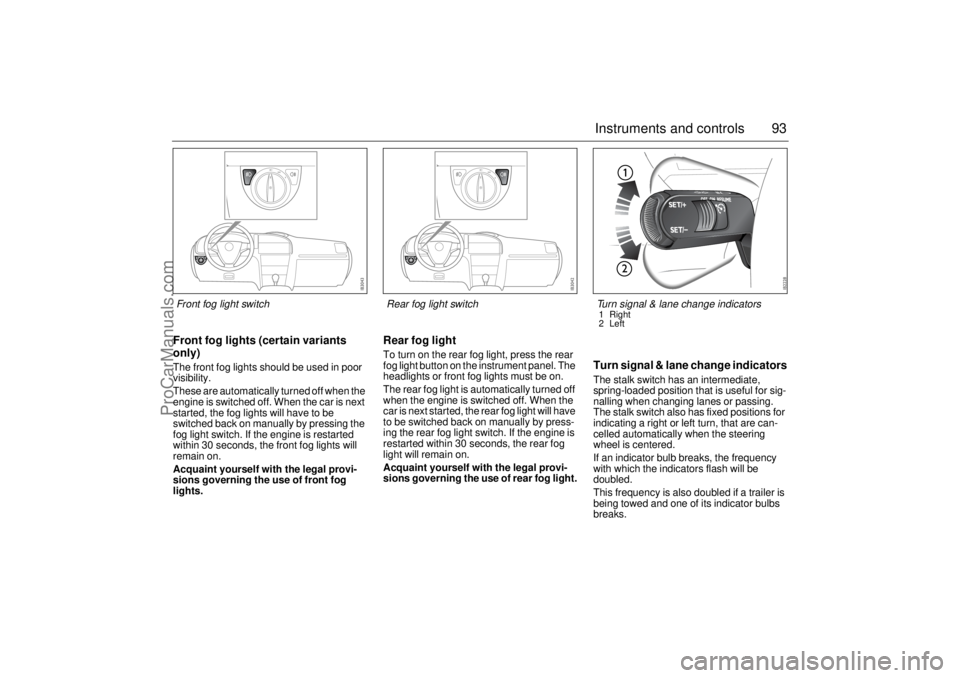
Front fog lights (certain variants
only)The front fog lights should be used in poor
visibility.
These are automatically turned off when the
engine is switched off. When the car is next
started, the fog lights will have to be
switched back on manually by pressing the
fog light switch. If the engine is restarted
within 30 seconds, the front fog lights will
remain on.
Acquaint yourself with the legal provi-
sions governing the use of front fog
lights.
Rear fog lightTo turn on the rear fog light, press the rear
fog light button on the instrument panel. The
headlights or front fog lights must be on.
The rear fog light is automatically turned off
when the engine is switched off. When the
car is next started, the rear fog light will have
to be switched back on manually by press-
ing the rear fog light switch. If the engine is
restarted within 30 seconds, the rear fog
light will remain on.
Acquaint yourself with the legal provi-
sions governing the use of rear fog light.
Turn signal & lane change indicatorsThe stalk switch has an intermediate,
spring-loaded position that is useful for sig-
nalling when changing lanes or passing.
The stalk switch also has fixed positions for
indicating a right or left turn, that are can-
celled automatically when the steering
wheel is centered.
If an indicator bulb breaks, the frequency
with which the indicators flash will be
doubled.
This frequency is also doubled if a trailer is
being towed and one of its indicator bulbs
breaks.
Front fog light switch
Rear fog light switch
Turn signal & lane change indicators1 Right
2 Left
ProCarManuals.com