Automatic SAAB 9-3 2009 Owner's Manual
[x] Cancel search | Manufacturer: SAAB, Model Year: 2009, Model line: 9-3, Model: SAAB 9-3 2009Pages: 304, PDF Size: 44.31 MB
Page 107 of 304
107 Instruments and controls
Automatic climate-
control system (ACC)Fresh air for the cabin is drawn in through an
inlet at the bottom edge of the windshield. It
passes through an effective filter before
reaching the climate control system and
delivery into the cabin. The air is evacuated
via openings in the parcel shelf. It is then led
through outlets on either side of the car
behind the rear bumper.
The Automatic Climate-Control system
(ACC) automatically maintains the desired
cabin temperature, regardless of the
weather outside.
The system will achieve the desired temper-
ature in the quickest possible way.
Note that heating or cooling is not more
rapid by setting the temperature higher
or lower than the final temperature you
desire.
To optimize the performance of the air con-
ditioning system, all windows and the
moonroof3 should be shut. The air vents in
the fascia must be open.The incoming air is treated in three stages:
first it passes through a filter; it is then dehu-
midified and cooled; and finally, if required,
it is heated.
The filter is a combined particle and char-
coal filter. It is so efficient that levels of nox-
ious substances such as benzene and tolu-
ene are also reduced.To reduce potential misting on the insides of
the windows, the glass should be cleaned
with a quality glass cleaner. How often this
will need to be done depends on how clean
the air is - if there are smokers in the car, the
windows will need to be cleaned more
frequently.
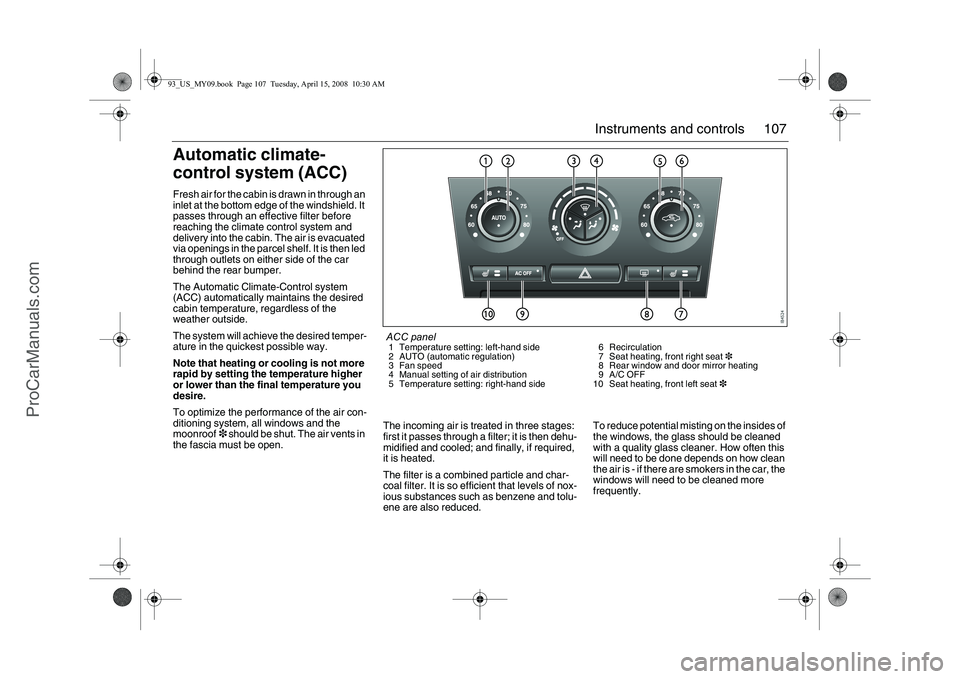
ACC panel1 Temperature setting: left-hand side
2 AUTO (automatic regulation)
3 Fan speed
4 Manual setting of air distribution
5 Temperature setting: right-hand side6 Recirculation
7 Seat heating, front right seat3
8 Rear window and door mirror heating
9A/C OFF
10 Seat heating, front left seat3
93_US_MY09.book Page 107 Tuesday, April 15, 2008 10:30 AM
ProCarManuals.com
Page 111 of 304
111 Instruments and controls
FunctionsPressing AUTO will cancel all manual settings.
If a manual function is selected, it will be locked in but other functions
will be controlled automatically.
The selected temperature is always maintained automatically.
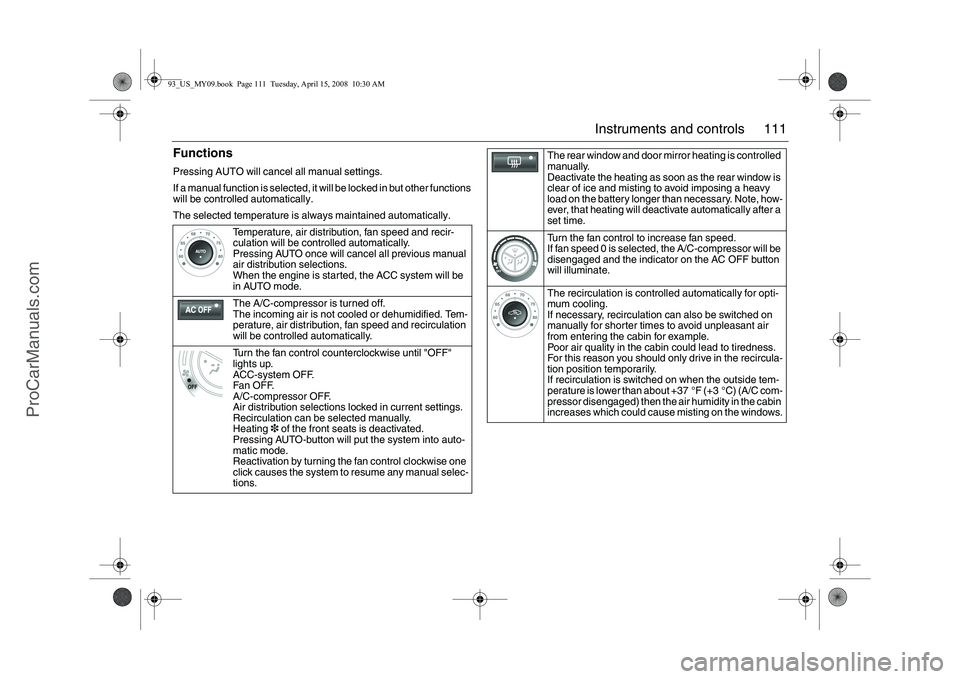
Temperature, air distribution, fan speed and recir-
culation will be controlled automatically.
Pressing AUTO once will cancel all previous manual
air distribution selections.
When the engine is started, the ACC system will be
in AUTO mode.
The A/C-compressor is turned off.
The incoming air is not cooled or dehumidified. Tem-
perature, air distribution, fan speed and recirculation
will be controlled automatically.
Turn the fan control counterclockwise until "OFF"
lights up.
ACC-system OFF.
Fan OFF.
A/C-compressor OFF.
Air distribution selections locked in current settings.
Recirculation can be selected manually.
Heating3 of the front seats is deactivated.
Pressing AUTO-button will put the system into auto-
matic mode.
Reactivation by turning the fan control clockwise one
click causes the system to resume any manual selec-
tions.
The rear window and door mirror heating is controlled
manually.
Deactivate the heating as soon as the rear window is
clear of ice and misting to avoid imposing a heavy
load on the battery longer than necessary. Note, how-
ever, that heating will deactivate automatically after a
set time.
Turn the fan control to increase fan speed.
If fan speed 0 is selected, the A/C-compressor will be
disengaged and the indicator on the AC OFF button
will illuminate.
The recirculation is controlled automatically for opti-
mum cooling.
If necessary, recirculation can also be switched on
manually for shorter times to avoid unpleasant air
from entering the cabin for example.
Poor air quality in the cabin could lead to tiredness.
For this reason you should only drive in the recircula-
tion position temporarily.
If recirculation is switched on when the outside tem-
perature is lower than about +37 °F (+3 °C) (A/C com-
pressor disengaged) then the air humidity in the cabin
increases which could cause misting on the windows.
93_US_MY09.book Page 111 Tuesday, April 15, 2008 10:30 AM
ProCarManuals.com
Page 113 of 304
113 Instruments and controls
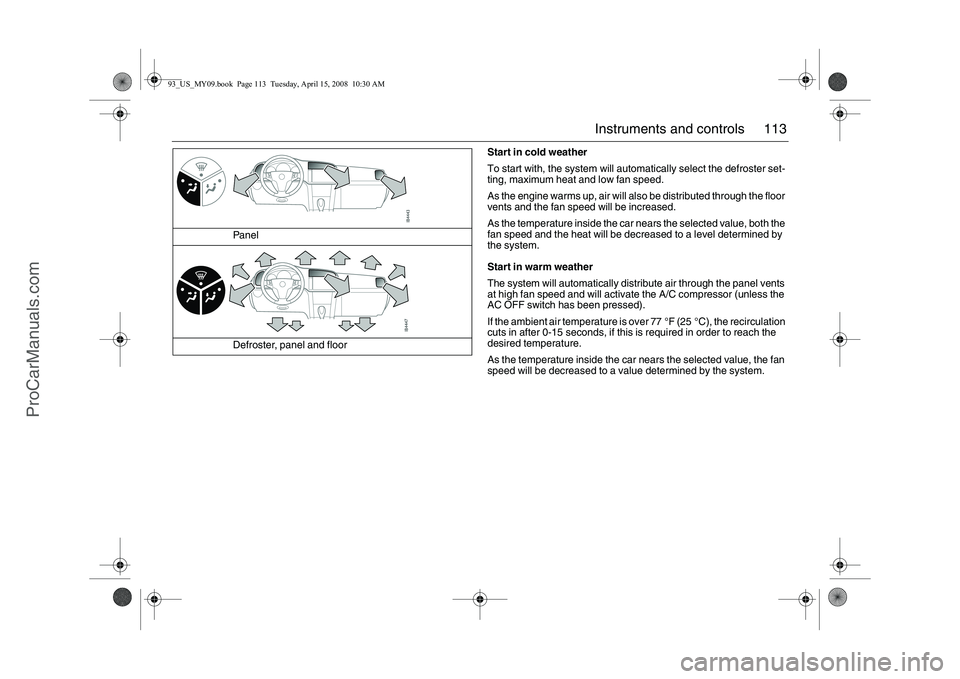
Start in cold weather
To start with, the system will automatically select the defroster set-
ting, maximum heat and low fan speed.
As the engine warms up, air will also be distributed through the floor
vents and the fan speed will be increased.
As the temperature inside the car nears the selected value, both the
fan speed and the heat will be decreased to a level determined by
the system.
Start in warm weather
The system will automatically distribute air through the panel vents
at high fan speed and will activate the A/C compressor (unless the
AC OFF switch has been pressed).
If the ambient air temperature is over 77 °F (25 °C), the recirculation
cuts in after 0-15 seconds, if this is required in order to reach the
desired temperature.
As the temperature inside the car nears the selected value, the fan
speed will be decreased to a value determined by the system. Panel
Defroster, panel and floor
93_US_MY09.book Page 113 Tuesday, April 15, 2008 10:30 AM
ProCarManuals.com
Page 114 of 304
114 Instruments and controlsFormation of ice and mist in
extreme weather conditionsIt is only in the most extreme conditions that
icing and misting of window glass are likely
to be a problem, such as in torrential rain or
severe cold coupled with high relative
humidity, or when passengers are perspir-
ing heavily or wearing wet clothes. The fol-
lowing measures are recommended if such
problems should occur:
1 Select AUTO and set the temperature to
70 °F (21 °C)
2 Push one time on the defroster button. If
this is not enough...
3 Increase the fan speed. If this is not
enough...
4 Select a higher temperature.The seat cushions and backrests of the front
seats are heated.
Heating is thermostatically controlled.
The heating has two effect steps.
We do not recommend prolonged use of the
higher level for people with sensitive skin.
Heating is controlled manually but can also
be automatic. Refer to Settings on
page 115.
CalibrationCalibration is performed automatically
every 40:th time the car is started after
having been switched off for more than
2 hours or if the battery has been discon-
nected.ProgrammingA number of functions can be customized
under Settings (see page 115).Tips(before contacting a dealer. We recom-
mend that you contact a Saab dealer)
If you feel that the ACC system is not func-
tioning satisfactorily, select "Default
Settings" under Settings, see page 115.
ACC- ConvertibleWhen the soft top is folded, several func-
tions in the ACC-system is effected.
The system adjusts itself as follows:
the sensitivity of the temperature knob
changes
air distribution and fan speed can only be
adjusted manually
Recirculation and rear window heating
are cut out
The A/C compressor is switched off
(manual activation is possible by pressing
the AC OFF button).
All manual selections are possible with the
exception of rear window heating and
defroster function.
When the soft top is raised, the system
reverts to the AUTO mode and the set tem-
perature.
Note: When the soft top or all the windows
are open in a hot, humid climate, turning the
air conditioning on manually can cause con-
densation to form on cold surfaces, such as
the air ducts.
Electric heating, front
seats3
93_US_MY09.book Page 114 Tuesday, April 15, 2008 10:30 AM
ProCarManuals.com
Page 115 of 304
115 Instruments and controls
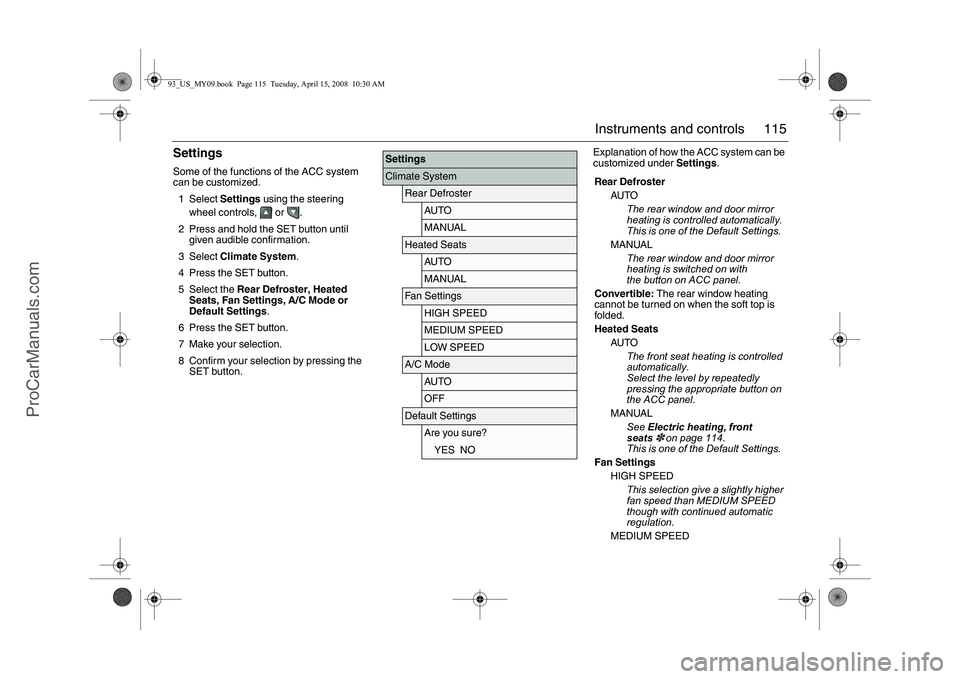
SettingsSome of the functions of the ACC system
can be customized.
1Select Settings using the steering
wheel controls, or .
2 Press and hold the SET button until
given audible confirmation.
3Select Climate System.
4 Press the SET button.
5 Select the Rear Defroster, Heated
Seats, Fan Settings, A/C Mode or
Default Settings.
6 Press the SET button.
7 Make your selection.
8 Confirm your selection by pressing the
SET button.Explanation of how the ACC system can be
customized under Settings.
SettingsClimate System
Rear Defroster
AUTOMANUAL
Heated Seats
AUTOMANUAL
Fan Settings
HIGH SPEEDMEDIUM SPEEDLOW SPEED
A/C Mode
AUTOOFF
Default Settings
Are you sure?YES NO
Rear Defroster
AUTO
The rear window and door mirror
heating is controlled automatically.
This is one of the Default Settings.
MANUAL
The rear window and door mirror
heating is switched on with
the button on ACC panel.
Convertible: The rear window heating
cannot be turned on when the soft top is
folded.
Heated Seats
AUTO
The front seat heating is controlled
automatically.
Select the level by repeatedly
pressing the appropriate button on
the ACC panel.
MANUAL
See Electric heating, front
seats
3 on page 114.
This is one of the Default Settings.
Fan Settings
HIGH SPEED
This selection give a slightly higher
fan speed than MEDIUM SPEED
though with continued automatic
regulation.
MEDIUM SPEED
93_US_MY09.book Page 115 Tuesday, April 15, 2008 10:30 AM
ProCarManuals.com
Page 116 of 304
116 Instruments and controls
Normal automatic fan speed. This is
one of the Default Settings.
LOW SPEED
This selection give a slightly lower
fan speed than MEDIUM SPEED
though with continued automatic
regulation.
Convertible: Fan speed is not regulated
automatically when the soft top is open.
A/C Mode
Auto
Automatic engagement and disen-
gagement of the A/C. This is one of
the Default Settings.
A/C offA/C compressor OFF (see also
page 111). The A/C compressor
can be activated temporarily by
pressing the AC or AUTO button
while on the road and if the outside
temperature is above 41°F (+5°C).
The A/C will be off the next time the
engine is started, if the engine has
been switched off for more than
2 hours.
Convertible: The A/C compressor is
switched off when the soft top is folded
down.
Further customizations to this function can
be made at a workshop. We recommend
that you contact a Saab dealer.
The A/C compressor can be on even
when the soft top is folded down.
The A/C compressor can be set to
operate as when the soft top was last
folded down.
93_US_MY09.book Page 116 Tuesday, April 15, 2008 10:30 AM
ProCarManuals.com
Page 119 of 304
119 Interior equipment
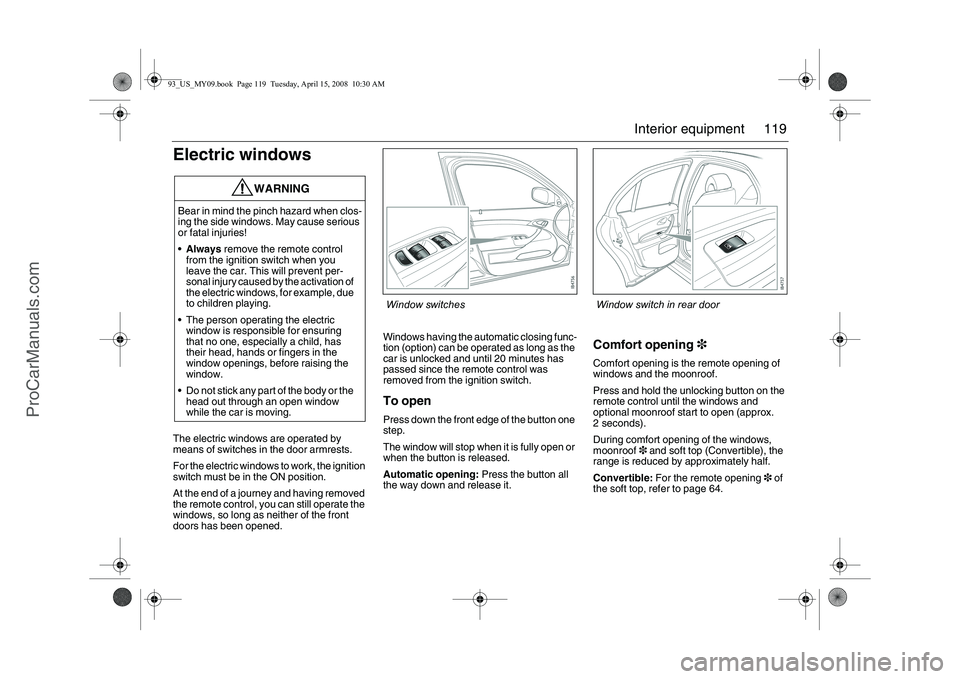
Electric windowsThe electric windows are operated by
means of switches in the door armrests.
For the electric windows to work, the ignition
switch must be in the ON position.
At the end of a journey and having removed
the remote control, you can still operate the
windows, so long as neither of the front
doors has been opened.Windows having the automatic closing func-
tion (option) can be operated as long as the
car is unlocked and until 20 minutes has
passed since the remote control was
removed from the ignition switch.
To openPress down the front edge of the button one
step.
The window will stop when it is fully open or
when the button is released.
Automatic opening: Press the button all
the way down and release it.
Comfort opening3Comfort opening is the remote opening of
windows and the moonroof.
Press and hold the unlocking button on the
remote control until the windows and
optional moonroof start to open (approx.
2 seconds).
During comfort opening of the windows,
moonroof3 and soft top (Convertible), the
range is reduced by approximately half.
Convertible: For the remote opening3 of
the soft top, refer to page 64.
WARNING
Bear in mind the pinch hazard when clos-
ing the side windows. May cause serious
or fatal injuries!
Always remove the remote control
from the ignition switch when you
leave the car. This will prevent per-
sonal injury caused by the activation of
the electric windows, for example, due
to children playing.
The person operating the electric
window is responsible for ensuring
that no one, especially a child, has
their head, hands or fingers in the
window openings, before raising the
window.
Do not stick any part of the body or the
head out through an open window
while the car is moving.
Window switches
Window switch in rear door
93_US_MY09.book Page 119 Tuesday, April 15, 2008 10:30 AM
ProCarManuals.com
Page 120 of 304
120 Interior equipmentTo closeRaise the front edge of the button one step.
The window will stop when it is fully closed
or when the button is released.
Automatic closing3: Raise the button all
the way and release it. If the window does
not close automatically, refer to Calibration
on page 121.
Pinch protection3On certain model variants, the front electric
windows are equipped with pinch protec-
tion. This is activated if something gets
trapped between the window pane and door
frame when the window is closed. The
window will stop and lower slightly.
Temporary overriding the pinch protec-
tion
If dirt, ice or similar create so much resis-
tance that the pinch protection cuts in (the
window cannot be closed), the pinch protec-
tion can be temporarily disengaged and the
window closed.
1 Make sure the ignition is ON.
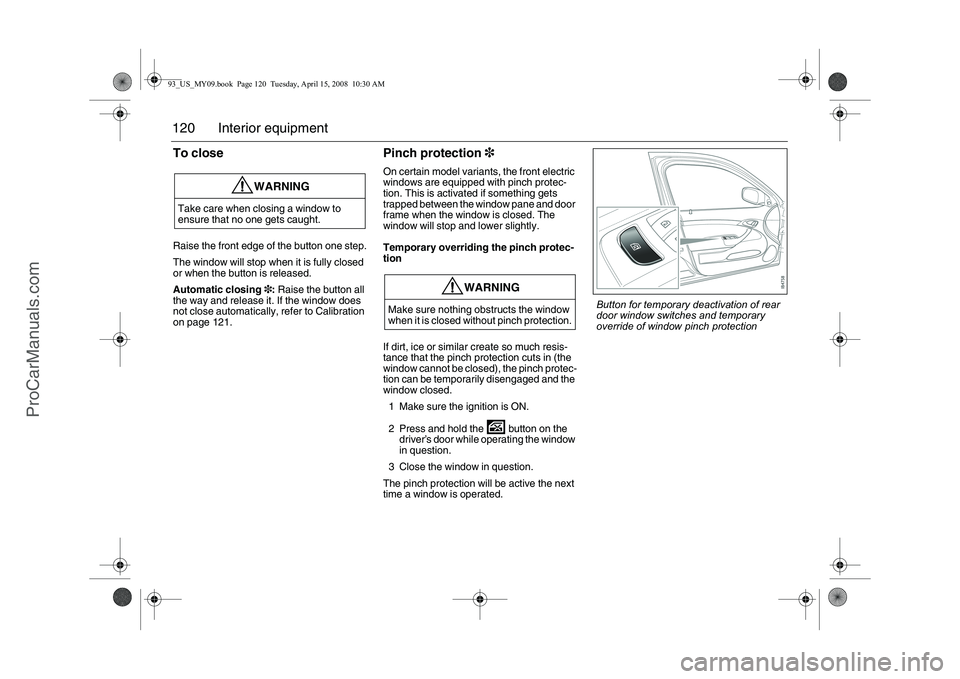
2 Press and hold the button on the
driver’s door while operating the window
in question.
3 Close the window in question.
The pinch protection will be active the next
time a window is operated.
WARNING
Take care when closing a window to
ensure that no one gets caught.
WARNING
Make sure nothing obstructs the window
when it is closed without pinch protection.
Button for temporary deactivation of rear
door window switches and temporary
override of window pinch protection
93_US_MY09.book Page 120 Tuesday, April 15, 2008 10:30 AM
ProCarManuals.com
Page 121 of 304
121 Interior equipment
CalibrationThe front electric windows should be cali-
brated if automatic closing does not work or
if the battery has been disconnected. The
pinch protection3 will not work if the win-
dows are not calibrated.Calibration is performed as follows:
1 Close the doors.
2 The car must be running at idling speed.
A battery charger must not be
connected to the car’s battery during
calibration.
3 Open the window fully, the button must
be kept depressed the whole time.
4 Close the window fully, the button must
be kept raised the whole time and for
approx. 1 second after the window has
closed.
5 Open the window fully, the button must
be kept depressed the whole time and
for approx. 1 second after the window
has fully opened.
6 Close the window fully, and keep the
button raised until the calibration is
confirmed with a "chime".
Repeat steps 3–6 for the windows which
require calibration.
Deactivating the rear window
switchesThe in the driver’s door deactivates the
window switches in the rear doors.
The illuminated switch will change color
from green to orange (deactivated).
WARNING
The pinch protection will not be engaged
after a power break until the electric win-
dows have been calibrated.93_US_MY09.book Page 121 Tuesday, April 15, 2008 10:30 AM
ProCarManuals.com
Page 127 of 304
127 Interior equipment
CompassThe compass is built into the rear view mir-
ror. The compass bearing is displayed in the
top right-hand corner of the mirror and is
updated every other second. The compass
displays the car’s direction of travel: N, NE,
E, etc.
Switch the compass display on and off by
pressing button 5 for 3 seconds, see illus-
tration on page 126.
Changing zones
The earth’s magnetic field varies depending
on one’s position on the globe. If you drive
your car from one magnetic zone to another
the compass setting will need to be changed
to ensure a correct bearing.
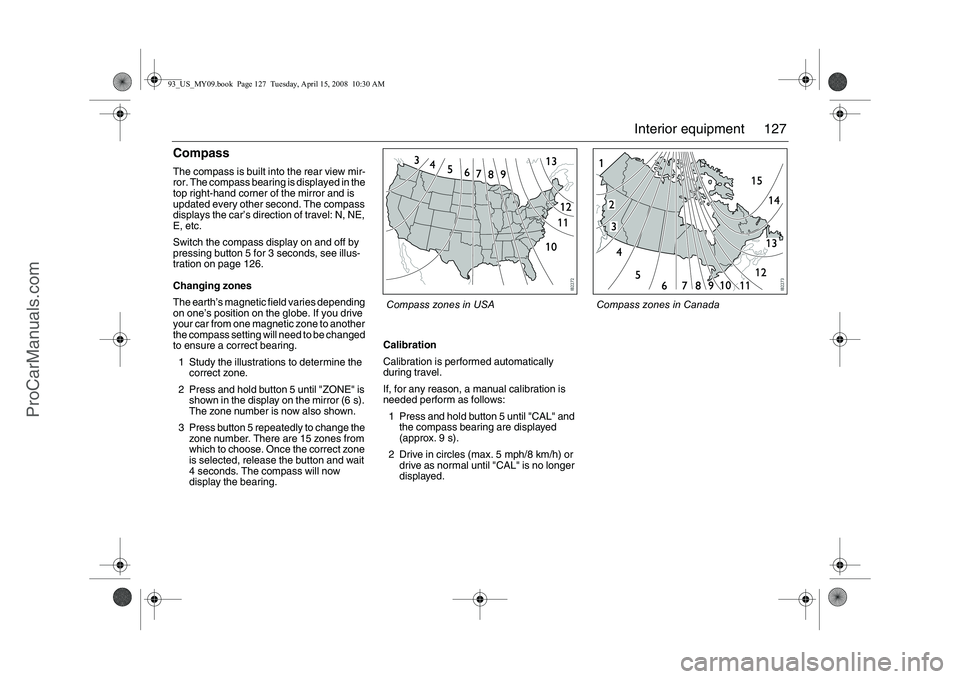
1 Study the illustrations to determine the
correct zone.
2 Press and hold button 5 until "ZONE" is
shown in the display on the mirror (6 s).
The zone number is now also shown.
3 Press button 5 repeatedly to change the
zone number. There are 15 zones from
which to choose. Once the correct zone
is selected, release the button and wait
4 seconds. The compass will now
display the bearing.Calibration
Calibration is performed automatically
during travel.
If, for any reason, a manual calibration is
needed perform as follows:
1 Press and hold button 5 until "CAL" and
the compass bearing are displayed
(approx. 9 s).
2 Drive in circles (max. 5 mph/8 km/h) or
drive as normal until "CAL" is no longer
displayed.
Compass zones in USA
Compass zones in Canada
93_US_MY09.book Page 127 Tuesday, April 15, 2008 10:30 AM
ProCarManuals.com