Automatic SAAB 9-3 2009 Service Manual
[x] Cancel search | Manufacturer: SAAB, Model Year: 2009, Model line: 9-3, Model: SAAB 9-3 2009Pages: 304, PDF Size: 44.31 MB
Page 162 of 304
162 Starting and drivingAutomatic
transmission3
The automatic transmission has an elec-
tronic control module. The control module
receives information including accelerator
position and road speed. Using this and
other information, it controls the hydraulic
pressure of the transmission to ensure that
gear changing is as smooth as possible.
The remote control can only be removed
when the selector lever is in the P position.The engine can only be started when the
selector lever is in the P or N position.
When the car is stationary, the engine must
be idling when you move the selector lever
from one position to another. If not, the
transmission could be damaged.
WARNING
Depress the brake pedal when shifting
the selector lever from P or N.
The car must be at a standstill before
P, R or N is selected. You have to have
your foot on the brake pedal to move
the lever out of P. If the car is still
moving when a drive position is subse-
quently selected, this could cause a
crash or damage the automatic trans-
mission.
Never park the car with the selector
lever in a drive position, even if the
parking brake is on.
If you want to leave the car with the
engine running, move the selector
lever to P or N and apply the parking
brake.
NOTICEAfter selecting a drive position, pause
briefly to allow the gear to engage (the car
starts to pull a little) before you acceler-
ate.
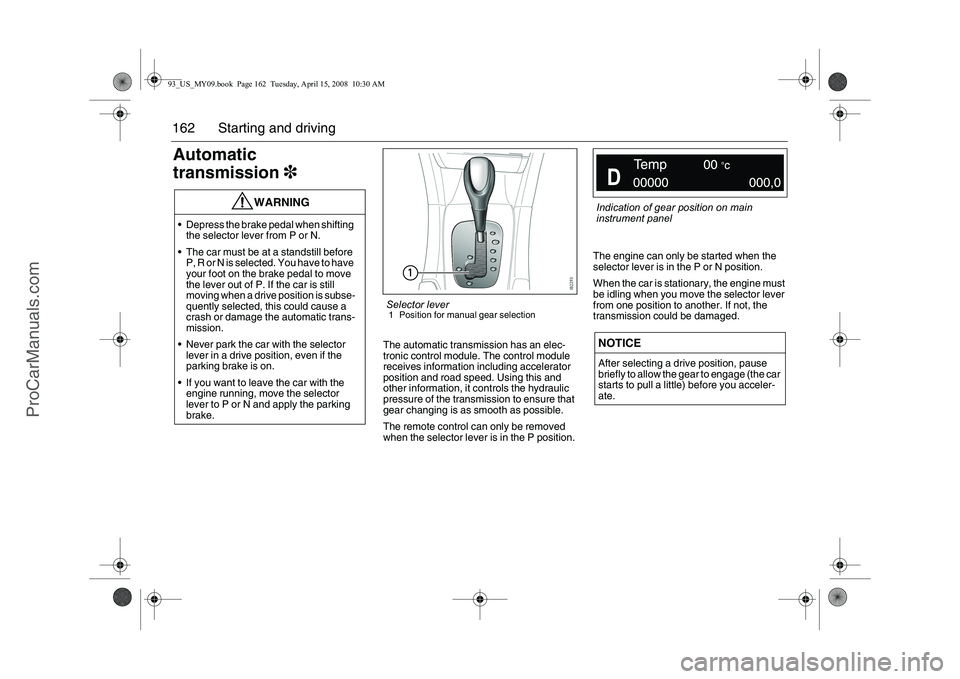
Selector lever1 Position for manual gear selection
Indication of gear position on main
instrument panel
93_US_MY09.book Page 162 Tuesday, April 15, 2008 10:30 AM
ProCarManuals.com
Page 163 of 304
163 Starting and driving
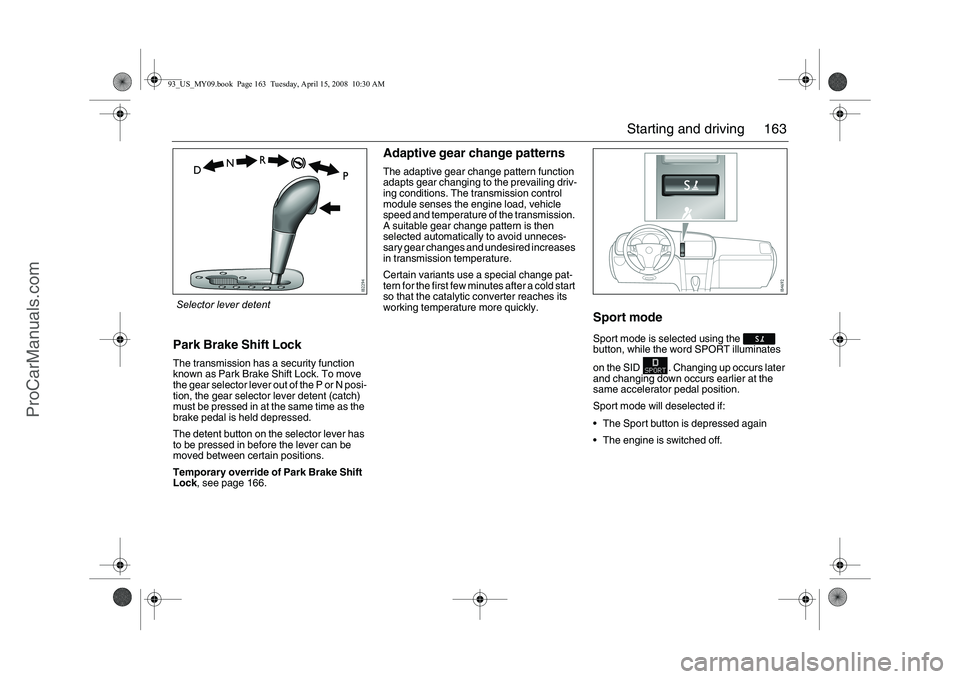
Park Brake Shift LockThe transmission has a security function
known as Park Brake Shift Lock. To move
the gear selector lever out of the P or N posi-
tion, the gear selector lever detent (catch)
must be pressed in at the same time as the
brake pedal is held depressed.
The detent button on the selector lever has
to be pressed in before the lever can be
moved between certain positions.
Temporary override of Park Brake Shift
Lock, see page 166.
Adaptive gear change patternsThe adaptive gear change pattern function
adapts gear changing to the prevailing driv-
ing conditions. The transmission control
module senses the engine load, vehicle
speed and temperature of the transmission.
A suitable gear change pattern is then
selected automatically to avoid unneces-
sary gear changes and undesired increases
in transmission temperature.
Certain variants use a special change pat-
tern for the first few minutes after a cold start
so that the catalytic converter reaches its
working temperature more quickly.
Sport modeSport mode is selected using the
button, while the word SPORT illuminates
on the SID . Changing up occurs later
and changing down occurs earlier at the
same accelerator pedal position.
Sport mode will deselected if:
The Sport button is depressed again
The engine is switched off.
Selector lever detent93_US_MY09.book Page 163 Tuesday, April 15, 2008 10:30 AM
ProCarManuals.com
Page 165 of 304
165 Starting and driving
TowingTowing of cars with automatic transmission,
see page 193.Descending hillsIf the speed of the car increases while
descending a steep hill, despite the acceler-
ator being released, the control module will
change down. If you desire more powerful
engine braking, manually select a lower
gear (see page 168).
Limp-homeIf the transmission malfunctions, the control
module will activate limp-home mode.
Driveability will be affected to varying
degrees.Cars with 5-speed transmission3
In this mode, only 2nd and 5th gears are
available. Select 2nd gear when driving at
low speeds and 5th gear at higher speeds.
2nd gear must be selected manually. Select
5th gear manually or move the selector
lever to D, see page 168.
Cars with 6-speed transmission3
The car may be totally powerless. If this is
case, have the car transported to a work-
shop to have the problem rectified.
The car may feel weak but can be driven
carefully to a workshop to have the prob-
lem rectified.
Driveability may barely be affected.
Irrespective of the driveability of the car, the
car must be taken to a workshop to have the
problem checked and rectified.NOTICEDo not tow a trailer if limp-home mode is
engaged.
93_US_MY09.book Page 165 Tuesday, April 15, 2008 10:30 AM
ProCarManuals.com
Page 167 of 304
167 Starting and driving
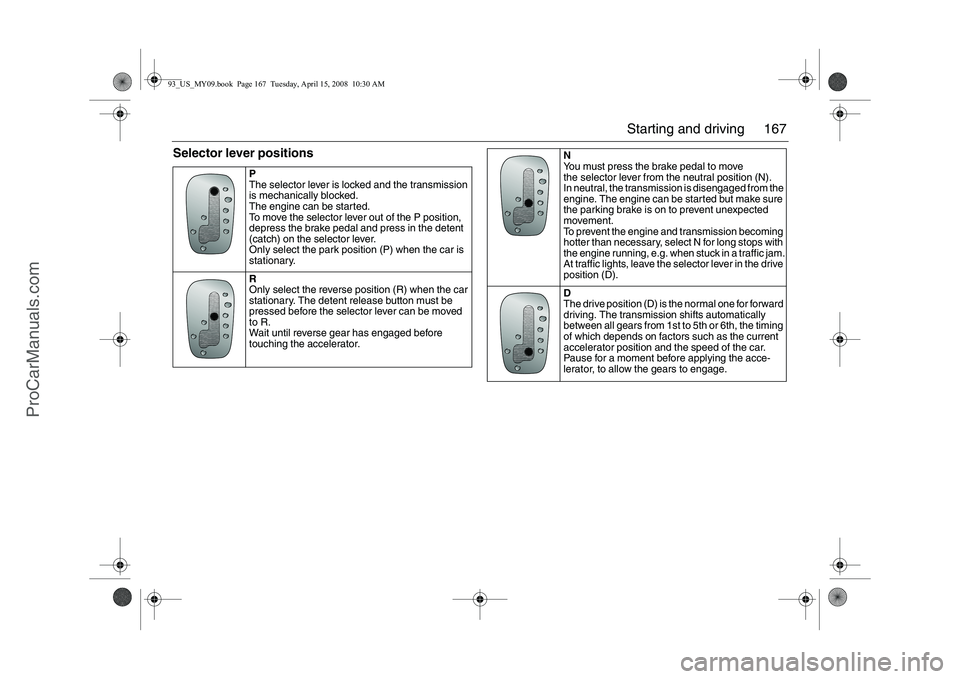
Selector lever positions
P
The selector lever is locked and the transmission
is mechanically blocked.
The engine can be started.
To move the selector lever out of the P position,
depress the brake pedal and press in the detent
(catch) on the selector lever.
Only select the park position (P) when the car is
stationary.
R
Only select the reverse position (R) when the car
stationary. The detent release button must be
pressed before the selector lever can be moved
to R.
Wait until reverse gear has engaged before
touching the accelerator.
N
You must press the brake pedal to move
the selector lever from the neutral position (N).
In neutral, the transmission is disengaged from the
engine. The engine can be started but make sure
the parking brake is on to prevent unexpected
movement.
To prevent the engine and transmission becoming
hotter than necessary, select N for long stops with
the engine running, e.g. when stuck in a traffic jam.
At traffic lights, leave the selector lever in the drive
position (D).
D
The drive position (D) is the normal one for forward
driving. The transmission shifts automatically
between all gears from 1st to 5th or 6th, the timing
of which depends on factors such as the current
accelerator position and the speed of the car.
Pause for a moment before applying the acce-
lerator, to allow the gears to engage.
93_US_MY09.book Page 167 Tuesday, April 15, 2008 10:30 AM
ProCarManuals.com
Page 170 of 304
170 Starting and drivingTo reduce the preset speedYou can reduce speed in any of the follow-
ing ways:
Brake to the desired speed. Jog the
control to SET/+ or SET/–.
Jog the control to SET/– to reduce the
speed by 1 mph (1.6 km/h).
Hold the control in the SET/– position until
the desired speed is reached.Temporary increase in speedAccelerate, without shifting down (manual
transmission), to exceed the set speed such
as for overtaking. When you release the
accelerator, the car will return to the set
speed.To disengage the system
temporarilySlide the switch to the left towards OFF, but
only as far as to disengage the cruise con-
trol. Allow the switch to spring back.
To re-engage the systemSlide the switch to RESUME. The car will
return to the previously set speed. Vehicle
speed must exceed 15 mph (25 km/h).To disengage the systemThe system will be disengaged:
As soon as the brake or clutch pedal is
depressed (cars with manual transmis-
sion).
When the switch is slid towards OFF. See
also heading "To disengage the system
temporarily".
When the switch is slid to OFF.
When the TCS/ESP
® system is operative.
When position N is selected (cars with
automatic transmission).
BrakingIt is good practice to try your brakes period-
ically while driving. This is particularly
important when driving in heavy rain, on
roads with a lot of surface water, in snow or
in salty slush. In such conditions a slight
delay in the braking effect may be noticed.
To minimize this delay, dry the brakes by
applying them lightly now and again. This
should also be done after the car has been
washed, and in extremely damp weather.
To avoid the brakes becoming overheated,
such as when negotiating long descents
with a drop of several hundred yards (hun-
dred metres), select a low gear to utilize the
braking effect of the engine. If the car has
automatic transmission, select 1st or 2nd
gear.
You can help to prolong the life of the brakes
by thinking ahead and braking harder over
short periods, rather than braking more
moderately over long stretches.
93_US_MY09.book Page 170 Tuesday, April 15, 2008 10:30 AM
ProCarManuals.com
Page 171 of 304
171 Starting and driving
ABS brakesThe Antilock Braking System (ABS) modu-
lates the brake pressure to each wheel. The
pressure is automatically reduced just
before the wheel locks up and then
increases again to the point at which the
wheel is just about to lock. The wheel sen-
sors send information to the brake system’s
electronic control module for every 4 or so
inches (decimeter) that the car rolls. This
information is processed continuously to
ensure that the adjustment of the brake
pressure will be as exact as possible.
Adjustment takes place up to 12 times per
second.The brake system provides Electronic
Brakeforce Distribution (EBD). This distri-
butes the brake pressure between the front
and rear wheels, in such a way as to achieve
optimum braking performance irrespective
of the car’s speed or load.
The ABS has a built-in diagnostics function
which will switch on the ABS warning light
if a fault is detected in the system (see
page 82).
Note. The following message will appear
on the SID (and corresponding symbol
on main instrument unit) if a fault is
detected:
WARNING
It is prudent to try your brakes from
time to time, especially when driving in
heavy rain, through water collected on
the road, in snow, on a wet road sur-
face or in salty slush. In such condi-
tions, the brakes may take longer than
normal to take effect. To rectify this,
touch the brake pedal periodically to
dry the brakes out.
The same applies after the car has
been washed or when the weather is
very humid.
Avoid parking the car with wet brakes.
Before parking, and if the traffic condi-
tions allow, brake quite heavily so that
the brake discs and pads warm up and
dry.
The brakes are power assisted and it
should be kept in mind that the servo
unit only provides the power assis-
tance when the engine is running.
The brake pressure required when the
engine is off, (e.g. when the car is
being towed) is roughly four times the
normal pedal force required. The
pedal also feels hard and unrespon-
sive.
Overheating can cause the brakes to
fade!
WARNING
The additional safety afforded by the
ABS system is not designed to allow
drivers to drive faster but to make
normal driving safer.
To stop as quickly as possible, without
loss of directional stability, whether
the road surface is dry, wet or slippery,
press the brake pedal down hard
without letting up (do not pump the
pedal), declutching simulta-
neously, and steer the car to safety.
Antilock brake malfunc.
Contact service.
93_US_MY09.book Page 171 Tuesday, April 15, 2008 10:30 AM
ProCarManuals.com
Page 174 of 304
174 Starting and drivingThe advantages of the TCS system are
most apparent when road surface friction is
so low that a lot of wheelspin can occur rap-
idly:
When the car is pulling away or accelerat-
ing with the front wheels on different
surfaces (e.g. one slippery and one dry),
the TCS functions like an electronic differ-
ential lock, making sure that both wheels
rotate at the same speed. The system
also functions when the car is reversing.
When cornering, if the inside front wheel
rotates faster than the other wheels.TCS OFF
lights up if:
The system has been switched off
manually. It cannot be switched off if the
car is travelling faster than 35 mph
(60 km/h).
There is a fault in the ABS system
A fault has been detected and the
system has therefore been switched
off and at the same time the following
message is shown on the SID:
TCS indicatorWhen the ignition switch is turned to the ON
position, the lamp is lit for about 4 seconds
while the system performs self-diagnosis.
The light comes on when the TCS is
operative, that is when one of the wheels
has lost its grip.
The fact that the TCS is operative indicates
that the limit for grip has been exceeded and
that the driver must exercise greater care.Temporarily turning the TCS offThe TCS is switched on automatically when
the engine is started.
It may be necessary to switch off the system
if the car has become bogged down, for
instance.
If a fault is detected in the ABS, the TCS will
be switched off automatically.
The cruise control system (if active) will
automatically be disengaged if the TCS is
operative.Disengage the system in Settings.
1Select Settings using the steering
wheel buttons, or .
2 Hold the SET button depressed until a
chime sounds.
3Select TCS.
4 Press the SET button.
5Select ON or OFF.
End by pressing the SET-button.
Go back/undo using the CLR-button.
Traction control failure.
Contact service.
93_US_MY09.book Page 174 Tuesday, April 15, 2008 10:30 AM
ProCarManuals.com
Page 176 of 304
176 Starting and drivingESP
® system OFF
lights up if:
The system is turned off manually. The
car must be travelling slower than 35 mph
(60 km/h). The TCS is also disengaged.
A fault is detected in the ABS-system.
A fault has been detected in the
system and the system has therefore
been switched off. The following
message will be displayed on the SID:
ESP
® system indicator light
When the ignition switch is turned to the ON
position, the lamp is lit for about 4 seconds
while the system performs self-diagnosis.
The light comes on for a short period of
time when the ESP
® system is operative.
Operation of the ESP® system indicates
reduced cohesion between the tires and the
road, and that extra care should be taken by
the driver during continued driving.
Temporarily turning ESP
®
system off
The ESP
® is switched on automatically
when the engine is started.
It may be necessary to switch off the system
if the car has become bogged down, for
instance.
The ESP® system is always engaged
during braking, even if it has been switched
off manually with the ESP
® button.
The cruise control system (if active) will
automatically be disengaged if the ESP
®
system is operative.Disengage the system in Settings.
1Select Settings using the steering
wheel buttons, or .
2 Hold the SET button depressed until a
chime sounds.
3Select ESP.
4 Press the SET button.
5Select ON or OFF.
End by pressing the SET-button.
Go back/modify using the CLR-button.
Stability control failure.
Contact service.
NOTICEChanges to the chassis, such as a
change of wheels, shock absorbers or
springs, could affect the function of the
ESP
® system.
Always consult a workshop before chang-
ing any chassis components. We recom-
mend that you contact a Saab dealer.
93_US_MY09.book Page 176 Tuesday, April 15, 2008 10:30 AM
ProCarManuals.com
Page 180 of 304
180 Starting and drivingSaab Parking
Assistance3Saab Parking Assistance
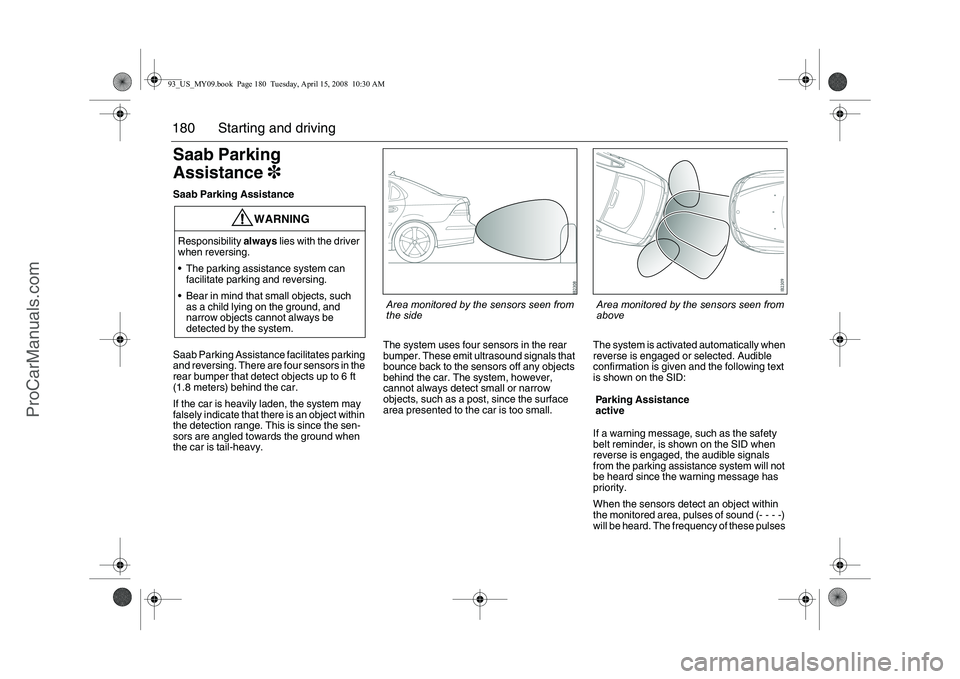
Saab Parking Assistance facilitates parking
and reversing. There are four sensors in the
rear bumper that detect objects up to 6 ft
(1.8 meters) behind the car.
If the car is heavily laden, the system may
falsely indicate that there is an object within
the detection range. This is since the sen-
sors are angled towards the ground when
the car is tail-heavy.The system uses four sensors in the rear
bumper. These emit ultrasound signals that
bounce back to the sensors off any objects
behind the car. The system, however,
cannot always detect small or narrow
objects, such as a post, since the surface
area presented to the car is too small.The system is activated automatically when
reverse is engaged or selected. Audible
confirmation is given and the following text
is shown on the SID:
If a warning message, such as the safety
belt reminder, is shown on the SID when
reverse is engaged, the audible signals
from the parking assistance system will not
be heard since the warning message has
priority.
When the sensors detect an object within
the monitored area, pulses of sound (- - - -)
will be heard. The frequency of these pulses
WARNING
Responsibility always lies with the driver
when reversing.
The parking assistance system can
facilitate parking and reversing.
Bear in mind that small objects, such
as a child lying on the ground, and
narrow objects cannot always be
detected by the system.
Parking Assistance
active
Area monitored by the sensors seen from
the side
Area monitored by the sensors seen from
above
93_US_MY09.book Page 180 Tuesday, April 15, 2008 10:30 AM
ProCarManuals.com
Page 181 of 304
181 Starting and driving
increases as the car comes closer to the
object.
If you stop the car with reverse gear
engaged, the sound pulse will stop after
2 seconds. The sound pulses will return if
you continue to reverse. If the car rolls for-
ward while reverse is engaged, the system
is silenced.
When the distance to the object is less
than 1 ft. (30 cm), a continuous tone will
be heard.
When an object is approximately 3 ft.
(90 cm) from the car, the sound pulses
change character markedly (frequency
increases). A distance of about 3 ft. (90 cm)
is suitable if you wish to load or unload the
trunk.
If the distance between an object and a
corner sensor does not change for
3 seconds, for example if you are reversing
alongside a wall, the system will switch to
monitoring straight back. The system indi-
cates if the distance to the wall decreases
again.
If a trailer is hitched up and correctly con-
nected to the trailer contact by the towbar,
the system is automatically deactivated.Reversing alongside a wall
If the distance between an object and a
corner sensor does not change for
2 seconds, for example if you are reversing
alongside a wall, the system will switch to
monitoring straight back. The system indi-
cates if the distance to the wall decreases
again.Cars with trailer hitch
If the car has a trailer hitch and its wiring is
correctly connected to the car’s electrical
system, the Saab Parking Assistance auto-
matically compensates for the protrusion of
the towbar.
If a camper or trailer is hitched up and the
trailer hitch wiring is correctly connected to
the car’s electrics, the system is automati-
cally deactivated.
You can temporarily deactivate the Saab
Parking Assistance as follows:
Engage reverse and press the CLR button
on the steering wheel.
The system will be reactivated the next time
you engage reverse.
NOTICEThe sensors must be kept clean to func-
tion well. Ice, snow and dirt can affect
their sensitivity.
Large quantities of snow or dirt covering
the sensors can prevent the parking
assistance system from detecting any
objects.
Do not spray the sensors with a pressure
washer, as this can damage them.
93_US_MY09.book Page 181 Tuesday, April 15, 2008 10:30 AM
ProCarManuals.com