radio SAAB 9-5 2005 User Guide
[x] Cancel search | Manufacturer: SAAB, Model Year: 2005, Model line: 9-5, Model: SAAB 9-5 2005Pages: 276, PDF Size: 16.72 MB
Page 102 of 276
100 Saab 9-5 Audio SystemLoudness ON/OFF To change the default setting:
The default setting for this function is ON.
– Press and hold the BAND button at the
same time as you switch on the Audio
System.
– After START VOL appears, release the
BAND button.
– Select LOUDNESS using
– Select ON or OFF using the VOL control.
– Wait 10 seconds or press one of the but-
tons on the bottom row of the Audio Sys-
tem, e.g. RADIO/BAND, to save the new
default setting.
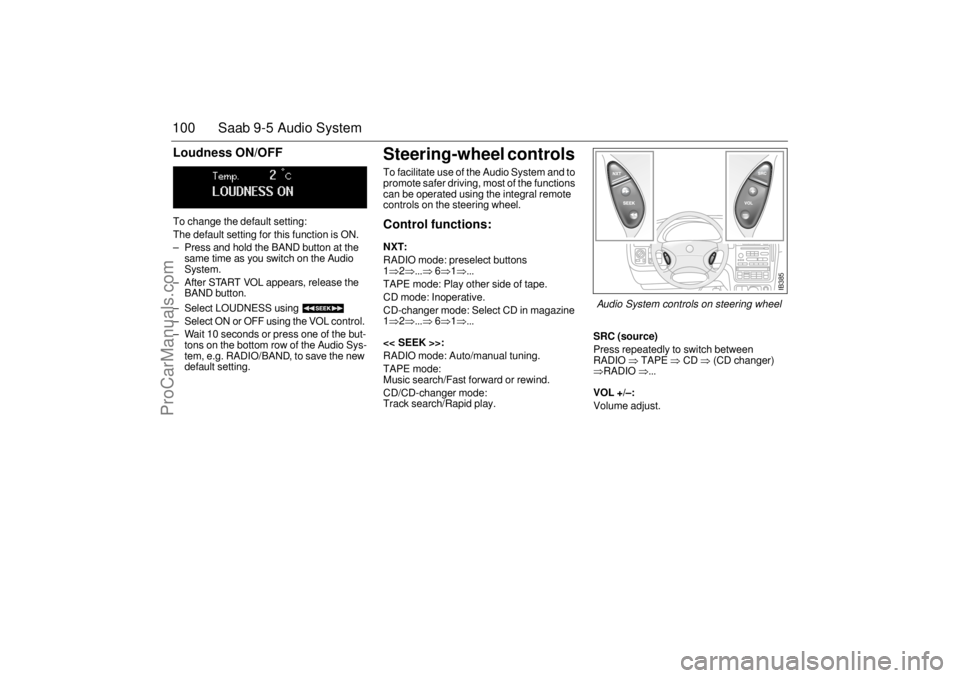
Steering-wheel controls To facilitate use of the Audio System and to
promote safer driving, most of the functions
can be operated using the integral remote
controls on the steering wheel. Control functions: NXT: RADIO mode: preselect buttons
1⇒2⇒...⇒
6⇒1⇒...
TAPE mode: Play other side of tape.
CD mode: Inoperative.
CD-changer mode: Select CD in magazine
1⇒2⇒...⇒
6⇒1⇒...
<< SEEK >>:
RADIO mode: Auto/manual tuning.
TAPE mode:
Music search/Fast forward or rewind.
CD/CD-changer mode:
Track search/Rapid play.
SRC (source)Press repeatedly to switch between
RADIO
⇒ TAPE
⇒ CD
⇒ (CD changer)
⇒RADIO
⇒...
VOL +/–: Volume adjust.
IB385
Audio System controls on steering wheel
ProCarManuals.com
Page 104 of 276

102 Saab 9-5 Audio SystemTechnical data
These specifications comply with the new IHF Standard
Since the policy at Saab is one of continual improvement, we retain the right to alter
specifications and design without prior notice.
Dolby noise reduction is produced under licence from Dolby Laboratories Licensing
Corporation
”Dolby” and the double-D symbol are trademarks of Dolby Laboratories Licen-
sing Corporation
Changes or modifications not expressly approved by the manufacturer for compliance
could void the user´s authority to operate the equipment.
Tone controlsBass ____________________ ±10 dB at 100 Hz
Treble ____________________ ±10 dB at 10,000 Hz Power outputPremium _________________ 150 W
110 W at 1 % THD (total har-
monic distortion) and 13.5 V
Prestige __________________ 200 W
150 W at 1 % THD (total har-
monic distortion) and 13.5 VRadio moduleRadio system _______________ PLL dual-synthesizer tuner
Number of presets:
FM ______________________ 3 x 6
AM ______________________ 2 x 6
Frequency range:
FM ______________________ 87.9–107.9 MHz
AM ______________________ 530–1710 kHz
Tuning steps:
Automatic seek tuning: ______ FM 200 kHz
AM 10 kHz
Manual tuning: _____________ FM 200 kHz
AM 10 kHzFrequency range (FM) ________ 40–15000 Hz
±1 dB
Distortion (FM) ______________ < 0.5 %
Cassette playerFast forward/rewind __________ < 120 seconds (C-60)
Frequency range _____________ 40–16000 Hz
±2 dB
Wow and flutter ______________ 0.2 % WRMS
Signal-to-noise ratio __________ 45 dB
Dolby B
NR effect ____________ 8/16 dB
CD player and CD changer1-bit system and 8 x oversampling
Frequency range _____________ 20–20000 Hz
±0.5 dB
Distortion __________________ < 0.008 %
Dynamics __________________ > 80 dB (1 kHz)
CD-changer capacity __________ 6 discs
ProCarManuals.com
Page 105 of 276
103 Saab 9-5 Audio System
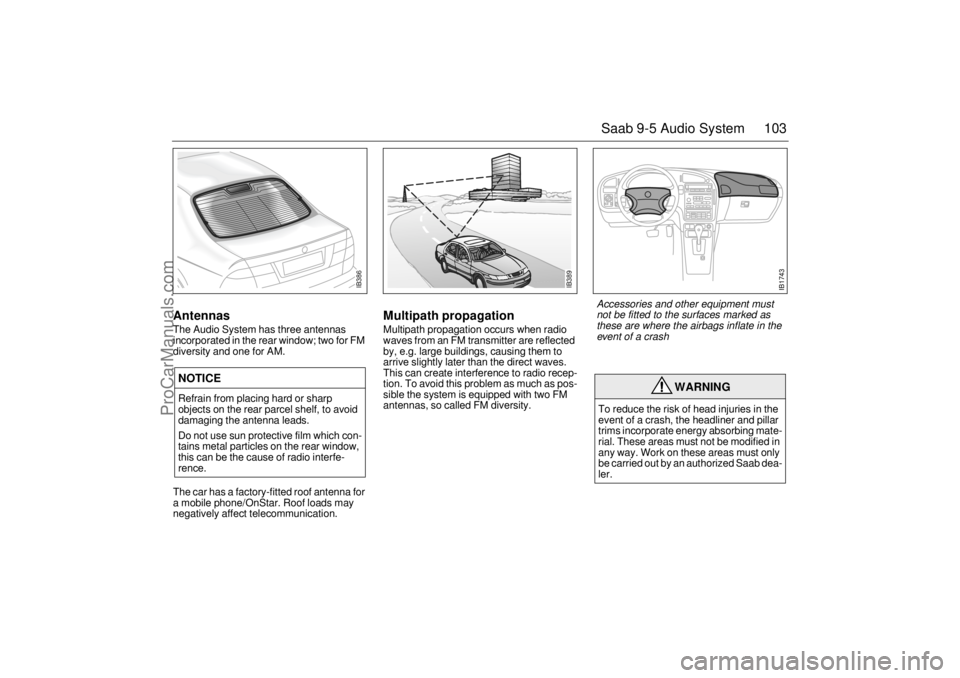
AntennasThe Audio System has three antennas
incorporated in the rear window; two for FM
diversity and one for AM. The car has a factory-fitted roof antenna for
a mobile phone/OnStar. Roof loads may
negatively affect telecommunication.
Multipath propagation Multipath propagation occurs when radio
waves from an FM transmitter are reflected
by, e.g. large buildings, causing them to
arrive slightly later than the direct waves.
This can create interference to radio recep-
tion. To avoid this problem as much as pos-
sible the system is equipped with two FM
antennas, so called FM diversity.
NOTICERefrain from placing hard or sharp
objects on the rear parcel shelf, to avoid
damaging the antenna leads.
Do not use sun protective film which con-
tains metal particles on the rear window,
this can be the cause of radio interfe-
rence.
WARNING
To reduce the risk of head injuries in the
event of a crash, the headliner and pillar
trims incorporate energy absorbing mate-
rial. These areas must not be modified in
any way. Work on these areas must only
be carried out by an authorized Saab dea-
ler.
IB386
IB389
IB1743
Accessories and other equipment must
not be fitted to the surfaces marked as
these are where the airbags inflate in the
event of a crash
ProCarManuals.com
Page 106 of 276
104 Saab 9-5 Audio SystemAdjusting the frequency steps
North America/Europe If the car is taken from North America to
Europe, the radio’s frequency steps can be
adjusted.
Press and hold (mid-segment)
and switch the radio on at the same time.
The preset stations will be cancelled and
replaced by default frequencies.
Fault codesThe Audio System has a built-in diagnostics
function. If a fault is detected, a fault code is
generated to help dealer technicians to
diagnose the fault. Below are the codes for
some faults that you might be able to rectify
yourself.
OnStar SystemYour vehicle may be equipped with OnStar,
a vehicle telematics communications sys-
tem. Please consult the separate OnStar
Owner’s Manual for system details.
NOTICEGreat care should be exercised in trying
to rectify a fault. If you are at all unsure,
contact an authorized Saab dealer. Fault code Possible cause CD/CDC
ERROR
12/17/19 CD is dirty, loaded
wrong side up or defec-
tive.
TAPE ERR 01 Tape broken or
mechanical fault in
deck.
TAPE ERR
02/03 Tape snarled up or
mechanical fault in
deck.
TAPE ERR 11 Cassette jammed: can-
not be loaded/ejected.
WARNING
The CD player/CD changer is classified
as Class 1 laser equipment
Service and repair work must only be
carried out by authorized technicians.
If the casing is damaged, hazardous
laser radiation can occur. NOTICEAll work on the Audio System must be
carried out by an authorized Saab dealer.
ProCarManuals.com
Page 112 of 276

110 Interior equipment and trunkGate Operator / Canadian ProgrammingCanadian radio-frequency laws require
transmitter signals to "time-out" (or quit)
after several seconds of transmission -
which may not be long enough for the
garage opener to pick up the signal during
programming. Similar to this Canadian law,
some U.S. gate operators are designed to
"time-out" in the same manner.
If you live in Canada or you are having diffi-
culties programming a gate operator by
using the "Programming" procedures
(regardless of where you live),
replace
"Programming " step 4
with the following:
Note:
If programming a garage door opener
or gate operator, it is advised to unplug the
device during the "cycling" process to pre-
vent possible overheating.
10 Continue to press and hold the button
while you
press and release - every
two seconds
("cycle") your hand-held
transmitter until the frequency signal
has successfully been accepted by the
garage opener. (The indicator light will
flash slowly and then rapidly.)
Proceed with "Programming" step five to
complete.
Reprogramming a single buttonTo program a device to the garage opener
using a button previously trained, follow
these steps:
1 Press and hold the desired button.
DO
NOT
release the button.
2 The indicator light will begin to flash after
20 seconds. Without releasing the but-
ton, proceed with "Programming" - step
3.
Erasing the three buttonsTo erase programming from the three but-
tons (individual buttons cannot be erased
but can be "reprogrammed" as outlined
below), follow the step noted:
Press and hold the two outer buttons until
the indicator light
begins to flash-after
20 seconds. Release both buttons. Do
not hold for longer that 30 seconds. The
garage opener is now in the train (or lear-
ning) mode
and can be programmed at
any time beginning with "Programming" -
step 3.
NOTICESwitch off the power supply to the garage
door or gate (or park the car beyond the
range of the remote control) while pro-
gramming using the "cycling" method to
prevent damaging the electrical motor.
ProCarManuals.com
Page 176 of 276
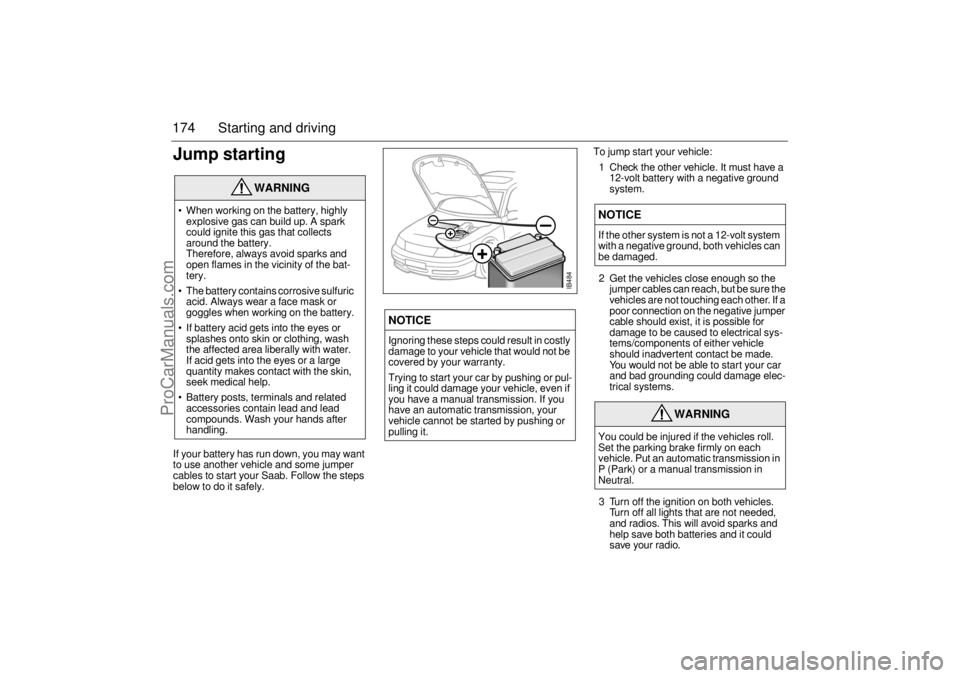
174 Starting and drivingJump startingIf your battery has run down, you may want
to use another vehicle and some jumper
cables to start your Saab. Follow the steps
below to do it safely.To jump start your vehicle:
1 Check the other vehicle. It must have a
12-volt battery with a negative ground
system.
2 Get the vehicles close enough so the
jumper cables can reach, but be sure the
vehicles are not touching each other. If a
poor connection on the negative jumper
cable should exist, it is possible for
damage to be caused to electrical sys-
tems/components of either vehicle
should inadvertent contact be made.
You would not be able to start your car
and bad grounding could damage elec-
trical systems.
3 Turn off the ignition on both vehicles.
Turn off all lights that are not needed,
and radios. This will avoid sparks and
help save both batteries and it could
save your radio.
WARNING
When working on the battery, highly
explosive gas can build up. A spark
could ignite this gas that collects
around the battery.
Therefore, always avoid sparks and
open flames in the vicinity of the bat-
tery.
The battery contains corrosive sulfuric
acid. Always wear a face mask or
goggles when working on the battery.
If battery acid gets into the eyes or
splashes onto skin or clothing, wash
the affected area liberally with water.
If acid gets into the eyes or a large
quantity makes contact with the skin,
seek medical help.
Battery posts, terminals and related
accessories contain lead and lead
compounds. Wash your hands after
handling.
NOTICEIgnoring these steps could result in costly
damage to your vehicle that would not be
covered by your warranty.
Trying to start your car by pushing or pul-
ling it could damage your vehicle, even if
you have a manual transmission. If you
have an automatic transmission, your
vehicle cannot be started by pushing or
pulling it.
NOTICEIf the other system is not a 12-volt system
with a negative ground, both vehicles can
be damaged.
WARNING
You could be injured if the vehicles roll.
Set the parking brake firmly on each
vehicle. Put an automatic transmission in
P (Park) or a manual transmission in
Neutral.
+
–
+
–
IB484
ProCarManuals.com
Page 177 of 276

175 Starting and driving
4 Open the hood and locate the battery.
Find the positive (+) and negative (–) termi-
nals on the battery.5 Check that the jumper cables do not
have loose or missing insulation. If they
do, you could get a shock and also the
vehicles could be damaged.
Before you connect the cables, here are
some basic things you should know.
Positive (+) will go to positive (+) and
negative (–) will go to a major metal
engine part with a good ground. Do not
connect (+) to (–) or you will get a short
that could injure you or would damage
the battery and maybe other parts as
well.
6 Connect the red positive (+) cable to the
positive (+) terminal of the vehicle with
the discharged battery.
7 Do not let the other end touch metal.
Connect it to the positive (+) terminal of
the good battery. Use a remote positive
(+) terminal if the vehicle has one.
8 Now connect the black negative (–)
cable to the good battery’s negative
terminal.NOTICEIf you leave your radio on, it could be
badly damaged. The repairs would not be
covered by your warranty.
WARNING
An electric fan can start up even when the
engine is not running and can injure you.
Keep hands, clothing and tools away from
any underhood electric fan.
WARNING
Using a match or flame of any kind near a
battery can cause battery gas to explode.
You can suffer burns or be blinded. Use a
flashlight if you need more light.
Be sure the battery has enough water.
The battery installed in your new Saab
has filler caps. Be sure the right amount
of water is there. Add distilled or boiled
water if the level is too low. If you don’t,
explosive gas could be present.
Be sure the electrolyte in the battery is not
frozen. Discharged batteries will freeze.
When connecting jumper cables to a
frozen battery, gas from the chemical
reaction inside the battery can build up
under the ice and cause an explosion.
Battery fluid contains acid that can burn
you. Do not get it on you. If you acciden-
tally get it in your eyes or on your skin,
flush the area with water and get medical
help immediately.
ProCarManuals.com
Page 228 of 276
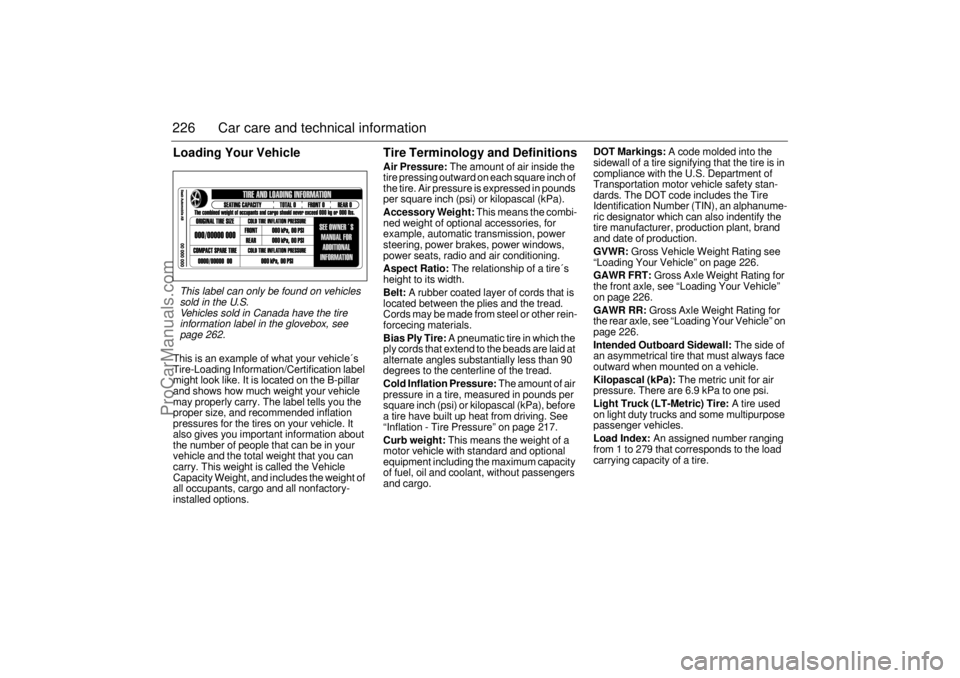
226 Car care and technical informationLoading Your VehicleThis is an example of what your vehicle´s
Tire-Loading Information/Certification label
might look like. It is located on the B-pillar
and shows how much weight your vehicle
may properly carry. The label tells you the
proper size, and recommended inflation
pressures for the tires on your vehicle. It
also gives you important information about
the number of people that can be in your
vehicle and the total weight that you can
carry. This weight is called the Vehicle
Capacity Weight, and includes the weight of
all occupants, cargo and all nonfactory-
installed options.
Tire Terminology and DefinitionsAir Pressure:
The amount of air inside the
tire pressing outward on each square inch of
the tire. Air pressure is expressed in pounds
per square inch (psi) or kilopascal (kPa).
Accessory Weight:
This means the combi-
ned weight of optional accessories, for
example, automatic transmission, power
steering, power brakes, power windows,
power seats, radio and air conditioning.
Aspect Ratio:
The relationship of a tire´s
height to its width.
Belt:
A rubber coated layer of cords that is
located between the plies and the tread.
Cords may be made from steel or other rein-
forcecing materials.
Bias Ply Tire:
A pneumatic tire in which the
ply cords that extend to the beads are laid at
alternate angles substantially less than 90
degrees to the centerline of the tread.
Cold Inflation Pressure:
The amount of air
pressure in a tire, measured in pounds per
square inch (psi) or kilopascal (kPa), before
a tire have built up heat from driving. See
“Inflation - Tire Pressure” on page 217.
Curb weight:
This means the weight of a
motor vehicle with standard and optional
equipment including the maximum capacity
of fuel, oil and coolant, without passengers
and cargo.
DOT Markings:
A code molded into the
sidewall of a tire signifying that the tire is in
compliance with the U.S. Department of
Transportation motor vehicle safety stan-
dards. The DOT code includes the Tire
Identification Number (TIN), an alphanume-
ric designator which can also indentify the
tire manufacturer, production plant, brand
and date of production.
GVWR:
Gross Vehicle Weight Rating see
“Loading Your Vehicle” on page 226.
GAWR FRT:
Gross Axle Weight Rating for
the front axle, see “Loading Your Vehicle”
on page 226.
GAWR RR:
Gross Axle Weight Rating for
the rear axle, see “Loading Your Vehicle” on
page 226.
Intended Outboard Sidewall:
The side of
an asymmetrical tire that must always face
outward when mounted on a vehicle.
Kilopascal (kPa):
The metric unit for air
pressure. There are 6.9 kPa to one psi.
Light Truck (LT-Metric) Tire:
A tire used
on light duty trucks and some multipurpose
passenger vehicles.
Load Index:
An assigned number ranging
from 1 to 279 that corresponds to the load
carrying capacity of a tire.
This label can only be found on vehicles
sold in the U.S.
Vehicles sold in Canada have the tire
information label in the glovebox, see
page 262.
ProCarManuals.com
Page 266 of 276

264 SpecificationsSeveral of the systems in your
Saab car can be adjusted to
better fit your individual needsSome functions are governed by legal
requirements and cannot therefore be
reprogrammed.
Consult an authorized Saab dealer for
further information.Car alarm/central locking system: The number of blinks when locking/
unlocking.
Automatic locking of the trunk when the
car is driven, 1 to 8 mph (2–14 km/h), YES
or NO.
Preclude the unlocking of the trunk while
the car is driven, YES or NO.
Automatic locking of the trunk after
1 second–4 minutes if it has not been
opened, YES or NO.
Automatic locking of the trunk when it is
closed, YES or NO.
Automatic locking of all doors when the
car is driven above 7.5 mph (12 km/h),
YES or NO.
Saab Information Display: Outdoor temperature display can be
adjusted.Miscellaneous: Select the on-time for heated rear seat.
Additional sweep of the wipers after
windshield washer function (ON or OFF).
Courtesy Headlight Feature on-time can
vary from 20 to 50 seconds.
Night panel illumination deactivation
speed for the speedometer can be adjus-
ted.
Following adjustments can be
done by the driver:Automatic Climate Control (ACC):To alter the preprogrammed ”AUTO” start
up mode with your own preferences you can
manually select the desired settings for:
Temperature.
Fan speed.
Air distribution.
See ”Programming I” on page 79 and ”Pro-
gramming II” on page 80.Saab 9-5 Audio System (see page 99): Maximum starting volume (when the
radio is switched on).
Telephone volume (if the car is equipped
with a phone connected to the audio
system).
Speed dependent volume (volume
increases or decreases with vehicle
speed).
Loudness.Daytime Running Lights:To disable, turn off the ignition and pull out
fuse 35, see page 214.
ProCarManuals.com
Page 269 of 276

267 Index
IIf a tire goes flat
________________ 223
Ignition switch
__________________ 132
Immobilizer
_____________________ 43
Indicator and warning lights
________ 52
Indicator lights
___________________ 52
Instrument illumination
____________ 69
Instruments and controls __________ 51
Interior equipment
_______________ 105
Interior lighting
_________________ 116
Interior rearview mirror
___________ 107
JJack
_________________________ 232
KKey
___________________________ 38
Key to chassis number
___________ 263
Key, remove
___________________ 132
LLATCH (child safety)
______________ 22
Labeling, tire sidewall ____________ 224
Labels
__________________________ 7Leather upholstery, care of
________ 236
Light horn
______________________ 67
Light switches ___________________ 67
Loading your vehicle
_____________ 226
Luggage-compartment lighting
_____ 116
MMain instrument panel
_____________ 52
Main/dipped beam
_______________ 67
Maintenance schedule ___________ 246
Maintenance, A/C-system _________ 234
Manual gearbox, technical data
____ 258
Maxi fuses
_____________________ 212
Milometer ______________________ 58
Motoring abroad
________________ 241
NNew tires, buying
_______________ 219
Night Panel
_____________________ 65
OOil capacity, engine
______________ 254
Oil change, engine ______________ 187
Oil specification
_________________ 254
Outdoor temperature
______________ 61
Owner assistance
_______________ 247
PPaintwork, touching-in
____________ 238
Parking Assistance
______________ 177
Parking lights
____________________ 67
Plates and labels
________________ 262
Poly-V-belt
_____________________ 194
Power steering
_________________ 191
Power-steering fluid
______________ 191
Pressure gauge
__________________ 60
Programming I, ACC
______________ 79
Programming II, ACC _____________ 80
Programming the ACC ____________ 79
QQuality grading, tires
_____________ 221
Questions on function of airbag
______ 35
Quick guide, Audio System
_________ 85
RRadiator fan
____________________ 194
Radio
__________________________ 88
Rain sensor
_____________________ 71
Rear fog light ____________________ 68
Rear seat, 9-5 Sedan, folding
______ 121
Rear seat, 9-5 SportWagon, folding
_ 124
Rear-seat head restraints
__________ 16
Rear-view mirror, auto-dimming
____ 111
ProCarManuals.com