ignition SAAB 9-5 2005 Owner's Manual
[x] Cancel search | Manufacturer: SAAB, Model Year: 2005, Model line: 9-5, Model: SAAB 9-5 2005Pages: 276, PDF Size: 16.72 MB
Page 72 of 276
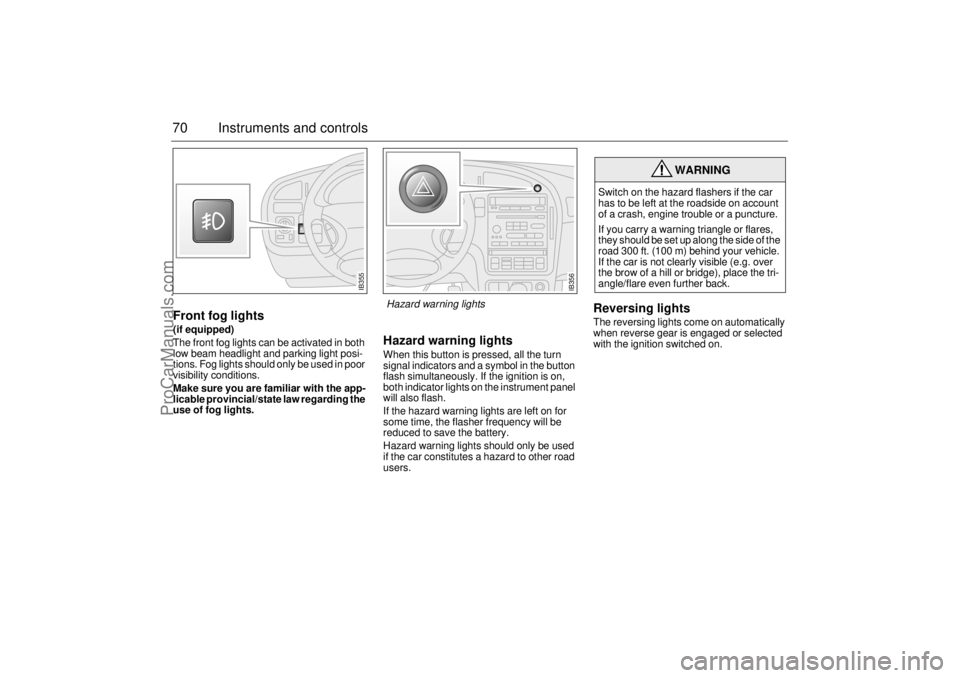
70 Instruments and controlsFront fog lights(if equipped)
The front fog lights can be activated in both
low beam headlight and parking light posi-
tions. Fog lights should only be used in poor
visibility conditions.
Make sure you are familiar with the app-
licable provincial/state law regarding the
use of fog lights.
Hazard warning lightsWhen this button is pressed, all the turn
signal indicators and a symbol in the button
flash simultaneously. If the ignition is on,
both indicator lights on the instrument panel
will also flash.
If the hazard warning lights are left on for
some time, the flasher frequency will be
reduced to save the battery.
Hazard warning lights should only be used
if the car constitutes a hazard to other road
users.
Reversing lightsThe reversing lights come on automatically
when reverse gear is engaged or selected
with the ignition switched on.
WARNING
Switch on the hazard flashers if the car
has to be left at the roadside on account
of a crash, engine trouble or a puncture.
If you carry a warning triangle or flares,
they should be set up along the side of the
road 300 ft. (100 m) behind your vehicle.
If the car is not clearly visible (e.g. over
the brow of a hill or bridge), place the tri-
angle/flare even further back.
IB355
IB356
Hazard warning lights
ProCarManuals.com
Page 73 of 276

71 Instruments and controls
Wipers and washers There are three intermittent wiper positions.
Moving the control stalk to the spring-loa-
ded position between 0 and 2 will produce a
single sweep of the wipers.
The wipers are designed for optimal clea-
ning at all driving speeds. At higher speeds,
it may be possible to detect a slight ”sweep-
ing” sound. This may be due to the
increased air pressure on the blades at
higher speeds.Headlight washers(if equipped)
If low beam is on, the headlights are washed
every fifth time the windshield washers are
used or if 2 minutes have elapsed since the
windshield was last washed. The headlight
washers cannot be activated separately.
The headlight washers are of the high-pres-
sure type, which means that other parts of
the car may become wet if you activate the
washers while the car is stationary.
Rain sensing wipers(if equipped)
The rain sensor automatically controls the
windshield wipers. The sensor is located on
the windshield beside the rearview mirror.
The system varies between single sweeps
of the windshield and continuous wiping
depending on how much water or snow
there is on the windshield.
WARNING
Turn the rain sensor off if the ignition is
ON when clearing snow and ice from the
windshield, to avoid personal injury.
NOTICETo avoid damaging the windshield
wipers, turn the rain sensor off before
washing the car in an automatic carwash.
IB359
0
41
2
3
0 OFF
1 Intermittent operation
2 Low speed
3 High speed
4 Washers
12
IB569
Control for setting wiper delay1 Long delay
2 Short delay
ProCarManuals.com
Page 79 of 276

77 Instruments and controls
The rear-window and door-mirror heating is
controlled manually. Switch off the heating as soon as the rear window
is clear, to avoid imposing a heavy load on the bat-
tery longer than necessary. Note, however, that the
heating will go off automatically after 2–10 minutes
(depending on the outdoor temperature) or sooner
if the voltage in the electrical system falls below
10 V
.
The ACC system can be programmed to switch on
the heating automatically when the outdoor temper-
ature is below 41°F (+5
°C) and the temperature
inside the car is below 50°F (+10
°C) (see ”Program-
ming I and II”, on pages 79 and 80).
Recirculation is selected automatically for effective
cooling, but it can also be switched on/off manually.
Although recirculation does not substantially affect
the air quality, it is useful to prevent unpleasant
smells or fumes being drawn into the car from
outside.
IB373IB374
To increase the fan speed in steps.
If, after being off, the ignition is switched on but the
engine is not started, the fan will run at low speed
until the engine is running.
To decrease the fan speed in steps.
If the fan is set to 0, the A/C compressor will cut out
and ECON will appear on the display.
If, after being off, the ignition is switched on but the
engine is not started, the fan will run at low speed
until the engine is running.
IB375IB376
ProCarManuals.com
Page 81 of 276

79 Instruments and controls
Starting in cold weatherTo start with, the system will automatically select the defroster set-
ting, maximum heat and low fan speed.
As the engine warms up, air will also be distributed through the floor
vents and the fan speed will be increased.
As the temperature inside the car nears the selected value, both the
fan speed and the heat will be decreased to a level determined by
the system. Starting in hot weatherThe system will automatically distribute air through the panel vents
at high fan speed and will switch on the A/C compressor (unless the
ECON switch has been pressed).
If the outdoor temperature is above 86°F (30°C), the system might
select recirculation after approximately 15 seconds if this is required
in order to reach the desired temperature.
As the temperature inside the car nears the selected value, the fan
speed will be decreased to a value determined by the system.
Programming IManual selections can be programmed into the ACC system so that
these will take effect when the car is started. Note that the ignition
must be switched off for at least ten minutes after programming for
the selections to be saved in the system’s memory.
1 Make sure the ignition is ON.
2 Select the desired settings.
3 Press and , simultaneously
(the display will flash to confirm that the settings have been
recorded).
Example: If you want air distribution through the panel vents when
you start the car, press
and then save the setting by pressing
and .
Cancelling the programmed settings (I) To cancel the programmed settings, press and
simultaneously (the display will flash to confirm that the settings
have been cancelled). Panel (and center rear vent)
ACC69
ProCarManuals.com
Page 83 of 276
81 Instruments and controls
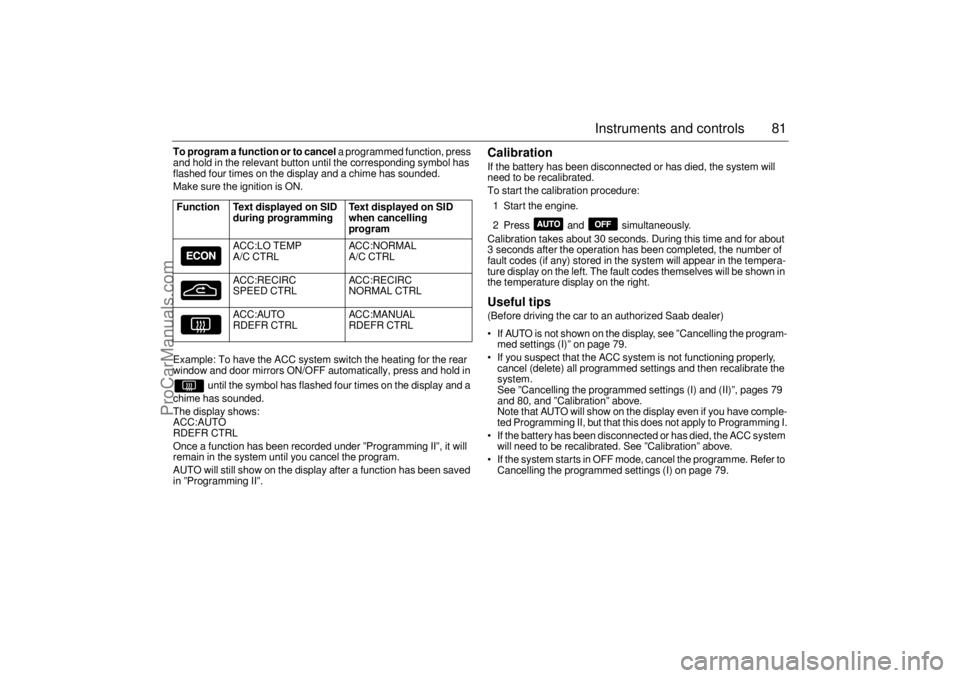
To program a function or to cancel
a programmed function, press
and hold in the relevant button until the corresponding symbol has
flashed four times on the display and a chime has sounded.
Make sure the ignition is ON.
Example: To have the ACC system switch the heating for the rear
window and door mirrors ON/OFF automatically, press and hold in
until the symbol has flashed four times on the display and a
chime has sounded.
The display shows:
ACC:AUTO
RDEFR CTRL
Once a function has been recorded under ”Programming II”, it will
remain in the system until you cancel the program.
AUTO will still show on the display after a function has been saved
in ”Programming II”.
Calibration If the battery has been disconnected or has died, the system will
need to be recalibrated.
To start the calibration procedure:
1 Start the engine.
2 Press and simultaneously.
Calibration takes about 30 seconds. During this time and for about
3 seconds after the operation has been completed, the number of
fault codes (if any) stored in the system will appear in the tempera-
ture display on the left. The fault codes themselves will be shown in
the temperature display on the right. Useful tips (Before driving the car to an authorized Saab dealer)
If AUTO is not shown on the display, see ”Cancelling the program-
med settings (I)” on page 79.
If you suspect that the ACC system is not functioning properly,
cancel (delete) all programmed settings and then recalibrate the
system.
See ”Cancelling the programmed settings (I) and (II)”, pages 79
and 80, and ”Calibration” above.
Note that AUTO will show on the display even if you have comple-
ted Programming II, but that this does not apply to Programming I.
If the battery has been disconnected or has died, the ACC system
will need to be recalibrated. See ”Calibration” above.
If the system starts in OFF mode, cancel the programme. Refer to
Cancelling the programmed settings (I) on page 79.
Function Text displayed on SID
during programming Text displayed on SID
when cancelling
program
ACC:LO TEMP
A/C CTRLACC:NORMAL
A/C CTRL
ACC:RECIRC
SPEED CTRLACC:RECIRC
NORMAL CTRL
ACC:AUTO
RDEFR CTRLACC :MANUAL
RDEFR CTRL
ProCarManuals.com
Page 87 of 276
85 Saab 9-5 Audio System
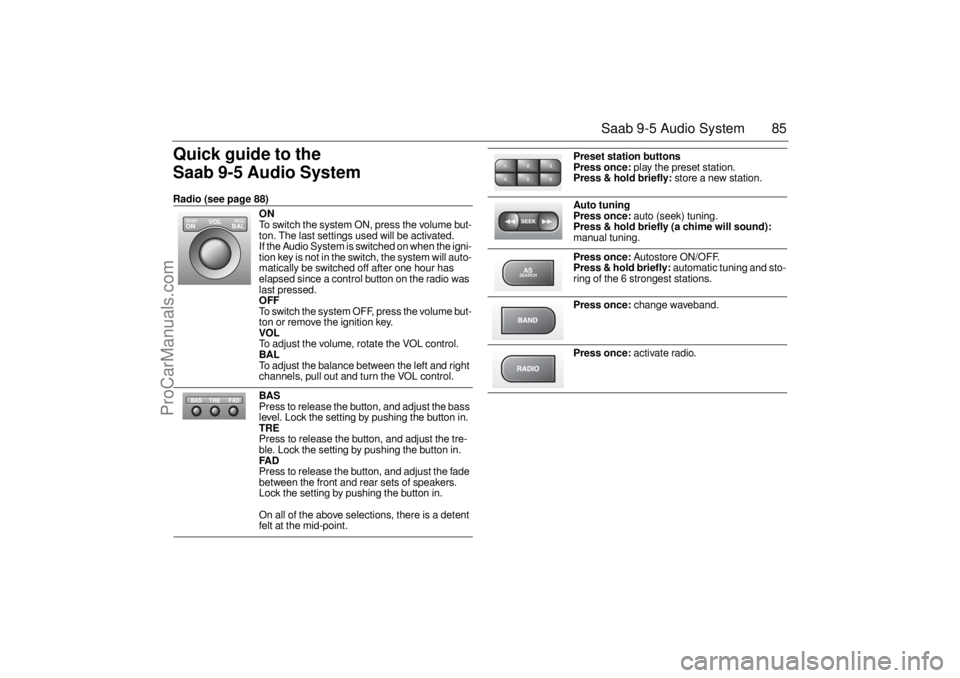
Quick guide to the
Saab 9-5 Audio System Radio (see page 88)
ON
To switch the system ON, press the volume but-
ton. The last settings used will be activated.
If the Audio System is switched on when the igni-
tion key is not in the switch, the system will auto-
matically be switched off after one hour has
elapsed since a control button on the radio was
last pressed. OFF To switch the system OFF, press the volume but-
ton or remove the ignition key. VOL To adjust the volume, rotate the VOL control. BAL To adjust the balance between the left and right
channels, pull out and turn the VOL control. BAS Press to release the button, and adjust the bass
level. Lock the setting by pushing the button in. TRE Press to release the button, and adjust the tre-
ble. Lock the setting by pushing the button in. FAD Press to release the button, and adjust the fade
between the front and rear sets of speakers.
Lock the setting by pushing the button in.
On all of the above selections, there is a detent
felt at the mid-point.
VOL
BAL ON
PULL PUSH
TREFAD BAS
Preset station buttons
Press once:
play the preset station.
Press & hold briefly:
store a new station.
Auto tuning
Press once:
auto (seek) tuning.
Press & hold briefly (a chime will sound):
manual tuning.
Press once:
Autostore ON/OFF.
Press & hold briefly:
automatic tuning and sto-
ring of the 6 strongest stations.
Press once:
change waveband.
Press once:
activate radio.
2 13
5 46ASSEARCH
ProCarManuals.com
Page 89 of 276
87 Saab 9-5 Audio System
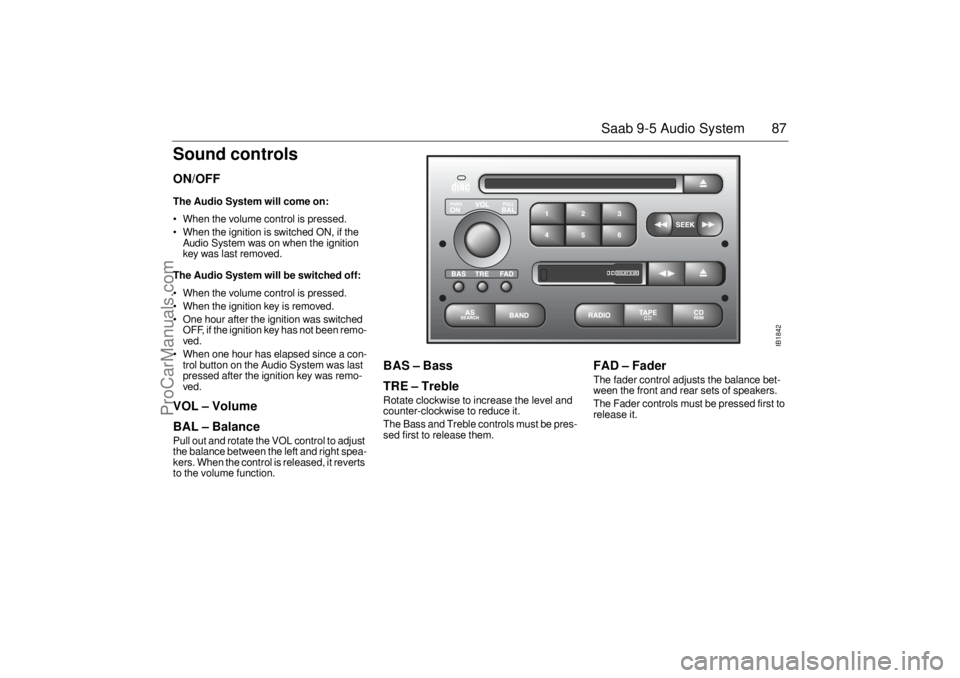
Sound controlsON/OFF The Audio System will come on: When the volume control is pressed.
When the ignition is switched ON, if the
Audio System was on when the ignition
key was last removed. The Audio System will be switched off: When the volume control is pressed.
When the ignition key is removed.
One hour after the ignition was switched
OFF, if the ignition key has not been remo-
ved.
When one hour has elapsed since a con-
trol button on the Audio System was last
pressed after the ignition key was remo-
ved. VOL – Volume
BAL – Balance Pull out and rotate the VOL control to adjust
the balance between the left and right spea-
kers. When the control is released, it reverts
to the volume function.
BAS – Bass
TRE – Treble Rotate clockwise to increase the level and
counter-clockwise to reduce it.
The Bass and Treble controls must be pres-
sed first to release them.
FAD – Fader The fader control adjusts the balance bet-
ween the front and rear sets of speakers.
The Fader controls must be pressed first to
release it.
IB1842
ProCarManuals.com
Page 111 of 276

109 Interior equipment and trunk
Preparations for first-time programmingBefore programming the garage opener for
the first time, you must delete any factory
codes.
Press and hold the two outer buttons until
the indicator light begins to flash-after
20 seconds. Release both buttons. Do not
hold for longer that 30 seconds. The garage
opener is now in the train (or learning) mode
and can be programmed at any time begin-
ning with "Programming" - step 2.ProgrammingThe garage opener can record and store the
frequencies of three different remote con-
trols.
The battery in the remote control should be
fairly new for programming to work well.Do not repeat "Programming" - step two
to train additional devices to a second or
third button. Begin with "Programming" -
step three.
1 Turn the ignition ON.
2 Press and hold the two outer buttons
(buttons one and three) - releasing only
when the indicator light begins to flash
(after 20 seconds).
Do not
hold the but-
tons for longer than 30 seconds and
do
not repeat step two
to program a
second and/or third hand-held transmit-
ter to the remaining two buttons.
3 Position the end of your hand-held trans-
mitter 1-3 inches (5-14 cm) away from
the button you wish to program while
keeping the indicator light in view. The transmitter should face the mirror from
below or left side of the mirror.
4 Simultaneously press and hold both the
chosen and hand-held transmitter but-
tons.
Do not release the buttons until
step 5 has been completed.
Note:
Some gate operators and garage
door openers may require you to replace
this Programming Step 4 with procedures
noted in the "Gate Operator / Canadian Pro-
gramming" section.
5 After the indicator light changes from a
slow to a rapidly blinking light, release
both the mirror and hand-held transmit-
ter buttons.
6 Press and hold the just-trained button
and observe the indicator light.
If the indicator light
stays on con-
stantly, programming is complete
and your device should activate when
the button is pressed and released.
Note:
To program the remaining two but-
tons, begin with "Programming" -
step
three. Do not repeat step two.
If the indicator light blinks
rapidly for two
seconds and then turns to a constant
light continue with "Programming"
steps 7-9
to complete the programming of
a rolling code equipped device (most com-
monly a garage door opener).
7 At the garage door opener receiver
(motor-head unit) in the garage, locate
the "learn" or "smart" button. This can
usually
be found where the hanging antenna wire is attached to the
motor-head unit.
8 Firmly press and release the "learn" or
"smart" button. (The name and color of
the button may vary by manufacturer.)
Note:
There are 30 seconds in which to ini-
tiate step nine.
9 Return to the vehicle and firmly
press,
hold for two seconds and release
the
programmed button. Repeat the
"press/hold/release"
sequence a
second time, and, depending on the
brand of the garage door opener (or
other rolling code equipped device),
repeat this sequence a third time to com-
plete the programming process.
The garage opener should now activate
your rolling code equipped device.
Note:
To program the remaining two but-
tons, begin with "Programming" -
step
three
. Do not repeat step two.
ProCarManuals.com
Page 115 of 276
113 Interior equipment and trunk
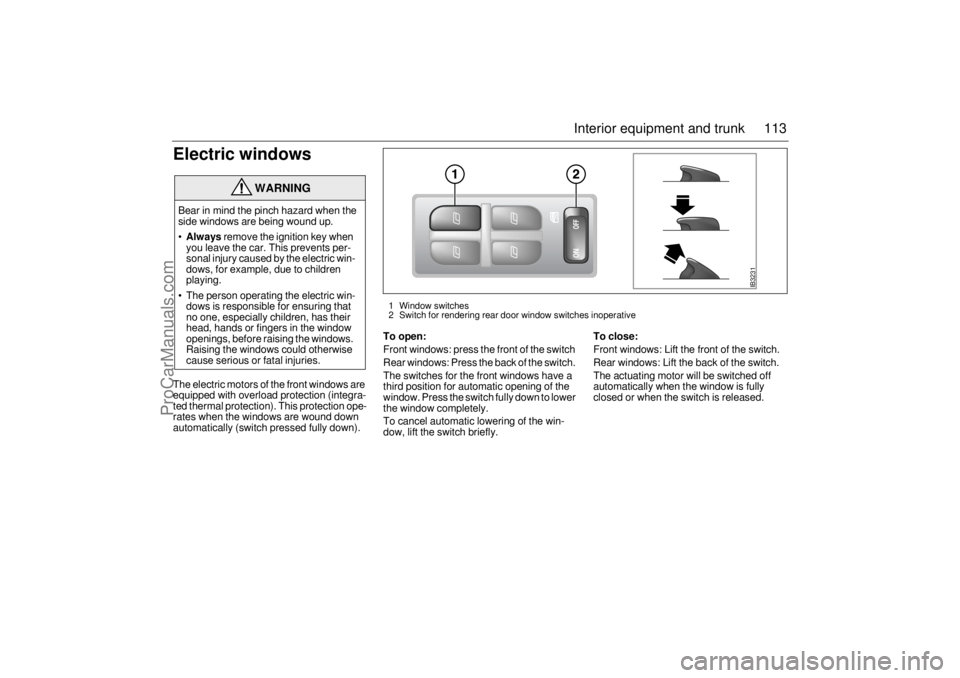
Electric windowsThe electric motors of the front windows are
equipped with overload protection (integra-
ted thermal protection). This protection ope-
rates when the windows are wound down
automatically (switch pressed fully down).
To open:Front windows: press the front of the switch
Rear windows: Press the back of the switch.
The switches for the front windows have a
third position for automatic opening of the
window. Press the switch fully down to lower
the window completely.
To cancel automatic lowering of the win-
dow, lift the switch briefly.
To close:Front windows: Lift the front of the switch.
Rear windows: Lift the back of the switch.
The actuating motor will be switched off
automatically when the window is fully
closed or when the switch is released.
WARNING
Bear in mind the pinch hazard when the
side windows are being wound up.
Always
remove the ignition key when
you leave the car. This prevents per-
sonal injury caused by the electric win-
dows, for example, due to children
playing.
The person operating the electric win-
dows is responsible for ensuring that
no one, especially children, has their
head, hands or fingers in the window
openings, before raising the windows.
Raising the windows could otherwise
cause serious or fatal injuries.
IB3231
1 Window switches
2 Switch for rendering rear door window switches inoperative
ProCarManuals.com
Page 116 of 276
114 Interior equipment and trunk
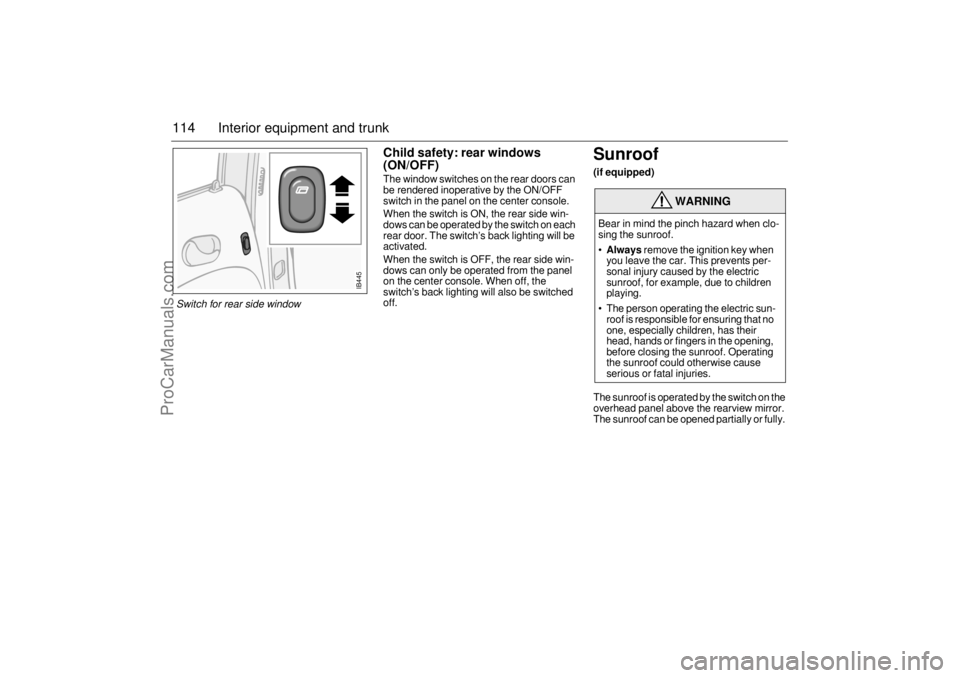
Child safety: rear windows
(ON/OFF)The window switches on the rear doors can
be rendered inoperative by the ON/OFF
switch in the panel on the center console.
When the switch is ON, the rear side win-
dows can be operated by the switch on each
rear door. The switch’s back lighting will be
activated.
When the switch is OFF, the rear side win-
dows can only be operated from the panel
on the center console. When off, the
switch’s back lighting will also be switched
off.
Sunroof (if equipped)The sunroof is operated by the switch on the
overhead panel above the rearview mirror.
The sunroof can be opened partially or fully.
WARNING
Bear in mind the pinch hazard when clo-
sing the sunroof.
Always
remove the ignition key when
you leave the car. This prevents per-
sonal injury caused by the electric
sunroof, for example, due to children
playing.
The person operating the electric sun-
roof is responsible for ensuring that no
one, especially children, has their
head, hands or fingers in the opening,
before closing the sunroof. Operating
the sunroof could otherwise cause
serious or fatal injuries.
IB445
Switch for rear side window
ProCarManuals.com