warning SATURN ASTRA 2008 User Guide
[x] Cancel search | Manufacturer: SATURN, Model Year: 2008, Model line: ASTRA, Model: SATURN ASTRA 2008Pages: 304, PDF Size: 1.92 MB
Page 95 of 304
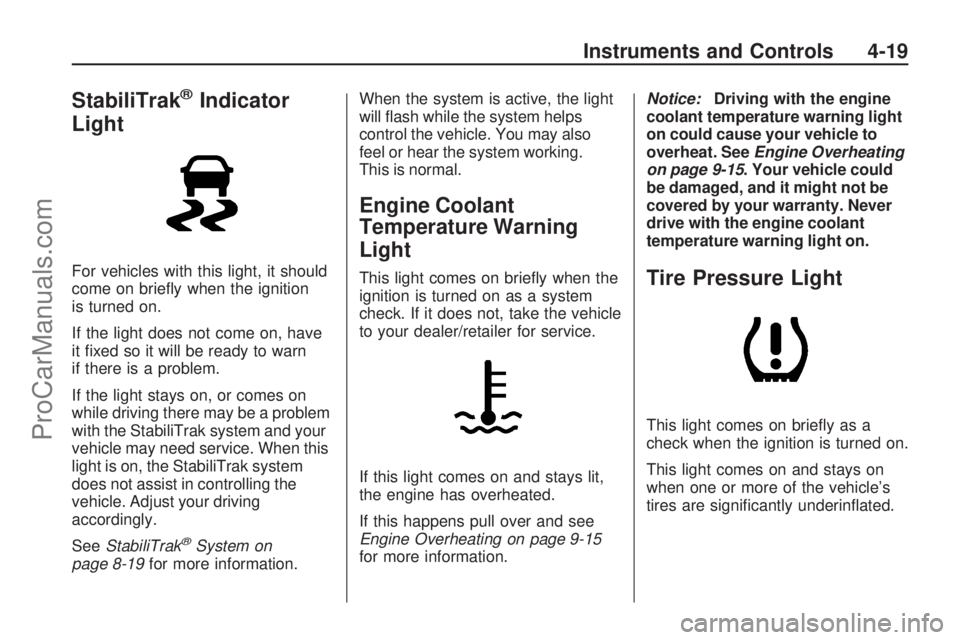
StabiliTrak®Indicator
Light
For vehicles with this light, it should
come on briey when the ignition
is turned on.
If the light does not come on, have
it xed so it will be ready to warn
if there is a problem.
If the light stays on, or comes on
while driving there may be a problem
with the StabiliTrak system and your
vehicle may need service. When this
light is on, the StabiliTrak system
does not assist in controlling the
vehicle. Adjust your driving
accordingly.
SeeStabiliTrak
®System on
page 8-19for more information.When the system is active, the light
will ash while the system helps
control the vehicle. You may also
feel or hear the system working.
This is normal.
Engine Coolant
Temperature Warning
Light
This light comes on briey when the
ignition is turned on as a system
check. If it does not, take the vehicle
to your dealer/retailer for service.
If this light comes on and stays lit,
the engine has overheated.
If this happens pull over and see
Engine Overheating on page 9-15
for more information.Notice:Driving with the engine
coolant temperature warning light
on could cause your vehicle to
overheat. SeeEngine Overheating
on page 9-15. Your vehicle could
be damaged, and it might not be
covered by your warranty. Never
drive with the engine coolant
temperature warning light on.Tire Pressure Light
This light comes on briey as a
check when the ignition is turned on.
This light comes on and stays on
when one or more of the vehicle’s
tires are signicantly underinated.
Instruments and Controls 4-19
ProCarManuals.com
Page 101 of 304
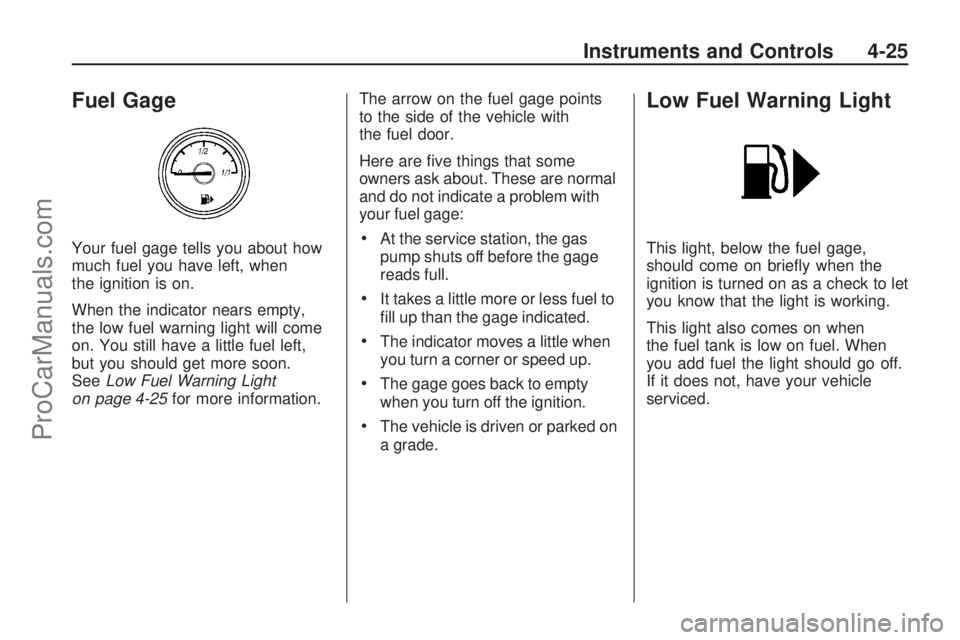
Fuel Gage
Your fuel gage tells you about how
much fuel you have left, when
the ignition is on.
When the indicator nears empty,
the low fuel warning light will come
on. You still have a little fuel left,
but you should get more soon.
SeeLow Fuel Warning Light
on page 4-25for more information.The arrow on the fuel gage points
to the side of the vehicle with
the fuel door.
Here are ve things that some
owners ask about. These are normal
and do not indicate a problem with
your fuel gage:At the service station, the gas
pump shuts off before the gage
reads full.
It takes a little more or less fuel to
ll up than the gage indicated.
The indicator moves a little when
you turn a corner or speed up.
The gage goes back to empty
when you turn off the ignition.
The vehicle is driven or parked on
a grade.
Low Fuel Warning Light
This light, below the fuel gage,
should come on briey when the
ignition is turned on as a check to let
you know that the light is working.
This light also comes on when
the fuel tank is low on fuel. When
you add fuel the light should go off.
If it does not, have your vehicle
serviced.
Instruments and Controls 4-25
ProCarManuals.com
Page 102 of 304
Driver Information
Center (DIC)
Vehicles with a Driver Information
Center (DIC) can display:
Time
Outside temperature
Date or audio system, if it is
turned on
Trip computer, on vehicles with
this feature
Warning messages
The type of information and how it is
displayed depends on the equipment
of the vehicle and the settings of the
trip computer and audio system.SeeDIC Operation and Displays
(Base Level DIC and Audio) on
page 4-27orDIC Operation and
Displays (Uplevel DIC and Audio)
on page 4-31andAudio System(s)
on page 6-1for more information.
An F in the display indicates a fault.
See your dealer/retailer for service.
Outside Air Temperature
The DIC shows the temperature
outside of the vehicle in either
degrees Fahrenheit or degrees
Celsius. A fall in temperature
is displayed immediately, while a
rise in temperature is displayed
after a short delay.On vehicles with the base level DIC,
Qdisplays when the outside air
temperature is cold enough to
create icy road conditions.
On vehicles with the uplevel DIC,
“Slippery road” displays.
The road surface may already be
icy even though the DIC shows
a few degrees above freezing.
Adjust your driving accordingly.
4-26 Instruments and Controls
ProCarManuals.com
Page 104 of 304
On some vehicles, if a warning
message appears, the display
is blocked from other functions.
SeeDIC Warnings and Messages
(Base and Uplevel Systems) on
page 4-37for information on
acknowledging the message.
System Settings
To enter the Settings menu:
1. Press SETTINGS on the audio
system.
Audio or System will appear.
2. Press the left arrow button on
the audio system or use the
thumbwheel on the steering
wheel, if the vehicle has one,
to reach menu item System.
After pressing the OK button,
the rst function of the System
menu is shown.The following functions are
available:
Time, setting hours
Time, setting minutes
Date, setting day
Date, setting month
Date, setting year
Ignition Logic
Language selection
Setting units of measure
Setting Date and Time
To set the date and time:
1. Select time and date from the
Settings menu.
2. Make the desired selections.
The setting is saved when
the menu item is exited.Ignition Logic
If the vehicle has this feature,
seeAudio System(s) on page 6-1
for more information.
Language Selection
To select the display language for
some functions:
1. Select language from the
Settings menu.
2. Make the desired selection.
Setting Units of Measure
To select which units of measure
are to be used:
1. Select units from the
Settings menu.
2. Make the desired selection.
4-28 Instruments and Controls
ProCarManuals.com
Page 106 of 304
Average Speed
This display shows the average
speed of the vehicle in miles
per hour (mph) or kilometers
per hour (km/h). This average is
calculated based on the various
vehicle speeds recorded since
the last reset of this value.
The measurement can be reset to
zero at any time and restarted.
See “Reset” later in this section.
Distance Travelled
This display shows the current
distance traveled in either miles (mi)
or kilometers (km) since the last
reset.
The measurement can be reset to
zero at any time and restarted.
See “Reset” later in this section.Range
This display shows the approximate
number of remaining miles (mi)
or kilometers (km) the vehicle
can be driven without refueling.
The message “Range” displays
if less than 31 mi (50 km) can be
driven with the fuel remaining in the
tank. The message “Refuel!” displays
when approximately 19 mi (30 km)
can be driven with the fuel remaining
in the tank. With less than 19 mi
(30 km) worth of fuel remaining the
range display will show “- -” once
the “Refuel!” message has been
acknowledged.
SeeDIC Warnings and Messages
(Base and Uplevel Systems) on
page 4-37for information on
acknowledging the message.
The fuel range estimate is based
on an average of the vehicle’s fuel
economy over recent driving history
and the amount of fuel remainingin the fuel tank. This estimate will
change if driving conditions change.
For example, if driving in traffic and
making frequent stops, this display
may read one number, but if the
vehicle is driven on a freeway, the
number may change even though
the same amount of fuel is in the
fuel tank. This is because different
driving conditions produce different
fuel economies. Generally, freeway
driving produces better fuel economy
than city driving. Fuel range cannot
be reset.
Stop Watch
This display can be used as a timer.
To start or stop the timer, press
the right arrow on the audio system.
To reset the timer, press the left
arrow until the value returns to zero.
If your vehicle has the left
thumbwheel on the steering wheel,
you can start or stop the timer
by pressing the thumbwheel.
4-30 Instruments and Controls
ProCarManuals.com
Page 108 of 304
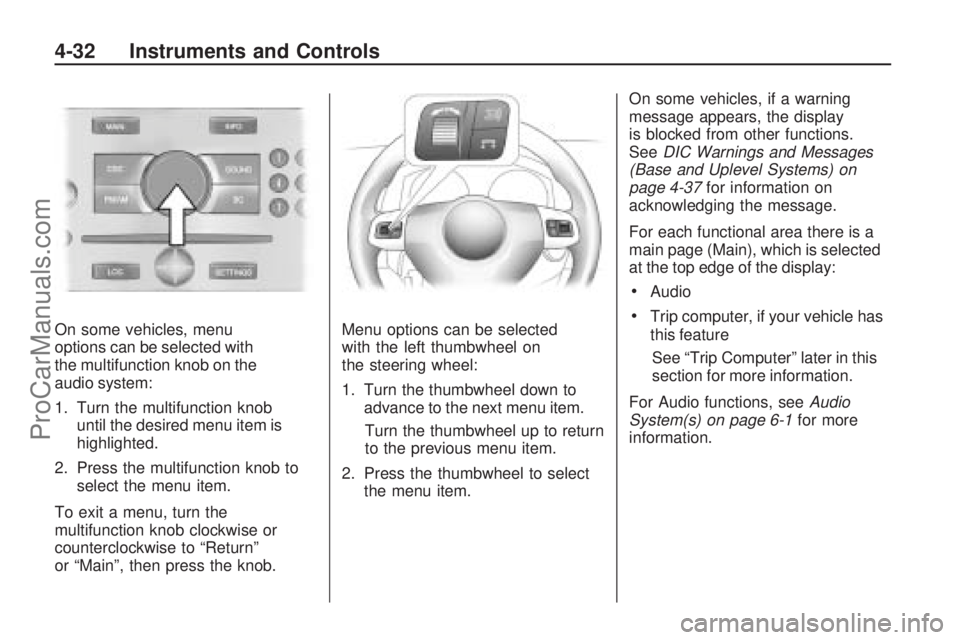
On some vehicles, menu
options can be selected with
the multifunction knob on the
audio system:
1. Turn the multifunction knob
until the desired menu item is
highlighted.
2. Press the multifunction knob to
select the menu item.
To exit a menu, turn the
multifunction knob clockwise or
counterclockwise to “Return”
or “Main”, then press the knob.Menu options can be selected
with the left thumbwheel on
the steering wheel:
1. Turn the thumbwheel down to
advance to the next menu item.
Turn the thumbwheel up to return
to the previous menu item.
2. Press the thumbwheel to select
the menu item.On some vehicles, if a warning
message appears, the display
is blocked from other functions.
SeeDIC Warnings and Messages
(Base and Uplevel Systems) on
page 4-37for information on
acknowledging the message.
For each functional area there is a
main page (Main), which is selected
at the top edge of the display:
Audio
Trip computer, if your vehicle has
this feature
See “Trip Computer” later in this
section for more information.
For Audio functions, seeAudio
System(s) on page 6-1for more
information.
4-32 Instruments and Controls
ProCarManuals.com
Page 110 of 304
Day / Night
The vehicle may have this feature.
The display can be adjusted to
best match the lighting conditions.
To adjust this setting:
1. Select Day / Night from the
Settings menu.
The available options are
displayed:
Auto:Adjusts the display
automatically based on
the lighting conditions.
Day:Black or colored text on
a light background.
Night:White or colored text
on a dark background.
2. Make the desired selection.
When selected, a
Oappears next
to the item.
Ignition Logic
If the vehicle has this feature, see
Audio System(s) on page 6-1
for more information.
Trip Computer
The vehicle may have a trip
computer. The trip computer
provides information on driving
data. This information is
continually recorded and
evaluated electronically. If power
has been interrupted or if the battery
voltage has dropped too low, the
values stored in the trip computer
will be lost.
The trip computer main page
provides information on range
and instantaneous consumption.
To access other trip computer
vehicle data, do one of the following:
Press the BC button on the
audio system, if your vehicle
has this feature.
Press the left thumbwheel, if your
vehicle has this feature, on the
steering wheel.
Select the trip computer menu
front display.The functions are displayed in the
following order:
Range
This display shows the approximate
number of remaining miles (mi)
or kilometers (km) the vehicle
can be driven without refueling.
The message “Range” displays if
less than 31 miles (50 km) can be
driven with the fuel remaining in
the tank.
SeeDIC Warnings and Messages
(Base and Uplevel Systems) on
page 4-37for information on
acknowledging the message.
The fuel range estimate is based
on an average of the vehicle’s fuel
economy over recent driving history
and the amount of fuel remaining in
the fuel tank. This estimate will
change if driving conditions change.
4-34 Instruments and Controls
ProCarManuals.com
Page 113 of 304
DIC Warnings and
Messages (Base and
Uplevel Systems)
Messages are displayed on the DIC
to notify the driver that the status of
the vehicle has changed and that
some action may be needed by
the driver to correct the condition.
Multiple messages may appear
one after another.
The DIC monitors some uid levels,
battery of the Remote Keyless Entry
(RKE) transmitter, the theft-deterrent
system on vehicles with this feature,
the brake light switch, and important
exterior lights, including wiring and
fuses.Some messages may not require
immediate action, but you can
acknowledge that you received the
messages and to clear them from the
display by doing one of the following:
Press the OK button on the base
level audio system.
Press the multifunction knob, if
your vehicle has this feature,
on the uplevel audio system.
Press the left thumbwheel, if your
vehicle has this feature, on the
steering wheel.
If there are several warning
messages, acknowledge them
one at a time.Some messages cannot be cleared
from the DIC display because they
are more urgent. These messages
require action before they can
be cleared. You should take any
messages that appear on the display
seriously and remember that clearing
the messages will only make the
messages disappear, not correct
the problem.
Warning messages for the uplevel
DIC follow. On the base level
DIC, messages appear in an
abbreviated form.
Brakelight check---
This message displays when there
is a problem with the vehicle lighting.
The source of the problem is
displayed as text. For example,
“Brakelight check right”.
Instruments and Controls 4-37
ProCarManuals.com
Page 133 of 304
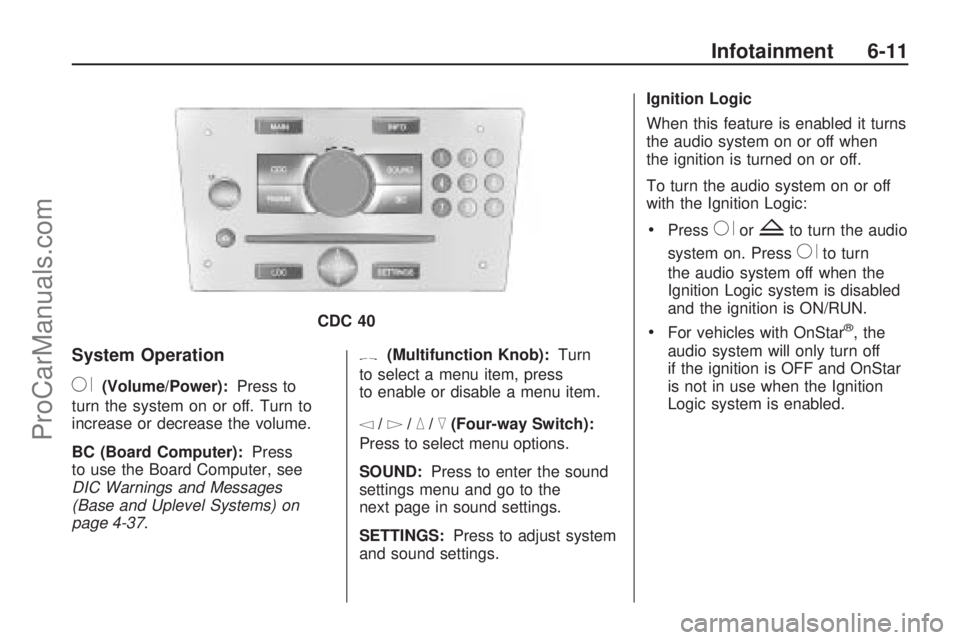
System Operation
R(Volume/Power):Press to
turn the system on or off. Turn to
increase or decrease the volume.
BC (Board Computer): Press
to use the Board Computer, see
DIC Warnings and Messages
(Base and Uplevel Systems) on
page 4-37 .
[(Multifunction Knob): Turn
to select a menu item, press
to enable or disable a menu item.
\/]/_/^(Four-way Switch):
Press to select menu options.
SOUND: Press to enter the sound
settings menu and go to the
next page in sound settings.
SETTINGS: Press to adjust system
and sound settings. Ignition Logic
When this feature is enabled it turns
the audio system on or off when
the ignition is turned on or off.
To turn the audio system on or off
with the Ignition Logic:
PressRorZto turn the audio
system on. Press
Rto turn
the audio system off when the
Ignition Logic system is disabled
and the ignition is ON/RUN.
For vehicles with OnStar®, the
audio system will only turn off
if the ignition is OFF and OnStar
is not in use when the Ignition
Logic system is enabled.
CDC 40
Infotainment 6-11
ProCarManuals.com
Page 155 of 304
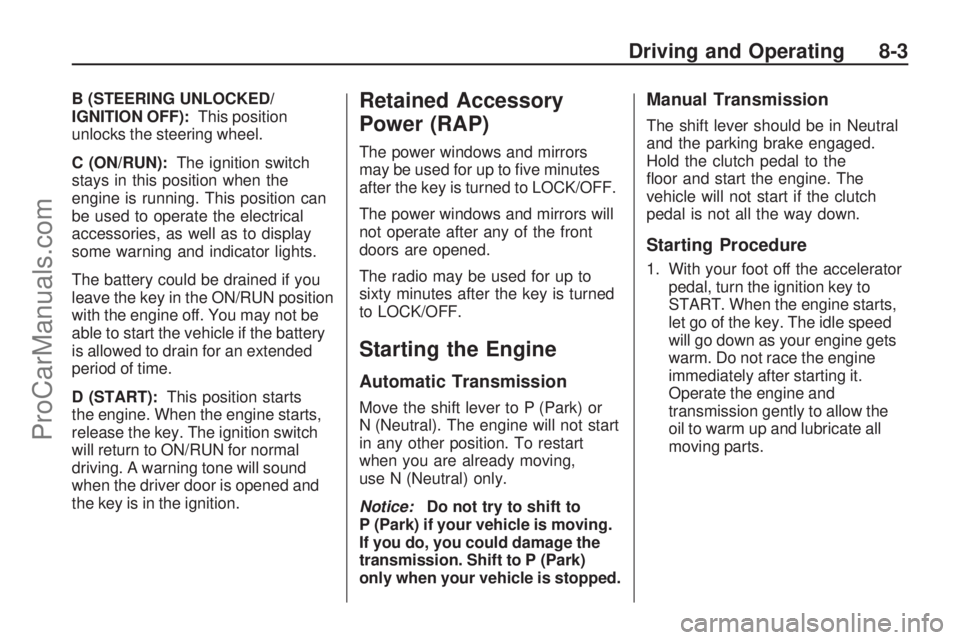
B (STEERING UNLOCKED/
IGNITION OFF):This position
unlocks the steering wheel.
C (ON/RUN):The ignition switch
stays in this position when the
engine is running. This position can
be used to operate the electrical
accessories, as well as to display
some warning and indicator lights.
The battery could be drained if you
leave the key in the ON/RUN position
with the engine off. You may not be
able to start the vehicle if the battery
is allowed to drain for an extended
period of time.
D (START):This position starts
the engine. When the engine starts,
release the key. The ignition switch
will return to ON/RUN for normal
driving. A warning tone will sound
when the driver door is opened and
the key is in the ignition.Retained Accessory
Power (RAP)
The power windows and mirrors
may be used for up to ve minutes
after the key is turned to LOCK/OFF.
The power windows and mirrors will
not operate after any of the front
doors are opened.
The radio may be used for up to
sixty minutes after the key is turned
to LOCK/OFF.
Starting the Engine
Automatic Transmission
Move the shift lever to P (Park) or
N (Neutral). The engine will not start
in any other position. To restart
when you are already moving,
use N (Neutral) only.
Notice:Do not try to shift to
P (Park) if your vehicle is moving.
If you do, you could damage the
transmission. Shift to P (Park)
only when your vehicle is stopped.
Manual Transmission
The shift lever should be in Neutral
and the parking brake engaged.
Hold the clutch pedal to the
oor and start the engine. The
vehicle will not start if the clutch
pedal is not all the way down.
Starting Procedure
1. With your foot off the accelerator
pedal, turn the ignition key to
START. When the engine starts,
let go of the key. The idle speed
will go down as your engine gets
warm. Do not race the engine
immediately after starting it.
Operate the engine and
transmission gently to allow the
oil to warm up and lubricate all
moving parts.
Driving and Operating 8-3
ProCarManuals.com