instrument panel SATURN AURA 2010 Owner's Guide
[x] Cancel search | Manufacturer: SATURN, Model Year: 2010, Model line: AURA, Model: SATURN AURA 2010Pages: 428, PDF Size: 2.78 MB
Page 173 of 428
Select from the following:
H(Vent):Air is directed to the instrument panel
outlets.
)(Bi-Level):Air is divided between the instrument
panel outlets and the floor outlets.
6(Floor):Air is directed to the floor outlets with
some air directed to the side window outlets.
-(Defog):This mode clears the windows of fog or
moisture. Air is directed to the floor and windshield
outlets.
0(Defrost):This mode clears the windows of fog or
frost more quickly. The system automatically controls
the fan speed if defrost is selected from the AUTO
mode. If the outside temperature is 40°F (4°C) or
warmer, the air conditioning compressor automatically
runs to help dehumidify the air and dry the windshield.
The air conditioning indicator light blinks three times
if the compressor is turned off while in this mode.
#(Air Conditioning):Press turn the air conditioning
on and off. An indicator light turns on to show the
air conditioning is on.
When air conditioning is selected or is in AUTO mode,
the system runs the air conditioning automatically to
cool and dehumidify the air entering the vehicle.On hot days, open the windows long enough to let hot
inside air escape. This reduces the time it takes for
the vehicle to cool down. Then keep the windows closed
for the air conditioner to work its best.
On cool, but sunny days while using manual operation
of the automatic system, use bi-level to deliver warm
air to the floor and cooler air to the instrument
panel outlets. To warm or cool the air delivered, press
the temperature buttons to the desired setting.
In AUTO mode the system cools and dehumidifies the
air inside the vehicle. Also while in AUTO mode,
the system maximizes its performance by using
recirculation as necessary.
Heating:On cold days when using manual operation of
the automatic system, use floor mode to deliver air to
the floor outlets. To warm or cool the air delivered, press
xorwto the desired temperature setting.
To use the automatic mode, turn the knob to AUTO and
press
xorwto adjust the temperature.
:(Outside Air):Press to turn the outside air mode
on. An indicator light comes on to show it is on. Air from
outside the vehicle will circulate throughout the vehicle.
The outside air mode can be used with all modes, but it
cannot be used with the recirculation mode. Pressing this
button cancels the recirculation mode.
4-21
ProCarManuals.com
Page 175 of 428
Remote Start Climate Control Operation
For vehicles with remote start, when it is activated the
climate control system heats and cools the inside of
the vehicle using the previous system settings before the
vehicle was turned off. The climate control knobs will
remain active during a remote start. However, the
climate control buttons will be inactive until the ignition
is turned on by the key. If the fan is off, the climate
control system will not operate during remote start.
With the automatic climate control system, the climate
control displays “RS” in place of the temperature to
indicate that remote start is activated. For best
performance, turn both the fan and mode knobs to
AUTO. If the temperature is cold enough and the mode
knob is set to AUTO, the system begins in defrost to
clear the windows. SeeRemote Keyless Entry
(RKE) System Operation on page 3-3.
Outlet Adjustment
There are four main air outlets on the instrument panel.
Move the lever located in the center of each outlet
side-to-side or up and down, to change the direction and
amount of airflow in the vehicle. The center thumbwheel
does not control the main outlets.
Rear Seat Air Outlet
For vehicles with this feature, the rear seat air outlet is
located in the center of the instrument panel above
the two main center outlets.
Use the thumbwheel in the center of the outlet to turn
the airflow on or off.
4-23
ProCarManuals.com
Page 177 of 428

Instrument Panel Cluster
United States version shown, Canada Similar
4-25
ProCarManuals.com
Page 179 of 428

Passenger Safety Belt Reminder Light
Several seconds after the engine is started, a chime
sounds for several seconds to remind the front
passenger to buckle their safety belt. The passenger
safety belt light, located on the instrument panel, comes
on and stays on for several seconds and then flashes
for several more.
This chime and light are
repeated if the passenger
remains unbuckled and
the vehicle is in motion.If the passenger safety belt is buckled, neither the
chime nor the light comes on.
The front passenger safety belt warning light and chime
may turn on if an object is put on the seat such as a
briefcase, handbag, grocery bag, laptop or other
electronic device. To turn off the warning light and or
chime, remove the object from the seat or buckle
the safety belt.
4-27
ProCarManuals.com
Page 181 of 428

Passenger Airbag Status Indicator
The vehicle has a passenger sensing system. See
Passenger Sensing System on page 2-68for important
safety information. The instrument panel has a
passenger airbag status indicator.
When the vehicle is started, the passenger airbag status
indicator will light ON and OFF, or the symbol for on
and off, for several seconds as a system check. If you
are using remote start to start the vehicle from a
distance, if equipped, you may not see the system
check. Then, after several more seconds, the status
indicator will light either ON or OFF, or either the on or
off symbol to let you know the status of the right
front passenger frontal and seat-mounted side impact
airbags.If the word ON or the on symbol is lit on the passenger
airbag status indicator, it means that the right front
passenger frontal airbag and seat-mounted side impact
airbag are enabled (may inflate).
If the word OFF or the off symbol is lit on the passenger
airbag status indicator, it means that the passenger
sensing system has turned off the right front passenger
frontal and seat-mounted side impact airbag.
If, after several seconds, both status indicator lights
remain on, or if there are no lights at all, there may be a
problem with the lights or the passenger sensing
system. See your dealer/retailer for service.
{WARNING:
If the airbag readiness light ever comes on and
stays on, it means that something may be wrong
with the airbag system. To help avoid injury to
yourself or others, have the vehicle serviced right
away. SeeAirbag Readiness Light on page 4-28
for more information, including important safety
information. United States
Canada
4-29
ProCarManuals.com
Page 191 of 428
Here are four things that some owners ask about.
These are normal and do not indicate a problem with
the fuel gage:
•At the service station, the gas pump shuts off
before the gage reads full.
•It takes a little more or less fuel to fill up than the
gage indicated. For example, the gage may have
indicated the fuel tank was half full, but it actually
took a little more or less than half the fuel tank’s
capacity to fill it.
•The indicator moves a little when while turning a
corner or speeding up.
•The gage goes back to empty when the ignition is
turned off.
Driver Information Center (DIC)
Your vehicle has a Driver Information Center (DIC).
The DIC display gives you the status of many of your
vehicle’s systems. The DIC is also used to display driver
personalization menu modes and warning/status
messages. All messages will appear in the DIC display,
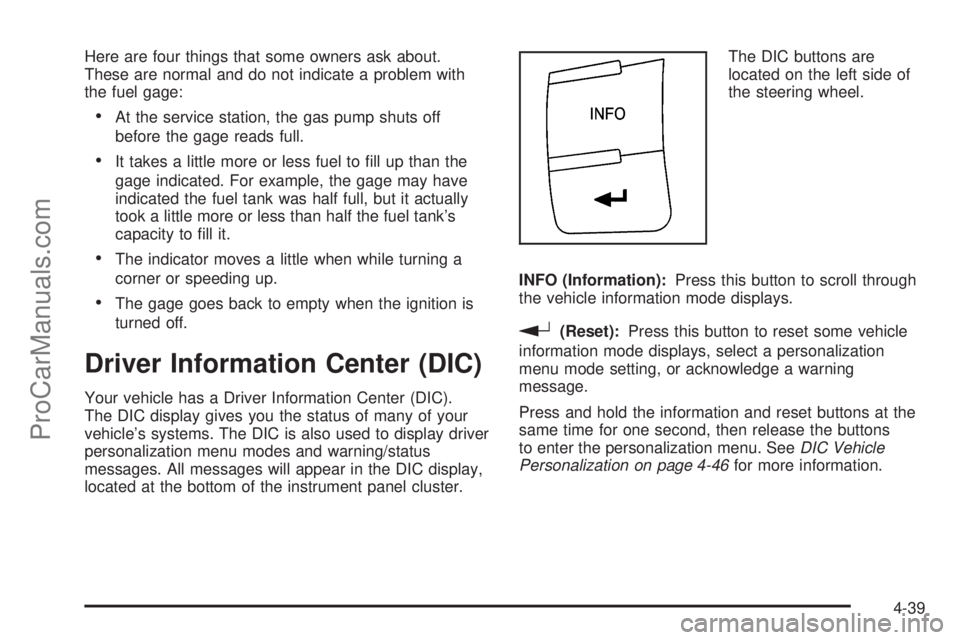
located at the bottom of the instrument panel cluster.The DIC buttons are
located on the left side of
the steering wheel.
INFO (Information):Press this button to scroll through
the vehicle information mode displays.
r(Reset):Press this button to reset some vehicle
information mode displays, select a personalization
menu mode setting, or acknowledge a warning
message.
Press and hold the information and reset buttons at the
same time for one second, then release the buttons
to enter the personalization menu. SeeDIC Vehicle
Personalization on page 4-46for more information.
4-39
ProCarManuals.com
Page 194 of 428
DIC Warnings and Messages
These messages appear if there is a problem detected
in one of your vehicle’s systems.
A message clears when the vehicle’s condition is no
longer present. To acknowledge a message and clear it
from the display, press and hold any of the DIC
buttons. If the condition is still present, the warning
message comes back on the next time the vehicle is
turned off and back on. With most messages, a warning
chime sounds when the message displays. Your
vehicle may have other warning messages.
AUTO (Automatic) LIGHTS OFF
This message displays if the automatic headlamp
system is disabled with the headlamp switch. See
Automatic Headlamp System on page 4-11for more
information.
AUTO (Automatic) LIGHTS ON
This message displays if the automatic headlamp
system is enabled with the headlamp switch. See
Automatic Headlamp System on page 4-11for more
information.
BRAKE FLUID
This message displays, while the ignition is on, when
the brake fluid level is low. The brake system warning
light on the instrument panel cluster also comes on.SeeBrake System Warning Light on page 4-30for more
information. Have the brake system serviced by your
dealer/retailer as soon as possible.
CHANGE OIL SOON
This message displays when the life of the engine oil
has expired and it should be changed.
When this message is acknowledged and cleared from
the display, the engine oil life system must still be
reset separately. SeeEngine Oil Life System on
page 6-20,Engine Oil on page 6-17, andScheduled
Maintenance on page 7-3for more information.
CHECK GAS CAP
This message displays if the fuel cap has not been fully
tightened. Recheck the fuel cap to make sure that it
is on properly. A few driving trips with the cap properly
installed should turn the message off.
CRUISE ENGAGED
This message displays when the cruise control system
is active. SeeCruise Control on page 4-7for more
information.
DOOR AJAR
This message displays if one or more of the vehicle’s
doors are not closed properly. Make sure that the
door(s) are closed completely.
4-42
ProCarManuals.com
Page 195 of 428

ENGINE DISABLED
This message displays if the starting of the engine is
disabled. Have your vehicle serviced by your dealer/
retailer immediately.
ENG (Engine) PWR (Power) REDUCED
This message displays when the vehicle’s engine power
is reduced. Reduced engine power can affect the
vehicle’s ability to accelerate. If this message is on, but
there is no reduction in performance, proceed to
your destination. The performance may be reduced the
next time the vehicle is driven. The vehicle may be
driven at a reduced speed while this message is on, but
acceleration and speed may be reduced. Anytime this
message stays on, the vehicle should be taken to
your dealer/retailer for service as soon as possible.
ESC (Electronic Stability Control) ACTIVE
If your vehicle has Electronic Stability Control (ESC),
this message displays and the ESC/TCS light on
the instrument panel cluster flashes when ESC is
assisting you with directional control of the vehicle. You
may feel or hear the system working and see this
message displayed in the DIC. Slippery road conditions
may exist when this message is displayed, so adjust
your driving accordingly. This message may stay on for
a few seconds after ESC stops assisting you withdirectional control of the vehicle. This is normal when
the system is operating. SeeElectronic Stability Control
(ESC) on page 5-5andElectronic Stability Control
(ESC)/Traction Control System (TCS) Indicator/Warning
Light on page 4-32for more information.
ESC (Electronic Stability Control) OFF
If your vehicle has Electronic Stability Control (ESC),
this message displays and the ESC/TCS light on
the instrument panel cluster comes on solid when ESC
is turned off. Adjust your driving accordingly. See
Electronic Stability Control (ESC) on page 5-5and
Electronic Stability Control (ESC)/Traction Control
System (TCS) Indicator/Warning Light on page 4-32for
more information.
ICE POSSIBLE
This message displays when the outside air temperature
is cold enough to create icy road conditions. Adjust
your driving accordingly.
KEY FOB BATT (Battery) LOW
This message displays if the Remote Keyless Entry
(RKE) transmitter battery is low. Replace the battery in
the transmitter. See “Battery Replacement” under
Remote Keyless Entry (RKE) System Operation on
page 3-3.
4-43
ProCarManuals.com
Page 196 of 428

LOW FUEL
This message displays when your vehicle is low on fuel.
Refill the fuel tank as soon as possible. SeeFuel
Gage on page 4-38,Fuel on page 6-5, andFilling the
Tank on page 6-10for more information.
LOW TRACTION
If your vehicle has the Traction Control System (TCS),
this message displays and the ESC/TCS light on
the instrument panel cluster flashes when the system is
actively limiting wheel spin. Slippery road conditions
may exist if this message is displayed, so adjust
your driving accordingly. This message stays on for a
few seconds after the system stops limiting wheel spin.
SeeTraction Control System (TCS) on page 5-7and
Electronic Stability Control (ESC)/Traction Control
System (TCS) Indicator/Warning Light on page 4-32for
more information.
LOW WASHER FLUID
This message displays when the vehicle’s windshield
washer fluid is low. Fill the windshield washer fluid
reservoir to the proper level as soon as possible. See
Windshield Washer Fluid on page 6-32.
POWER STEERING
On some vehicles, this message displays if a problem
has been detected with the electric power steering. Have
your vehicle serviced by your dealer/retailer immediately.
PUSH PARK PEDAL
This message displays if the parking brake is left
engaged. SeeParking Brake on page 3-26for more
information.
SERVICE AIR BAG
This message displays when there is a problem with the
airbag system. Have your vehicle serviced by your
dealer/retailer immediately.
SERVICE ESC (ELECTRONIC STABILITY
CONTROL)
If your vehicle has Electronic Stability Control (ESC),
this message displays and a chime sounds if there has
been a problem detected with ESC. The ESC/TCS
light also appears on the instrument panel cluster. This
light stays on solid as long as the detected problem
remains present. When this message displays, the
system is not working. Adjust your driving accordingly.
SeeElectronic Stability Control (ESC) on page 5-5
andElectronic Stability Control (ESC)/Traction Control
System (TCS) Indicator/Warning Light on page 4-32
for more information.
If this message turns on while you are driving, pull off
the road as soon as possible and stop carefully.
Try resetting the system by turning the ignition off and
then back on. If this message still stays on or turns back
4-44
ProCarManuals.com
Page 197 of 428

on again while you are driving, your vehicle needs
service. Have the ESC inspected by your dealer/retailer
as soon as possible.
SERVICE TRACTION
If your vehicle has the Traction Control System (TCS),
this message displays and a chime sounds when
the system is not functioning properly. The ESC/TCS
light also appears on the instrument panel cluster. This
light stays on solid as long as the detected problem
remains present. When this message displays, the
system is not working. Adjust your driving accordingly.
SeeTraction Control System (TCS) on page 5-7
andElectronic Stability Control (ESC)/Traction Control
System (TCS) Indicator/Warning Light on page 4-32
for more information. Have the system serviced by your
dealer/retailer as soon as possible.
SVC (Service) TIRE MONITOR
On vehicles with the Tire Pressure Monitor System
(TPMS), this message displays if a part on the TPMS
is not working properly. The tire pressure light also
flashes and then remains on during the same ignition
cycle. SeeTire Pressure Light on page 4-34. Several
conditions may cause this message to appear. SeeTire
Pressure Monitor Operation on page 6-54for more
information. If the warning comes on and stays on, there
may be a problem with the TPMS. See your
dealer/retailer.
TIRE LOW ADD AIR
On vehicles with the Tire Pressure Monitor System
(TPMS), this message displays when the pressure in
one or more of the vehicle’s tires is low on air. The low
tire pressure warning light also comes on. SeeTire
Pressure Light on page 4-34. If this message appears
on the DIC, stop as soon as you can. Have the tire
pressures checked and set to those shown on the Tire
Loading Information label. SeeTires on page 6-44,
Loading the Vehicle on page 5-19, andInation - Tire
Pressure on page 6-51. The DIC also shows the
tire pressure values. SeeDIC Operation and Displays
on page 4-40.
TRACTION OFF
If your vehicle has the Traction Control System (TCS),
this message displays and the ESC/TCS light on
the instrument panel cluster comes on solid when the
system is turned off. Adjust your driving accordingly. See
Traction Control System (TCS) on page 5-7and
Electronic Stability Control (ESC)/Traction Control
System (TCS) Indicator/Warning Light on page 4-32for
more information.
TRUNK AJAR
This message displays when the trunk is not closed
completely. Make sure that the trunk is closed
completely. SeeTrunk on page 3-11for more
information.
4-45
ProCarManuals.com