maintenance Seat Alhambra 2009 Workshop Manual
[x] Cancel search | Manufacturer: SEAT, Model Year: 2009, Model line: Alhambra, Model: Seat Alhambra 2009Pages: 285, PDF Size: 7.62 MB
Page 103 of 285
Unlocking and locking101
Safety First
Operating instructions
Tips and Maintenance
Te c h n i c a l D a t a
Safety instructions for the tailgate
WARNING
For safety reasons, you should always keep the tailgate fully closed when
driving. Always close the tailgate properly. Risk of accident or injury.•
Ensure the tailgate is locked after cl osing. If not, it may open unexpect-
edly while driving.
•
Never close the tailgate without observing and ensuring it is clear, to do
otherwise could cause serious injury to you and others. Make sure that no
one is in the path of the tailgate.
•
Loose objects which could fall out of the vehicle when the tailgate is
opened could cause injury.
•
If you have objects (for example bicycles) on a rack fitted to the tailgate,
you may not be able to open the tailgate fully, or the additional weight
could close the tailgate. For this reason, you should support the tailgate or
remove the objects from the rack. Risk of injury.
•
Never allow children to play in or around the vehicle. A locked vehicle
can be subjected to extremely high and low temperatures, depending on
the time of year. This could cause serious injuries/illness. It could even
have fatal consequences. Close and lock both the tailgate and all the other
doors when you are not using the vehicle. Make sure first that there is no
one in the vehicle.
•
If you have to drive with the tailgate open, observe the all notes
⇒ page 100 to reduce the risk, for example, of poisoning caused by
exhaust fumes entering the passenger compartment.
alhambra_aleman.book Seite 101 Montag, 23. M‰ rz 2009 1:12 13
Page 105 of 285
Unlocking and locking103
Safety First
Operating instructions
Tips and Maintenance
Te c h n i c a l D a t a
−
If the ignition is switched on, the electric equipment could be acti-
vated with risk of injury, for example, in the electric windows.
− The doors can be locked using the remote control key. This could
result in people being trapped in the vehicle in an emergency.
− Always take the key with you when you leave the vehicle.
•
The electric windows will work until the ignition has been switched off
and one of the front doors has been opened.
•
If necessary, use the safety switch to disable the rear electric windows.
Make sure that they have been disabled.Note
If the window is not able to close because it is stiff or because of an obstruc-
tion, the window will automatically open again ⇒page 104. If this happens,
check why the window could not be closed before attempting to close it
again.One-touch closing and opening
One-touch opening and closing means you do not have to
hold down the button.The one-touch closing and opening of the electric windows can only
be controlled with the switches on the driver's door. The buttons
⇒ page 102, fig. 64 and have two levels for opening the
front windows and two for closing. This makes it easier to open or
close windows to the desired position. One-touch closing
– Pull up the button for the window briefly to the second position.
The window closes fully.
One-touch opening
– Push down the button for the window briefly to the second posi- tion. The window opens fully.
Restoring one-touch opening and closing
– The one-touch opening and closing function is not active after the vehicle battery has been disconnected or is empty and will
have to be reset.
– Close all windows and doors.
– Use the key to lock the vehicle from outside and hold the key in the lock position for at least one second. The one-touch function
is now ready for operation.
If you push (or pull) a button to the first stage, the window will open (or close)
until you release the button. If you push or lift the button briefly to the second
stage, the window will open (one-touch opening) or close (one-touch closing)
automatically. If you operate the button while the window is opening or
closing, it stops at this position.
The one-touch opening and closing function will not function once the igni-
tion has been switched off.
The one-touch function and roll-back function will not work if there is a
malfunction in the electric windows. Contact an Authorised Service Centre.
WARNING (continued)
A1
A2
alhambra_aleman.book Seite 103 Montag, 23. M‰ rz 2009 1:12 13
Page 107 of 285
Unlocking and locking105
Safety First
Operating instructions
Tips and Maintenance
Te c h n i c a l D a t a
Mechanical vent wings
The rear vent wings can be opened and closed manually.Opening
– Pull the release lever ⇒fig. 65 in the direction of the arrow and
push it out at the same time until the lever engages.
Closing
– Pull the release lever in the opposite direction to the arrow and push it back until the lever engages.
WARNING
Incorrect use of the vent wings can result in injury!•
Never close the windows without observing and ensuring it is clear, to
do otherwise could cause serious injury to you and others. Make sure that
no one is in the path of a window.
Sliding/tilting sun roof Opening and closing the sliding/tilting roof
The sliding/tilting roof is opened and closed using the switch
when the ignition is switched on.Opening sliding/tilting roof
– Press the surface ⇒fig. 66 .
Tilting the sliding/tilting sunroof
– Press the surface .
Closing the sliding/tilting roof,
– Press the surface ⇒.
Fig. 65 Release lever for
mechanical vent wing
Fig. 66 Interior roof trim:
control of sliding/tilting
roof
A1
A2A3
alhambra_aleman.book Seite 105 Montag, 23. M‰ rz 2009 1:12 13
Page 109 of 285
Unlocking and locking107
Safety First
Operating instructions
Tips and Maintenance
Te c h n i c a l D a t a
Roll-back function of the sliding/tilting roofThe sliding/tilting roof has a roll-back function which prevents larger objects
getting trapped when the roof is closed. ⇒ The roll-back function does
not prevent fingers getting pinched against the roof opening. The
sliding/tilting sunroof stops and opens again immediately if it is obstructed
when closing.
If the sliding/tilting roof has been opened again by the roll-back function, it
can be closed only by pressing button ⇒ page 105, fig. 66 until the
sliding/tilting roof has closed fully. The sliding/tilting roof then closes
without the roll-back function.
If it still does not close, consult a specialised workshop.
WARNING
Incorrect use of the sliding/tilting sunroof can result in injury.
•
Never close the sliding/tilting sunroof without observing and ensuring
it is clear, to do otherwise could cause serious injury to you and others.
Make sure that no one is in the path of the sliding/tilting sunroof.
Fig. 67 Interior roof trim:
control of sliding/tilting
roof
A3
WARNING (continued)
alhambra_aleman.book Seite 107 Montag, 23. M‰ rz 2009 1:12 13
Page 111 of 285
Lights and visibility109
Safety First
Operating instructions
Tips and Maintenance
Te c h n i c a l D a t a
Lights and visibilityLightsSwitching lights on and off
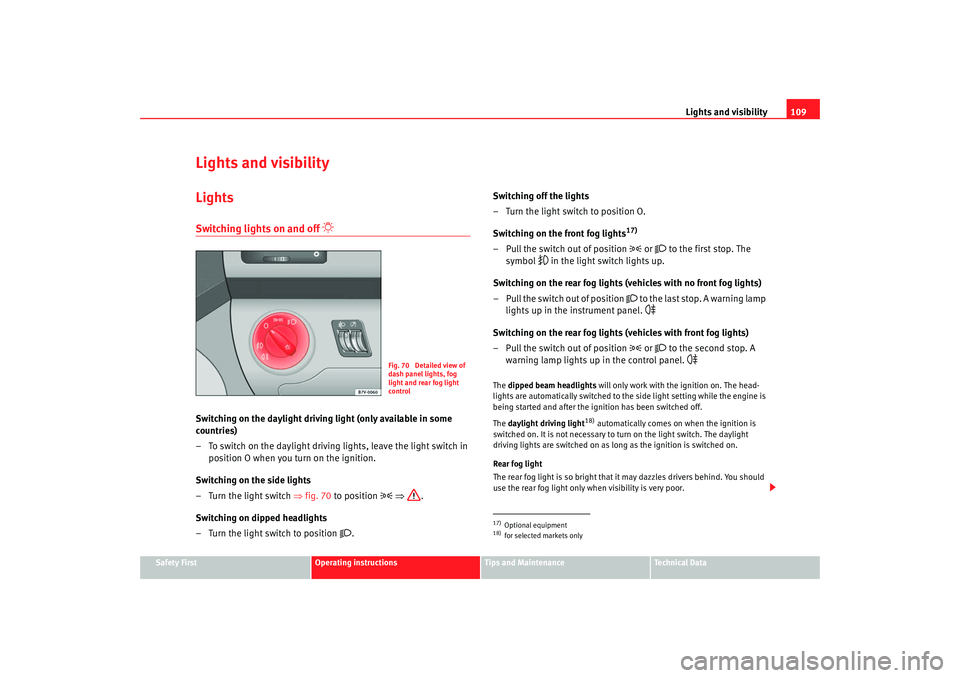
Switching on the daylight driving light (only available in some
countries)
– To switch on the daylight driving lights, leave the light switch in
position O when you turn on the ignition.
Switching on the side lights
– Turn the light switch ⇒fig. 70 to position
⇒ .
Switching on dipped headlights
– Turn the light switch to position
. Switching off the lights
– Turn the light switch to position O.
Switching on the front fog lights
17)
– Pull the switch out of position
or
to the first stop. The
symbol
in the light switch lights up.
Switching on the rear fog lights (vehicles with no front fog lights)
– Pull the switch out of position
to the last stop. A warning lamp
lights up in the instrument panel.
Switching on the rear fog lights (vehicles with front fog lights)
– Pull the switch out of position
or
to the second stop. A
warning lamp lights up in the control panel.
The dipped beam headlights will only work with the ignition on. The head-
lights are automatically switched to the side light setting while the engine is
being started and after the ignition has been switched off.
The daylight driving light
18) automatically comes on when the ignition is
switched on. It is not necessary to turn on the light switch. The daylight
driving lights are switched on as long as the ignition is switched on.
Rear fog light
The rear fog light is so bright that it may dazzles drivers behind. You should
use the rear fog light only when visibility is very poor.
Fig. 70 Detailed view of
dash panel lights, fog
light and rear fog light
control
17)Optional equipment18)for selected markets only
alhambra_aleman.book Seite 109 Montag, 23. M‰ rz 2009 1:12 13
Page 113 of 285
Lights and visibility111
Safety First
Operating instructions
Tips and Maintenance
Te c h n i c a l D a t a
Illumination of instruments and switches
When the headlights are switched on, the brightness of the instruments and
switch lighting can be regulated to suit your requirements by turning the
switch
⇒page 110, fig. 71 .
Headlight range control
Using the headlight range control, you can adjust the headlight range to the
load level that is being carried in the vehicle. In this way it is possible to avoid
dazzling oncoming traffic more than necessary. At the same time, the driver
has the best possible lighting for the road ahead using the correct headlight
settings.
The headlights can only be adjusted when the dipped beam is switched on.
To lower the beam, turn the switch down from the basic setting 0.
If the vehicle load does not correspond to those shown in the table, it is
possible to select intermediary positions.
Dynamic headlight range control
Vehicles with gas discharge lamps
19) (“xenon lamps”) are equipped with
dynamic headlight range control . When the dipped light is switched on, the
range of the headlights adjusts to the vehicle load condition. In these vehi-
cles, the control is not available.
WARNING
In order not to dazzle other drivers, the dipped light should be adjusted
according to the vehicle load using the headlight range control. If not, an
accident may occur.•
Use the switch to lower the light cone, depending on the vehicle load.
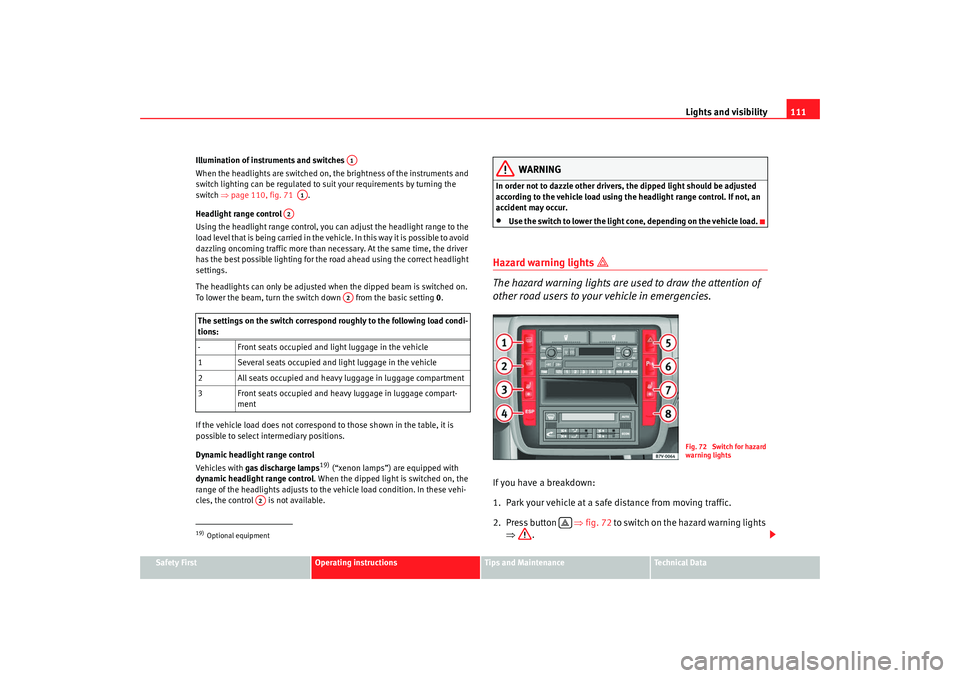
Hazard warning lights
The hazard warning lights are used to draw the attention of
other road users to your vehicle in emergencies.If you have a breakdown:
1. Park your vehicle at a safe distance from moving traffic.
2. Press button ⇒fig. 72 to switch on the hazard warning lights
⇒ .
The settings on the switch correspond roughly to the following load condi-
tions:
- Front seats occupied and light luggage in the vehicle
1 Several seats occupied and light luggage in the vehicle
2 All seats occupied and heavy luggage in luggage compartment
3 Front seats occupied and heavy luggage in luggage compart-
ment19)Optional equipment
A1
A1
A2
A2
A2
Fig. 72 Switch for hazard
warning lights
alhambra_aleman.book Seite 111 Montag, 23. M‰ rz 2009 1:12 13
Page 115 of 285
Lights and visibility113
Safety First
Operating instructions
Tips and Maintenance
Te c h n i c a l D a t a
Switching on the turn signals
– Move the lever all the way up ⇒page 112, fig. 73 to indicate
right , and all the way down to indicate left .
Signalling a lane change
– Move the lever upwards or downwards to change lanes.
Switching main beam on and off
– Turn the light switch to position
⇒ page 109, fig. 70 .
– Press the lever forward to switch on the main beams.
– Pull the lever back towards you to switch the main beam head- lights off again.
Headlight flasher
– Pull the lever towards the steering wheel to operate the flasher.
Switching on parking lights
– Switch off the ignition and remove the key from the lock.
– Move the lever up or down to turn on the right or left-hand parking lights respectively.
WARNING
The main beam can dazzle other drivers. Risk of accident! Never use the
main beam headlights or the headlight flasher if they could dazzle other
drivers.
Note
•
The turn signals only work when the ignition is switched on. The corre-
sponding warning lamp or flashes in the combi-instrument. The warning
lamp 20) flashes when the turn signals are operated, provided a trailer is
correctly attached and connected to the vehicle. If a turn signal bulb is defec-
tive, the warning lamp flashes at dou ble speed. I f the trailer turn signal bulbs
are damaged, warning lamp does not light up. You should have the bulbs
replaced.
•
Both warning lamps will flash at the same time when the hazard warning
lights are switched on.
•
If one turn signal fails, whether that of the vehicle or of the trailer, the
warning lamp will start flashing twice as fast.
•
The main beam headlights can only be switched on if the dipped beam
headlights are already on. The warning lamp
then comes on in the combi-
instrument.
•
The headlight flasher comes on for as long as you pull the lever – even if
no other lights are switched on. The warning lamp
then comes on in the
combi-instrument.
•
When the parking light is switched on, the front side light and the rear
light of the corresponding side of the vehicle stay lit. The parking lights will
only work if the key is removed from the ignition.
•
If the turn signal lever is left on after the key has been taken out of the
ignition lock, a buzzer sounds when the driver door is opened. This is a
reminder to switch off the turn signal, unless of course you wish to leave the
parking light on.
A1
A2
A1
A2
A3
A4
20)Optional equipment
alhambra_aleman.book Seite 113 Montag, 23. M‰ rz 2009 1:12 13
Page 117 of 285
Lights and visibility115
Safety First
Operating instructions
Tips and Maintenance
Te c h n i c a l D a t a
Note
•
If not all the vehicle doors are closed, the interior lights will be switched
off after approx. 10 minutes, providing the key has been removed and the
courtesy light position selected. This prevents the battery discharging.
•
Reading lights function independently of the interior lights and must be
switched off manually to prevent the battery being drained when the engine
is switched off.
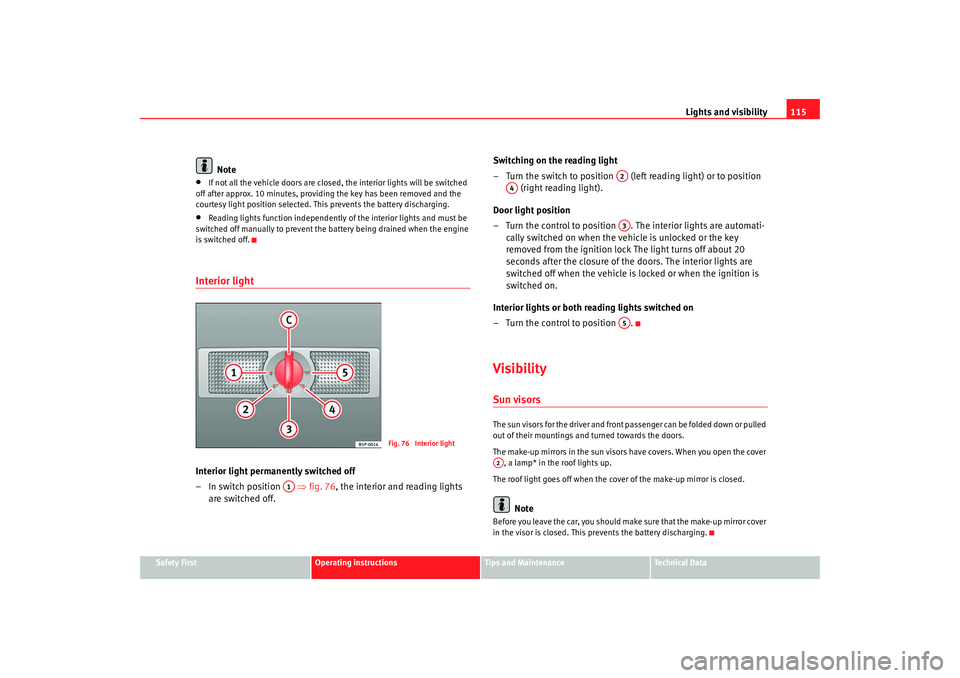
Interior light Interior light permanently switched off
–In switch position ⇒fig. 76 , the interior and reading lights
are switched off. Switching on the reading light
– Turn the switch to position (left reading light) or to position
(right reading light).
Door light position
– Turn the control to position . The interior lights are automati- cally switched on when the vehicle is unlocked or the key
removed from the ignition lock The light turns off about 20
seconds after the closure of the doors. The interior lights are
switched off when the vehicle is locked or when the ignition is
switched on.
Interior lights or both reading lights switched on
– Turn the control to position .
VisibilitySun visorsThe sun visors for the driver and front passenger can be folded down or pulled
out of their mountings and turned towards the doors.
The make-up mirrors in the sun visors have covers. When you open the cover , a lamp* in the roof lights up.
The roof light goes off when the cover of the make-up mirror is closed.
Note
Before you leave the car, you should make sure that the make-up mirror cover
in the visor is closed. This prevents the battery discharging.
Fig. 76 Interior light
A1
A2
A4
A3A5
A2
alhambra_aleman.book Seite 115 Montag, 23. M‰ rz 2009 1:12 13
Page 119 of 285
Lights and visibility117
Safety First
Operating instructions
Tips and Maintenance
Te c h n i c a l D a t a
Windscreen washersWindscreen wiper
The windscreen wiper lever controls the windscreen wipers
and the automatic wash and wipe.
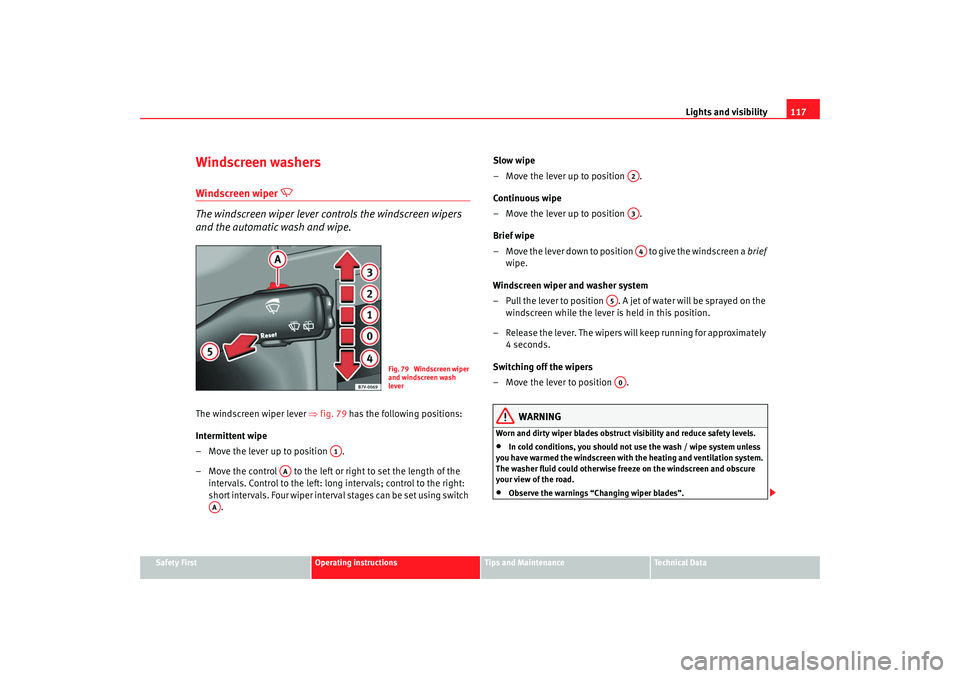
The windscreen wiper lever ⇒fig. 79 has the following positions:
Intermittent wipe
– Move the lever up to position .
– Move the control to the left or right to set the length of the intervals. Control to the left: long intervals; control to the right:
short intervals. Four wiper interval stages can be set using switch . Slow wipe
– Move the lever up to position .
Continuous wipe
– Move the lever up to position .
Brief wipe
– Move the lever down to position to give the windscreen a
brief
wipe.
Windscreen wiper and washer system
– Pull the lever to position . A jet of water will be sprayed on the windscreen while the lever is held in this position.
– Release the lever. The wipers will keep running for approximately 4seconds.
Switching off the wipers
– Move the lever to position .
WARNING
Worn and dirty wiper blades obstruct visibility and reduce safety levels.•
In cold conditions, you should not use the wash / wipe system unless
you have warmed the windscreen with the heating and ventilation system.
The washer fluid could otherwise freeze on the windscreen and obscure
your view of the road.
•
Observe the warnings “Changing wiper blades”.
Fig. 79 Windscreen wiper
and windscreen wash
lever
A1
AA
AA
A2A3A4
A5A0
alhambra_aleman.book Seite 117 Montag, 23. M‰ rz 2009 1:12 13
Page 121 of 285
Lights and visibility119
Safety First
Operating instructions
Tips and Maintenance
Te c h n i c a l D a t a
Headlamp washer*
The headlight washers clean the headlight lenses.The headlight washers are activated automatically when the windscreen
washer is used and the windscreen wiper lever is pulled towards the steering
wheel ⇒page 117, fig. 79 for at least 5 seconds – provided the dipped
headlights or main beams are switched on. Clean off stubborn dirt (insects,
etc.) from the headlights at regular intervals, for instance when filling the fuel
tank.
Note
To ensure that the headlight washers work properly in winter, keep the
nozzles in the bumper free of snow and remove any ice with a de-icer spray.
MirrorsInterior mirror
It is dangerous to drive if you cannot see clearly through the
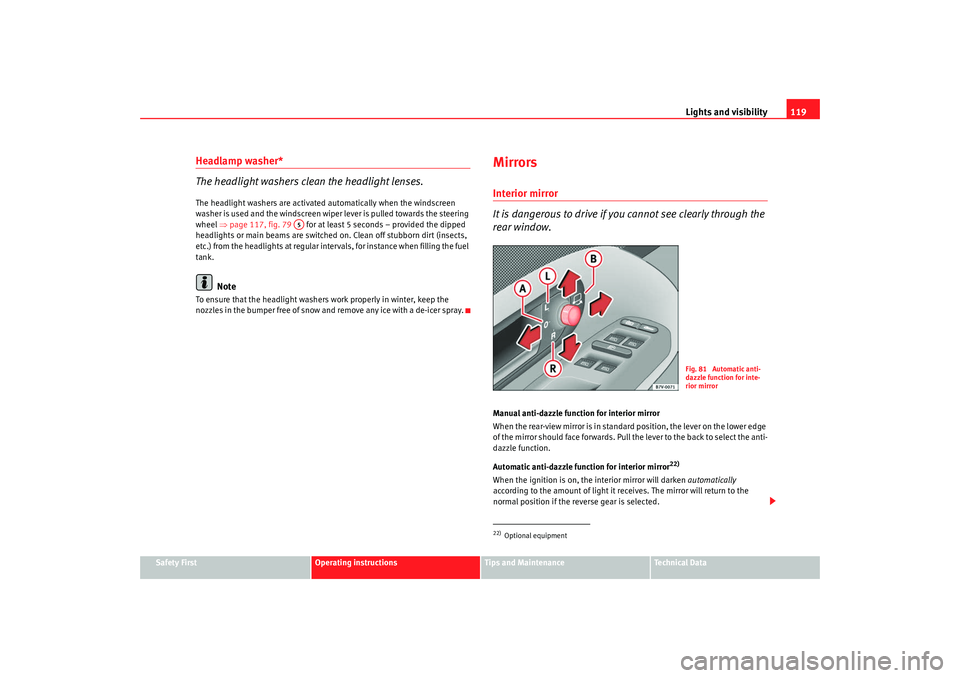
rear window.Manual anti-dazzle function for interior mirror
When the rear-view mirror is in standard position, the lever on the lower edge
of the mirror should face forwards. Pull the lever to the back to select the anti-
dazzle function.
Automatic anti-dazzle function for interior mirror
22)
When the ignition is on, the interior mirror will darken automatically
according to the amount of light it receives. The mirror will return to the
normal position if the reverse gear is selected.
A5
22)Optional equipment
Fig. 81 Automatic anti-
dazzle function for inte-
rior mirror
alhambra_aleman.book Seite 119 Montag, 23. M‰ rz 2009 1:12 13