clutch Seat Alhambra 2011 User Guide
[x] Cancel search | Manufacturer: SEAT, Model Year: 2011, Model line: Alhambra, Model: Seat Alhambra 2011Pages: 385, PDF Size: 7.92 MB
Page 206 of 385
204
Driving
Parking
● Parking parallel to the road: Drive next to the gap at a speed of no more
than 40 km/h and at a distance of between 0.5 m and 2 m.
● Parking perpendicular to the road: Drive next
to the gap at a speed of no
more than 20 km/h and at a distance of between 0.5 m and 2 m.
● The best parking results will be achieved if you position the vehicle as
paral
lel as possible to the line of parked cars or the kerb.
● When a suitable parking place is displayed on the instrument panel,
stop and sel
ect reverse gear.
● Follow the instructions given on the instrument panel display
● Then, release the steering wheel when the warning signal sounds ⇒ :
The sys t
em will move the steering wheel! Observe the surrounding area.
● Observe the surrounding area and accelerate carefully at a maximum of
up to 7 km/h.
● The park
assist system is only r
esponsible for moving the steering wheel
during the manoeuvre. The driver applies the accelerator, the clutch, the
gears and the brake.
● Follow the instructions given by the park assist system until the ma-
noeuvre i
s completed.
● The park assist system steers the vehicle forwards and backwards until
it is
in a straight position in the parking space.
● The manoeuvre is complete when the corresponding indication is given
on the instrument
panel display.
Stopping the parking manoeuvre
The park assist system stops the manoeuvre in the event of one of the fol-
lowing:
● Press button .
● Driving faster than 7 km/h.
● The driver moves the steering wheel.
● The parking manoeuvre has not been completed after six minutes since
the park a
ssist system was activated. ●
A sliding door is opened. To restart the manoeuvre, close the sliding
door and pre
ss the button again.
● There is a system malfunction (system temporarily unavailable).
● The ASR (TCS) system is switched off or the ASR (TCS) or ESC (ESP) is
work in
g. WARNING
The steering wheel turns quickly by itself when parking using the park
as s
ist system. Placing your hand between the steering wheel spokes
could lead to injuries. Note
● The park assist system has its limitations. For example, it is not possible
t o p
ark on tight bends using the park assist system.
● Even if the park assist system recognises that there is not enough space
for park
ing the vehicle, the display screen on the instrument panel will still
display this place. In this case, the parking manoeuvre should not be re-
quested.
● Changing gears between forward and reverse gears before indicated
(that i
s, before the signal from the parking sensor system) the parking re-
sults may not be ideal.
● For parallel parking (parallel to the road), a sound will tell the driver
when they mus
t change from forward gears to reverse; the signal from the
parking sensor system does not indicate changes of direction.
● The park assist can also be activated afterwards, if you pass close to a
paral
lel parking space at a maximum of 40 km an hour or close to be per-
pendicular parking space at about 20 km an hour then press the button .
● The progress bar on the screen of the instrument panel shows a display
of the r el
ative distance to be covered.
● When the Park Assist system is turning the steering wheel of the stop-
ped vehic
le the symbol is also displayed. Press on the brake pedal so
that the steering can turn with the vehicle at a standstill and thus reduce
the number of manoeuvres.
Page 207 of 385
205
Driving
● A suitable parking space length is at least 1.1 m greater than the length
of the
vehicle.
● If the results of the park assist system are not as good after changing
the wheels, the sys
tem must memorise the perimeter of the new wheels.
This process is performed automatically while the vehicle is in motion. To
help this process, turn slowly (at less than 20 km/h), e.g. in an empty car
park.
Leaving a parking space using the Park Assist system Driving off
●
Switch on the engine.
● Press button . When the function is enabled, the button
⇒ fig. 144
wi l
l light up.
● Apply the turn signal indicator for the side on which you want to leave
the parkin
g space.
● Select reverse gear.
● Follow the instructions given by the park assist system.
● When the next indication appears, release the steering wheel ⇒ in
Park in
g using the park assist system on page 204: The system will move the
steering wheel! Observe the surrounding area.
● Observe the surrounding area and accelerate carefully at a maximum of
up to 7 km/h.
● The park
assist system is only r
esponsible for moving the steering wheel
during the manoeuvre. The driver applies the accelerator, the clutch, the
gears and the brake.
● When it is possible to leave the parking space, the Park Assist system
wil
l stop. Take control of the steering and when traffic conditions permit,
leave the parking space. Automatic stoppage of the manoeuvre
The park a
ssist system stops the manoeuvre in the event of one of the fol-
lowing:
● Driving faster than 7 km/h.
● The driver moves the steering wheel.
● A sliding door is opened. To restart the manoeuvre, close the sliding
door and pres
s the button again.
● There is a system malfunction (system temporarily unavailable).
● The ASR (TCS) system is switched off or the ASR (TCS) or ESC (ESP) is
work in
g. WARNING
The steering wheel turns quickly automatically when leaving a parking
sp ac
e using the park assist system. Placing your hand between the steer-
ing wheel spokes could lead to injuries.
Park Assist brake operation The Park Assist system helps the driver by braking automatically. Automatic
brak
in
g does not relieve the driver of responsibility for controlling the accel-
erator, brake and clutch ⇒ .
Brak in
g to avoid damage at excess speed
It is possible that the system operates the brakes to reduce excess speed.
The parking manoeuvre can then continue. The brakes will intervene during
each parking process.
Braking to minimise damage
When approaching an obstacle, the vehicle may brake automatically. In cer-
tain circumstances (for example, storm, detection of ultrasounds, vehicle Safety First Operating instructions Practical tips Technical Data
Page 215 of 385
213
Driving
CCS temporarily switched off. The set speed is displayed in small fig-
ure s.
S
ystem error. Contact a specialist workshop.
CCS switched on. The speed memory is empty.
The CCS is switched on. The set speed is displayed in large figures. WARNING
If the warning lamps and messages are ignored, the vehicle may stall in
traffic, or m a
y cause accidents and severe injuries.
● Never ignore the warning lamps or text messages.
● Stop the vehicle safely as soon as possible. CAUTION
Failure to heed the warning lamps and text messages when they appear
ma y
result in faults in the vehicle.
A B
C
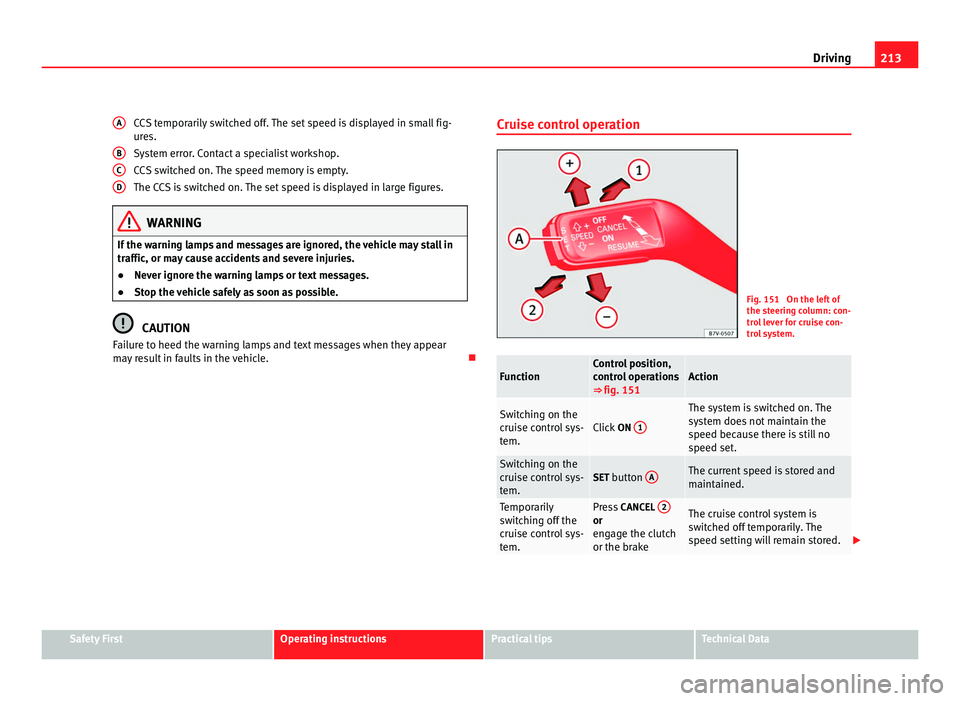
D Cruise control operation
Fig. 151 On the left of
the st
eerin
g column: con-
trol lever for cruise con-
trol system. Function Control position,
contr
o
l operations
⇒ fig. 151 Action
Switching on the
crui
se c
ontrol sys-
tem. Click
ON 1 The system is switched on. The
sys
t
em does not maintain the
speed because there is still no
speed set. Switching on the
crui
se c
ontrol sys-
tem. SET button
A The current speed is stored and
maint
ained. Temporarily
swit
c
hing off the
cruise control sys-
tem. Press
CANCEL 2 or
eng
ag
e the clutch
or the brake The cruise control system is
swit
c
hed off temporarily. The
speed setting will remain stored. Safety First Operating instructions Practical tips Technical Data
Page 216 of 385
214
Driving Function Control position,
contr
o
l operations
⇒ fig. 151 Action
Switching the
speed settin
g
b
ack on. Press
RESUME 1 The stored speed is reached again
and maint
ained. If
no speed has
been set then the vehicle will re-
cord and maintain the actual
speed of the vehicle. Increasing the
st
or
ed speed (dur-
ing CCS setting). Hold down
SPEED + + Short press:
Incre
ases the speed
at intervals of 10 km/h and re-
cords it.
Long press: the vehicle acceler-
ates while the button remains
pressed. Release the button to
store the current speed. Reducing the stor-
ed speed (durin
g
C
CS setting). Press
SPEED – – Short press:
Reduce
s the speed at
intervals of 10 km/h and records
it.
Long press: while this remains
pressed, speed is reduced inter-
rupting the accelerator without
using the brakes. Release the but-
ton to store the current speed. Switching off the
crui
se c
ontrol sys-
tem. Click
OFF 2 The system is switched off. The
st
or
ed speed is deleted. Travelling down hills with the CCS
When trav
el
ling down hills the CCS cannot maintain a constant speed. Slow
the vehicle down using the brake pedal and reduce gears if required.
Automatic off
The cruise control system is switched off automatically or temporarily: ●
If the system detects a fault that could affect the working order of the
CC
S.
● If you increase the stored speed by using the accelerator for a certain
time.
● if the brake or clutch pedal is depressed.
● If you change gears.
● If the airbag is triggered.
Page 228 of 385
226
Driving and the environment
Economic driving style Changing gear early
General
in
structions: The highest gear is always the most economical gear.
As a guideline, for the majority of vehicles: At a speed of 30 km/h, drive in
third gear, at 40 km/h in fourth gear and at 50 km/h in fifth gear.
In addition, skipping gears when shifting up helps to save fuel, weather and
traffic conditions permitting.
Do not wait until the last moment before changing gear. Only use first gear
when you move off and change to second gear quickly. Avoid the kick-down
function in vehicles with automatic gearbox.
Vehicles with a gear display help to achieve an economical driving style as
the display indicates the best moment to change gear.
Let the vehicle roll
If you take your foot off the accelerator, the fuel supply is stopped and con-
sumption is reduced.
Allow the vehicle to roll without accelerating, for example when approach-
ing a red traffic light. However, if the vehicle is rolling too slowly or the dis-
tance is too long, the clutch pedal should be pressed to declutch. The en-
gine will then operate at idle speed.
If the vehicle is going to be at a standstill for a period of time, switch off the
engine; for example, while waiting at a level crossing. In vehicles which
have the Start-Stop function on, the engine switches off automatically when
the vehicle is not moving.
Think ahead and “flow” with the traffic
Frequent acceleration and braking considerably increase fuel consumption.
If you think ahead as you drive and keep a safe distance from the vehicle in
front, it is possible to slow down by simply lifting your foot off the accelera-
tor. This eliminates the need for constant braking and acceleration. Calm and steady driving
Cons
tancy is more important than speed: The more you drive at a constant
speed, the lower the fuel consumption.
When driving on the motorway, it is more efficient to drive at a constant and
more moderate speed than to be continuously accelerating and braking. As
a general rule, you will reach your destination just as quickly when you drive
at a constant speed.
The cruise control function helps you to achieve a constant style of driving.
Moderate use of additional electrical appliances
It is important to travel in comfort, but convenience systems should be used
in an ecological manner.
Some equipment, when connected, increase fuel consumption considera-
bly, for example:
● Air conditioning cooling system: If the air conditioning system is re-
quired to c
ool to significantly lower temperatures than the true outside tem-
perature, it will require a large quantity of energy from the engine. There-
fore, we recommend that the selected temperature for the vehicle is not too
different to the outside temperature. It is a good idea to open all the win-
dows of the car before starting your journey, and to drive a short distance
with all the windows open to allow the vehicle to cool down slightly. Only
then should you close all the windows and switch on the air conditioning.
Keep windows closed when travelling at high speeds. Driving with the win-
dows open increases fuel consumption.
● Switch off the seat heating when the seats have warmed up.
● Switch off the heated rear window and the windscreen heating when the
window
s have demisted and are free of ice.
● Do not leave the auxiliary heater switched on when the vehicle is mov-
ing ⇒ p
age 163.
Page 240 of 385
238
Trailer towing
●The vehicle centre of gravity and handling change because of the trailer
lo a
d and because of the increased combined mass of the vehicle and trail-
er.
● If the towing vehicle is empty and the trailer loaded then the load distri-
bution is
incorrect. If you must travel in these conditions, drive carefully and
reduce your speed accordingly.
Hill starts with a trailer
Depending on the hill and the gross combined weight, it is possible that the
combined vehicle and trailer move backwards slightly when starting.
For a hill start with a trailer, proceed as follows:
● Press and hold the brake pedal.
● Press the button once to turn off the electric parking brake
⇒ p ag
e 183.
● Press and hold the button to hold the vehicle and trailer combination
us in
g the parking brake.
● With a manual gearbox: press the clutch pedal to the floor.
● Engage first gear or the gear range D ⇒ page 174, Ch
anging gear.
● Release the brake pedal.
● Move off slowly. To do this, gently release the clutch pedal (for manual
gearbo
x).
● Release the button only when the engine provides sufficient power
to mo v
e the vehicle and trailer combination. WARNING
Jerking the trailer in an unsuitable manner could cause loss of vehicle
contr o
l with the subsequent serious consequences.
● Driving with a trailer and transporting heavy or a large objects will
chan
ge the vehicle handling and braking distances. WARNING (Continued)
● Antic ipate traffic and be extremely cautious. Brake early.
● Adju
s
t your speed and driving style to visibility, road, traffic and
weather c
onditions. Reduce your speed, especially on steep hills.
● Accelerate gently and carefully. Avoid brusque manoeuvres and sud-
den brakin
g.
● Always take the following precautions seriously. Reduce your speed
immediately
if you observe the trailer rocking from side to side.
● Never try to stop the “snaking” by increasing speed.
● Always take the speed limits for vehicles with and without trailers in
each c
ountry into account.
Stabilising the vehicle and trailer combination Stabilisation of the vehicle and trailer combination is an extension of the
electr
onic
stability control ESC (ESP) and helps, with the assistance of the
trajectory control, to reduce trailer “snaking”.
Stabilisation of the vehicle and trailer combination is active when the ESC
(ESP) indicator on the dashboard remains lit for about two seconds more
than the ABS indicator.
Requirements for stabilising the vehicle/trailer combination
● An original tow hitch is fitted by the manufacturer or a compatible model
is r
etrofitted.
● The ESC (ESP) is on. The warning indicator in the control panel is not
lit
.
● The trailer is connected to the vehicle using the socket.
● The vehicle is driven faster than 60 km/h.
● The maximum drawbar load is used.
Page 343 of 385
341
If and when
Instructions for tow starting In general, the vehicle should not be started by towing. Jump-starting is
much mor
e pr
eferable ⇒ page 337.
For technical reasons, the following vehicles can not be tow started:
● Vehicles with an automatic gearbox.
● Vehicles with an electronic parking brake, given that it is possible that
the brake w
ill not be disengaged.
● If the vehicle battery is flat, it is possible that the engine control units do
not operat
e correctly.
However, if your vehicle must absolutely be tow-started (manual gearbox):
● Engage the 2nd or 3rd gear.
● Keep the clutch pressed down.
● Switch on the ignition and the hazard warning lights.
● Release the clutch when both vehicles are moving.
● As soon as the engine starts, press the clutch and move the gear lever
into neutral
. This helps to prevent a collision with the towing vehicle. CAUTION
When tow-starting, fuel could enter the catalytic converter and damage it.
Towing instructions Tow-rope or tow-bar
When to
w
ing, the tow bar is the safest and vehicle friendly way. You should
only use a tow-rope if you do not have a tow-bar. A tow-rope should be slightly elastic to avoid damage to both vehicles. It is
advi
sable to use a tow-rope made of synthetic fibre or similarly elastic mate-
rial.
Only secure the tow rope or tow bar to the tow ring or specially designed
fitting.
Vehicles with a factory fitted towing device , can only be used for towing
with a tow-bar, specially designed to fit on a tow hitch ball ⇒ page 233.
Towing vehicles with an automatic gearbox
Note the following for a towed vehicle:
● Make sure the gear selector lever is in the N position.
● Do not
drive faster than 50 km/h (30 mph) when towing a vehicle.
● Do not tow further than 50 km (30 miles).
● If a breakdown truck is used, the vehicle must be towed with the front
wheels r
aised. Note the following instructions for towing four wheel drive
vehicles.
Instructions for towing four-wheel-drive vehicles
Four wheel drive vehicles can be towed using a toolbar or tow rope. If the
vehicle is towed with the front or rear axle raised, the engine must be turned
off to avoid transmission damage.
For vehicles with a double clutched DSG ®
(direct shift gearbox) the instruc-
tions for towing vehicles with an automatic gearbox apply ⇒ page 341.
Situations in which the vehicle should not be towed
In the following cases, the vehicle should not be towed but transported on a
trailer or special vehicle:
● If the vehicle gearbox does not contain lubricant due to a fault.
● If the vehicle battery is flat and, as a result, the electronic steering lock
and electronic
parking brake cannot be disengaged if applied.
● If the vehicle to be towed has an automatic gearbox and the distance to
be cov
ered is greater than 50 km (30 miles). Safety First Operating instructions Practical tips Technical Data