roof Seat Alhambra 2011 User Guide
[x] Cancel search | Manufacturer: SEAT, Model Year: 2011, Model line: Alhambra, Model: Seat Alhambra 2011Pages: 385, PDF Size: 7.92 MB
Page 82 of 385
80
Unlocking and locking
● Push the
OFF button. A yellow warning lamp will light up in the button
unti l
the vehicle is locked.
● Lock all doors and tailgate.
● Use the key to lock the vehicle. The interior monitor and / or anti-towing
alarm are sw
itched off until the next time the vehicle is locked.
To turn off the interior monitoring and anti-tow systems before unlocking
the vehicle, for example in the following situations:
● When leaving animals inside the vehicle ⇒ page 74.
● When the
vehicle must be loaded.
● When the vehicle is being transported, for example, by ferry.
● When the vehicle must be towed with the axle raised.
Risk of
false alarms
The interior monitoring system only operates correctly if the vehicle is com-
pletely closed. Observe legal requirements. The alarm may be accidentally
triggered in the following cases:
● When a window is completely or partially open.
● If the sunglasses storage compartment in the roof console is open.
● When the panorama sliding sunroof is completely or partially open.
● When suspended objects are hung from the interior mirror (air freshen-
er) or there are loo
se papers in the vehicle.
● If the separation net is fitted and moves (due to heating).
● Due to a vibrating mobile telephone inside the vehicle. Note
Upon activating the alarm, if any door or the tailgate is open, only the alarm
wi l
l be activated. The interior monitoring and anti-tow systems will only be
activated when the doors and tailgate are fully closed. Doors
Introduction Additional information and warnings:
●
Vehicle key set ⇒ page 71
● C
entral locking and locking system ⇒ page 74
● Emer
gency locking and unlocking ⇒ page 314 WARNING
If a door is not correctly closed, it could open unexpectedly when driving
and cau se seriou
s injuries.
● Always stop immediately and close the door.
● When closing, ensure that the door has closed correctly. A closed
door should be flu
sh with the corresponding parts of the bodywork.
● Open and close doors only when nobody is in the way of the door. WARNING
A door held open by its retainer could be blown closed by the wind or
clo se if
the vehicle is on a hill causing injury.
● When opening and closing doors, always use the door handle.
Warning indicator lights up Possible cause Solution
At least one vehicle door is
open or not c
orr
ectly shut.
Stop driving immediately!
Open the c orr
esponding door
and close it immediately.
Page 92 of 385
90
Unlocking and locking
After turning off the ignition, the windows can be opened and closed for a
short time u
sing the buttons on the door as long as the driver's door or pas-
senger side door is not open. When the key is removed from the ignition
and the driver's door is open, all of the electric windows can be opened or
closed using the corresponding button on the driver's door. After a few sec-
onds, the convenience opening or closing function will begin ⇒ page 90.
Electric windows: functions One-touch opening and closing
The one-touc
h aut
omatic opening and closing is used to open or close the
windows completely. It will not be necessary to hold the button of the corre-
sponding electric window.
For the one-touch closing function: pull up on the button for the window to
the second position.
For the one-touch opening function: Push down the button for the window
to the second position.
To stop the one touch function: Push or pull on the button of the corre-
sponding window.
Restoring one-touch opening and closing
The one-touch opening and closing function is not active after the vehicle
battery has been disconnected or is flat and will have to be reset.
● Close all windows and doors.
● Pull the button of the corresponding window and hold it for one second
in this po
sition.
● Release the button and pull upwards and hold again. The one-touch
function i
s now ready for operation.
The automatic one-touch electric windows can be reinitialised individually
or several at a time. Convenience opening and closing function
The electric w
indows can be opened or closed from outside using the vehi-
cle key:
● Hold in the unlocking for locking button for the vehicle. All windows
which fu
nction electrically will be either opened or closed.
● To interrupt the function, release the locking or unlocking button.
During c
onvenience closing, first the windows and then the sliding sunroof
will be closed.
In the Configuration - convenience menu, there are different settings for oper- ating the windows ⇒ page 62. WARNING
Careless use of the electric windows can cause serious injury.
● Only operate the electric windows when nobody is in the way.
● Never leave children or disabled people alone in the vehicle if the
doors ar
e to be locked. The windows cannot be opened in case of an
emergency.
● Always take all the keys with you whenever you leave the vehicle. Af-
ter turnin
g off the ignition, the windows can be opened and closed for a
short time using the buttons on the door as long as the driver's door or
passenger side door is not open.
● When transporting children in the rear seats, always deactivate the
rear el
ectric windows with the child safety lock so that they cannot be
opened and closed. Note
The one-touch function and roll-back function will not work if there is a mal-
fu nction in the el
ectric windows. Visit a specialist workshop.
Page 94 of 385
92
Unlocking and locking
Panorama sliding sunroof*
Introduction Additional information and warnings:
●
SEAT information system ⇒ pag e 62
● C
entral locking and locking system ⇒ page 74
● Emer
gency locking and unlocking ⇒ page 314WARNING
Careless use of the panorama sliding sunroof can cause serious injury.
● Only close the panorama sliding sunroof and the sunshade when no-
body i s
in the way.
● Always take all the keys with you whenever you leave the vehicle.
● Never leave children or disabled persons in the vehicle, particularly if
they hav
e access to the keys. Uncontrolled use of the key could lock the
vehicle, start the engine, turn on the ignition and operate the sliding
sunroof.
● The sliding sunroof can be operated for up to about ten minutes after
the ignition has
been switched off, provided the driver door and the front
passenger door are not opened. Note
In case of a fault in the operation of the sliding sunroof, the anti-trap func-
tion wi l
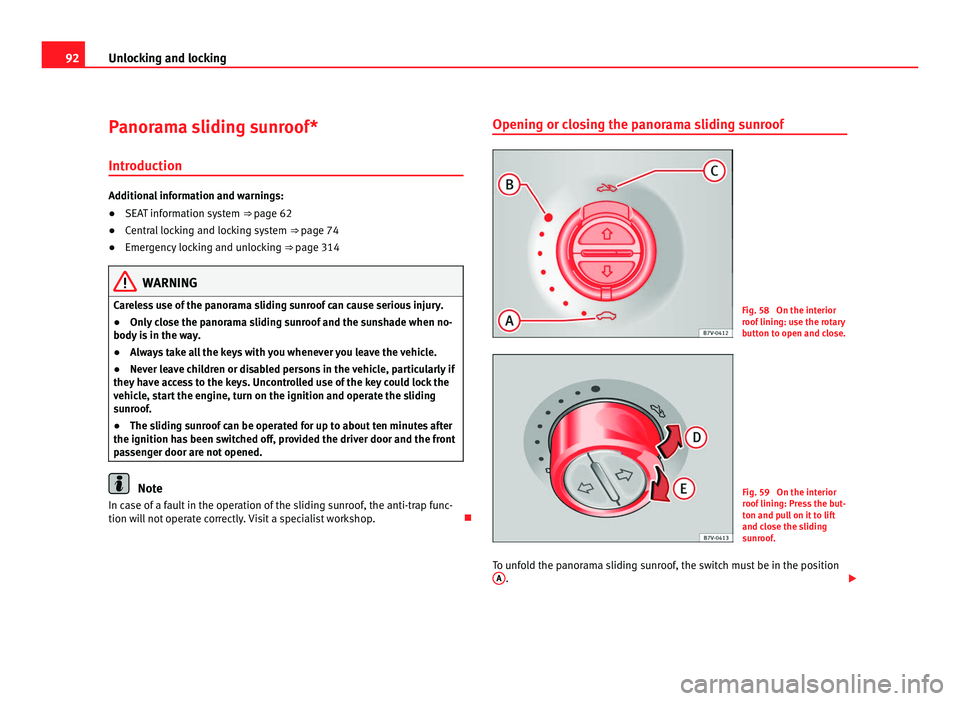
l not operate correctly. Visit a specialist workshop. Opening or closing the panorama sliding sunroof
Fig. 58 On the interior
roof
linin
g: use the rotary
button to open and close. Fig. 59 On the interior
roof
linin
g: Press the but-
ton and pull on it to lift
and close the sliding
sunroof.
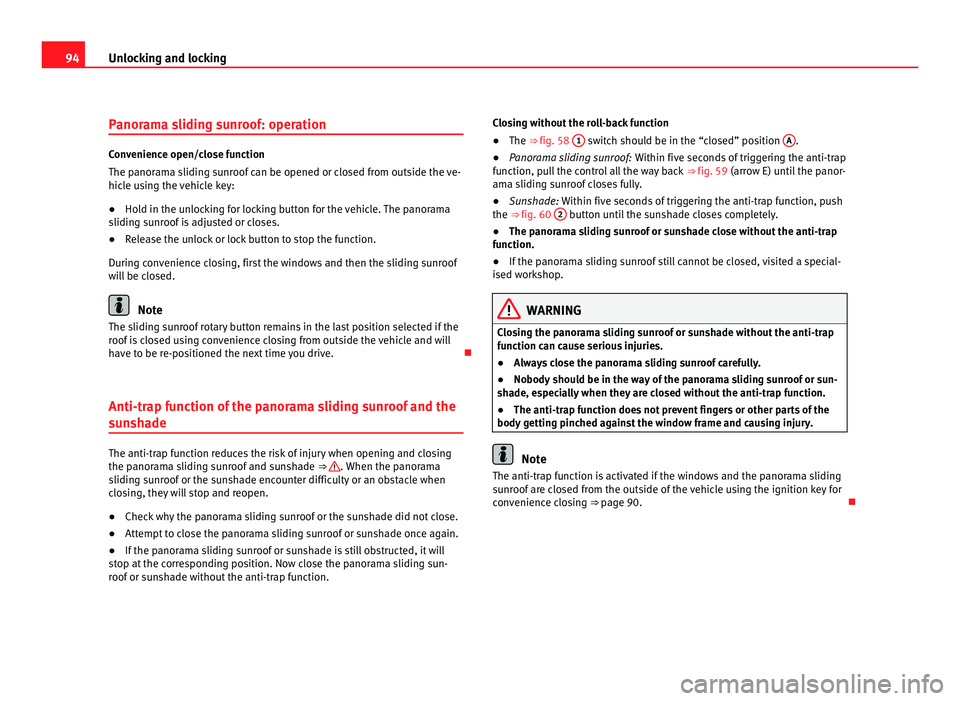
To unfold the panorama sliding sunroof, the switch must be in the position A .
Page 95 of 385
93
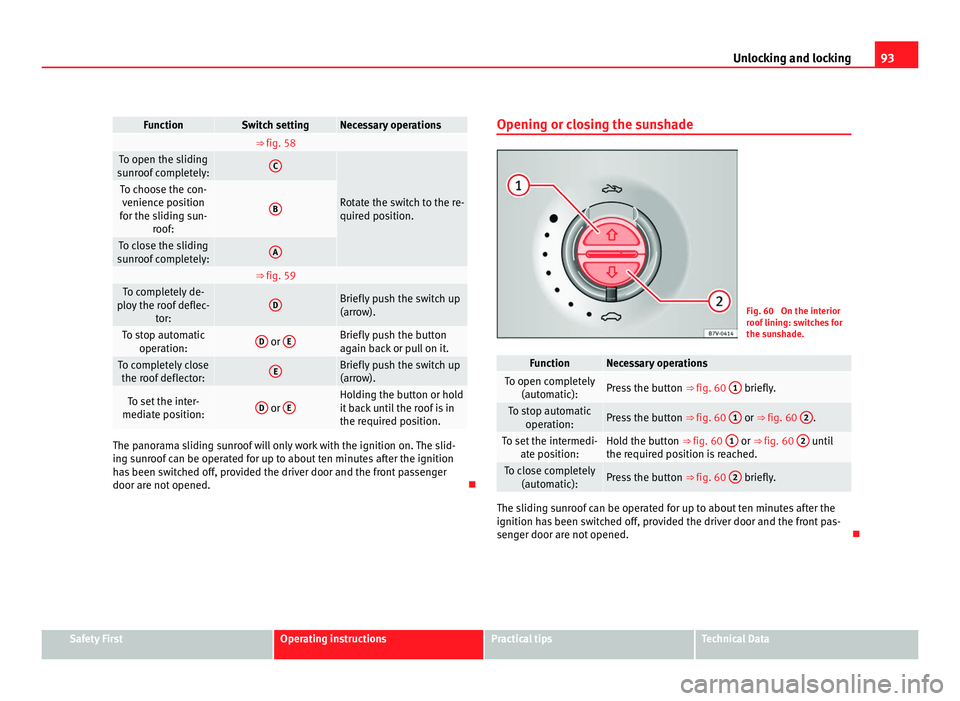
Unlocking and locking Function Switch setting Necessary operations
⇒ fig. 58
To open the sliding
su nr
oof completely: C
Rotate the switch to the re-
quired po
s
ition. To choose the con-
venienc e po
sition
for the sliding sun- roof: B
To close the sliding
su nr
oof completely: A
⇒ fig. 59
To completely de-
plo y
the roof deflec- tor: D Briefly push the switch up
(arro
w). To stop automatic
operation: D
or
E Briefly push the button
again b
ac
k or pull on it. To completely close
the roof defl
ector: E Briefly push the switch up
(arro
w). To set the inter-
mediat e po
sition: D
or
E Holding the button or hold
it b
ac
k until the roof is in
the required position. The panorama sliding sunroof will only work with the ignition on. The slid-
ing s
u
nroof can be operated for up to about ten minutes after the ignition
has been switched off, provided the driver door and the front passenger
door are not opened. Opening or closing the sunshade
Fig. 60 On the interior
roof
linin
g: switches for
the sunshade. Function Necessary operations
To open completely
(autom atic): Press the button
⇒ fig. 60 1 briefly.
To stop automatic
operation: Press the button
⇒ fig. 60 1 or ⇒ fig. 60
2 .
To set the intermedi-
ate po s
ition: Hold the button ⇒ fig. 60
1 or ⇒ fig. 60
2 until
the requir ed po
sition is reached. To close completely
(autom atic): Press the button
⇒ fig. 60 2 briefly.
The sliding sunroof can be operated for up to about ten minutes after the
ignition ha
s
been switched off, provided the driver door and the front pas-
senger door are not opened. Safety First Operating instructions Practical tips Technical Data
Page 96 of 385
94
Unlocking and locking
Panorama sliding sunroof: operation Convenience open/close function
The panor
am
a sliding sunroof can be opened or closed from outside the ve-
hicle using the vehicle key:
● Hold in the unlocking for locking button for the vehicle. The panorama
sliding s
unroof is adjusted or closes.
● Release the unlock or lock button to stop the function.
During c
onvenience closing, first the windows and then the sliding sunroof
will be closed. Note
The sliding sunroof rotary button remains in the last position selected if the
roof i
s closed using convenience closing from outside the vehicle and will
have to be re-positioned the next time you drive.
Anti-trap function of the panorama sliding sunroof and the
sun
shade The anti-trap function reduces the risk of injury when opening and closing
the panor
am
a sliding sunroof and sunshade ⇒ . When the panorama
slidin g s
unroof or the sunshade encounter difficulty or an obstacle when
closing, they will stop and reopen.
● Check why the panorama sliding sunroof or the sunshade did not close.
● Attempt to close the panorama sliding sunroof or sunshade once again.
● If the panorama sliding sunroof or sunshade is still obstructed, it will
stop at
the corresponding position. Now close the panorama sliding sun-
roof or sunshade without the anti-trap function. Closing without the roll-back function
●
The ⇒ fig. 58 1 switch should be in the “closed” position
A .
● Panorama sliding sunroof: Within five sec
onds of triggering the anti-trap
function, pull the control all the way back ⇒ fig. 59 (arrow E) until the panor-
ama sliding sunroof closes fully.
● Sunshade: Within five sec
onds of triggering the anti-trap function, push
the ⇒ fig. 60 2 button until the sunshade closes completely.
● The panorama sliding sunroof or sunshade close without the anti-trap
fu nction.
● If
the panorama sliding sunroof still cannot be closed, visited a special-
ised work
shop. WARNING
Closing the panorama sliding sunroof or sunshade without the anti-trap
fu nction c
an cause serious injuries.
● Always close the panorama sliding sunroof carefully.
● Nobody should be in the way of the panorama sliding sunroof or sun-
shade, e
specially when they are closed without the anti-trap function.
● The anti-trap function does not prevent fingers or other parts of the
body gettin
g pinched against the window frame and causing injury. Note
The anti-trap function is activated if the windows and the panorama sliding
su nr
oof are closed from the outside of the vehicle using the ignition key for
convenience closing ⇒ page 90.
Page 127 of 385
125
Seats and storage compartments WARNING
Travelling with the head restraints removed or improperly adjusted in-
cr e
ases the risk of severe or fatal injuries in the event of accidents and
sudden braking or manoeuvres.
● Always fit and adjust the head restraint properly whenever a person
is oc
cupying a seat.
● Refit any removed head restraints immediately so that passengers
are properly
protected. CAUTION
On removing and fitting the head restraint, make sure the head restraint
does not
hit the interior roof of the vehicle or the backrest of the front seat.
This could damage the interior roof and other parts of the vehicle.
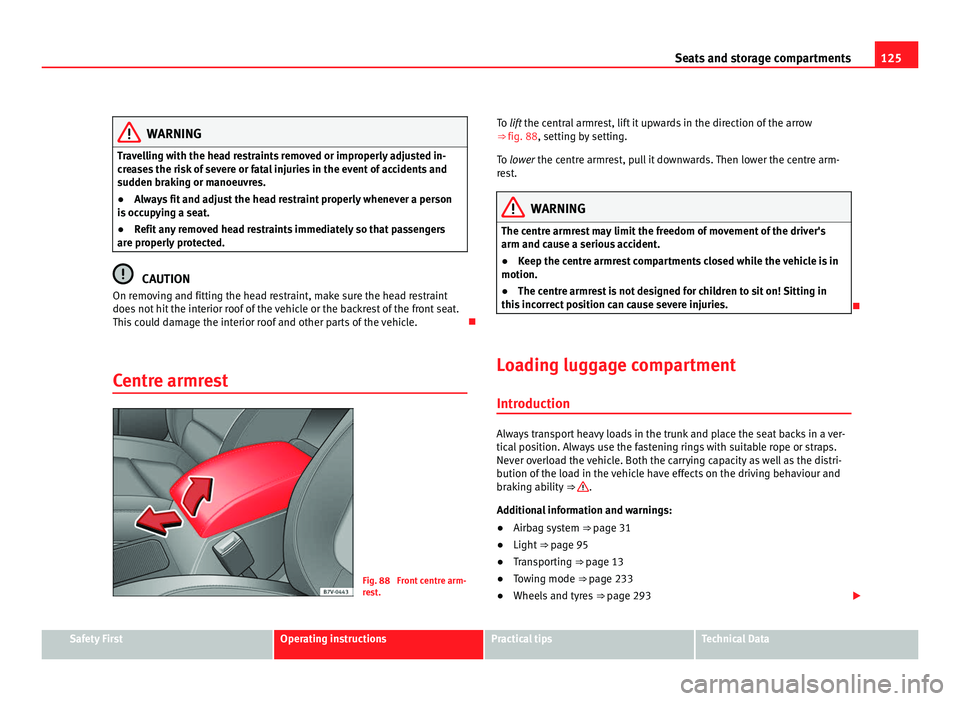
Centre armrest Fig. 88 Front centre arm-
re
s
t. To lift the central armrest, lift it upwards in the direction of the arrow
⇒ fig. 88
, setting by setting.
To lower the centre armrest, pull it downwards. Then lower the centre arm-
rest. WARNING
The centre armrest may limit the freedom of movement of the driver's
arm and cau se a seriou
s accident.
● Keep the centre armrest compartments closed while the vehicle is in
motion.
● The centre armrest is not designed for children to sit on! Sitting in
this inc
orrect position can cause severe injuries.
Loading luggage compartment Introduction Always transport heavy loads in the trunk and place the seat backs in a ver-
tical
po
sition. Always use the fastening rings with suitable rope or straps.
Never overload the vehicle. Both the carrying capacity as well as the distri-
bution of the load in the vehicle have effects on the driving behaviour and
braking ability ⇒ .
Addition a
l information and warnings:
● Airbag system ⇒ page 31
● Light
⇒ page 95
● Tr
ansporting ⇒ page 13
● T
owing mode ⇒ page 233
● Wheel
s and tyres ⇒ page 293 Safety First Operating instructions Practical tips Technical Data
Page 134 of 385
132
Seats and storage compartments
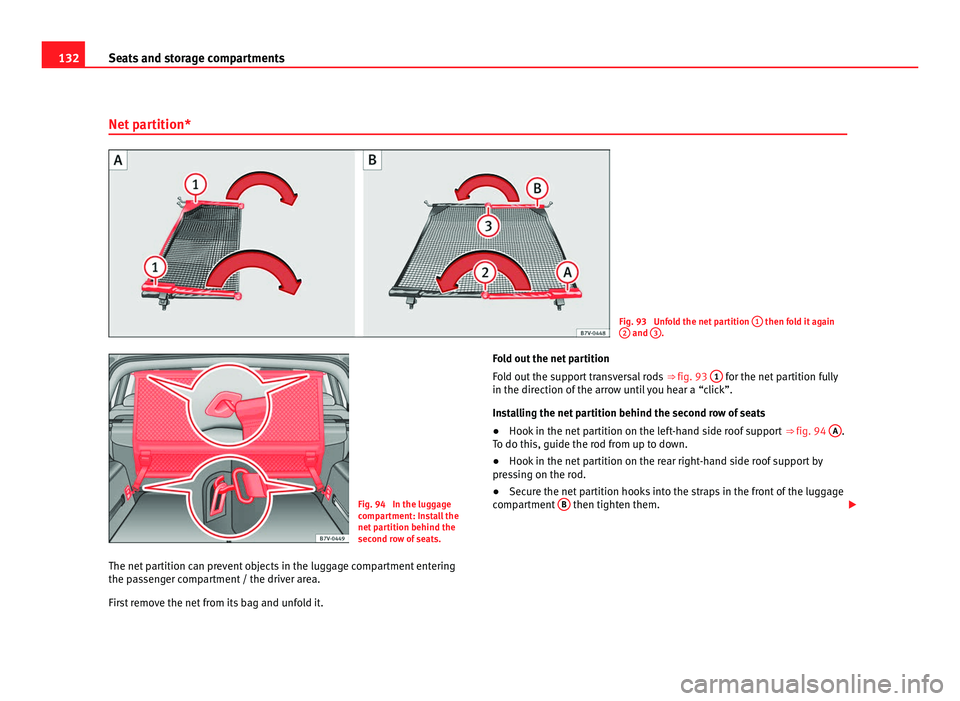
Net partition* Fig. 93 Unfold the net partition
1 then fold it again
2 and
3 .
Fig. 94 In the luggage
comp
ar
tment: Install the
net partition behind the
second row of seats.
The net partition can prevent objects in the luggage compartment entering
the pas
senger compartment / the driver area.
First remove the net from its bag and unfold it. Fold out the net partition
Fol
d out the support transversal rods ⇒ fig. 93 1 for the net partition fully
in the direction of the arr
ow until you hear a “click”.
Installing the net partition behind the second row of seats
● Hook in the net partition on the left-hand side roof support ⇒ fig. 94 A .
To do thi s, guide the r
od from up to down.
● Hook in the net partition on the rear right-hand side roof support by
pres
sing on the rod.
● Secure the net partition hooks into the straps in the front of the luggage
compar
tment B then tighten them.
Page 135 of 385
133
Seats and storage compartments
Installing the net partition behind the front seats
● Hook in the net partition on the left-hand side roof support C . To do
this, guide the r od fr
om up to down.
● Hook in the net partition on the rear right-hand side roof support by
pres
sing on the rod.
● Secure the hooks of the net partition to the attachment rings in the left
and right hand s
ide foot rests on the second row of seats then tighten the
straps.
Removing the net partition
● Loosen the net partition straps.
● Release the net partition hooks from the rings B .
● Release the net partition from the right and left roof supports A or
C by pressing on the rod.
●
Unhook the net partition from the left-hand side roof support.
Fo l
ding in the net partition
● Press on the release button ⇒ fig. 93 2 and bend the rod
A in the di-
rection of the arr
ow with the release o button pressed.
● Press on the release button 3 and bend the rod
B in the direction of
the arro w w
ith the release button pressed.
● Store the net partition securely in the vehicle. WARNING
Loose objects in the passenger compartment can be violently thrown in
ca se of
a sudden manoeuvre or braking and especially in accidents caus-
ing serious injury.
● Ensure that the rods are correctly locked in place.
● Even when net partition is correctly fitted, objects must be secured.
● When driving with the net partition, no passengers should be behind
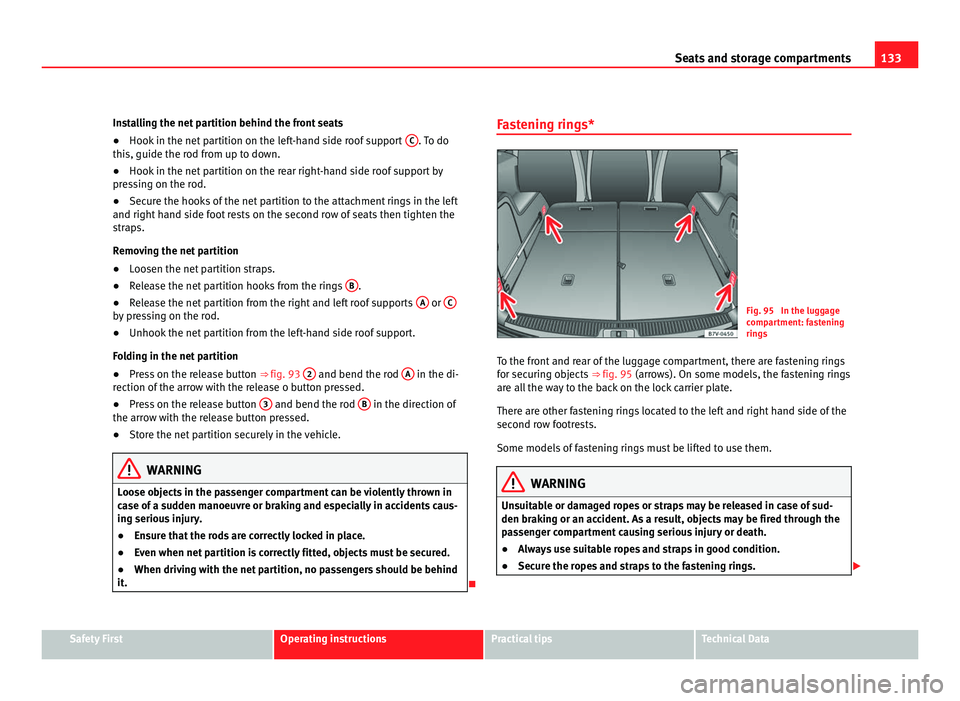
it. Fastening rings*
Fig. 95 In the luggage
comp
ar
tment: fastening
rings
To the front and rear of the luggage compartment, there are fastening rings
for securin
g objects ⇒ fig. 95 (arrows). On some models, the fastening rings
are all the way to the back on the lock carrier plate.
There are other fastening rings located to the left and right hand side of the
second row footrests.
Some models of fastening rings must be lifted to use them. WARNING
Unsuitable or damaged ropes or straps may be released in case of sud-
den brak in
g or an accident. As a result, objects may be fired through the
passenger compartment causing serious injury or death.
● Always use suitable ropes and straps in good condition.
● Secure the ropes and straps to the fastening rings. Safety First Operating instructions Practical tips Technical Data
Page 140 of 385
138
Seats and storage compartments
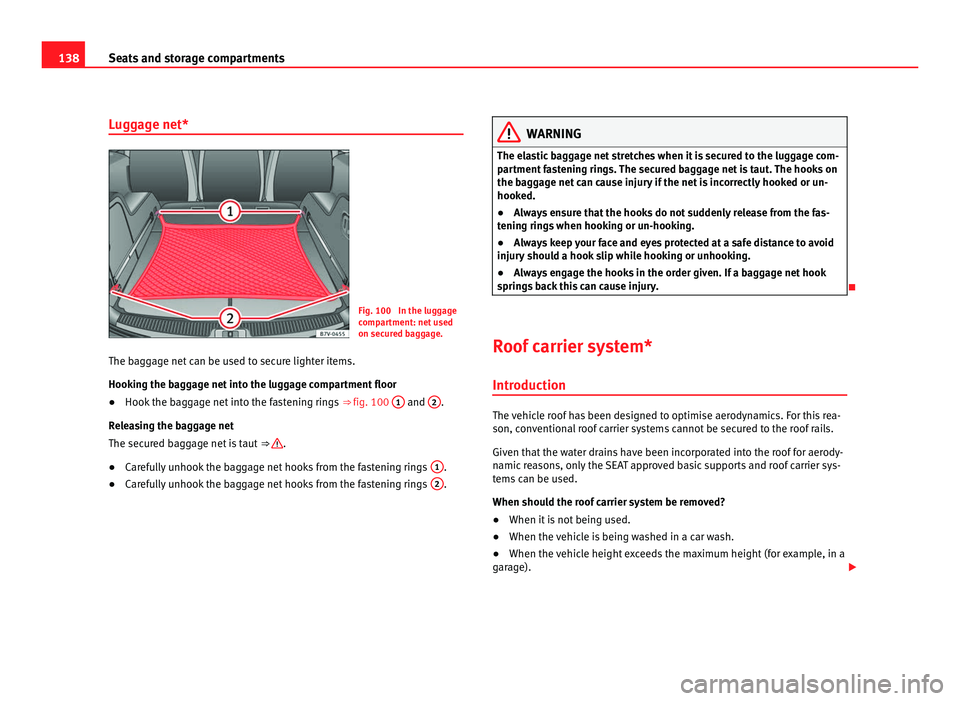
Luggage net* Fig. 100 In the luggage
comp
ar
tment: net used
on secured baggage.
The baggage net can be used to secure lighter items.
Hooking the b
aggage net into the luggage compartment floor
● Hook the baggage net into the fastening rings ⇒ fig. 100 1 and
2 .
Rel e
asing the baggage net
The secured baggage net is taut ⇒ .
● Carefully unhook the baggage net hooks from the fastening rings 1 .
● Carefully unhook the baggage net hooks from the fastening rings 2 . WARNING
The elastic baggage net stretches when it is secured to the luggage com-
par tment
fastening rings. The secured baggage net is taut. The hooks on
the baggage net can cause injury if the net is incorrectly hooked or un-
hooked.
● Always ensure that the hooks do not suddenly release from the fas-
tening rin
gs when hooking or un-hooking.
● Always keep your face and eyes protected at a safe distance to avoid
injury shou
ld a hook slip while hooking or unhooking.
● Always engage the hooks in the order given. If a baggage net hook
spring
s back this can cause injury.
Roof carrier system* Introduction The vehicle roof has been designed to optimise aerodynamics. For this rea-
son, con
v
entional roof carrier systems cannot be secured to the roof rails.
Given that the water drains have been incorporated into the roof for aerody-
namic reasons, only the SEAT approved basic supports and roof carrier sys-
tems can be used.
When should the roof carrier system be removed?
● When it is not being used.
● When the vehicle is being washed in a car wash.
● When the vehicle height exceeds the maximum height (for example, in a
garag
e).
Page 141 of 385
139
Seats and storage compartments
Additional information and warnings:
● Light ⇒ page 95
● Tr
ansporting ⇒ page 13
● E
cological driving ⇒ page 225
● Wheel
s and tyres ⇒ page 293
● A
ccessories, parts replacement, repairs and modifications ⇒ page 257WARNING
The risk of an accident is increased by transporting heavy or bulky loads
on the roof , whic
h affects the car's handling by shifting the centre of
gravity and increasing susceptibility to cross winds.
● Always secure loads correctly with suitable and undamaged attach-
ment rope or s
traps.
● Large, heavy, wide and flat loads negatively affect the vehicle aerody-
namics, c
entre of gravity and handling.
● Avoid brusque manoeuvres and sudden braking.
● Adjust your speed and driving style to visibility, road, traffic and
weather c
onditions. CAUTION
● Always remove the roof carrier system from the roof before entering a car
w a
sh.
● The height of your vehicle is changed by the installation of the roof carri-
er and the load sec
ured on it. Compare the vehicle height with the passage
height, for example in underground car parks or entering garage doors.
● The roof antenna, the range of the panoramic sliding roof and the tail-
gate shou
ld not be affected by the roof carrier system and the load being
transported.
● Take extra care not to let the tailgate strike the roof load when opening. For the sake of the environment
The vehicle uses more fuel when the roof carrier system is fitted.
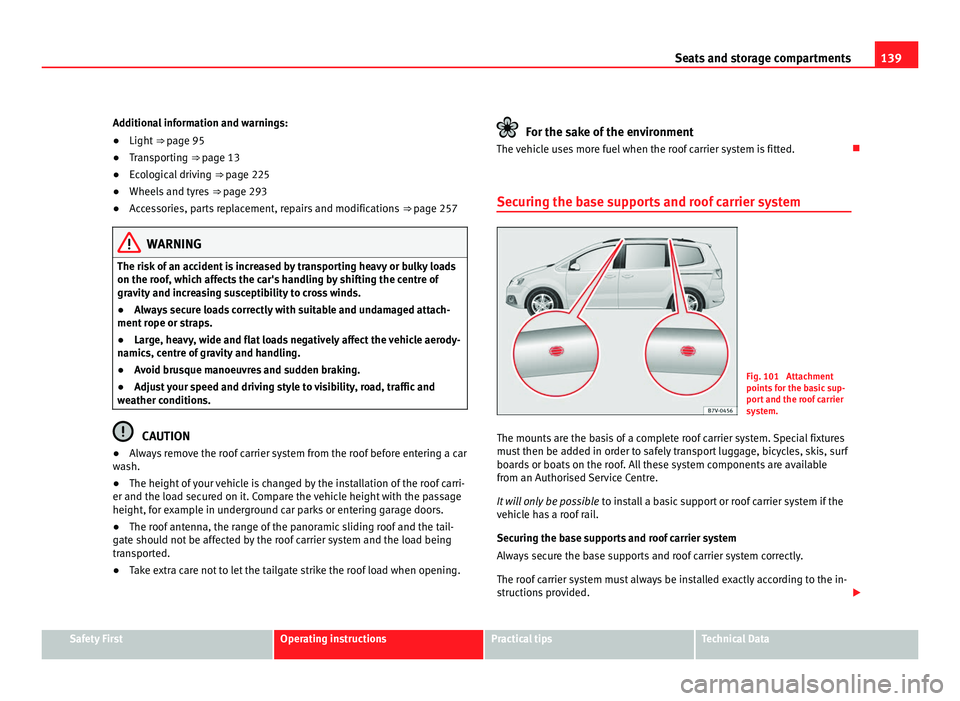
Securing the base supports and roof carrier system Fig. 101 Attachment
points
f
or the basic sup-
port and the roof carrier
system.
The mounts are the basis of a complete roof carrier system. Special fixtures
mus t
then be added in order to safely transport luggage, bicycles, skis, surf
boards or boats on the roof. All these system components are available
from an Authorised Service Centre.
It will only be possible to install a basic support or roof carrier system if the
vehicle has a roof rail.
Securing the base supports and roof carrier system
Always secure the base supports and roof carrier system correctly.
The roof carrier system must always be installed exactly according to the in-
structions provided. Safety First Operating instructions Practical tips Technical Data