brake light Seat Alhambra 2011 Owner's Manual
[x] Cancel search | Manufacturer: SEAT, Model Year: 2011, Model line: Alhambra, Model: Seat Alhambra 2011Pages: 385, PDF Size: 7.92 MB
Page 12 of 385
10
Safe driving
Adjusting the seat position
Introduction Number of seats
Dependin
g on the equipment,
your vehicle has a total of five or seven seats.
Each seat is equipped with a seat belt. Equipment Seats in the
front Seats in the sec-
ond ro w Seats in the
third r o
w 5 seats 2 3 –
7 seats 2 3 2
Additional information and warnings:
●
Seat functions ⇒ page 117
● Se
at belts ⇒ page 21
● Airb
ag system ⇒ page 31
● Chi
ld seats (accessories) ⇒ page 39WARNING
An incorrect sitting position in the vehicle can lead to severe injuries or
death in the ev ent
of sudden braking or manoeuvres, collision or acci-
dents or if the airbag deploys.
● Before the vehicle moves, assume the proper sitting position and
maintain it
throughout the trip. This also includes fastening the seat
belt.
● Never transport more people than there are seats with a seat belt
avail
able in the vehicle. WARNING (Continued)
● Children must always be protected with an approved child restraint
sy s
tem suited to their height and weight ⇒ page 39, ⇒ page 31.
● Always keep your feet in the footwell while the vehicle is in motion.
Never, f
or example, put your feet on the surface of a seat or on the dash
panel and never put them out of a window. Otherwise the airbag and seat
belt offer insufficient protection and the risk of injury in the event of an
accident is increased. WARNING
Before every trip, adjust the seat, the seat belt and the head restraints
and ins truct
your passengers to fasten their seat belts properly.
● Move the front passenger seat back as far as possible.
● Adjust the driver's seat so that there is a distance of at least 25 cm
(10 inches) betw
een the centre of your chest and the hub of the steering
wheel. Adjust the driver's seat so that you are able to press the accelera-
tor, brake and clutch pedals to the floor with your knees slightly angled
and that the distance between your knees and the dash panel is at least
10 cm (4 inches). If you physical constitution prevents you from meeting
these requirements, contact a Technical Service to make any modifica-
tions required.
● Never drive with the backrest tilted far back. The further the backrests
are tilt
ed to the rear, the greater the risk of injury due to incorrect posi-
tioning of the belt web or to the incorrect sitting position.
● Never drive with the backrest tilted forwards. Should a front airbag
deploy
, it could throw the backrest backwards and injure the passengers
of the rear seats.
● Sit as far away as possible from the steering wheel and the dash pan-
el.
Page 14 of 385
12
Safe driving
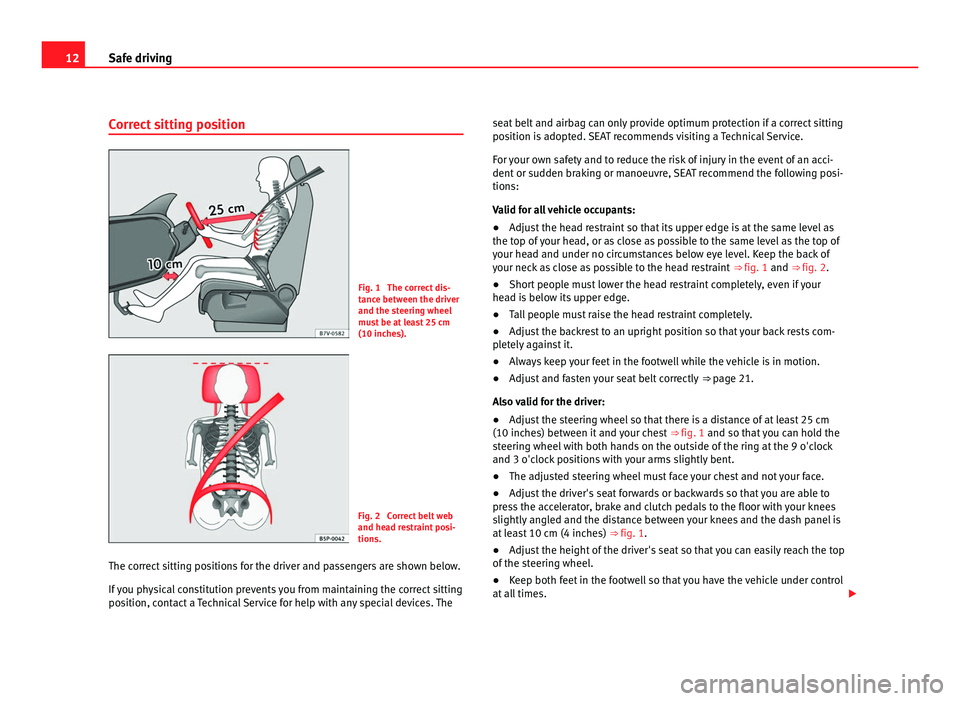
Correct sitting position Fig. 1 The correct dis-
tanc
e betw
een the driver
and the steering wheel
must be at least 25 cm
(10 inches). Fig. 2 Correct belt web
and hea
d r
estraint posi-
tions.
The correct sitting positions for the driver and passengers are shown below.
If y
ou physical constitution prevents you from maintaining the correct sitting
position, contact a Technical Service for help with any special devices. The seat belt and airbag can only provide optimum protection if a correct sitting
position i
s adopted. SEAT recommends visiting a Technical Service.
For your own safety and to reduce the risk of injury in the event of an acci-
dent or sudden braking or manoeuvre, SEAT recommend the following posi-
tions:
Valid for all vehicle occupants:
● Adjust the head restraint so that its upper edge is at the same level as
the top of
your head, or as close as possible to the same level as the top of
your head and under no circumstances below eye level. Keep the back of
your neck as close as possible to the head restraint ⇒ fig. 1 and ⇒ fig. 2.
● Short people must lower the head restraint completely, even if your
head i
s below its upper edge.
● Tall people must raise the head restraint completely.
● Adjust the backrest to an upright position so that your back rests com-
plet
ely against it.
● Always keep your feet in the footwell while the vehicle is in motion.
● Adjust and fasten your seat belt correctly ⇒ page 21.
A
lso valid for the driver:
● Adjust the steering wheel so that there is a distance of at least 25 cm
(10 inches) betw
een it and your chest ⇒ fig. 1 and so that you can hold the
steering wheel with both hands on the outside of the ring at the 9 o'clock
and 3 o'clock positions with your arms slightly bent.
● The adjusted steering wheel must face your chest and not your face.
● Adjust the driver's seat forwards or backwards so that you are able to
pres
s the accelerator, brake and clutch pedals to the floor with your knees
slightly angled and the distance between your knees and the dash panel is
at least 10 cm (4 inches) ⇒ fig. 1.
● Adjust the height of the driver's seat so that you can easily reach the top
of the st
eering wheel.
● Keep both feet in the footwell so that you have the vehicle under control
at all
times.
Page 16 of 385
14
Safe driving WARNING
The driving behaviour and braking ability change when transporting
heavy and l
arge objects.
● Adjust your speed and driving style to visibility, road, traffic and
weather c
onditions.
● Accelerate gently and carefully.
● Avoid sudden braking and manoeuvres.
● Brake early.
Transporting a load Secure all objects in the vehicle
●
Distribute the load throughout the vehicle, on the roof and in a trailer as
unif orm
ly as possible.
● Transport heavy objects as far forward as possible in the luggage com-
partment
and lock the seat backs in the vertical position.
● Secure luggage in the luggage compartment with suitable straps on the
fas
tening rings ⇒ page 125.
● Check the headlight adjustment ⇒ page 95.
● U
se the suitable tyre pressure according to the load being transported.
Rea
d the tire inflation information label ⇒ page 293.
● For vehicles with a tire pressure indicator, change the vehicle load status
⇒ page 221. CAUTION
Objects on the shelf could chafe against the wires of the heating element in
the re ar w
indow and cause damage. Note
Please note the information about loading a trailer ⇒ pag
e 233 and the
roof carrier system ⇒ page 138.
Driving with the tailgate open Driving with the tailgate open creates an additional risk. Secure all objects
and secur
e the t
ailgate correctly and take all measures possible to reduce
toxic gases from entering the vehicle. WARNING
Driving with the tailgate unlocked or open could cause serious injuries.
● Always drive with the tailgate closed.
● Secure all objects in the vehicle. Loose items could fall out of the ve-
hicl e and injur
e other road users or damage other vehicles.
● Drive particularly carefully and think ahead.
● Avoid sudden manoeuvres and braking given that this could cause an
uncontr
olled movement of the open tailgate.
● When transporting objects that protrude out of the luggage compart-
ment, indicate them s
uitably. Observe legal requirements.
● If objects must project out of the luggage compartment, the tailgate
must
never be used to “secure” or “attach” objects.
● If a baggage rack is fitted on the tailgate, it should be removed before
travel
ling with the tailgate open.
Page 56 of 385
54
Cockpit
Radio or navigation system (fitted at factory) ⇒ Booklet Ra-
dio or ⇒ Booklet Navigation system
Storage compartment . . . . . . . . . . . . . . . . . . . . . . . . . . . . . . . . . . . . . 141
Hazard warning lights switch . . . . . . . . . . . . . . . . . . . . . . . . . . . . 312
Switches for:
– Climatic . . . . . . . . . . . . . . . . . . . . . . . . . . . . . . . . . . . . . . . . . . . . . . . . 155
– C
limatronic . . . . . . . . . . . . . . . . . . . . . . . . . . . . . . . . . . . . . . . . . . . . . 155
Right se
at heating controls . . . . . . . . . . . . . . . . . . . . . . . . . . . . . . 117
Button for:
– Anti-slip r
egulation (ASR) . . . . . . . . . . . . . . . . . . . . . . . . . . 183
– Start/stop operation . . . . . . . . . . . . . . . . . . . . . . . . . . . . . . . . . 194
– Parking distance warning system (Park Pilot) . . . . . . . . . . 198
– Park Assist system . . . . . . . . . . . . . . . . . . . . . . . . . . . . . . . . . . . 202
– Tyre pressure monitor
. . . . . . . . . . . . . . . . . . . . . . . . . . . . . 221
– Opening the tailgate . . . . . . . . . . . . . . . . . . . . . . . . . . . . . . . . . 84
– Opening and closing of electric sliding doors . . . . . . . . . 81
Loc
king lever to open glove compartment . . . . . . . . . . . . . . . . . .141
Position of passenger front airbag on the instrument panel . .31
Key-operated switch in glove box for deactivating front pas-
senger's
airbag . . . . . . . . . . . . . . . . . . . . . . . . . . . . . . . . . . . . . . . . . . . 31
Passenger front airbag off warning lamp . . . . . . . . . . . . . . . . . . .31
Lever for:
– Manual g
earbox . . . . . . . . . . . . . . . . . . . . . . . . . . . . . . . . . . . . . . . . 174
– Automatic gearbox . . . . . . . . . . . . . . . . . . . . . . . . . . . . . . . . . . . . . 174
12 V
olt socket . . . . . . . . . . . . . . . . . . . . . . . . . . . . . . . . . . . . . . . . . . . . . 151
Auto Hold Switch - . . . . . . . . . . . . . . . . . . . . . . . . . . . . . . . . . 194
Electr
onic parking brake switch . . . . . . . . . . . . . . . . . . . . . . . . . 183
Ignition lock . . . . . . . . . . . . . . . . . . . . . . . . . . . . . . . . . . . . . . . . . . . . . . 170
Pedals . . . . . . . . . . . . . . . . . . . . . . . . . . . . . . . . . . . . . . . . . . . . . . . . . . . . 174
Steering column adjustment lever . . . . . . . . . . . . . . . . . . . . . . . . . . 10
13 14
15
16
17
18
19
20
21
22
23
24
25
26
27
28
29 Fuse box cover
. . . . . . . . . . . . . . . . . . . . . . . . . . . . . . . . . . . . . . . . . . . . 322
Lever for:
– Crui se c
ontrol system (GRA) – – – / -
- / -- . . . . . . . . . . . . . . . . . . . . . . . . . . . . . . . . . . . . . . . . . . . . . 212
Open bonnet lever . . . . . . . . . . . . . . . . . . . . . . . . . . . . . . . . . . . . . . . . 275
Controls for:
– Electric w
indows . . . . . . . . . . . . . . . . . . . . . . . . . . . . . . . . . . . . . 89
– Childproof locks . . . . . . . . . . . . . . . . . . . . . . . . . . . . . . . . . . . . . 80 Note
● Some of the items of equipment listed here are fitted only on certain
model s/model
years or are optional extras.
● In versions with the steering wheel on the right, the layout of the control
elements i
s somewhat different. But the symbols assigned to the controls
correspond to the symbols used in the versions with the steering wheel on
the left
Instrument panel Contro
l and warning lamps The control and warning lamps are indicators of warnings,
⇒ , faults
⇒ or certain functions. Some control and warning lamps come on when the ig-
nition is
sw
itched on, and go out when the engine starts running, or while
driving.
Depending on the model, additional text messages may be viewed on the
instrument panel display. These may be purely informative or they may be
advising of the need for action ⇒ page 57, Instruments.
30 31
32
33
Page 57 of 385
55
Cockpit
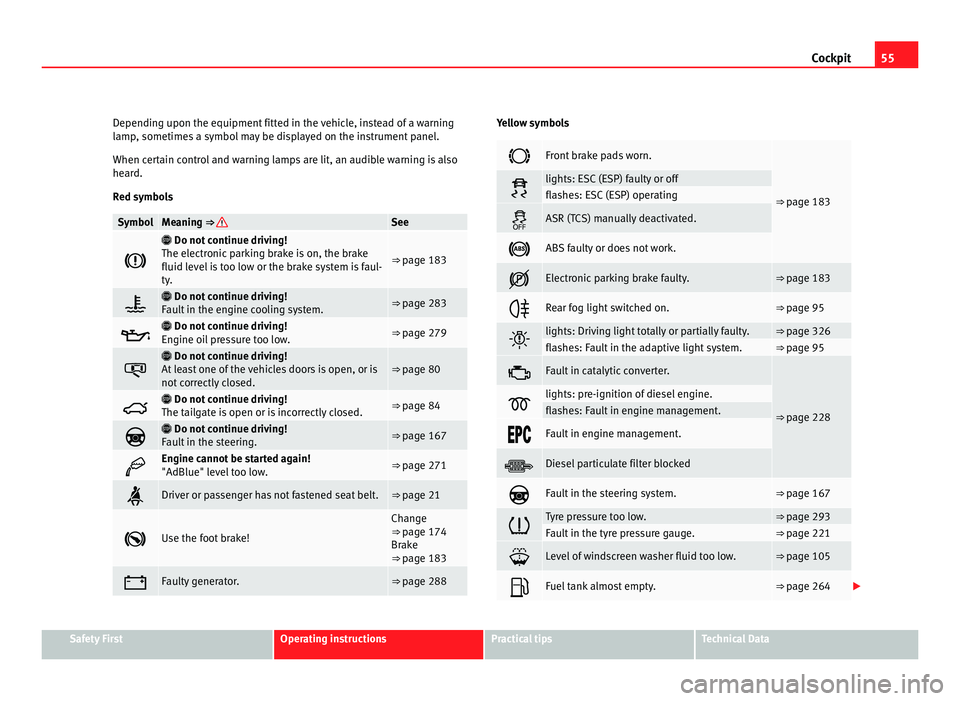
Depending upon the equipment fitted in the vehicle, instead of a warning
lamp , sometime
s a symbol may be displayed on the instrument panel.
When certain control and warning lamps are lit, an audible warning is also
heard.
Red symbols Symbol Meaning ⇒ See
Do not continue driving!
The el ectr
onic parking brake is on, the brake
fluid level is too low or the brake system is faul-
ty. ⇒ page 183
Do not continue driving!
F au
lt in the engine cooling system. ⇒ page 283
Do not continue driving!
En gine oi
l pressure too low. ⇒ page 279
Do not continue driving!
At l
east one of the vehicles doors is open, or is
not correctly closed. ⇒ page 80
Do not continue driving!
The t ai
lgate is open or is incorrectly closed. ⇒ page 84
Do not continue driving!
F au
lt in the steering. ⇒ page 167
Engine cannot be started again!
"AdBlue" lev
el
too low. ⇒ page 271
Driver or passenger has not fastened seat belt. ⇒ page 21
Use the foot brake! Change
⇒ pag
e 174
Br
ake
⇒ page 183 Faulty generator. ⇒ page 288 Yellow symbols
Front brake pads worn.
⇒ page 183 lights: ESC (ESP) faulty or off
flashes: ESC (ESP) operating
ASR (TCS) manually deactivated.
ABS faulty or does not work.
Electronic parking brake faulty. ⇒ page 183
Rear fog light switched on. ⇒ page 95
lights: Driving light totally or partially faulty. ⇒ page 326
flashes: Fault in the adaptive light system. ⇒ page 95
Fault in catalytic converter.
⇒ page 228 lights: pre-ignition of diesel engine.
flashes: Fault in engine management.
Fault in engine management.
Diesel particulate filter blocked
Fault in the steering system. ⇒ page 167
Tyre pressure too low. ⇒ page 293
Fault in the tyre pressure gauge. ⇒ page 221
Level of windscreen washer fluid too low. ⇒ page 105
Fuel tank almost empty. ⇒ page 264
Safety First Operating instructions Practical tips Technical Data
Page 58 of 385
56
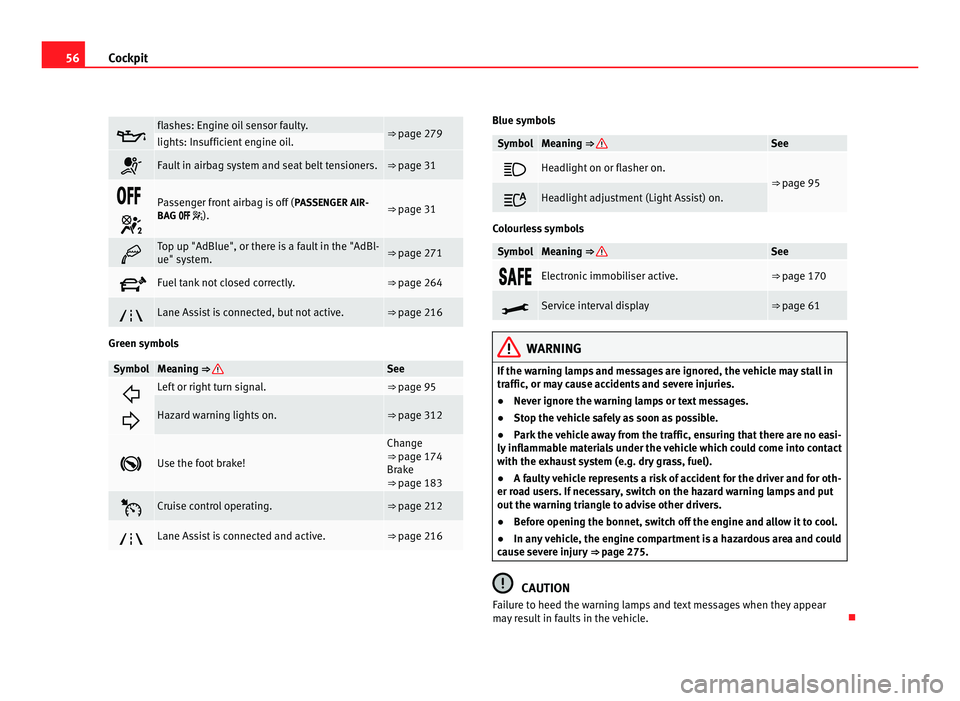
Cockpit flashes: Engine oil sensor faulty.
⇒ page 279
lights: Insufficient engine oil.
Fault in airbag system and seat belt tensioners. ⇒ page 31
Passenger front airbag is off (
PASSENGER AIR-
BAG ). ⇒ page 31
Top up "AdBlue", or there is a fault in the "AdBl-
ue" system.
⇒ page 271
Fuel tank not closed correctly. ⇒ page 264
Lane Assist is connected, but not active. ⇒ page 216
Green symbols
Symbol Meaning ⇒ See
Left or right turn signal. ⇒ page 95
Hazard warning lights on. ⇒ page 312
Use the foot brake! Change
⇒ page 174
Br ak
e
⇒ page 183 Cruise control operating. ⇒ page 212
Lane Assist is connected and active. ⇒ page 216 Blue symbols
Symbol Meaning
⇒ See
Headlight on or flasher on.
⇒
page 95 Headlight adjustment (Light Assist) on.
Colourless symbols
Symbol Meaning ⇒ See
Electronic immobiliser active. ⇒ page 170
Service interval display ⇒ page 61
WARNING
If the warning lamps and messages are ignored, the vehicle may stall in
traffic, or may cause accidents and severe injuries.
● Never ignore the warning lamps or text messages.
● Stop the vehicle safely as soon as possible.
● Park the vehicle away from the traffic, ensuring that there are no easi-
ly inflammable materials under the vehicle which could come into contact
with the exhaust system (e.g. dry grass, fuel).
● A faulty vehicle represents a risk of accident for the driver and for oth-
er road users. If necessary, switch on the hazard warning lamps and put
out the warning triangle to advise other drivers.
● Before opening the bonnet, switch off the engine and allow it to cool.
● In any vehicle, the engine compartment is a hazardous area and could
cause severe injury ⇒ page 275. CAUTION
Failure to heed the warning lamps and text messages when they appear
may result in faults in the vehicle.
Page 83 of 385
81
Unlocking and locking
Several warning and control lamps should light up for a few seconds when
the ignition is sw
itched. This signals that the lamp is working properly. They
will switch off after a few seconds.
If a door is open or incorrectly closed, the indicator or on the instru-
ment panel will light.
Depending on the vehicle equipment, a symbol may be displayed on the in-
strument panel screen instead of the warning lamp. The indication is also
visible when the ignition is switched off. The indication disappears around
15 seconds after the vehicle has been locked.
Sliding doors Introduction Additional information:
●
Vehicle key set ⇒ page 71
● C
entral locking and locking system ⇒ page 74
● Emer
gency locking and unlocking ⇒ page 314WARNING
If a sliding door is not correctly closed, it could open unexpectedly when
drivin g and c
ause serious injuries.
● Always stop immediately and close the sliding door.
● When closing, ensure that the sliding door has closed correctly. A
closed s
liding door should be flush with the corresponding parts of the
bodywork.
● Only open and close sliding doors when no body is in the way of the
door. WARNING
If a sliding door is not fully open, it could close unexpectedly and cause
serious injurie
s.
● Always open the sliding door fully. WARNING
Opening sliding doors while driving is dangerous. The sliding door could
be pushed open or c
losed when the vehicle accelerates and brakes caus-
ing serious injuries.
● Never open the sliding doors when the vehicle is in movement.
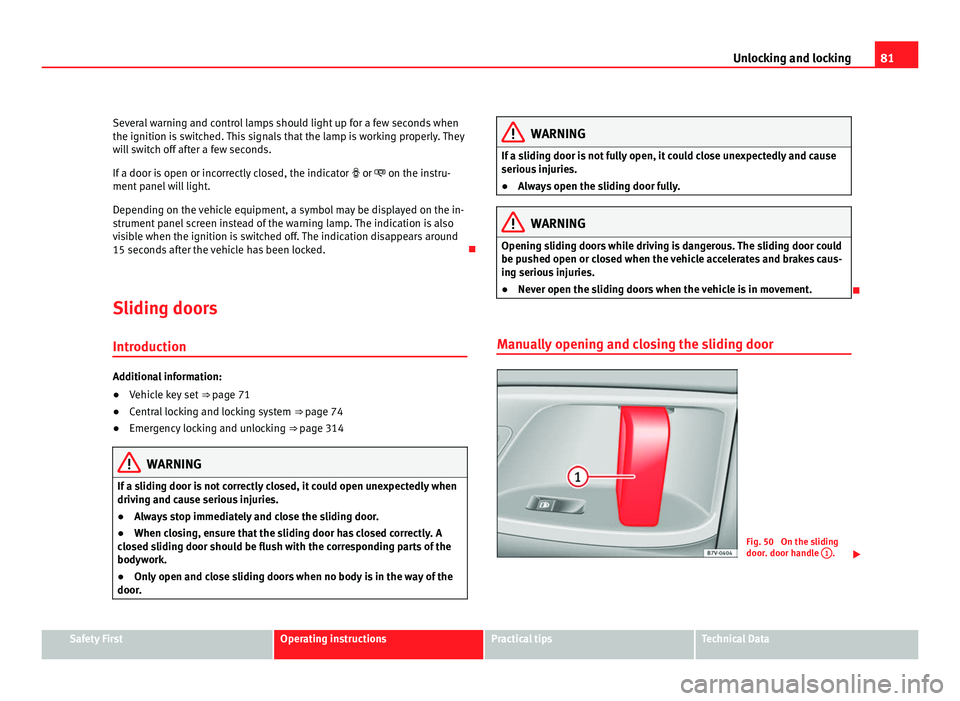
Manually opening and closing the sliding door Fig. 50 On the sliding
door. door h
andl
e 1 .
Safety First Operating instructions Practical tips Technical Data
Page 114 of 385
112
Lights and visibility
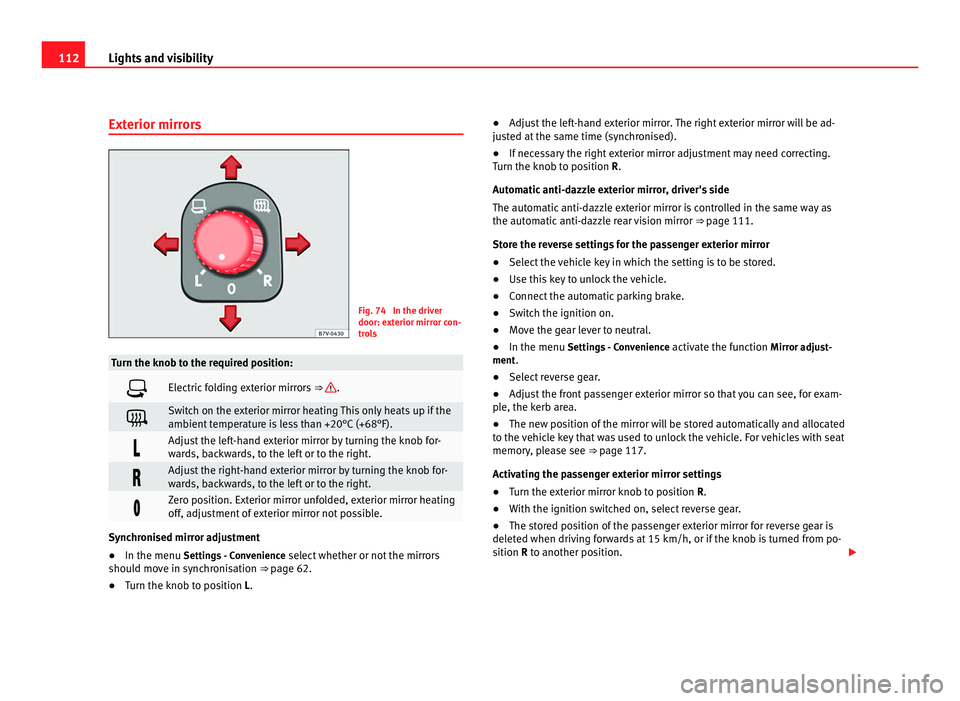
Exterior mirrors Fig. 74 In the driver
door: ext
erior mirr
or con-
trols Turn the knob to the required position:
Electric folding exterior mirrors
⇒ .
Switch on the exterior mirror heating This only heats up if the
ambient
t
emperature is less than +20°C (+68°F). Adjust the left-hand exterior mirror by turning the knob for-
war
d
s, backwards, to the left or to the right. Adjust the right-hand exterior mirror by turning the knob for-
war
d
s, backwards, to the left or to the right. Zero position. Exterior mirror unfolded, exterior mirror heating
off, a
dju
stment of exterior mirror not possible. Synchronised mirror adjustment
●
In the menu Setting s
- Convenience select whether or not the mirrors
should move in synchronisation ⇒ page 62.
● Turn the knob to position L. ●
Adjust the left-hand exterior mirror. The right exterior mirror will be ad-
jus
ted at the same time (synchronised).
● If necessary the right exterior mirror adjustment may need correcting.
Turn the knob t
o position R.
Automatic anti-dazzle exterior mirror, driver's side
The automatic anti-dazzle exterior mirror is controlled in the same way as
the automatic anti-dazzle rear vision mirror ⇒ page 111.
Store the reverse settings for the passenger exterior mirror
● Select the vehicle key in which the setting is to be stored.
● Use this key to unlock the vehicle.
● Connect the automatic parking brake.
● Switch the ignition on.
● Move the gear lever to neutral.
● In the menu Settings
- Convenience activate the function Mirror adjust-
ment.
● Select reverse gear.
● Adjust the front passenger exterior mirror so that you can see, for exam-
ple, the k
erb area.
● The new position of the mirror will be stored automatically and allocated
to the v
ehicle key that was used to unlock the vehicle. For vehicles with seat
memory, please see ⇒ page 117.
Activating the passenger exterior mirror settings
● Turn the exterior mirror knob to position R.
● With the ignition switched on, select reverse gear.
● The stored position of the passenger exterior mirror for reverse gear is
deleted when driv
ing forwards at 15 km/h, or if the knob is turned from po-
sition R to another position.
Page 174 of 385
172
Driving
Key not authorised for the vehicle
If a k ey
which is not authorised for this vehicle is inserted in the ignition
lock, it can be removed as follows:
● Automatic gearbox: the key cannot be removed from the ignition lock.
Pres
s and release the selector lever locking button. Key can be removed
from the vehicle.
● Manual gearbox: Remove the key from the ignition. WARNING
Unsuitable or careless use of the vehicle key could result in serious in-
jury .
● A
lways take all the keys with you whenever you leave the vehicle. The
engine cou
ld accidentally be started and electrical equipment such as
the windows could accidentally be operated resulting in serious injury.
● Never leave children or disabled people alone in the car. They could
be trapped in the c
ar in an emergency and will not be able to get them-
selves to safety. For example, depending on the time of the year, temper-
atures inside a locked and closed vehicle can be extremely high or ex-
tremely low resulting in serious injuries and illness or even death, partic-
ularly for young children.
● Never remove the key from the ignition if the vehicle is in motion. The
steerin
g may lock and it will not be possible to turn the steering wheel. Note
● If the key is left in the ignition lock with the engine off for long periods,
the v
ehicle battery will run flat.
● For automatic gearbox vehicles the key
can only be removed from the ig-
nition lock if the gear selector lever is in position P. In this case, press and
release the selector lever locking button. Starting the engine Complete operations only in the sequence given:
Step
1. Press the brake pedal and keep pressed until step 5 has been
comp
l
eted. 1 a. In vehicles with a manual gearbox:
Pres
s the clutch pedal all
the way and keep pressed until the engine starts. 2. Put the gearstick in neutral or the selector lever in position
P
or N. 3. Only in vehicles with diesel engine:
To prehe
at, turn the key
in the ignition lock to position ⇒ fig. 127 1 . A warning lamp
lights up in the c ontr
ol panel . 4. Turn the key in the ignition lock to position
⇒ fig. 127 2 ; do
not pr e
ss the accelerator. 5. When the engine has started, release the key in the ignition
lock.
6. If the engine does not start, stop the process and try again af-
ter one minut
e. 7. Disconnect the electronic parking brake when you wish to
st
ar
t driving ⇒ page 183. WARNING
Never leave the vehicle unattended if the engine is running. The vehicle
cou l
d move off suddenly, especially if it is in gear, resulting in an acci-
dent and serious injury.
Page 177 of 385
175
Driving WARNING
Do not allow the brakes to “rub” for a prolonged period of time, or brake
frequently or f
or long periods of time. Continuous braking heats up the
brakes. This could significantly reduce braking power, increase braking
distance or even result in the total failure of the brake system. CAUTION
● Never make the brakes slip by pressing the pedal gently, if it is not really
nec e
ssary to brake. This will increase wear.
● Reduce speed, move down a gear or select a shorter range of gears be-
fore lon
g steep slopes. This allows you to use the engine braking effect and
to reduce the strain on the brake system. Otherwise, the brakes may over-
heat and fail. Only use the brakes to reduce speed or to stop.
Warning and control lamps lights up Possible cause Solution
(red) Brake pedal not pressed! Press brake pedal to the floor.
(green) Brake pedal not pressed. To select a range of gears, press
the brak
e ped
al.
Please also see "Electronic park-
ing brake" ⇒ page 183. flashes Possible cause Solution
(green) The selector lever locking but-
ton h
a
s not engaged. The ve-
hicle does not start to move. Engage the selector lever lock
⇒ pag
e 178. Several warning and control lamps should light up for a few seconds when
the ignition is
sw
itched. This signals that the lamp is working properly. They
will switch off after a few seconds. WARNING
If the warning lamps and messages are ignored, the vehicle may stall in
traffic, or m a
y cause accidents and severe injuries.
● Never ignore the warning lamps or text messages.
● Stop the vehicle safely as soon as possible.
● If the vehicle stops and must be stopped for repairs, always park a
safe di
stance from surrounding traffic, turn on the hazard warning lights,
stop the engine and take all of the safety measures necessary to warn
other road users. CAUTION
Failure to heed the warning lamps and text messages when they appear
ma y
result in faults in the vehicle. Safety First Operating instructions Practical tips Technical Data