reset Seat Alhambra 2011 Owner's Manual
[x] Cancel search | Manufacturer: SEAT, Model Year: 2011, Model line: Alhambra, Model: Seat Alhambra 2011Pages: 385, PDF Size: 7.92 MB
Page 60 of 385
58
Cockpit
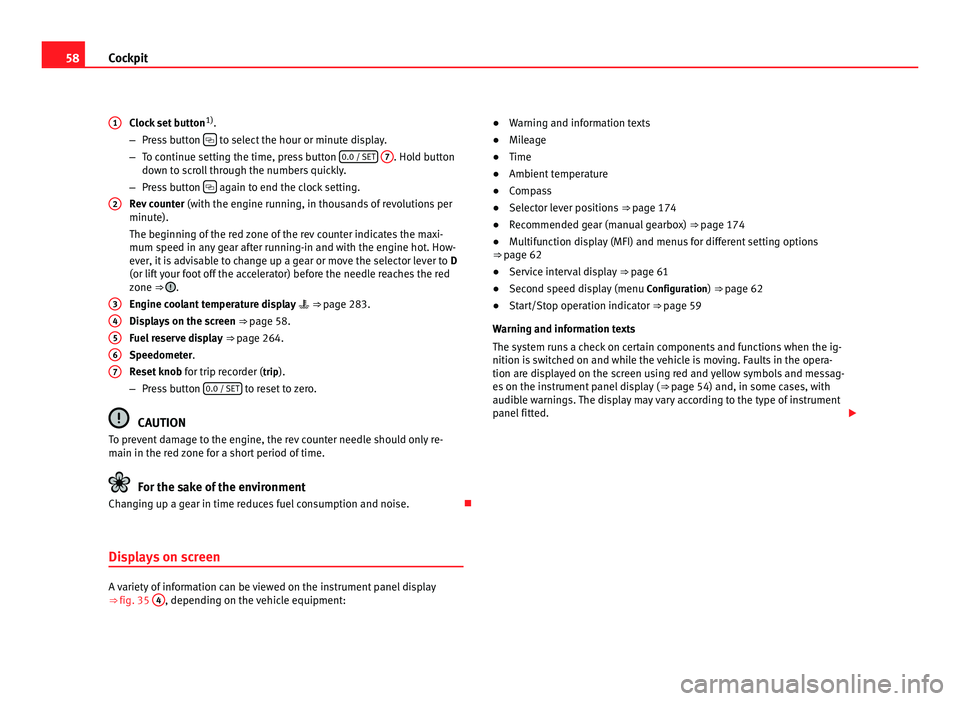
Clock set button 1)
.
– Pre s
s button to select the hour or minute display.
– To c ontinue settin
g the time, press button 0.0 / SET
7 . Hold button
down t o s
croll through the numbers quickly.
– Press button again to end the clock setting.
Rev c
ounter (with the engine running, in thousands of revolutions per
minute).
The beginning of the red zone of the rev counter indicates the maxi-
mum speed in any gear after running-in and with the engine hot. How-
ever, it is advisable to change up a gear or move the selector lever to D
(or lift your foot off the accelerator) before the needle reaches the red
zone ⇒ .
Engine c oo
lant temperature display ⇒ page 283.
Displays on the screen ⇒ page 58.
Fuel reserve display ⇒ page 264.
Speedometer.
Reset knob for trip recorder (trip).
– Press button 0.0 / SET to reset to zero.
CAUTION
To prevent damage to the engine, the rev counter needle should only re-
main in the r ed
zone for a short period of time. For the sake of the environment
Changing up a gear in time reduces fuel consumption and noise.
Displays on screen A variety of information can be viewed on the instrument panel display
⇒
fig. 35 4 , depending on the vehicle equipment:
1
2
3
4
5
6
7 ●
Warning and information texts
● Mil
eage
● Time
● Ambient temperature
● Compass
● Selector lever positions ⇒ page 174
● R
ecommended gear (manual gearbox) ⇒ page 174
● M
ultifunction display (MFI) and menus for different setting options
⇒ page 62
● Ser
vice interval display ⇒ page 61
● Sec
ond speed display (menu Configuration
) ⇒ page 62
● Start/Stop operation indicator ⇒ pag
e 59
Warning and information texts
The system runs a check on certain components and functions when the ig-
nition is switched on and while the vehicle is moving. Faults in the opera-
tion are displayed on the screen using red and yellow symbols and messag-
es on the instrument panel display ( ⇒ page 54) and, in some cases, with
audible warnings. The display may vary according to the type of instrument
panel fitted.
Page 61 of 385
59
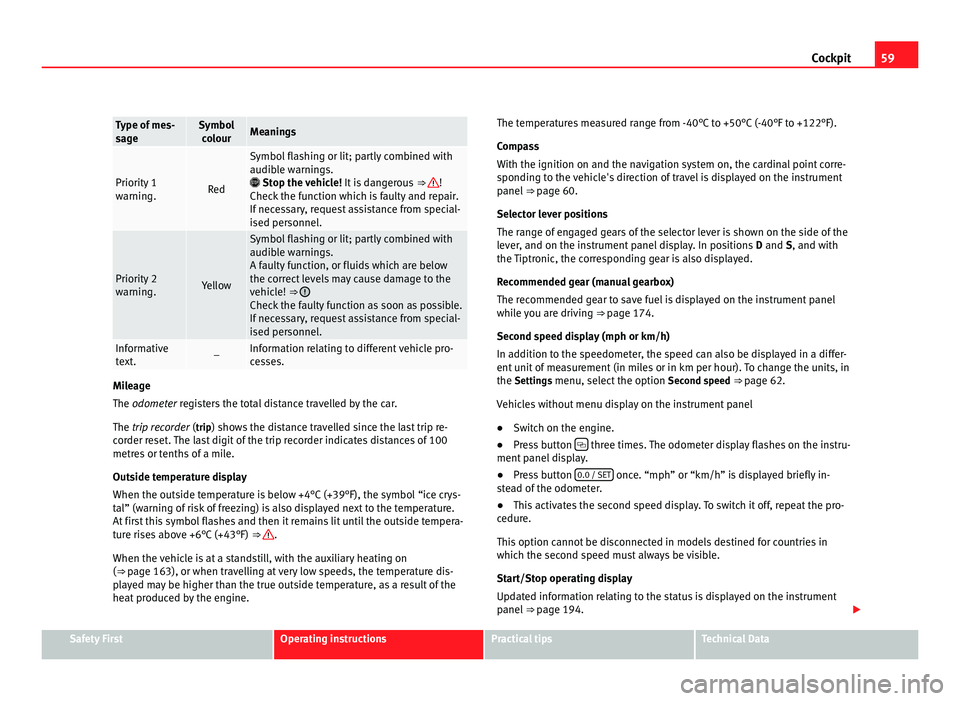
Cockpit Type of mes-
sag
e Symbol
co lour Meanings
Priority 1
warnin
g. Red Symbol flashing or lit; partly combined with
audibl
e w
arnings.
Stop the vehicle! It is dangerous ⇒ !
Check the f
unction which is faulty and repair.
If necessary, request assistance from special-
ised personnel. Priority 2
warnin
g. Yellow Symbol flashing or lit; partly combined with
audibl
e w
arnings.
A faulty function, or fluids which are below
the correct levels may cause damage to the
vehicle! ⇒ Check the faulty function as soon as possible.
If nec
e
ssary, request assistance from special-
ised personnel. Informative
te
xt
. – Information relating to different vehicle pro-
ce
s
ses. Mileage
The odometer
r
egisters the total distance travelled by the car.
The trip recorder (trip) shows the distance travelled since the last trip re- corder reset. The last digit of the trip recorder indicates distances of 100
metres or tenths of a mile.
Outside temperature display
When the outside temperature is below +4°C (+39°F), the symbol “ice crys-
tal” (warning of risk of freezing) is also displayed next to the temperature.
At first this symbol flashes and then it remains lit until the outside tempera-
ture rises above +6°C (+43°F) ⇒ .
When the v ehic
le is at a standstill, with the auxiliary heating on
(⇒ page 163), or when travelling at very low speeds, the temperature dis-
played may be higher than the true outside temperature, as a result of the
heat produced by the engine. The temperatures measured range from -40°C to +50°C (-40°F to +122°F).
Compa
ss
With the ignition on and the navigation system on, the cardinal point corre-
sponding to the vehicle's direction of travel is displayed on the instrument
panel ⇒ page 60.
Selector lever positions
The range of engaged gears of the selector lever is shown on the side of the
lever, and on the instrument panel display. In positions D and S, and with
the Tiptronic, the corresponding gear is also displayed.
Recommended gear (manual gearbox)
The recommended gear to save fuel is displayed on the instrument panel
while you are driving ⇒ page 174.
Second speed display (mph or km/h)
In addition to the speedometer, the speed can also be displayed in a differ-
ent unit of measurement (in miles or in km per hour). To change the units, in
the Settings menu, select the option Second speed ⇒ page 62.
Vehicles without menu display on the instrument panel
● Switch on the engine.
● Press button three times. The odometer display flashes on the instru-
ment p anel
display.
● Press button 0.0 / SET once. “mph” or “km/h” is displayed briefly in-
st e
ad of the odometer.
● This activates the second speed display. To switch it off, repeat the pro-
cedure.
Thi
s option cannot be disconnected in models destined for countries in
which the second speed must always be visible.
Start/Stop operating display
Updated information relating to the status is displayed on the instrument
panel ⇒ page 194. Safety First Operating instructions Practical tips Technical Data
Page 64 of 385
62
Cockpit
The service interval display is reset
If the ser v
ice was not carried out by a Technical Service, the display can be
reset as follows: In vehicles with text messages:
Select the
Settings
menu.In the submenu Serv
ic
e, select the option Reset.Confirm with
OK when requested to do so by the system.
In vehicles without text messages:
Switch the ignition off.
Press and hold the
0.0 / S
ET button.
Switch the ignition back on.
Release the
0.0 / S
ET button and, press
for the next 20 seconds.
Do not reset the indicator to zero between two intervals, otherwise the dis-
p l
ay will be incorrect.
If, while the LongLife service is valid, the service interval display is reset to
zero, the “service will be activated by time or mileage”. The service interval
is no longer calculated individually ⇒ Booklet Maintenance Programme.Note
● The service message disappears after a few seconds, when the engine is
s t
arted or when OK is pressed.
● In vehicles with the LongLife system in which the battery has been dis-
connect ed f
or a long period of time, it is not possible to calculate the date
of the next service. Therefore the service interval display may not be correct.
In this case, please check the maximum permitted service intervals ⇒ Book-
let Maintenance Programme. SEAT information system
Introduction With the ignition switched on, it is possible to read the different functions of
the dis
p
lay by scrolling through the menus.
In vehicles with a multifunction steering wheel, there are no buttons on the
windscreen wiper lever. The multifunction display can only be controlled
from the buttons on the multifunction steering wheel.
The number of menus displayed on the instrument panel will vary according
to the vehicle electronics and equipment.
A specialised dealer will be able to programme or modify additional func-
tions, according to the vehicle equipment. SEAT recommends visiting a
Technical Service.
Some menu options can only be read when the vehicle is at a standstill.
As long as a priority 1 warning is displayed, it will not be possible to read
the menus. To display the menus, confirm the warning by pressing OK .
Addition a
l information and warnings:
● Exterior mirrors ⇒ pag
e 110
● Auxiliary heating ⇒ pag
e 163 WARNING
Any distraction may lead to an accident, with the risk of injury.
● Do not read the instrument panel menus when driving.
Page 66 of 385
64
Cockpit
■Con v
enience indicators On / Off
■ Default setting
■ Time
■ Winter tyres
■ Settings: Language
■ Units
■ Second speed display On / Off
■ Autohold
■ Tourist light On / Off
■ Service
■ Info
■ Reset
■ Default setting
Page 70 of 385
68
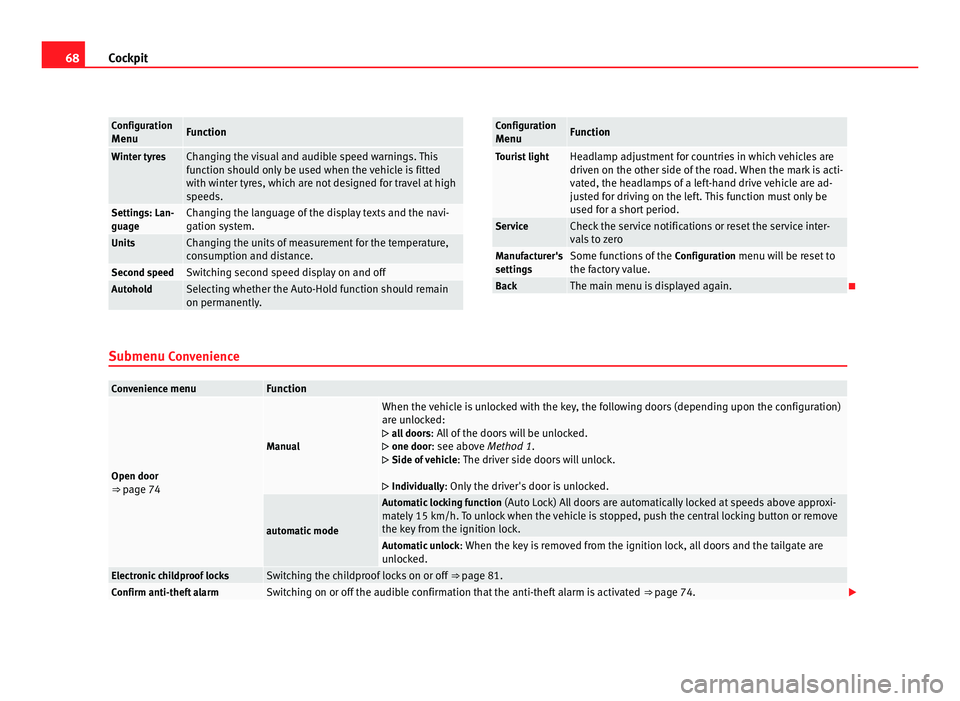
Cockpit Configuration
Menu Function
Winter tyres Changing the visual and audible speed warnings. This
fu
nction shou
ld only be used when the vehicle is fitted
with winter tyres, which are not designed for travel at high
speeds. Settings: Lan-
guage Changing the language of the display texts and the navi-
gation sy
s
tem. Units Changing the units of measurement for the temperature,
con
s
umption and distance. Second speed Switching second speed display on and off
Autohold Selecting whether the Auto-Hold function should remain
on permanently
. Configuration
Menu Function
Tourist light Headlamp adjustment for countries in which vehicles are
driven on the other s
ide of
the road. When the mark is acti-
vated, the headlamps of a left-hand drive vehicle are ad-
justed for driving on the left. This function must only be
used for a short period. Service Check the service notifications or reset the service inter-
val
s
to zero Manufacturer's
setting
s Some functions of the
Configuration
menu will be reset to
the factory value. Back The main menu is displayed again.
Submenu Con v
enienceConvenience menu Function
Open door
⇒ pag
e 74 Manual When the vehicle is unlocked with the key, the following doors (depending upon the configuration)
are u
n
locked:
all doors : All of the doors will be unlocked.
one door: see above Method 1.
Side of vehicle : The driver side doors will unlock.
Individually: Only the driver's door is unlocked. automatic mode Automatic locking function
(Auto Loc
k) All doors are automatically locked at speeds above approxi-
mately 15 km/h. To unlock when the vehicle is stopped, push the central locking button or remove
the key from the ignition lock. Automatic unlock
: When the key
is removed from the ignition lock, all doors and the tailgate are
unlocked. Electronic childproof locks Switching the childproof locks on or off
⇒ page 81. Confirm anti-theft alarm Switching on or off the audible confirmation that the anti-theft alarm is activated
⇒ page 74.
Page 71 of 385
69
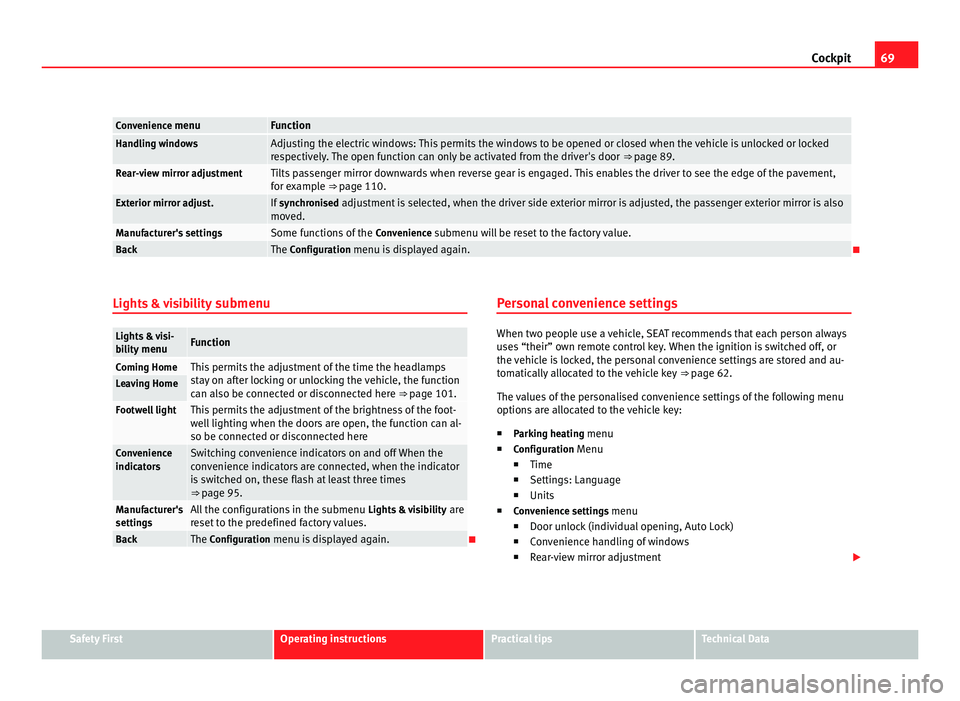
Cockpit Convenience menu Function
Handling windows Adjusting the electric windows: This permits the windows to be opened or closed when the vehicle is unlocked or locked
re
s
pectively. The open function can only be activated from the driver's door ⇒ page 89.Rear-view mirror adjustment Tilts passenger mirror downwards when reverse gear is engaged. This enables the driver to see the edge of the pavement,
for e
x
ample ⇒ page 110. Exterior mirror adjust. If
synchronised adjustment is selected, when the driver side exterior mirror is adjusted, the passenger exterior mirror is also
mo v
ed. Manufacturer's settings Some functions of the
Conv
enience submenu will be reset to the factory value.Back The Configuration menu is displayed again.
Lights & visibility submenuLights & visi-
bi
lity
menu Function
Coming Home This permits the adjustment of the time the headlamps
st
a
y on after locking or unlocking the vehicle, the function
can also be connected or disconnected here ⇒ page 101. Leaving Home
Footwell light This permits the adjustment of the brightness of the foot-
wel
l
lighting when the doors are open, the function can al-
so be connected or disconnected here Convenience
indicat
or
s Switching convenience indicators on and off When the
con
v
enience indicators are connected, when the indicator
is switched on, these flash at least three times
⇒ page 95. Manufacturer's
setting
s All the configurations in the submenu
Lights &
visibility are
reset to the predefined factory values. Back The Configuration menu is displayed again. Personal convenience settings When two people use a vehicle, SEAT recommends that each person always
use
s
“their” own remote control key. When the ignition is switched off, or
the vehicle is locked, the personal convenience settings are stored and au-
tomatically allocated to the vehicle key ⇒ page 62.
The values of the personalised convenience settings of the following menu
options are allocated to the vehicle key: ■ Parking heating menu
■ Configuration Menu
■ Time
■ Settings: Language
■ Units
■ Convenience settings menu
■Door unlock (individual opening, Auto Lock)
■ Convenience handling of windows
■ Rear-view mirror adjustment Safety First Operating instructions Practical tips Technical Data
Page 90 of 385
88
Unlocking and locking
Interrupting the opening and closing process
Tai l
gate opening and closing can be stopped by pressing one of the but-
ton s. E
ach time one of the buttons is pressed, the tailgate moves to its
initial po
sition.
Then, it can be opened or closed by hand. To do this, apply a little more
force.
Memorising the opening angle
The tailgate must be at least half open to memorise an opening angle.
● Stop automatic opening in the opening position required ⇒ pag
e 88.
● Hold down the button ⇒ fig. 56 w
ith the tailgate open for at least three
seconds. The opening angle is memorised.
Memorisation is confirmed by blinking of the hazard lights and a sound sig-
nal.
To be opened completely, the opening angle must be memorised once
more.
● Release the tailgate and open it to the memorised height.
● Push the tailgate all the way up. To do this, apply a little more force.
● Hold down the button ⇒ fig. 56 w
ith the tailgate open for at least three
seconds.
● The opening angle is reset to the original factory setting. WARNING
Unsuitable or careless closing and locking of the tailgate could cause se-
rious injurie
s.
● Never allow children to play inside or around the vehicle without su-
pervi
sion, especially if the tailgate is open. Children could enter the lug-
gage compartment, close the tailgate and become trapped. A locked ve- WARNING (Continued)
hicle can be subjected to extremely high and low temperatures, depend-
in g on the time of
year, thus causing serious injuries/illness and even
death. WARNING
It is possible that the tailgate does not open completely or, if it is open,
clo se
s alone if a large amount of snow has built up on it or if a luggage
rack is fitted. In this case, the tailgate must be supported. CAUTION
● When using a trailer, ensure that there is sufficient space to open and
c lo
se the tailgate.
● Before opening the tailgate, any kind of equipment carrier should be re-
moved, f
or example a bicycle carrier. CAUTION
In case of repeated short-term use, the system is turned off to avoid over-
heatin g.
● When it
has cooled, it may be used once again. During this time, the
tail
gate may be manually opened or closed applying a little more effort.
● If the vehicle battery is disconnected or the fuse blows when the tailgate
is open, the t
ailgate system must be re-initialised. To do this, close the tail-
gate. Note
Before closing the tailgate, make sure that the key has not been left inside
the boot.
Page 92 of 385
90
Unlocking and locking
After turning off the ignition, the windows can be opened and closed for a
short time u
sing the buttons on the door as long as the driver's door or pas-
senger side door is not open. When the key is removed from the ignition
and the driver's door is open, all of the electric windows can be opened or
closed using the corresponding button on the driver's door. After a few sec-
onds, the convenience opening or closing function will begin ⇒ page 90.
Electric windows: functions One-touch opening and closing
The one-touc
h aut
omatic opening and closing is used to open or close the
windows completely. It will not be necessary to hold the button of the corre-
sponding electric window.
For the one-touch closing function: pull up on the button for the window to
the second position.
For the one-touch opening function: Push down the button for the window
to the second position.
To stop the one touch function: Push or pull on the button of the corre-
sponding window.
Restoring one-touch opening and closing
The one-touch opening and closing function is not active after the vehicle
battery has been disconnected or is flat and will have to be reset.
● Close all windows and doors.
● Pull the button of the corresponding window and hold it for one second
in this po
sition.
● Release the button and pull upwards and hold again. The one-touch
function i
s now ready for operation.
The automatic one-touch electric windows can be reinitialised individually
or several at a time. Convenience opening and closing function
The electric w
indows can be opened or closed from outside using the vehi-
cle key:
● Hold in the unlocking for locking button for the vehicle. All windows
which fu
nction electrically will be either opened or closed.
● To interrupt the function, release the locking or unlocking button.
During c
onvenience closing, first the windows and then the sliding sunroof
will be closed.
In the Configuration - convenience menu, there are different settings for oper- ating the windows ⇒ page 62. WARNING
Careless use of the electric windows can cause serious injury.
● Only operate the electric windows when nobody is in the way.
● Never leave children or disabled people alone in the vehicle if the
doors ar
e to be locked. The windows cannot be opened in case of an
emergency.
● Always take all the keys with you whenever you leave the vehicle. Af-
ter turnin
g off the ignition, the windows can be opened and closed for a
short time using the buttons on the door as long as the driver's door or
passenger side door is not open.
● When transporting children in the rear seats, always deactivate the
rear el
ectric windows with the child safety lock so that they cannot be
opened and closed. Note
The one-touch function and roll-back function will not work if there is a mal-
fu nction in the el
ectric windows. Visit a specialist workshop.
Page 104 of 385
102
Lights and visibility
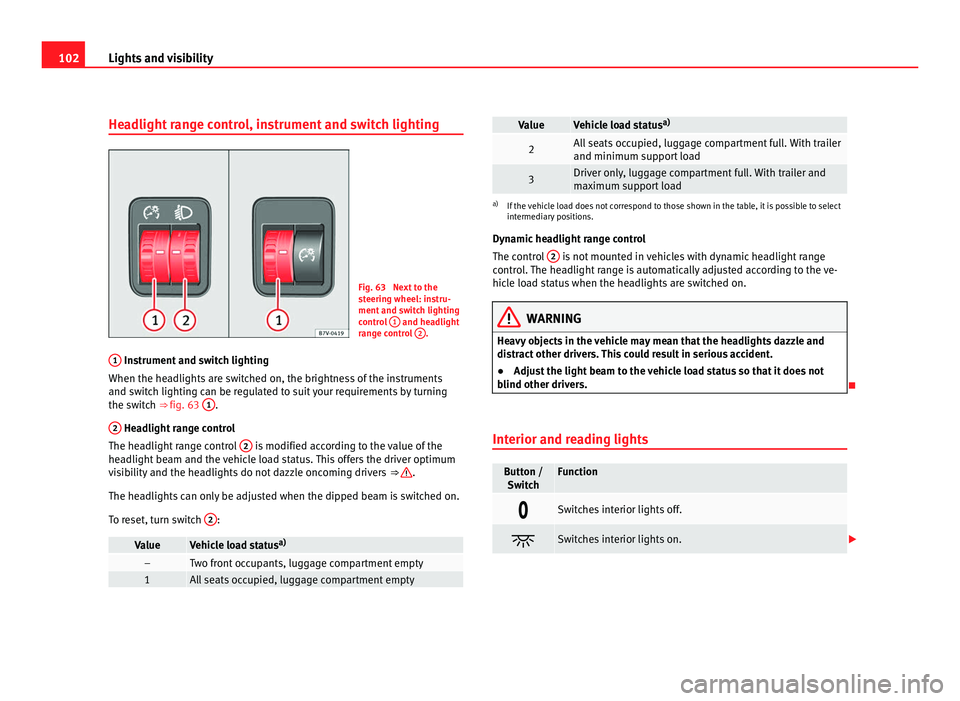
Headlight range control, instrument and switch lighting Fig. 63 Next to the
st
eerin
g wheel: instru-
ment and switch lighting
control 1 and headlight
ran g
e control 2 .
1 Instrument and switch lighting
When the hea dlights
are switched on, the brightness of the instruments
and switch lighting can be regulated to suit your requirements by turning
the switch ⇒ fig. 63 1 .
2 Headlight range control
The hea dlight
range control 2 is modified according to the value of the
hea dlight
beam and the vehicle load status. This offers the driver optimum
visibility and the headlights do not dazzle oncoming drivers ⇒ .
The hea dlights
can only be adjusted when the dipped beam is switched on.
To reset, turn switch 2 :
Value Vehicle load status
a) – Two front occupants, luggage compartment empty
1 All seats occupied, luggage compartment empty Value Vehicle load status
a) 2 All seats occupied, luggage compartment full. With trailer
and minimum sup
por
t load 3 Driver only, luggage compartment full. With trailer and
max
imum s
upport load a)
If the vehicle load does not correspond to those shown in the table, it is possible to select
intermedi ar
y positions.
Dynamic headlight range control
The control 2 is not mounted in vehicles with dynamic headlight range
contr o
l. The headlight range is automatically adjusted according to the ve-
hicle load status when the headlights are switched on. WARNING
Heavy objects in the vehicle may mean that the headlights dazzle and
dis tr
act other drivers. This could result in serious accident.
● Adjust the light beam to the vehicle load status so that it does not
blind other driver
s.
Interior and reading lights Button /
Swit c
h Function
Switches interior lights off.
Switches interior lights on.
Page 198 of 385
196
Driving
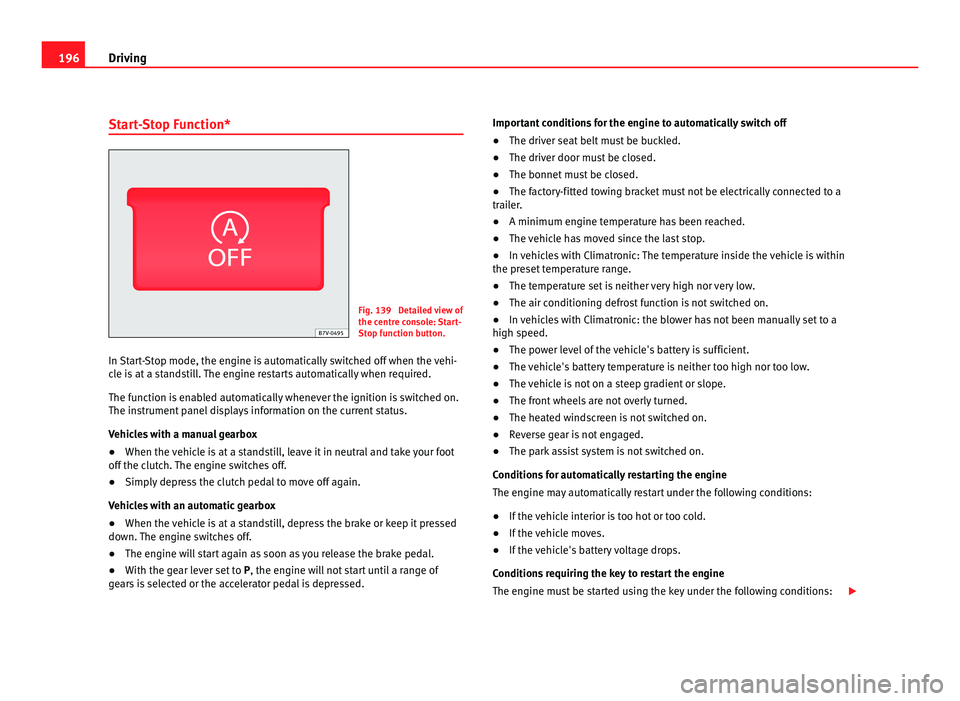
Start-Stop Function* Fig. 139 Detailed view of
the centr
e c
onsole: Start-
Stop function button.
In Start-Stop mode, the engine is automatically switched off when the vehi-
cle i
s at a standstill. The engine restarts automatically when required.
The function is enabled automatically whenever the ignition is switched on.
The instrument panel displays information on the current status.
Vehicles with a manual gearbox
● When the vehicle is at a standstill, leave it in neutral and take your foot
off the clut
ch. The engine switches off.
● Simply depress the clutch pedal to move off again.
Vehicl
es with an automatic gearbox
● When the vehicle is at a standstill, depress the brake or keep it pressed
down. The en
gine switches off.
● The engine will start again as soon as you release the brake pedal.
● With the gear lever set to P, the engine wi
ll not start until a range of
gears is selected or the accelerator pedal is depressed. Important conditions for the engine to automatically switch off
●
The driver seat belt must be buckled.
● The driver door must be closed.
● The bonnet must be closed.
● The factory-fitted towing bracket must not be electrically connected to a
trail
er.
● A minimum engine temperature has been reached.
● The vehicle has moved since the last stop.
● In vehicles with Climatronic: The temperature inside the vehicle is within
the preset
temperature range.
● The temperature set is neither very high nor very low.
● The air conditioning defrost function is not switched on.
● In vehicles with Climatronic: the blower has not been manually set to a
high speed.
● The pow
er level of the vehicle's battery is sufficient.
● The vehicle's battery temperature is neither too high nor too low.
● The vehicle is not on a steep gradient or slope.
● The front wheels are not overly turned.
● The heated windscreen is not switched on.
● Reverse gear is not engaged.
● The park assist system is not switched on.
Conditions
for automatically restarting the engine
The engine may automatically restart under the following conditions:
● If the vehicle interior is too hot or too cold.
● If the vehicle moves.
● If the vehicle's battery voltage drops.
Conditions
requiring the key to restart the engine
The engine must be started using the key under the following conditions: