Start stop Seat Alhambra 2012 User Guide
[x] Cancel search | Manufacturer: SEAT, Model Year: 2012, Model line: Alhambra, Model: Seat Alhambra 2012Pages: 388, PDF Size: 6.72 MB
Page 156 of 388
154Seats and storage compartments
Note
● Using electrical appliances with the engine stopped and the ignition
switched on will drain the battery.
● Unshielded equipment can cause interference on the radio equipment
and the vehicle's electrical system.
● Interference can occur on the radio's AM waveband if electrical applian-
ces are used near the rear window aerial.
Vehicle sockets
Depending on your vehicle's version, you may have a 12-
volt socket and/or a 230 volt socket.
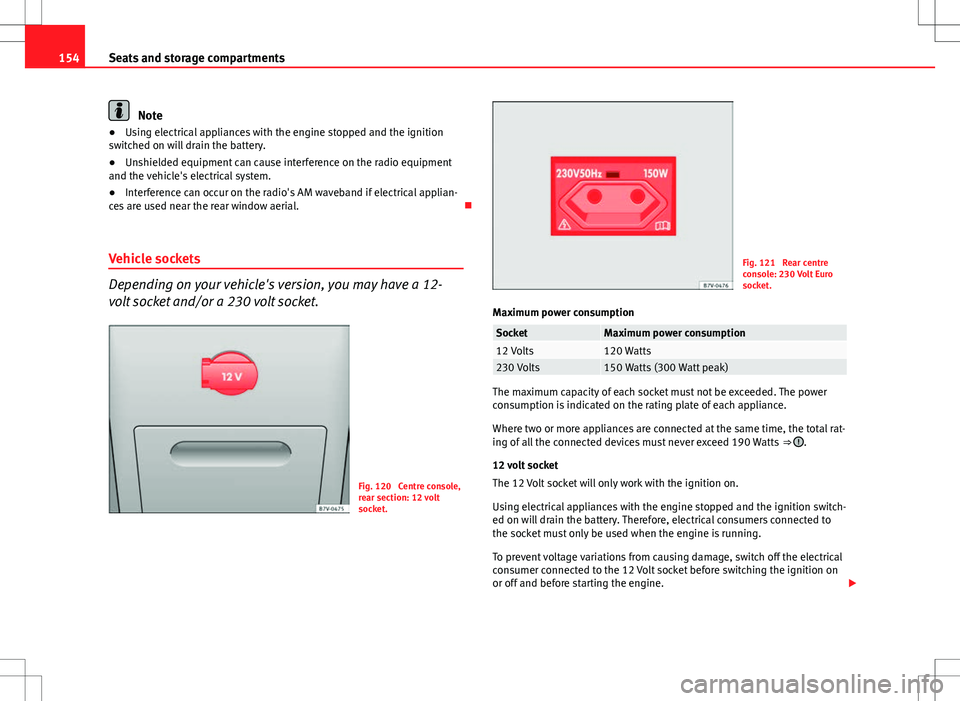
Fig. 120 Centre console,
rear section: 12 volt
socket.
Fig. 121 Rear centre
console: 230 Volt Euro
socket.
Maximum power consumption
SocketMaximum power consumption12 Volts120 Watts230 Volts150 Watts (300 Watt peak)
The maximum capacity of each socket must not be exceeded. The power
consumption is indicated on the rating plate of each appliance.
Where two or more appliances are connected at the same time, the total rat-
ing of all the connected devices must never exceed 190 Watts ⇒
.
12 volt socket
The 12 Volt socket will only work with the ignition on.
Using electrical appliances with the engine stopped and the ignition switch-
ed on will drain the battery. Therefore, electrical consumers connected to
the socket must only be used when the engine is running.
To prevent voltage variations from causing damage, switch off the electrical
consumer connected to the 12 Volt socket before switching the ignition on
or off and before starting the engine.
Page 157 of 388

155
Seats and storage compartments
12 Volt sockets can be found in the following locations in the vehicle:
● Compartment in the centre of the centre console.
● Compartment in the front centre console.
● Storage compartment in the front central armrest.
● Rear centre console ⇒ fig. 120.
● At the rear right of the luggage compartment.
230 Volt Euro socket*
The socket only works when the engine is running ⇒
.
Connecting an electrical appliance: Plug the appliance into the socket as far
as possible to unlock the built-in child safety device. The current only flows
when the child safety device is unlocked.
LED on the socket ⇒ fig. 121Steady green light:The child safety device is unlocked. The
socket can now be used.
Flashing red light:There is some kind of fault (e.g. discon-
nection due to excess current or tempera-
ture).
Heat protection
The 230 Volt Euro power connector converter switches off automatically
when a certain temperature is exceeded. This disconnect prevents overheat-
ing in the event of an increase in power consumption of the connected ap-
pliance and where the atmospheric temperature is too high. The inverter
will switch on again automatically after it has cooled down. Appliances that
are switched on and connected to the socket will start up again. Therefore,
switch off all electrical appliances connected to the socket when the current
converter switches off due to overheating.
WARNING
High voltage in the electrical installation!
● Liquids must not be spilt over the socket.
● Do not plug adapters or extension cords into the 230 Volt Euro power
connector. Otherwise, the built-in child safety device will switch off and
the connector will become live.
● Do not plug current conductors such as a knitting needle into the 230
Volt Euro power connector.
CAUTION
● Always follow the operating instructions for the appliances to be con-
nected!
● Never exceed the maximum power rating as this could damage the vehi-
cle's general electrical system.
● 12 volt socket:
– Only use accessories with approved electromagnetic compatibility ac-
cording to current regulations.
– Never power the socket.
● 230 Volt Euro socket:
– Do not hang appliances or plugs that are too heavy (e.g. a transform-
er) from the socket.
– Do not connect lamps which contain a neon tube.
– Only plug appliances with a voltage that matches the socket voltage
into the socket.
– In the event of consumers with a high start-up current, surge protec-
tion prevents them from switching on. In this case, unplug the consumer
and try plugging it back in after around 10 seconds.
Safety FirstOperating instructionsPractical tipsTechnical Specifications
Page 171 of 388
169
Driving
Driving SteeringIntroduction
The power steering is not hydraulic but electromechanical. The advantage
of this steering system is that it disposes of hydraulic tubes, hydraulic oil,
the pump, filter and other components. The electromechanical system
saves fuel. While a hydraulic system requires oil pressure to be maintained,
electromechanical steering only requires energy when the steering wheel is
turned.
With the power steering system, the assisted steering function automatical-
ly adjusts according to the vehicle speed, the steering torque and the wheel
turning angle. The power steering only works when the engine is running.
Additional information and warnings:
● Start and stop the engine ⇒ page 172
● Vehicle battery ⇒ page 292
● Tow-starting and towing away ⇒ page 344
WARNING
If the power steering is not working then the steering wheel is much
more difficult to turn and the vehicle more difficult to control.
● The power steering only works when the engine is running.
● Never allow the vehicle to move when the engine is switched off.
● Never remove the key from the ignition if the vehicle is in motion. The
steering may lock and it will not be possible to turn the steering wheel.
Control and warning lamps
lights upPossible causeSolution
(red)Power steering faulty.The steering system should be
checked by a Technical Service
as soon as possible.
(yel-
low)
Power steering operation re-
duced.
The steering system should be
checked by a qualified work-
shop as soon as possible.
If, after restarting the engine
and driving for a short distance,
the yellow warning light no lon-
ger comes on, it will not be nec-
essary to take the vehicle to a
specialised workshop.
The vehicle battery was dis-
connected and has been re-
connected.Drive for a short distance at 15 –
20 km/h.
Safety FirstOperating instructionsPractical tipsTechnical Specifications
Page 174 of 388
172Driving
Stopping and starting the engine
Introduction
Immobiliser display
When an invalid key is used or in the event of a system fault, or Immo-
biliser on is displayed on the instrument panel. The engine cannot be star- ted.
Pushing or towing
For technical reasons, the vehicle must not be push- or tow-started. Jump
starting is preferable.
Additional information and warnings:
● Vehicle key set ⇒ page 71
● Changing gear ⇒ page 176
● Braking, stopping and parking ⇒ page 185
● Steering ⇒ page 169
● Start assist systems ⇒ page 196
● Refuelling ⇒ page 268
● Fuel ⇒ page 271
● Emergency locking and unlocking ⇒ page 318
● Jump starting ⇒ page 341
● Tow-starting and towing away ⇒ page 344
WARNING
Turning off the engine while driving will make stopping the vehicle diffi-
cult; this could even result in the loss of control causing an accident with
serious consequences.
● The assisted braking and steering systems, the airbag system, safety
belts and certain safety equipment are only active while the engine is
running.
● The engine should only be switched off when the vehicle is at a
standstill.
WARNING
While the engine is running or starting it could help reduce the risk of se-
rious injury.
● Never start or leave the engine running in poorly ventilated or closed
spaces. Exhaust gas contains carbon monoxide, a toxic, colourless and
odourless gas. Carbon monoxide can cause people to lose conscious-
ness. It can also cause death.
● Never leave the vehicle unattended if the engine is running. The vehi-
cle could move off suddenly or something unexpected could happen re-
sulting in damage and serious injury.
● Never use start boosters. Cold start sprays could explode or increase
the engine speed unexpectedly.
Page 176 of 388
174Driving
Key not authorised for the vehicle
If a key which is not authorised for this vehicle is inserted in the ignition
lock, it can be removed as follows:
● Automatic gearbox: the key cannot be removed from the ignition lock.
Press and release the selector lever locking button. Key can be removed
from the vehicle.
● Manual gearbox: Remove the key from the ignition.
WARNING
Unsuitable or careless use of the vehicle key could result in serious in-
jury.
● Always take all the keys with you whenever you leave the vehicle. The
engine could accidentally be started and electrical equipment such as
the windows could accidentally be operated resulting in serious injury.
● Never leave children or disabled people alone in the car. They could
be trapped in the car in an emergency and will not be able to get them-
selves to safety. For example, depending on the time of the year, temper-
atures inside a locked and closed vehicle can be extremely high or ex-
tremely low resulting in serious injuries and illness or even death, partic-
ularly for young children.
● Never remove the key from the ignition if the vehicle is in motion. The
steering may lock and it will not be possible to turn the steering wheel.
Note
● If the key is left in the ignition lock with the engine off for long periods,
the vehicle battery will run flat.
● For automatic gearbox vehicles the key can only be removed from the ig-
nition lock if the gear selector lever is in position P. In this case, press and
release the selector lever locking button. Starting the engine
Complete operations only in the sequence given:
Step
1.Press the brake pedal and keep pressed until step 5 has been
completed.
1 a.In vehicles with a manual gearbox:
Press the clutch pedal all
the way and keep pressed until the engine starts.
2.Put the gearstick in neutral or the selector lever in position P
or N.
3.Only in vehicles with diesel engine: To preheat, turn the key
in the ignition lock to position ⇒ fig. 128 1. A warning lamp
lights up in the control panel .
4.Turn the key in the ignition lock to position ⇒ fig. 128 2; do
not press the accelerator.
5.When the engine has started, release the key in the ignition
lock.
6.If the engine does not start, stop the process and try again af-
ter one minute.
7.Disconnect the electronic parking brake when you wish to
start driving ⇒ page 185.
WARNING
Never leave the vehicle unattended if the engine is running. The vehicle
could move off suddenly, especially if it is in gear, resulting in an acci-
dent and serious injury.
Page 177 of 388
175
Driving
WARNING
Cold start sprays could explode or cause a sudden increase in the engine
speed.
● Never use start boosters.
CAUTION
● An attempt to start the engine while driving or starting the engine imme-
diately after turning it off can cause damage to the engine or starter motor.
● When the engine is cold, avoid high revs and heavy acceleration and do
not make the engine work hard.
● Do not push or tow start the engine. Sunburnt fuel could damage the
catalytic converter.
For the sake of the environment
Do not warm the engine at idle speed; start driving immediately if the visi-
bility is OK. This helps the engine reach operating temperature faster and
reduces emissions.
Note
● For example, if the key battery is very worn or flat, the engine cannot be
started with the starter button. In this case, remove the ignition button from
the lock and insert the key.
● Electrical components with a high power consumption are switched off
temporarily when the engine starts.
● When the engine is started cold, there may be strong vibrations for a few
moments for technical reasons. This is quite normal, and no cause for con-
cern.
● At temperatures below +5 °C (+41 °F), smoke may be given off below the
vehicle when the additional heater is connected. Stopping the engine
Complete operations only in the sequence given:
Step 1.Stopping the vehicle completely
⇒ .
2.Press the brake pedal and keep pressed until step 4 has been
completed.
3.In automatic gearboxes, put the selector lever in position P.4.Connect the electronic parking brake ⇒ page 185.5.Turn the key in the ignition lock to position ⇒ fig. 128 0.6.With a manual gearbox, put the vehicle in first or reverse gear.
WARNING
Never switch off the engine while the vehicle is moving. You may lose
control of the vehicle and there is a risk of serious accident.
● The airbags and belt tensioners do not work when the ignition is
switched off.
● The brake servo does not work with the engine off. To stop, the brake
pedal must be pressed with more force.
● As the power steering does not work if the engine is not running, you
will need more strength to steer than normally.
● If the key is removed from the ignition, the steering may lock and it
will not be possible to steer the vehicle.
CAUTION
If the engine has been driven at high speed for a prolonged period of time,
it may overheat when turned off. To avoid engine damage, allow the engine
to run for approximately two minutes in neutral before switching it off.
Safety FirstOperating instructionsPractical tipsTechnical Specifications
Page 178 of 388
176Driving
Note
● In vehicles with automatic gearbox, the key can only be removed when
the selector lever is in position P.
● After stopping the engine, the engine compartment fan may continue
running for a few minutes, even when the ignition has been switched off or
the key removed. The radiator fan is automatically switched off.
Electronic immobiliser
The gear lock prevents the engine from being started with an unauthorised
key and the vehicle being moved.
The vehicle key has a built-in chip. It automatically deactivates the immobil-
izer when the key is inserted into the ignition lock.
For this reason, the vehicle can only be used with a genuine SEAT key with
the correct code. Coded keys can be obtained from your Technical Services
⇒ page 71.
If an unauthorised key is used, the message SAFE or Immobiliser active is
displayed on the instrument panel. The vehicle cannot be started in this
case
Note
The correct operation of the vehicle is only guaranteed when original SEAT
keys are used. Changing gear
Introduction
When reverse gear is engaged and the ignition is switched on the following
takes place:
● Reverse lights light up.
● When reversing, the air conditioner automatically changes to air recircu-
lation mode.
● The rear window heater switches on when the windscreen wiper is acti-
vated.
● Also, the parking sensor system, the optical parking sensor and the
camera for the reverse assist system are connected.
Additional information and warnings:
● Instruments ⇒ page 57
● Braking, stopping and parking ⇒ page 185
● Parking sensor system ⇒ page 200
● Park Assist system ⇒ page 204
● Reverse assist system (Rear Assist) ⇒ page 209
● Air conditioning ⇒ page 157
● Electronic power control and exhaust gases purification system
⇒ page 232
● Emergency locking and unlocking ⇒ page 318
WARNING
Rapid acceleration can cause loss of traction and skidding, especially on
slippery ground. This could cause loss of control of the vehicle resulting
in an accident and considerable damage.
● Only use the kickdown or rapid acceleration if visibility, weather, road
and traffic conditions so permit.
Page 179 of 388
177
Driving
WARNING
Do not allow the brakes to “rub” for a prolonged period of time, or brake
frequently or for long periods of time. Continuous braking heats up the
brakes. This could significantly reduce braking power, increase braking
distance or even result in the total failure of the brake system.
CAUTION
● Never make the brakes slip by pressing the pedal gently, if it is not really
necessary to brake. This will increase wear.
● Reduce speed, move down a gear or select a shorter range of gears be-
fore long steep slopes. This allows you to use the engine braking effect and
to reduce the strain on the brake system. Otherwise, the brakes may over-
heat and fail. Only use the brakes to reduce speed or to stop.
Warning and control lamps
lights upPossible causeSolution (red)Brake pedal not pressed!Press brake pedal to the floor.
(green)Brake pedal not pressed.
To select a range of gears, press
the brake pedal.
Please also see "Electronic park-
ing brake" ⇒ page 185.
flashesPossible causeSolution
(green)The selector lever locking but-
ton has not engaged. The ve-
hicle does not start to move.Engage the selector lever lock
⇒ page 180.
Several warning and control lamps should light up for a few seconds when
the ignition is switched. This signals that the lamp is working properly. They
will switch off after a few seconds.
WARNING
If the warning lamps and messages are ignored, the vehicle may stall in
traffic, or may cause accidents and severe injuries.
● Never ignore the warning lamps or text messages.
● Stop the vehicle safely as soon as possible.
● If the vehicle stops and must be stopped for repairs, always park a
safe distance from surrounding traffic, turn on the hazard warning lights,
stop the engine and take all of the safety measures necessary to warn
other road users.
CAUTION
Failure to heed the warning lamps and text messages when they appear
may result in faults in the vehicle.
Safety FirstOperating instructionsPractical tipsTechnical Specifications
Page 181 of 388
179
Driving
Manual gearbox: Engaging gears
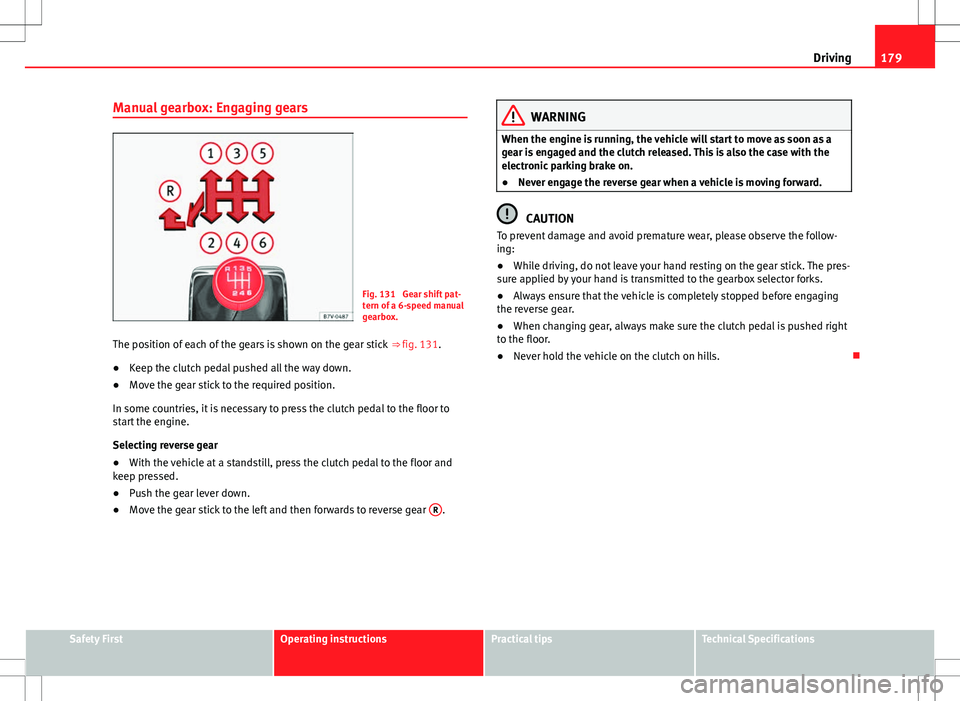
Fig. 131 Gear shift pat-
tern of a 6-speed manual
gearbox.
The position of each of the gears is shown on the gear stick ⇒ fig. 131.
● Keep the clutch pedal pushed all the way down.
● Move the gear stick to the required position.
In some countries, it is necessary to press the clutch pedal to the floor to
start the engine.
Selecting reverse gear
● With the vehicle at a standstill, press the clutch pedal to the floor and
keep pressed.
● Push the gear lever down.
● Move the gear stick to the left and then forwards to reverse gear R
.
WARNING
When the engine is running, the vehicle will start to move as soon as a
gear is engaged and the clutch released. This is also the case with the
electronic parking brake on.
● Never engage the reverse gear when a vehicle is moving forward.
CAUTION
To prevent damage and avoid premature wear, please observe the follow-
ing:
● While driving, do not leave your hand resting on the gear stick. The pres-
sure applied by your hand is transmitted to the gearbox selector forks.
● Always ensure that the vehicle is completely stopped before engaging
the reverse gear.
● When changing gear, always make sure the clutch pedal is pushed right
to the floor.
● Never hold the vehicle on the clutch on hills.
Safety FirstOperating instructionsPractical tipsTechnical Specifications
Page 185 of 388
183
Driving
● You should reduce speed accordingly.
● Press the selector lever from position D to the right into the Tiptronic se-
lector gate ⇒ page 182.
● Gently pull the selector lever back to change down a gear.
● ALTERNATIVELY: Reduce using the steering wheel paddles ⇒ page 182.
Emergency program
If all the selector lever positions on the instrument panel display are shown
with a light-coloured background, this means there is a fault in the system.
The automatic gearbox will operate in emergency programme mode. When
the emergency program is activated, it is possible to drive the vehicle how-
ever, at low speeds and within a selected range of gears.
For the DSG ®
dual clutch gearbox, in some cases, this may mean that the
reverse gear does not engage . The gearbox should be checked by a Techni-
cal Service as soon as possible.
Overload protection for the 6-speed DSG gearbox ®
When the clutch is overloaded, the vehicle begins to jerk and the selector
lever position indicator begins to flash. To prevent damage to the clutch,
this interrupts the power transmission between the engine and the gearbox.
There is no more traction and it is not possible to accelerate. If the clutch is
opened automatically due to overloading, press the brake pedal. Wait a few
seconds before starting to move again.
Kick-down
The kick-down system provides maximum acceleration when the gear selec-
tor lever is in the positions D, S or in the Tiptronic position.
When the accelerator pedal is pressed right down, the automatic gearbox
will shift down to a lower gear, depending on road speed and engine speed.
This takes advantage of the maximum acceleration of the vehicle ⇒
.
When the accelerator is pressed to the floor, the automatic gearbox shifts to
the next gear only after the engine reaches the specified maximum engine
speed. Launch-Control Programme
The Launch-Control programme enables maximum acceleration while at a
standstill.
●
Switch off the ASR ⇒ page 185.
● Press and hold the brake pedal with your left foot.
● Place the selector lever in position S or Tiptronic.
● Press the accelerator with the right foot until the vehicle reaches an en-
gine speed of approximately 3200 rpm.
● Lift the left foot off the brake ⇒
. The vehicle starts with maximum ac-
celeration.
● Turn on the ASR after accelerating!
WARNING
Rapid acceleration can cause loss of traction and skidding, especially on
slippery ground. This could cause loss of control of the vehicle resulting
in an accident and considerable damage.
● Only use kick-down and rapid acceleration when weather conditions,
surface conditions and traffic conditions permit; accelerate and drive in a
manner that does not endanger other road users.
● Please remember that the driven wheels can slip and the vehicle can
skid if the ASR is turned off, especially on slippery ground.
● Turn on the ASR after accelerating!
CAUTION
● If you stop on a hill with a gear ratio engaged, do not try to prevent the
vehicle from rolling back by pressing on the accelerator. This could cause
overheating and damage the automatic gearbox.
● Never allow the vehicle to move with the gear selector lever in N, espe-
cially with the engine turned off. The automatic gearbox will not be lubrica-
ted and could be damaged.
Safety FirstOperating instructionsPractical tipsTechnical Specifications