display Seat Alhambra 2012 User Guide
[x] Cancel search | Manufacturer: SEAT, Model Year: 2012, Model line: Alhambra, Model: Seat Alhambra 2012Pages: 388, PDF Size: 6.72 MB
Page 63 of 388
61
Cockpit
Calibrating compass
To calibrate the compass you must be in one of the valid magnetic zones
with sufficient space to be able to trace a circumference with the vehicle.
● Switch the ignition on.
● Select the Settings menu followed by the option Compass and Calibrate.
● Confirm the message Describe a complete circumference to calibrate the
compass with OK
and then trace a complete circumference driving at ap-
proximately 10 km/h (6 mph).
When the corresponding cardinal point is displayed, the calibration is com-
plete.
Service interval display
The inspection display appears on the instrument panel ⇒ fig. 35 4.
SEAT makes a difference between services with engine oil change (Mainte-
nance Service) and services without engine oil change (Inspection Service).
The service interval display only gives information for service dates which
involve an engine oil change. The dates of the remaining services (for exam-
ple, the next Inspection Service or change of brake fluid) are listed on the
label attached to the door strut, or even in the Maintenance Programme.
In vehicles with Services established by time or mileage , the service inter-
vals are already pre-defined.
In vehicles with LongLife Service , the intervals are determined individually.
Technical progress has made it possible to considerably reduce servicing re-
quirements. The technology used by SEAT ensures that your vehicle only
has an maintenance service when it is necessary. To establish when the
Maintenance Service is due (max. 2 years), the vehicle's conditions of use
and individual driving styles are considered. The service pre-warning first
appears 20 days before the date established for the corresponding service.
The kilometres remaining until the next service are always rounded up to the nearest 100 km and the remaining time is given in complete days. The
current service message cannot be viewed until 500 km after the last serv-
ice. Prior to this only lines are visible on the display.
Inspection reminder
When the Service date is approaching, when the ignition is switched on a
Service reminder is displayed.
In vehicles without text messages
, a spanner is displayed on the instrument
panel with a figure given in km. The number of kilometres shown is the
maximum number that may be driven until the next service. After a few sec-
onds,the display mode changes. A clock symbol appears and the number of
days until the next service appointment is due.
In vehicles with text messages , Service in --- km or --- days is displayed on
the instrument panel.
Service due
After the service date, an audible warning is given when the ignition is
switched on and the spanner displayed on the screen flashes for a few sec-
onds. In vehicles with text messages , Service in --- km or --- days is dis-
played on the instrument panel.
Reading a service notification
With the ignition switched on, the engine off and the vehicle at a standstill,
the current service notification can be read:
● Press the button
on the instrument panel several times until the
spanner symbol is displayed .
● ALTERNATIVELY: select the Settings menu.
● From the Service submenu, select the option Info.
When the service date has past , a minus sign is displayed in front of the
number of kilometres or days. In vehicles with text messages the following
is displayed: Service --- km or --- days ago .
Safety FirstOperating instructionsPractical tipsTechnical Specifications
Page 64 of 388
62Cockpit
The service interval display is reset
If the service was not carried out by a Technical Service, the display can be
reset as follows:
In vehicles with text messages:Select the Settings menu.In the submenu Service, select the option Reset.Confirm with OK when requested to do so by the system.
In vehicles without text messages:Switch the ignition off.Press and hold the 0.0 / SET button.Switch the ignition back on.Release the 0.0 / SET button and, press for the next 20 seconds.
Do not reset the indicator to zero between two intervals, otherwise the dis-
play will be incorrect.
If, while the LongLife service is valid, the service interval display is reset to
zero, the “service will be activated by time or mileage”. The service interval
is no longer calculated individually
⇒ Booklet Maintenance Programme.
Note
● The service message disappears after a few seconds, when the engine is
started or when OK
is pressed.
● In vehicles with the LongLife system in which the battery has been dis-
connected for a long period of time, it is not possible to calculate the date
of the next service. Therefore the service interval display may not be correct.
In this case, please check the maximum permitted service intervals ⇒ Book-
let Maintenance Programme. SEAT information system
Introduction
With the ignition switched on, it is possible to read the different functions of
the display by scrolling through the menus.
In vehicles with a multifunction steering wheel, there are no buttons on the
windscreen wiper lever. The multifunction display can only be controlled
from the buttons on the multifunction steering wheel.
The number of menus displayed on the instrument panel will vary according
to the vehicle electronics and equipment.
A specialised dealer will be able to programme or modify additional func-
tions, according to the vehicle equipment. SEAT recommends visiting a
Technical Service.
Some menu options can only be read when the vehicle is at a standstill.
As long as a priority 1 warning is displayed, it will not be possible to read
the menus. To display the menus, confirm the warning by pressing OK
.
Additional information and warnings:
● Exterior mirrors ⇒ page 110
● Auxiliary heating ⇒ page 165
WARNING
Any distraction may lead to an accident, with the risk of injury.
● Do not read the instrument panel menus when driving.
Page 65 of 388
63
Cockpit
Summary of the menu structure
■ Multifunction display (MFI) ⇒ page 66
■ Journey duration
■ Current fuel consumption
■ Average fuel consumption
■ Distance to empty
■ Distance covered
■ Average speed
■ Digital display of speed
■ Oil temperature digital display
■ Speed warning
■ Audio ⇒ Booklet Radio or ⇒ Booklet navigation system
■ Navigation ⇒ Booklet Navigation system
■ Auxiliary heating ⇒ page 165
■ Activation
■ Programme On / Off
■ Disconnection
■ Timer 1-3
■ Day
■ Time
■ Minute
■ Activate
■ Duration
■ Operating mode
■ Heat
■ Ventilation
■ Day
■ Default setting
■ Vehicle condition ⇒ page 66 ■
Configuration ⇒ page 67
■ Multifunction display data
■ Journey duration
■ Current fuel consumption
■ Average fuel consumption
■ Distance covered
■ Distance to empty
■ Average speed
■ Digital display of speed
■ Speed warning
■ Compass
■ Convenience ⇒ page 68
■ Open door
■ Manual
■ automatic mode
■ Anti-theft alarm confirmation On / Off
■ Handling windows
■ Off
■ All
■ Driver
■ Mirror adjustment On / Off
■ Rear-view mirror adjustment
■ Synchronised
■ Individual
■ Default setting
■ Lights & visibility ⇒ page 69
■ Coming Home
■ Leaving Home
■ Footwell light
■ Convenience indicators On / Off
■ Default setting
■ Tourist light On / Off
Safety FirstOperating instructionsPractical tipsTechnical Specifications
Page 66 of 388
64Cockpit
■Time
■ Winter tyres
■ Settings: Language
■ Units
■ Second speed display On / Off
■ Autohold
■ Service
■ Info
■ Reset
■ Default setting
Page 67 of 388
65
Cockpit
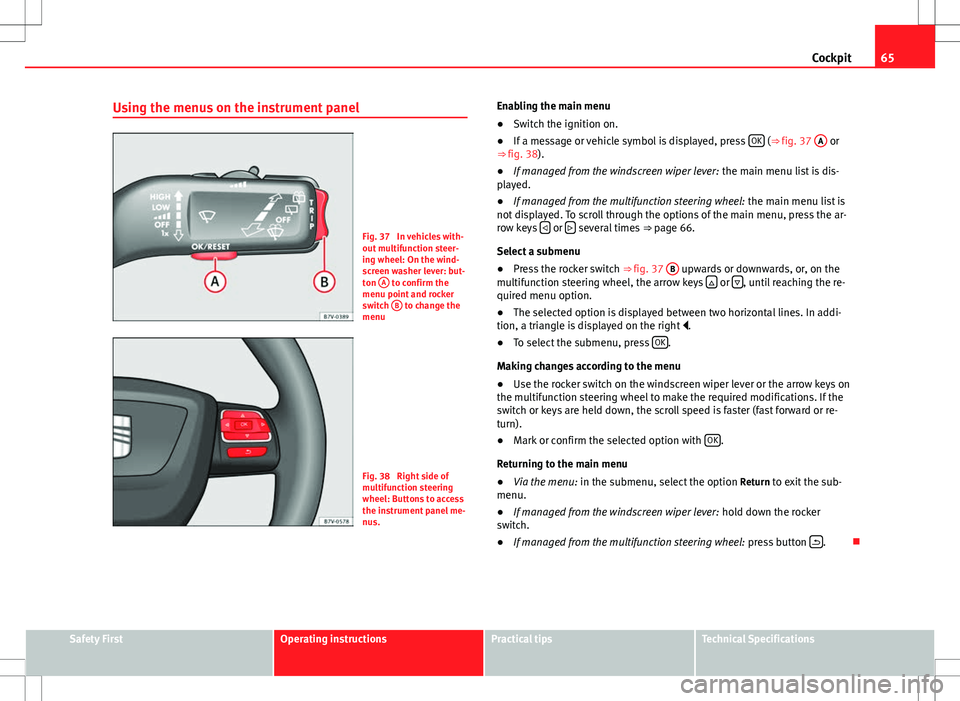
Using the menus on the instrument panel
Fig. 37 In vehicles with-
out multifunction steer-
ing wheel: On the wind-
screen washer lever: but-
ton A
to confirm the
menu point and rocker
switch B
to change the
menu
Fig. 38 Right side of
multifunction steering
wheel: Buttons to access
the instrument panel me-
nus. Enabling the main menu
●
Switch the ignition on.
● If a message or vehicle symbol is displayed, press OK
(⇒
fig. 37 A or
⇒ fig. 38).
● If managed from the windscreen wiper lever: the main menu list is dis-
played.
● If managed from the multifunction steering wheel: the main menu list is
not displayed. To scroll through the options of the main menu, press the ar-
row keys
or several times
⇒ page 66.
Select a submenu
● Press the rocker switch ⇒ fig. 37 B
upwards or downwards, or, on the
multifunction steering wheel, the arrow keys or , until reaching the re-
quired menu option.
● The selected option is displayed between two horizontal lines. In addi-
tion, a triangle is displayed on the right .
● To select the submenu, press OK
.
Making changes according to the menu
● Use the rocker switch on the windscreen wiper lever or the arrow keys on
the multifunction steering wheel to make the required modifications. If the
switch or keys are held down, the scroll speed is faster (fast forward or re-
turn).
● Mark or confirm the selected option with OK
.
Returning to the main menu
● Via the menu: in the submenu, select the option Return to exit the sub-
menu.
● If managed from the windscreen wiper lever: hold down the rocker
switch.
● If managed from the multifunction steering wheel: press button
.
Safety FirstOperating instructionsPractical tipsTechnical Specifications
Page 68 of 388
66Cockpit
Main menu
MenuFunctionSeeMFIInformation and possible configurations of
the multifunction display (MFI).⇒ page 66
AudioIf the radio is on, the station is displayed.
In CD mode, the current CD is played.⇒ Booklet Ra-
dio or ⇒ Book- let navigation system
NavigationNavigation system information:
when the navigation to destination is on,
change of direction arrows and a proximity
bar are displayed. These symbols are similar
to those used in the navigation system.
If navigation to destination is not on, the di-
rection of travel (compass) and the name of
the street on which you are driving are dis-
played.⇒ Book-
let Navigation system
Parking
heatingInformation and configurations of the park-
ing heating:
switching the parking heating on or off. Se-
lect the operating mode and duration.⇒ page 165
Vehicle con-
ditionCurrent warning or information texts.
This option only appears when one of the
following texts is available. The number of
available messages is displayed. Example
1/1 or 2/2.⇒ page 57
SettingsDifferent setting options, for example, the
Convenience, Lighting & Visibility menus,
and the time, speed warning with winter
tyres, language, units of measurement, or
“Display off”.⇒ page 67
MFI (multifunction display) menu
The multifunction display (MFI) has two automatic memories:
1 - Partial
memory and 2 - Total memory . The selected memory will be shown in the
upper right-hand corner of the display.
With the ignition switched on, and memory 1 or 2 displayed, briefly press OK to change from one memory to another.
1
Trip memo-
ry (for a
single jour-
ney).
The memory stores the values for the journey and the con-
sumption from the moment the ignition is switched on un-
til it is switched off again.
If the journey is broken for more than two hours, the mem-
ory is automatically erased. If the journey is continued in
less than two hours after the ignition is switched off, the
new data is added to the data already stored in the memo-
ry.
2Total mem-
ory (for all
journeys).
The memory records the values for a specific number of
partial trips, up to a total of 19 hours and 59 minutes or 99
hours and 59 minutes, or 1999.9 km (or miles) for 9999
km (or miles), depending on the model of instrument pan-
el. On reaching either of these limits, the memory is auto-
matically erased and starts to count from 0 again.
Possible displays
MenuFunctionJourney durationThis indicates the hours (h) and minutes (min) since
the ignition was switched on.
Current fuel con-
sumptionThe current fuel consumption while driving is dis-
played in l/100 km (or miles per gallon, mpg); when
the engine is running but the vehicle is not moving,
in l/h (or gallons per hour).
Page 69 of 388
67
Cockpit
MenuFunctionAverage fuel con-
sumptionWhen the ignition is switched on, the average con-
sumption (in l/100 km or in mpg) is displayed after
the vehicle has moved approximately 100 metres
(328 feet). Otherwise horizontal lines are displayed.
The value shown is updated approximately every 5
seconds.
Distance to emptyApproximate distance in km (or miles) that can still
be travelled with the fuel remaining in the tank, as-
suming the same style of driving is maintained. This
is calculated using the current fuel consumption.
Distance coveredDistance travelled, after ignition is switched on, in
km (or miles).
Average speedAfter the ignition is switched on, the average speed
will be shown after a distance of approximately 100
metres (328 feet) has been travelled. Otherwise hori-
zontal lines are displayed. The value shown is upda-
ted approximately every 5 seconds.
Digital display of
speedCurrent speed displayed digitally.
Oil temperature digi-
tal displayUpdated engine oil temperature digital display
Speed warning to ---
km/hIf the stored speed is exceeded (between 30 -
250 km/h, or 18 - 155 mph), an audible warning is
given together with a visual warning.
Changing between display modes
● In vehicles without multifunction steering wheel: press the lever.
● Vehicles with a multifunction steering wheel: press
or .
Storing a speed for the speed warning
● Select the display Speed warning at --- km/h .
● Press OK
to store the current speed and switch off the warning. ●
In addition, set the required speed by pressing the rocker switch on the
windscreen wiper lever or buttons
or on the multifunction steering
wheel for 5 seconds. Next, press OK again or wait a few seconds. The
speed is stored and the warning activated.
● To switch off , press OK
. The stored speed is deleted.
Manually erasing memory 1 or 2
● Select the memory to be erased.
● Press and hold OK
for approximately two seconds.
Personalising the displays
It is possible to select which of the displays in the multifunction display you
wish to see on the instrument panel in the settings menu. The units of
measurement can also be modified ⇒ page 67.
Configuration Menu
Configuration MenuFunction
Multifunction
display dataConfiguration of the multifunction display data that you
wish to see on the instrument panel display ⇒ page 66.
CompassChanging the magnetic region and calibration of the com-
pass. To calibrate the compass, please follow the instruc-
tions given on the instrument panel display.
ConvenienceChanging vehicle convenience functions ⇒ page 68.Lights & visi-
bilityConfiguration of vehicle lighting ⇒ page 69.
TimeChanging the hours and minutes of the clock and the navi-
gation system. The time can be set here and the choice
can be made between the 24 hour and 12 hour display.
The S in the upper part of the display indicates that the
clock is set to summer time.
Safety FirstOperating instructionsPractical tipsTechnical Specifications
Page 70 of 388
68Cockpit
Configuration
MenuFunction
Winter tyresChanging the visual and audible speed warnings. This
function should only be used when the vehicle is fitted
with winter tyres, which are not designed for travel at high
speeds.
Settings: Lan-
guageChanging the language of the display texts and the navi-
gation system.
UnitsChanging the units of measurement for the temperature,
consumption and distance.
Second speedSwitching second speed display on and off
Configuration
MenuFunction
AutoholdSelecting whether the Auto-Hold function should remain
on permanently.
ServiceCheck the service notifications or reset the service inter-
vals to zero
Factory set-
tingsSome functions of the Configuration menu will be reset to
the factory value.
BackThe main menu is displayed again.
Submenu Convenience
Convenience menuFunction
Open door
⇒ page 74
Manual
When the vehicle is unlocked with the key, the following doors (depending upon the configuration)
are unlocked:
all doors : All of the doors will be unlocked.
one door: see above Method 1.
Side of vehicle : The driver side doors will unlock.
Individually: Only the driver's door is unlocked.
automatic mode
Automatic locking function (Auto Lock) All doors are automatically locked at speeds above approxi-
mately 15 km/h. To unlock when the vehicle is stopped, push the central locking button or remove
the key from the ignition lock.
Automatic unlock : When the key is removed from the ignition lock, all doors and the tailgate are
unlocked.
Electronic childproof locksSwitching the childproof locks on or off ⇒ page 83.Confirm anti-theft alarmSwitching on or off the audible confirmation that the anti-theft alarm is activated ⇒ page 74.Handling windowsAdjusting the electric windows: This permits the windows to be opened or closed when the vehicle is unlocked or locked
respectively. The open function can only be activated from the driver's door ⇒ page 88.
Page 71 of 388

69
Cockpit
Convenience menuFunctionRear-view mirror adjustmentTilts passenger mirror downwards when reverse gear is engaged. This enables the driver to see the edge of the pavement,
for example ⇒ page 110.
Exterior mirror adjust.If synchronised adjustment is selected, when the driver side exterior mirror is adjusted, the passenger exterior mirror is also
moved.
Factory settingsSome functions of the Convenience submenu will be reset to the factory value.BackThe Configuration menu is displayed again.
Lights & visibility submenu
Lights & visi-
bility menuFunction
Coming HomeThis permits the adjustment of the time the headlamps
stay on after locking or unlocking the vehicle, the function
can also be connected or disconnected here ⇒ page 101.Leaving Home
Footwell lightThis permits the adjustment of the brightness of the foot-
well lighting when the doors are open, the function can al-
so be connected or disconnected here
Convenience
indicatorsSwitching convenience indicators on and off When the
convenience indicators are connected, when the indicator
is switched on, these flash at least three times
⇒ page 95.
Factory set-
tingsAll the configurations in the submenu Lights & visibility are
reset to the predefined factory values.
Tourist lightHeadlamp adjustment for countries in which vehicles are
driven on the other side of the road. When the mark is acti-
vated, the headlamps of a left-hand drive vehicle are ad-
justed for driving on the left. This function must only be
used for a short period.
BackThe Configuration menu is displayed again. Personal convenience settings
When two people use a vehicle, SEAT recommends that each person always
uses “their” own remote control key. When the ignition is switched off, or
the vehicle is locked, the personal convenience settings are stored and au-
tomatically allocated to the vehicle key
⇒ page 62.
The values of the personalised convenience settings of the following menu
options are allocated to the vehicle key: ■ Parking heating menu
■ Configuration Menu
■ Time
■ Settings: Language
■ Units
■ Convenience settings menu
■Door unlock (individual opening, Auto Lock)
■ Convenience handling of windows
■ Rear-view mirror adjustment
■ Lights & visibility settings menu
■ Coming home and leaving home
■ Footwell light
■ Convenience indicators
Safety FirstOperating instructionsPractical tipsTechnical Specifications
Page 82 of 388
80Unlocking and locking
Note
Upon activating the alarm, if any door or the tailgate is open, only the alarm
will be activated. The interior monitoring and anti-tow systems will only be
activated when the doors and tailgate are fully closed.
Doors Introduction
Additional information and warnings:
● Vehicle key set ⇒ page 71
● Central locking and locking system ⇒ page 74
● Emergency locking and unlocking ⇒ page 318
WARNING
If a door is not correctly closed, it could open unexpectedly when driving
and cause serious injuries.
● Always stop immediately and close the door.
● When closing, ensure that the door has closed correctly. A closed
door should be flush with the corresponding parts of the bodywork.
● Open and close doors only when nobody is in the way of the door.
WARNING
A door held open by its retainer could be blown closed by the wind or
close if the vehicle is on a hill causing injury.
● When opening and closing doors, always use the door handle.
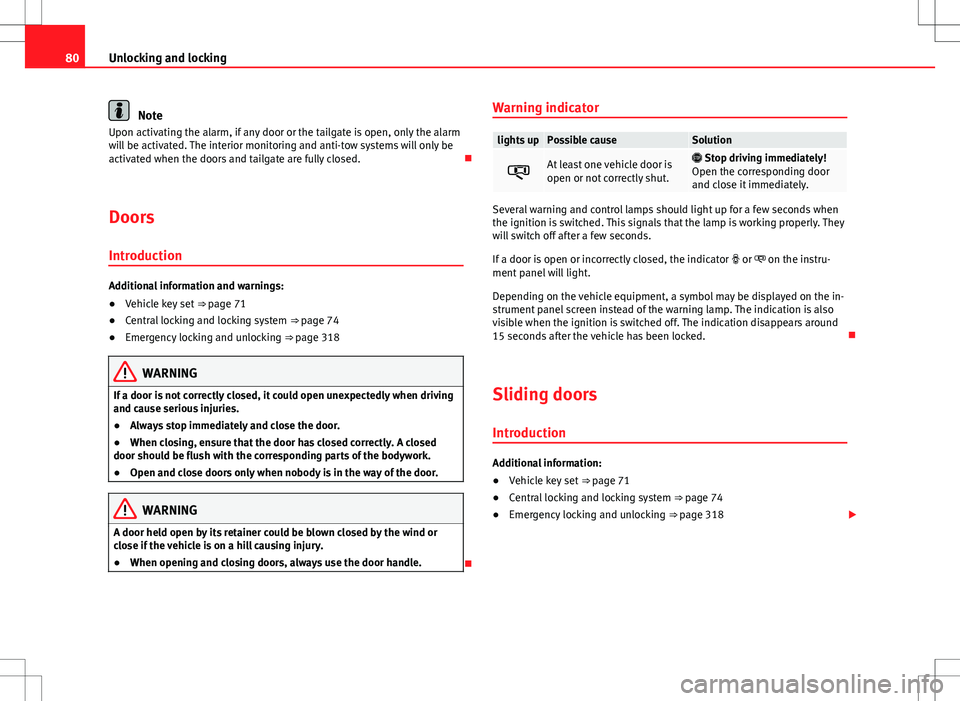
Warning indicator
lights upPossible causeSolution
At least one vehicle door is
open or not correctly shut.
Stop driving immediately!
Open the corresponding door
and close it immediately.
Several warning and control lamps should light up for a few seconds when
the ignition is switched. This signals that the lamp is working properly. They
will switch off after a few seconds.
If a door is open or incorrectly closed, the indicator or on the instru-
ment panel will light.
Depending on the vehicle equipment, a symbol may be displayed on the in-
strument panel screen instead of the warning lamp. The indication is also
visible when the ignition is switched off. The indication disappears around
15 seconds after the vehicle has been locked.
Sliding doors Introduction
Additional information:
● Vehicle key set ⇒ page 71
● Central locking and locking system ⇒ page 74
● Emergency locking and unlocking ⇒ page 318