display Seat Alhambra 2012 Service Manual
[x] Cancel search | Manufacturer: SEAT, Model Year: 2012, Model line: Alhambra, Model: Seat Alhambra 2012Pages: 388, PDF Size: 6.72 MB
Page 206 of 388
204Driving
Park Assist system*
Introduction
The Park Assist system helps the driver to find a suitable place to park, to
insert the vehicle into parallel and perpendicular parking places and to
leave parallel parking places.
The Park Assist system is limited to the system abilities and requires that
the driver is especially attentive ⇒
.
The parking sensor system is a component of the Park Assist system that
helps to park the vehicle.
For vehicles with the optical parking system, the radio navigation systems
screen displays the detected zones in front of and behind the vehicle, indi-
cating - within the limits of the system - the position of obstacles compared
to the vehicle.
The park assist system cannot be switched on if the factory-fitted towing
bracket is electrically connected to a trailer.
Additional information and warnings:
● Braking, stopping and parking ⇒ page 185
● Parking sensor system ⇒ page 200
● Caring for and cleaning the vehicle exterior ⇒ page 246
● Accessories, parts replacement, repairs and modifications ⇒ page 261
WARNING
Despite the assistance provided by the park assist system, do not run
any risks when parking. The system is not a replacement for driver
awareness.
● Unintentional movements of the vehicle could cause serious injury.
● Adjust your speed and driving style to visibility, road, traffic and
weather conditions.
● The surface of certain objects and items of clothing and external
sound sources may have a negative affect on the park assist signals or on
the system sensors or may not reflect its signals.
● The sensors have blind spots in which obstacles and people are not
registered.
● Always observe the area around the vehicle, as the sensors do not al-
ways detect small children, animals or objects.
CAUTION
● The park assist system aims exclusively at other parked vehicles, with-
out taking curbs or other circumstances into account. Make sure you do not
damage the tyres and wheel rims when parking. Where necessary, stop ma-
noeuvring to avoid damaging the vehicle.
● The sensors may not always be able to detect objects such as trailer
draw bars, thin rails, fences, posts and trees, etc. This could result in dam-
age to your car.
● Although the parking sensor system detects and warns of the presence
of an obstacle, the obstacle could disappear from the angle of measure-
ment of the sensors if it is too high or low and the system would no longer
indicate it. Therefore, it will not warn you of these objects. Ignoring the
warnings of the parking sensor system could cause considerable damage to
the vehicle. This is also valid when using the park assist (e.g. to park be-
hind a truck or motorcycle). Therefore, always keep a close watch on the
area in front of and behind the vehicle while parking, and intervene prompt-
ly if necessary.
Page 207 of 388
205
Driving
● To ensure that the system works properly, the bumper sensors must be
kept clean, free of ice and snow and uncovered.
● The bumper sensors may become damaged or misaligned, for example,
when parking.
● When cleaning the sensors with high-pressure or steam cleaning equip-
ment, spray the sensors briefly at a distance of no less than 10 cm.
Note
Contact a specialised workshop with any system faults. SEAT recommends
visiting a Technical Service.
Parking using the park assist system
Fig. 145 Detailed view of
the centre console: but-
ton to switch the park as-
sist system on manually.
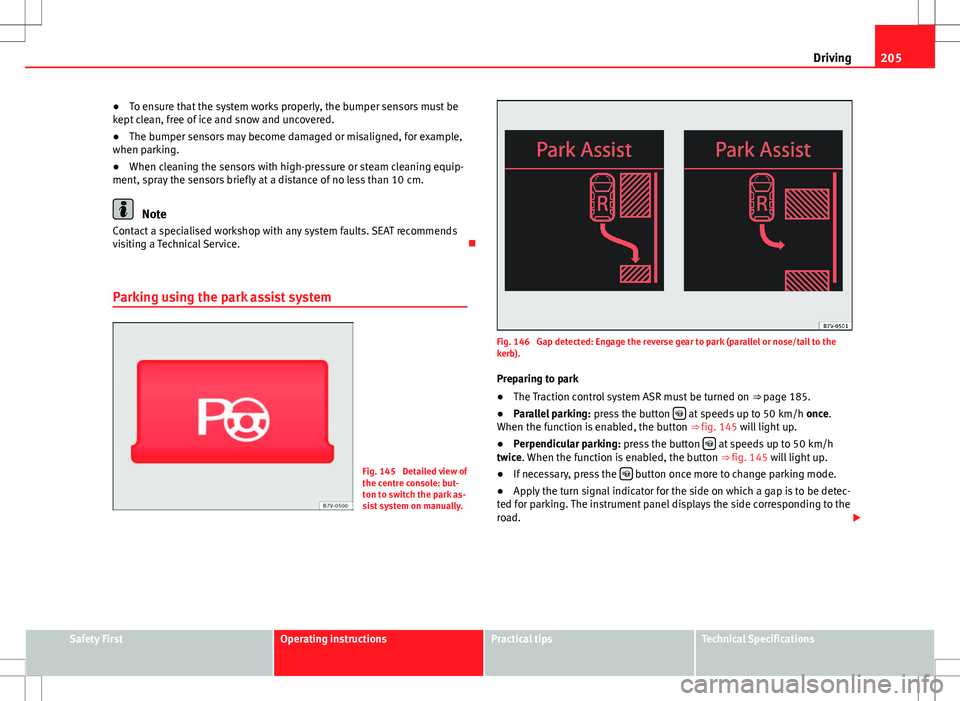
Fig. 146 Gap detected: Engage the reverse gear to park (parallel or nose/tail to the
kerb). Preparing to park
● The Traction control system ASR must be turned on ⇒ page 185.
● Parallel parking: press the button
at speeds up to 50 km/h once.
When the function is enabled, the button ⇒ fig. 145 will light up.
● Perpendicular parking: press the button
at speeds up to 50 km/h
twice. When the function is enabled, the button ⇒ fig. 145 will light up.
● If necessary, press the
button once more to change parking mode.
● Apply the turn signal indicator for the side on which a gap is to be detec-
ted for parking. The instrument panel displays the side corresponding to the
road.
Safety FirstOperating instructionsPractical tipsTechnical Specifications
Page 208 of 388
206Driving
Parking
● Parking parallel to the road: Drive next to the gap at a speed of no more
than 40 km/h and at a distance of between 0.5 m and 2 m.
● Parking perpendicular to the road: Drive next to the gap at a speed of no
more than 20 km/h and at a distance of between 0.5 m and 2 m.
● The best parking results will be achieved if you position the vehicle as
parallel as possible to the line of parked cars or the kerb.
● When a suitable parking place is displayed on the instrument panel,
stop and select reverse gear.
● Follow the instructions given on the instrument panel display
● Then, release the steering wheel when the warning signal sounds ⇒
:
The system will move the steering wheel! Observe the surrounding area.
● Observe the surrounding area and accelerate carefully at a maximum of
up to 7 km/h.
● The park assist system is only responsible for moving the steering wheel
during the manoeuvre. The driver applies the accelerator, the clutch, the
gears and the brake.
● Follow the instructions given by the park assist system until the ma-
noeuvre is completed.
● The park assist system steers the vehicle forwards and backwards until
it is in a straight position in the parking space.
● The manoeuvre is complete when the corresponding indication is given
on the instrument panel display.
Stopping the parking manoeuvre
The park assist system stops the manoeuvre in the event of one of the fol-
lowing:
● Press button
.
● Driving faster than 7 km/h.
● The driver moves the steering wheel.
● The parking manoeuvre has not been completed after six minutes since
the park assist system was activated. ●
A sliding door is opened. To restart the manoeuvre, close the sliding
door and press the button
again.
● There is a system malfunction (system temporarily unavailable).
● The ASR system is switched off or the ASR or ESC is working.
WARNING
The steering wheel turns quickly by itself when parking using the park
assist system. Placing your hand between the steering wheel spokes
could lead to injuries.
Note
● The park assist system has its limitations. For example, it is not possible
to park on tight bends using the park assist system.
● Even if the park assist system recognises that there is not enough space
for parking the vehicle, the display screen on the instrument panel will still
display this place. In this case, the parking manoeuvre should not be re-
quested.
● Changing gears between forward and reverse gears before indicated
(that is, before the signal from the parking sensor system) the parking re-
sults may not be ideal.
● For parallel parking (parallel to the road), a sound will tell the driver
when they must change from forward gears to reverse; the signal from the
parking sensor system does not indicate changes of direction.
● The park assist can also be activated afterwards, if you pass close to a
parallel parking space at a maximum of 40 km an hour or close to be per-
pendicular parking space at about 20 km an hour then press the button
.
● The progress bar on the screen of the instrument panel shows a display
of the relative distance to be covered.
● When the Park Assist system is turning the steering wheel of the stop-
ped vehicle the symbol is also displayed. Press on the brake pedal so
that the steering can turn with the vehicle at a standstill and thus reduce
the number of manoeuvres.
Page 211 of 388
209
Driving
Rear Assist system*
Introduction
The camera fitted to the tailgate helps drivers during parking or reversing
manoeuvres. The camera image and certain orientation points generated by
the system are indicated on the factory-fitted radio or navigation system
screen.
Two types of location point (modes) can be selected:
● Mode 1: reverse parking perpendicular to the road (e.g. in a car park).
● Mode 2: reverse parking parallel to the curb.
The mode can be changed by pressing the button on the radio or navigation
system screen. Only the mode to which the points can be changed will be
displayed.
Additional information and warnings:
● Accessories, parts replacement, repairs and modifications ⇒ page 261
WARNING
Use of the camera to calculate the distance from obstacles (people, vehi-
cles, etc.) is inaccurate and may cause accidents and severe injuries.
● The camera lens expands and distorts the field of vision and displays
the objects on the screen in a different, vague manner.
● Some objects may not be displayed or may not be very clear (e.g. very
thin posts or fences), due to the resolution of the monitor or if the light is
dim.
● The camera has blind spots in which obstacles and people are not
registered.
● Keep the camera lens clean and clear of snow and ice. Do not cover it.
WARNING
The intelligent technology in the rear assist system cannot change the
limits imposed by the laws of physics and by the system itself. Careless
or uncontrolled use of the rear assist system may result in severe injuries
and accidents. The system is not a replacement for driver awareness.
● Adjust your speed and driving style to visibility, road, traffic and
weather conditions.
● Always keep a close eye on the area around the vehicle and always
look towards where you are parking. The display shows the path of the
rear end of the vehicle using the current steering angle. The front of the
vehicle turns more in comparison with the rear.
● Do not be distracted from the traffic when looking at the screen.
● Always observe the area around the vehicle, as the cameras do not al-
ways detect children, animals or objects.
● The system might not show all areas clearly.
● Only use the rear assist system when the tailgate is completely
closed.
CAUTION
● The camera only displays 2D images on the screen. Due to the lack of
depth, it might be difficult or impossible to recognise protruding objects or
cracks in the road.
● The cameras may not always be able to detect objects such as thin rails,
fences, posts and trees, etc. This could result in damage to your car.
Safety FirstOperating instructionsPractical tipsTechnical Specifications
Page 212 of 388
210Driving
User instructions
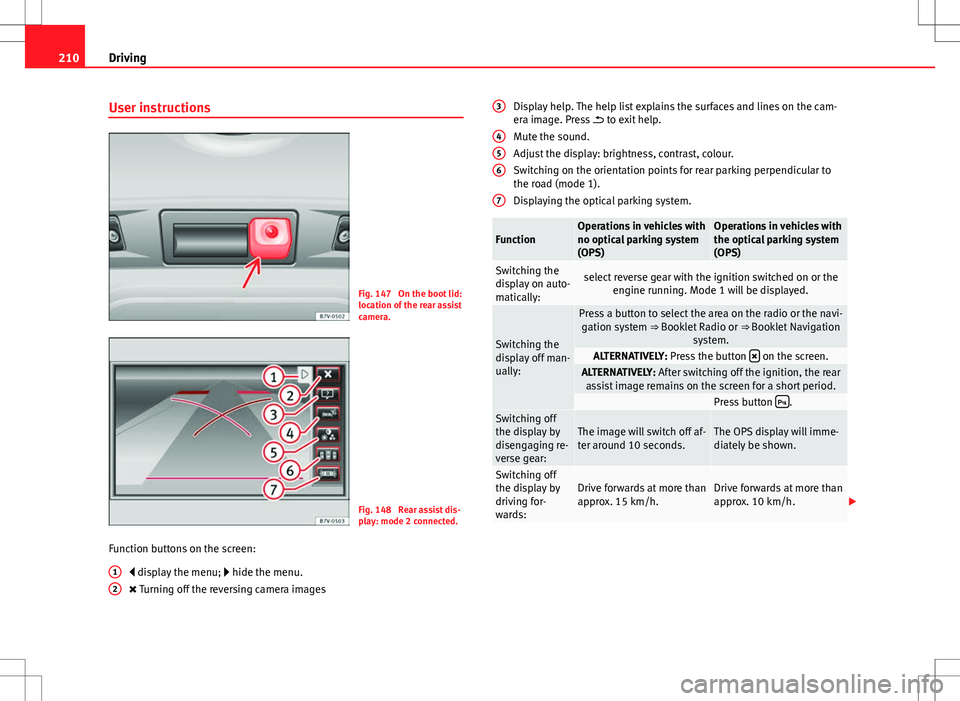
Fig. 147 On the boot lid:
location of the rear assist
camera.
Fig. 148 Rear assist dis-
play: mode 2 connected.
Function buttons on the screen: display the menu; hide the menu.
Turning off the reversing camera images
1
2
Display help. The help list explains the surfaces and lines on the cam-
era image. Press
to exit help.
Mute the sound.
Adjust the display: brightness, contrast, colour.
Switching on the orientation points for rear parking perpendicular to
the road (mode 1).
Displaying the optical parking system.
FunctionOperations in vehicles with
no optical parking system
(OPS)Operations in vehicles with
the optical parking system
(OPS)
Switching the
display on auto-
matically:select reverse gear with the ignition switched on or the engine running. Mode 1 will be displayed.
Switching the
display off man-
ually:
Press a button to select the area on the radio or the navi-gation system ⇒ Booklet Radio or ⇒ Booklet Navigation
system.
ALTERNATIVELY: Press the button on the screen.ALTERNATIVELY: After switching off the ignition, the rear
assist image remains on the screen for a short period.
Press button .Switching off
the display by
disengaging re-
verse gear:The image will switch off af-
ter around 10 seconds.The OPS display will imme-
diately be shown.
Switching off
the display by
driving for-
wards:Drive forwards at more than
approx. 15 km/h.Drive forwards at more than
approx. 10 km/h.
3
456
7
Page 213 of 388
211
Driving
Things to note
1) Do not use the rear assist system in the following cases:– If there is a fault in the dynamic chassis control (DCC).– If the image displayed is not very clear or reliable (low visibility or dirty
lens).
– If the space behind the vehicle cannot be clearly or completely recog-
nised.
– If the vehicle has been overloaded at the rear.– If the driver is not familiar with the system.– If the tailgate is open.– If the position and installation angle of the camera have been changed,
e.g. in a rear-end collision. Have a specialised workshop check the system.
2) Optical illusions of the camera (examples)The rear assist camera produces two-dimensional images. Any cracks in or
objects protruding from the ground or from other vehicles are more diffi-
cult to spot or cannot be seen due to a lack of depth in the image dis-
played.
Objects or other vehicles may seem to be closer or further away than what
they really are:
– On changing from a flat surface to a slope or gradient.– On changing from a slope or gradient to a flat surface.– If the vehicle has been overloaded at the rear.– On approaching protruding objects. These objects may be outside the
angle of vision of the camera when reversing.
Cleaning the camera lens
Keep the camera lens clean and clear of snow and ice:
● Moisten the lens using a commercially available, alcohol-based glass
cleaning agent and clean the lens with a dry cloth ⇒
.
● Remove snow using a small brush.
● Use de-icing spray to remove any ice ⇒
.
CAUTION
● Never use abrasive cleaners to clean the camera lens.
● Never remove snow or ice from the camera lens using warm or hot water.
This could damage the lens.
Note
● SEAT recommends that you practise parking with the rear assist system
in a quiet location or in a car park to become familiar with the system, in-
cluding the orientation lines and their function.
● The orientation lines will not be displayed on the screen if the tailgate is
open or the factory-fitted towing bracket is electrically connected to a trailer.
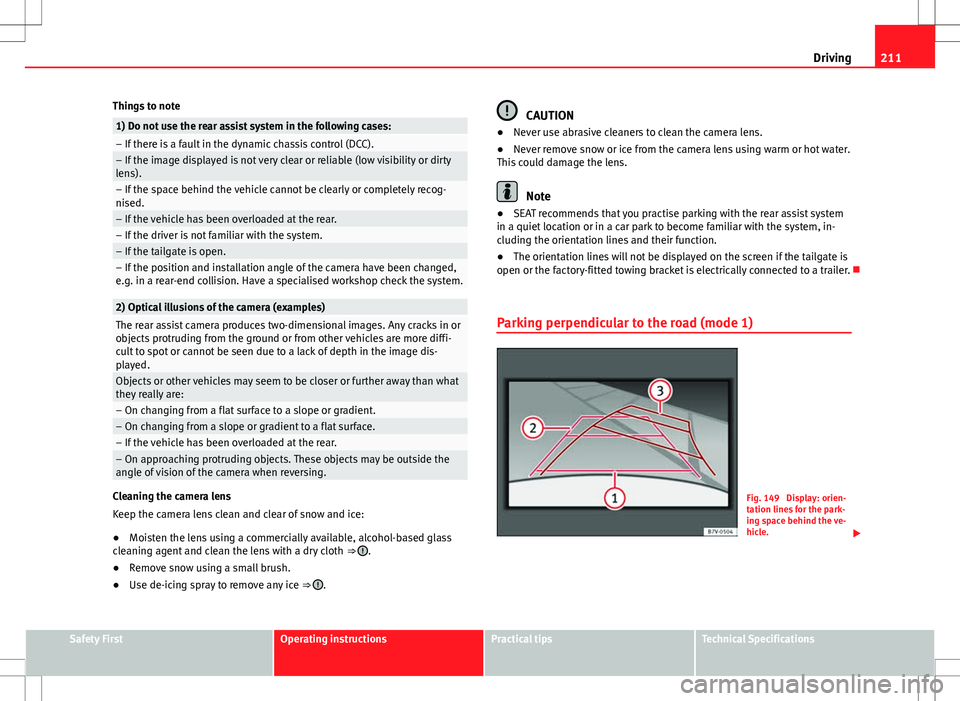
Parking perpendicular to the road (mode 1)
Fig. 149 Display: orien-
tation lines for the park-
ing space behind the ve-
hicle.
Safety FirstOperating instructionsPractical tipsTechnical Specifications
Page 214 of 388
212Driving
Summary of the orientation points
Meaning of orientation lines displayed on the screen ⇒ fig. 149. All of the
lengths of the orientation lines use a vehicle located on a horizontal surface
as reference.
Red Safety distance: road area located up to around 40 cm behind the
vehicle.
Green: prolongation of the rear of the vehicle (somewhat enlarged). The
area displayed green ends around two metres behind the vehicle, on
the road.
Yellow: prolongation of the rear of the vehicle as the steering wheel
turns. The area displayed yellow ends around three metres behind the
vehicle, on the road.
Parking the vehicle
● Stop the vehicle in front of a space and select reverse gear.
● Reverse slowly and turn the steering wheel so that the yellow orientation
lines guide you towards the space 3
.
● Align the vehicle straight in the parking place using the help of the
green orientation lines.
1
2
3
Parking parallel to the road (mode 2)
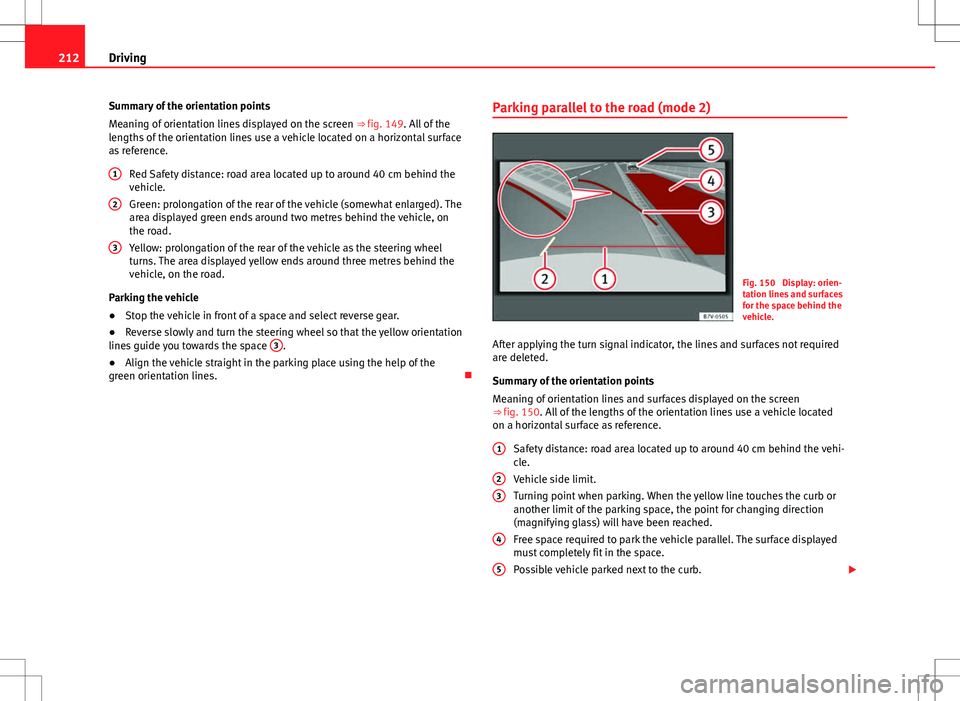
Fig. 150 Display: orien-
tation lines and surfaces
for the space behind the
vehicle.
After applying the turn signal indicator, the lines and surfaces not required
are deleted.
Summary of the orientation points
Meaning of orientation lines and surfaces displayed on the screen
⇒ fig. 150. All of the lengths of the orientation lines use a vehicle located
on a horizontal surface as reference. Safety distance: road area located up to around 40 cm behind the vehi-
cle.
Vehicle side limit.
Turning point when parking. When the yellow line touches the curb or
another limit of the parking space, the point for changing direction
(magnifying glass) will have been reached.
Free space required to park the vehicle parallel. The surface displayed
must completely fit in the space.
Possible vehicle parked next to the curb.
1
23
4
5
Page 215 of 388
213
Driving
Parking the vehicle
● Stop the vehicle 1 m away parallel to the parking space and select re-
verse gear.
● Switch on mode 2 on the navigation system screen for parallel parking.
● Slowly reverse and turn the steering wheel so that the surface displayed
yellow on the screen stops in front of any obstacles 5
(e.g. another vehi-
cle).
● Turn the steering wheel fully towards the space and reverse slowly.
● When the yellow line 3
touches the side limit of the space, e.g. the bor-
der or curb (magnifying glass), turn the steering wheel fully in the opposite
direction.
● Continue reversing until the vehicle is inside the space, parallel to the
road. Correct the position if necessary.
Safety FirstOperating instructionsPractical tipsTechnical Specifications
Page 216 of 388
214Driving
Cruise control system*
Introduction
The cruise control system (CCS) is able to maintain the set speed when driv-
ing forwards from approx. 20 km/h (12 mph).
The CCS only slows down by reducing the accelerator but not by braking.
⇒
.
Additional information and warnings:
● Changing gear ⇒ page 176
● Accessories, parts replacement, repairs and modifications ⇒ page 261
WARNING
Use of the cruise control could cause accidents and severe injuries if it is
not possible to drive at a constant speed maintaining the safety distance.
● Do not use the CCS in heavy traffic, if the distance from the vehicle in
front is insufficient, on steep roads, with several bends or in slippery cir-
cumstances (snow, ice, rain or loose gravel), or on flooded roads.
● Never use the CCS when driving off-road or on unpaved roads.
● Always adapt your speed and the distance to the vehicles ahead in
line with visibility, weather conditions, the condition of the road and the
traffic situation.
● To avoid unexpected operation of the cruise control system, turn it off
every time you finish using it.
● It is dangerous to use a set speed which is too high for the prevailing
road, traffic or weather conditions.
● When travelling down hills, the CCS cannot maintain a constant
speed. The vehicle tends to accelerate under its own weight. Select a
lower gear or use the foot brake to slow the vehicle.
Warning and control lamp
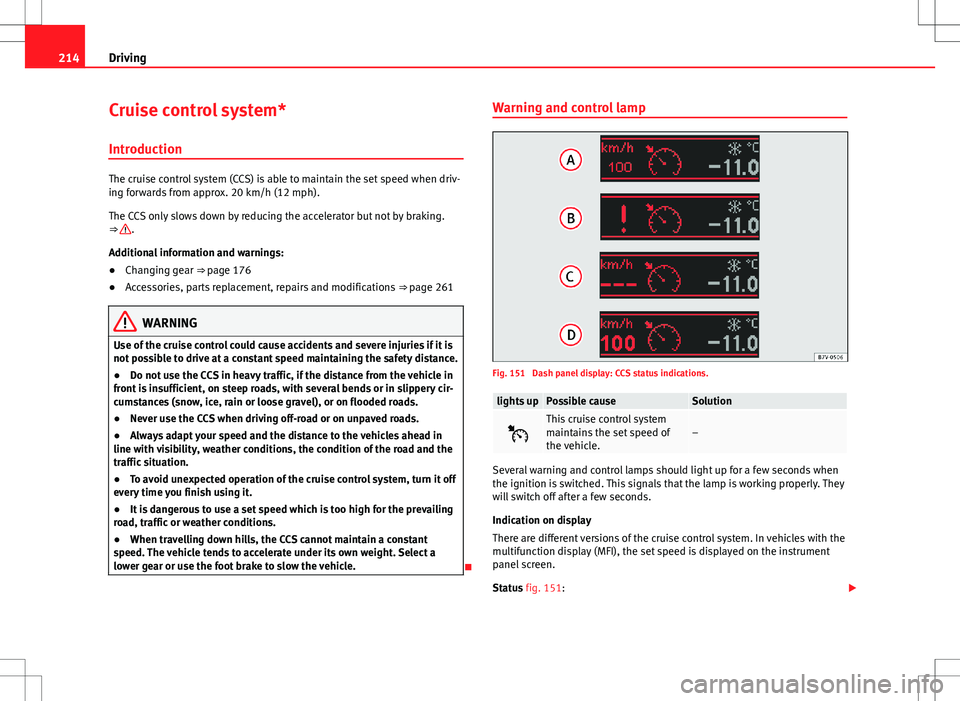
Fig. 151 Dash panel display: CCS status indications.
lights upPossible causeSolution
This cruise control system
maintains the set speed of
the vehicle.–
Several warning and control lamps should light up for a few seconds when
the ignition is switched. This signals that the lamp is working properly. They
will switch off after a few seconds.
Indication on display
There are different versions of the cruise control system. In vehicles with the
multifunction display (MFI), the set speed is displayed on the instrument
panel screen.
Status fig. 151:
Page 217 of 388
215
Driving
CCS temporarily switched off. The set speed is displayed in small fig-
ures.
System error. Contact a specialised workshop.
CCS switched on. The speed memory is empty.
The CCS is switched on. The set speed is displayed in large figures.
WARNING
If the warning lamps and messages are ignored, the vehicle may stall in
traffic, or may cause accidents and severe injuries.
● Never ignore the warning lamps or text messages.
● Stop the vehicle safely as soon as possible.
CAUTION
Failure to heed the warning lamps and text messages when they appear
may result in faults in the vehicle.
A
BCD
Cruise control operation
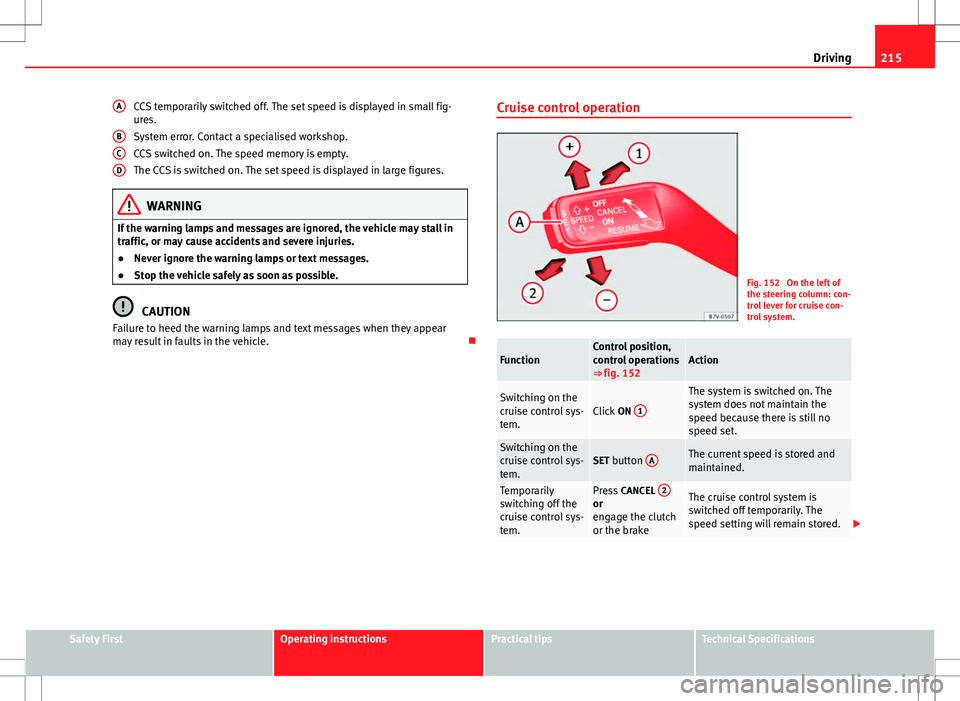
Fig. 152 On the left of
the steering column: con-
trol lever for cruise con-
trol system.
FunctionControl position,
control operations
⇒ fig. 152Action
Switching on the
cruise control sys-
tem.Click
ON 1
The system is switched on. The
system does not maintain the
speed because there is still no
speed set.
Switching on the
cruise control sys-
tem.SET button AThe current speed is stored and
maintained.
Temporarily
switching off the
cruise control sys-
tem.Press
CANCEL 2or
engage the clutch
or the brakeThe cruise control system is
switched off temporarily. The
speed setting will remain stored.
Safety FirstOperating instructionsPractical tipsTechnical Specifications