warning light Seat Alhambra 2014 User Guide
[x] Cancel search | Manufacturer: SEAT, Model Year: 2014, Model line: Alhambra, Model: Seat Alhambra 2014Pages: 381, PDF Size: 5.75 MB
Page 55 of 381
53
Cockpit
Operating instructions Cockpit
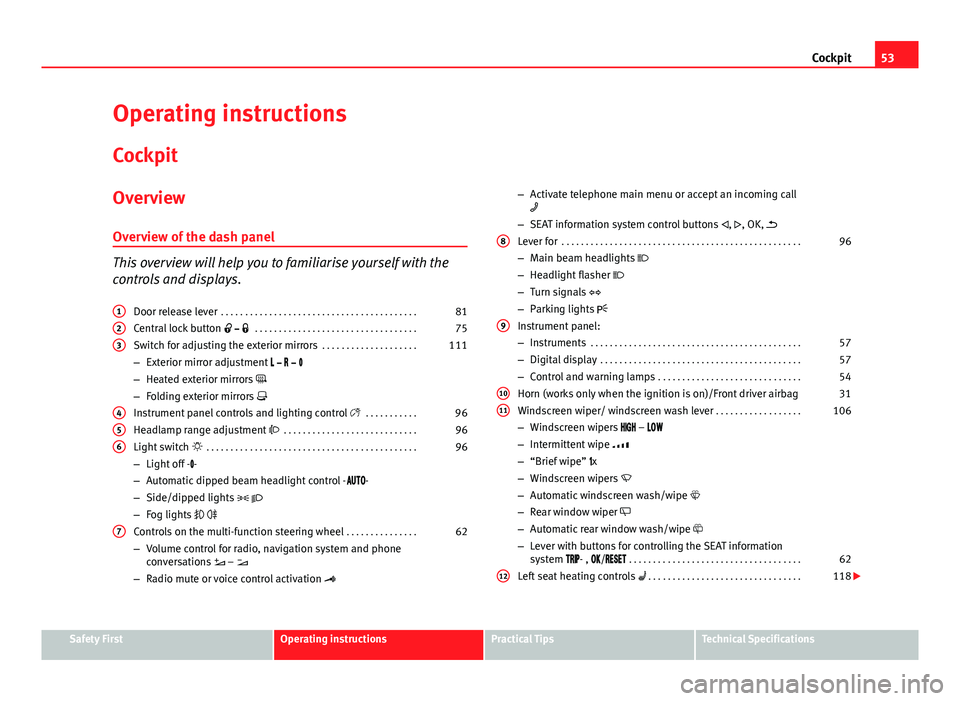
Overview Overview of the dash panel
This overview will help you to familiarise yourself with the
controls and displays. Door release lever . . . . . . . . . . . . . . . . . . . . . . . . . . . . . . . . . . . . . . . . . 81
Central lock button . . . . . . . . . . . . . . . . . . . . . . . . . . . . . . . . . . 75
Switch for adjusting the exterior mirrors . . . . . . . . . . . . . . . . . . . .111
– Exterior mirror adjustment
– Heated exterior mirrors
– Folding exterior mirrors
Instrument panel controls and lighting control . . . . . . . . . . .96
Headlamp range adjustment . . . . . . . . . . . . . . . . . . . . . . . . . . . . 96
Light switch . . . . . . . . . . . . . . . . . . . . . . . . . . . . . . . . . . . . . . . . . . . . 96
– Light off - -
– Automatic dipped beam headlight control - -
– Side/dipped lights
– Fog lights
Controls on the multi-function steering wheel . . . . . . . . . . . . . . .62
– Volume control for radio, navigation system and phone
conversations –
– Radio mute or voice control activation
1
23
456
7
–
Activate telephone main menu or accept an incoming call
– SEAT information system control buttons , , OK,
Lever for . . . . . . . . . . . . . . . . . . . . . . . . . . . . . . . . . . . . . . . . . . . . . . . . . . 96
– Main beam headlights
– Headlight flasher
– Turn signals
– Parking lights
Instrument panel:
– Instruments . . . . . . . . . . . . . . . . . . . . . . . . . . . . . . . . . . . . . . . . . . . . 57
– Digital display . . . . . . . . . . . . . . . . . . . . . . . . . . . . . . . . . . . . . . . . . . 57
– Control and warning lamps . . . . . . . . . . . . . . . . . . . . . . . . . . . . . . 54
Horn (works only when the ignition is on)/Front driver airbag 31
Windscreen wiper/ windscreen wash lever . . . . . . . . . . . . . . . . . .106
– Windscreen wipers –
– Intermittent wipe
– “Brief wipe” x
– Windscreen wipers
– Automatic windscreen wash/wipe
– Rear window wiper
– Automatic rear window wash/wipe
– Lever with buttons for controlling the SEAT information
system - , / . . . . . . . . . . . . . . . . . . . . . . . . . . . . . . . . . . . . 62
Left seat heating controls . . . . . . . . . . . . . . . . . . . . . . . . . . . . . . . . 118
8
9
1011
12
Safety FirstOperating instructionsPractical TipsTechnical Specifications
Page 56 of 381
54Cockpit
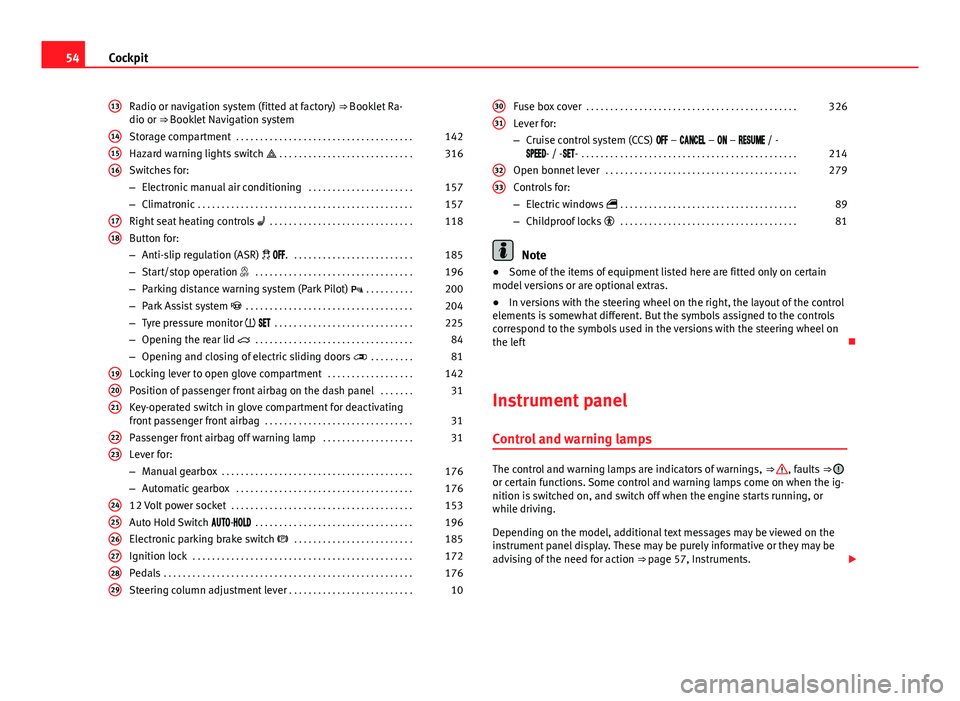
Radio or navigation system (fitted at factory) ⇒ Booklet Ra-
dio or ⇒ Booklet Navigation system
Storage compartment . . . . . . . . . . . . . . . . . . . . . . . . . . . . . . . . . . . . . 142
Hazard warning lights switch . . . . . . . . . . . . . . . . . . . . . . . . . . . . 316
Switches for:
– Electronic manual air conditioning . . . . . . . . . . . . . . . . . . . . . .157
– Climatronic . . . . . . . . . . . . . . . . . . . . . . . . . . . . . . . . . . . . . . . . . . . . . 157
Right seat heating controls . . . . . . . . . . . . . . . . . . . . . . . . . . . . . . 118
Button for:
– Anti-slip regulation (ASR) . . . . . . . . . . . . . . . . . . . . . . . . . . 185
– Start/stop operation . . . . . . . . . . . . . . . . . . . . . . . . . . . . . . . . . 196
– Parking distance warning system (Park Pilot) . . . . . . . . . . 200
– Park Assist system . . . . . . . . . . . . . . . . . . . . . . . . . . . . . . . . . . . 204
– Tyre pressure monitor . . . . . . . . . . . . . . . . . . . . . . . . . . . . . 225
– Opening the rear lid . . . . . . . . . . . . . . . . . . . . . . . . . . . . . . . . . 84
– Opening and closing of electric sliding doors . . . . . . . . . 81
Locking lever to open glove compartment . . . . . . . . . . . . . . . . . .142
Position of passenger front airbag on the dash panel . . . . . . .31
Key-operated switch in glove compartment for deactivating
front passenger front airbag . . . . . . . . . . . . . . . . . . . . . . . . . . . . . . . 31
Passenger front airbag off warning lamp . . . . . . . . . . . . . . . . . . .31
Lever for:
– Manual gearbox . . . . . . . . . . . . . . . . . . . . . . . . . . . . . . . . . . . . . . . . 176
– Automatic gearbox . . . . . . . . . . . . . . . . . . . . . . . . . . . . . . . . . . . . . 176
12 Volt power socket . . . . . . . . . . . . . . . . . . . . . . . . . . . . . . . . . . . . . . 153
Auto Hold Switch - . . . . . . . . . . . . . . . . . . . . . . . . . . . . . . . . . 196
Electronic parking brake switch . . . . . . . . . . . . . . . . . . . . . . . . . 185
Ignition lock . . . . . . . . . . . . . . . . . . . . . . . . . . . . . . . . . . . . . . . . . . . . . . 172
Pedals . . . . . . . . . . . . . . . . . . . . . . . . . . . . . . . . . . . . . . . . . . . . . . . . . . . . 176
Steering column adjustment lever . . . . . . . . . . . . . . . . . . . . . . . . . . 10
13
141516
1718
192021
2223
242526272829
Fuse box cover
. . . . . . . . . . . . . . . . . . . . . . . . . . . . . . . . . . . . . . . . . . . . 326
Lever for:
– Cruise control system (CCS) – – – / -
- / -- . . . . . . . . . . . . . . . . . . . . . . . . . . . . . . . . . . . . . . . . . . . . . 214
Open bonnet lever . . . . . . . . . . . . . . . . . . . . . . . . . . . . . . . . . . . . . . . . 279
Controls for:
– Electric windows . . . . . . . . . . . . . . . . . . . . . . . . . . . . . . . . . . . . . 89
– Childproof locks . . . . . . . . . . . . . . . . . . . . . . . . . . . . . . . . . . . . . 81
Note
● Some of the items of equipment listed here are fitted only on certain
model versions or are optional extras.
● In versions with the steering wheel on the right, the layout of the control
elements is somewhat different. But the symbols assigned to the controls
correspond to the symbols used in the versions with the steering wheel on
the left
Instrument panel Control and warning lamps
The control and warning lamps are indicators of warnings, ⇒ , faults ⇒ or certain functions. Some control and warning lamps come on when the ig-
nition is switched on, and switch off when the engine starts running, or
while driving.
Depending on the model, additional text messages may be viewed on the
instrument panel display. These may be purely informative or they may be
advising of the need for action ⇒ page 57, Instruments.
30
31
3233
Page 57 of 381
55
Cockpit
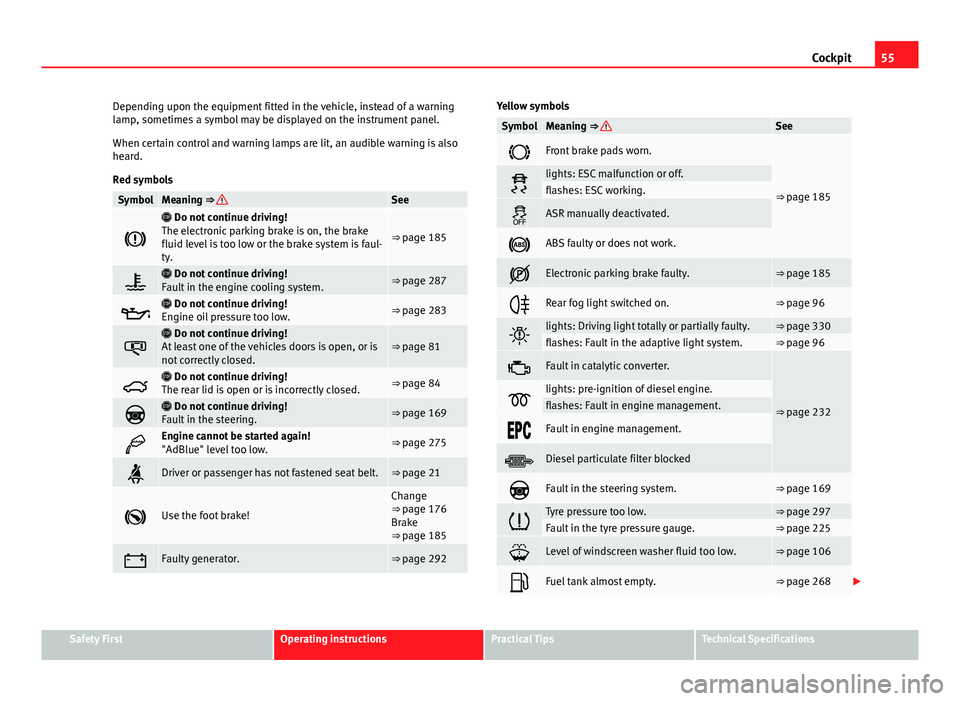
Depending upon the equipment fitted in the vehicle, instead of a warning
lamp, sometimes a symbol may be displayed on the instrument panel.
When certain control and warning lamps are lit, an audible warning is also
heard.
Red symbols
SymbolMeaning ⇒ See
Do not continue driving!
The electronic parking brake is on, the brake
fluid level is too low or the brake system is faul-
ty.
⇒ page 185
Do not continue driving!
Fault in the engine cooling system.⇒ page 287
Do not continue driving!
Engine oil pressure too low.⇒ page 283
Do not continue driving!
At least one of the vehicles doors is open, or is
not correctly closed.⇒ page 81
Do not continue driving!
The rear lid is open or is incorrectly closed.⇒ page 84
Do not continue driving!
Fault in the steering.⇒ page 169
Engine cannot be started again!
"AdBlue" level too low.⇒ page 275
Driver or passenger has not fastened seat belt.⇒ page 21
Use the foot brake!
Change
⇒ page 176
Brake
⇒ page 185
Faulty generator.⇒ page 292
Yellow symbols
SymbolMeaning ⇒ See
Front brake pads worn.
⇒ page 185lights: ESC malfunction or off.flashes: ESC working.
ASR manually deactivated.
ABS faulty or does not work.
Electronic parking brake faulty.⇒ page 185
Rear fog light switched on.⇒ page 96
lights: Driving light totally or partially faulty.⇒ page 330flashes: Fault in the adaptive light system.⇒ page 96
Fault in catalytic converter.
⇒ page 232lights: pre-ignition of diesel engine.flashes: Fault in engine management.
Fault in engine management.
Diesel particulate filter blocked
Fault in the steering system.⇒ page 169
Tyre pressure too low.⇒ page 297Fault in the tyre pressure gauge.⇒ page 225
Level of windscreen washer fluid too low.⇒ page 106
Fuel tank almost empty.⇒ page 268
Safety FirstOperating instructionsPractical TipsTechnical Specifications
Page 58 of 381
56Cockpit
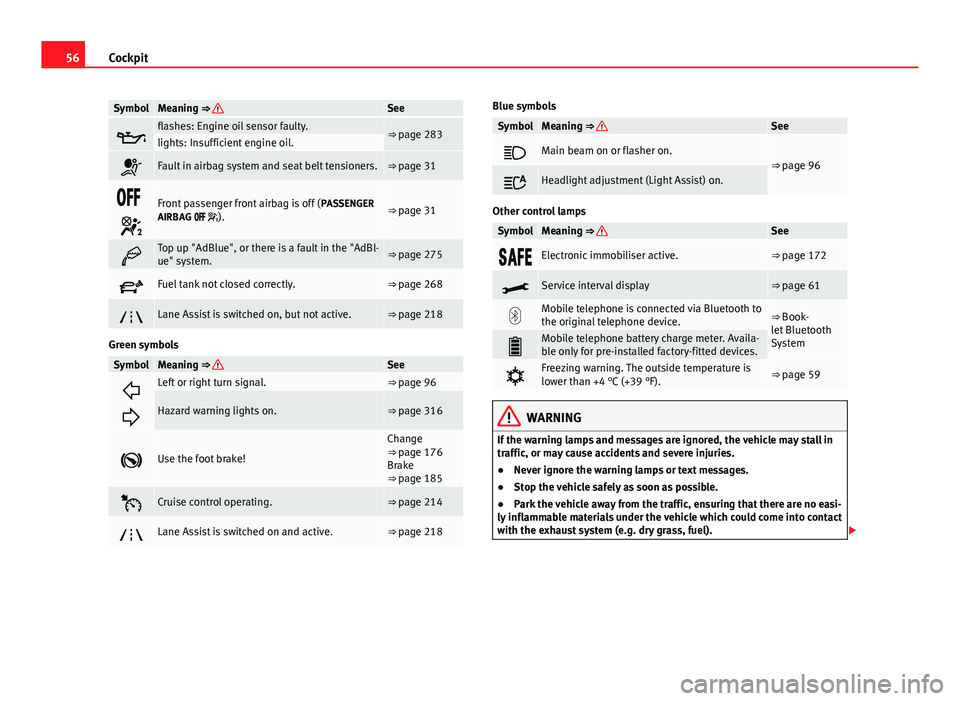
SymbolMeaning ⇒ See
flashes: Engine oil sensor faulty.⇒ page 283lights: Insufficient engine oil.
Fault in airbag system and seat belt tensioners.⇒ page 31
Front passenger front airbag is off ( PASSENGER
AIRBAG ).⇒ page 31
Top up "AdBlue", or there is a fault in the "AdBl-
ue" system.⇒ page 275
Fuel tank not closed correctly.⇒ page 268
Lane Assist is switched on, but not active.⇒ page 218
Green symbols
SymbolMeaning ⇒ See
Left or right turn signal.⇒ page 96
Hazard warning lights on.⇒ page 316
Use the foot brake!
Change
⇒ page 176
Brake
⇒ page 185
Cruise control operating.⇒ page 214
Lane Assist is switched on and active.⇒ page 218
Blue symbols
SymbolMeaning ⇒ See
Main beam on or flasher on.⇒ page 96
Headlight adjustment (Light Assist) on.
Other control lamps
SymbolMeaning ⇒ See
Electronic immobiliser active.⇒ page 172
Service interval display⇒ page 61
Mobile telephone is connected via Bluetooth to
the original telephone device.⇒ Book-
let Bluetooth
System
Mobile telephone battery charge meter. Availa-
ble only for pre-installed factory-fitted devices.
Freezing warning. The outside temperature is
lower than +4 °C (+39 °F).⇒ page 59
WARNING
If the warning lamps and messages are ignored, the vehicle may stall in
traffic, or may cause accidents and severe injuries.
● Never ignore the warning lamps or text messages.
● Stop the vehicle safely as soon as possible.
● Park the vehicle away from the traffic, ensuring that there are no easi-
ly inflammable materials under the vehicle which could come into contact
with the exhaust system (e.g. dry grass, fuel).
Page 65 of 381
63
Cockpit
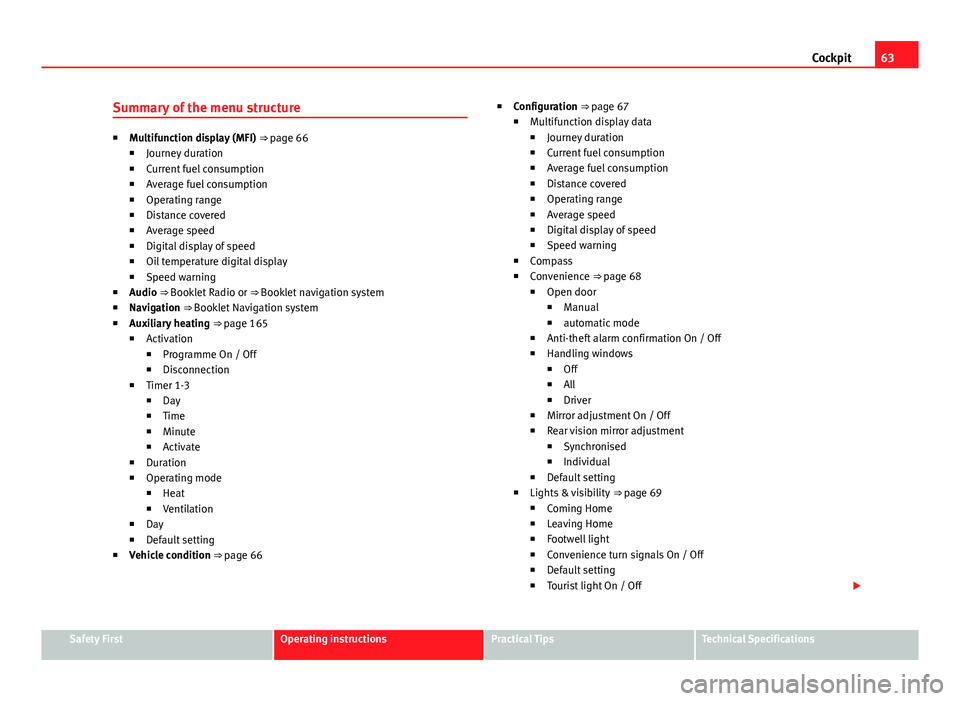
Summary of the menu structure
■ Multifunction display (MFI) ⇒ page 66
■ Journey duration
■ Current fuel consumption
■ Average fuel consumption
■ Operating range
■ Distance covered
■ Average speed
■ Digital display of speed
■ Oil temperature digital display
■ Speed warning
■ Audio ⇒ Booklet Radio or ⇒ Booklet navigation system
■ Navigation ⇒ Booklet Navigation system
■ Auxiliary heating ⇒ page 165
■ Activation
■ Programme On / Off
■ Disconnection
■ Timer 1-3
■ Day
■ Time
■ Minute
■ Activate
■ Duration
■ Operating mode
■ Heat
■ Ventilation
■ Day
■ Default setting
■ Vehicle condition ⇒ page 66 ■
Configuration ⇒ page 67
■ Multifunction display data
■ Journey duration
■ Current fuel consumption
■ Average fuel consumption
■ Distance covered
■ Operating range
■ Average speed
■ Digital display of speed
■ Speed warning
■ Compass
■ Convenience ⇒ page 68
■ Open door
■ Manual
■ automatic mode
■ Anti-theft alarm confirmation On / Off
■ Handling windows
■ Off
■ All
■ Driver
■ Mirror adjustment On / Off
■ Rear vision mirror adjustment
■ Synchronised
■ Individual
■ Default setting
■ Lights & visibility ⇒ page 69
■ Coming Home
■ Leaving Home
■ Footwell light
■ Convenience turn signals On / Off
■ Default setting
■ Tourist light On / Off
Safety FirstOperating instructionsPractical TipsTechnical Specifications
Page 68 of 381
66Cockpit
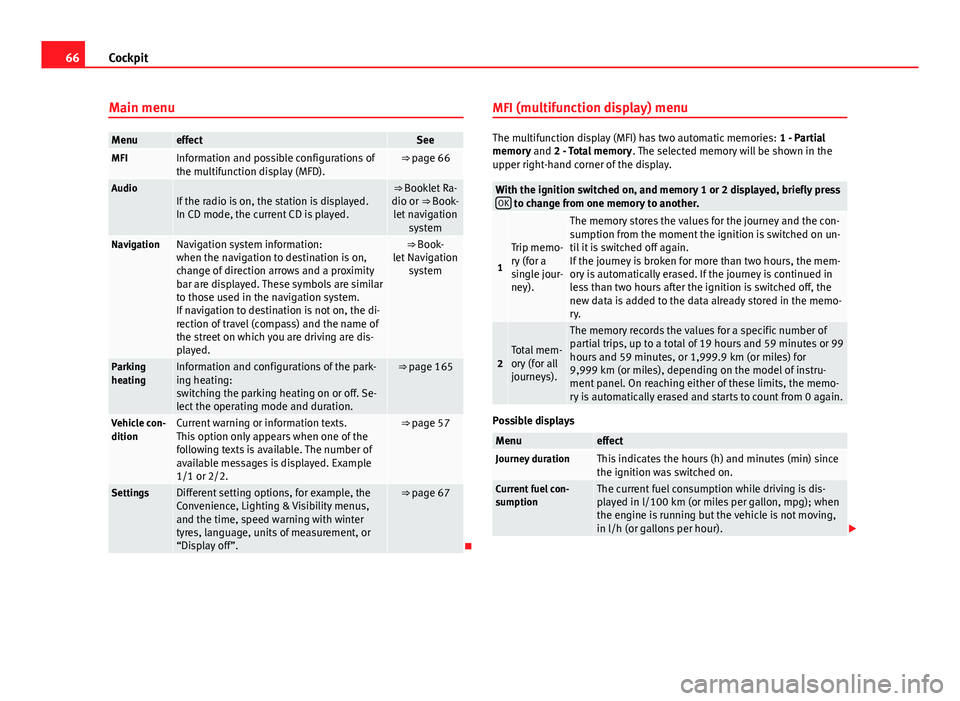
Main menu
MenueffectSeeMFIInformation and possible configurations of
the multifunction display (MFD).⇒ page 66
AudioIf the radio is on, the station is displayed.
In CD mode, the current CD is played.⇒ Booklet Ra-
dio or ⇒ Book- let navigation system
NavigationNavigation system information:
when the navigation to destination is on,
change of direction arrows and a proximity
bar are displayed. These symbols are similar
to those used in the navigation system.
If navigation to destination is not on, the di-
rection of travel (compass) and the name of
the street on which you are driving are dis-
played.⇒ Book-
let Navigation system
Parking
heatingInformation and configurations of the park-
ing heating:
switching the parking heating on or off. Se-
lect the operating mode and duration.⇒ page 165
Vehicle con-
ditionCurrent warning or information texts.
This option only appears when one of the
following texts is available. The number of
available messages is displayed. Example
1/1 or 2/2.⇒ page 57
SettingsDifferent setting options, for example, the
Convenience, Lighting & Visibility menus,
and the time, speed warning with winter
tyres, language, units of measurement, or
“Display off”.⇒ page 67
MFI (multifunction display) menu
The multifunction display (MFI) has two automatic memories:
1 - Partial
memory and 2 - Total memory . The selected memory will be shown in the
upper right-hand corner of the display.
With the ignition switched on, and memory 1 or 2 displayed, briefly press OK to change from one memory to another.
1
Trip memo-
ry (for a
single jour-
ney).
The memory stores the values for the journey and the con-
sumption from the moment the ignition is switched on un-
til it is switched off again.
If the journey is broken for more than two hours, the mem-
ory is automatically erased. If the journey is continued in
less than two hours after the ignition is switched off, the
new data is added to the data already stored in the memo-
ry.
2Total mem-
ory (for all
journeys).
The memory records the values for a specific number of
partial trips, up to a total of 19 hours and 59 minutes or 99
hours and 59 minutes, or 1,999.9 km (or miles) for
9,999 km (or miles), depending on the model of instru-
ment panel. On reaching either of these limits, the memo-
ry is automatically erased and starts to count from 0 again.
Possible displays
MenueffectJourney durationThis indicates the hours (h) and minutes (min) since
the ignition was switched on.
Current fuel con-
sumptionThe current fuel consumption while driving is dis-
played in l/100 km (or miles per gallon, mpg); when
the engine is running but the vehicle is not moving,
in l/h (or gallons per hour).
Page 69 of 381
67
Cockpit
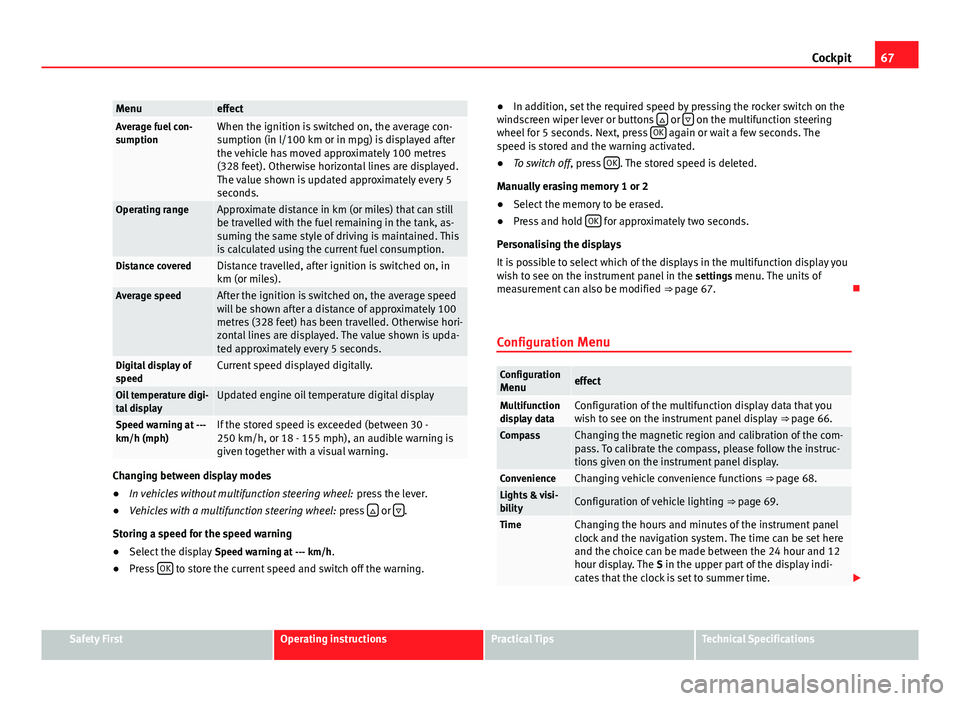
MenueffectAverage fuel con-
sumptionWhen the ignition is switched on, the average con-
sumption (in l/100 km or in mpg) is displayed after
the vehicle has moved approximately 100 metres
(328 feet). Otherwise horizontal lines are displayed.
The value shown is updated approximately every 5
seconds.
Operating rangeApproximate distance in km (or miles) that can still
be travelled with the fuel remaining in the tank, as-
suming the same style of driving is maintained. This
is calculated using the current fuel consumption.
Distance coveredDistance travelled, after ignition is switched on, in
km (or miles).
Average speedAfter the ignition is switched on, the average speed
will be shown after a distance of approximately 100
metres (328 feet) has been travelled. Otherwise hori-
zontal lines are displayed. The value shown is upda-
ted approximately every 5 seconds.
Digital display of
speedCurrent speed displayed digitally.
Oil temperature digi-
tal displayUpdated engine oil temperature digital display
Speed warning at ---
km/h (mph)If the stored speed is exceeded (between 30 -
250 km/h, or 18 - 155 mph), an audible warning is
given together with a visual warning.
Changing between display modes
● In vehicles without multifunction steering wheel: press the lever.
● Vehicles with a multifunction steering wheel: press
or .
Storing a speed for the speed warning
● Select the display Speed warning at --- km/h.
● Press OK
to store the current speed and switch off the warning. ●
In addition, set the required speed by pressing the rocker switch on the
windscreen wiper lever or buttons
or on the multifunction steering
wheel for 5 seconds. Next, press OK again or wait a few seconds. The
speed is stored and the warning activated.
● To switch off , press OK
. The stored speed is deleted.
Manually erasing memory 1 or 2
● Select the memory to be erased.
● Press and hold OK
for approximately two seconds.
Personalising the displays
It is possible to select which of the displays in the multifunction display you
wish to see on the instrument panel in the settings menu. The units of
measurement can also be modified ⇒ page 67.
Configuration Menu
Configuration Menueffect
Multifunction
display dataConfiguration of the multifunction display data that you
wish to see on the instrument panel display ⇒ page 66.
CompassChanging the magnetic region and calibration of the com-
pass. To calibrate the compass, please follow the instruc-
tions given on the instrument panel display.
ConvenienceChanging vehicle convenience functions ⇒ page 68.Lights & visi-
bilityConfiguration of vehicle lighting ⇒ page 69.
TimeChanging the hours and minutes of the instrument panel
clock and the navigation system. The time can be set here
and the choice can be made between the 24 hour and 12
hour display. The S in the upper part of the display indi-
cates that the clock is set to summer time.
Safety FirstOperating instructionsPractical TipsTechnical Specifications
Page 83 of 381
81
Opening and closing
Doors Introduction
Additional information and warnings:
● Vehicle key set ⇒ page 72
● Central locking and locking system ⇒ page 75
● Emergency locking and unlocking ⇒ page 318
WARNING
If a door is not correctly closed, it could open unexpectedly when driving
and cause serious injuries.
● Always stop immediately and close the door.
● When closing, ensure that the door has closed correctly. A closed
door should be flush with the corresponding parts of the bodywork.
● Open and close doors only when nobody is in the way of the door.
WARNING
A door held open by its retainer could be blown closed by the wind or
close if the vehicle is on a hill causing injury.
● When opening and closing doors, always use the door handle.
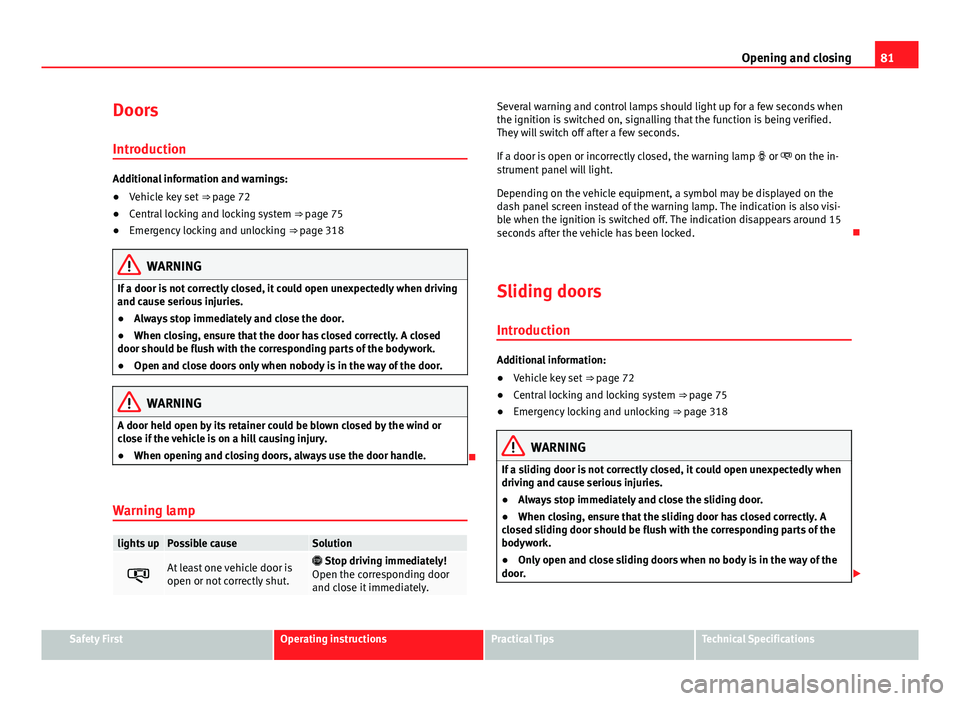
Warning lamp
lights upPossible causeSolution
At least one vehicle door is
open or not correctly shut. Stop driving immediately!
Open the corresponding door
and close it immediately.
Several warning and control lamps should light up for a few seconds when
the ignition is switched on, signalling that the function is being verified.
They will switch off after a few seconds.
If a door is open or incorrectly closed, the warning lamp or on the in-
strument panel will light.
Depending on the vehicle equipment, a symbol may be displayed on the
dash panel screen instead of the warning lamp. The indication is also visi-
ble when the ignition is switched off. The indication disappears around 15
seconds after the vehicle has been locked.
Sliding doors Introduction
Additional information:
● Vehicle key set ⇒ page 72
● Central locking and locking system ⇒ page 75
● Emergency locking and unlocking ⇒ page 318
WARNING
If a sliding door is not correctly closed, it could open unexpectedly when
driving and cause serious injuries.
● Always stop immediately and close the sliding door.
● When closing, ensure that the sliding door has closed correctly. A
closed sliding door should be flush with the corresponding parts of the
bodywork.
● Only open and close sliding doors when no body is in the way of the
door.
Safety FirstOperating instructionsPractical TipsTechnical Specifications
Page 87 of 381
85
Opening and closing
WARNING (Continued)
● Ensure the rear lid is locked after closing, otherwise, it may open un-
expectedly while driving. A closed rear lid should be flush with the corre-
sponding parts of the bodywork.
● Always keep the rear lid closed while driving to avoid toxic gases en-
tering the vehicle interior.
● Do not open the rear lid when there is a load carrier installed. Like-
wise, the rear lid cannot be opened when a load is attached to it, for ex-
ample bicycles. An open rear lid could close itself if there is an additional
weight on it. If necessary, press down on the rear lid and remove the
load.
● Close and lock both the rear lid and all the other doors when you are
not using the vehicle. Ensure that nobody remains inside the vehicle.
● Never allow children to play inside or around the vehicle without su-
pervision, especially if the rear lid is open. Children could enter the lug-
gage compartment, close the rear lid and become trapped. Depending on
the time of the year, temperatures inside a locked and closed vehicle can
be extremely high or extremely low resulting in serious injuries and ill-
ness or even death, particularly for young children.
● Never leave children or disabled people alone in the vehicle. If the ve-
hicle key or the central locking button is used, they may be locked in the
vehicle.
CAUTION
Before opening the rear lid, ensure that there is sufficient free space to
open and close it, for example if you are towing a trailer or in a garage. Warning lamp
lights upPossible causeSolution
The rear lid is open or not
correctly shut.
Stop driving immediately!
Open the rear lid and close it
again.
Several warning and control lamps should light up for a few seconds when
the ignition is switched on, signalling that the function is being verified.
They will switch off after a few seconds.
A warning lamp appears on the instrument panel if the rear lid is open or
not properly closed.
Depending on the vehicle equipment, a symbol may be displayed on the
dash panel screen instead of the warning lamp. The indication is also visi-
ble when the ignition is switched off. The indication disappears around 15
seconds after the vehicle has been locked.
WARNING
If the rear lid is not correctly closed, it could open unexpectedly when
driving and cause serious injuries.
● Always stop immediately and close the rear lid.
● Ensure that the rear lid has been locked into place by the element on
the lock carrier when you close it.
Safety FirstOperating instructionsPractical TipsTechnical Specifications
Page 90 of 381
88Opening and closing
Opening the rear lid
● Press and hold the
button on the vehicle key until the rear lid opens
automatically.
● OR: Press and hold the
button on the centre console for approxi-
mately 1 second ⇒ Fig. 53.
● OR: Press the ⇒ Fig. 54 rear lid button (arrow).
In case of difficulty or obstruction, automatic opening of the rear lid is inter-
rupted.
Electronically opening the rear lid does not work when a trailer is electrically
connected and hitched to a factory fitted tow hitch ⇒ page 237.
The rear lid can be opened manually by applying more force.
Closing the rear lid
● Press and hold the
button on the vehicle key for approximately 1
second.
● OR: Press and hold the
button on the centre console for approxi-
mately 1 second ⇒ Fig. 53.
● OR: Press the ⇒ Fig. 54 rear lid button (arrow).
● Press the button
on the open rear lid ⇒ Fig. 56 ⇒ .
● Manually push the rear lid down to close it.
The rear lid will move down to the closed position to close and lock itself
automatically using the power-close feature ⇒
.
In case of difficulty or obstruction, automatic closing of the rear lid is inter-
rupted and it will open slightly.
Check why the rear lid could not close.
Attempt to close it once more. Interrupting the opening and closing process
Rear lid opening and closing can be stopped by pressing one of the
but-
tons. Each time one of the buttons is pressed, the rear lid moves to its
initial position.
Then, it can be opened or closed by hand. To do this, apply a little more
force.
Memorising the opening angle
The rear lid must be at least half open to memorise an opening angle.
● Stop automatic opening in the opening position required ⇒ page 88.
● Hold down the button ⇒ Fig. 56 with the rear lid open for at least three
seconds. The opening angle is memorised.
Memorisation is confirmed by blinking of the hazard warning lights and an
audible warning.
To be opened completely, the opening angle must be memorised once
more.
● Release the rear lid and open it to the memorised height.
● Push the rear lid all the way up. To do this, apply a little more force.
● Hold down the button ⇒ Fig. 56 with the rear lid open for at least three
seconds.
● The opening angle is reset to the original factory setting.
WARNING
Unsuitable or careless closing and locking of the rear lid could cause se-
rious injuries.
● Never allow children to play inside or around the vehicle without su-
pervision, especially if the rear lid is open. Children could enter the lug-
gage compartment, close the rear lid and become trapped. A locked vehi-
cle can be subjected to extremely high and low temperatures, depending
on the time of year, thus causing serious injuries/illness and even death.