wheel Seat Alhambra 2014 Owner's Guide
[x] Cancel search | Manufacturer: SEAT, Model Year: 2014, Model line: Alhambra, Model: Seat Alhambra 2014Pages: 381, PDF Size: 5.75 MB
Page 142 of 381

140Seats and storage
Hooking the baggage net into the luggage compartment floor
● Hook the baggage net into the fastening rings ⇒ Fig. 101 1
and 2.
Releasing the baggage net
The secured baggage net is taut ⇒
.
● Carefully unhook the baggage net hooks from the fastening rings
⇒ Fig. 101 1
.
● Carefully unhook the baggage net hooks from the fastening rings
⇒ Fig. 101 2
.
WARNING
The elastic baggage net stretches when it is secured to the luggage com-
partment fastening rings. The secured baggage net is taut. The hooks on
the baggage net can cause injury if the net is incorrectly hooked or un-
hooked.
● Always ensure that the hooks do not suddenly release from the fas-
tening rings when hooking or un-hooking.
● Always keep your face and eyes protected at a safe distance to avoid
injury should a hook slip while hooking or unhooking.
● Always engage the hooks in the order given. If a baggage net hook
springs back this can cause injury.
Roof carrier system* Introduction
The vehicle roof has been designed to optimise aerodynamics. For this rea-
son, conventional roof carrier systems cannot be secured to the roof rails. Given that the water drains have been incorporated into the roof for aerody-
namic reasons, only the SEAT approved basic supports and roof carrier sys-
tems can be used.
When should the roof carrier system be removed?
●
When it is not being used.
● When the vehicle is being washed in a car wash.
● When the vehicle height exceeds the maximum height (for example, in a
garage).
Additional information and warnings:
● Light ⇒ page 96
● Transporting ⇒ page 13
● Ecological driving ⇒ page 229
● Wheels and tyres ⇒ page 297
● Accessories, parts replacement, repairs and modifications ⇒ page 261
WARNING
The risk of an accident is increased by transporting heavy or bulky loads
on the roof, which affects the car's handling by shifting the centre of
gravity and increasing susceptibility to cross winds.
● Always secure loads correctly with suitable and undamaged attach-
ment rope or straps.
● Large, heavy, wide and flat loads negatively affect the vehicle aerody-
namics, centre of gravity and handling.
● Avoid brusque manoeuvres and sudden braking.
● Adjust your speed and driving style to visibility, road, traffic and
weather conditions.
Page 143 of 381
141
Seats and storage
CAUTION
● Always remove the roof carrier system from the roof before entering a car
wash.
● The height of your vehicle is changed by the installation of the roof carri-
er and the load secured on it. Compare the vehicle height with the passage
height, for example in underground car parks or entering garage doors.
● The roof antenna, the range of the panoramic sliding sunroof and the
rear lid should not be affected by the roof carrier system and the load being
transported.
● Take extra care not to let the rear lid strike the roof load when opening.
For the sake of the environment
The vehicle uses more fuel when the roof carrier system is fitted.
Securing the base supports and roof carrier system
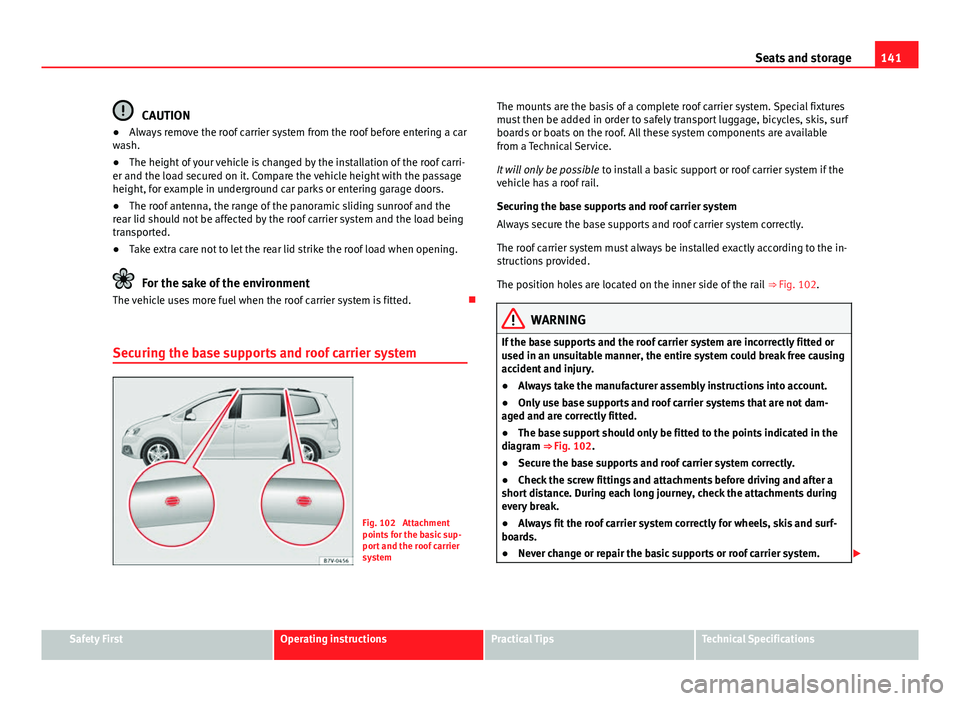
Fig. 102 Attachment
points for the basic sup-
port and the roof carrier
system The mounts are the basis of a complete roof carrier system. Special fixtures
must then be added in order to safely transport luggage, bicycles, skis, surf
boards or boats on the roof. All these system components are available
from a Technical Service.
It will only be possible
to install a basic support or roof carrier system if the
vehicle has a roof rail.
Securing the base supports and roof carrier system
Always secure the base supports and roof carrier system correctly.
The roof carrier system must always be installed exactly according to the in-
structions provided.
The position holes are located on the inner side of the rail ⇒ Fig. 102.
WARNING
If the base supports and the roof carrier system are incorrectly fitted or
used in an unsuitable manner, the entire system could break free causing
accident and injury.
● Always take the manufacturer assembly instructions into account.
● Only use base supports and roof carrier systems that are not dam-
aged and are correctly fitted.
● The base support should only be fitted to the points indicated in the
diagram ⇒ Fig. 102.
● Secure the base supports and roof carrier system correctly.
● Check the screw fittings and attachments before driving and after a
short distance. During each long journey, check the attachments during
every break.
● Always fit the roof carrier system correctly for wheels, skis and surf-
boards.
● Never change or repair the basic supports or roof carrier system.
Safety FirstOperating instructionsPractical TipsTechnical Specifications
Page 165 of 381
163
Air conditioning
Air vents
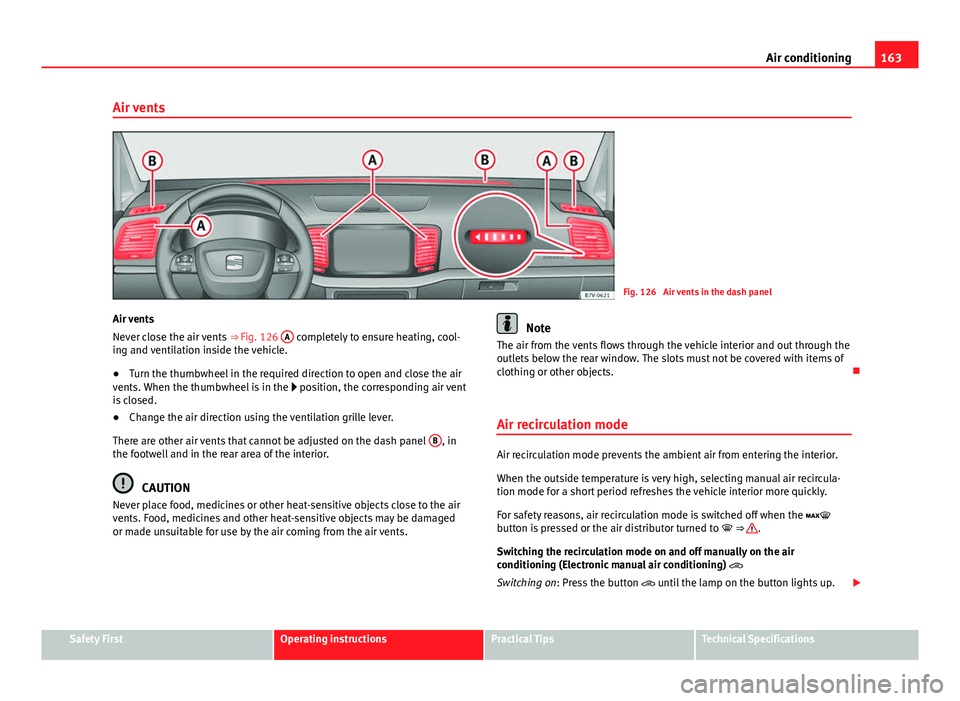
Fig. 126 Air vents in the dash panel
Air vents
Never close the air vents ⇒ Fig. 126 A
completely to ensure heating, cool-
ing and ventilation inside the vehicle.
● Turn the thumbwheel in the required direction to open and close the air
vents. When the thumbwheel is in the position, the corresponding air vent
is closed.
● Change the air direction using the ventilation grille lever.
There are other air vents that cannot be adjusted on the dash panel B
, in
the footwell and in the rear area of the interior.
CAUTION
Never place food, medicines or other heat-sensitive objects close to the air
vents. Food, medicines and other heat-sensitive objects may be damaged
or made unsuitable for use by the air coming from the air vents.
Note
The air from the vents flows through the vehicle interior and out through the
outlets below the rear window. The slots must not be covered with items of
clothing or other objects.
Air recirculation mode
Air recirculation mode prevents the ambient air from entering the interior.
When the outside temperature is very high, selecting manual air recircula-
tion mode for a short period refreshes the vehicle interior more quickly.
For safety reasons, air recirculation mode is switched off when the
button is pressed or the air distributor turned to ⇒
.
Switching the recirculation mode on and off manually on the air
conditioning (Electronic manual air conditioning)
Switching on: Press the button until the lamp on the button lights up.
Safety FirstOperating instructionsPractical TipsTechnical Specifications
Page 169 of 381
167
Air conditioning
Range
The receiver is in the interior of the vehicle. The remote control, when fitted
with new batteries, has a range of several hundred metres. Obstacles be-
tween the remote control and the vehicle, bad weather conditions and dis-
charged batteries can considerably reduce the range of the remote control.
An optimum range is obtained by keeping the remote control vertical, with
the aerial ⇒ Fig. 127 A
pointing upwards. When doing so, do not cover the
aerial with your fingers or with the palm of your hand.
There must be a minimum distance of two metres between the remote con-
trol and the vehicle.
CAUTION
● The radio frequency remote control contains electronic components.
Therefore, avoid getting the remote control wet and from being knocked
and protect it from direct sunlight.
● Use of inappropriate batteries may damage the remote control. For this
reason, always replace the dead battery with another of the same voltage,
size and specifications.
For the sake of the environment
● Please dispose of old batteries so that they do not harm the environ-
ment.
● The remote control battery may contain perchlorate. Observe the legal
requirements for their disposal.
Programming the auxiliary heater
The heater or ventilation inside the vehicle can be programmed for a certain
period. Before programming, check that the day is correctly set in the
Auxiliary heat-
er - day of the week menu ⇒
.
Enabling the Auxiliary heater menu on the instrument panel
● From the main menu, select the Auxiliary heater submenu and press the
OK
button on the windscreen wiper lever.
● OR: press the or arrow buttons on the multi-function steering
wheel until the Auxiliary heater menu is displayed.
Menu optionsDescription
Switching on
Switching off
The auxiliary heater can be set to come on automati-
cally if required. To do so, select a timer:
– The timer is displayed marked with a .
– Only one timer can be selected. If a timer has been
selected, Prog. ON will be displayed on the screen. If
no timer has been selected, the instrument panel dis-
play will show Prog. OFF.
– To modify the programmed timer, select another tim-
er or select the Off option.
Timer 1
Timer 2
Timer 3Three different timers (hh.mm) can later be selected
using the On option. If the auxiliary heater is to be
switched on for just a certain day of the week, select
the day of the week and the time for the auxiliary heat-
er to come on.
DurationThe operating time may vary between 10 and 60 mi-
nutes and can be set to 5-minute intervals.
Operating modeSet to heat or ventilate the vehicle interior when the
auxiliary heater is switched on.
DaySet the current day of the week.
Factory settingsThe predefined factory values for the functions of this
menu are restored.
BackThis returns to the main menu.
Safety FirstOperating instructionsPractical TipsTechnical Specifications
Page 171 of 381
169
Driving
Driving SteeringIntroduction
The power steering is not hydraulic but electromechanical. The advantage
of this steering system is that it disposes of hydraulic tubes, hydraulic oil,
the pump, filter and other components. The electromechanical system
saves fuel. While a hydraulic system requires oil pressure to be maintained,
electromechanical steering only requires energy when the steering wheel is
turned.
With the power steering system, the assisted steering function automatical-
ly adjusts according to the vehicle speed, the steering torque and the wheel
turning angle. The power steering only works when the engine is running.
Additional information and warnings:
● Start and stop the engine ⇒ page 172
● Vehicle battery ⇒ page 292
● Tow starting and towing away ⇒ page 344
WARNING
If the power steering is not working then the steering wheel is much
more difficult to turn and the vehicle more difficult to control.
● The power steering only works when the engine is running.
● Never allow the vehicle to move when the engine is switched off.
● Never remove the key from the ignition if the vehicle is in motion. The
steering may lock and it will not be possible to turn the steering wheel.
Control and warning lamps
lights upPossible causeSolution
(red)Power steering faulty.The steering system should be
checked by a specialised work-
shop as soon as possible.
(yellow)
Power steering operation re-
duced.
The steering system should be
checked by a specialised work-
shop as soon as possible.
If, after restarting the engine
and driving for a short distance,
the yellow warning lamp no lon-
ger comes on, it will not be nec-
essary to take the vehicle to a
specialised workshop.
The vehicle battery was dis-
connected and has been re-
connected.Travel a short distance at about
15-20 km/h (9-12 mph).
Safety FirstOperating instructionsPractical TipsTechnical Specifications
Page 172 of 381
170Driving
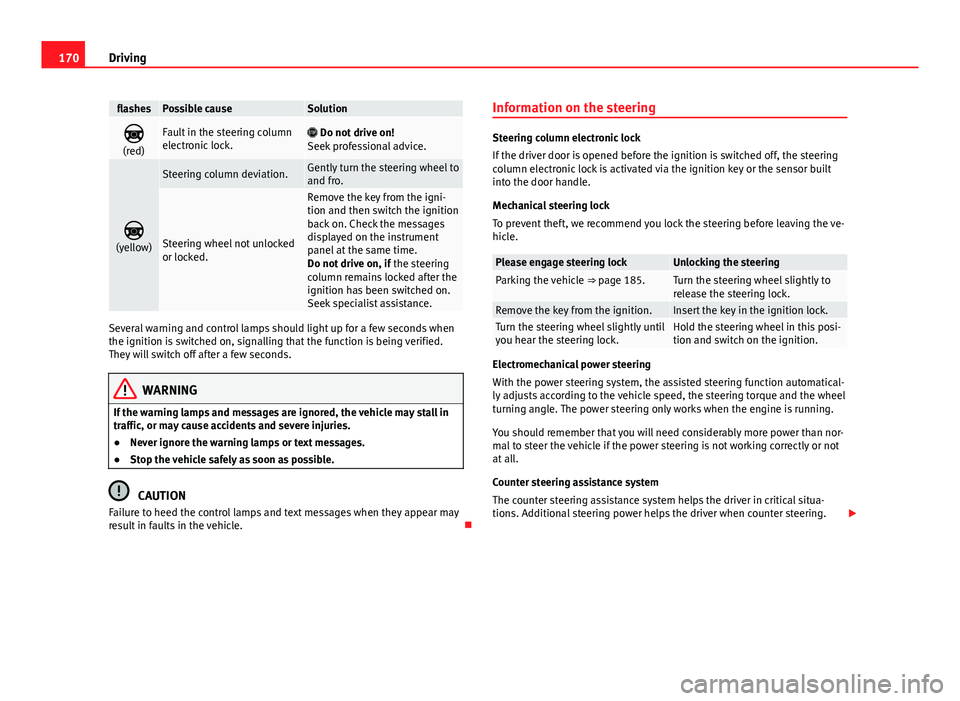
flashesPossible causeSolution
(red)Fault in the steering column
electronic lock. Do not drive on!
Seek professional advice.
(yellow)
Steering column deviation.Gently turn the steering wheel to
and fro.
Steering wheel not unlocked
or locked.
Remove the key from the igni-
tion and then switch the ignition
back on. Check the messages
displayed on the instrument
panel at the same time.
Do not drive on, if the steering
column remains locked after the
ignition has been switched on.
Seek specialist assistance.
Several warning and control lamps should light up for a few seconds when
the ignition is switched on, signalling that the function is being verified.
They will switch off after a few seconds.
WARNING
If the warning lamps and messages are ignored, the vehicle may stall in
traffic, or may cause accidents and severe injuries.
● Never ignore the warning lamps or text messages.
● Stop the vehicle safely as soon as possible.
CAUTION
Failure to heed the control lamps and text messages when they appear may
result in faults in the vehicle. Information on the steering
Steering column electronic lock
If the driver door is opened before the ignition is switched off, the steering
column electronic lock is activated via the ignition key or the sensor built
into the door handle.
Mechanical steering lock
To prevent theft, we recommend you lock the steering before leaving the ve-
hicle.
Please engage steering lockUnlocking the steeringParking the vehicle
⇒ page 185.Turn the steering wheel slightly to
release the steering lock.
Remove the key from the ignition.Insert the key in the ignition lock.Turn the steering wheel slightly until
you hear the steering lock.Hold the steering wheel in this posi-
tion and switch on the ignition.
Electromechanical power steering
With the power steering system, the assisted steering function automatical-
ly adjusts according to the vehicle speed, the steering torque and the wheel
turning angle. The power steering only works when the engine is running.
You should remember that you will need considerably more power than nor-
mal to steer the vehicle if the power steering is not working correctly or not
at all.
Counter steering assistance system
The counter steering assistance system helps the driver in critical situa-
tions. Additional steering power helps the driver when counter steering.
Page 173 of 381
171
Driving
WARNING
The counter steering assistance system combined with ESC helps the
driver to steer the vehicle in critical driving conditions. At all times, it is
the driver who steers the vehicle. The counter steering system does not
steer the vehicle.
Adjusting the steering wheel position
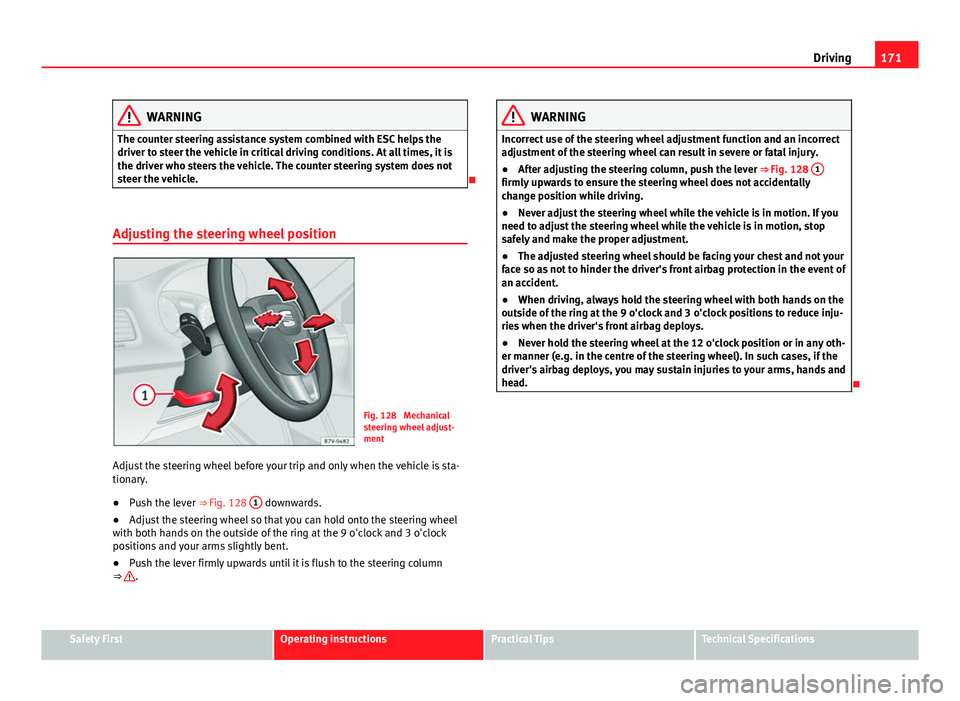
Fig. 128 Mechanical
steering wheel adjust-
ment
Adjust the steering wheel before your trip and only when the vehicle is sta-
tionary.
● Push the lever ⇒ Fig. 128 1
downwards.
● Adjust the steering wheel so that you can hold onto the steering wheel
with both hands on the outside of the ring at the 9 o'clock and 3 o'clock
positions and your arms slightly bent.
● Push the lever firmly upwards until it is flush to the steering column
⇒
.
WARNING
Incorrect use of the steering wheel adjustment function and an incorrect
adjustment of the steering wheel can result in severe or fatal injury.
● After adjusting the steering column, push the lever ⇒ Fig. 128 1
firmly upwards to ensure the steering wheel does not accidentally
change position while driving.
●
Never adjust the steering wheel while the vehicle is in motion. If you
need to adjust the steering wheel while the vehicle is in motion, stop
safely and make the proper adjustment.
● The adjusted steering wheel should be facing your chest and not your
face so as not to hinder the driver's front airbag protection in the event of
an accident.
● When driving, always hold the steering wheel with both hands on the
outside of the ring at the 9 o'clock and 3 o'clock positions to reduce inju-
ries when the driver's front airbag deploys.
● Never hold the steering wheel at the 12 o'clock position or in any oth-
er manner (e.g. in the centre of the steering wheel). In such cases, if the
driver's airbag deploys, you may sustain injuries to your arms, hands and
head.
Safety FirstOperating instructionsPractical TipsTechnical Specifications
Page 176 of 381
174Driving
Key not authorised for the vehicle
If a key which is not authorised for this vehicle is inserted in the ignition
lock, it can be removed as follows:
● Automatic gearbox: the key cannot be removed from the ignition lock.
Press and release the selector lever locking button. Key can be removed
from the vehicle.
● Manual gearbox: Remove the key from the ignition.
WARNING
Unsuitable or careless use of the vehicle key could result in serious in-
jury.
● Always take all the keys with you whenever you leave the vehicle. The
engine could accidentally be started and electrical equipment such as
the windows could accidentally be operated resulting in serious injury.
● Never leave children or disabled people alone in the car. They could
be trapped in the car in an emergency and will not be able to get them-
selves to safety. For example, depending on the time of the year, temper-
atures inside a locked and closed vehicle can be extremely high or ex-
tremely low resulting in serious injuries and illness or even death, partic-
ularly for young children.
● Never remove the key from the ignition if the vehicle is in motion. The
steering may lock and it will not be possible to turn the steering wheel.
Note
● If the key is left in the ignition lock with the engine off for long periods,
the vehicle battery will run flat.
● In vehicles with automatic gearbox the ignition key can only be with-
drawn with the selector lever in position P. In this case, press and release
the selector lever locking button. Starting the engine
Complete operations only in the sequence given:
Step
1.Press the brake pedal and keep pressed until step 5 has been
completed.
1 a.In vehicles with a manual gearbox:
Press the clutch pedal all
the way and keep pressed until the engine starts.
2.Put the gearbox lever in neutral or the selector lever in posi-
tion P or N.
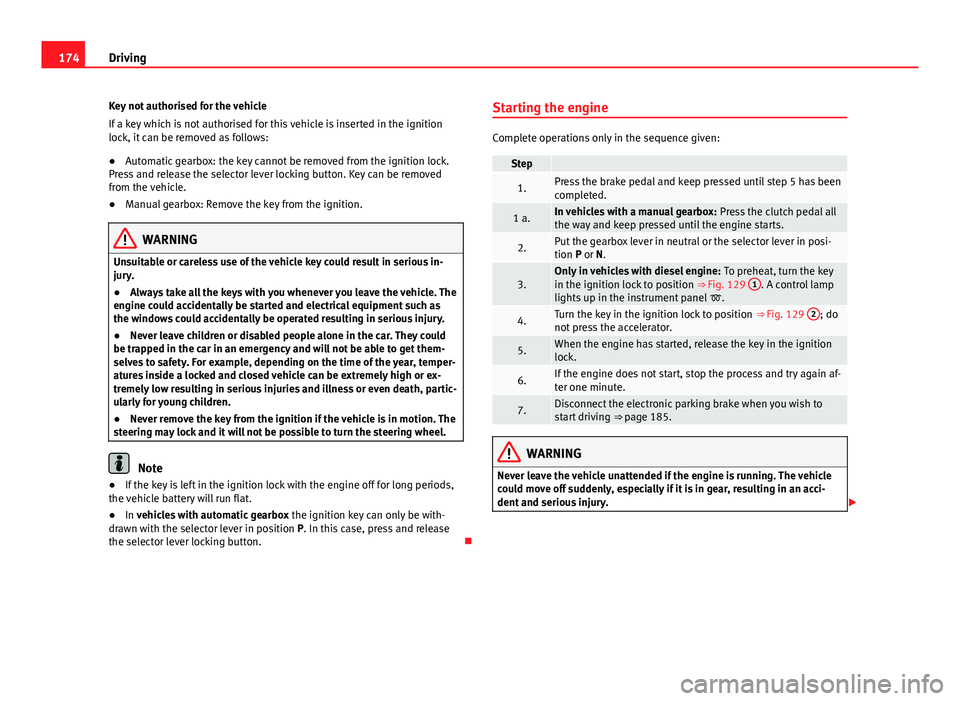
3.Only in vehicles with diesel engine: To preheat, turn the key
in the ignition lock to position ⇒ Fig. 129 1. A control lamp
lights up in the instrument panel .
4.Turn the key in the ignition lock to position ⇒ Fig. 129 2; do
not press the accelerator.
5.When the engine has started, release the key in the ignition
lock.
6.If the engine does not start, stop the process and try again af-
ter one minute.
7.Disconnect the electronic parking brake when you wish to
start driving ⇒ page 185.
WARNING
Never leave the vehicle unattended if the engine is running. The vehicle
could move off suddenly, especially if it is in gear, resulting in an acci-
dent and serious injury.
Page 182 of 381
180Driving
Automatic gearbox*: Selecting gears
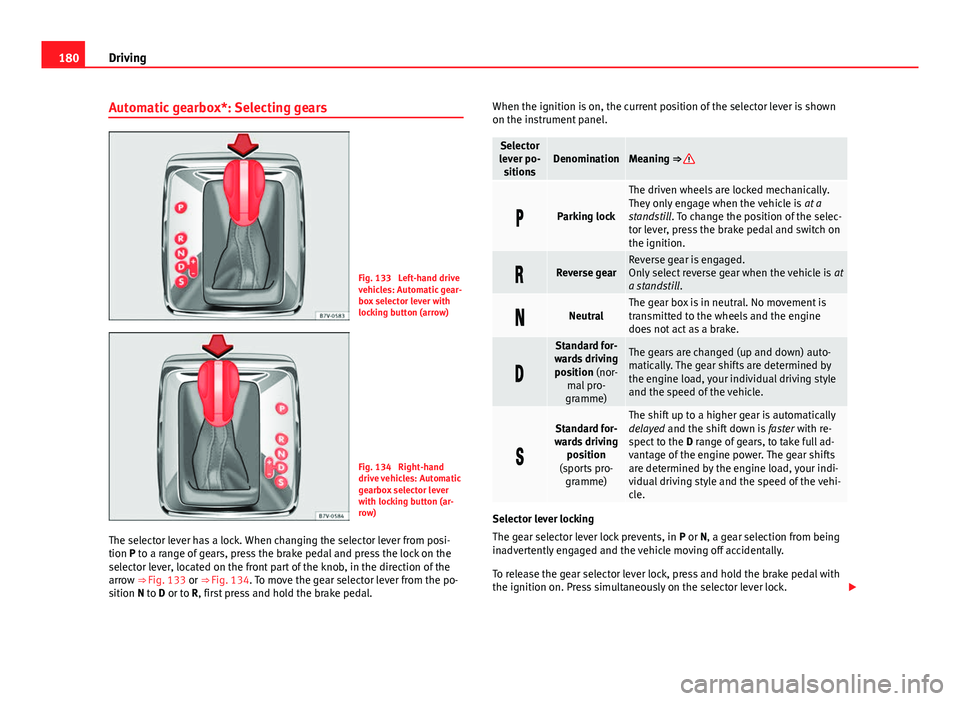
Fig. 133 Left-hand drive
vehicles: Automatic gear-
box selector lever with
locking button (arrow)
Fig. 134 Right-hand
drive vehicles: Automatic
gearbox selector lever
with locking button (ar-
row)
The selector lever has a lock. When changing the selector lever from posi-
tion P to a range of gears, press the brake pedal and press the lock on the
selector lever, located on the front part of the knob, in the direction of the
arrow ⇒ Fig. 133 or ⇒ Fig. 134. To move the gear selector lever from the po-
sition N to D or to R, first press and hold the brake pedal. When the ignition is on, the current position of the selector lever is shown
on the instrument panel.
Selector
lever po- sitionsDenominationMeaning ⇒
Parking lock
The driven wheels are locked mechanically.
They only engage when the vehicle is at a
standstill. To change the position of the selec-
tor lever, press the brake pedal and switch on
the ignition.
Reverse gearReverse gear is engaged.
Only select reverse gear when the vehicle is at
a standstill .
NeutralThe gear box is in neutral. No movement is
transmitted to the wheels and the engine
does not act as a brake.
Standard for-
wards driving position (nor- mal pro-
gramme)The gears are changed (up and down) auto-
matically. The gear shifts are determined by
the engine load, your individual driving style
and the speed of the vehicle.
Standard for-
wards driving position
(sports pro- gramme)The shift up to a higher gear is automatically
delayed and the shift down is faster with re-
spect to the D range of gears, to take full ad-
vantage of the engine power. The gear shifts
are determined by the engine load, your indi-
vidual driving style and the speed of the vehi-
cle.
Selector lever locking
The gear selector lever lock prevents, in P or N, a gear selection from being
inadvertently engaged and the vehicle moving off accidentally.
To release the gear selector lever lock, press and hold the brake pedal with
the ignition on. Press simultaneously on the selector lever lock.
Page 184 of 381
182Driving
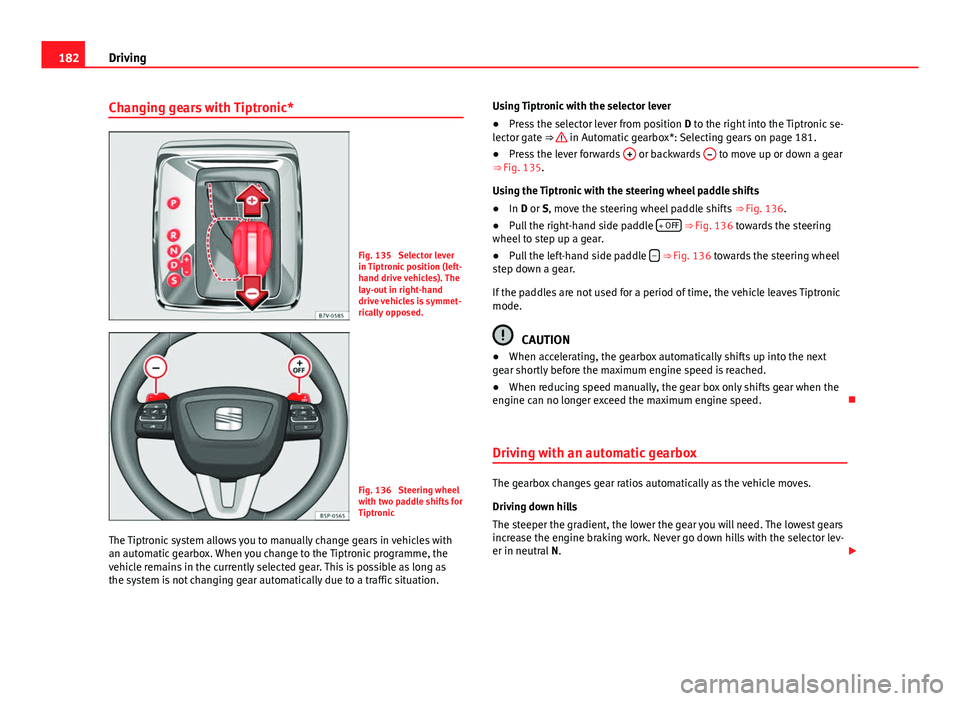
Changing gears with Tiptronic*
Fig. 135 Selector lever
in Tiptronic position (left-
hand drive vehicles). The
lay-out in right-hand
drive vehicles is symmet-
rically opposed.
Fig. 136 Steering wheel
with two paddle shifts for
Tiptronic
The Tiptronic system allows you to manually change gears in vehicles with
an automatic gearbox. When you change to the Tiptronic programme, the
vehicle remains in the currently selected gear. This is possible as long as
the system is not changing gear automatically due to a traffic situation. Using Tiptronic with the selector lever
●
Press the selector lever from position D to the right into the Tiptronic se-
lector gate ⇒
in Automatic gearbox*: Selecting gears on page 181.
● Press the lever forwards + or backwards – to move up or down a gear
⇒ Fig. 135.
Using the Tiptronic with the steering wheel paddle shifts
● In D or S, move the steering wheel paddle shifts ⇒ Fig. 136.
● Pull the right-hand side paddle + OFF
⇒ Fig. 136 towards the steering
wheel to step up a gear.
● Pull the left-hand side paddle –
⇒ Fig. 136 towards the steering wheel
step down a gear.
If the paddles are not used for a period of time, the vehicle leaves Tiptronic
mode.
CAUTION
● When accelerating, the gearbox automatically shifts up into the next
gear shortly before the maximum engine speed is reached.
● When reducing speed manually, the gear box only shifts gear when the
engine can no longer exceed the maximum engine speed.
Driving with an automatic gearbox
The gearbox changes gear ratios automatically as the vehicle moves.
Driving down hills
The steeper the gradient, the lower the gear you will need. The lowest gears
increase the engine braking work. Never go down hills with the selector lev-
er in neutral N.