Wiper Seat Alhambra 2015 User Guide
[x] Cancel search | Manufacturer: SEAT, Model Year: 2015, Model line: Alhambra, Model: Seat Alhambra 2015Pages: 305, PDF Size: 5.46 MB
Page 86 of 305
Operation
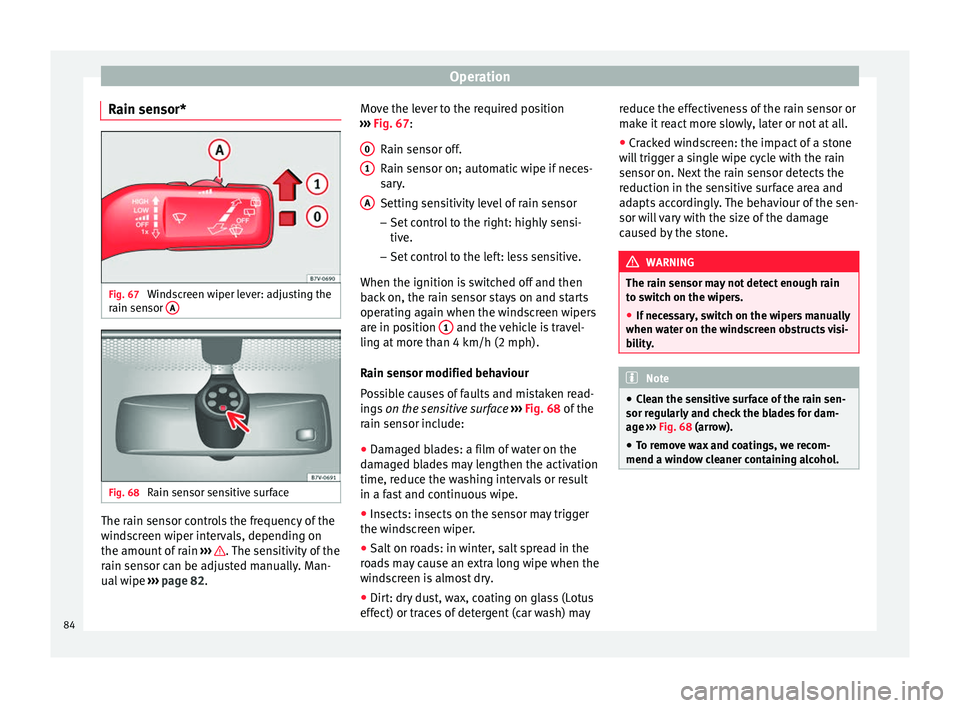
Rain sensor* Fig. 67
Windscreen wiper lever: adjusting the
rain sensor AFig. 68
Rain sensor sensitive surface The rain sensor controls the frequency of the
windscreen wiper intervals, depending on
the amount of rain
››› . The sensitivity of the
rain sensor can be adjusted manually. Man-
ual wipe ››› page 82 . Mo
v e the lever to the required position
››› Fig. 67:
Rain sen
sor off.
Rain sensor on; automatic wipe if neces-
sary.
Setting sensitivity level of rain sensor
– Set control to the right: highly sensi-
tive.
– Set control to the left: less sensitive.
When the ignition is switched off and then
back on, the rain sensor stays on and starts
operating again when the windscreen wipers
are in position 1 and the vehicle is travel-
ling at more than 4 km/h (2 mph).
Rain sensor modified behaviour
Possible causes of faults and mistaken read-
ings on the sensitive surface ››› Fig. 68 of the
r ain sen
sor include:
● Damaged blades: a film of water on the
damaged blades may lengthen the activation
time, reduce the washing intervals or result
in a fast and continuous wipe.
● Insects: insects on the sensor may trigger
the windscreen wiper.
● Salt on roads: in winter, salt spread in the
roads may cause an extra long wipe when the
windscreen is almost dry.
● Dirt: dry dust, wax, coating on glass (Lotus
effect) or traces of detergent (car wash) may 0 1
A reduce the effectiveness of the rain sensor or
make it react more slowly, later or not at all.
●
Cracked windscreen: the impact of a stone
will trigger a single wipe cycle with the rain
sensor on. Next the rain sensor detects the
reduction in the sensitive surface area and
adapts accordingly. The behaviour of the sen-
sor will vary with the size of the damage
caused by the stone. WARNING
The rain sensor may not detect enough rain
to switch on the wipers.
● If necessary, switch on the wipers manually
when water on the windscreen obstructs visi-
bility. Note
● Clean the sensitive surface of the rain sen-
sor regularly and check the blades for dam-
age ››› Fig. 68 (arrow).
● To r
emove wax and coatings, we recom-
mend a window cleaner containing alcohol. 84
Page 129 of 305
Air conditioning
CAUTION
Never place food, medicines or other heat-
sensitive objects close to the air vents. Being
heat-sensitive, they may be damaged or
made unsuitable for use by the air coming
from the air vents. Note
The air from the vents flows through the vehi-
cle interior and out through the outlets below
the rear window. The slots must not be cov-
ered with items of clothing or other objects. Air recirculation mode
Air recirculation mode prevents the ambient
air from entering the interior.
When the outside temperature is very high,
selecting manual air recirculation mode for a
short period refreshes the vehicle interior
more quickly.
For safety reasons, air recirculation mode is
switched off when the
button is press-
ed or the air distributor turned to ››› .
Switching the recirculation mode on and off
manually on the air conditioning (Electronic
manual air conditioning)
Switching on : press the button
u
nti l the
lamp on the button lights up. Switching off: press the button
until the
lamp on the button switches off.
Switching the recirculation mode on and off
manually on the Climatronic
Switching on: press the button until the
l
amp on the button lights up.
Switching off
: press the button until the
lamp on the button switches off.
Automatic air recirculation mode
Fresh air enters the vehicle interior in posi-
tion . If the system detects a high con-
centration of hazardous substances in the
ambient air, air recirculation mode is switch-
ed on automatically. When the level of impur-
ities drops to within a normal range, recircu-
lation mode is switched off.
The system is unable to detect unpleasant
smells.
With the following outside temperatures and
conditions the air recirculation does not
switch on automatically:
● The cooling system is switched on (the A/C button is lit up) and the outside temperature
is below +3 °C (+38 °F).
● The cooling system and the windscreen
wipers are switched off and the outside tem-
perature is below +10 °C (+50 °F).
● The cooling system is switched off and the
outside temperature is below +15 °C (+59 °F). The windscreen wiper is switched
on.
Switching the automatic air recirculation
mode on and off
Switching on
: press the button
until the
right
lamp on the button lights up.
Switching off
: press the button until all
the lamps on the button are switched off.
Switching the automatic air recirculation
mode off temporarily
● Press the button once to temporarily
switch to manual air recirculation mode in
the event of unpleasant smells from outside.
The left indicator lamp turns on.
● After more than two seconds, press the
button again to restart automatic air recircu-
lation. The right indicator lamp turns on. WARNING
Observe the safety warnings ››› in Intro-
duction on page 122.
● If the c
ooling system is switched off and air
recirculation mode switched on, the windows
can mist over very quickly, considerably limit-
ing visibility.
● Switch air recirculation mode off when it is
not required. » 127
Technical specifications
Advice
Operation
Safety
Page 130 of 305
Operation
CAUTION
Do not smoke when air recirculation is
switched on in vehicles with an air condition-
er. The smoke taken in could lie on the cool-
ing system vaporiser and on the activated
charcoal cartridge of the dust and pollen fil-
ter, leading to a permanently unpleasant
smell. Note
Climatronic: air recirculation mode switches
on to prevent exhaust gas from entering the
vehicle interior when it is in reverse and
while the automatic windscreen wipers are
working. Auxiliary heater* (additional
heater)
Introduction The auxiliary heater is powered by fuel from
the vehicle's fuel tank and can be used while
the vehicle is in motion and at a standstill.
Select the mode required (
heat
or fan
)
››› page 130 on the dash panel.
In w int
er, the auxiliary heater can be used in
heat mode before switching on the ignition to
remove any ice, mist or snow from the wind-
screen (thin layers only). WARNING
The auxiliary heater fumes contain carbon di-
oxide, an odourless and colourless toxic gas.
Carbon monoxide can cause people to lose
consciousness. It can also cause death.
● Never switch on the auxiliary heater or
leave it running in places that are enclosed or
unventilated.
● Never program the independent heating
system to be activated and operated in
closed, unventilated areas. WARNING
The components of the auxiliary heater ex-
haust system heat up a great deal. This could
cause a fire.
● Always park your vehicle so that no part of
the exhaust system can come in contact with
flammable materials (such as dried grass). CAUTION
Never place food, medicines or other heat-
sensitive objects close to the air vents. Food,
medicines and other heat-sensitive objects
may be damaged or made unsuitable for use
by the air coming from the air vents. Switching the auxiliary heater on and
off
Switching the auxiliary heater on:
Manually using the instant on/off
button.›››
page
123
ONManually using the remote control.››› page
129
Automatically at the programmed
and enabled on time.››› page
130
Switching the auxiliary heater off:
Manually using the instant on/off
button for the air conditioner.›››
page
123
OFFManually using the remote control.››› page
129
Automatically after the programmed
time.››› page
130
Automatically when the light comes
on (fuel reserve).››› page
206
Automatically when the battery pow-
er drops to a very low level.››› page
227 Things to note
After switching the auxiliary heater off, it con-
tinues to run for a short period to completely
128
Page 132 of 305
Operation
An optimum range is obtained by keeping
the remote control vertical, with the aerial
››› Fig. 124 A pointing upwards. When doing
so, do not cover the aerial with your fingers
or with the palm of your hand.
There must be a minimum distance of 2 me-
tr e
s between the remote control and the vehi-
cle. CAUTION
● The radio frequency remote control con-
tains electronic components. Therefore, avoid
getting it wet and being knocked and protect
it from direct sunlight.
● Use of inappropriate batteries may damage
the remote control. For this reason, always re-
place the used battery with another of the
same voltage, size and specifications. For the sake of the environment
● Please dispose of old batteries so that they
do not harm the environment.
● The remote control battery may contain
perchlorate. Observe the legal requirements
for their disposal. Programming the auxiliary heater
The heater or ventilation inside the vehicle
can be programmed for a certain period. Before programming, check that the day is
correctly set in the
Auxiliary heater - day of the
week menu ››› .
Enabling the Auxiliary heater
menu on the
in s
trument panel
● From the main menu, select the Auxiliary
heater submenu and press the OK button on
the windscreen wiper lever.
● OR: press the or
arrow buttons on the
multi-function steering wheel until the Auxili-
ary heater menu is displayed.
Menu op-
tionsDescription
Switching on
Switching off
The auxiliary heater can be set to come
on automatically if required. To do so,
select a timer:
– The timer is displayed marked with a
.
– Only one timer can be selected. If a
timer has been selected, Prog. ON will be
displayed on the screen. If no timer has
been selected, the dash panel display
will show Prog. OFF.
– To modify the programmed timer, se-
lect another timer or select the Off op-
tion.
Timer 1
Timer 2
Timer 3
Three different timers (hh.mm) can later
be selected using the On option. If the
auxiliary heater is to be switched on for
just a certain day of the week, select the
day of the week and the time for the aux-
iliary heater to come on.
Menu op-
tionsDescription
DurationThe operating time may vary between 10
and 60 minutes and can be set to 5-mi-
nute intervals.
Operating
modeSet to heat or ventilate the vehicle interi-
or when the auxiliary heater is switched
on.
DaySet the current day of the week.
Factory set-
tingsThe predefined factory values for the
functions of this menu are restored.
BackThis returns to the main menu. Checking programming
If the
timer has been switched on after
switching the ignition off, the light on button will remain lit for around 10 seconds.
WARNING
Never program the independent heating sys-
tem to be activated and operated in closed,
unventilated areas. The auxiliary heater
fumes contain carbon dioxide, an odourless
and colourless toxic gas. Carbon monoxide
can cause people to lose consciousness. It
can also cause death. 130
Page 145 of 305
Driving
reduce the strain on the brake system. Other-
wise, the brakes may overheat and fail. Only
use the brakes to reduce speed or to stop.
Note
When checking the front brake pads, take the
time to also check the rear brake pads. The
thickness of the brake pads should be
checked visually and regularly, by looking
through the openings in the wheel rims or
from underneath the vehicle. If necessary, re-
move the wheels to check them thoroughly.
SEAT recommends taking your car in for tech-
nical service. Changing gear
Introduction When reverse gear is engaged and the
ignition is switched on the following takes
place:
● Reverse lights light up.
● When reversing, the air conditioner auto-
matically changes to air recirculation mode.
● The rear window heater switches on when
the windscreen wiper is activated.
● Also, the parking sensor system, the opti-
cal parking sensor and the camera for the re-
verse assist system are connected. WARNING
Rapid acceleration can cause loss of traction
and skidding, especially on slippery ground.
This could cause loss of control of the vehicle
resulting in an accident and considerable
damage.
● Only use the kick-down function or rapid
acceleration if visibility, weather, road and
traffic conditions so permit. WARNING
Do not allow the brakes to “rub” for a pro-
longed period of time, or brake frequently or
for long periods of time. Continuous braking
heats up the brakes. This could significantly
reduce braking power, increase braking dis-
tance or even result in the total failure of the
brake system. Warning and control lampsIt lights
upPossible causeSolution
(red)Brake pedal not
pressed!Press brake pedal to
the floor.
(green)Brake pedal not
pressed.
To select a range of
gears, press the
brake pedal.
Please also see "Elec-
tronic parking brake"
››› page 137.
FlashesPossible causeSolution
(green)
The selector lever
locking button
has not engaged.
The vehicle does
not start to move.Engage the selector
lever lock
››› page 145. Several warning and control lamps light up
for a few seconds when the ignition is switch-
ed on, signalling that the function is being
verified. They will switch off after a few sec-
onds.
WARNING
Observe the safety warnings ››› in Control
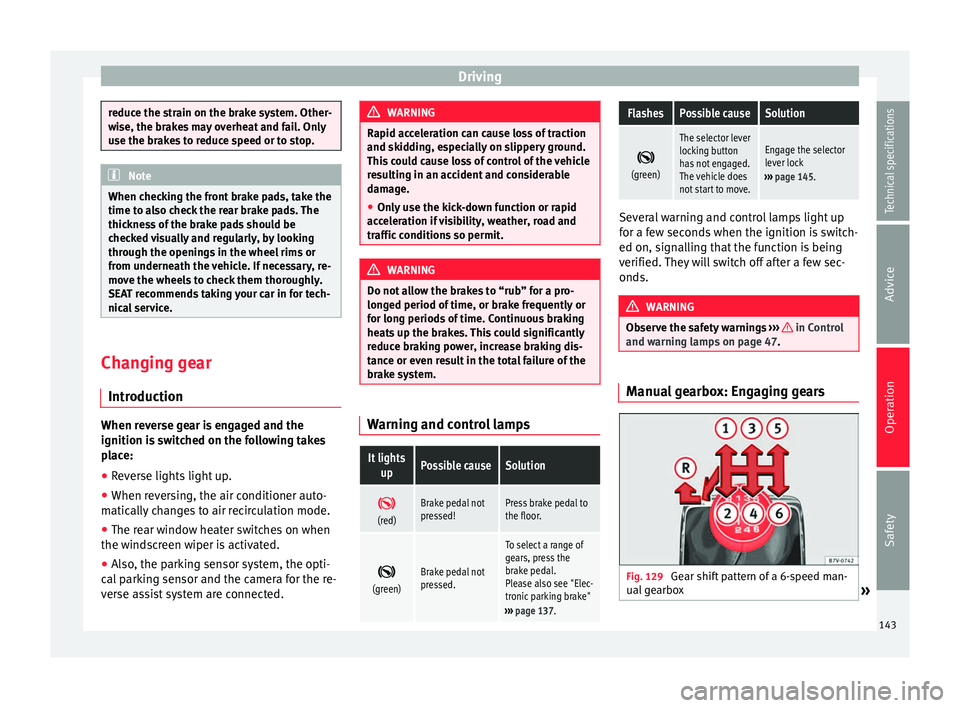
and warning lamps on page 47. Manual gearbox: Engaging gears
Fig. 129
Gear shift pattern of a 6-speed man-
ual gearbox » 143
Technical specifications
Advice
Operation
Safety
Page 178 of 305
Operation
Tiredness detection
(recommendation to take a
break) Introduction WARNING
Do not let the extra convenience afforded by
the tiredness detection function tempt you
into taking any risks when driving. When
making long trips, conveniently long breaks
must be taken.
● The driver is responsible for determining
their capacity to drive.
● Never drive when tired.
● The system does not always detect the
tiredness of the driver. Please read the infor-
mation provided in the section ››› page 176,
Limited operation.
● In some s it
uations the system may incor-
rectly interpret an intended manoeuvre as a
sign of tiredness of the driver.
● In the event of the an episode called “mi-
crosleep” at the wheel, a strong warning is
not in place!
● Observe the indications on the display of
the instrument panel and act in accordance
with them. Note
● The tiredness detection function has only
been designed for driving on motorways and
wide roads.
● If there is a fault in the system, refer to a
Specialised workshop to have the system in-
spected. Function and operation
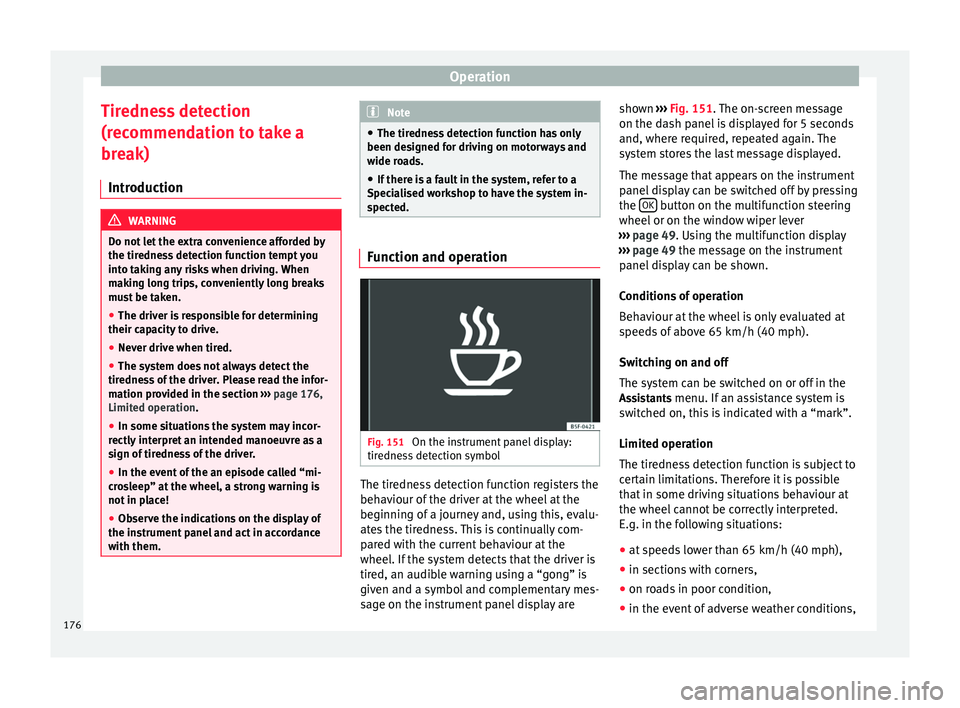
Fig. 151
On the instrument panel display:
tiredness detection symbol The tiredness detection function registers the
behaviour of the driver at the wheel at the
beginning of a journey and, using this, evalu-
ates the tiredness. This is continually com-
pared with the current behaviour at the
wheel. If the system detects that the driver is
tired, an audible warning using a “gong” is
given and a symbol and complementary mes-
sage on the instrument panel display areshown
››› Fig. 151 . The on-screen message
on the d a
sh panel is displayed for 5 seconds
and, where required, repeated again. The
system stores the last message displayed.
The message that appears on the instrument
panel display can be switched off by pressing
the OK button on the multifunction steering
wheel or on the window wiper lever
››› page 49 . Using the multifunction display
› ›
› page 49 the message on the instrument
panel
display can be shown.
Conditions of operation
Behaviour at the wheel is only evaluated at
speeds of above 65 km/h (40 mph).
Switching on and off
The system can be switched on or off in the
Assistants menu. If an assistance system is switched on, this is indicated with a “mark”.
Limited operation
The tiredness detection function is subject to
certain limitations. Therefore it is possible
that in some driving situations behaviour at
the wheel cannot be correctly interpreted.
E.g. in the following situations:
● at speeds lower than 65 km/h (40 mph),
● in sections with corners,
● on roads in poor condition,
● in the event of adverse weather conditions,
176
Page 198 of 305
Advice
Automatic car washes
Always observe the instructions provided at
the automatic car wash. The standard pre-
cautionary measures prior to entering the car
wash should be taken to avoid damage to
the vehicle (close all windows, fold in exterior
mirrors). If the vehicle is fitted with additional
components (spoiler, roof-rack, aerial, etc.),
check with the car wash supervisor whether
these can enter the car wash ››› .
The vehicle paintwork is so durable that the
vehicle can normally be washed without
problems in an automatic car wash tunnel.
However, wear and damage to the paintwork
will depend on the type of car wash used.
SEAT recommends the use of car washes
without brushes.
To remove traces of wax on windows and to
prevent wiper blades from scratching, please
observe the following ››› page 197, Cleaning
windows and exterior mirrors .
Washing the car by hand
When washing the car by hand, use plenty of
water to soften the dirt first, and rinse off as
well as possible.
Then clean the vehicle with a soft sponge,
glove or brush using only slight pressure.
St ar
t at the roof and work downwards. Spe-
cial car shampoo should only be used for
ver
y persistent dirt. Rinse the sponge or glove thoroughly and of-
ten.
Wheels, sills and similar should be cleaned
last. Use a second sponge for this.
WARNING
Sharp components on the vehicle may cause
injury.
● Protect arms and hands from sharp edges
when cleaning the vehicle undercarriage or
the interior of the wheel hubs. WARNING
After the vehicle has been washed, the brak-
ing effect will be reduced (and the braking
distance increased) due to moisture (and ice
in winter) on the brakes.
● “Dry the brakes and remove ice” by braking
carefully. Ensure that you are not endanger-
ing other road-users or breaking traffic regu-
lations in the process. CAUTION
● The temperature of the water must not ex-
ceed +60 °C (+140 °F).
● To avoid damage to the paintwork, do not
wash the vehicle in full sun.
● Do not use rough sponges or similar which
could damage the surface to clean away the
traces of insects. ●
Never wipe the headlights with a dry cloth
or sponge, always moisten first. It is best to
use soapy water.
● Washing the vehicle in low temperatures:
When washing the vehicle with a hose, do
not direct water into the lock cylinders or the
gaps around the doors or roof. Locks and
seals could freeze! CAUTION
To prevent damage to the vehicle, please ob-
serve the following before entering an auto-
matic car wash: ● Compare the distance between the vehicle
wheels and the distance between the guide-
rails of the car wash to prevent damage to the
wheels and tyres!
● Switch off the rain sensor and the Au-
to Hold function before entering a car wash.
● Compare the height and width of your vehi-
cle with the available height and width when
entering and driving through the car wash.
● Fold in exterior mirrors Electrically retracta-
ble exterior mirrors must not be folded in or
out by hand. Always use the electrical power
control.
● To avoid damaging the bonnet paintwork,
rest the wipers on the windscreen after dry-
ing them. Do not let them fall!
● Lock the rear lid to prevent it from opening
unexpectedly while inside the car wash. 196
Page 199 of 305
Care and maintenance
Washing the vehicle with high
pressure cleaning equipment When cleaning the vehicle with a high-pres-
sure cleaner, always follow the operating in-
structions for the equipment. Pay special at-
tention to the required pressure of the jet
and the distance
between the jet and the ve-
hic
le ››› .
Keep a suitable distance from soft materials,
such as rubber hoses or insulating material,
and from the parking distance warning sys-
tem sensors. The parking distance sensors
are fitted in the rear bumpers and, where ap-
plicable, in the front bumpers ››› .
Do not use a nozzle that sprays the water out
in a direct stream
or one th
at
has a rotating
jet for forcing off dirt ››› .
WARNING
The incorrect use of high pressure cleaning
equipment could result in permanent dam-
age, visible or invisible, to the tyres or other
materials. This could result in a serious acci-
dent.
● Ensure there is a suitable distance between
the nozzle and the tyres.
● Never wash tyres with a concentrated jet or
so-called “dirt blasters”. Even at large spray-
ing distances and short cleaning times, you
may damage the tyres. WARNING
After the vehicle has been washed, the brak-
ing effect will be reduced (and the braking
distance increased) due to moisture (and ice
in winter) on the brakes.
● “Dry the brakes and remove ice” by braking
carefully. Ensure that you are not endanger-
ing other road-users or breaking traffic regu-
lations in the process. CAUTION
● The temperature of the water must not be
above +60 °C (+140 °F).
● To avoid damage to the paintwork, do not
wash the vehicle in full sun.
● The sensors on the bumpers should be kept
clean and free of ice at all times to ensure the parking distance warning system and the
parking aid system operate correctly. When
cleaning with pressure hoses and steam
cleaners, the sensors should be sprayed only
briefly. A distance of 10 cm between the sen-
sors and the steam / hose nozzle must be ob-
served.
● Do not use a high pressure cleaner to re-
move ice or snow from windows
● Washing the vehicle in low temperatures:
When washing the vehicle with a hose, do
not direct water into the lock cylinders or the
gaps around the doors or roof. Locks and
seals could freeze! Cleaning windows and exterior
mirrors
Cleaning windows and exterior mirrors
Spray windows and exterior windows with a
standard window cleaner containing alcohol.
Dry the windows with a clean chamois leath-
er or a lint-free cloth. The chamois leathers
used on painted surfaces are not suitable for
cleaning windows because they are soiled
with wax deposits which could smear the
windows.
Use window cleaner or a silicone remover to
clean rubber, oil, grease and silicone depos-
its off
››› .
Removing wax deposits
Automatic car washes and certain car care
products may leave wax deposits on the win-
dows. These deposits can only be removed
with a special product or cleaning cloths.
Wax deposits on the windscreen could cause
the wiper blades to judder. SEAT recom-
mends you wipe the wax deposits off the
windscreen with a soft cloth each time after
you have washed the vehicle.
A window cleaning detergent which helps to
dissolve the wax may be added to the wind-
screen washer fluid to prevent the wiper
blades from scratching the windscreen.
Please ensure you add the cleaning product
in the correct proportions. Products for »
197
Technical specifications
Advice
Operation
Safety
Page 219 of 305
Checking and refilling levels
● Before opening the bonnet, make sure that
the windscreen wiper arms are in place
against the windscreen ››› .
● Open the driver door.
● Pull the release lever ››› Fig. 162 in the di-
r ection of
the arrow. The bonnet is released
from the lock carrier by a spring mechanism
››› .
● Lift the bonnet using the release lever
››› Fig. 163 (arrow) and open the bonnet fully.
The bonnet i
s held open thanks to the gas
strut.
Closing the bonnet
● To close the bonnet, pull it down to over-
come the gas strut pressure ››› .
● Allow the bonnet to fall into the lock carrier.
Do not press down.
If the bonnet is not correctly closed, open it
once again and close it correctly.
The bonnet is correctly closed when it is flush
with the corresponding parts on the body-
work. WARNING
If the bonnet is not correctly closed, it could
suddenly open while driving leaving the driv-
er without visibility. This could result in a se-
rious accident.
● After closing the bonnet, always check that
it is properly secured by the locking mecha- nism in the lock carrier. The bonnet must be
flush with the surrounding body panels.
●
While driving, if you notice that the bonnet
is not correctly closed then stop immediately
and close it correctly.
● Only open and close the bonnet when there
is nobody within its range. CAUTION
● To avoid damage to the bonnet and to the
windscreen wiper arms, only open it when
the windscreen wipers are in place against
the windscreen.
● Before driving, always lower the wiper
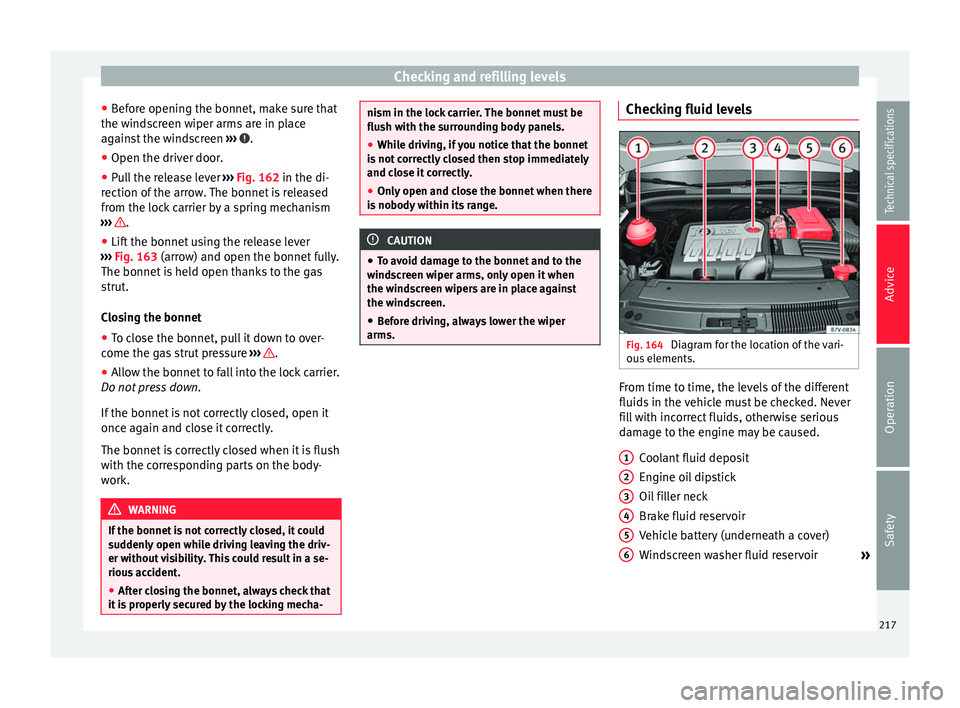
arms. Checking fluid levels
Fig. 164
Diagram for the location of the vari-
ous elements. From time to time, the levels of the different
fluids in the vehicle must be checked. Never
fill with incorrect fluids, otherwise serious
damage to the engine may be caused.
Coolant fluid deposit
Engine oil dipstick
Oil filler neck
Brake fluid reservoir
Vehicle battery (underneath a cover)
Windscreen washer fluid reservoir »
1 2
3
4
5
6
217
Technical specifications
Advice
Operation
Safety
Page 260 of 305
Advice
● After towing, remove the towline anchorage
by turning it clockwise and put the cover
b ac
k in place. CAUTION
The towline anchorage must always be com-
pletely and firmly tightened. Otherwise, it
could be released while towing and tow-start-
ing. Fitting the rear towline anchorage
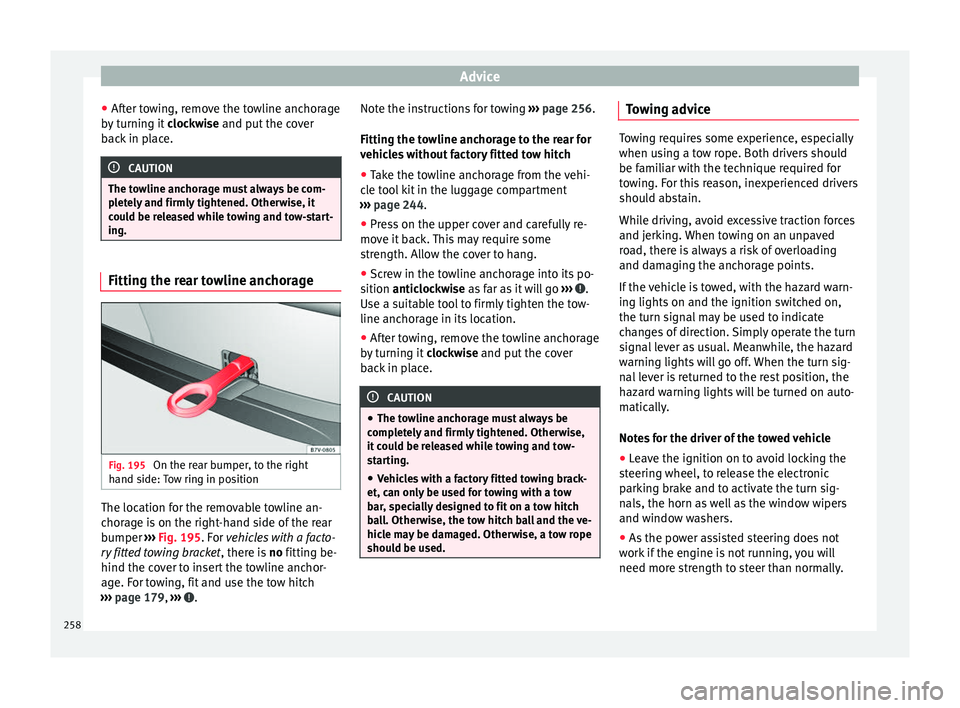
Fig. 195
On the rear bumper, to the right
hand side: Tow ring in position The location for the removable towline an-
chorage is on the right-hand side of the rear
bumper
››› Fig. 195 . For
vehicles with a facto-
ry
fitted towing bracket , there is no fitting be-
hind the cover to insert the towline anchor-
age. For towing, fit and use the tow hitch
››› page 179, ››› . Note the instructions for towing
››› page 256.
Fitting the towline anchorage to the rear for
vehicles without factory fitted tow hitch ● Take the towline anchorage from the vehi-
cle tool kit in the luggage compartment
››› page 244 .
● Pr e
ss on the upper cover and carefully re-
move it back. This may require some
strength. Allow the cover to hang.
● Screw in the towline anchorage into its po-
sition anticlockwise as far as it will go ›
›› .
Use a suitable tool to firmly tighten the tow-
line anchorage in its location.
● After towing, remove the towline anchorage
by turning it clockwise and put the cover
b ac
k in place. CAUTION
● The towline anchorage must always be
completely and firmly tightened. Otherwise,
it could be released while towing and tow-
starting.
● Vehicles with a factory fitted towing brack-
et, can only be used for towing with a tow
bar, specially designed to fit on a tow hitch
ball. Otherwise, the tow hitch ball and the ve-
hicle may be damaged. Otherwise, a tow rope
should be used. Towing advice
Towing requires some experience, especially
when using a tow rope. Both drivers should
be familiar with the technique required for
towing. For this reason, inexperienced drivers
should abstain.
While driving, avoid excessive traction forces
and jerking. When towing on an unpaved
road, there is always a risk of overloading
and damaging the anchorage points.
If the vehicle is towed, with the hazard warn-
ing lights on and the ignition switched on,
the turn signal may be used to indicate
changes of direction. Simply operate the turn
signal lever as usual. Meanwhile, the hazard
warning lights will go off. When the turn sig-
nal lever is returned to the rest position, the
hazard warning lights will be turned on auto-
matically.
Notes for the driver of the towed vehicle
●
Leave the ignition on to avoid locking the
steering wheel, to release the electronic
parking brake and to activate the turn sig-
nals, the horn as well as the window wipers
and window washers.
● As the power assisted steering does not
work if the engine is not running, you will
need more strength to steer than normally.
258