instrument panel Seat Alhambra 2015 Owner's Manual
[x] Cancel search | Manufacturer: SEAT, Model Year: 2015, Model line: Alhambra, Model: Seat Alhambra 2015Pages: 305, PDF Size: 5.46 MB
Page 13 of 305
Seat belts
WARNING
It is extremely dangerous to drive using dam-
aged seat belts and could result in serious in-
jury or loss of life.
● Avoid damaging the seat belt by jamming it
in the door or the seat mechanism.
● If the fabric or other parts of the seat belt
are damaged, the seat belts could break in
the event of an accident or sudden braking.
● Always have damaged seatbelts replaced
immediately by seat belts approved for the
vehicle in question by SEAT. Seat belts which
have been worn in an accident and stretched
must be replaced by a specialised workshop.
Renewal may be necessary even if there is no
apparent damage. The belt anchorage should
also be checked.
● Never attempt to repair, modify or remove a
seat belt yourself. All repairs to seat belts, re-
tractors and buckles must be carried out by a
specialised workshop. Warning lamp
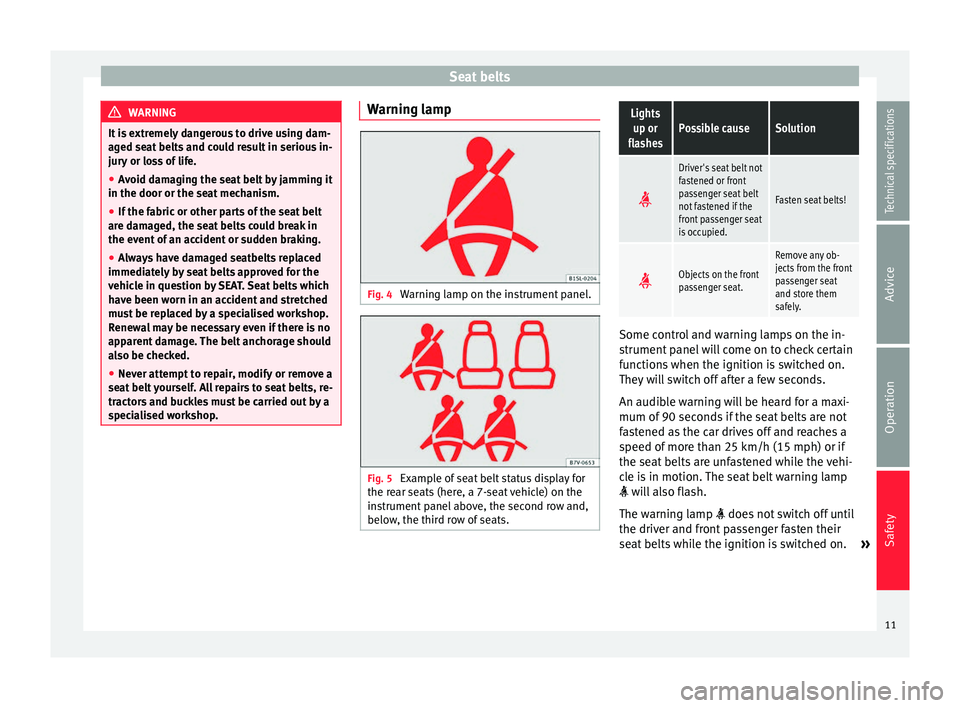
Fig. 4
Warning lamp on the instrument panel. Fig. 5
Example of seat belt status display for
the rear seats (here, a 7-seat vehicle) on the
instrument panel above, the second row and,
below, the third row of seats.Lights
up or
flashesPossible causeSolution
Driver's seat belt not
fastened or front
passenger seat belt
not fastened if the
front passenger seat
is occupied.
Fasten seat belts!
Objects on the front
passenger seat.
Remove any ob-
jects from the front
passenger seat
and store them
safely.
Some control and warning lamps on the in-
strument panel will come on to check certain
functions when the ignition is switched on.
They will switch off after a few seconds.
An audible warning will be heard for a maxi-
mum of 90 seconds if the seat belts are not
fastened as the car drives off and reaches a
speed of more than 25 km/h (15 mph) or if
the seat belts are unfastened while the vehi-
cle is in motion. The seat belt warning lamp
will also flash.
The warning lamp does not switch off until
the driver and front passenger fasten their
seat belts while the ignition is switched on. »
11
Technical specifications
Advice
Operation
Safety
Page 21 of 305
Airbag system
●
Have any repairs or modifications carried
out at a specialised workshop. Specialised
workshops have the necessary tools, diag-
nostics equipment, repair information and
qualified personnel.
● Never fit recycled or reused airbag compo-
nents in your vehicle.
● Never modify the airbag system compo-
nents. WARNING
If the airbags are triggered, a fine dust is pro-
duced. This is normal and it is not an indica-
tion of fire in the vehicle.
● This fine dust may irritate the skin and eyes
and cause breathing difficulties, particularly
in people suffering from or who have suffered
from asthma or other illnesses of the respira-
tory tract. To reduce breathing difficulties,
get out of the vehicle and open and doors and
windows to breath in fresh air.
● Should you touch the dust, wash your
hands and face using a mild soap and water
before you eat.
● Prevent the dust from affecting the eyes or
open wounds.
● Rinse your eyes with water if you have dust
in them. WARNING
Solvents cause the surfaces of the airbag
modules to become porous. If an airbag is ac- cidentally triggered, the detachment of plas-
tic parts could cause serious injury.
●
Never clean the dash panel and the surfa-
ces of the airbag modules with cleaners con-
taining solvents. Description of airbag system
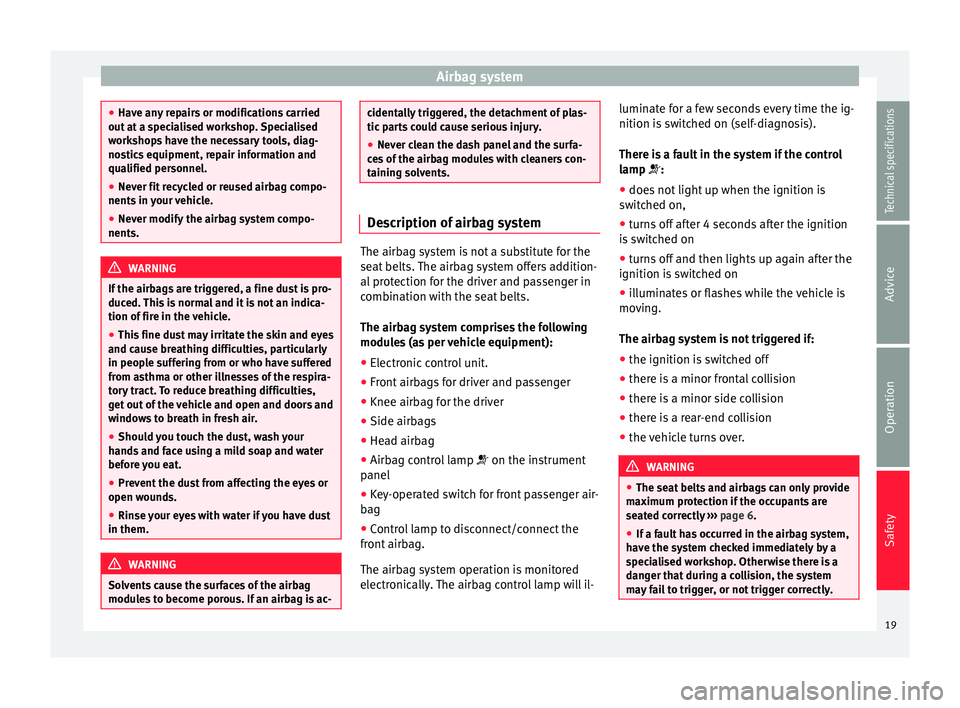
The airbag system is not a substitute for the
seat belts. The airbag system offers addition-
al protection for the driver and passenger in
combination with the seat belts.
The airbag system comprises the following
modules (as per vehicle equipment):
●
Electronic control unit.
● Front airbags for driver and passenger
● Knee airbag for the driver
● Side airbags
● Head airbag
● Airbag control lamp on the instrument
panel
● Key-operated switch for front passenger air-
bag
● Control lamp to disconnect/connect the
front airbag.
The airbag system operation is monitored
electronically. The airbag control lamp will il- luminate for a few seconds every time the ig-
nition is switched on (self-diagnosis).
There is a fault in the system if the control
lamp
:
● doe
s not light up when the ignition is
switched on,
● turns off after 4 seconds after the ignition
is switched on
● turns off and then lights up again after the
ignition is switched on
● illuminates or flashes while the vehicle is
moving.
The airbag system is not triggered if:
● the ignition is switched off
● there is a minor frontal collision
● there is a minor side collision
● there is a rear-end collision
● the vehicle turns over. WARNING
● The seat belts and airbags can only provide
maximum protection if the occupants are
seated correctly ››› page 6.
● If a f
ault has occurred in the airbag system,
have the system checked immediately by a
specialised workshop. Otherwise there is a
danger that during a collision, the system
may fail to trigger, or not trigger correctly. 19
Technical specifications
Advice
Operation
Safety
Page 24 of 305
SafetyAB
Characteristics of the front
passenger front airbag
that can only be disabled
in a specialised workshop.Characteristics of the front
passenger front airbag
that can be disabled man-
ually
››› page 25.
Name: airbag system. Name: airbag system
with front passenger front
airbag disabling.
Control lamp on the
instrument panel. Control lamp on the
instrument panel.
Front passenger front
airbag located in the dash
panel.
Front passenger front
airbag located in the dash
panel.
Control lamp on the
dash panel
.
Key switch in the glove
compartment on the front
passenger side of the
dash panel. Knee airbag
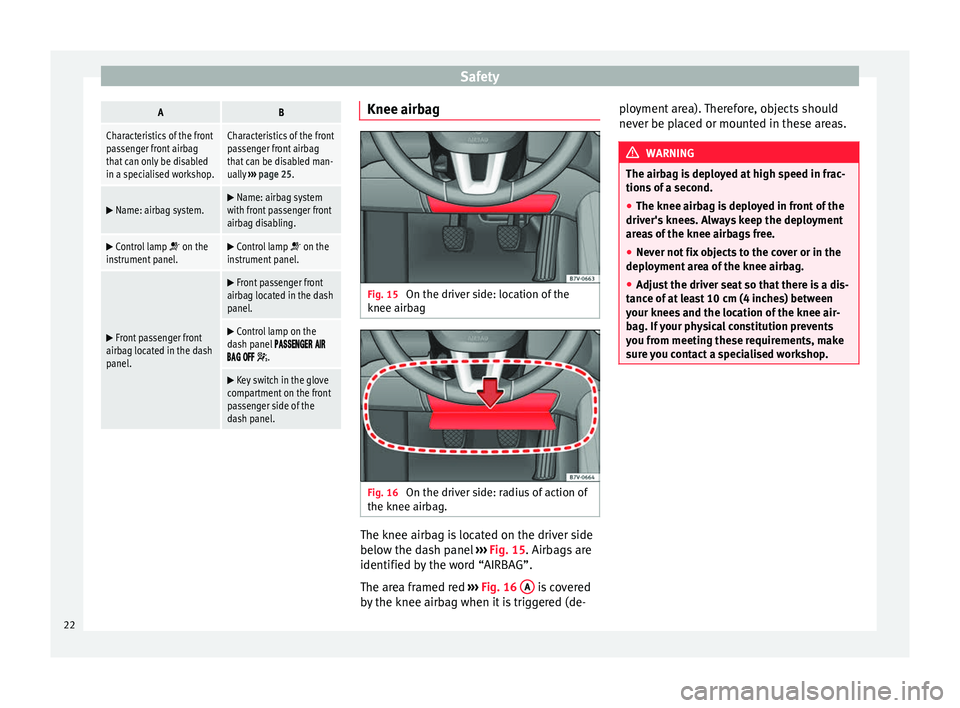
Fig. 15
On the driver side: location of the
knee airbag Fig. 16
On the driver side: radius of action of
the knee airbag. The knee airbag is located on the driver side
below the dash panel
››› Fig. 15 . Airbags are
identified b y
the word “AIRBAG”.
The area framed red ››› Fig. 16
A is covered
by the knee airbag when it is triggered (de- ployment area). Therefore, objects should
never be placed or mounted in these areas. WARNING
The airbag is deployed at high speed in frac-
tions of a second.
● The knee airbag is deployed in front of the
driver's knees. Always keep the deployment
areas of the knee airbags free.
● Never not fix objects to the cover or in the
deployment area of the knee airbag.
● Adjust the driver seat so that there is a dis-
tance of at least 10 cm (4 inches) between
your knees and the location of the knee air-
bag. If your physical constitution prevents
you from meeting these requirements, make
sure you contact a specialised workshop. 22
Page 41 of 305
Cockpit
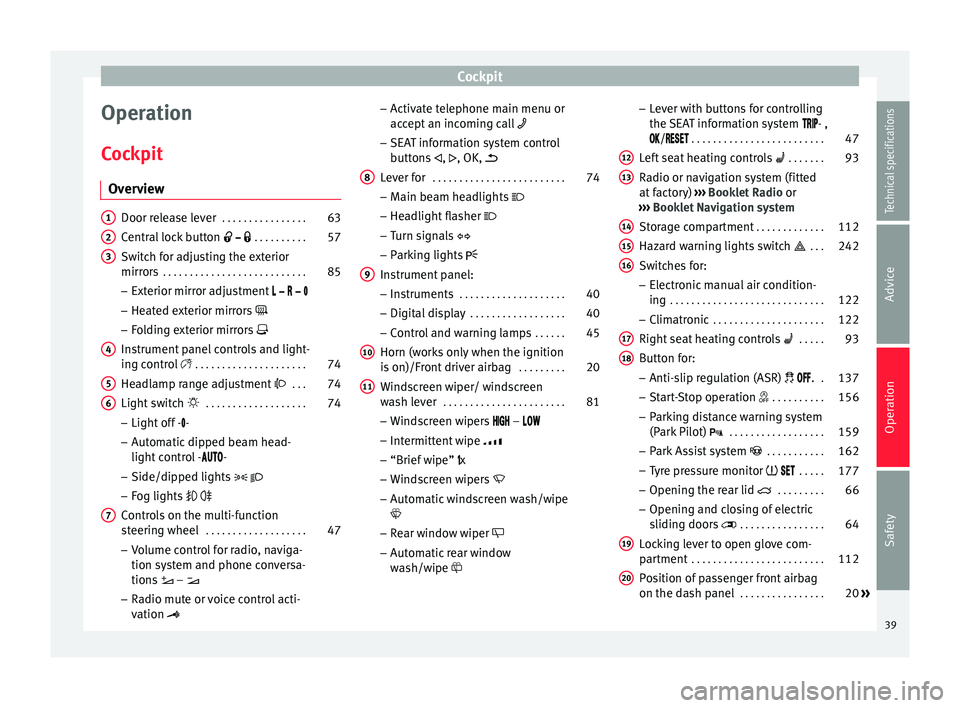
Operation
Cockpit Overview Door release lever
. . . . . . . . . . . . . . . . 63
Central lock button . . . . . . . . . . 57
Switch for adjusting the exterior
mirrors . . . . . . . . . . . . . . . . . . . . . . . . . . . 85
– Exterior mirror adjustment
– Heated exterior mirrors
– Folding exterior mirrors
Instrument panel controls and light-
ing control . . . . . . . . . . . . . . . . . . . . . 74
Headlamp range adjustment . . . 74
Light switch . . . . . . . . . . . . . . . . . . . 74
– Light off - -
– Automatic dipped beam head-
light control - -
– Side/dipped lights
– Fog lights
Controls on the multi-function
steering wheel . . . . . . . . . . . . . . . . . . . 47
– Volume control for radio, naviga-
tion system and phone conversa-
tions –
– Radio mute or voice control acti-
vation
1 2
3
4
5
6
7 –
Activate telephone main menu or
accept an incoming call
– SEAT information system control
buttons ,
, OK,
Lever for . . . . . . . . . . . . . . . . . . . . . . . . . 74
– Main beam headlights
– Headlight flasher
– Turn signals
– Parking lights
Instrument panel: – Instruments . . . . . . . . . . . . . . . . . . . . 40
– Digital display . . . . . . . . . . . . . . . . . . 40
– Control and warning lamps . . . . . .45
Horn (works only when the ignition
is on)/Front driver airbag . . . . . . . . .20
Windscreen wiper/ windscreen
wash lever . . . . . . . . . . . . . . . . . . . . . . . 81
– Windscreen wipers –
– Intermittent wipe
– “Brief wipe” x
– Windscreen wipers
– Automatic windscreen wash/wipe
– Rear window wiper
– Automatic rear window
wash/wipe
8
9
10
11 –
Lever with buttons for controlling
the SEAT information system - ,
/
. . . . . . . . . . . . . . . . . . . . . . . . . 47
L ef
t seat heating controls . . . . . . . 93
Radio or navigation system (fitted
at factory) ››› Booklet Radio or
››› Booklet Navigation system
Storage compartment . . . . . . . . . . . . .112
Hazard warning lights switch . . . 242
Switches for: – Electronic manual air condition-
ing . . . . . . . . . . . . . . . . . . . . . . . . . . . . . 122
– Climatronic . . . . . . . . . . . . . . . . . . . . . 122
Right seat heating controls . . . . . 93
Button for: – Anti-slip regulation (ASR) . .137
– Start-Stop operation . . . . . . . . . .156
– Parking distance warning system
(Park Pilot) . . . . . . . . . . . . . . . . . . 159
– Park Assist system . . . . . . . . . . . 162
– Tyre pressure monitor . . . . .177
– Opening the rear lid . . . . . . . . .66
– Opening and closing of electric
sliding doors . . . . . . . . . . . . . . . . 64
Locking lever to open glove com-
partment . . . . . . . . . . . . . . . . . . . . . . . . . 112
Position of passenger front airbag
on the dash panel . . . . . . . . . . . . . . . . 20
»
12 13
14
15
16
17
18
19
20
39
Technical specifications
Advice
Operation
Safety
Page 42 of 305
Operation
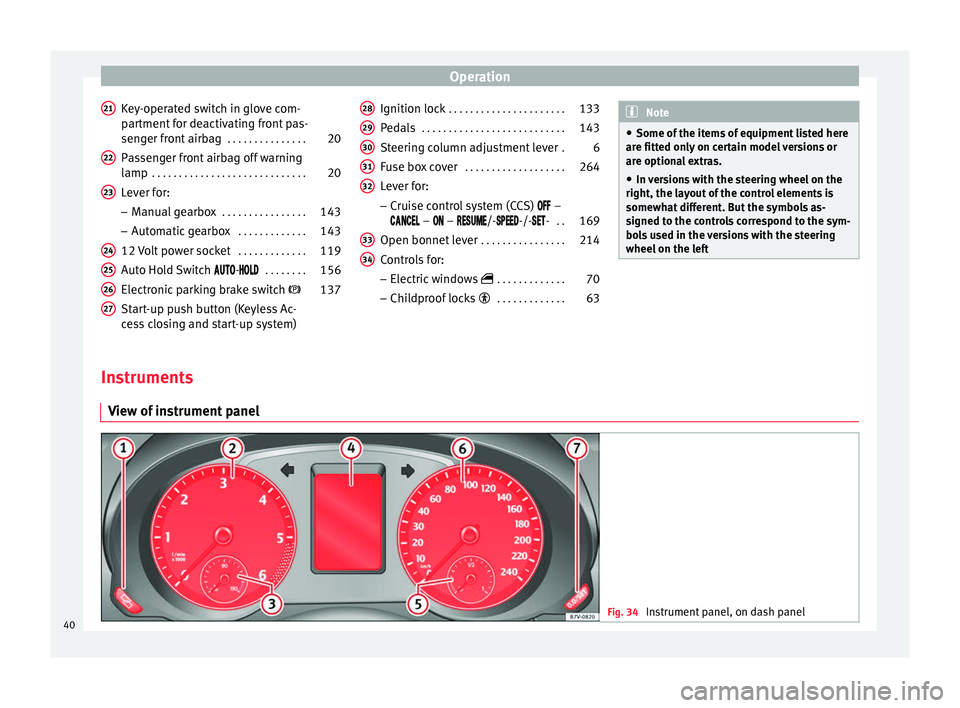
Key-operated switch in glove com-
partment for deactivating front pas-
senger front airbag . . . . . . . . . . . . . . .20
Passenger front airbag off warning
lamp . . . . . . . . . . . . . . . . . . . . . . . . . . . . . 20
Lever for:
– Manual gearbox . . . . . . . . . . . . . . . . 143
– Automatic gearbox . . . . . . . . . . . . .143
12 Volt power socket . . . . . . . . . . . . .119
Auto Hold Switch
- . . . . . . . . 156
Electronic parking brake switch 137
Start-up push button (Keyless Ac-
cess closing and start-up system)
21 22
23
24
25
26
27 Ignition lock
. . . . . . . . . . . . . . . . . . . . . . 133
Pedals . . . . . . . . . . . . . . . . . . . . . . . . . . . 143
Steering column adjustment lever .6
Fuse box cover . . . . . . . . . . . . . . . . . . . 264
Lever for:
– Cruise control system (CCS) –
– – /--/-- . . 169
Open bonnet lever . . . . . . . . . . . . . . . . 214
Controls for:
– Electric windows . . . . . . . . . . . . . 70
– Childproof locks . . . . . . . . . . . . . 63
28 29
30
31
32
33
34 Note
● Some of the items of equipment listed here
are fitted only on certain model versions or
are optional extras.
● In versions with the steering wheel on the
right, the layout of the control elements is
somewhat different. But the symbols as-
signed to the controls correspond to the sym-
bols used in the versions with the steering
wheel on the left Instruments
View of instrument panel Fig. 34
Instrument panel, on dash panel40
Page 43 of 305
Cockpit
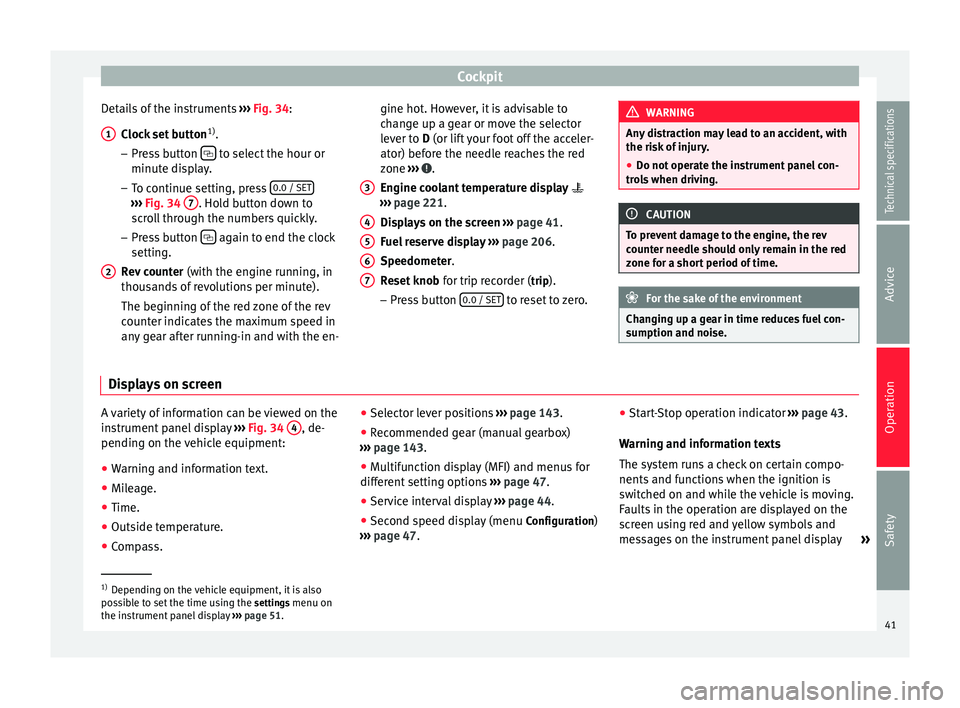
Details of the instruments ››› Fig. 34 :
C loc
k set button 1)
.
– Press button to select the hour or
minute display.
– To continue setting, press 0.0 / SET›››
Fig. 34 7 . Hold button down to
scroll through the numbers quickly.
– Press button again to end the clock
setting.
Rev counter (with the engine running, in
thousands of revolutions per minute).
The beginning of the red zone of the rev
counter indicates the maximum speed in
any gear after running-in and with the en-
1 2 gine hot. However, it is advisable to
change up a gear or move the selector
lever to
D
(or lift your foot off the acceler-
at
or) before the needle reaches the red
zone ››› .
Engine coolant temperature display
››› page 221 .
Di s
plays on the screen ››› page 41.
Fuel reserve display ››› page 206.
Speedometer.
Reset knob for trip recorder (trip).
– Pre
ss button 0.0 / SET to reset to zero.
3 4
5
6
7 WARNING
Any distraction may lead to an accident, with
the risk of injury.
● Do not operate the instrument panel con-
trols when driving. CAUTION
To prevent damage to the engine, the rev
counter needle should only remain in the red
zone for a short period of time. For the sake of the environment
Changing up a gear in time reduces fuel con-
sumption and noise. Displays on screen
A variety of information can be viewed on the
instrument panel display
››› Fig. 34 4 , de-
pending on the vehicle equipment:
● Warning and information text.
● Mileage.
● Time.
● Outside temperature.
● Compass. ●
Selector lever positions ››› page 143.
● Recommended gear (manual gearbox)
››› page 143 .
● Mu
ltifunction display (MFI) and menus for
different setting options ››› page 47.
● Service interval display ››› page 44 .
● Second speed display (menu Configuration)
››› page 47. ●
Star
t-Stop operation indicator
››› page 43.
Warning and information texts
The system runs a check on certain compo-
nents and functions when the ignition is
switched on and while the vehicle is moving.
Faults in the operation are displayed on the
screen using red and yellow symbols and
messages on the instrument panel display »1)
Depending on the vehicle equipment, it is also
possible to set the time using the settings menu on
the in s
trument panel display ››› page 51.
41
Technical specifications
Advice
Operation
Safety
Page 44 of 305
Operation
( ››› page 45 ) and, in some cases, with audi-
b l
e warnings. The display may vary according
to the type of instrument panel fitted.
Type of messageSymbol colourDescription
Priority 1 warning.RedSymbol flashing or lit; partly combined with audible warnings. Stop the vehicle! It is dangerous ››› in Control and warning lamps on page 47 !
Check the function that is faulty and repair it. If necessary, request assistance from specialised personnel.
Priority 2 warning.Yellow
Symbol flashing or lit; partly combined with audible warnings.
A function fault, or fluids which are below the correct levels may cause damage to the vehicle ››› in Control and
warning lamps on page 47 !
Check the faulty operation as soon as possible. If necessary, request assistance from specialised personnel.
Informative text.–Information relating to different vehicle processes. Mileage
The
odometer
registers the total distance
tr
avelled by the car.
The
odometer (trip) shows the distance trav-
elled since the last odometer reset. The last
digit of the trip recorder indicates distances
of 100 metres or one tenths of a mile.
Outside temperature display
When the outside temperature is below +4 °C
(+39 °F), the symbol “ice crystal” (warning of
risk of freezing) is also displayed next to the
temperature. At first this symbol flashes and
then it remains lit until the outside tempera-
ture rises above +6 °C (+43 °F) ››› .
When the vehicle is at a standstill, with the
auxiliary heating on ( ››› page 128), or when travelling at very low speeds, the tempera-
ture displayed may be higher than the true
outside temperature, as a result of the heat
produced by the engine.
The temperatures measured range from
-40 °C to +50 °C (-40 °F to +122 °F).
Compass
With the ignition on and the navigation sys-
tem on, the cardinal point corresponding to
the vehicle's direction of travel is displayed
on the instrument panel
››› page 43.
Selector lever positions
The range of engaged gears of the selector
lever is shown on the side of the lever, and
on the instrument panel display. In positions D
and
S
, and with the Tiptronic, the corre-
sponding gear is also displayed.
Recommended gear (manual gearbox)
The recommended gear in order to save fuel
is displayed on the instrument panel while
you are driving ››› page 143
.
Second speed display (mph or km/h)
In addition to the speedometer, the speed
can also be displayed in a different unit of
measurement (in miles or in km per hour). To
change the units, in the Settings menu, se-
lect the option Second speed ››› page 47.
Vehicles without menu display on the instru-
ment panel
● Switch on the engine.
42
Page 45 of 305
Cockpit
● Press button three times. The odometer
display flashes on the instrument panel dis-
play.
● Press button 0.0 / SET once. “mph”
or “km/h” is displayed briefly instead of the
odometer.
● This activates the second speed display. To
switch it off, repeat the procedure.
This option cannot be deactivated in models
destined for countries in which the second
speed must always be visible.
Start-Stop operating display.
Updated information relating to the status is
displayed on the instrument panel
››› page 156 . WARNING
Observe the safety warnings ››› in Control
and warning lamps on page 47. WARNING
Even though outside temperatures are above
freezing, some roads and bridges may be icy.
● At outside temperatures above +4°C
(+39°F), even when the “ice crystal symbol”
is not visible, there may still be patches of ice
on the road.
● Never rely on the outside temperature indi-
cator! Note
● Different versions of the instrument panel
are available and therefore the versions and
instructions on the display may vary. In the
case of displays without warning or informa-
tion texts, faults are indicated exclusively by
the warning lamps.
● When several warnings are active at the
same time, the symbols are shown succes-
sively for a few seconds and will stay on until
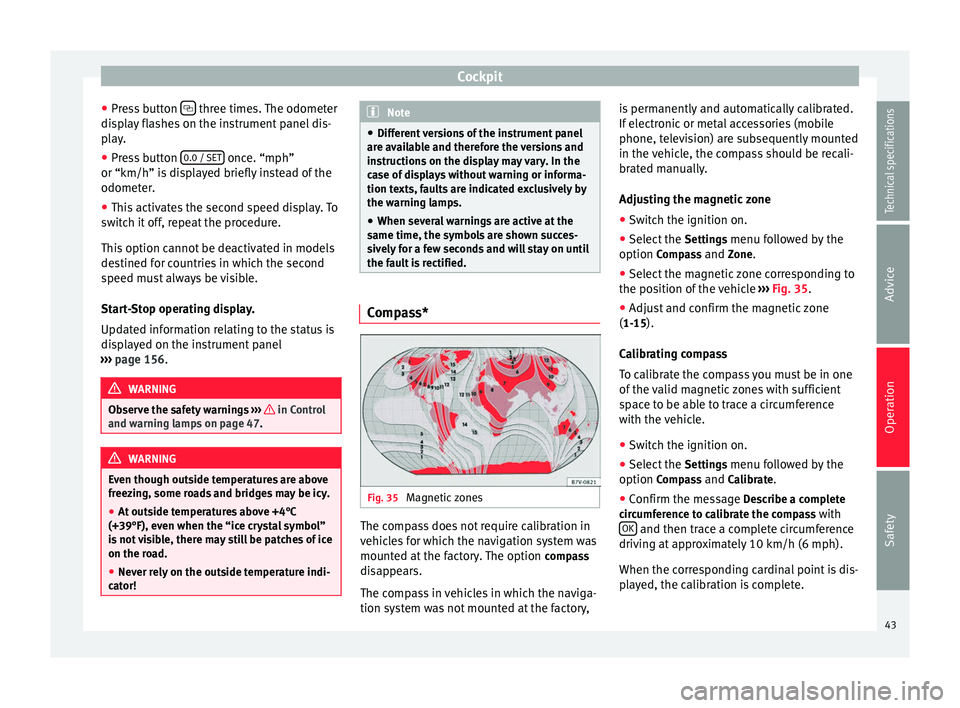
the fault is rectified. Compass*
Fig. 35
Magnetic zones The compass does not require calibration in
vehicles for which the navigation system was
mounted at the factory. The option
compass
disappears.
The compass in vehicles in which the naviga-
tion system was not mounted at the factory, is permanently and automatically calibrated.
If electronic or metal accessories (mobile
phone, television) are subsequently mounted
in the vehicle, the compass should be recali-
brated manually.
Adjusting the magnetic zone
● Switch the ignition on.
● Select the Settings menu followed by the
option Compass and Zone.
● Sel ect
the magnetic zone corresponding to
the position of the vehicle ››› Fig. 35.
● Adjus
t and confirm the magnetic zone
(1-15).
Calibrating compass
To calibrate the compass you must be in one
of the valid magnetic zones with sufficient
space to be able to trace a circumference
with the vehicle.
● Switch the ignition on.
● Select the Settings menu followed by the
option Compass and Calibrate.
● Confirm the message Describe a complete
circumference to calibrate the compass with OK and then trace a complete circumference
driving at approximately 10 km/h (6 mph).
When the corresponding cardinal point is dis-
played, the calibration is complete.
43
Technical specifications
Advice
Operation
Safety
Page 46 of 305
Operation
Service interval display The service indication is shown on the dash
panel display
››› Fig. 34 4 .
SEAT distinguishes between services with en-
gine oi l
change (Interval Service) and serv-
ices without
engine oil change (Inspection
Service). The service interval display only
gives information for service dates which in-
volve an engine oil change. The dates for the
other services (e.g. the next Inspection Serv-
ice or change of brake fluid) are listed on the
label attached to the door strut, or in the
Maintenance Programme.
In vehicles with Services established by time
or mileage, the service intervals are already
pr e-defined.
In
vehicles with LongLife Service , the inter-
vals are determined individually. Technical
progress has made it possible to considera-
bly reduce servicing requirements. The tech-
nology used by SEAT ensures that your vehi-
cle only has an Interval Service when it is
necessary. To establish when the Interval
Service is due (max. 2 years), the vehicle's
conditions of use and individual driving
styles are considered. The service pre-warn-
ing first appears 20 days before the date es-
tablished for the corresponding service. The
kilometres (miles) remaining until the next
service are always rounded up to the nearest
100 km (miles) and the time is given in com-
plete days. The current service message can- not be viewed until 500 km after the last
service. Prior to this only lines are visible on
the display.
Inspection reminder
When the Service date is approaching, when
the ignition is switched on a
Service remind-
er
is displayed.
In
vehicles without text messages , a spanner
is displayed on the instrument panel with
a figure given in km. The number of kilome- tre
s shown is the maximum number that may
be driven until the next service. After a few
seconds, the display mode changes. A clock
symbol appears and the number of days until
the next service appointment is due.
In vehicles with text messages , Serv
ice in ---
km (miles) or --- days is displayed on the in- strument panel.
Service due
After the service date, an audible warning is
giv
en when the ignition is switched on and
the spanner displayed on the screen flashes
for a few seconds . In
vehicles with text
messages, Service in --- km or --- days is dis-
played on the instrument panel.
Reading a service notification
With the ignition switched on, the engine off
and the vehicle at a standstill, the current
service notification
can be read: ●
Press the button on the instrument pan-
el several times until the spanner symbol is
displayed
.
● OR:
select the Setting
s menu.
● From the
Service submenu, select the op-
tion Info.
When the service date has past , a minus
sign
is displayed in front of the number of kilome-
tres or days. In vehicles with text messages
the following is displayed: Service --- km
(miles) or --- days ago .
Resetting service interval display
If the service was not carried out by a techni-
cal service centre, the display can be reset as
follows:
In vehicles with text messages:
Select the Settings menu.
In the submenu Service, select the option Reset.
Confirm with OK when requested to do so by the sys-
tem.
In vehicles without text messages:
Switch the ignition off.
Press and hold the 0.0 / SET button.
Switch the ignition back on.44
Page 47 of 305
CockpitIn vehicles without text messages:
Release the
0.0 / SET button and, press for the next
20 seconds. Do not
reset the indicator to zero between
tw
o intervals, otherwise the display will be
incorrect.
If, while the LongLife service is valid, the
service interval display is reset to zero, the
“service will be activated by time or mile-
age”. The service interval is no longer calcu-
lated individually ›››
Booklet Maintenance
Programme. Note
● The service message disappears after a few
seconds, when the engine is started or when OK is pressed.
● In vehicles with the LongLife system in
which the battery has been disconnected for
a long period of time, it is not possible to cal-
culate the date of the next service. Therefore
the service interval display may not be cor-
rect. In this case, bear in mind the maximum
service intervals permitted in the ››› Book-
let Maintenance Programme. Control lamps
Control and warning lamps The control and warning lamps are indicators
of warnings,
››› , faults
››› or certain func-
tions. Some control and warning lamps come
on when the ignition is switched on, and
switch off when the engine starts running, or
while driving.
Depending on the model, additional text
messages may be viewed on the instrument
panel display. These may be purely informa-
tive or they may be advising of the need for
action ›››
page 40, Instruments .
D ependin
g upon the equipment fitted in the
vehicle, instead of a warning lamp, some-
times a symbol may be displayed on the in-
strument panel.
When certain control and warning lamps are
lit, an audible warning is also heard.
Red symbols
Sym- bolMeaning ››› See
Do not continue driving!
The electronic parking brake is on,
the brake fluid level is too low or
the brake system is faulty.››› page
137
Sym-
bolMeaning ››› See
Do not continue driving!
Fault in the engine cooling sys-
tem.››› page
221
Do not continue driving!
Engine oil pressure too low.››› page
218
Do not continue driving!
At least one of the vehicles doors
is open, or is not correctly closed.››› page
63
Do not continue driving!
The rear lid is open or is incorrect-
ly closed.››› page
66
Do not continue driving!
Fault in the steering.››› page
131
Engine cannot be started again!
"AdBlue" level too low.›››
page
212
Driver or passenger has not fas-
tened seat belt.›››
page
14
Use the foot brake!
Change
››› page
143
Brake
››› page
137
Faulty generator.›››
page
227» 45
Technical specifications
Advice
Operation
Safety