mirror Seat Alhambra 2015 User Guide
[x] Cancel search | Manufacturer: SEAT, Model Year: 2015, Model line: Alhambra, Model: Seat Alhambra 2015Pages: 305, PDF Size: 5.46 MB
Page 87 of 305
Lights and visibility
Rear vision mirror Introduction WARNING
The automatic anti-dazzle rear vision mirror
contains an electrolytic fluid which may leak
if the mirror is broken. This could cause irrita-
tion to the skin, eyes and respiratory organs.
● The electrolytic fluid may cause irritation to
the skin, eyes and respiratory organs, partic-
ularly in individuals suffering from asthma or
other illnesses. Make sure that adequate
quantities of fresh air enter and leave the ve-
hicle if it is not possible to open all the doors
and windows.
● If the electrolytic fluid comes into contact
with eyes or skin, wash the area for at least
15 minutes with plenty of water, and seek
medical advice.
● If the electrolytic fluid comes into contact
with shoes or clothing, wash the area for at
least 15 minutes with plenty of water. Wash
shoes and clothing before wearing them
again.
● If the electrolytic fluid is swallowed, wash
your mouth with plenty of water for at least
15 minutes. Do not try to provoke vomiting
unless recommended by a Doctor. Seek medi-
cal advice immediately. CAUTION
In the event that an automatic anti-dazzle
rear vision mirror breaks, an electrolyte fluid
may leak. This liquid attacks plastic surfaces.
Therefore, it should be cleaned as fast as
possible with a damp sponge or similar. Rear vision mirror
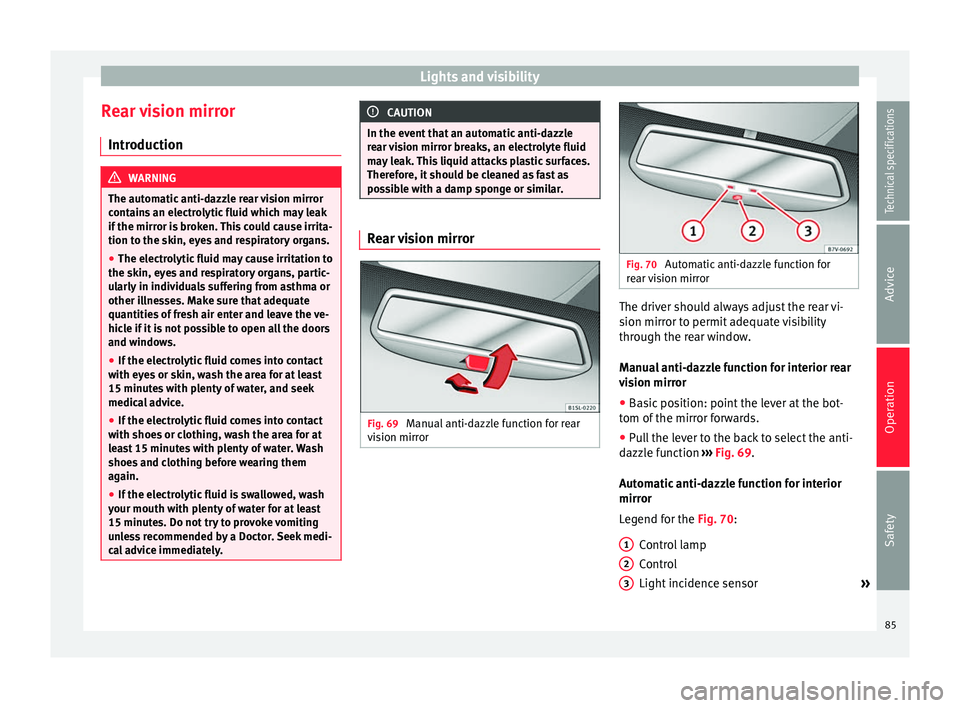
Fig. 69
Manual anti-dazzle function for rear
vision mirror Fig. 70
Automatic anti-dazzle function for
rear vision mirror The driver should always adjust the rear vi-
sion mirror to permit adequate visibility
through the rear window.
Manual anti-dazzle function for interior rear
vision mirror
● Basic position: point the lever at the bot-
tom of the mirror forwards.
● Pull the lever to the back to select the anti-
dazzle function ››› Fig. 69 .
Aut om
atic anti-dazzle function for interior
mirror
Legend for the
Fig. 70:
Control lamp
Control
Light incidence sensor »
1 2
3
85
Technical specifications
Advice
Operation
Safety
Page 88 of 305
Operation
This function can be activated and deactiva-
ted by pressing the rear-view mirror switch
››› Fig. 70 2 . When it is activated, the warn-
ing lamp lights up 1 .
When the ignition is on, the sensor 3
auto-
matic a
lly moves the rear vision mirror to the
anti-dazzle position depending upon the in-
cidence of the light from behind.
The automatic anti-dazzle function is deacti-
vated when reverse gear is engaged or the in-
terior or reading lights are on. Note
If the light is obstructed or prevented from
reaching the sensor, e.g. by the sun blinds,
the rear vision mirror with automatic anti-
dazzle function will not operate correctly. Exterior mirrors
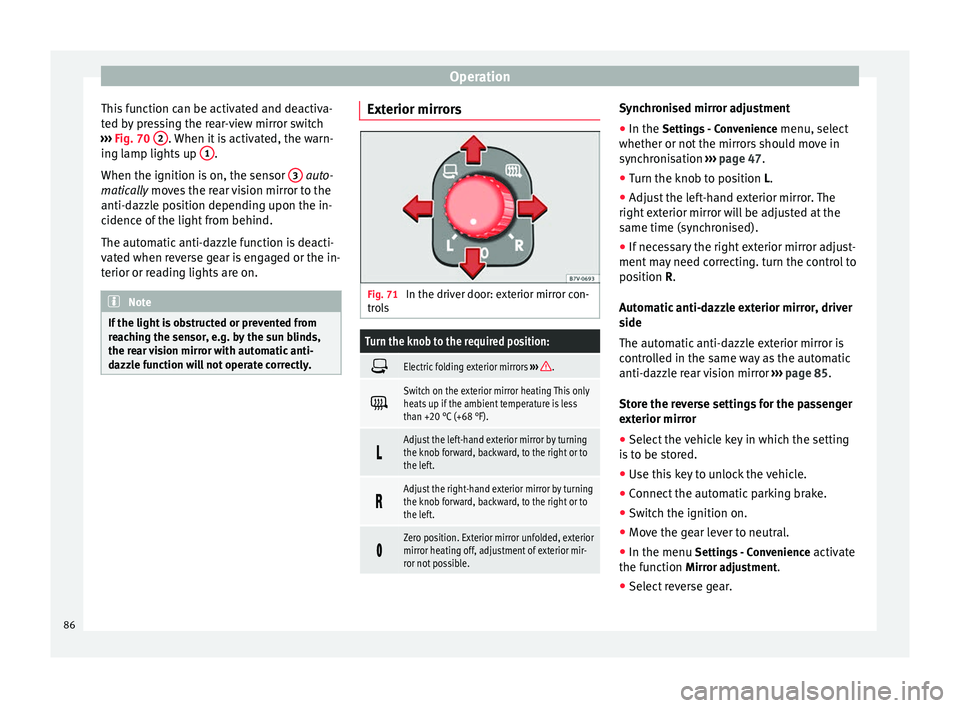
Fig. 71
In the driver door: exterior mirror con-
trols
Turn the knob to the required position:
Electric folding exterior mirrors
››› .
Switch on the exterior mirror heating This only
heats up if the ambient temperature is less
than +20 °C (+68 °F).
Adjust the left-hand exterior mirror by turning
the knob forward, backward, to the right or to
the left.
Adjust the right-hand exterior mirror by turning
the knob forward, backward, to the right or to
the left.
Zero position. Exterior mirror unfolded, exterior
mirror heating off, adjustment of exterior mir-
ror not possible. Synchronised mirror adjustment
●
In the Settings - Convenience
menu, sel
ect
whether or not
the mirrors should move in
synchronisation ››› page 47
.
● Turn the knob to position L.
● Adjust the left-hand exterior mirror. The
right exterior mirror will be adjusted at the
same time (synchronised).
● If necessary the right exterior mirror adjust-
ment may need correcting. turn the control to
position
R.
Automatic anti-dazzle exterior mirror, driver
side
The automatic anti-dazzle exterior mirror is
controlled in the same way as the automatic
anti-dazzle rear vision mirror ››› page 85.
Store the reverse settings for the passenger
exterior mirror ● Select the vehicle key in which the setting
is to be stored.
● Use this key to unlock the vehicle.
● Connect the automatic parking brake.
● Switch the ignition on.
● Move the gear lever to neutral.
● In the menu Settings - Convenience activate
the function Mirror adjustment.
● Select reverse gear.
86
Page 89 of 305
Lights and visibility
● Adjust the front passenger side exterior
mirror so that you can see, for example, the
kerb area.
● The new position of the mirror will be stor-
ed automatically and allocated to the vehicle
key that was used to unlock the vehicle. For
vehicles with seat memory, please see
››› page 93 .
A ctiv
ating the passenger exterior mirror
settings
● Turn the exterior mirror knob to position R.
● With the ignition switched on, select re-
verse gear.
● The stored position of the passenger exteri-
or mirror for reverse gear is deleted when
driving forwards at 15 km/h (9 mph), or if the
knob is turned from position R to another po-
sition. WARNING
Fold and unfold the exterior mirror, taking
care to avoid injuries.
● Only fold or unfold the exterior mirror when
there is no-one in the way of the mirror.
● When moving the mirror, take care not to
trap fingers between the mirror and the mir-
ror bracket. WARNING
Failure to correctly estimate the distance of
the vehicle behind could lead to serious acci-
dent.
● Rear-view convex or aspheric mirrors in-
crease the field of vision, however objects ap-
pear smaller and further away in the mirrors.
● The use of these mirrors to estimate the
distance to the next vehicle when changing
lane is imprecise and could result in serious
accident.
● If possible, use the rear vision mirror to es-
timate distances to vehicles behind you or in
other circumstances.
● Make sure that the rear visibility is ade-
quate. CAUTION
● Before entering a car wash, always ensure
that the exterior mirrors are correctly folded
in.
● Electrically-folding exterior mirrors should
not be folded and unfolded mechanically as
this may damage the electrical operation. For the sake of the environment
The exterior mirror heating should be switch-
ed off when it is no longer needed. Other-
wise, it is an unnecessary fuel waste. Note
● The exterior mirror heating initially heats
up with a high power, after two minutes the
heat will depend upon the ambient tempera-
ture.
● In the event of faults, the electric exterior
mirrors can be adjusted manually by pressing
the edge of the mirror surface. 87Technical specifications
Advice
Operation
Safety
Page 90 of 305
Operation
Seats and head restraints
Adjusting the seats and head
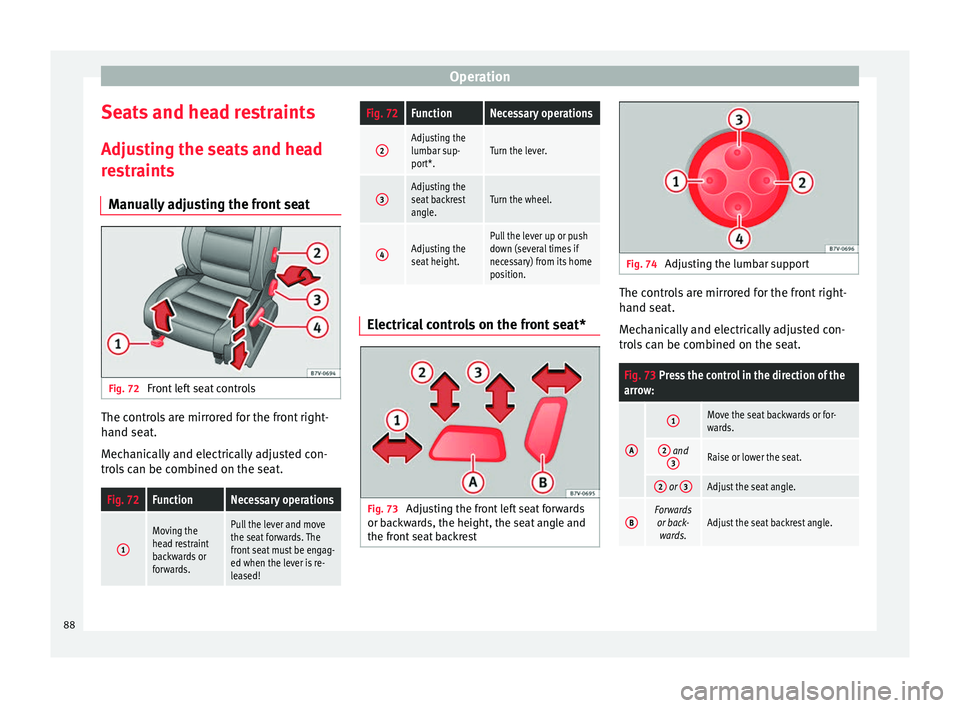
restraints Manually adjusting the front seat Fig. 72
Front left seat controls The controls are mirrored for the front right-
hand seat.
Mechanically and electrically adjusted con-
trols can be combined on the seat.Fig. 72FunctionNecessary operations
1
Moving the
head restraint
backwards or
forwards.Pull the lever and move
the seat forwards. The
front seat must be engag-
ed when the lever is re-
leased!
Fig. 72FunctionNecessary operations
2Adjusting the
lumbar sup-
port*.Turn the lever.
3Adjusting the
seat backrest
angle.Turn the wheel.
4Adjusting the
seat height.Pull the lever up or push
down (several times if
necessary) from its home
position. Electrical controls on the front seat*
Fig. 73
Adjusting the front left seat forwards
or backwards, the height, the seat angle and
the front seat backrest Fig. 74
Adjusting the lumbar support The controls are mirrored for the front right-
hand seat.
Mechanically and electrically adjusted con-
trols can be combined on the seat.
Fig. 73 Press the control in the direction of the
arrow:
A
1Move the seat backwards or for-
wards.
2 and
3Raise or lower the seat.
2 or 3Adjust the seat angle.
BForwards
or back- wards.Adjust the seat backrest angle. 88
Page 96 of 305
Operation
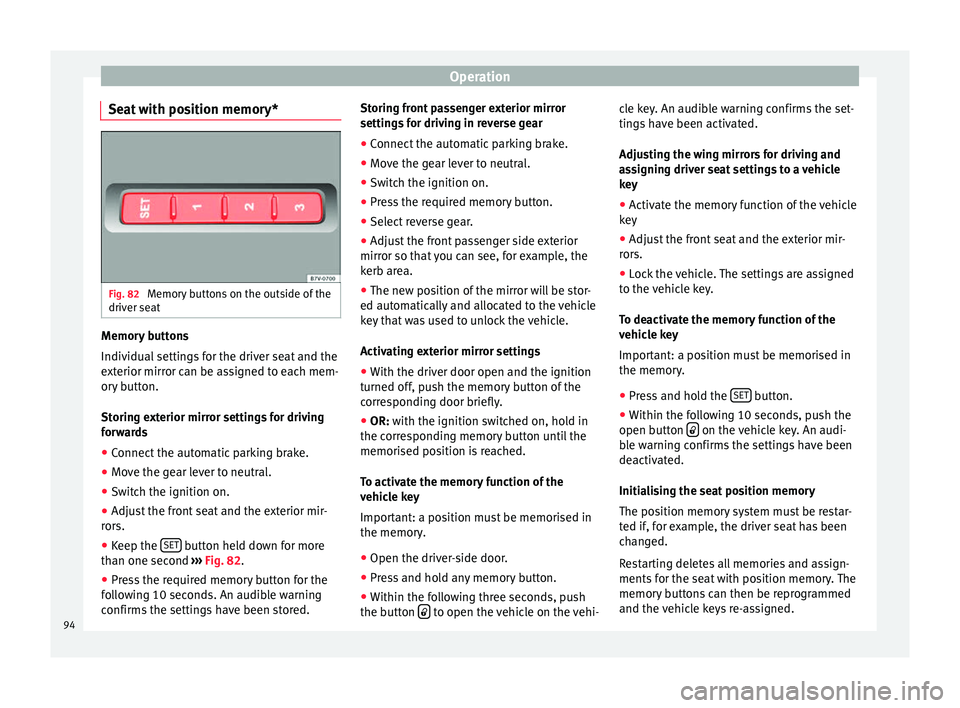
Seat with position memory* Fig. 82
Memory buttons on the outside of the
driver seat Memory buttons
Individual settings for the driver seat and the
exterior mirror can be assigned to each mem-
ory button.
Storing exterior mirror settings for driving
forwards
● Connect the automatic parking brake.
● Move the gear lever to neutral.
● Switch the ignition on.
● Adjust the front seat and the exterior mir-
rors.
● Keep the SET button held down for more
than one second ››› Fig. 82 .
● Pr e
ss the required memory button for the
following 10 seconds. An audible warning
confirms the settings have been stored. Storing front passenger exterior mirror
settings for driving in reverse gear
●
Connect the automatic parking brake.
● Move the gear lever to neutral.
● Switch the ignition on.
● Press the required memory button.
● Select reverse gear.
● Adjust the front passenger side exterior
mirror so that you can see, for example, the
kerb area.
● The new position of the mirror will be stor-
ed automatically and allocated to the vehicle
key that was used to unlock the vehicle.
Activating exterior mirror settings
● With the driver door open and the ignition
turned off, push the memory button of the
corresponding door briefly.
● OR: with the ignition switched on, hold in
the corr
esponding memory button until the
memorised position is reached.
To activate the memory function of the
vehicle key
Important: a position must be memorised in
the memory.
● Open the driver-side door.
● Press and hold any memory button.
● Within the following three seconds, push
the button to open the vehicle on the vehi-cle key. An audible warning confirms the set-
tings have been activated.
Adjusting the wing mirrors for driving and
assigning driver seat settings to a vehicle
key
● Activate the memory function of the vehicle
key
● Adjust the front seat and the exterior mir-
rors.
● Lock the vehicle. The settings are assigned
to the vehicle key.
To deactivate the memory function of the
vehicle key
Important: a position must be memorised in
the memory.
● Press and hold the SET button.
● Within the following 10 seconds, push the
open button on the vehicle key. An audi-
ble warning confirms the settings have been
deactivated.
Initialising the seat position memory
The position memory system must be restar-
ted if, for example, the driver seat has been
changed.
Restarting deletes all memories and assign-
ments for the seat with position memory. The
memory buttons can then be reprogrammed
and the vehicle keys re-assigned.
94
Page 97 of 305
Seats and head restraints
● Open the driver door and do not get into
the vehicle.
● Operating the seat settings from outside
the vehicle.
● Move the angle of the seat backrest com-
pletely forwards.
● Release the control to set the angle and
then press again until an audible warning is
heard. Note
The front passenger side exterior mirror auto-
matically changes from the position stored
for reversing as soon as the vehicle moves
forward at a speed of at least 15 km/h
(9 mph) or when the gear selection lever is
changed to a position other than R. Convenient entry function for the third
row of seats
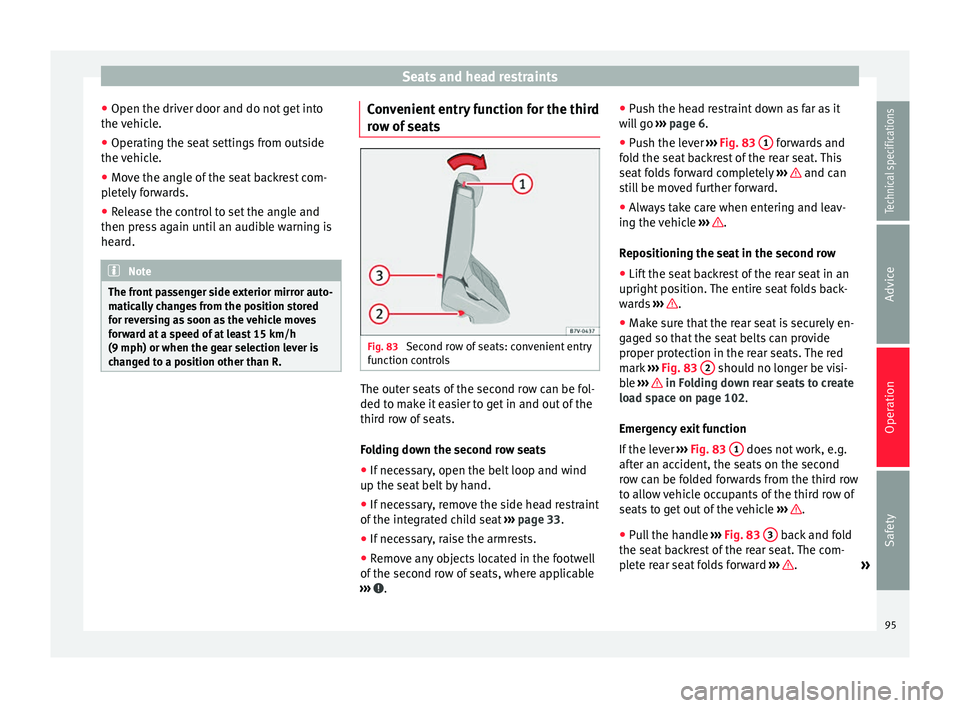
Fig. 83
Second row of seats: convenient entry
function controls The outer seats of the second row can be fol-
ded to make it easier to get in and out of the
third row of seats.
Folding down the second row seats
● If necessary, open the belt loop and wind
up the seat belt by hand.
● If necessary, remove the side head restraint
of the integrated child seat ›››
page 33.
● If necessary, raise the armrests.
● Remove any objects located in the footwell
of the second row of seats, where applicable
››› .●
Push the head restraint down as far as it
will go ››› page 6
.
● Pu
sh the lever ››› Fig. 83 1 forwards and
fold the seat backrest of the rear seat. This
seat folds forward completely ››› and can
still be moved further forward.
● Always take care when entering and leav-
ing the vehicle ››› .
Repositioning the seat in the second row
● Lift the seat backrest of the rear seat in an
upright position. The entire seat folds back-
wards ››› .
● Make sure that the rear seat is securely en-
gaged so that the seat belts can provide
proper protection in the rear seats. The red
mark ››› Fig. 83 2 should no longer be visi-
ble ››› in Folding down rear seats to create
load space on page 102.
Emergency exit function
If the lever ››› Fig. 83 1 does not work, e.g.
after an accident, the seats on the second
row can be folded forwards from the third row
to allow vehicle occupants of the third row of
seats to get out of the vehicle ››› .
● Pull the handle ››› Fig. 83 3 back and fold
the seat backrest of the rear seat. The com-
plete rear seat folds forward ››› .
»
95
Technical specifications
Advice
Operation
Safety
Page 177 of 305
Driver assistance systemsDisplay text of
Sign Assist on
the instrument
panelCause and solution
Error: Sign AssistSystem fault.
Have the system checked by a
specialised workshop.
Sign Assist: Clean the
windscreen!The windscreen is dirty in the
area of the camera.
Clean the windscreen.
Sign Assist: only
partly available at the
moment.No data is being transmitted
from the navigator.
Connect the navigator and in-
sert the navigation data medi-
um.
ALTERNATIVELY: Sign Assist is
not supported in the country in
which you are driving at this
time. WARNING
If the warning lamps and messages are ignor-
ed, the vehicle may stall in traffic, or may
cause accidents and severe injuries.
● Never ignore the warning lamps or text
messages.
● Stop the vehicle safely as soon as possible. CAUTION
Failure to heed the control lamps and text
messages when they appear may result in ve-
hicle faults. Operation mode
Sign Assist does not work in all countries.
This must be taken into account when travel-
ling abroad.
Display of traffic signs
Speed limits or overtaking prohibitions to-
gether with the corresponding additional
signs are shown on the instrument panel dis-
play
››› Fig. 150. Depending on the naviga-
tion sy s
tem installed in the vehicle, traffic
signs will be shown as above and also in the
navigation system's map display.
When Sign Assist is connected, the vehicle
records the traffic signs with a camera in the
base of the interior rear vision mirror. After
checking and evaluating the information
from the camera, the navigation system and
the current vehicle data, up to three valid
traffic signs are displayed in conjunction with
the corresponding additional signs. The traf-
fic sign that is currently valid for the driver is
shown first, in the left side of the screen. A
traffic sign of only limited validity,
e.g. 90 km/h
(56 mph) is shown second, to-
gether with the additional sign “if the road is
wet”. If the vehicle's rain sensor detects rain
during travel, the traffic sign valid at this mo-
ment will move to the first position along the
additional sign “if the road is wet”.
The permanent display on the instrument
panel screen is shown as you pass the real traffic signs. The signs for entering and leav-
ing towns activate the display of the usual
speed limits for that country on roads in
populated areas and national highways, even
if the speed is not limited by an actual traffic
sign.
The end of a prohibition or limitation is not
displayed. If you exceed the speed limits
shown, a warning will not appear. The system
does not detect areas with little traffic. The
current legal provisions apply.
Connection and disconnection
● Connect or disconnect the assist system in
the Settings menu in the SEAT information
system ››› page 47.
● OR: press the button for the driver assist
sy s
tems on the main beam lever.
Trailer
Connect or disconnect the secondary display
for speed limits and overtaking bans that ap-
ply to trailers (trailer mode) in the Settings
menu in the SEAT information system
››› page 47.
175
Technical specifications
Advice
Operation
Safety
Page 183 of 305
Towing bracket device
Bumper mounted tow hitch
Never fit a tow hitch or its attachments to the
bumper. A tow hitch should never interfere
with the bumper performance. Do not modify
the exhaust system and brake system. Regu-
larly check the tow hitch to ensure it is firmly
fitted.
Engine cooling system
Driving with a trailer increases the load on
the engine and cooling system. The cooling
system should always have sufficient coolant
and to be able to cope with the vehicle and
trailer.
Electric trailer brake
If the trailer has its own braking system,
please note the relevant legal requirements.
The trailer braking system should never be
connected to the vehicle braking system.
Trailer cable
Always use a cable between the vehicle and
the trailer ››› page 183 .
T r
ailer rear lights
The rear lights of a trailer must fulfil the cor-
responding standards ››› page 183.
Never connect the trailer's rear lights directly
to the vehicle electric system. In case of any
doubt about the electrical connection of the trailer, ask a specialised workshop. SEAT rec-
ommends visiting a technical service.
Wing mirrors
When the field of vision behind the trailer
cannot be seen using the standard wing mir-
rors of the towing vehicle, additional wing
mirrors are required according to the legal re-
quirements of each country. The wing mirrors
must be fitted before driving and must pro-
vide a sufficient field of vision behind.
Trailer electricity consumption
Never exceed the specifications:
DevicesMaximum power
Side lights and rear lights50 Watts
Turn signal (each side)54 Watts
Brake lights (total)84 Watts
Reversing lights (total)42 Watts
Rear fog light42 Watts
WARNING
If the tow hitch is badly fitted or unsuitable,
the trailer may separate from the vehicle
causing an accident with serious consequen-
ces. CAUTION
● If the rear lights of the trailer are not cor-
rectly connected, the vehicle electronics may
be damaged.
● If the trailer absorbs excessive electric cur-
rent, the vehicle electronics may be dam-
aged.
● Never connect the trailer's electric system
to the electrical connections of the rear lights
or any other power sources. Only use suitable
connections for providing electric current to
the trailer. Note
● Towing a trailer places additional demands
on the vehicle. At SEAT, we recommend addi-
tional services between the normal inspec-
tion intervals if the vehicle is used frequently
for towing a trailer.
● In some countries, an additional fire extin-
guisher is required if the trailer weight is
more than 2500 kg 181
Technical specifications
Advice
Operation
Safety
Page 198 of 305
Advice
Automatic car washes
Always observe the instructions provided at
the automatic car wash. The standard pre-
cautionary measures prior to entering the car
wash should be taken to avoid damage to
the vehicle (close all windows, fold in exterior
mirrors). If the vehicle is fitted with additional
components (spoiler, roof-rack, aerial, etc.),
check with the car wash supervisor whether
these can enter the car wash ››› .
The vehicle paintwork is so durable that the
vehicle can normally be washed without
problems in an automatic car wash tunnel.
However, wear and damage to the paintwork
will depend on the type of car wash used.
SEAT recommends the use of car washes
without brushes.
To remove traces of wax on windows and to
prevent wiper blades from scratching, please
observe the following ››› page 197, Cleaning
windows and exterior mirrors .
Washing the car by hand
When washing the car by hand, use plenty of
water to soften the dirt first, and rinse off as
well as possible.
Then clean the vehicle with a soft sponge,
glove or brush using only slight pressure.
St ar
t at the roof and work downwards. Spe-
cial car shampoo should only be used for
ver
y persistent dirt. Rinse the sponge or glove thoroughly and of-
ten.
Wheels, sills and similar should be cleaned
last. Use a second sponge for this.
WARNING
Sharp components on the vehicle may cause
injury.
● Protect arms and hands from sharp edges
when cleaning the vehicle undercarriage or
the interior of the wheel hubs. WARNING
After the vehicle has been washed, the brak-
ing effect will be reduced (and the braking
distance increased) due to moisture (and ice
in winter) on the brakes.
● “Dry the brakes and remove ice” by braking
carefully. Ensure that you are not endanger-
ing other road-users or breaking traffic regu-
lations in the process. CAUTION
● The temperature of the water must not ex-
ceed +60 °C (+140 °F).
● To avoid damage to the paintwork, do not
wash the vehicle in full sun.
● Do not use rough sponges or similar which
could damage the surface to clean away the
traces of insects. ●
Never wipe the headlights with a dry cloth
or sponge, always moisten first. It is best to
use soapy water.
● Washing the vehicle in low temperatures:
When washing the vehicle with a hose, do
not direct water into the lock cylinders or the
gaps around the doors or roof. Locks and
seals could freeze! CAUTION
To prevent damage to the vehicle, please ob-
serve the following before entering an auto-
matic car wash: ● Compare the distance between the vehicle
wheels and the distance between the guide-
rails of the car wash to prevent damage to the
wheels and tyres!
● Switch off the rain sensor and the Au-
to Hold function before entering a car wash.
● Compare the height and width of your vehi-
cle with the available height and width when
entering and driving through the car wash.
● Fold in exterior mirrors Electrically retracta-
ble exterior mirrors must not be folded in or
out by hand. Always use the electrical power
control.
● To avoid damaging the bonnet paintwork,
rest the wipers on the windscreen after dry-
ing them. Do not let them fall!
● Lock the rear lid to prevent it from opening
unexpectedly while inside the car wash. 196
Page 199 of 305
Care and maintenance
Washing the vehicle with high
pressure cleaning equipment When cleaning the vehicle with a high-pres-
sure cleaner, always follow the operating in-
structions for the equipment. Pay special at-
tention to the required pressure of the jet
and the distance
between the jet and the ve-
hic
le ››› .
Keep a suitable distance from soft materials,
such as rubber hoses or insulating material,
and from the parking distance warning sys-
tem sensors. The parking distance sensors
are fitted in the rear bumpers and, where ap-
plicable, in the front bumpers ››› .
Do not use a nozzle that sprays the water out
in a direct stream
or one th
at
has a rotating
jet for forcing off dirt ››› .
WARNING
The incorrect use of high pressure cleaning
equipment could result in permanent dam-
age, visible or invisible, to the tyres or other
materials. This could result in a serious acci-
dent.
● Ensure there is a suitable distance between
the nozzle and the tyres.
● Never wash tyres with a concentrated jet or
so-called “dirt blasters”. Even at large spray-
ing distances and short cleaning times, you
may damage the tyres. WARNING
After the vehicle has been washed, the brak-
ing effect will be reduced (and the braking
distance increased) due to moisture (and ice
in winter) on the brakes.
● “Dry the brakes and remove ice” by braking
carefully. Ensure that you are not endanger-
ing other road-users or breaking traffic regu-
lations in the process. CAUTION
● The temperature of the water must not be
above +60 °C (+140 °F).
● To avoid damage to the paintwork, do not
wash the vehicle in full sun.
● The sensors on the bumpers should be kept
clean and free of ice at all times to ensure the parking distance warning system and the
parking aid system operate correctly. When
cleaning with pressure hoses and steam
cleaners, the sensors should be sprayed only
briefly. A distance of 10 cm between the sen-
sors and the steam / hose nozzle must be ob-
served.
● Do not use a high pressure cleaner to re-
move ice or snow from windows
● Washing the vehicle in low temperatures:
When washing the vehicle with a hose, do
not direct water into the lock cylinders or the
gaps around the doors or roof. Locks and
seals could freeze! Cleaning windows and exterior
mirrors
Cleaning windows and exterior mirrors
Spray windows and exterior windows with a
standard window cleaner containing alcohol.
Dry the windows with a clean chamois leath-
er or a lint-free cloth. The chamois leathers
used on painted surfaces are not suitable for
cleaning windows because they are soiled
with wax deposits which could smear the
windows.
Use window cleaner or a silicone remover to
clean rubber, oil, grease and silicone depos-
its off
››› .
Removing wax deposits
Automatic car washes and certain car care
products may leave wax deposits on the win-
dows. These deposits can only be removed
with a special product or cleaning cloths.
Wax deposits on the windscreen could cause
the wiper blades to judder. SEAT recom-
mends you wipe the wax deposits off the
windscreen with a soft cloth each time after
you have washed the vehicle.
A window cleaning detergent which helps to
dissolve the wax may be added to the wind-
screen washer fluid to prevent the wiper
blades from scratching the windscreen.
Please ensure you add the cleaning product
in the correct proportions. Products for »
197
Technical specifications
Advice
Operation
Safety