brake light Seat Alhambra 2015 Owner's Guide
[x] Cancel search | Manufacturer: SEAT, Model Year: 2015, Model line: Alhambra, Model: Seat Alhambra 2015Pages: 305, PDF Size: 5.46 MB
Page 166 of 305
Operation
● Perpendicular parking: press the button at speeds up to 50 km/h (31 mph) twice.
When the function is enabled, the button
››› Fig. 141 will light up.
● If nec
essary, press the button once
more to change parking mode.
● Apply the turn signal for the side on which
a gap is to be detected for parking. The in-
strument panel displays the side correspond-
ing to the road.
Parking
● Parking parallel to the road: drive next to
the gap at a speed of no more than 40 km/h
(25 mph) and
at a distance of between 0.5 m
and 2 m.
● P
arking perpendicular to the road: drive
next to the gap at a speed of no more than
20 km/h (12 mph)
and at a distance of be-
tween 0.5 m and 2 m.
● The best parking results will be achieved if
you position the vehicle as parallel as possi-
ble to the line of parked cars or the kerb.
● When a suitable parking place is displayed
on the instrument panel, stop and select re-
verse gear.
● Follow the instructions given on the instru-
ment panel display
● Then, release the steering wheel when the
warning signal sounds ››› : The system will
move the steering wheel! Observe the sur-
rounding area. ●
Observe the surrounding area and acceler-
ate carefully at a maximum of 7 km/h
(4 mph).
● The park assist system is only responsible
f or mo
ving the steering wheel during the ma-
noeuvre.
The driver applies the accelerator,
the clutch, the gears and the brake.
● Follow the instructions given by the park
assist system until the manoeuvre is comple-
ted.
● The park assist system steers the vehicle
forwards and backwards until it is in a
straight position in the parking space.
● The manoeuvre is complete when the corre-
sponding indication is given on the instru-
ment panel display.
Stopping the parking manoeuvre
The park assist system stops the manoeuvre
in the event of one of the following:
● Press button .
● Driving faster than 7 km/h (4 mph).
● The driver moves the steering wheel.
● The parking manoeuvre has not been com-
pleted after 6 minutes since the park assist
system was activated.
● A sliding door is opened. To restart the ma-
noeuvre, close the sliding door and press the
button again.●
There is a system malfunction (system tem-
porarily unavailable).
● The ASR system is switched off or the ASR
or ESC is working. WARNING
The steering wheel turns quickly by itself
when parking using the park assist system.
Placing your hand between the steering
wheel spokes could lead to injuries. Note
● The park assist system has its limitations.
For example, it is not possible to park on
tight bends using the park assist system.
● Even if the park assist system recognises
that there is not enough space for parking
the vehicle, the instrument panel display will
still show this place. In this case, the parking
manoeuvre should not be requested.
● Changing gears between forward and re-
verse gears before indicated (that is, before
the signal from the parking sensor system)
the parking results may not be ideal.
● For parallel parking (parallel to the road), a
sound will tell the driver when they must
change from forward gears to reverse; the
signal from the parking sensor system does
not indicate changes of direction.
● The park assist can also be activated after-
wards, if you pass close to a parallel parking
space at a maximum of 40 km an hour 164
Page 167 of 305
Driver assistance systems
(25 mph) or close to be perpendicular parking
space at about 20 km an hour (12 mph) then
press the button
.
● The progress bar on the screen of the in-
strument panel shows a display of the rela-
tive distance to be covered.
● When the Park Assist system is turning the
steering wheel of the stopped vehicle the
symbol is also displayed. Press on the
brake pedal so that the steering can turn with
the vehicle at a standstill and thus reduce the
number of manoeuvres.
● A “suitable” parking space length is at
least 1.1 m greater than the length of the ve-
hicle.
● If the results of the park assist system are
not as good after changing the wheels, the
system must memorise the perimeter of the
new wheels. This process is performed auto-
matically while the vehicle is in motion. To
help this process, turn slowly (at less than
20 km/h [12 mph]), e.g. in an empty car park. Leaving a parking space using the
Park Assist system
Driving off
● Switch on the engine.
● Press button . When the function is ena-
bled, the button ››› Fig. 141 will light up.
● Ap p
ly the turn signal for the side on which
you want to leave the parking space. ●
Select reverse gear.
● Follow the instructions given by the park
assist system.
● When the next indication appears, release
the steering wheel ››› in Parking using the
park assist system on page 164 :
The system
w
ill move the steering wheel! Observe the sur-
rounding area.
● Observe the surrounding area and acceler-
ate carefully at a maximum of 7 km/h
(4 mph).
● The park assist system is only
responsible
for moving the steering wheel during the ma-
noeuvre.
The driver applies the accelerator,
the clutch, the gears and the brake.
● When it is possible to leave the parking
space, the Park Assist system will stop. Take
control of the steering and when traffic condi-
tions permit, leave the parking space.
Automatic stoppage of the manoeuvre
The park assist system stops the manoeuvre
in the event of one of the following:
● Driving faster than 7 km/h (4 mph).
● The driver moves the steering wheel.
● A sliding door is opened. To restart the ma-
noeuvre, close the sliding door and press the
button again.
● There is a system malfunction (system tem-
porarily unavailable). ●
The ASR system is switched off or the ASR
or ESC is working. WARNING
The steering wheel turns quickly automatical-
ly when leaving a parking space using the
park assist system. Placing your hand be-
tween the steering wheel spokes could lead
to injuries. Park Assist brake operation
The Park Assist system helps the driver by
braking automatically. Automatic braking
does not relieve the driver of responsibility
for controlling the accelerator, brake and
clutch
››› .
Braking to avoid damage at excess speed
It is possible that the system operates the
brakes to reduce excess speed. The parking
manoeuvre can then continue. The brakes
will intervene during each parking process.
Braking to minimise damage
When approaching an obstacle, the vehicle
may brake automatically. In certain circum-
stances (e.g. storm, detection of ultrasounds,
vehicle status, load, inclination), the Park As-
sist system may stop the vehicle completely
before an object. »
165
Technical specifications
Advice
Operation
Safety
Page 168 of 305
Operation
● Press the foot brake ››› !
Following the intervention of the brakes, the
Park Assist will stop. WARNING
Despite the assistance provided by the park
assist system, do not run any risks when
parking. The system is not a replacement for
driver awareness.
● Always be ready to brake.
● Automatic brake intervention will end after
1.5 seconds approximately. Following auto-
matic intervention of the brakes, stop the ve-
hicle yourself. Rear Assist system*
Introduction The camera fitted to the rear lid helps drivers
during parking or reversing manoeuvres. The
camera image and certain orientation points
generated by the system are indicated on the
factory-fitted radio or navigation system
screen.
Two types of location point (modes) can be
selected:
● Mode 1: reverse parking perpendicular to
the road (e.g. in a car park). ●
Mode 2 : reverse parking parallel to the
c urb
.
The mode can be changed by pressing the
button on the radio or navigation system
screen. Only the mode to which the points
can be changed will be displayed. WARNING
Use of the camera to calculate the distance
from obstacles (people, vehicles, etc.) is inac-
curate and may cause accidents and severe
injuries.
● The camera lens expands and distorts the
field of vision and displays the objects on the
screen in a different, vague manner.
● Some objects may not be displayed or may
not be very clear (e.g. very thin posts or fen-
ces), due to the resolution of the monitor or if
the light is dim.
● The camera has blind spots in which obsta-
cles and people are not detected.
● Keep the camera lens clean and clear of
snow and ice. Do not cover it. WARNING
The intelligent technology in the rear assist
system cannot change the limits imposed by
the laws of physics and by the system itself.
Careless or uncontrolled use of the rear assist
system may result in severe injuries and acci-
dents. The system is not a replacement for
driver awareness. ●
Adjust your speed and driving style to visi-
bility, road, traffic and weather conditions.
● Always keep a close eye on the area around
the vehicle and always look towards where
you are parking. The display shows the path
of the rear end of the vehicle using the cur-
rent steering angle. The front of the vehicle
turns more in comparison with the rear.
● Do not be distracted from the traffic when
looking at the screen.
● Always observe the area around the vehi-
cle, as the cameras do not always detect chil-
dren, animals or objects.
● The system might not show all areas clear-
ly.
● Only use the rear assist system when the
boot hatch is completely closed. CAUTION
● The camera only displays 2D images on the
screen. Due to the lack of depth, it might be
difficult or impossible to recognise protrud-
ing objects or cracks in the road.
● The cameras may not always be able to de-
tect objects such as thin rails, fences, posts
and trees, etc. This could result in damage to
your car. 166
Page 172 of 305
Operation
●
To avoid unexpected operation of the cruise
control system, turn it off every time you fin-
ish using it.
● It is dangerous to use a set speed which is
too high for the prevailing road, traffic or
weather conditions.
● When travelling down hills, the CCS cannot
maintain a constant speed. The vehicle tends
to accelerate under its own weight. Select a
lower gear or use the foot brake to slow the
vehicle. Warning and control lamp
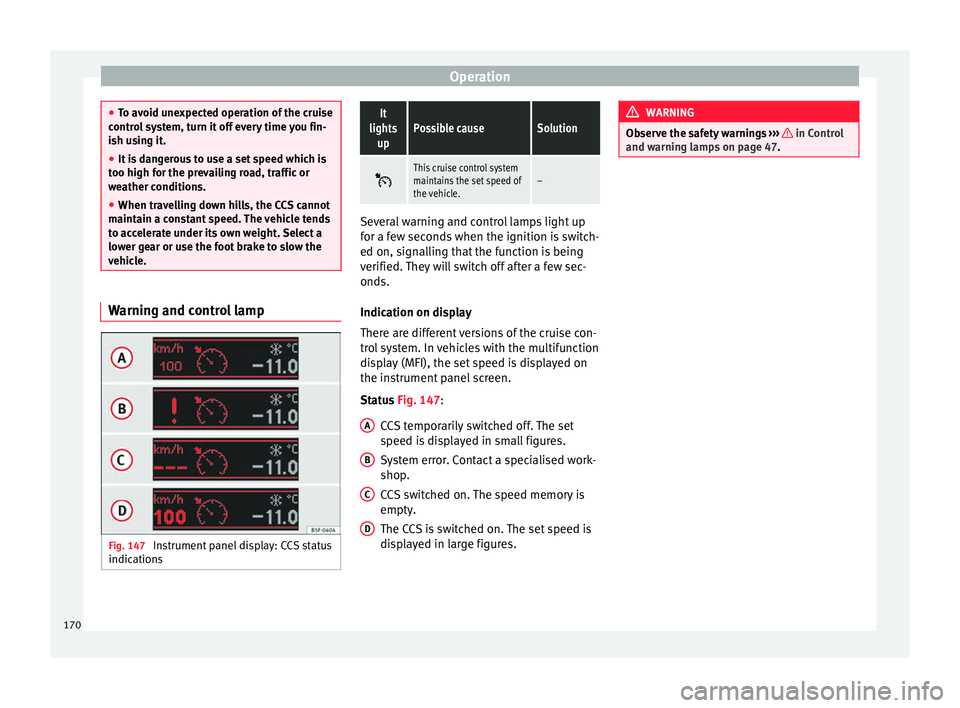
Fig. 147
Instrument panel display: CCS status
indicationsIt
lights upPossible causeSolution
This cruise control system
maintains the set speed of
the vehicle.–
Several warning and control lamps light up
for a few seconds when the ignition is switch-
ed on, signalling that the function is being
verified. They will switch off after a few sec-
onds.
Indication on display
There are different versions of the cruise con-
trol system. In vehicles with the multifunction
display (MFI), the set speed is displayed on
the instrument panel screen.
Status
Fig. 147
:
CCS temporarily switched off. The set
speed is displayed in small figures.
System error. Contact a specialised work-
shop.
CCS switched on. The speed memory is
empty.
The CCS is switched on. The set speed is
displayed in large figures.
A B
C
D WARNING
Observe the safety warnings ››› in Control
and warning lamps on page 47. 170
Page 174 of 305
Operation
Travelling down hills with the CCS
When travelling down hills the CCS cannot
maintain a constant speed. Slow the vehicle
down using the brake pedal and reduce
gears if required.
Automatic off
The cruise control system (CCS) is switched
off automatically or temporarily:
● If the system detects a fault that could af-
fect the working order of the CCS.
● If you increase the stored speed by using
the accelerator for a certain time.
● if the brake or clutch pedal is depressed.
● If you change gears.
● If the airbag is triggered.
Lane Assist system* Introduction WARNING
The intelligent technology in the lane assist
system cannot change the limits imposed by
the laws of physics and by the system itself.
Careless or uncontrolled use of the Lane As-
sist system may cause accidents and injury.
The system is not a replacement for driver
awareness. ●
Always adapt your speed and the distance
to the vehicles ahead in line with visibility,
weather conditions, the condition of the road
and the traffic situation.
● Always keep your hands on the steering
wheel so you can turn it at any time.
● The lane assist system does not detect all
road markings. In some circumstances, the
poor state of the road, structures located on
it or certain objects may be mistakenly recog-
nised as road markings by the lane assist
system. In such situations, switch the lane
assist system off immediately.
● Pay attention to the instructions on the in-
strument panel display and act accordingly to
its requests.
● Always pay attention to the vehicle's sur-
roundings. Note
The lane assist system has been exclusively
developed for driving on asphalted roads. Note
If the lane assist system does not work as de-
scribed in this chapter, do not use it and con-
tact a specialised workshop. Note
If you observe any system malfunction, have
the system checked by a specialised work-
shop. Control lampsBlinks
or
lights up
Possible causeSolution
(yellow)
Lane assist system
connected but in-
active.
The system cannot
clearly detect the
lane. See
page 173,
The lane assist sys-
tem is inactive (con-
trol lamp lit in yel-
low).
(green)
Lane assist system
connected and ac-
tive.–
Several warning and control lamps light up
for a few seconds when the ignition is switch-
ed on, signalling that the function is being
verified. They will switch off after a few sec-
onds.
WARNING
Observe the safety warnings ››› in Control
and warning lamps on page 47. 172
Page 183 of 305
Towing bracket device
Bumper mounted tow hitch
Never fit a tow hitch or its attachments to the
bumper. A tow hitch should never interfere
with the bumper performance. Do not modify
the exhaust system and brake system. Regu-
larly check the tow hitch to ensure it is firmly
fitted.
Engine cooling system
Driving with a trailer increases the load on
the engine and cooling system. The cooling
system should always have sufficient coolant
and to be able to cope with the vehicle and
trailer.
Electric trailer brake
If the trailer has its own braking system,
please note the relevant legal requirements.
The trailer braking system should never be
connected to the vehicle braking system.
Trailer cable
Always use a cable between the vehicle and
the trailer ››› page 183 .
T r
ailer rear lights
The rear lights of a trailer must fulfil the cor-
responding standards ››› page 183.
Never connect the trailer's rear lights directly
to the vehicle electric system. In case of any
doubt about the electrical connection of the trailer, ask a specialised workshop. SEAT rec-
ommends visiting a technical service.
Wing mirrors
When the field of vision behind the trailer
cannot be seen using the standard wing mir-
rors of the towing vehicle, additional wing
mirrors are required according to the legal re-
quirements of each country. The wing mirrors
must be fitted before driving and must pro-
vide a sufficient field of vision behind.
Trailer electricity consumption
Never exceed the specifications:
DevicesMaximum power
Side lights and rear lights50 Watts
Turn signal (each side)54 Watts
Brake lights (total)84 Watts
Reversing lights (total)42 Watts
Rear fog light42 Watts
WARNING
If the tow hitch is badly fitted or unsuitable,
the trailer may separate from the vehicle
causing an accident with serious consequen-
ces. CAUTION
● If the rear lights of the trailer are not cor-
rectly connected, the vehicle electronics may
be damaged.
● If the trailer absorbs excessive electric cur-
rent, the vehicle electronics may be dam-
aged.
● Never connect the trailer's electric system
to the electrical connections of the rear lights
or any other power sources. Only use suitable
connections for providing electric current to
the trailer. Note
● Towing a trailer places additional demands
on the vehicle. At SEAT, we recommend addi-
tional services between the normal inspec-
tion intervals if the vehicle is used frequently
for towing a trailer.
● In some countries, an additional fire extin-
guisher is required if the trailer weight is
more than 2500 kg 181
Technical specifications
Advice
Operation
Safety
Page 184 of 305
Operation
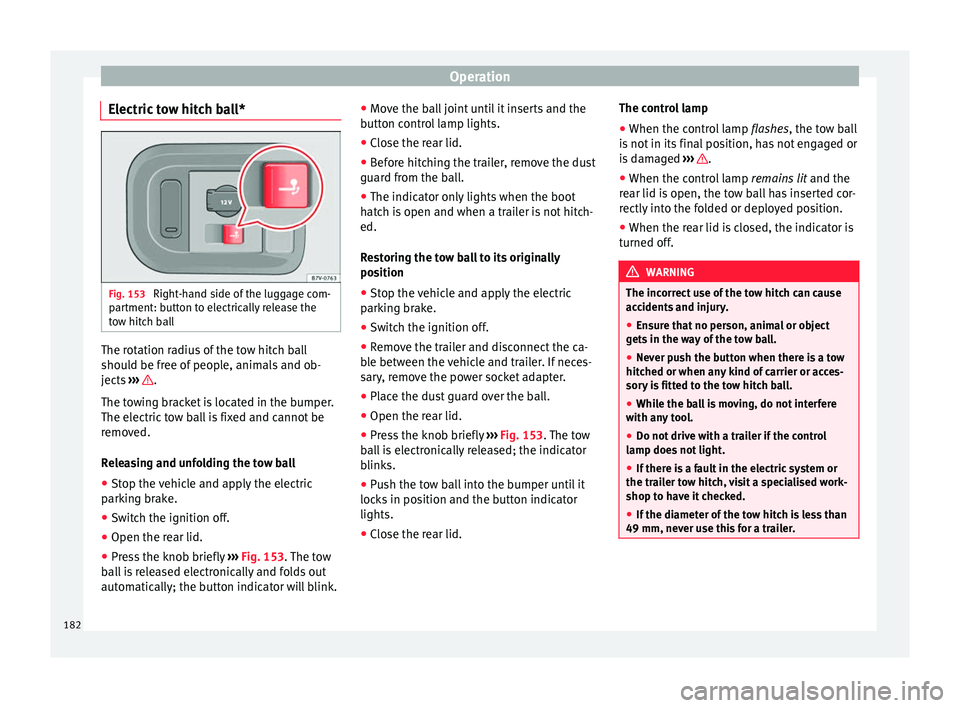
Electric tow hitch ball* Fig. 153
Right-hand side of the luggage com-
partment: button to electrically release the
tow hitch ball The rotation radius of the tow hitch ball
should be free of people, animals and ob-
jects
››› .
The towing bracket is located in the bumper.
The electric tow ball is fixed and cannot be
removed.
Releasing and unfolding the tow ball
● Stop the vehicle and apply the electric
parking brake.
● Switch the ignition off.
● Open the rear lid.
● Press the knob briefly ››› Fig. 153 . The tow
b al
l is released electronically and folds out
automatically; the button indicator will blink. ●
Move the ball joint until it inserts and the
button control lamp lights.
● Close the rear lid.
● Before hitching the trailer, remove the dust
guard from the ball.
● The indicator only lights when the boot
hatch is open and when a trailer is not hitch-
ed.
Restoring the tow ball to its originally
position
● Stop the vehicle and apply the electric
parking brake.
● Switch the ignition off.
● Remove the trailer and disconnect the ca-
ble between the vehicle and trailer. If neces-
sary, remove the power socket adapter.
● Place the dust guard over the ball.
● Open the rear lid.
● Press the knob briefly ››› Fig. 153
. The tow
ball is electronically released; the indicator
blinks.
● Push the tow ball into the bumper until it
locks in position and the button indicator
lights.
● Close the rear lid. The control lamp
●
When the control lamp flashes, the tow ball
is
not in its final position, has not engaged or
is damaged ››› .
● When the control lamp remains lit and the
rear lid is open, the tow ball has inserted cor-
rectly into the folded or deployed position.
● When the rear lid is closed, the indicator is
turned off. WARNING
The incorrect use of the tow hitch can cause
accidents and injury.
● Ensure that no person, animal or object
gets in the way of the tow ball.
● Never push the button when there is a tow
hitched or when any kind of carrier or acces-
sory is fitted to the tow hitch ball.
● While the ball is moving, do not interfere
with any tool.
● Do not drive with a trailer if the control
lamp does not light.
● If there is a fault in the electric system or
the trailer tow hitch, visit a specialised work-
shop to have it checked.
● If the diameter of the tow hitch is less than
49 mm, never use this for a trailer. 182
Page 185 of 305
Towing bracket device
CAUTION
● If anything is attached to the tow hitch ball,
do not, under any circumstances press the
button.
● Never direct a high-pressure or steam
cleaning system directly at the tow hitch ball
or trailer power socket. This could cause
damage to seals or remove lubricating
grease. Note
In extremely low temperatures, it is possible
that the tow hitch is not released. In this
case, place the vehicle in a warmer location
(e.g. a garage). Installing a bicycle carrier to the tow
hitch
The maximum load permitted for a bicycle
carrier on the tow hitch ball is
75 kg, with a
m ax
imum distance of 30 cm from the sup-
port. The distance between supports is the
distance between the bicycle carrier centre of
gravity (with the bicycles) and the centre of
point of the tow hitch ball. WARNING
The incorrect use of the tow hitch with a bicy-
cle carrier installed can cause accidents and
injury. ●
Never exceed the load and distances be-
tween supports indicated.
● Never fit the bicycle carrier to the tow hitch
ball neck, underneath the tow hitch given
that the bicycle carrier may be incorrectly fit-
ted due to the shape of the tow hitch and the
model of bicycle carrier.
● Always read and take the manufacturer as-
sembly instructions into account. CAUTION
Exceeding the maximum load and distance
between supports indicated can cause con-
siderable damage to the vehicle.
● Never exceed the specifications. Hitching and connecting the trailer
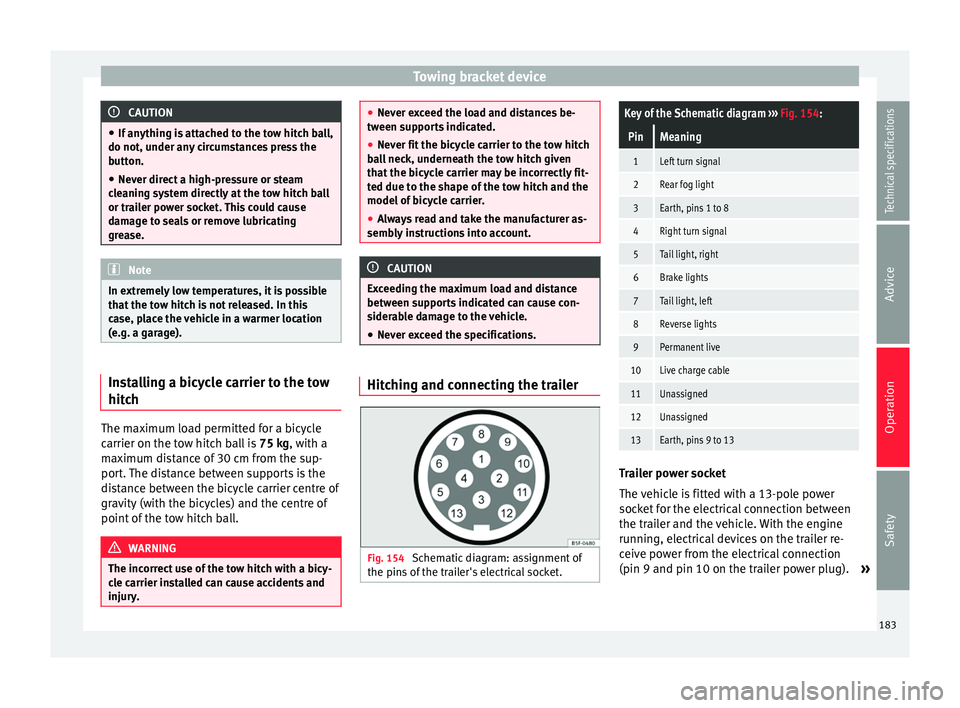
Fig. 154
Schematic diagram: assignment of
the pins of the trailer's electrical socket.
Key of the Schematic diagram ››› Fig. 154:
PinMeaning
1Left turn signal
2Rear fog light
3Earth, pins 1 to 8
4Right turn signal
5Tail light, right
6Brake lights
7Tail light, left
8Reverse lights
9Permanent live
10Live charge cable
11Unassigned
12Unassigned
13Earth, pins 9 to 13 Trailer power socket
The vehicle is fitted with a 13-pole power
socket for the electrical connection between
the trailer and the vehicle. With the engine
running, electrical devices on the trailer re-
ceive power from the electrical connection
(pin 9 and pin 10 on the trailer power plug).
»
183
Technical specifications
Advice
Operation
Safety
Page 187 of 305
Towing bracket device
●
With the engine running, the electrical
equipment on the trailer will be supplied with
power. Loading the trailer
Trailer weight / drawbar load
The trailer weight is the load that the vehicle
can pull
››› . The drawbar load is the vertical
weight of the tow hitch on the tow hitch ball
››› page 188.
The figur e
s for trailer weights and drawbar
load weights given on the data plate of the
tow hitch are for values of this model only.
The correct figures for your specific vehicle,
which may be lower than these figures for the
t o
w hitch, are given in the vehicle documen-
tation. The instructions in the official vehicle
documents take precedence.
For the sake of road safety, SEAT recom-
mends using the maximum allowed drawbar
load
. The handling of the combined vehicle
and trailer will be poor if the drawbar load is
too low.
The drawbar load increases the weight on the
rear axle, reducing the vehicle carrying ca-
pacity.
Gross combination weight
This figure refers to the combined weight of
the loaded vehicle and loaded trailer. Loading the trailer
The combined vehicle and trailer must be
balanced. Use the maximum drawbar load
authorised and do not overload the front or
the rear of the trailer:
●
Distribute loads in the trailer so that heavy
objects are as near to the axle as possible or
above it.
● Correctly secure the trailer load.
Tyre pressure
Inflate the trailer tyres according to the man-
ufacturer's instructions.
Inflate the towing vehicles tyres to the maxi-
mum ››› page 231. WARNING
Exceeding the maximum authorised axle
load, drawbar load or the gross combination
weight of the towing vehicle and trailer could
cause a serious accident with severe conse-
quences.
● Never exceed the specifications.
● With the actual load on the front and rear
axles, the maximum axle load should never
be exceeded. The weight on the front and rear
should never exceed the gross vehicle
weight. WARNING
If the load moves, the stability and safety of
the vehicle and trailer combination will be se-
riously affected and this could result in a seri-
ous accident.
● Always correctly load the trailer.
● Always secure loads correctly with suitable
and undamaged attachment rope or straps. Driving with a trailer
Adjusting the headlights
When towing a trailer, the front of the vehicle
may rise and so the dipped beam headlights
may blind other drivers. Use the headlight
range control to lower the cone of light. If you
do not have headlight range control, have
the headlights adjusted by a specialised
workshop. Vehicles with high-intensity dis-
charge lamps adapt automatically and do not
require adjustment.
Details of driving with a trailer
● If the trailer has an overrun brake, apply
the brakes gently at first and then, firmly.
This will prevent the jerking that can be
caused by the trailer wheels locking.
● As of the combined vehicle and trailer
mass, braking distances will be greater.
● Select a low gear before driving down a
steep hill to use the engine braking effect to »
185
Technical specifications
Advice
Operation
Safety
Page 188 of 305
Operation
slow down the vehicle. Otherwise, the brak-
ing system could overheat and fail.
● The vehicle centre of gravity and handling
change because of the trailer load and be-
cause of the increased combined mass of the
vehicle and trailer.
● If the towing vehicle is empty and the trail-
er loaded then the load distribution is incor-
rect. If you must travel in these conditions,
drive carefully and reduce your speed accord-
ingly.
Hill starts with a trailer
Depending on the hill and the gross com-
bined weight, it is possible that the com-
bined vehicle and trailer move backwards
slightly when starting.
For a hill start with a trailer, proceed as fol-
lows:
● Press and hold the brake pedal.
● Press the button once to turn off the
electric parking brake ››› page 137.
● Press and hold the button to hold the
vehicle and trailer combination using the
parking brake.
● With a manual gearbox: press the clutch
pedal to the floor.
● Engage first gear or the gear range D
››› page 143, Changing gear .
● Rel
ease the brake pedal. ●
Move off slowly. To do this, gently release
the clutch pedal (for manual gearbox).
● Release the button only when the en-
gine provides sufficient power to move the
vehicle and trailer combination. WARNING
Jerking the trailer in an unsuitable manner
could cause loss of vehicle control with the
subsequent serious consequences.
● Driving with a trailer and transporting
heavy or a large objects will change the vehi-
cle handling and braking distances.
● Anticipate traffic and be extremely cau-
tious. Brake early.
● Adjust your speed and driving style to visi-
bility, road, traffic and weather conditions.
Reduce your speed, especially on steep hills.
● Accelerate gently and carefully. Avoid brus-
que manoeuvres and sudden braking.
● Always take the following precautions seri-
ously. Reduce your speed immediately if you
observe the trailer rocking from side to side.
● Never try to stop the “snaking” by increas-
ing speed.
● Always take the speed limits for vehicles
with and without trailers in each country into
account. Stabilising the vehicle and trailer
combination
Stabilisation of the vehicle and trailer combi-
nation is an extension of the electronic sta-
bility control (ESC) and helps, with the assis-
tance of the trajectory control, to reduce trail-
er “snaking”.
Stabilisation of the vehicle and trailer combi-
nation is active when the ESC
indicator on
the d a
sh panel remains lit for about two sec-
onds more than the ABS indicator.
Requirements for stabilising the
vehicle/trailer combination
● An original tow hitch is fitted by the manu-
facturer or a compatible model is retrofitted.
● The ECS is switched on. The warning lamp
on the dash panel is not lit.
● The trailer is connected to the vehicle using
the power socket.
● It travels faster than 60 km/h (37 mph).
● The maximum drawbar load is used.
● The trailer must have a fixed drawbar.
● Trailers with brakes must be equipped with
a mechanical inertia brake. WARNING
Do not let the extra safety afforded by the
stabilisation system tempt you into taking
any risks when driving. 186