lights Seat Alhambra 2015 Owner's Guide
[x] Cancel search | Manufacturer: SEAT, Model Year: 2015, Model line: Alhambra, Model: Seat Alhambra 2015Pages: 305, PDF Size: 5.46 MB
Page 78 of 305
Operation
● Switching on the front fog lights : Turn
the sw it
ch to position or pull out to the
first stop.
● Switching on the rear fog light : turn the
light sw
itch to position or pull out to
the maximum.
● To switch off the fog lights, press the light
switch or turn it to position
.
Audible warnings to advise the driver that
the lights have not been switched off
If the key is not in the ignition and the driver
door is open, an audible warning signal is
heard in the following cases: this is a remind-
er to turn off the lights.
● When the parking light is on ››› page 76.
● When the light switch is in position .WARNING
The side lights or daytime driving lights are
not bright enough to illuminate the road
ahead and to ensure that other road users are
able to see you.
● Always use your dipped beam head lights if
it is raining or if visibility is poor. Turn signal and main beam lever
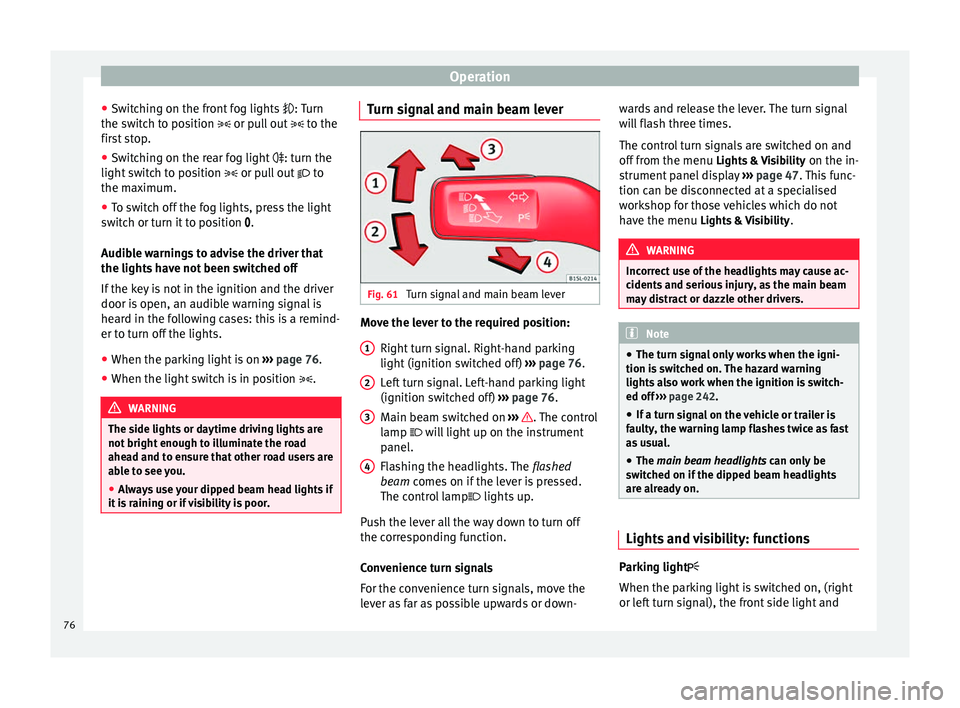
Fig. 61
Turn signal and main beam lever Move the lever to the required position:
Right turn signal. Right-hand parking
light (ignition switched off) ››› page 76.
Left turn signal. Left-hand parking light
(ignition switched off) ››› page 76.
Main beam switched on ››› . The control
lamp will light up on the instrument
panel.
Flashing the headlights. The flashed
beam comes on if the lever is pressed.
The c ontr
ol lamp lights up.
Push the lever all the way down to turn off
the corresponding function.
Convenience turn signals
For the convenience turn signals, move the
lever as far as possible upwards or down- 1 2
3
4 wards and release the lever. The turn signal
will flash three times.
The control turn signals are switched on and
off from the menu
Lights & Visibility on the in-
strument panel display ››› page 47. This func-
tion can be disconnected at a specialised
workshop for those vehicles which do not
have the menu Lights & Visibility
. WARNING
Incorrect use of the headlights may cause ac-
cidents and serious injury, as the main beam
may distract or dazzle other drivers. Note
● The turn signal only works when the igni-
tion is switched on. The hazard warning
lights also work when the ignition is switch-
ed off ››› page 242.
● If a t
urn signal on the vehicle or trailer is
faulty, the warning lamp flashes twice as fast
as usual.
● The main beam headlights can only be
sw
itched on if the dipped beam headlights
are already on. Lights and visibility: functions
Parking light
When the parking light is switched on, (right
or left turn signal), the front side light and
76
Page 79 of 305
Lights and visibility
the rear light on the corresponding side of
the vehicle stay lit. The parking lights will on-
ly work with the ignition off.
Daytime driving light
The daytime light reduces the risk of acci-
dents by increasing the visibility of the vehi-
cle. These are independent lights which are
built into the headlights and which come on
each time the ignition is turned on if the light
switch is in position or 0
.
When the light
switch is in position , a
photo sensor automatically turns the instru-
ment and switch lighting on and off.
Automatic dipped beam control
The automatic dipped beam control is merely
intended as an aid and is not able to recog-
nise all driving situations.
When the light switch is in position , the
vehicle lights and the instrument panel and
switch lighting switch on and off automatical-
ly in the following situations ››› :
Automatic switching
onAutomatic switching
off or switch to day-
time running lighting
The photo sensor detects
darkness, for example,
when driving through a
tunnel.When adequate lighting is
detected.
Automatic switching
onAutomatic switching
off or switch to day-
time running lighting
The rain sensor detects
rain and activates the
windscreen wipers.When the windscreen wip-
er has been inactive for a
few minutes. Adaptive headlights (AFS)
The adaptive headlights only operate when
the dipped beam is on and at speeds of over
10 km/h (6 mph). On bends, the adaptive
headlights automatically improve lighting on
the road ahead.
The adaptive headlights can be switched on
and off from the infotainment system.
Static turning lights
When turning slowly to change direction or
going round a tight bend, the static cornering
lights automatically come on. The static cor-
nering lights only work at speeds of less than
40 km/h (25 mph).
The static cornering lights may be incorpora-
ted into the fog lights or the front headlights,
depending upon the equipment.
WARNING
If the road is not well lit and other road users
cannot see the vehicle well enough or at all,
accidents may occur. ●
The automatic dipped beam control ( )
only switches on the dipped beam when
there are no changes in brightness, and not,
for example when it is foggy.
● Never drive with daytime lights if the road
is not well lit due to weather or lighting con-
ditions. Daytime lights do not provide
enough light to illuminate the road properly
or be seen by other road users.
● The rear lights do not come on with the
daytime driving light. A vehicle which does
not have the rear lights on may not be visible
to other drivers in the darkness, if it is rain-
ing or in conditions of poor visibility. Headlight adjustment
Headlight adjustment (Light Assist)
The headlight adjustment automatically con-
nects and disconnects these lights depend-
ing on the environmental and traffic condi-
tions and on the speed, within the limitations
of the system
››› . This is monitored by a
sensor located on the inside of the wind-
screen, above the interior rear vision mirror.
The automatic headlight adjustment auto-
matically switches on the lights depending
on the vehicles travelling in front and in the
opposite direction, and on other environmen-
tal and traffic conditions from an approxi-
mate speed of 60 km/h (37 mph) and turns »
77
Technical specifications
Advice
Operation
Safety
Page 80 of 305
Operation
them off again at speeds below approximate-
ly 30 km/h (18 mph).
Switching on and off Action
Switch-
ing on:– With the ignition on, turn the lights control
to the position and put the turn signal
and main beam lever in the main beam posi-
tion ››› page 76. When the headlight adjust-
ment (automatic lights also) is activated, the
warning lamp lights up in the dash panel
display
.
Switch-
ing off:– Disconnect the on button.
– OR: turn the lights control to a different po-
sition to
››› page 75.
– OR: place the turn signal and main beam
lever in the headlight flasher or main beam
position ››› page 76. The following conditions can cause the head-
light adjustment to fail to turn off the main
beam or fail to do so in time:
●
On roads with insufficient lighting with very
reflective signs
● If road users are insufficiently lit up, e.g.
pedestrians or cyclists.
● On closed curves, when the traffic in the
opposite direction is partially hidden, on pro-
nounced slopes
● On roads with traffic in the opposite direc-
tion and with a central reservation barrier
where the driver can see through gaps or
over it e.g. lorry drivers. ●
If the camera is damaged or if the power
supply has been cut off
● In the event of fog, snow or heavy rain
● In the event of dust or sand storms
● If the windscreen is damaged by the impact
from a stone in the camera's field of vision
● If the camera's field of vision is misted up,
dirty or covered by a sticker, snow or ice. WARNING
The greater comfort that the headlight ad-
justment provides (automatic also) must not
cause you to take risks. The system is not a
replacement for driver awareness.
● Always monitor the lights yourself and ad-
just them depending on the light, visibility
and traffic conditions.
● The headlight adjustment (automatic also)
may not correctly detect all situations and in
certain situations may only provide limited
function.
● If the windscreen is damaged or modifica-
tions are made to the vehicle lighting, this
may harm the functioning of the headlight
adjustment (automatic lights also), for exam-
ple, if additional headlight are fitted. Note
Main beam and flashed headlights can be
turned on and off manually at any time with
the turn signal and main beam lever
››› page 76. “Coming home” and “Leaving home”
function (guidance lights)
The “Coming home” function should be
switched on manually. However the “Leav-
ing home” function is automatically control-
led by a photo sensor.
Coming home: necessary operations
To switch sys-
tem on:
– Switch off the ignition.
– Briefly flash the headlights
for ap-
proximately one second ››› page 76.
The “Coming home” lighting comes on
when the driver door is opened. The
delay in switching off the headlights is
counted from when the last door or
boot hatch is closed.
To switch sys-
tem off:
– Automatically at the end of the delay
period.
– Automatically, if 30 seconds after
coming on, a vehicle door or the boot
hatch remains open.
– When the light switch is turned to po-
sition
.
– When the ignition is switched on.
Leaving home: necessary operations
To switch sys-
tem on:– Unlock the vehicle when the light
switch is in position and the pho-
to sensor detects darkness.78
Page 81 of 305
Lights and visibilityLeaving home: necessary operations
To switch sys-
tem off:
– Automatically, at the end of the delay
period.
– When the vehicle is locked.
– When the light switch is turned to po-
sition
.
– When the ignition is switched on. Lighting around the exterior mirrors
The lighting around the exterior mirrors illu-
minates the door area on entering and leav-
ing the vehicles. It comes on when the vehi-
cle is unlocked, when the vehicle door is
opened and when the “Coming home” or
“Leaving home” function is switched on. If
the equipment includes the light sensor, the
lighting around the exterior mirrors only
comes when it is dark.
Note
● The time taken for the headlights to go off
can be changed in the Lights & Visibility menu
and the f u
nction can be switched on or off
››› page 47.
● When the “Comin
g home” function is on, if
the vehicle door is opened there is no audible
warning signal to advise that the light is still
on. Adhesive strips for headlights or
adjusting headlights
In those countries where vehicles drive on
the other side of the road to the home coun-
try, the asymmetric dipped beam may dazzle
drivers of oncoming vehicles. Therefore,
when driving abroad, adhesive strips should
be attached to the headlights or the head-
lights should be adjusted accordingly.
The direction of the headlights can be adjus-
ted from the instrument panel, in the
Tourist
light submenu of the Configuration menu
››› page 51
.
F or tho
se vehicles in which it is not possible
to adjust the headlights from the menu, ad-
hesive strips are used to cover certain parts
of the headlamp cover or the headlights may
be adjusted at a specialised workshop. For
further information, please refer to a special-
ised workshop. SEAT recommends visiting a
technical service. Note
Use of the Tourist light option and the adhe-
sives on the headlights is only allowed if they
are to be used for a short period of time. To
modify the direction of the headlights perma-
nently, please take the vehicle to a special-
ised workshop. SEAT recommends visiting a
technical service centre. Headlight range control, instrument
and switch lighting
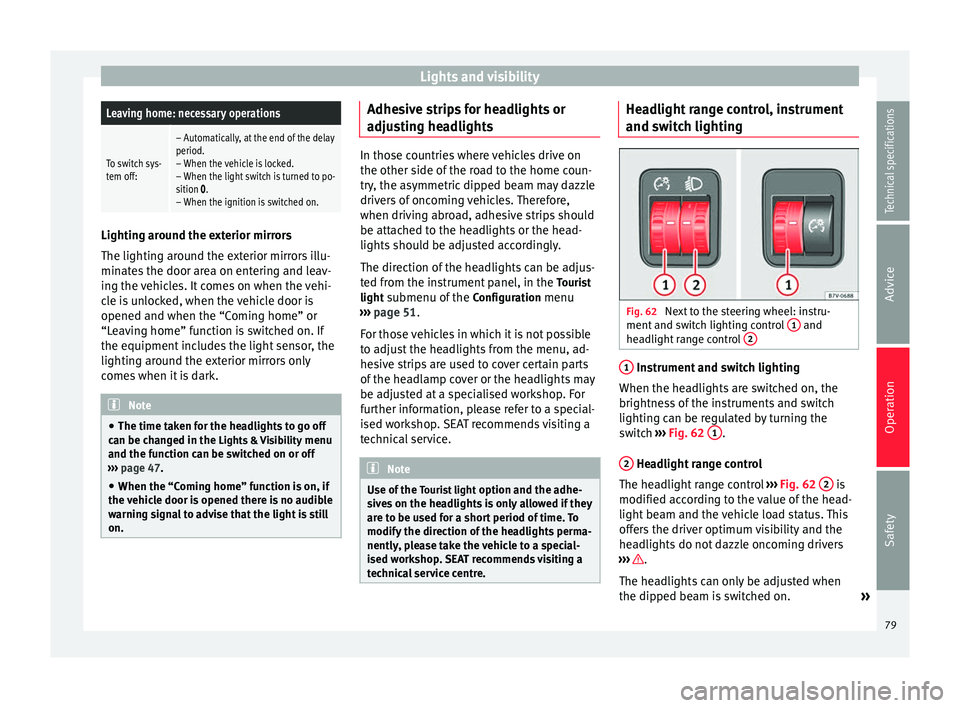
Fig. 62
Next to the steering wheel: instru-
ment and switch lighting control 1 and
headlight range control 2 1
Instrument and switch lighting
When the headlights are switched on, the
brightness of the instruments and switch
lighting can be regulated by turning the
switch ››› Fig. 62 1 .
2 Headlight range control
The headlight range control ››› Fig. 62 2 is
modified according to the value of the head-
light beam and the vehicle load status. This
offers the driver optimum visibility and the
headlights do not dazzle oncoming drivers
››› .
The headlights can only be adjusted when
the dipped beam is switched on. »
79
Technical specifications
Advice
Operation
Safety
Page 82 of 305
Operation
To reset, turn switch ››› Fig. 62 2 :ValueVehicle load status
a)
–Two front occupants, luggage compart-
ment empty
1All seats occupied, luggage compartment
empty
2All seats occupied, luggage compartment
full With trailer and minimum drawbar load
3Driver only, luggage compartment full With
trailer and maximum drawbar load
a)
If the vehicle load does not correspond to those shown in the
table, it is possible to select intermediary positions.
Dynamic headlight range control
The control 2 is not mounted in vehicles
with dynamic headlight range control. The
headlight range is automatically adjusted ac-
cording to the vehicle load status when they
are switched on. WARNING
Heavy objects in the vehicle may mean that
the headlights dazzle and distract other driv-
ers. This could result in a serious accident.
● Adjust the light beam to the vehicle load
status so that it does not blind other drivers. Interior and reading lights
Button/
SwitchFunction
Switches interior lights off.
Switches interior lights on.
Switches door contact control on (cen-
tral position).
The interior lights come on automati-
cally when the vehicle is unlocked, a
door is opened or the key is removed
from the ignition.
The lights go off a few seconds after all
the doors are closed, the vehicle is
locked or the ignition is switched on.
Turning the reading light on and off
Storage and luggage compartment lighting
When the glove compartment and the rear lid
are opened and closed, a light automatically
switches on or off.
Ambient lighting
The ambient lighting in the front covering of
the ceiling lights up the controls on the cen-
tre console from above when the side light or
dipped beam lights are on.
In addition, the lever on the door moulding
can also be illuminated. Note
The reading lights go out when the vehicle is
locked, or a few minutes after the key is re-
moved from the ignition. This prevents the
vehicle's battery from discharging. Visibility
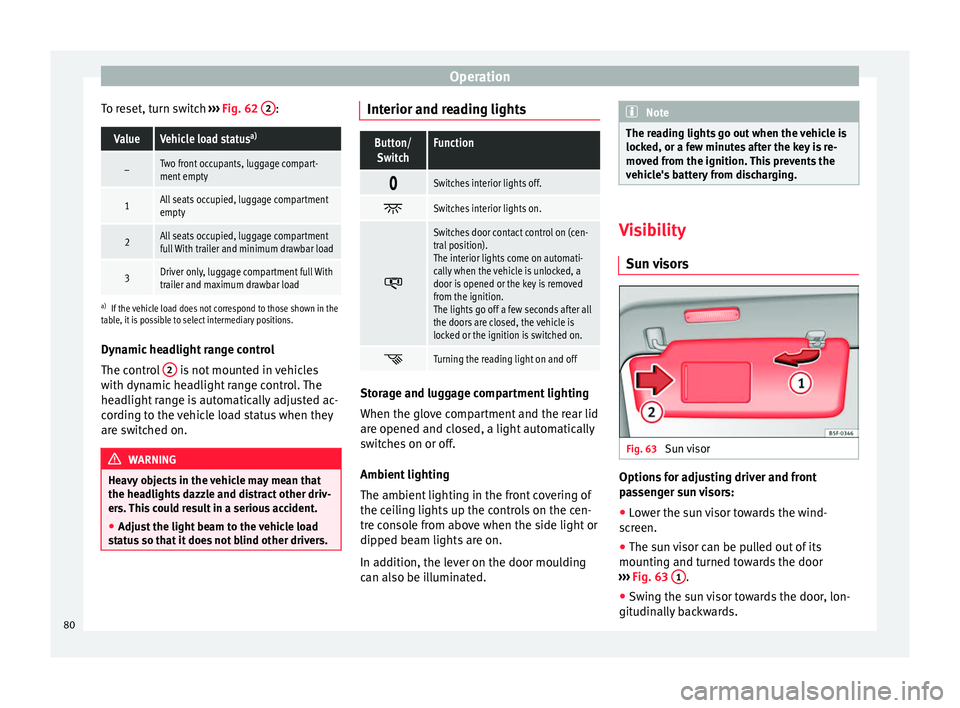
Sun visors Fig. 63
Sun visor Options for adjusting driver and front
passenger sun visors:
● Lower the sun visor towards the wind-
screen.
● The sun visor can be pulled out of its
mounting and turned towards the door
››› Fig. 63 1 .
● Swing the sun visor towards the door, lon-
gitudinally backwards.
80
Page 83 of 305
Lights and visibility
Vanity mirror light
There may be a vanity mirror, with a cover, on
the rear of the sun visor. When the cover is
opened ››› Fig. 63 2 a light comes on.
The lamp goes out when the vanity mirror
cover is closed or the sun visor is pushed
back up. WARNING
Sun visors and sun blinds may reduce visibili-
ty when open.
● Always roll or fold sun blinds and visors
away when not in use. Note
The light above the sun visor automatically
switches off after a few minutes in certain
conditions. This prevents the battery from
discharging. Rear side window sun blinds
Fig. 64
On the rear right-hand window: sun
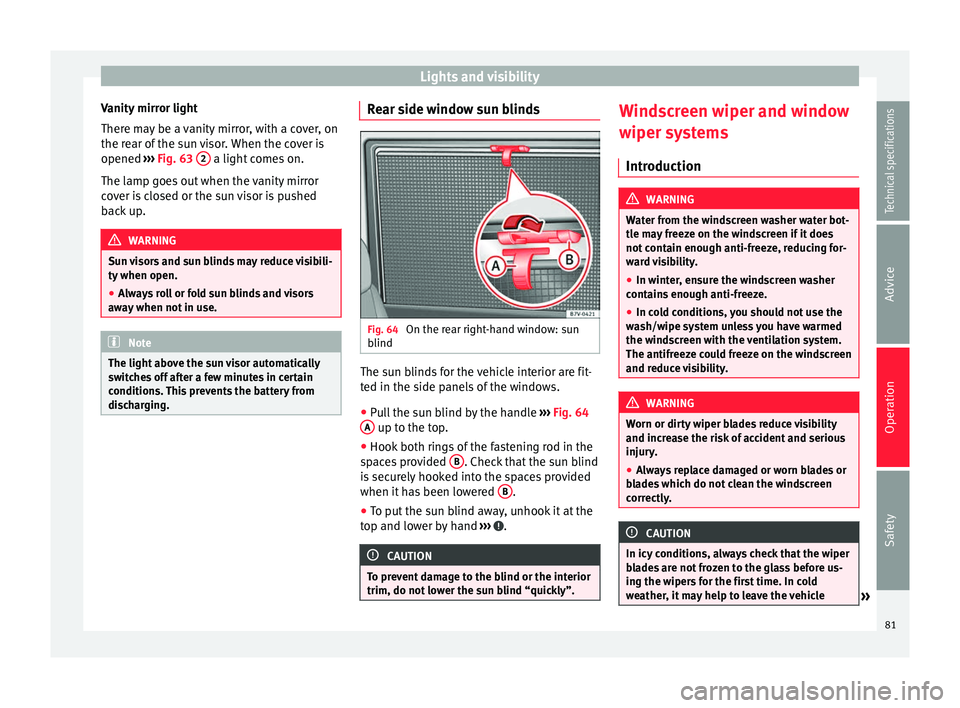
blind The sun blinds for the vehicle interior are fit-
ted in the side panels of the windows.
● Pull the sun blind by the handle ›››
Fig. 64
A up to the top.
● Hook both rings of the fastening rod in the
spaces provided B . Check that the sun blind
is securely hooked into the spaces provided
when it has been lowered B .
● To put the sun blind away, unhook it at the
top and lower by hand ››› .
CAUTION
To prevent damage to the blind or the interior
trim, do not lower the sun blind “quickly”. Windscreen wiper and window
wiper systems
Introduction WARNING
Water from the windscreen washer water bot-
tle may freeze on the windscreen if it does
not contain enough anti-freeze, reducing for-
ward visibility.
● In winter, ensure the windscreen washer
contains enough anti-freeze.
● In cold conditions, you should not use the
wash/wipe system unless you have warmed
the windscreen with the ventilation system.
The antifreeze could freeze on the windscreen
and reduce visibility. WARNING
Worn or dirty wiper blades reduce visibility
and increase the risk of accident and serious
injury.
● Always replace damaged or worn blades or
blades which do not clean the windscreen
correctly. CAUTION
In icy conditions, always check that the wiper
blades are not frozen to the glass before us-
ing the wipers for the first time. In cold
weather, it may help to leave the vehicle » 81Technical specifications
Advice
Operation
Safety
Page 84 of 305
Operation
parked with the wipers in service position
››› page 83. Control lampIt
lights upPossible causeSolution
Windscreen wiper
fluid level too lowTop up the windscreen
wiper reservoir as
soon as possible
››› page 226. Several warning and control lamps light up
for a few seconds when the ignition is switch-
ed on, signalling that the function is being
verified. They will switch off after a few sec-
onds.
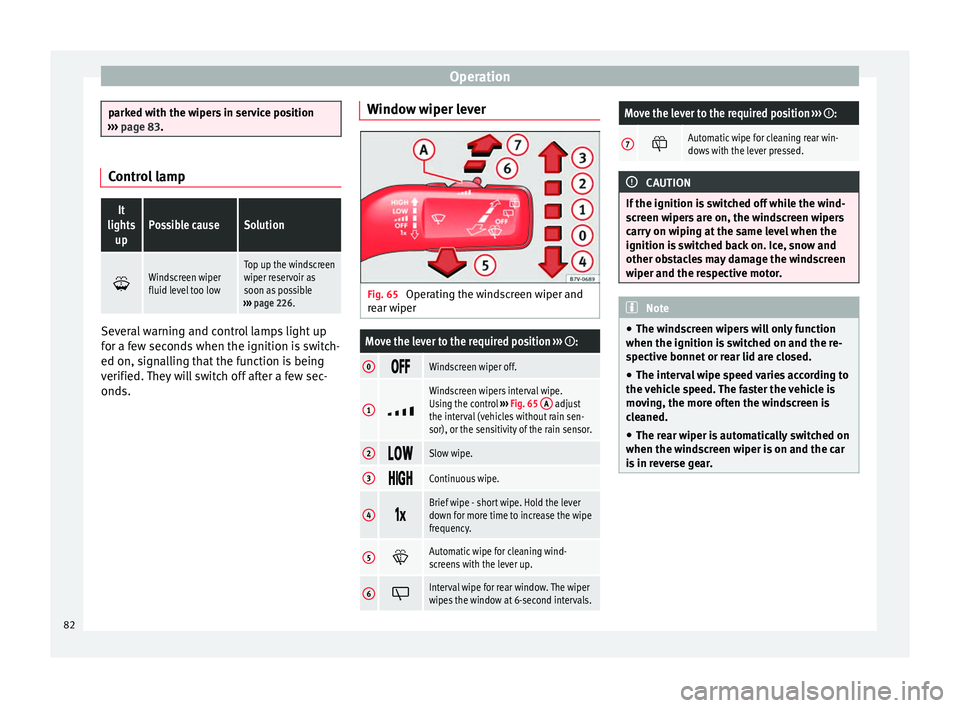
Window wiper lever Fig. 65
Operating the windscreen wiper and
rear wiper
Move the lever to the required position ››› :
0 Windscreen wiper off.
1
Windscreen wipers interval wipe.
Using the control
››› Fig. 65 A adjust
the interval (vehicles without rain sen-
sor), or the sensitivity of the rain sensor.
2 Slow wipe.
3
Continuous wipe.
4
Brief wipe - short wipe. Hold the lever
down for more time to increase the wipe
frequency.
5
Automatic wipe for cleaning wind-
screens with the lever up.
6
Interval wipe for rear window. The wiper
wipes the window at 6-second intervals.
Move the lever to the required position
››› :
7 Automatic wipe for cleaning rear win-
dows with the lever pressed.
CAUTION
If the ignition is switched off while the wind-
screen wipers are on, the windscreen wipers
carry on wiping at the same level when the
ignition is switched back on. Ice, snow and
other obstacles may damage the windscreen
wiper and the respective motor. Note
● The windscreen wipers will only function
when the ignition is switched on and the re-
spective bonnet or rear lid are closed.
● The interval wipe speed varies according to
the vehicle speed. The faster the vehicle is
moving, the more often the windscreen is
cleaned.
● The rear wiper is automatically switched on
when the windscreen wiper is on and the car
is in reverse gear. 82
Page 85 of 305
Lights and visibility
Windscreen wiper functionsWindscreen wiper performance in different sit-
uations
If the vehicle
is at a stand-
stillThe activated position provisionally
changes to the previous position.
During auto-
matic wipe
The air conditioner comes on for ap-
proximately 30 seconds in air recircula-
tion mode to prevent the smell of the
windscreen washer fluid entering the
inside the vehicle.
For the inter-
val wipeIntervals between wipes depend on the
vehicle's speed. The higher the vehicle
speed the shorter the intervals. Heated windscreen washer jets
The heating only thaws the frozen jets, it
does not thaw the water in the washer hoses.
The heated windscreen washer jets automati-
cally adjust the heat depending on the ambi-
ent temperature, when the ignition is switch-
ed on.
Headlight wash/wipe system
The headlight washers/wipers clean the
headlight lenses.
After the ignition is switched on, the first and
every fifth time the windscreen washer is
switched on, the headlights are also washed.
Therefore, the windscreen wiper lever should
be pulled towards the steering wheel when the dipped beam or main beam are on. Any
incrusted dirt (such as insects) should be
cleaned regularly (e.g. when refuelling).
To ensure the headlight washers work cor-
rectly in winter, any snow which has got into
the bumper jet supports should be cleaned
away. If necessary, remove snow with an anti-
icing spray.
Note
The wiper will try to wipe away any obstacles
that are on the windscreen. The wiper will
stop moving if the obstacle blocks its path.
Remove the obstacle and switch the wiper
back on again. Windscreen wipers service position
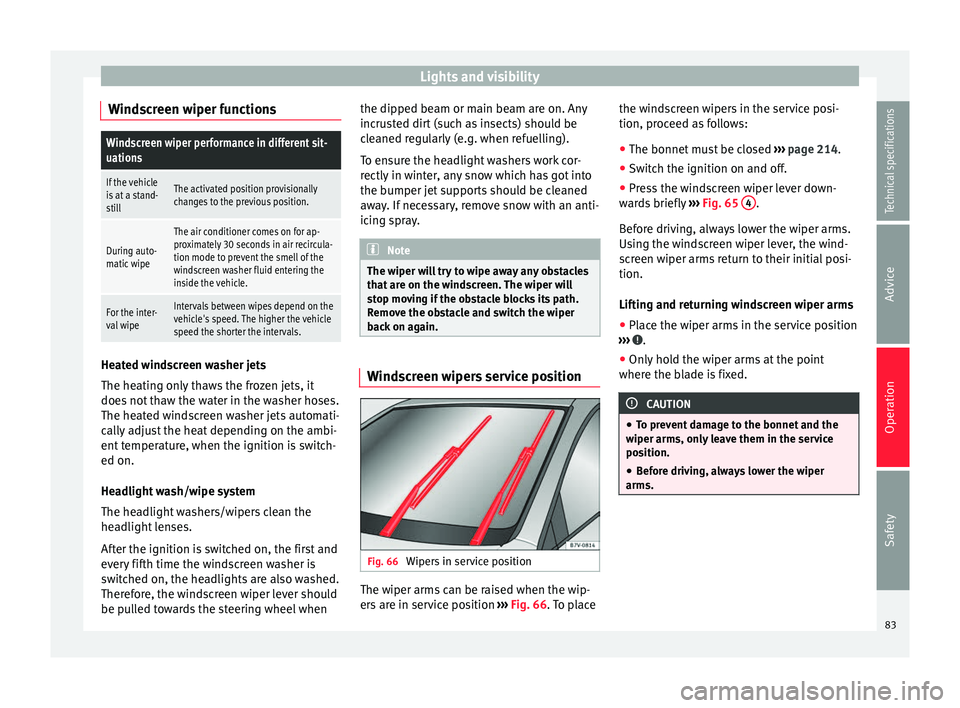
Fig. 66
Wipers in service position The wiper arms can be raised when the wip-
ers are in service position
››› Fig. 66 . To place the w
ind
screen wipers in the service posi-
tion, proceed as follows:
● The bonnet must be closed ››› page 214.
● Switch the ignition on and off.
● Press the windscreen wiper lever down-
wards briefly ››› Fig. 65 4 .
Before driving, always lower the wiper arms.
Using the windscreen wiper lever, the wind-
screen wiper arms return to their initial posi-
tion.
Lifting and returning windscreen wiper arms
● Place the wiper arms in the service position
››› .
● Only hold the wiper arms at the point
where the blade is fixed. CAUTION
● To prevent damage to the bonnet and the
wiper arms, only leave them in the service
position.
● Before driving, always lower the wiper
arms. 83
Technical specifications
Advice
Operation
Safety
Page 87 of 305
Lights and visibility
Rear vision mirror Introduction WARNING
The automatic anti-dazzle rear vision mirror
contains an electrolytic fluid which may leak
if the mirror is broken. This could cause irrita-
tion to the skin, eyes and respiratory organs.
● The electrolytic fluid may cause irritation to
the skin, eyes and respiratory organs, partic-
ularly in individuals suffering from asthma or
other illnesses. Make sure that adequate
quantities of fresh air enter and leave the ve-
hicle if it is not possible to open all the doors
and windows.
● If the electrolytic fluid comes into contact
with eyes or skin, wash the area for at least
15 minutes with plenty of water, and seek
medical advice.
● If the electrolytic fluid comes into contact
with shoes or clothing, wash the area for at
least 15 minutes with plenty of water. Wash
shoes and clothing before wearing them
again.
● If the electrolytic fluid is swallowed, wash
your mouth with plenty of water for at least
15 minutes. Do not try to provoke vomiting
unless recommended by a Doctor. Seek medi-
cal advice immediately. CAUTION
In the event that an automatic anti-dazzle
rear vision mirror breaks, an electrolyte fluid
may leak. This liquid attacks plastic surfaces.
Therefore, it should be cleaned as fast as
possible with a damp sponge or similar. Rear vision mirror
Fig. 69
Manual anti-dazzle function for rear
vision mirror Fig. 70
Automatic anti-dazzle function for
rear vision mirror The driver should always adjust the rear vi-
sion mirror to permit adequate visibility
through the rear window.
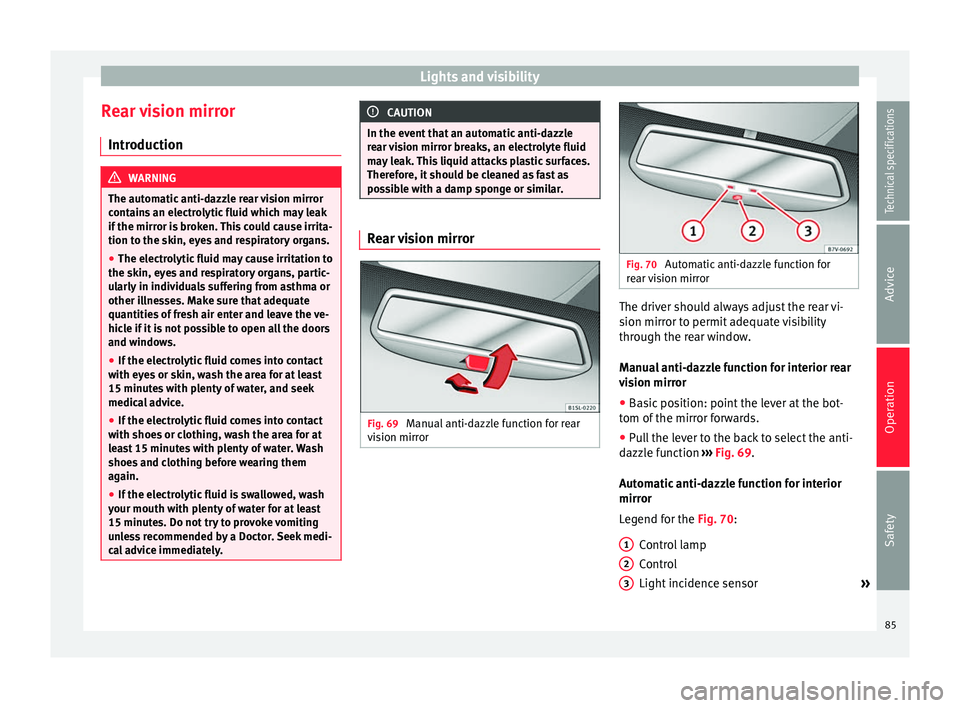
Manual anti-dazzle function for interior rear
vision mirror
● Basic position: point the lever at the bot-
tom of the mirror forwards.
● Pull the lever to the back to select the anti-
dazzle function ››› Fig. 69 .
Aut om
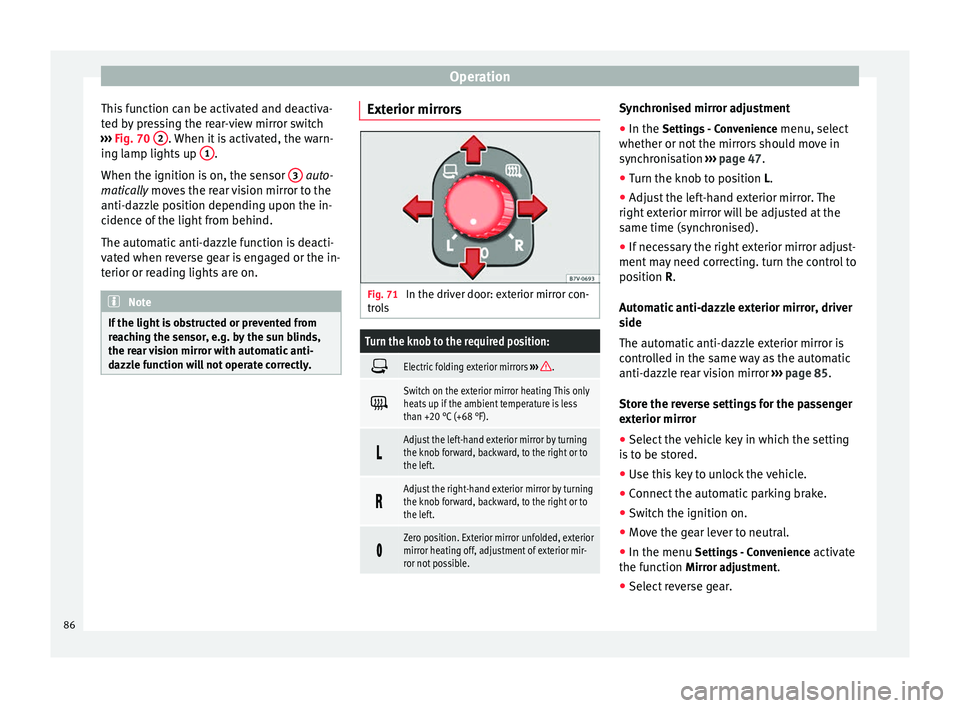
atic anti-dazzle function for interior
mirror
Legend for the
Fig. 70:
Control lamp
Control
Light incidence sensor »
1 2
3
85
Technical specifications
Advice
Operation
Safety
Page 88 of 305
Operation
This function can be activated and deactiva-
ted by pressing the rear-view mirror switch
››› Fig. 70 2 . When it is activated, the warn-
ing lamp lights up 1 .
When the ignition is on, the sensor 3
auto-
matic a
lly moves the rear vision mirror to the
anti-dazzle position depending upon the in-
cidence of the light from behind.
The automatic anti-dazzle function is deacti-
vated when reverse gear is engaged or the in-
terior or reading lights are on. Note
If the light is obstructed or prevented from
reaching the sensor, e.g. by the sun blinds,
the rear vision mirror with automatic anti-
dazzle function will not operate correctly. Exterior mirrors
Fig. 71
In the driver door: exterior mirror con-
trols
Turn the knob to the required position:
Electric folding exterior mirrors
››› .
Switch on the exterior mirror heating This only
heats up if the ambient temperature is less
than +20 °C (+68 °F).
Adjust the left-hand exterior mirror by turning
the knob forward, backward, to the right or to
the left.
Adjust the right-hand exterior mirror by turning
the knob forward, backward, to the right or to
the left.
Zero position. Exterior mirror unfolded, exterior
mirror heating off, adjustment of exterior mir-
ror not possible. Synchronised mirror adjustment
●
In the Settings - Convenience
menu, sel
ect
whether or not
the mirrors should move in
synchronisation ››› page 47
.
● Turn the knob to position L.
● Adjust the left-hand exterior mirror. The
right exterior mirror will be adjusted at the
same time (synchronised).
● If necessary the right exterior mirror adjust-
ment may need correcting. turn the control to
position
R.
Automatic anti-dazzle exterior mirror, driver
side
The automatic anti-dazzle exterior mirror is
controlled in the same way as the automatic
anti-dazzle rear vision mirror ››› page 85.
Store the reverse settings for the passenger
exterior mirror ● Select the vehicle key in which the setting
is to be stored.
● Use this key to unlock the vehicle.
● Connect the automatic parking brake.
● Switch the ignition on.
● Move the gear lever to neutral.
● In the menu Settings - Convenience activate
the function Mirror adjustment.
● Select reverse gear.
86