steering wheel Seat Alhambra 2015 Owner's Guide
[x] Cancel search | Manufacturer: SEAT, Model Year: 2015, Model line: Alhambra, Model: Seat Alhambra 2015Pages: 305, PDF Size: 5.46 MB
Page 135 of 305
Driving
Electromechanical power steering
With the power steering system, the assisted
steering function automatically adjusts ac-
cording to the vehicle speed, the steering tor-
que and the wheel turning angle. The power
steering only works when the engine is run-
ning.
You should remember that you will need con-
siderably more power than normal to steer
the vehicle if the power steering is not work-
ing correctly or not at all.
Counter steering assistance system
The counter steering assistance system helps
the driver in critical situations. Additional
steering power helps the driver when counter
steering. WARNING
The counter steering assistance system com-
bined with ESC helps the driver to steer the
vehicle in critical driving conditions. At all
times, it is the driver who steers the vehicle.
The counter steering system does not steer
the vehicle. Stopping and starting the
engine
Introduction Immobiliser display
When an invalid key is used or in the event of
a system fault,
or Immobiliser on is dis-
played on the instrument panel. The engine
cannot be started.
Pushing or towing
For technical reasons, the vehicle must not
be push- or tow-started. Jump starting is pref-
erable. WARNING
Turning off the engine while driving will make
stopping the vehicle difficult; this could even
result in the loss of control causing an acci-
dent with serious consequences.
● The assisted braking and steering systems,
the airbag system, seat belts and certain
safety equipment are only active while the
engine is running.
● The engine should only be switched off
when the vehicle is at a standstill. WARNING
While the engine is running or starting it
could help reduce the risk of serious injury. ●
Never start or leave the engine running in
poorly ventilated or closed spaces. Exhaust
gas contains carbon monoxide, a toxic, col-
ourless and odourless gas. Carbon monoxide
can cause people to lose consciousness. It
can also cause death.
● Never leave the vehicle unattended if the
engine is running. The vehicle could move off
suddenly or something unexpected could
happen resulting in damage and serious in-
jury.
● Never use start boosters. Cold start sprays
could explode or increase the engine speed
unexpectedly. WARNING
The components of the exhaust system reach
very high temperatures. This could cause a
fire and considerable damage.
● Always park your vehicle so that no part of
the exhaust system can come in contact with
flammable materials (such as wood, leaves,
dried grass, spilled fuel, etc.).
● Do not apply additional underseal or anti-
corrosion coatings to the exhaust pipes, cata-
lytic converter, heat shields or the diesel par-
ticulate filter. 133
Technical specifications
Advice
Operation
Safety
Page 136 of 305
Operation
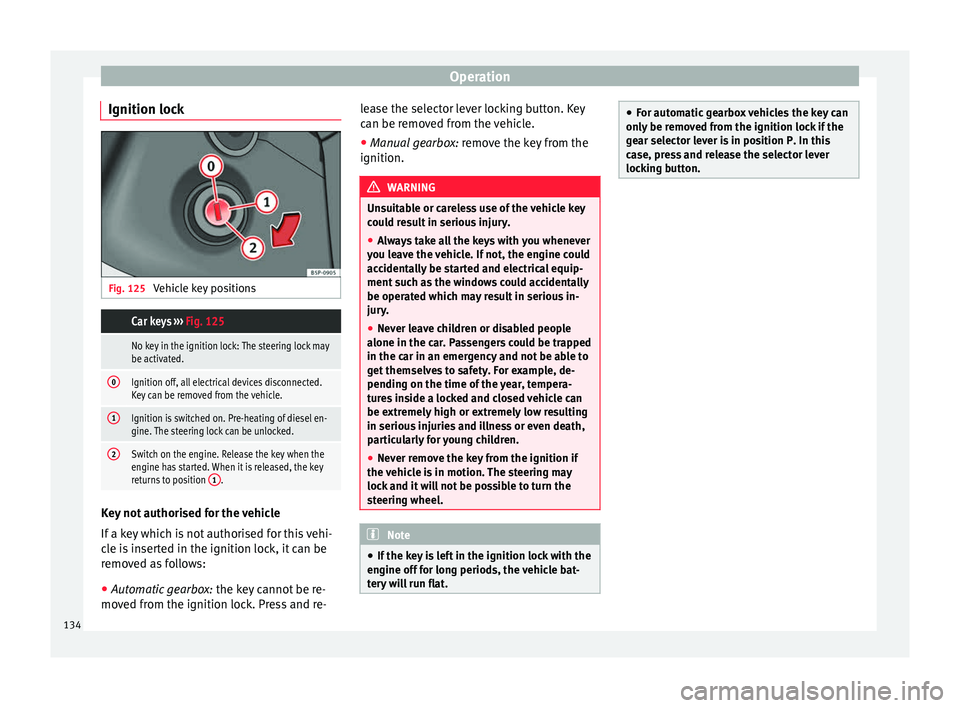
Ignition lock Fig. 125
Vehicle key positions Car keys ››› Fig. 125
No key in the ignition lock: The steering lock may
be activated.
0Ignition off, all electrical devices disconnected.
Key can be removed from the vehicle.
1Ignition is switched on. Pre-heating of diesel en-
gine. The steering lock can be unlocked.
2Switch on the engine. Release the key when the
engine has started. When it is released, the key
returns to position 1
.Key not authorised for the vehicle
If a key which is not authorised for this vehi-
cle is inserted in the ignition lock, it can be
removed as follows:
●
Automatic gearbox: the key cannot be re-
moved from the ignition lock. Press and re- lease the selector lever locking button. Key
can be removed from the vehicle.
●
Manual gearbox: remove the key from the
ignition. WARNING
Unsuitable or careless use of the vehicle key
could result in serious injury.
● Always take all the keys with you whenever
you leave the vehicle. If not, the engine could
accidentally be started and electrical equip-
ment such as the windows could accidentally
be operated which may result in serious in-
jury.
● Never leave children or disabled people
alone in the car. Passengers could be trapped
in the car in an emergency and not be able to
get themselves to safety. For example, de-
pending on the time of the year, tempera-
tures inside a locked and closed vehicle can
be extremely high or extremely low resulting
in serious injuries and illness or even death,
particularly for young children.
● Never remove the key from the ignition if
the vehicle is in motion. The steering may
lock and it will not be possible to turn the
steering wheel. Note
● If the key is left in the ignition lock with the
engine off for long periods, the vehicle bat-
tery will run flat. ●
For automatic gearbox vehicles the key can
only be removed from the ignition lock if the
gear selector lever is in position P. In this
case, press and release the selector lever
locking button. 134
Page 140 of 305
Operation
WARNING
Driving with worn brake pads or a faulty
brake system may lead to serious accident.
● If lights, alone or accompanied by a
warning message on the instrument panel
display, please go immediately to a special-
ised workshop to check the brake pads and to
replace them if they are worn. WARNING
Careless parking can cause serious injury.
● Never remove the key from the ignition if
the vehicle is in motion. The steering lock
may engage and lock the steering wheel mak-
ing the vehicle impossible to control.
● Always park your vehicle so that no part of
the exhaust system can come in contact with
flammable materials (such as wood, leaves,
dried grass, spilled fuel, etc.).
● Always apply the electronic parking brake
when you leave your vehicle and when you
park.
● Never leave children or disabled people
alone in the vehicle. They could release the
electronic parking brake, activate the selec-
tor lever or gear stick and start the vehicle
moving. This could result in a serious acci-
dent.
● Always take all the keys with you whenever
you leave the vehicle. The engine could acci-
dentally be started and electrical equipment
such as the windows could accidentally be
operated resulting in serious injury. ●
Never leave children or disabled people
alone in the car. They could be trapped in the
car in an emergency and will not be able to
get themselves to safety. For example, de-
pending on the time of the year, tempera-
tures inside a locked and closed vehicle can
be extremely high or extremely low resulting
in serious injuries and illness or even death,
particularly for young children. CAUTION
● Special care should be taken when parking
in areas with high kerbs or fixed barriers. Ob-
jects protruding from the ground may dam-
age the bumper or other parts of the vehicle
during manoeuvres. To avoid damage, stop
before the wheels touch the barrier or kerb.
● Special attention is required when driving
through entrances, over ramps, kerbs or oth-
er objects. The vehicle underbody, bumpers,
mudguards and running gear, and the engine
and exhaust system could be damaged as
you drive over these objects. Warning and control lampsIt lights
upPossible causeSolution
(red)
Together with the
control lamp on
the button: Elec-
tronic parking
brake on.››› page 140
Fault in the brake
system Stop the vehicle!
Seek professional
assistance!
››› page 142.
Brake fluid level
inadequate. Do not drive on!
Check brake fluid
level ››› page 225.
Together with the
ABS control lamp
: ABS fault.
Contact a special-
ised workshop. The
vehicle can be
braked without ABS.
(red)Brake pedal not
pressed!Press brake pedal to
the floor.
(yellow)Front brake pads
worn.
Contact a special-
ised workshop im-
mediately. Inspect
all the brake pads
and replace as nec-
essary.
138
Page 143 of 305
Driving
● Press and hold the brake pedal until the ve-
hicle comes to a standstill.
● Connect the electronic parking brake
››› page 140 .
● For an aut
omatic gearbox, move the selec-
tor lever to position P.
● Sw
itch off the engine and release the brake
pedal.
● Remove the key from the ignition.
● If necessary, turn the steering wheel slight-
ly to lock the steering.
● With a manual gearbox, engage 1st gear on
flat ground and slopes, or even reverse gear
on hills, and release the clutch pedal.
● Ensure that all passengers leave the vehi-
cle, especially children.
● When leaving the vehicle, take all keys with
you.
● Lock the vehicle.
Additional information for steep slopes and
hills
Before switching off the engine, rotate the
steering wheel so that if the vehicle should
move, it will be held by the kerb.
● On slopes, turn the front wheels so that
they are against the edge of the kerb.
● Uphill, turn the wheels towards the centre
of the road. WARNING
The components of the exhaust system reach
very high temperatures. This could cause a
fire and considerable damage.
● Always park your vehicle so that no part of
the exhaust system can come in contact with
flammable materials (such as wood,
leaves,dried grass, or spilled fuel). CAUTION
● Special care should be taken when parking
in areas with high kerbs or fixed barriers. Ob-
jects protruding from the ground may dam-
age the bumper or other parts of the vehicle
during manoeuvres. To avoid damage, stop
before the wheels touch the barrier or kerb.
● Special attention is required when driving
through entrances, over ramps, kerbs or oth-
er objects. The vehicle underbody, bumpers,
mudguards and running gear, and the engine
and exhaust system could be damaged as
you drive over these objects. Information about the brakes
For the first 200 to 300 km, new brake pads
have not yet reached their maximum braking
capacity, and need to be “run in” first
››› .
The slightly reduced braking effect can be
compensated for by increasing pressure on
the brake pedal. While running in, the full
br ak
ing distance or emergency braking dis- tance is larger
then when the brake pads
have been run in. While running in, avoid full
power braking or situations requiring braking
performance. For example, in heavy traffic.
The
rate of wear of the brake pads depends
to a great extent on the conditions in which
the vehicle is used and the way the vehicle is
driven. If the vehicle is used frequently in city
traffic or for short trips or driven sport style,
visit a specialised workshop regularly, more
frequently than advised in the Maintenance
Programme, to have the brake pads checked.
If you drive with wet brakes, for example, af-
ter crossing areas of water, in heavy rainfall
or even after washing the car, the effect of
the brakes is lessened as the brake discs are
wet or even frozen (in winter). At higher
speed, “dry” the brakes as quickly as possi-
ble by braking gently several times. Only do
this without endangering vehicles behind
you or any other road users ››› .
A layer of salt on the discs and brake pads
w i
ll reduce the effectiveness of the brakes
and increase braking distance. If you drive for
a prolonged period on salted roads without
braking then brake carefully several times to
eliminate the layer of salt on the brakes ››› .
If the vehicle remains parked for considera-
ble lengths of time, is used little, or if the
brakes are not used, there may be corrosion
on the brake discs and a build up of dirt on
the brake pads. If the brakes are not used »
141
Technical specifications
Advice
Operation
Safety
Page 148 of 305
Operation
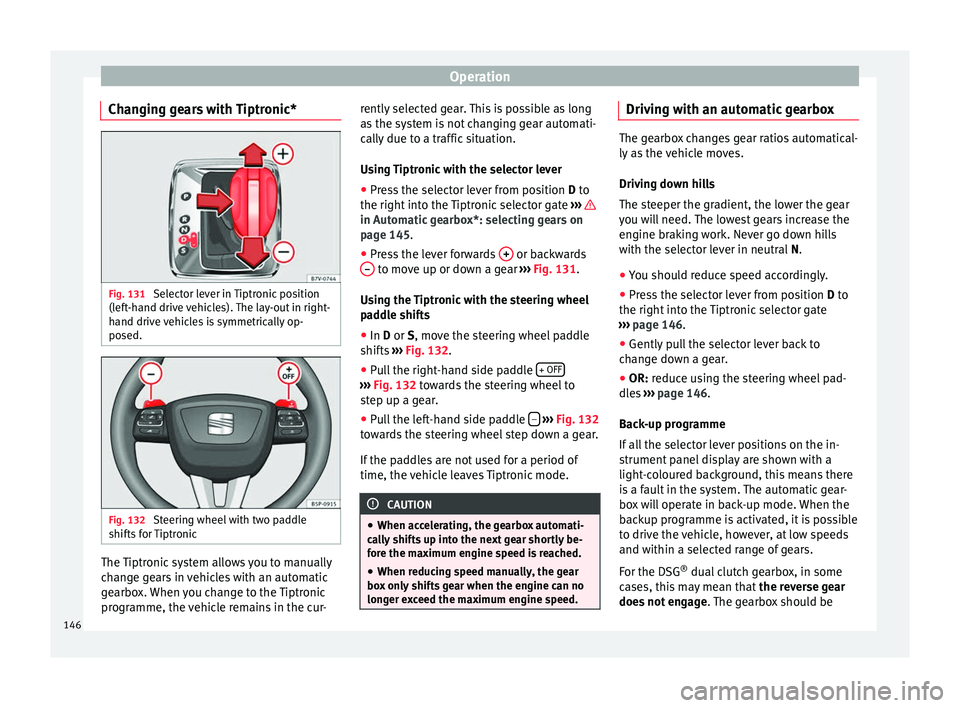
Changing gears with Tiptronic* Fig. 131
Selector lever in Tiptronic position
(left-hand drive vehicles). The lay-out in right-
hand drive vehicles is symmetrically op-
posed. Fig. 132
Steering wheel with two paddle
shifts for Tiptronic The Tiptronic system allows you to manually
change gears in vehicles with an automatic
gearbox. When you change to the Tiptronic
programme, the vehicle remains in the cur- rently selected gear. This is possible as long
as the system is not changing gear automati-
cally due to a traffic situation.
Using Tiptronic with the selector lever
● Press the selector lever from position D to
the right int
o the Tiptronic selector gate ››› in Automatic gearbox*: selecting gears on
page 145
.
● Pr e
ss the lever forwards + or backwards
– to move up or down a gear
››› Fig. 131 .
U s
ing the Tiptronic with the steering wheel
paddle shifts
● In
D or S, move the steering wheel paddle
shifts ››› Fig. 132.
● Pu
ll the right-hand side paddle + OFF ›››
Fig. 132 towards the steering wheel to
s t
ep up a gear.
● Pull the left-hand side paddle –
››› Fig. 132
towards the steering wheel step down a gear.
If the paddles are not used for a period of
time, the vehicle leaves Tiptronic mode. CAUTION
● When accelerating, the gearbox automati-
cally shifts up into the next gear shortly be-
fore the maximum engine speed is reached.
● When reducing speed manually, the gear
box only shifts gear when the engine can no
longer exceed the maximum engine speed. Driving with an automatic gearbox
The gearbox changes gear ratios automatical-
ly as the vehicle moves.
Driving down hills
The steeper the gradient, the lower the gear
you will need. The lowest gears increase the
engine braking work. Never go down hills
with the selector lever in neutral
N.
● You shou
ld reduce speed accordingly.
● Press the selector lever from position D to
the right int
o the Tiptronic selector gate
››› page 146
.
● Gently pull the selector lever back to
change down a gear.
● OR:
reduce using the steering wheel pad-
dles ›››
page 146.
Bac
k-up programme
If all the selector lever positions on the in-
strument panel display are shown with a
light-coloured background, this means there
is a fault in the system. The automatic gear-
box will operate in back-up mode. When the
backup programme is activated, it is possible
to drive the vehicle, however, at low speeds
and within a selected range of gears.
For the DSG ®
dual clutch gearbox, in some
cases, this may mean that the reverse gear
does not engage . The gearbox should be
146
Page 156 of 305
Operation
Driver assistance systems
Braking and stability systems Brake assist systems The brake assist systems ESC, ABS, BAS, ASR
and EDL only operate when the ignition is
switched on. They contribute significantly to
increasing active safety.
Electronic Stability Control (ESC)
ESC reduces the risk of skidding and increa-
ses the vehicle stability by braking individual
wheels under specific driving conditions. ESC
detects critical handling situations, such as
understeer, oversteer and wheelspin on the
driven wheels. The system stabilises the ve-
hicle by braking individual wheels or by re-
ducing the engine torque.
The ESC has limits. It is important to realise
that the ESC is also subject to the laws of
physics. ESC will not be able to deal with all
situations with which drivers may be faced.
For example, if the road surface changes sud-
denly then ESC will not be useful in all cases.
If the vehicle suddenly enters a section cov-
ered by water, mud or snow then ESC will not
provide assistance in the same way as on dry
ground. If the vehicle loses its grip on the
ground and moves on a film of water (“aqua-
planing”), the ESC will not be able to assist the driver to control the vehicle as the loss of
adherence with the road surface will prevent-
ing braking and steering. If the vehicle is
driven through series of bends at high
speed, the ESC will not always be as effec-
tive: the vehicle reaction to aggressive driv-
ing is not the same as at reduced speeds.
When driving with a trailer, ESC does not pro-
vide the same amount of vehicle control as
without a trailer.
Adjust your speed and driving style to road,
traffic and weather conditions. ESC cannot
push the limits of the laws of physics; im-
prove the transmission available or maintain
the vehicle on the road if a lack of driver at-
tention creates an inevitable situation. Other-
wise, ESC assists in maintaining vehicle con-
trol in extreme situations and uses the move-
ments of the steering made by the driver to
maintain the vehicle moving in the desired
direction. If the vehicle is driven at such a
speed that it will leave the road before ESC
can intervene then the system cannot pro-
vide assistance.
The ABS, BAS, ASR and EDL systems are in-
corporated into the ESC. The ESC is always
on. The ESC should only be turned off using
the ASR button
›››
Fig. 134 when traction is
in s
ufficient. Always remember to turn on the
ASR once more when the vehicle has traction
again. Anti-lock brake system (ABS)
ABS can prevent the wheels from locking dur-
ing braking until just before the vehicle stops
thus helping the driver to steer the vehicle
and maintain control. This means that, even
during full braking, the risk of skidding is re-
duced:
● Press and hold the brake pedal fully. Do not
remove your foot from the brake pedal or re-
duce braking force!
● Do not “pump” the brake pedal, or reduce
braking force!
● Maintain vehicle direction when braking
fully.
● When the brake pedal is released or when
the brake force is reduced, ABS is turned off.
ABS control can be observed by vibration of
the brake pedal and noise. You should never
expect
the ABS to reduce the braking dis-
tance under
any circumstances. This distance
will increase when driving on gravel, recent
snow or on icy and slippery ground.
When driving on loose ground, the all-terrain
configuration of the ABS is automatically
turned on. When ABS is activated, the front
wheels may lock briefly. This shortens the
braking distance in off-road situations as the
wheels are prevented from digging into loose
surfaces. All-terrain ABS only intervenes
when driving in a straight line. When the
154
Page 160 of 305
Operation
CAUTION
Before entering an automatic car wash, al-
ways switch the Auto Hold function off, as it
could be damaged when the electronic park-
ing brake automatically engages. Start-Stop Function*
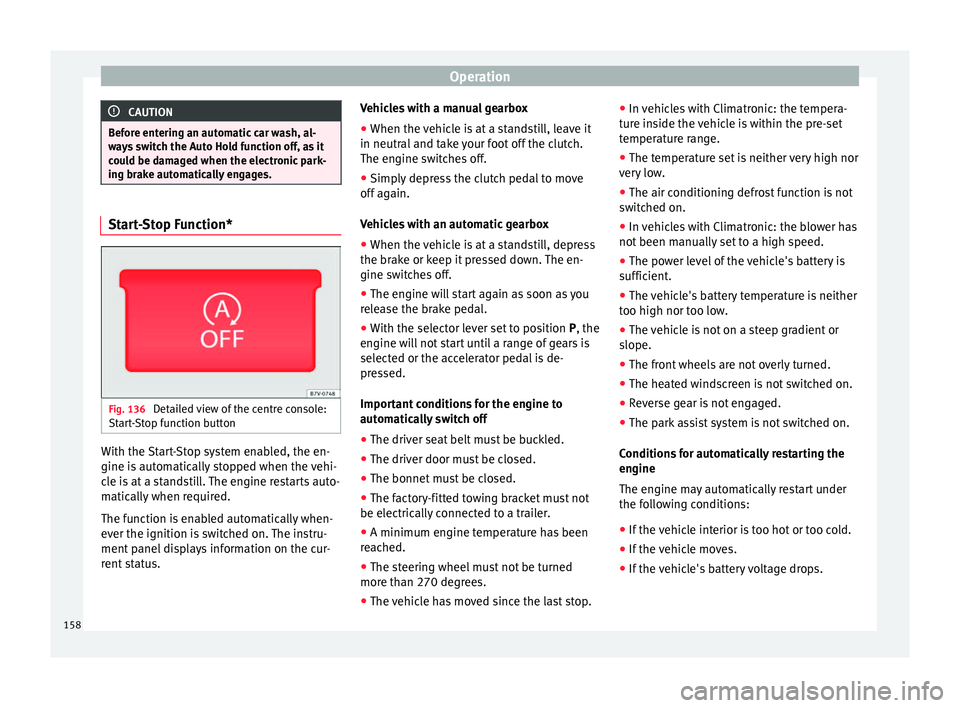
Fig. 136
Detailed view of the centre console:
Start-Stop function button With the Start-Stop system enabled, the en-
gine is automatically stopped when the vehi-
cle is at a standstill. The engine restarts auto-
matically when required.
The function is enabled automatically when-
ever the ignition is switched on. The instru-
ment panel displays information on the cur-
rent status. Vehicles with a manual gearbox
● When the vehicle is at a standstill, leave it
in neutral and take your foot off the clutch.
The engine switches off.
● Simply depress the clutch pedal to move
off again.
Vehicles with an automatic gearbox
● When the vehicle is at a standstill, depress
the brake or keep it pressed down. The en-
gine switches off.
● The engine will start again as soon as you
release the brake pedal.
● With the selector lever set to position P, the
en gine w
ill not start until a range of gears is
selected or the accelerator pedal is de-
pressed.
Important conditions for the engine to
automatically switch off
● The driver seat belt must be buckled.
● The driver door must be closed.
● The bonnet must be closed.
● The factory-fitted towing bracket must not
be electrically connected to a trailer.
● A minimum engine temperature has been
reached.
● The steering wheel must not be turned
more than 270 degrees.
● The vehicle has moved since the last stop. ●
In vehicles with Climatronic: the tempera-
ture inside the vehicle is within the pre-set
temperature range.
● The temperature set is neither very high nor
very low.
● The air conditioning defrost function is not
switched on.
● In vehicles with Climatronic: the blower has
not been manually set to a high speed.
● The power level of the vehicle's battery is
sufficient.
● The vehicle's battery temperature is neither
too high nor too low.
● The vehicle is not on a steep gradient or
slope.
● The front wheels are not overly turned.
● The heated windscreen is not switched on.
● Reverse gear is not engaged.
● The park assist system is not switched on.
Conditions for automatically restarting the
engine
The engine may automatically restart under
the following conditions:
● If the vehicle interior is too hot or too cold.
● If the vehicle moves.
● If the vehicle's battery voltage drops.
158
Page 161 of 305
Driver assistance systems
Conditions requiring the key to restart the
engine
The engine must be started manually under
the following conditions:
● If the driver unbuckles his/her seat belt.
● If the driver door is opened.
● If the bonnet is opened.
● In vehicles with a manual gearbox: if a gear
has been selected.
Switching Start-Stop mode on and off
manually
● Press the button on the centre console
››› Fig. 136 .
● The b utt
on will light up when the Start-Stop
function is switched off.
The engine will start immediately if the vehi-
cle is in Stop mode when it is switched off
manually. WARNING
The brake servo and the power steering do
not work when the engine is switched off.
● Never allow the vehicle to move when the
engine is switched off. CAUTION
Using the Start-Stop function for a long peri-
od at very high outside temperatures could
damage the vehicle's battery. Note
● In some cases, you may have to restart the
vehicle using the key. Observe the corre-
sponding message on the instrument panel
display.
● If the steering wheel is turned more than
270°, Stop will not function; however, the an-
gle of steering wheel turn does not affect
starting the vehicle. Parking sensor system*
Introduction The parking sensor system assists the driver
when parking. When the vehicle approaches
an obstacle, forwards or backwards, an inter-
mittent audible warning will be heard, higher
or lower depending on the distance. The
shorter the distance, the shorter the intervals
between tones. If the vehicle is too close to
the obstacle, the audible warning becomes
constant.
If you continue to approach an obstacle when
the sound is continuous, this means the sys-
tem can no longer measure the distance.
The sensor system on the bumpers transmit
and receive ultrasound. Using the ultrasound
signal (transmission, reflection from the ob-
stacle and reception), this system continu-ously calculates the distance between the
bumper and the obstacle. WARNING
The parking sensor system and the optical
parking system cannot replace driver aware-
ness.
● The sensors have blind spots in which ob-
stacles and people are not registered.
● Always observe the area around the vehi-
cle, as the sensors do not always detect
small children, animals or objects.
● The surface of certain objects and some
clothing do not reflect the ultrasound signals
from the parking distance system. The sys-
tem cannot detect or incorrectly detects
these objects and people wearing these
types of clothes.
● External sound sources can affect the park-
ing distance aid signals. In this case, under
certain circumstances, people and objects
will not be detected. CAUTION
● The sensors may not always be able to de-
tect objects such as trailer draw bars, thin
rails, fences, posts, trees and open boots,
etc. This could result in damage to your car.
● Although the parking sensor system de-
tects and warns of the presence of an obsta-
cle, the obstacle could disappear from the an-
gle of measurement of the sensors if it is too
high or low and the system would no longer » 159
Technical specifications
Advice
Operation
Safety
Page 166 of 305
Operation
● Perpendicular parking: press the button at speeds up to 50 km/h (31 mph) twice.
When the function is enabled, the button
››› Fig. 141 will light up.
● If nec
essary, press the button once
more to change parking mode.
● Apply the turn signal for the side on which
a gap is to be detected for parking. The in-
strument panel displays the side correspond-
ing to the road.
Parking
● Parking parallel to the road: drive next to
the gap at a speed of no more than 40 km/h
(25 mph) and
at a distance of between 0.5 m
and 2 m.
● P
arking perpendicular to the road: drive
next to the gap at a speed of no more than
20 km/h (12 mph)
and at a distance of be-
tween 0.5 m and 2 m.
● The best parking results will be achieved if
you position the vehicle as parallel as possi-
ble to the line of parked cars or the kerb.
● When a suitable parking place is displayed
on the instrument panel, stop and select re-
verse gear.
● Follow the instructions given on the instru-
ment panel display
● Then, release the steering wheel when the
warning signal sounds ››› : The system will
move the steering wheel! Observe the sur-
rounding area. ●
Observe the surrounding area and acceler-
ate carefully at a maximum of 7 km/h
(4 mph).
● The park assist system is only responsible
f or mo
ving the steering wheel during the ma-
noeuvre.
The driver applies the accelerator,
the clutch, the gears and the brake.
● Follow the instructions given by the park
assist system until the manoeuvre is comple-
ted.
● The park assist system steers the vehicle
forwards and backwards until it is in a
straight position in the parking space.
● The manoeuvre is complete when the corre-
sponding indication is given on the instru-
ment panel display.
Stopping the parking manoeuvre
The park assist system stops the manoeuvre
in the event of one of the following:
● Press button .
● Driving faster than 7 km/h (4 mph).
● The driver moves the steering wheel.
● The parking manoeuvre has not been com-
pleted after 6 minutes since the park assist
system was activated.
● A sliding door is opened. To restart the ma-
noeuvre, close the sliding door and press the
button again.●
There is a system malfunction (system tem-
porarily unavailable).
● The ASR system is switched off or the ASR
or ESC is working. WARNING
The steering wheel turns quickly by itself
when parking using the park assist system.
Placing your hand between the steering
wheel spokes could lead to injuries. Note
● The park assist system has its limitations.
For example, it is not possible to park on
tight bends using the park assist system.
● Even if the park assist system recognises
that there is not enough space for parking
the vehicle, the instrument panel display will
still show this place. In this case, the parking
manoeuvre should not be requested.
● Changing gears between forward and re-
verse gears before indicated (that is, before
the signal from the parking sensor system)
the parking results may not be ideal.
● For parallel parking (parallel to the road), a
sound will tell the driver when they must
change from forward gears to reverse; the
signal from the parking sensor system does
not indicate changes of direction.
● The park assist can also be activated after-
wards, if you pass close to a parallel parking
space at a maximum of 40 km an hour 164
Page 167 of 305
Driver assistance systems
(25 mph) or close to be perpendicular parking
space at about 20 km an hour (12 mph) then
press the button
.
● The progress bar on the screen of the in-
strument panel shows a display of the rela-
tive distance to be covered.
● When the Park Assist system is turning the
steering wheel of the stopped vehicle the
symbol is also displayed. Press on the
brake pedal so that the steering can turn with
the vehicle at a standstill and thus reduce the
number of manoeuvres.
● A “suitable” parking space length is at
least 1.1 m greater than the length of the ve-
hicle.
● If the results of the park assist system are
not as good after changing the wheels, the
system must memorise the perimeter of the
new wheels. This process is performed auto-
matically while the vehicle is in motion. To
help this process, turn slowly (at less than
20 km/h [12 mph]), e.g. in an empty car park. Leaving a parking space using the
Park Assist system
Driving off
● Switch on the engine.
● Press button . When the function is ena-
bled, the button ››› Fig. 141 will light up.
● Ap p
ly the turn signal for the side on which
you want to leave the parking space. ●
Select reverse gear.
● Follow the instructions given by the park
assist system.
● When the next indication appears, release
the steering wheel ››› in Parking using the
park assist system on page 164 :
The system
w
ill move the steering wheel! Observe the sur-
rounding area.
● Observe the surrounding area and acceler-
ate carefully at a maximum of 7 km/h
(4 mph).
● The park assist system is only
responsible
for moving the steering wheel during the ma-
noeuvre.
The driver applies the accelerator,
the clutch, the gears and the brake.
● When it is possible to leave the parking
space, the Park Assist system will stop. Take
control of the steering and when traffic condi-
tions permit, leave the parking space.
Automatic stoppage of the manoeuvre
The park assist system stops the manoeuvre
in the event of one of the following:
● Driving faster than 7 km/h (4 mph).
● The driver moves the steering wheel.
● A sliding door is opened. To restart the ma-
noeuvre, close the sliding door and press the
button again.
● There is a system malfunction (system tem-
porarily unavailable). ●
The ASR system is switched off or the ASR
or ESC is working. WARNING
The steering wheel turns quickly automatical-
ly when leaving a parking space using the
park assist system. Placing your hand be-
tween the steering wheel spokes could lead
to injuries. Park Assist brake operation
The Park Assist system helps the driver by
braking automatically. Automatic braking
does not relieve the driver of responsibility
for controlling the accelerator, brake and
clutch
››› .
Braking to avoid damage at excess speed
It is possible that the system operates the
brakes to reduce excess speed. The parking
manoeuvre can then continue. The brakes
will intervene during each parking process.
Braking to minimise damage
When approaching an obstacle, the vehicle
may brake automatically. In certain circum-
stances (e.g. storm, detection of ultrasounds,
vehicle status, load, inclination), the Park As-
sist system may stop the vehicle completely
before an object. »
165
Technical specifications
Advice
Operation
Safety