steering wheel Seat Alhambra 2015 User Guide
[x] Cancel search | Manufacturer: SEAT, Model Year: 2015, Model line: Alhambra, Model: Seat Alhambra 2015Pages: 305, PDF Size: 5.46 MB
Page 51 of 305
Cockpit
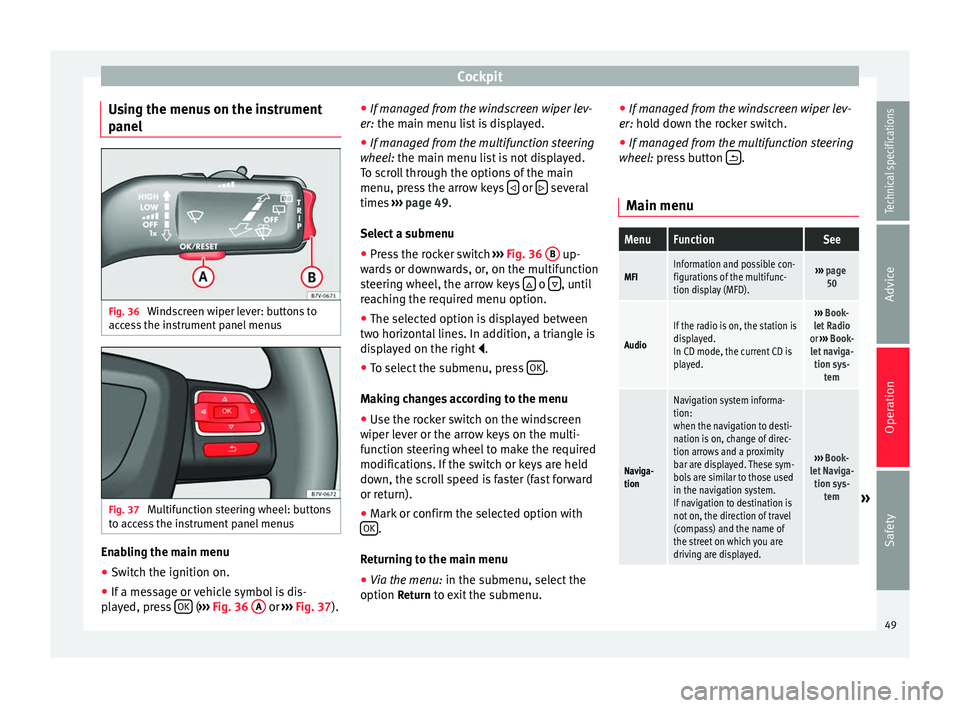
Using the menus on the instrument
panel Fig. 36
Windscreen wiper lever: buttons to
access the instrument panel menus Fig. 37
Multifunction steering wheel: buttons
to access the instrument panel menus Enabling the main menu
● Switch the ignition on.
● If a message or vehicle symbol is dis-
played, press OK (
››› Fig. 36 A or
››› Fig. 37 ).●
If mana ge d from the windscreen wiper lev-
er: the main menu list is displayed.
● If manage
d from the multifunction steering
wheel: the main menu list is not displayed.
To s
croll through the options of the main
menu, press the arrow keys or
several
times ››› page 49 .
Sel ect
a submenu
● Press the rocker switch ››› Fig. 36
B up-
wards or downwards, or, on the multifunction
steering wheel, the arrow keys o
, until
reaching the required menu option.
● The selected option is displayed between
two horizontal lines. In addition, a triangle is
displayed on the right .
● To select the submenu, press OK .
Making changes according to the menu ● Use the rocker switch on the windscreen
wiper lever or the arrow keys on the multi-
function steering wheel to make the required
modifications. If the switch or keys are held
down, the scroll speed is faster (fast forward
or return).
● Mark or confirm the selected option with
OK .
Returning to the main menu
● Via the menu: in the submenu, select the
option Return to exit the submenu. ●
If managed from the windscreen wiper lev-
er: hold down the rocker switch.
● If mana ge
d from the multifunction steering
wheel: press button .
Main menu
MenuFunctionSee
MFIInformation and possible con-
figurations of the multifunc-
tion display (MFD).››› page
50
Audio
If the radio is on, the station is
displayed.
In CD mode, the current CD is
played.››› Book-
let Radio
or ››› Book-
let naviga- tion sys- tem
Naviga-
tion
Navigation system informa-
tion:
when the navigation to desti-
nation is on, change of direc-
tion arrows and a proximity
bar are displayed. These sym-
bols are similar to those used
in the navigation system.
If navigation to destination is
not on, the direction of travel
(compass) and the name of
the street on which you are
driving are displayed.
››› Book-
let Naviga- tion sys- tem
» 49
Technical specifications
Advice
Operation
Safety
Page 53 of 305
CockpitMenuFunction
Speed warn-
ing at --- km/hIf the stored speed is exceeded (be-
tween 30 - 250 km/h, or 18 -
155 mph), an audible warning is given
together with a visual warning. Changing between display modes
● In vehicles without multifunction steering
wheel: press the lever.
● Vehicle
s with a multifunction steering
wheel:
press or
.
Storing a speed for the speed warning
● Select the display Speed warning at --- km/h
.
● Press OK to store the current speed and
switch off the warning.
● In addition, set the required speed by
pressing the rocker switch on the windscreen
wiper lever or buttons or
on the multi-
function steering wheel for 5 seconds. Next,
press OK again or wait a few seconds. The
speed is stored and the warning activated.
● To switch off , press OK . The stored speed is
deleted.
Manually erasing memory 1 or 2
● Select the memory to be erased.
● Press and hold OK for approximately 2 sec-
onds. Personalising the displays
It is possible to select which of the displays
in the multifunction display you wish to see
on the instrument panel in the
settings
menu. The units of measurement can also be
modified ››› page 51 .
C onfigur
ation Menu
Configu-
ration
MenuFunction
Multi-
function
display
dataConfiguration of the multifunction display
data that you wish to see on the instrument
panel display ››› page 50.
Compass
Changing the magnetic region and calibra-
tion of the compass. To calibrate the com-
pass, please follow the instructions given
on the instrument panel display.
Conven-
ienceChanging vehicle convenience functions
››› page 52.
Lights &
visibilityConfiguration of vehicle lighting
››› page 52.
Time
Changing the hours and minutes of the in-
strument panel clock and the navigation
system. The time can be set here and the
choice can be made between the 24-hour
and 12-hour display. The S in the upper
part of the display indicates that the clock
is set to summer time.
Configu-
ration
MenuFunction
Winter
tyres
Changing the visual and audible speed
warnings. This function should only be
used when the vehicle is fitted with winter
tyres, which are not designed for travel at
high speeds.
LanguageChanging the language of the display texts
and the navigation system.
UnitsChanging the units of measurement for the
temperature, consumption and distance.
Second
speedSwitching second speed display on and off.
Auto-HoldSelect if the Auto-Hold function should be
on permanently.
ServiceCheck the service notifications or reset the
service intervals to zero.
Factory
settingsSome functions of the Configuration menu
will be reset to the factory value.
BackThe main menu is displayed again. 51
Technical specifications
Advice
Operation
Safety
Page 56 of 305
Operation
Assistance call
The assistance call button gives immediate
help in c a
se of a breakdown. To this end, the
SEAT dealer network, with its mobile assis-
tance vehicles, is at your disposal.
To establish communication, press the
button for more than 2 seconds. Note
Calls made with the and
buttons take pri-
ority over normal calls. If the or button is
pr
essed during a normal telephone call, this
call will be cut off and a connection will be
made to the information or assistance centre. Note
Any call made to the information service will
be interrupted if the assistance button is
pr e
ssed. The connection to the assistance
service will then be made (and vice versa). Note
Mobile phone coverage must be available to
place a call to the information and assistance
services. This service might not be available
in some countries. Activating and deactivating
Switching on the speech control system
● Press the button on the multi-function
s t
eering wheel.
● OR:
press the button in the three button
unit in the headliner .
● Wait for the acoustic signal.
● Give the command.
● Follow the dialogue instructions (extended
dialogue).
Ending voice control
● Press the button on the multi-function
steering wheel.
● OR: press the button in the three button
u nit
in the headliner .
Interrupting the instructions
● During the instructions, press the button
on the multi-function steering wheel.
● OR:
press the button in the three button
unit in the headliner .
● You will be able to give a command imme-
diately afterwards. Opening and closing
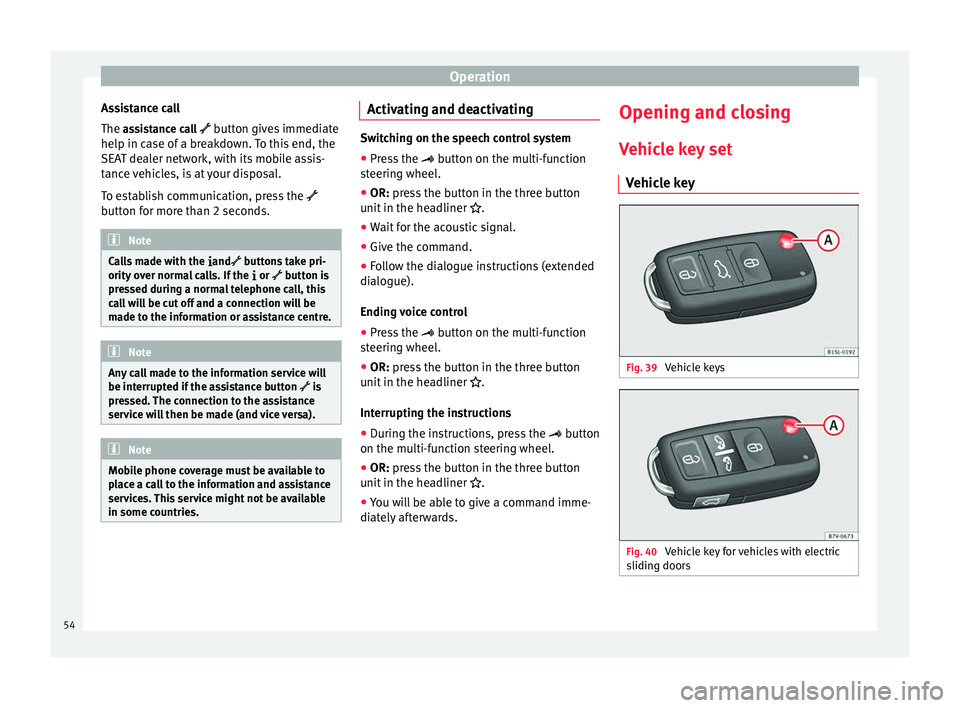
Vehicle key set Vehicle key Fig. 39
Vehicle keys Fig. 40
Vehicle key for vehicles with electric
sliding doors 54
Page 57 of 305
Opening and closing
Vehicle keys
With the vehicle key ››› Fig. 39 or
›
›› Fig. 40
the
vehicle may be locked or unlocked re-
motely.
The vehicle key includes an emitter and bat-
teries. The receiver is in the interior of the ve-
hicle. The range of the vehicle key with re-
mote control and new batteries is several me-
tres around the vehicle.
If it is not possible to open or close the vehi-
cle using the remote control key, this should
be re-synchronised ››› page 57 or the bat-
tery changed ››› page 56.
Differ
ent keys belonging to the vehicle may
be used.
Folding the key shaft in and out
When the button is pressed A , the key shaft
is released and unfolds.
To fold it
press button A and fold the key
shaft in until it locks in place.
Replacing a key
To obtain a spare key and other vehicle keys,
the vehicle chassis number is required.
Each new key must contain a microchip and
be coded with the data from the vehicle elec-
tronic immobiliser. A vehicle key will not work
if it does not contain a microchip or the mi-
crochip has not been encoded. This is also
true for keys cut for the vehicle. The vehicle keys or new spare keys can be
obtained from a technical service centre, a
specialised workshop or approved key serv-
ice qualified to provide this kind of key.
New keys or spare keys must be synchron-
ised before use
››› page 57. WARNING
Careless or incorrect use of vehicle keys may
result in severe injury and accident.
● Always take all the keys with you whenever
you leave the vehicle. Children and unauthor-
ised individuals could lock the doors or the
boot hatch, start the engine or turn on the ig-
nition, activating electrical systems, the elec-
tric windows, for example.
● Never leave children or disabled people
alone in the car. They could be trapped in the
car in an emergency and will not be able to
get themselves to safety. For example, de-
pending on the time of the year, tempera-
tures inside a locked and closed vehicle can
be extremely high or extremely low resulting
in serious injuries and illness or even death,
particularly for young children.
● Never remove the key from the ignition if
the vehicle is in motion. The steering may
lock and it will not be possible to turn the
steering wheel. CAUTION
All of the vehicle keys contain electronic com-
ponents. Protect them from damage, impacts
and humidity. Note
● Only use the key button when you require
the corresponding function. Pushing the but-
ton unnecessarily could accidentally unlock
the vehicle or trigger the alarm. It is also pos-
sible even when you are outside the radius of
action.
● Key operation can be greatly influenced by
overlapping radio signals around the vehicle
working in the same range of frequencies
(e.g. radio transmitters, mobile telephones).
● Obstacles between the remote control and
the vehicle, bad weather conditions and
draining batteries can considerably reduce
the range of the remote control. 55
Technical specifications
Advice
Operation
Safety
Page 77 of 305
Lights and visibility
Control lampsIt lights upPossible causeSolution
Driving light totally
or partially faulty.
Replace the corre-
sponding bulb
››› page 266.
If all the bulbs are
OK, the vehicle
should be taken to
a specialised work-
shop if necessary.
Fault in adaptive
light.››› page 77.
Rear fog light
switched on.
›››
page 75. Front fog lights
switched on
Left or right turn
signal.
The control lamp
flashes twice as
fast when a vehicle
or trailer turn signal
is faulty.
If necessary, check
the vehicle and
trailer lighting.
Main beam on or
flasher on.›››
page 76.
Headlight adjust-
ment (Light Assist)
on.›››
page 76.
FlashesPossible causeSolution
Fault in the adap-
tive light system.Contact a special-
ised workshop
››› page 76. Several warning and control lamps light up
for a few seconds when the ignition is switch-
ed on, signalling that the function is being
verified. They will switch off after a few sec-
onds.
WARNING
Observe the safety warnings ››› in Control
and warning lamps on page 47. Turning lights on and off
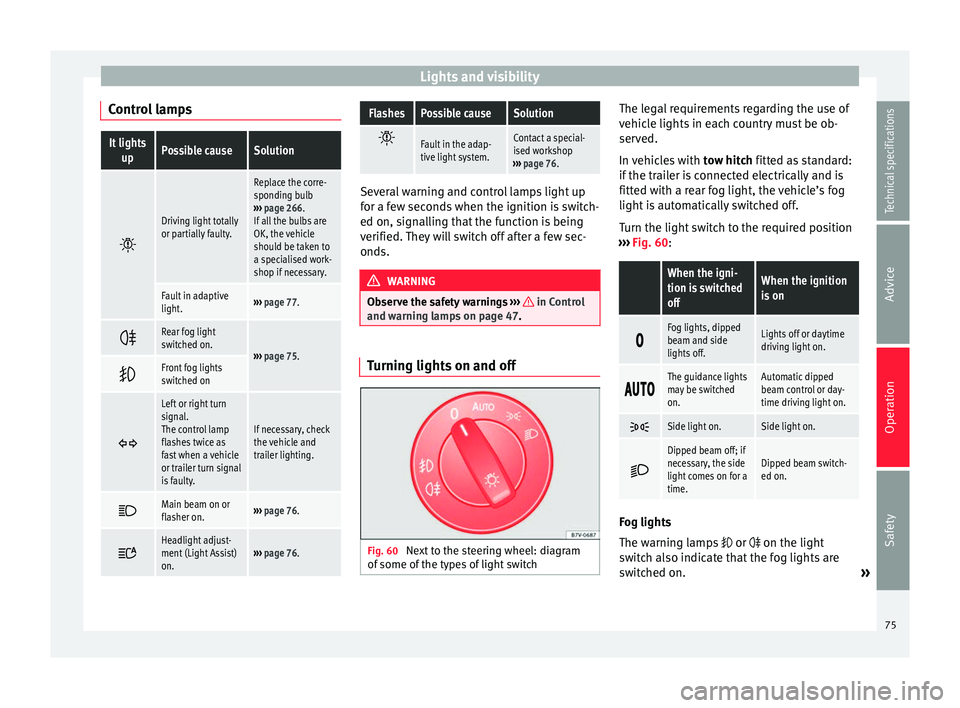
Fig. 60
Next to the steering wheel: diagram
of some of the types of light switch The legal requirements regarding the use of
vehicle lights in each country must be ob-
served.
In vehicles with
tow hitch fitted as standard:
if the trailer is connected electrically and is
fitted with a rear fog light, the vehicle’s fog
light is automatically switched off.
Turn the light switch to the required position
››› Fig. 60 :
When the igni-
tion is switched
offWhen the ignition
is on
Fog lights, dipped
beam and side
lights off.Lights off or daytime
driving light on.
The guidance lights
may be switched
on.Automatic dipped
beam control or day-
time driving light on.
Side light on.Side light on.
Dipped beam off; if
necessary, the side
light comes on for a
time.Dipped beam switch-
ed on.
Fog lights
The warning lamps
or on the light
switch also indicate that the fog lights are
switched on. »
75
Technical specifications
Advice
Operation
Safety
Page 81 of 305
Lights and visibilityLeaving home: necessary operations
To switch sys-
tem off:
– Automatically, at the end of the delay
period.
– When the vehicle is locked.
– When the light switch is turned to po-
sition
.
– When the ignition is switched on. Lighting around the exterior mirrors
The lighting around the exterior mirrors illu-
minates the door area on entering and leav-
ing the vehicles. It comes on when the vehi-
cle is unlocked, when the vehicle door is
opened and when the “Coming home” or
“Leaving home” function is switched on. If
the equipment includes the light sensor, the
lighting around the exterior mirrors only
comes when it is dark.
Note
● The time taken for the headlights to go off
can be changed in the Lights & Visibility menu
and the f u
nction can be switched on or off
››› page 47.
● When the “Comin
g home” function is on, if
the vehicle door is opened there is no audible
warning signal to advise that the light is still
on. Adhesive strips for headlights or
adjusting headlights
In those countries where vehicles drive on
the other side of the road to the home coun-
try, the asymmetric dipped beam may dazzle
drivers of oncoming vehicles. Therefore,
when driving abroad, adhesive strips should
be attached to the headlights or the head-
lights should be adjusted accordingly.
The direction of the headlights can be adjus-
ted from the instrument panel, in the
Tourist
light submenu of the Configuration menu
››› page 51
.
F or tho
se vehicles in which it is not possible
to adjust the headlights from the menu, ad-
hesive strips are used to cover certain parts
of the headlamp cover or the headlights may
be adjusted at a specialised workshop. For
further information, please refer to a special-
ised workshop. SEAT recommends visiting a
technical service. Note
Use of the Tourist light option and the adhe-
sives on the headlights is only allowed if they
are to be used for a short period of time. To
modify the direction of the headlights perma-
nently, please take the vehicle to a special-
ised workshop. SEAT recommends visiting a
technical service centre. Headlight range control, instrument
and switch lighting
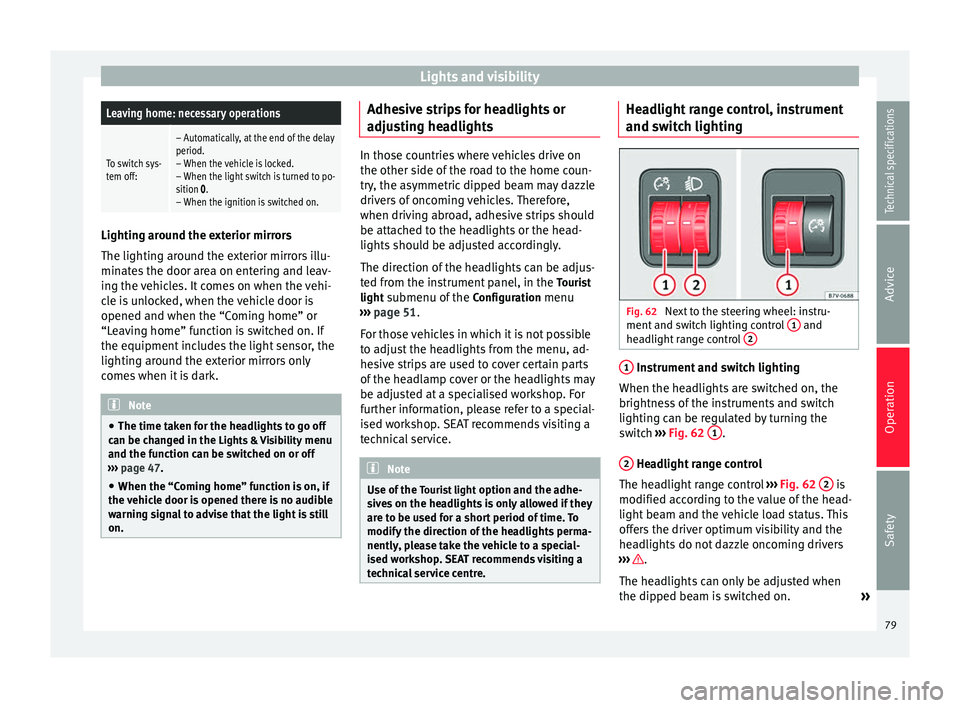
Fig. 62
Next to the steering wheel: instru-
ment and switch lighting control 1 and
headlight range control 2 1
Instrument and switch lighting
When the headlights are switched on, the
brightness of the instruments and switch
lighting can be regulated by turning the
switch ››› Fig. 62 1 .
2 Headlight range control
The headlight range control ››› Fig. 62 2 is
modified according to the value of the head-
light beam and the vehicle load status. This
offers the driver optimum visibility and the
headlights do not dazzle oncoming drivers
››› .
The headlights can only be adjusted when
the dipped beam is switched on. »
79
Technical specifications
Advice
Operation
Safety
Page 85 of 305
Lights and visibility
Windscreen wiper functionsWindscreen wiper performance in different sit-
uations
If the vehicle
is at a stand-
stillThe activated position provisionally
changes to the previous position.
During auto-
matic wipe
The air conditioner comes on for ap-
proximately 30 seconds in air recircula-
tion mode to prevent the smell of the
windscreen washer fluid entering the
inside the vehicle.
For the inter-
val wipeIntervals between wipes depend on the
vehicle's speed. The higher the vehicle
speed the shorter the intervals. Heated windscreen washer jets
The heating only thaws the frozen jets, it
does not thaw the water in the washer hoses.
The heated windscreen washer jets automati-
cally adjust the heat depending on the ambi-
ent temperature, when the ignition is switch-
ed on.
Headlight wash/wipe system
The headlight washers/wipers clean the
headlight lenses.
After the ignition is switched on, the first and
every fifth time the windscreen washer is
switched on, the headlights are also washed.
Therefore, the windscreen wiper lever should
be pulled towards the steering wheel when the dipped beam or main beam are on. Any
incrusted dirt (such as insects) should be
cleaned regularly (e.g. when refuelling).
To ensure the headlight washers work cor-
rectly in winter, any snow which has got into
the bumper jet supports should be cleaned
away. If necessary, remove snow with an anti-
icing spray.
Note
The wiper will try to wipe away any obstacles
that are on the windscreen. The wiper will
stop moving if the obstacle blocks its path.
Remove the obstacle and switch the wiper
back on again. Windscreen wipers service position
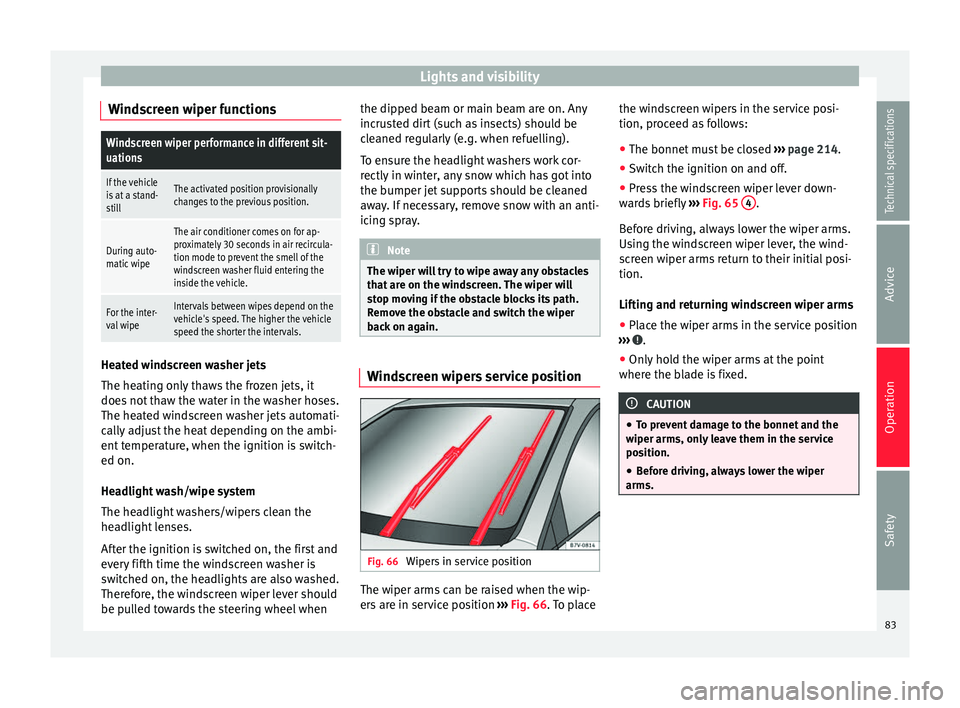
Fig. 66
Wipers in service position The wiper arms can be raised when the wip-
ers are in service position
››› Fig. 66 . To place the w
ind
screen wipers in the service posi-
tion, proceed as follows:
● The bonnet must be closed ››› page 214.
● Switch the ignition on and off.
● Press the windscreen wiper lever down-
wards briefly ››› Fig. 65 4 .
Before driving, always lower the wiper arms.
Using the windscreen wiper lever, the wind-
screen wiper arms return to their initial posi-
tion.
Lifting and returning windscreen wiper arms
● Place the wiper arms in the service position
››› .
● Only hold the wiper arms at the point
where the blade is fixed. CAUTION
● To prevent damage to the bonnet and the
wiper arms, only leave them in the service
position.
● Before driving, always lower the wiper
arms. 83
Technical specifications
Advice
Operation
Safety
Page 132 of 305
Operation
An optimum range is obtained by keeping
the remote control vertical, with the aerial
››› Fig. 124 A pointing upwards. When doing
so, do not cover the aerial with your fingers
or with the palm of your hand.
There must be a minimum distance of 2 me-
tr e
s between the remote control and the vehi-
cle. CAUTION
● The radio frequency remote control con-
tains electronic components. Therefore, avoid
getting it wet and being knocked and protect
it from direct sunlight.
● Use of inappropriate batteries may damage
the remote control. For this reason, always re-
place the used battery with another of the
same voltage, size and specifications. For the sake of the environment
● Please dispose of old batteries so that they
do not harm the environment.
● The remote control battery may contain
perchlorate. Observe the legal requirements
for their disposal. Programming the auxiliary heater
The heater or ventilation inside the vehicle
can be programmed for a certain period. Before programming, check that the day is
correctly set in the
Auxiliary heater - day of the
week menu ››› .
Enabling the Auxiliary heater
menu on the
in s
trument panel
● From the main menu, select the Auxiliary
heater submenu and press the OK button on
the windscreen wiper lever.
● OR: press the or
arrow buttons on the
multi-function steering wheel until the Auxili-
ary heater menu is displayed.
Menu op-
tionsDescription
Switching on
Switching off
The auxiliary heater can be set to come
on automatically if required. To do so,
select a timer:
– The timer is displayed marked with a
.
– Only one timer can be selected. If a
timer has been selected, Prog. ON will be
displayed on the screen. If no timer has
been selected, the dash panel display
will show Prog. OFF.
– To modify the programmed timer, se-
lect another timer or select the Off op-
tion.
Timer 1
Timer 2
Timer 3
Three different timers (hh.mm) can later
be selected using the On option. If the
auxiliary heater is to be switched on for
just a certain day of the week, select the
day of the week and the time for the aux-
iliary heater to come on.
Menu op-
tionsDescription
DurationThe operating time may vary between 10
and 60 minutes and can be set to 5-mi-
nute intervals.
Operating
modeSet to heat or ventilate the vehicle interi-
or when the auxiliary heater is switched
on.
DaySet the current day of the week.
Factory set-
tingsThe predefined factory values for the
functions of this menu are restored.
BackThis returns to the main menu. Checking programming
If the
timer has been switched on after
switching the ignition off, the light on button will remain lit for around 10 seconds.
WARNING
Never program the independent heating sys-
tem to be activated and operated in closed,
unventilated areas. The auxiliary heater
fumes contain carbon dioxide, an odourless
and colourless toxic gas. Carbon monoxide
can cause people to lose consciousness. It
can also cause death. 130
Page 133 of 305
Driving
Operating instructions The auxiliary heater exhaust system located
below the vehicle must be kept clear of snow,
mud and other objects. The exhaust gases
must not be obstructed in any way. The ex-
haust gases generated by the auxiliary heater
are removed via an exhaust pipe fitted under-
neath the vehicle.
On heating the vehicle interior, depending on
the outside temperature the warm air is first
directed at the windscreen and then to the
rest of the vehicle interior through the air
vents. If the air vents are turned towards the
windows, for example, the form of air distri-
bution may be affected.
Depending on the outside temperature, the
temperature at which the auxiliary heater
warms the vehicle interior may be somewhat
higher if the heating or air conditioner tem-
perature control is set to maximum before
switching the heating on.
Depending on the engine, vehicles with aux-
iliary heater may be fitted with a second bat-
tery in the luggage compartment that is re-
sponsible for powering the auxiliary heater.
Cases in which the auxiliary heater will not
switch on
● The auxiliary heater requires about as
much power as the dipped beam headlights.
If the battery charge is low, the auxiliary heat- er will switch off automatically or will not
even switch on. This avoids problems when
starting the engine.
●
The heater will switch on just once each
time. The timer will also have to be switched
back on every time it is required. Note
● Noise will be heard while the auxiliary
heater is running.
● When the air humidity is high and the out-
side temperature low, the heating system
may evaporate condensation from the auxili-
ary heater. In this case, steam may be re-
leased from underneath the vehicle. This is
completely normal and there is no need to
suspect a fault!
● If the auxiliary heater runs several times
over a prolonged period, the vehicle battery
may run flat. To re-charge the battery, drive
the vehicle for a long distance. As a general
rule, drive for as much time as the auxiliary
heating was working. Driving
Address Introduction The power steering is not hydraulic but elec-
tromechanical. The advantage of this steer-
ing system is that it disposes of hydraulic
tubes, hydraulic oil, the pump, filter and oth-
er components. The electromechanical sys-
tem saves fuel. While a hydraulic system re-
quires oil pressure to be maintained, electro-
mechanical steering only requires energy
when the steering wheel is turned.
With the power steering system, the assisted
steering function automatically adjusts ac-
cording to the vehicle speed, the steering tor-
que and the wheel turning angle. The power
steering only works when the engine is run-
ning.
WARNING
If the power steering is not working then the
steering wheel is much more difficult to turn
and the vehicle more difficult to control.
● The power steering only works when the
engine is running.
● Never allow the vehicle to move when the
engine is switched off.
● Never remove the key from the ignition if
the vehicle is in motion. The steering may » 131Technical specifications
Advice
Operation
Safety
Page 134 of 305
Operation
lock and it will not be possible to turn the
steering wheel.
Control and warning lampsIt lights
upPossible causeSolution
(red)Power steering
faulty.
The steering system
should be checked by
a specialised work-
shop as soon as pos-
sible.
(yellow)
Power steering
operation re-
duced.
The steering system
should be checked by
a specialised work-
shop as soon as pos-
sible.
If, after restarting the
engine and driving for
a short distance, the
yellow warning lamp
no longer comes on, it
will
not be necessary
to take the vehicle to
a specialised work-
shop.
The vehicle bat-
tery was discon-
nected and has
been reconnec-
ted.Drive for a short dis-
tance at 15-20 km/h
(9-12 mph).
FlashesPossible causeSolution
(red)
Fault in the steer-
ing column elec-
tronic lock. Do not drive on!
Seek professional ad-
vice.
(yellow)
Steering column
deviation.Gently turn the steer-
ing wheel to and fro.
Steering wheel
not unlocked or
locked.
Remove the key from
the ignition and then
switch the ignition
back on. Check the
messages displayed
on the instrument
panel at the same
time.
Do not drive on, if
the
steering column re-
mains locked after the
ignition has been
switched on. Seek
specialist assistance. Several warning and control lamps light up
for a few seconds when the ignition is switch-
ed on, signalling that the function is being
verified. They will switch off after a few sec-
onds.
WARNING
Observe the safety warnings ››› in Control
and warning lamps on page 47. Information on the steering
Steering column electronic lock
Vehicles with Keyless Access: the steering
column locks when the driver's door is
opened and the ignition is switched off.
Therefore, the vehicle should be at a stand-
still and, where applicable, the selector lever
in position P
.
If
the driver door is opened before the igni-
tion is switched off, the steering column elec-
tronic lock is activated via the ignition key or
the sensor built into the door handle.
Mechanical steering lock
To prevent theft, we recommend you lock the
steering before leaving the vehicle.
Please engage steer-
ing lockUnlocking the steering
Parking the vehicle
››› page 137.Turn the steering wheel
slightly to release the
steering lock.
Remove the key from the
ignition.Insert the key in the igni-
tion lock.
Turn the steering wheel
slightly until you hear the
steering lock.Hold the steering wheel in
this position and switch
on the ignition. 132