belt Seat Alhambra 2015 Owner's Guide
[x] Cancel search | Manufacturer: SEAT, Model Year: 2015, Model line: Alhambra, Model: Seat Alhambra 2015Pages: 305, PDF Size: 5.46 MB
Page 97 of 305
Seats and head restraints
● Open the driver door and do not get into
the vehicle.
● Operating the seat settings from outside
the vehicle.
● Move the angle of the seat backrest com-
pletely forwards.
● Release the control to set the angle and
then press again until an audible warning is
heard. Note
The front passenger side exterior mirror auto-
matically changes from the position stored
for reversing as soon as the vehicle moves
forward at a speed of at least 15 km/h
(9 mph) or when the gear selection lever is
changed to a position other than R. Convenient entry function for the third
row of seats
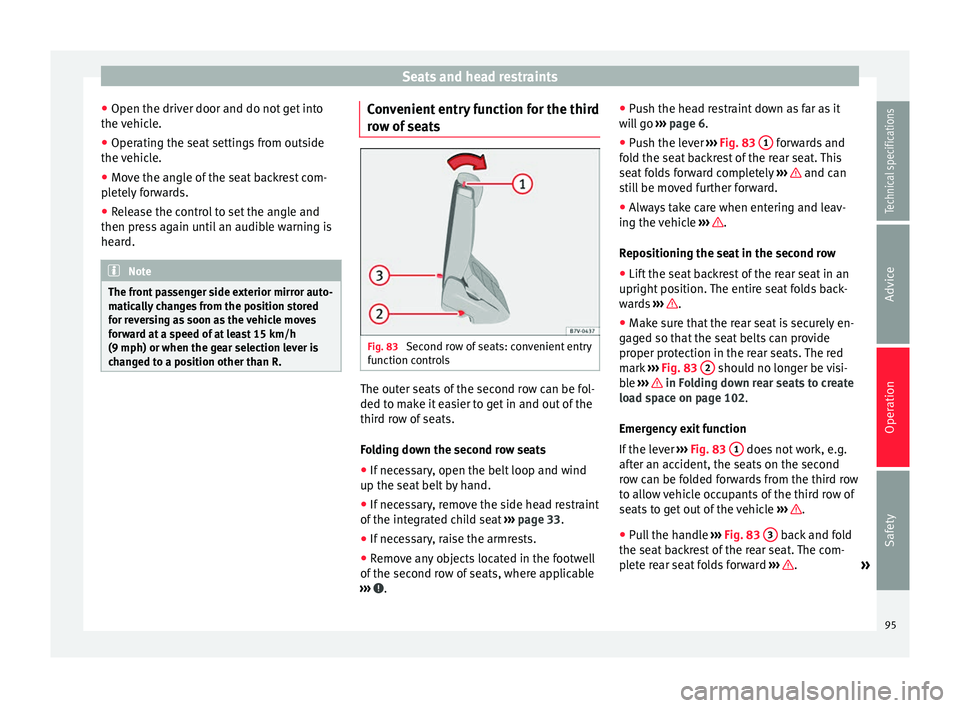
Fig. 83
Second row of seats: convenient entry
function controls The outer seats of the second row can be fol-
ded to make it easier to get in and out of the
third row of seats.
Folding down the second row seats
● If necessary, open the belt loop and wind
up the seat belt by hand.
● If necessary, remove the side head restraint
of the integrated child seat ›››
page 33.
● If necessary, raise the armrests.
● Remove any objects located in the footwell
of the second row of seats, where applicable
››› .●
Push the head restraint down as far as it
will go ››› page 6
.
● Pu
sh the lever ››› Fig. 83 1 forwards and
fold the seat backrest of the rear seat. This
seat folds forward completely ››› and can
still be moved further forward.
● Always take care when entering and leav-
ing the vehicle ››› .
Repositioning the seat in the second row
● Lift the seat backrest of the rear seat in an
upright position. The entire seat folds back-
wards ››› .
● Make sure that the rear seat is securely en-
gaged so that the seat belts can provide
proper protection in the rear seats. The red
mark ››› Fig. 83 2 should no longer be visi-
ble ››› in Folding down rear seats to create
load space on page 102.
Emergency exit function
If the lever ››› Fig. 83 1 does not work, e.g.
after an accident, the seats on the second
row can be folded forwards from the third row
to allow vehicle occupants of the third row of
seats to get out of the vehicle ››› .
● Pull the handle ››› Fig. 83 3 back and fold
the seat backrest of the rear seat. The com-
plete rear seat folds forward ››› .
»
95
Technical specifications
Advice
Operation
Safety
Page 98 of 305
Operation
WARNING
Careless or uncontrolled use of the conven-
ient entry assistant may result in severe in-
jury and accident.
● Never use the convenient entry function
when the vehicle is in motion.
● Avoid trapping or damaging the seat belt
when folding the rear seats back.
● Keep your hands, fingers, feet and other
body parts out of the hinges and the seat
locking mechanism when folding and unfold-
ing.
● Mats or other objects can be caught in the
hinges of the seat backrests or rear seat. This
could prevent the seat backrest from locking
safely when positioned upright.
● All seat backrests must engage correctly for
the seat belts on the rear seats to work prop-
erly. When the seat backrest of an occupied
seat is not correctly locked in place, the pas-
senger can be thrust forward with the seat
backrest in case of sudden braking, sudden
manoeuvres or an accident.
● A red mark on the side of the seat ››› Fig. 83
2 indicates that the seat backrest is not en-
gaged. The mark is no longer visible when it
is correctly engaged.
● If the seat backrest or seat are folded down
and are not correctly locked in place, no pas-
senger should use them.
● When getting in or out, never lean or hold
onto the folded seat on the second row of
seats. WARNING
If child seats are fitted to all the seats in the
second row then it is possible that the seats
of this row cannot be folded down from the
third row of seats in the event of an accident.
In the event of an emergency, passengers in
the third row of seats will not be able to leave
the vehicle or to help themselves.
● Child seats should not occupy all the seats
of the second row if other passengers are to
occupy the third row. CAUTION
● Before folding down the rear seat backrest
for returning it to its position, adjust the front
seats so that the head restraints and seat
backrests do not hit each other when folding
and unfolding.
● Any objects located in the footwell of the
second row of seats may be damaged on fold-
ing the rear seat forwards. Remove any ob-
jects before folding the seat down. Folding the seat backrest of the front
passenger seat*
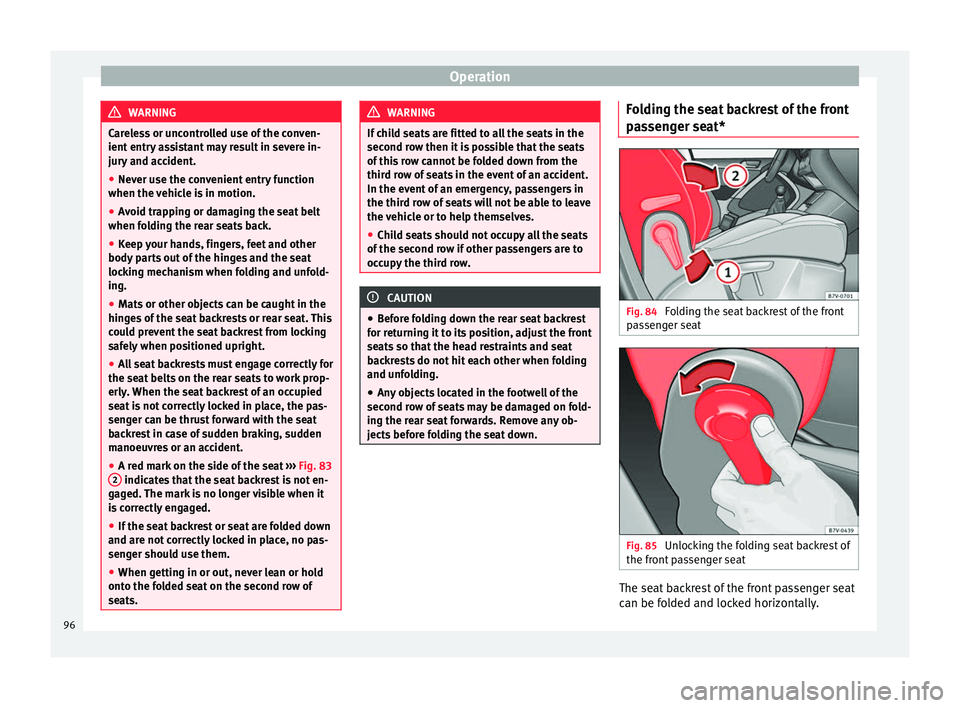
Fig. 84
Folding the seat backrest of the front
passenger seat Fig. 85
Unlocking the folding seat backrest of
the front passenger seat The seat backrest of the front passenger seat
can be folded and locked horizontally.
96
Page 103 of 305
Transport and practical equipment
Note
The ventilating slits between the heated rear
window and the shelf must not be covered so
that used air can escape from the vehicle. Folding down rear seats to create load
space
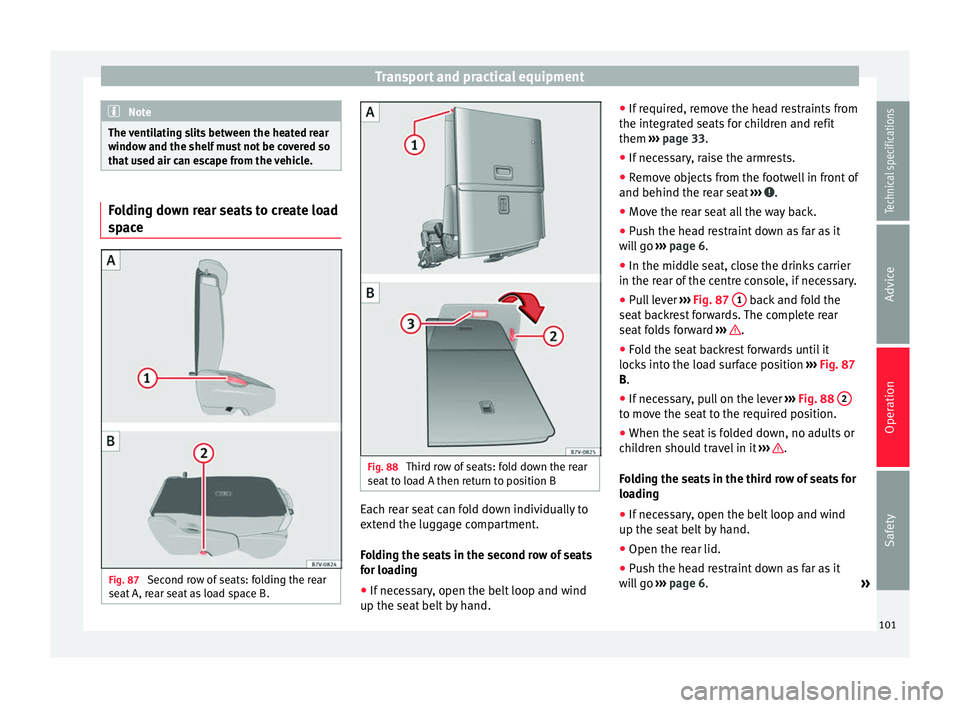
Fig. 87
Second row of seats: folding the rear
seat A, rear seat as load space B. Fig. 88
Third row of seats: fold down the rear
seat to load A then return to position B Each rear seat can fold down individually to
extend the luggage compartment.
Folding the seats in the second row of seats
for loading
●
If necessary, open the belt loop and wind
up the seat belt by hand. ●
If required, remove the head restraints from
the integrated seats for children and refit
them ››› page 33 .
● If nec
essary, raise the armrests.
● Remove objects from the footwell in front of
and behind the rear seat ››› .
● Move the rear seat all the way back.
● Push the head restraint down as far as it
will go ››› page 6 .
● In the mid dl
e seat, close the drinks carrier
in the rear of the centre console, if necessary.
● Pull lever ››› Fig. 87
1 back and fold the
seat backrest forwards. The complete rear
seat folds forward ››› .
● Fold the seat backrest forwards until it
locks into the load surface position ››› Fig. 87
B .
● If nec
essary, pull on the lever ››› Fig. 88 2 to move the seat to the required position.
●
When the seat is folded down, no adults or
children should travel in it ››› .
Folding the seats in the third row of seats for
loading
● If necessary, open the belt loop and wind
up the seat belt by hand.
● Open the rear lid.
● Push the head restraint down as far as it
will go ››› page 6 .
»
101
Technical specifications
Advice
Operation
Safety
Page 104 of 305
Operation
● Remove objects from the footwell in front of
and behind the rear seat ››› .
● Remove objects from the space below the
rear seat.
● Remove the attachment elements and sup-
ports for the net from the rail system.
● Pull lever ››› Fig. 88 1 back and fold the
seat backrest forwards. The rear seat folds
forward ››› and the cushion also moves for-
ward.
● Fold the seat tray forward on top of the fol-
ded seat.
● When the seat is folded down, no adults or
children should travel in it ››› .
Putting the seats in the second row back in
place
● Pull lever ››› Fig. 87 1 upwards and place
the seat backrests in vertical position. The
entire seat folds backwards.
● Pull on the rear seats and the seat backrest
to ensure that they are correctly locked in
place and that the seat belt protection is
guaranteed for rear seat passengers.
Putting the seats in the third row back in
place
● Open the rear lid.
● Pull on the handle ››› Fig. 88 2 to put the
seat tray back in position. ●
Pull on the handle ››› Fig. 88 3 . The entire
seat folds backwards.
● Press on the seat tray in the seat backrest
until it is held in position by its magnets.
● Open the sliding door.
● Put the seat backrest into position and
press firmly until it clicks into place.
● Pull on the rear seats and the seat backrest
to ensure that they are correctly locked in
place and that the seat belt protection is
guaranteed for rear seat passengers. WARNING
Folding and lifting the rear seats carelessly
without paying attention could cause serious
injury.
● Never fold or lift the seats while driving.
● Do no trap or damage seat belts when rais-
ing the seat backrest.
● Keep your hands, fingers, feet and other
body parts out of the hinges and the seat
locking mechanism when folding and unfold-
ing.
● Mats or other objects can be caught in the
hinges of the seat backrests or rear seat. This
could prevent the seat or seat backrest from
locking securely in the vertical position.
● All seat backrests must engage correctly for
the seat belts on the rear seats to work prop-
erly. When the seat backrest of an occupied
seat is not correctly locked in place, the pas-
senger can be thrust forward with the seat backrest in case of sudden braking, sudden
manoeuvres or an accident.
●
No seat must be occupied if the seat back-
rest or seat is folded or not correctly engag-
ed. CAUTION
● Before folding the rear seat backrest, ad-
just the front seats so that neither the head
restraint or backrest hit them when folded.
● Objects placed in the footrest area in front
of and behind the rear seats can be damaged
when seats are folded down or put back into
position. Remove any objects in the way be-
fore folding seats down or repositioning
them.
● Objects placed in the moulding on the back
of the third row of seats can be damaged
when folding down the seats or putting them
back into position. Remove any objects in the
way before folding seats down or reposition-
ing them.
● The attachment elements and supports for
the net partition placed on the rail system
can be damaged when folding down seats
from the third row or putting them back into
position and these can also damage the seats
themselves. Before folding down or reposi-
tioning the seats, remove the attachment ele-
ments and supports for the net from the rail
system. 102
Page 107 of 305
Transport and practical equipment
● Hook in the net partition on the rear right-
hand side roof support by pressing on the
rod.
● Secure the net partition hooks into the
straps in the front of the boot ››› Fig. 92 then
tight en the belts.
In
stalling the net partition behind the front
seats
● Hook in the net partition on the front left-
hand side roof support ››› Fig. 92. To do this,
guide the rod fr
om up to down.
● Hook in the net partition on the rear right-
hand side roof support by pressing on the
rod.
● Secure the hooks of the net partition to the
attachment rings in the left and right hand
side footwells on the second row of seats
then tighten the straps.
Removing the net partition
● Loosen the net partition straps.
● Release the net partition hooks from the
rings ››› Fig. 92.
● Unhook the net
partition on the right-hand
side roof support ››› Fig. 92 by pressing on
the rod.
● Unhook
the net partition from the left-hand
side roof support. Folding in the net partition
●
Press on the release button ››› Fig. 91 2 and bend the rod
A in the direction of the
arrow with the release button pressed.
● Press on the release button ››› Fig. 91 3 and bend the rod
B in the direction of the
arrow with the release button pressed.
● Store the net partition securely in the vehi-
cle. WARNING
Loose objects in the vehicle interior can be vi-
olently thrown in case of a sudden manoeu-
vre or braking and especially in accidents
causing serious injury.
● Ensure that the rods are correctly locked in
place.
● Even when the net partition is correctly fit-
ted, objects must be secured.
● When driving with the net partition, no pas-
sengers should be behind it. Fastening rings*
Fig. 93
In the luggage compartment: fasten-
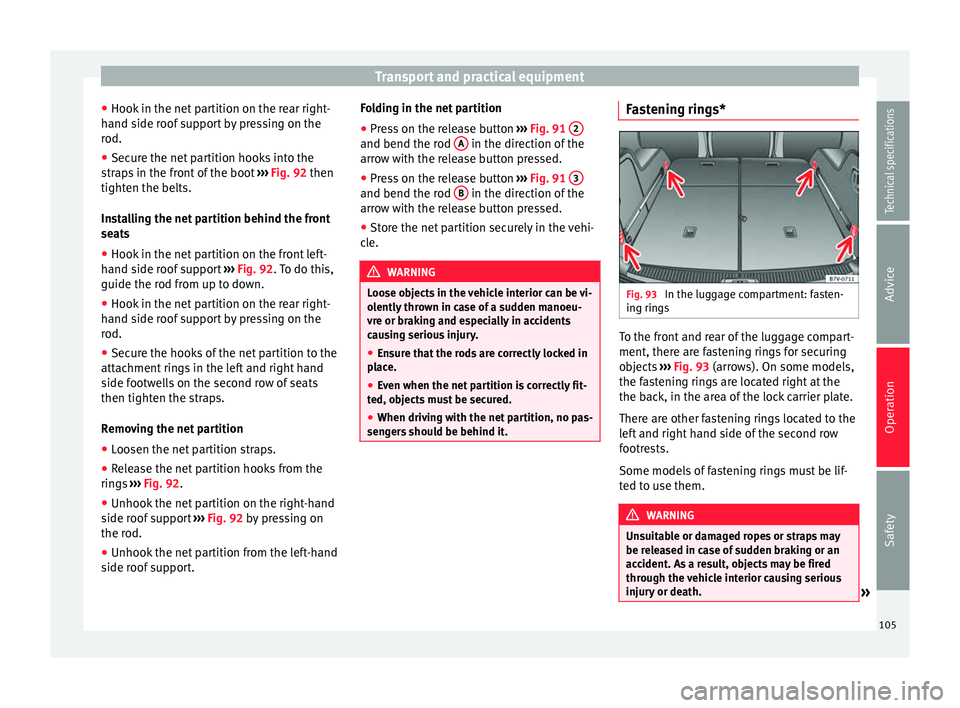
ing rings To the front and rear of the luggage compart-
ment, there are fastening rings for securing
objects
››› Fig. 93 (arrows). On some models,
the f a
stening rings are located right at the
the back, in the area of the lock carrier plate.
There are other fastening rings located to the
left and right hand side of the second row
footrests.
Some models of fastening rings must be lif-
ted to use them. WARNING
Unsuitable or damaged ropes or straps may
be released in case of sudden braking or an
accident. As a result, objects may be fired
through the vehicle interior causing serious
injury or death. » 105
Technical specifications
Advice
Operation
Safety
Page 117 of 305
Transport and practical equipment
Vehicle wallet compartment
The glove compartment is designed to store
the vehicle documentation.
The vehicle on-board documentation wallet
should always be kept in the glove compart-
ment. Insert it crosswise in the glove com-
partment.
Glove compartment cooling
There is an air vent ››› Fig. 107 A on the rear
panel so that cooled air from the air condi-
tioner (this must be connected) is fed into
the glove compartment. Turn the air vent to
open and close it. WARNING
The risk of serious injuries in the event of an
accident during a sudden braking manoeuvre
or turn is increased if the glove compartment
is left open.
● Keep the glove compartment closed while
the vehicle is in motion. CAUTION
For structural reasons, some model versions
will have gaps behind the glove compartment
into which small objects may fall. This could
lead to strange noises and damage to the ve-
hicle. You should therefore not keep very
small objects in the glove compartment. Storage compartments in the rear
footwell*
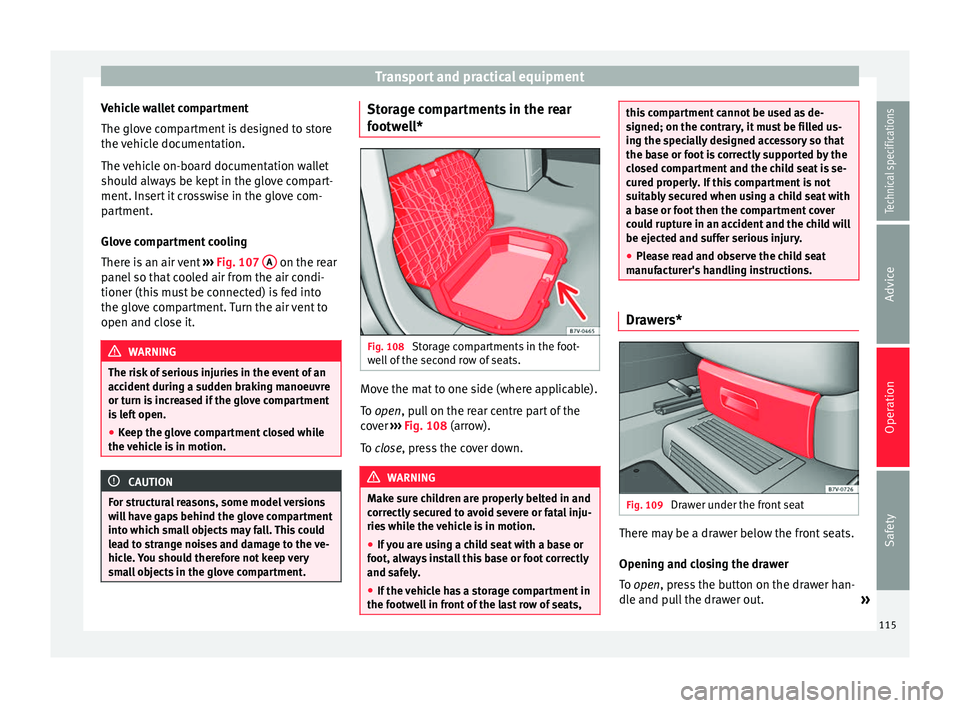
Fig. 108
Storage compartments in the foot-
well of the second row of seats. Move the mat to one side (where applicable).
To
open
, pull on the rear centre part of the
c
over ›››
Fig. 108 (arrow).
To
close, press the cover down. WARNING
Make sure children are properly belted in and
correctly secured to avoid severe or fatal inju-
ries while the vehicle is in motion.
● If you are using a child seat with a base or
foot, always install this base or foot correctly
and safely.
● If the vehicle has a storage compartment in
the footwell in front of the last row of seats, this compartment cannot be used as de-
signed; on the contrary, it must be filled us-
ing the specially designed accessory so that
the base or foot is correctly supported by the
closed compartment and the child seat is se-
cured properly. If this compartment is not
suitably secured when using a child seat with
a base or foot then the compartment cover
could rupture in an accident and the child will
be ejected and suffer serious injury.
●
Please read and observe the child seat
manufacturer's handling instructions. Drawers*
Fig. 109
Drawer under the front seat There may be a drawer below the front seats.
Opening and closing the drawer
To
open
, press the button on the drawer han-
dl
e and pull the drawer out. »
115
Technical specifications
Advice
Operation
Safety
Page 135 of 305
Driving
Electromechanical power steering
With the power steering system, the assisted
steering function automatically adjusts ac-
cording to the vehicle speed, the steering tor-
que and the wheel turning angle. The power
steering only works when the engine is run-
ning.
You should remember that you will need con-
siderably more power than normal to steer
the vehicle if the power steering is not work-
ing correctly or not at all.
Counter steering assistance system
The counter steering assistance system helps
the driver in critical situations. Additional
steering power helps the driver when counter
steering. WARNING
The counter steering assistance system com-
bined with ESC helps the driver to steer the
vehicle in critical driving conditions. At all
times, it is the driver who steers the vehicle.
The counter steering system does not steer
the vehicle. Stopping and starting the
engine
Introduction Immobiliser display
When an invalid key is used or in the event of
a system fault,
or Immobiliser on is dis-
played on the instrument panel. The engine
cannot be started.
Pushing or towing
For technical reasons, the vehicle must not
be push- or tow-started. Jump starting is pref-
erable. WARNING
Turning off the engine while driving will make
stopping the vehicle difficult; this could even
result in the loss of control causing an acci-
dent with serious consequences.
● The assisted braking and steering systems,
the airbag system, seat belts and certain
safety equipment are only active while the
engine is running.
● The engine should only be switched off
when the vehicle is at a standstill. WARNING
While the engine is running or starting it
could help reduce the risk of serious injury. ●
Never start or leave the engine running in
poorly ventilated or closed spaces. Exhaust
gas contains carbon monoxide, a toxic, col-
ourless and odourless gas. Carbon monoxide
can cause people to lose consciousness. It
can also cause death.
● Never leave the vehicle unattended if the
engine is running. The vehicle could move off
suddenly or something unexpected could
happen resulting in damage and serious in-
jury.
● Never use start boosters. Cold start sprays
could explode or increase the engine speed
unexpectedly. WARNING
The components of the exhaust system reach
very high temperatures. This could cause a
fire and considerable damage.
● Always park your vehicle so that no part of
the exhaust system can come in contact with
flammable materials (such as wood, leaves,
dried grass, spilled fuel, etc.).
● Do not apply additional underseal or anti-
corrosion coatings to the exhaust pipes, cata-
lytic converter, heat shields or the diesel par-
ticulate filter. 133
Technical specifications
Advice
Operation
Safety
Page 139 of 305
Driving Vehicles without
Keyless AccessVehicles with
Keyless Access
1.Bring the vehicle to a full stop ››› .
2.Press and hold the brake pedal until the step 4 is
performed.
3.If the vehicle has an automatic gearbox, place theselector lever in position P.
4.Connect the electronic parking brake ››› page 137.
5.Turn the vehicle key in
the ignition lock to po-
sition ››› Fig. 125 0
.
Briefly press the start-
up button
››› Fig. 126. If
the engine fails to
switch off, perform an
emergency disconnect
››› page 135.
6.If the vehicle is equipped with a manual gearbox,
put it into 1st or reverse. WARNING
Never switch off the engine while the vehicle
is moving. You may lose control of the vehicle
and there is a risk of serious accident.
● The airbags and belt tensioners do not
work when the ignition is switched off.
● The brake servo does not work with the en-
gine off. To stop, the brake pedal must be
pressed with more force.
● As the power steering does not work if the
engine is not running, you will need more
strength to steer than normally. ●
If the key is removed from the ignition, the
steering may lock and it will not be possible
to steer the vehicle. CAUTION
If the engine has been driven at high speed
for a prolonged period of time, it may over-
heat when turned off. To avoid engine dam-
age, allow the engine to run for approximate-
ly two minutes in neutral before switching it
off. Note
● In vehicles with automatic gearbox, the key
can only be removed when the selector lever
is in position P.
● After stopping the engine, the engine com-
partment fan may continue running for a few
minutes, even when the ignition has been
switched off or the key removed. The radiator
fan is automatically switched off. Electronic immobiliser
The gear lock prevents the engine from being
started with an unauthorised key and the ve-
hicle being moved.
The vehicle key has a chip that automatically
disables the immobilizer when the key is
placed in the ignition lock.The electronic immobiliser will be activated
again automatically as soon as you pull the
key out of the ignition lock. For vehicles with
the Keyless Access system, the key has to be
outside the vehicle
››› page 59.
For this reason, the vehicle can only be used
with a genuine SEAT key with the correct
code. Coded keys can be purchased from
your technical service centre ››› page 54.
If an unauthorised key is used, the message SAFE or Immobiliser active is displayed on the
instrument panel. The vehicle cannot be star-
ted in this case Note
The correct operation of the vehicle is only
guaranteed when original SEAT keys are
used. Braking and parking
Introduction The
assisted braking systems
include the an-
ti-loc
k braking system (ABS), the brake assist
system (BAS), the electronic differential lock
(EDL), the traction control system (ASR) and
the electronic stability control (ESC). »
137
Technical specifications
Advice
Operation
Safety
Page 142 of 305
Operation
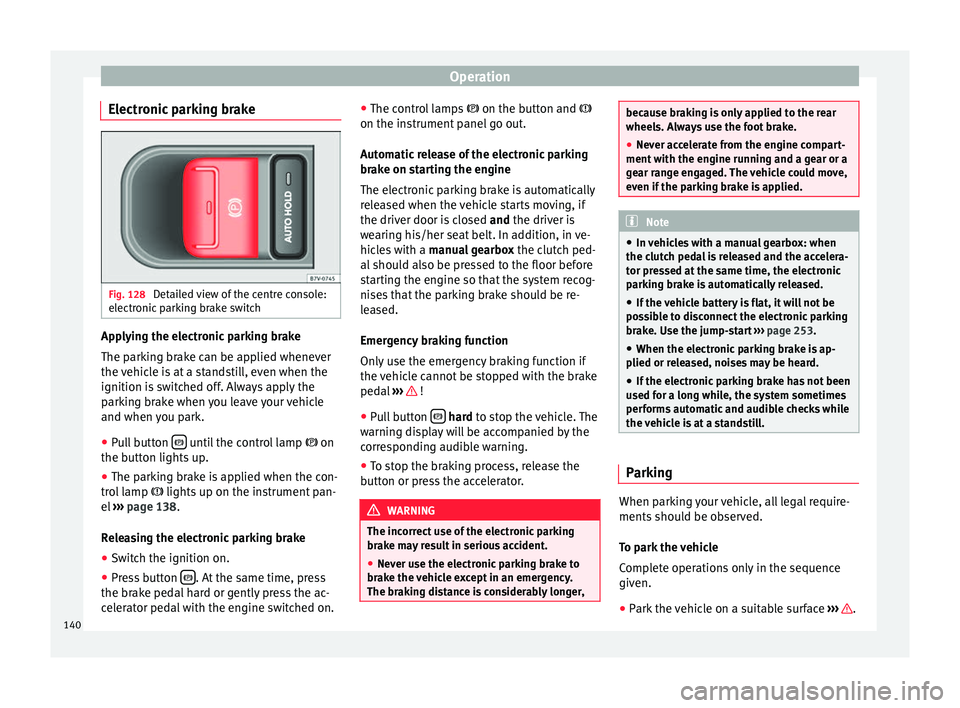
Electronic parking brake Fig. 128
Detailed view of the centre console:
electronic parking brake switch Applying the electronic parking brake
The parking brake can be applied whenever
the vehicle is at a standstill, even when the
ignition is switched off. Always apply the
parking brake when you leave your vehicle
and when you park.
●
Pull button until the control lamp
on
the button lights up.
● The parking brake is applied when the con-
trol lamp lights up on the instrument pan-
el ››› page 138 .
R el
easing the electronic parking brake
● Switch the ignition on.
● Press button . At the same time, press
the brake pedal hard or gently press the ac-
celerator pedal with the engine switched on. ●
The control lamps on the button and
on the in s
trument panel go out.
Automatic release of the electronic parking
brake on starting the engine
The electronic parking brake is automatically
released when the vehicle starts moving, if
the driver door is closed and
the driver is
wearing his/her seat belt. In addition, in ve-
hicles with a manual gearbox the clutch ped-
al should also be pressed to the floor before
starting the engine so that the system recog-
nises that the parking brake should be re-
leased.
Emergency braking function
Only use the emergency braking function if
the vehicle cannot be stopped with the brake
pedal ››› !
● Pull button
hard
to stop the vehicle. The
w
arning display will be accompanied by the
corresponding audible warning.
● To stop the braking process, release the
button or press the accelerator. WARNING
The incorrect use of the electronic parking
brake may result in serious accident.
● Never use the electronic parking brake to
brake the vehicle except in an emergency.
The braking distance is considerably longer, because braking is only applied to the rear
wheels. Always use the foot brake.
●
Never accelerate from the engine compart-
ment with the engine running and a gear or a
gear range engaged. The vehicle could move,
even if the parking brake is applied. Note
● In vehicles with a manual gearbox: when
the clutch pedal is released and the accelera-
tor pressed at the same time, the electronic
parking brake is automatically released.
● If the vehicle battery is flat, it will not be
possible to disconnect the electronic parking
brake. Use the jump-start ››› page 253.
● When the electronic parking brake is ap-
plied or released, noises may be heard.
● If the electronic parking brake has not been
used for a long while, the system sometimes
performs automatic and audible checks while
the vehicle is at a standstill. Parking
When parking your vehicle, all legal require-
ments should be observed.
To park the vehicle
Complete operations only in the sequence
given.
● Park the vehicle on a suitable surface ››› .
140
Page 159 of 305
Driver assistance systems
The Auto Hold function automatically pre-
vents the vehicle from rolling away acciden-
tally when at a standstill, without the driver
having to keep his/her foot on the brake ped-
al.
When the system that detects that the vehi-
cle has stopped, the Auto Hold keeps the ve-
hicle at a standstill. The brake pedal can be
released.
If the driver presses the brake pedal briefly or
the accelerator to start off, the Auto Hold
function releases the brake once more. The
vehicle moves according to the gradient.
If any of the conditions necessary for the Au-
to Hold function change while the vehicle
stopped, the system is turned off as is the in-
dicator on the button ››› Fig. 135 . The elec-
tr onic
parking brake engages where necessa-
ry to park the vehicle safely ››› .
Conditions for keeping the vehicle at a
standstill with Auto Hold:
● The driver door must be closed.
● The driver seat belt must be buckled.
● The engine must be running.
● The ASR system is switched on
››› page 137 . Sw
it
ching Auto Hold on and off manually
Press the AUTO HOLD button
››› . The control
lamp on the button switches off when the Au-
to Hold function is switched off.
Permanent Auto Hold connection
The Auto Hold function must be switched on
every time the engine is started. However, to
switch the Auto Hold function on permanent-
ly, the mark must be switched on in the
Set
-
tin
gs menu, “Autohold” submenu ››› page 47.
Auto Hold works automatically under the
following conditions:
All points must be fulfilled simultaneously
››› :
Manual gearboxAutomatic gearbox
1.If the vehicle is stopped using the brake pedal on a
flat or slope.
2.The engine must be “running smoothly”.
3.On a slope, the 1st gear
is engaged uphill or the
reverse gear is engaged
for a downhill. The
clutch must be held
down.A gear for driving is se-
lected from R, D or S.
Upon accelerating and
pressing in the clutch
simultaneously, the
brake releases gradual-
ly.Upon accelerating, the
brake releases gradual-
ly. Auto Hold turns off automatically under the
following conditions:
Manual gearboxAutomatic gearbox
1.If one of the conditions mentioned in
table on
page 157 changes.
2.If the engine is “not running regularly” or if there is a malfunction.
3.When changing to idle
speed.If the selector lever is
placed in neutral (N).
4.If the engine is turned
off or stalls.If the engine is switch-
ed off.
5.If the driver accelerates
while pressing the
clutch in.If the vehicle is acceler-
ated.
6. When one of the wheels
has minimal contact
with the ground (e.g. on
uneven ground). WARNING
The Auto Hold technology is limited by the
laws of physics. The improved comfort provi-
ded by Auto Hold should never prompt you to
take risks.
● Never leave the vehicle running and with
the Auto Hold function switched on.
● Auto Hold cannot always stop the vehicle
uphill and downhill (e.g. if the ground is slip-
pery or frozen). » 157
Technical specifications
Advice
Operation
Safety