steering Seat Alhambra 2015 Owner's Guide
[x] Cancel search | Manufacturer: SEAT, Model Year: 2015, Model line: Alhambra, Model: Seat Alhambra 2015Pages: 305, PDF Size: 5.46 MB
Page 156 of 305
Operation
Driver assistance systems
Braking and stability systems Brake assist systems The brake assist systems ESC, ABS, BAS, ASR
and EDL only operate when the ignition is
switched on. They contribute significantly to
increasing active safety.
Electronic Stability Control (ESC)
ESC reduces the risk of skidding and increa-
ses the vehicle stability by braking individual
wheels under specific driving conditions. ESC
detects critical handling situations, such as
understeer, oversteer and wheelspin on the
driven wheels. The system stabilises the ve-
hicle by braking individual wheels or by re-
ducing the engine torque.
The ESC has limits. It is important to realise
that the ESC is also subject to the laws of
physics. ESC will not be able to deal with all
situations with which drivers may be faced.
For example, if the road surface changes sud-
denly then ESC will not be useful in all cases.
If the vehicle suddenly enters a section cov-
ered by water, mud or snow then ESC will not
provide assistance in the same way as on dry
ground. If the vehicle loses its grip on the
ground and moves on a film of water (“aqua-
planing”), the ESC will not be able to assist the driver to control the vehicle as the loss of
adherence with the road surface will prevent-
ing braking and steering. If the vehicle is
driven through series of bends at high
speed, the ESC will not always be as effec-
tive: the vehicle reaction to aggressive driv-
ing is not the same as at reduced speeds.
When driving with a trailer, ESC does not pro-
vide the same amount of vehicle control as
without a trailer.
Adjust your speed and driving style to road,
traffic and weather conditions. ESC cannot
push the limits of the laws of physics; im-
prove the transmission available or maintain
the vehicle on the road if a lack of driver at-
tention creates an inevitable situation. Other-
wise, ESC assists in maintaining vehicle con-
trol in extreme situations and uses the move-
ments of the steering made by the driver to
maintain the vehicle moving in the desired
direction. If the vehicle is driven at such a
speed that it will leave the road before ESC
can intervene then the system cannot pro-
vide assistance.
The ABS, BAS, ASR and EDL systems are in-
corporated into the ESC. The ESC is always
on. The ESC should only be turned off using
the ASR button
›››
Fig. 134 when traction is
in s
ufficient. Always remember to turn on the
ASR once more when the vehicle has traction
again. Anti-lock brake system (ABS)
ABS can prevent the wheels from locking dur-
ing braking until just before the vehicle stops
thus helping the driver to steer the vehicle
and maintain control. This means that, even
during full braking, the risk of skidding is re-
duced:
● Press and hold the brake pedal fully. Do not
remove your foot from the brake pedal or re-
duce braking force!
● Do not “pump” the brake pedal, or reduce
braking force!
● Maintain vehicle direction when braking
fully.
● When the brake pedal is released or when
the brake force is reduced, ABS is turned off.
ABS control can be observed by vibration of
the brake pedal and noise. You should never
expect
the ABS to reduce the braking dis-
tance under
any circumstances. This distance
will increase when driving on gravel, recent
snow or on icy and slippery ground.
When driving on loose ground, the all-terrain
configuration of the ABS is automatically
turned on. When ABS is activated, the front
wheels may lock briefly. This shortens the
braking distance in off-road situations as the
wheels are prevented from digging into loose
surfaces. All-terrain ABS only intervenes
when driving in a straight line. When the
154
Page 160 of 305
Operation
CAUTION
Before entering an automatic car wash, al-
ways switch the Auto Hold function off, as it
could be damaged when the electronic park-
ing brake automatically engages. Start-Stop Function*
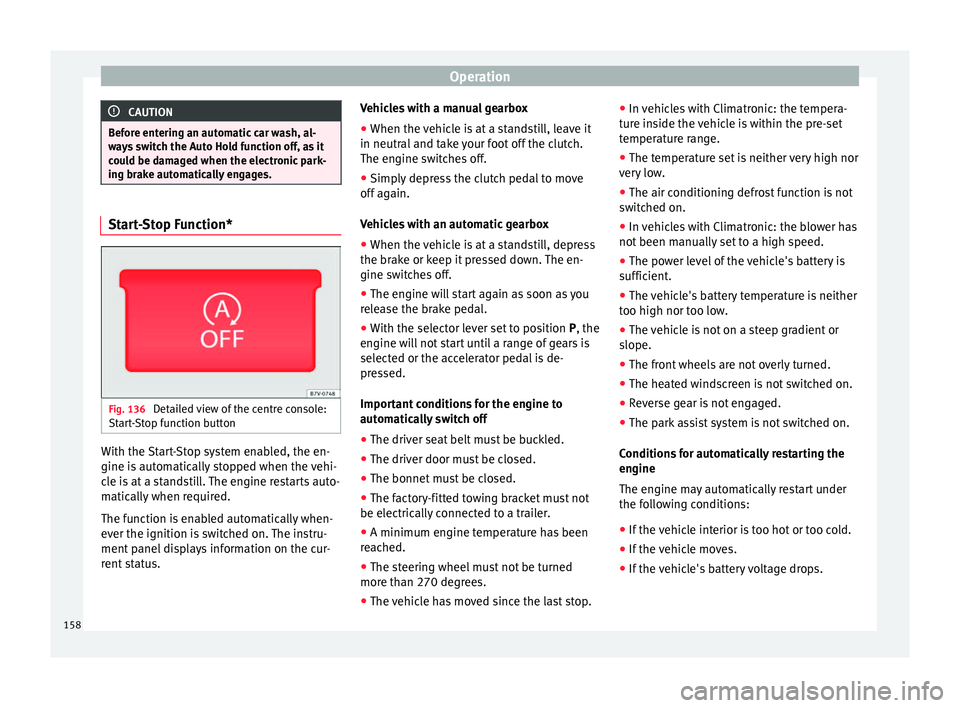
Fig. 136
Detailed view of the centre console:
Start-Stop function button With the Start-Stop system enabled, the en-
gine is automatically stopped when the vehi-
cle is at a standstill. The engine restarts auto-
matically when required.
The function is enabled automatically when-
ever the ignition is switched on. The instru-
ment panel displays information on the cur-
rent status. Vehicles with a manual gearbox
● When the vehicle is at a standstill, leave it
in neutral and take your foot off the clutch.
The engine switches off.
● Simply depress the clutch pedal to move
off again.
Vehicles with an automatic gearbox
● When the vehicle is at a standstill, depress
the brake or keep it pressed down. The en-
gine switches off.
● The engine will start again as soon as you
release the brake pedal.
● With the selector lever set to position P, the
en gine w
ill not start until a range of gears is
selected or the accelerator pedal is de-
pressed.
Important conditions for the engine to
automatically switch off
● The driver seat belt must be buckled.
● The driver door must be closed.
● The bonnet must be closed.
● The factory-fitted towing bracket must not
be electrically connected to a trailer.
● A minimum engine temperature has been
reached.
● The steering wheel must not be turned
more than 270 degrees.
● The vehicle has moved since the last stop. ●
In vehicles with Climatronic: the tempera-
ture inside the vehicle is within the pre-set
temperature range.
● The temperature set is neither very high nor
very low.
● The air conditioning defrost function is not
switched on.
● In vehicles with Climatronic: the blower has
not been manually set to a high speed.
● The power level of the vehicle's battery is
sufficient.
● The vehicle's battery temperature is neither
too high nor too low.
● The vehicle is not on a steep gradient or
slope.
● The front wheels are not overly turned.
● The heated windscreen is not switched on.
● Reverse gear is not engaged.
● The park assist system is not switched on.
Conditions for automatically restarting the
engine
The engine may automatically restart under
the following conditions:
● If the vehicle interior is too hot or too cold.
● If the vehicle moves.
● If the vehicle's battery voltage drops.
158
Page 161 of 305
Driver assistance systems
Conditions requiring the key to restart the
engine
The engine must be started manually under
the following conditions:
● If the driver unbuckles his/her seat belt.
● If the driver door is opened.
● If the bonnet is opened.
● In vehicles with a manual gearbox: if a gear
has been selected.
Switching Start-Stop mode on and off
manually
● Press the button on the centre console
››› Fig. 136 .
● The b utt
on will light up when the Start-Stop
function is switched off.
The engine will start immediately if the vehi-
cle is in Stop mode when it is switched off
manually. WARNING
The brake servo and the power steering do
not work when the engine is switched off.
● Never allow the vehicle to move when the
engine is switched off. CAUTION
Using the Start-Stop function for a long peri-
od at very high outside temperatures could
damage the vehicle's battery. Note
● In some cases, you may have to restart the
vehicle using the key. Observe the corre-
sponding message on the instrument panel
display.
● If the steering wheel is turned more than
270°, Stop will not function; however, the an-
gle of steering wheel turn does not affect
starting the vehicle. Parking sensor system*
Introduction The parking sensor system assists the driver
when parking. When the vehicle approaches
an obstacle, forwards or backwards, an inter-
mittent audible warning will be heard, higher
or lower depending on the distance. The
shorter the distance, the shorter the intervals
between tones. If the vehicle is too close to
the obstacle, the audible warning becomes
constant.
If you continue to approach an obstacle when
the sound is continuous, this means the sys-
tem can no longer measure the distance.
The sensor system on the bumpers transmit
and receive ultrasound. Using the ultrasound
signal (transmission, reflection from the ob-
stacle and reception), this system continu-ously calculates the distance between the
bumper and the obstacle. WARNING
The parking sensor system and the optical
parking system cannot replace driver aware-
ness.
● The sensors have blind spots in which ob-
stacles and people are not registered.
● Always observe the area around the vehi-
cle, as the sensors do not always detect
small children, animals or objects.
● The surface of certain objects and some
clothing do not reflect the ultrasound signals
from the parking distance system. The sys-
tem cannot detect or incorrectly detects
these objects and people wearing these
types of clothes.
● External sound sources can affect the park-
ing distance aid signals. In this case, under
certain circumstances, people and objects
will not be detected. CAUTION
● The sensors may not always be able to de-
tect objects such as trailer draw bars, thin
rails, fences, posts, trees and open boots,
etc. This could result in damage to your car.
● Although the parking sensor system de-
tects and warns of the presence of an obsta-
cle, the obstacle could disappear from the an-
gle of measurement of the sensors if it is too
high or low and the system would no longer » 159
Technical specifications
Advice
Operation
Safety
Page 166 of 305
Operation
● Perpendicular parking: press the button at speeds up to 50 km/h (31 mph) twice.
When the function is enabled, the button
››› Fig. 141 will light up.
● If nec
essary, press the button once
more to change parking mode.
● Apply the turn signal for the side on which
a gap is to be detected for parking. The in-
strument panel displays the side correspond-
ing to the road.
Parking
● Parking parallel to the road: drive next to
the gap at a speed of no more than 40 km/h
(25 mph) and
at a distance of between 0.5 m
and 2 m.
● P
arking perpendicular to the road: drive
next to the gap at a speed of no more than
20 km/h (12 mph)
and at a distance of be-
tween 0.5 m and 2 m.
● The best parking results will be achieved if
you position the vehicle as parallel as possi-
ble to the line of parked cars or the kerb.
● When a suitable parking place is displayed
on the instrument panel, stop and select re-
verse gear.
● Follow the instructions given on the instru-
ment panel display
● Then, release the steering wheel when the
warning signal sounds ››› : The system will
move the steering wheel! Observe the sur-
rounding area. ●
Observe the surrounding area and acceler-
ate carefully at a maximum of 7 km/h
(4 mph).
● The park assist system is only responsible
f or mo
ving the steering wheel during the ma-
noeuvre.
The driver applies the accelerator,
the clutch, the gears and the brake.
● Follow the instructions given by the park
assist system until the manoeuvre is comple-
ted.
● The park assist system steers the vehicle
forwards and backwards until it is in a
straight position in the parking space.
● The manoeuvre is complete when the corre-
sponding indication is given on the instru-
ment panel display.
Stopping the parking manoeuvre
The park assist system stops the manoeuvre
in the event of one of the following:
● Press button .
● Driving faster than 7 km/h (4 mph).
● The driver moves the steering wheel.
● The parking manoeuvre has not been com-
pleted after 6 minutes since the park assist
system was activated.
● A sliding door is opened. To restart the ma-
noeuvre, close the sliding door and press the
button again.●
There is a system malfunction (system tem-
porarily unavailable).
● The ASR system is switched off or the ASR
or ESC is working. WARNING
The steering wheel turns quickly by itself
when parking using the park assist system.
Placing your hand between the steering
wheel spokes could lead to injuries. Note
● The park assist system has its limitations.
For example, it is not possible to park on
tight bends using the park assist system.
● Even if the park assist system recognises
that there is not enough space for parking
the vehicle, the instrument panel display will
still show this place. In this case, the parking
manoeuvre should not be requested.
● Changing gears between forward and re-
verse gears before indicated (that is, before
the signal from the parking sensor system)
the parking results may not be ideal.
● For parallel parking (parallel to the road), a
sound will tell the driver when they must
change from forward gears to reverse; the
signal from the parking sensor system does
not indicate changes of direction.
● The park assist can also be activated after-
wards, if you pass close to a parallel parking
space at a maximum of 40 km an hour 164
Page 167 of 305
Driver assistance systems
(25 mph) or close to be perpendicular parking
space at about 20 km an hour (12 mph) then
press the button
.
● The progress bar on the screen of the in-
strument panel shows a display of the rela-
tive distance to be covered.
● When the Park Assist system is turning the
steering wheel of the stopped vehicle the
symbol is also displayed. Press on the
brake pedal so that the steering can turn with
the vehicle at a standstill and thus reduce the
number of manoeuvres.
● A “suitable” parking space length is at
least 1.1 m greater than the length of the ve-
hicle.
● If the results of the park assist system are
not as good after changing the wheels, the
system must memorise the perimeter of the
new wheels. This process is performed auto-
matically while the vehicle is in motion. To
help this process, turn slowly (at less than
20 km/h [12 mph]), e.g. in an empty car park. Leaving a parking space using the
Park Assist system
Driving off
● Switch on the engine.
● Press button . When the function is ena-
bled, the button ››› Fig. 141 will light up.
● Ap p
ly the turn signal for the side on which
you want to leave the parking space. ●
Select reverse gear.
● Follow the instructions given by the park
assist system.
● When the next indication appears, release
the steering wheel ››› in Parking using the
park assist system on page 164 :
The system
w
ill move the steering wheel! Observe the sur-
rounding area.
● Observe the surrounding area and acceler-
ate carefully at a maximum of 7 km/h
(4 mph).
● The park assist system is only
responsible
for moving the steering wheel during the ma-
noeuvre.
The driver applies the accelerator,
the clutch, the gears and the brake.
● When it is possible to leave the parking
space, the Park Assist system will stop. Take
control of the steering and when traffic condi-
tions permit, leave the parking space.
Automatic stoppage of the manoeuvre
The park assist system stops the manoeuvre
in the event of one of the following:
● Driving faster than 7 km/h (4 mph).
● The driver moves the steering wheel.
● A sliding door is opened. To restart the ma-
noeuvre, close the sliding door and press the
button again.
● There is a system malfunction (system tem-
porarily unavailable). ●
The ASR system is switched off or the ASR
or ESC is working. WARNING
The steering wheel turns quickly automatical-
ly when leaving a parking space using the
park assist system. Placing your hand be-
tween the steering wheel spokes could lead
to injuries. Park Assist brake operation
The Park Assist system helps the driver by
braking automatically. Automatic braking
does not relieve the driver of responsibility
for controlling the accelerator, brake and
clutch
››› .
Braking to avoid damage at excess speed
It is possible that the system operates the
brakes to reduce excess speed. The parking
manoeuvre can then continue. The brakes
will intervene during each parking process.
Braking to minimise damage
When approaching an obstacle, the vehicle
may brake automatically. In certain circum-
stances (e.g. storm, detection of ultrasounds,
vehicle status, load, inclination), the Park As-
sist system may stop the vehicle completely
before an object. »
165
Technical specifications
Advice
Operation
Safety
Page 168 of 305
Operation
● Press the foot brake ››› !
Following the intervention of the brakes, the
Park Assist will stop. WARNING
Despite the assistance provided by the park
assist system, do not run any risks when
parking. The system is not a replacement for
driver awareness.
● Always be ready to brake.
● Automatic brake intervention will end after
1.5 seconds approximately. Following auto-
matic intervention of the brakes, stop the ve-
hicle yourself. Rear Assist system*
Introduction The camera fitted to the rear lid helps drivers
during parking or reversing manoeuvres. The
camera image and certain orientation points
generated by the system are indicated on the
factory-fitted radio or navigation system
screen.
Two types of location point (modes) can be
selected:
● Mode 1: reverse parking perpendicular to
the road (e.g. in a car park). ●
Mode 2 : reverse parking parallel to the
c urb
.
The mode can be changed by pressing the
button on the radio or navigation system
screen. Only the mode to which the points
can be changed will be displayed. WARNING
Use of the camera to calculate the distance
from obstacles (people, vehicles, etc.) is inac-
curate and may cause accidents and severe
injuries.
● The camera lens expands and distorts the
field of vision and displays the objects on the
screen in a different, vague manner.
● Some objects may not be displayed or may
not be very clear (e.g. very thin posts or fen-
ces), due to the resolution of the monitor or if
the light is dim.
● The camera has blind spots in which obsta-
cles and people are not detected.
● Keep the camera lens clean and clear of
snow and ice. Do not cover it. WARNING
The intelligent technology in the rear assist
system cannot change the limits imposed by
the laws of physics and by the system itself.
Careless or uncontrolled use of the rear assist
system may result in severe injuries and acci-
dents. The system is not a replacement for
driver awareness. ●
Adjust your speed and driving style to visi-
bility, road, traffic and weather conditions.
● Always keep a close eye on the area around
the vehicle and always look towards where
you are parking. The display shows the path
of the rear end of the vehicle using the cur-
rent steering angle. The front of the vehicle
turns more in comparison with the rear.
● Do not be distracted from the traffic when
looking at the screen.
● Always observe the area around the vehi-
cle, as the cameras do not always detect chil-
dren, animals or objects.
● The system might not show all areas clear-
ly.
● Only use the rear assist system when the
boot hatch is completely closed. CAUTION
● The camera only displays 2D images on the
screen. Due to the lack of depth, it might be
difficult or impossible to recognise protrud-
ing objects or cracks in the road.
● The cameras may not always be able to de-
tect objects such as thin rails, fences, posts
and trees, etc. This could result in damage to
your car. 166
Page 170 of 305
Operation1) Do not use the rear assist system in the fol-
lowing cases:
– If the position and installation angle of the camera
have been changed, e.g. in a rear-end collision. Have a
specialised workshop check the system.
2) Optical illusions of the camera (examples)
The rear assist camera produces two-dimensional im-
ages. Any cracks in or objects protruding from the
ground or from other vehicles are more difficult to spot
or cannot be seen due to a lack of depth in the image
displayed.
Objects or other vehicles may seem to be closer or fur-
ther away than what they really are:
– On changing from a flat surface to a slope or gradient.
– On changing from a slope or gradient to a flat surface.
– If the vehicle has been overloaded at the rear.
– On approaching protruding objects. These objects
may be outside the angle of vision of the camera when
reversing. Cleaning the camera lens
Keep the camera lens clean and clear of snow
and ice:
● Moisten the lens using a commercially
available, alcohol-based glass cleaning
agent and clean the lens with a dry cloth
››› .
● Remove snow using a small brush.
● Use de-icing spray to remove any ice ››› . CAUTION
● Never use abrasive cleaners to clean the
camera lens.
● Never remove snow or ice from the camera
lens using warm or hot water. This could
damage the lens. Note
● SEAT recommends that you practise park-
ing with the rear assist system in a quiet lo-
cation or in a car park to become familiar with
the system, including the orientation lines
and their function.
● The orientation lines will not be displayed
on the screen if the rear lid is open or the fac-
tory-fitted towing bracket is electrically con-
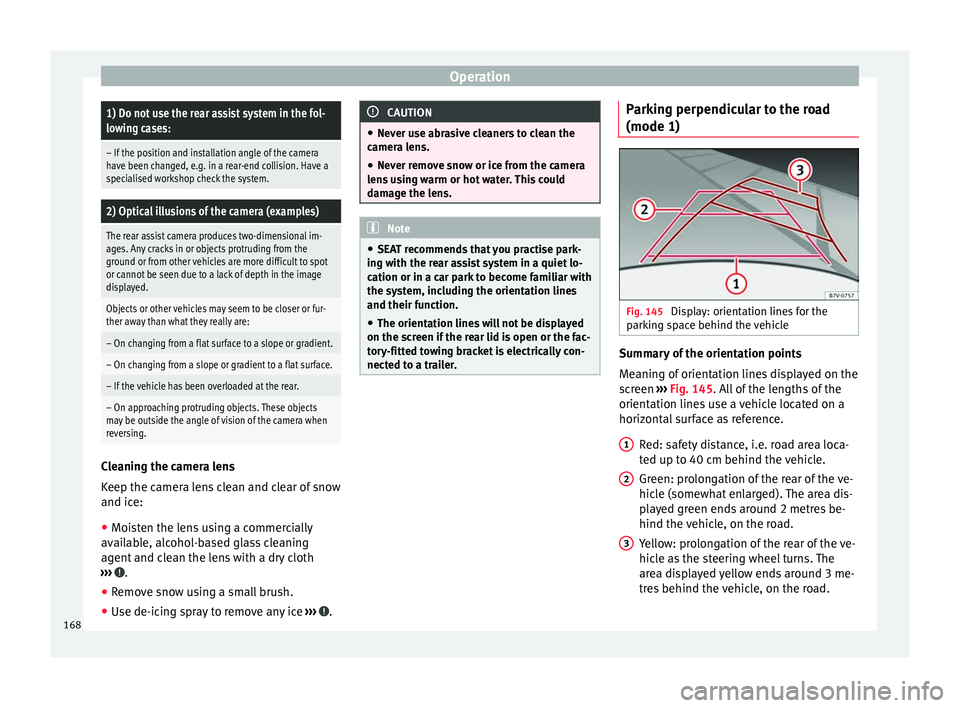
nected to a trailer. Parking perpendicular to the road
(mode 1)
Fig. 145
Display: orientation lines for the
parking space behind the vehicle Summary of the orientation points
Meaning of orientation lines displayed on the
screen
››› Fig. 145 . All of the lengths of the
orient ation line
s use a vehicle located on a
horizontal surface as reference.
Red: safety distance, i.e. road area loca-
ted up to 40 cm behind the vehicle.
Green: prolongation of the rear of the ve-
hicle (somewhat enlarged). The area dis-
played green ends around 2 metres be-
hind the vehicle, on the road.
Yellow: prolongation of the rear of the ve-
hicle as the steering wheel turns. The
area displayed yellow ends around 3 me-
tres behind the vehicle, on the road.
1 2
3
168
Page 171 of 305
Driver assistance systems
Parking
● Stop the vehicle in front of a space and se-
lect reverse gear.
● Reverse slowly and turn the steering wheel
so that the yellow orientation lines guide you
towards the space ››› Fig. 145 3 .
● Align the vehicle straight in the parking
place using the help of the green orientation
lines.
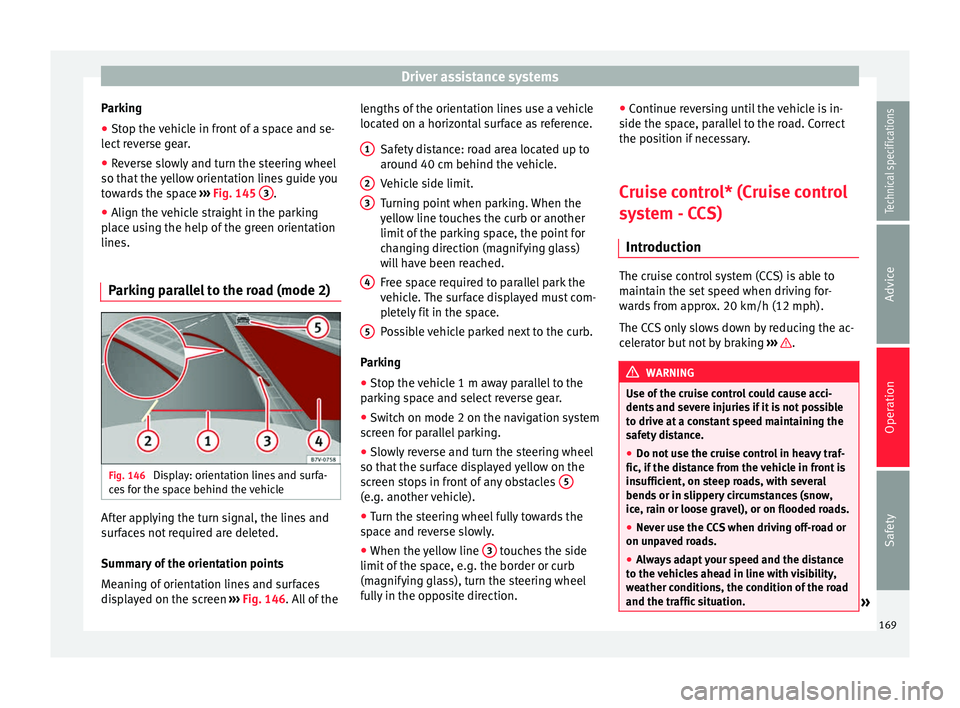
Parking parallel to the road (mode 2) Fig. 146
Display: orientation lines and surfa-
ces for the space behind the vehicle After applying the turn signal, the lines and
surfaces not required are deleted.
Summary of the orientation points
Meaning of orientation lines and surfaces
displayed on the screen
››› Fig. 146 . All of the l
en gths of the orientation lines use a vehicle
located on a horizontal surface as reference.
Safety distance: road area located up to
around 40 cm behind the vehicle.
Vehicle side limit.
Turning point when parking. When the
yellow line touches the curb or another
limit of the parking space, the point for
changing direction (magnifying glass)
will have been reached.
Free space required to parallel park the
vehicle. The surface displayed must com-
pletely fit in the space.
Possible vehicle parked next to the curb.
Parking ● Stop the vehicle 1 m away parallel to the
parking space and select reverse gear.
● Switch on mode 2 on the navigation system
screen for parallel parking.
● Slowly reverse and turn the steering wheel
so that the surface displayed yellow on the
screen stops in front of any obstacles 5 (e.g. another vehicle).
●
Turn the steering wheel fully towards the
space and reverse slowly.
● When the yellow line 3 touches the side
limit of the space, e.g. the border or curb
(magnifying glass), turn the steering wheel
fully in the opposite direction. 1 2
3
4
5 ●
Continue reversing until the vehicle is in-
side the space, parallel to the road. Correct
the position if necessary.
Cruise control* (Cruise control
system - CCS) Introduction The cruise control system (CCS) is able to
maintain the set speed when driving for-
wards from approx. 20 km/h (12 mph).
The CCS only slows down by reducing the ac-
celerator but not by braking
››› .
WARNING
Use of the cruise control could cause acci-
dents and severe injuries if it is not possible
to drive at a constant speed maintaining the
safety distance.
● Do not use the cruise control in heavy traf-
fic, if the distance from the vehicle in front is
insufficient, on steep roads, with several
bends or in slippery circumstances (snow,
ice, rain or loose gravel), or on flooded roads.
● Never use the CCS when driving off-road or
on unpaved roads.
● Always adapt your speed and the distance
to the vehicles ahead in line with visibility,
weather conditions, the condition of the road
and the traffic situation. » 169
Technical specifications
Advice
Operation
Safety
Page 173 of 305
Driver assistance systems
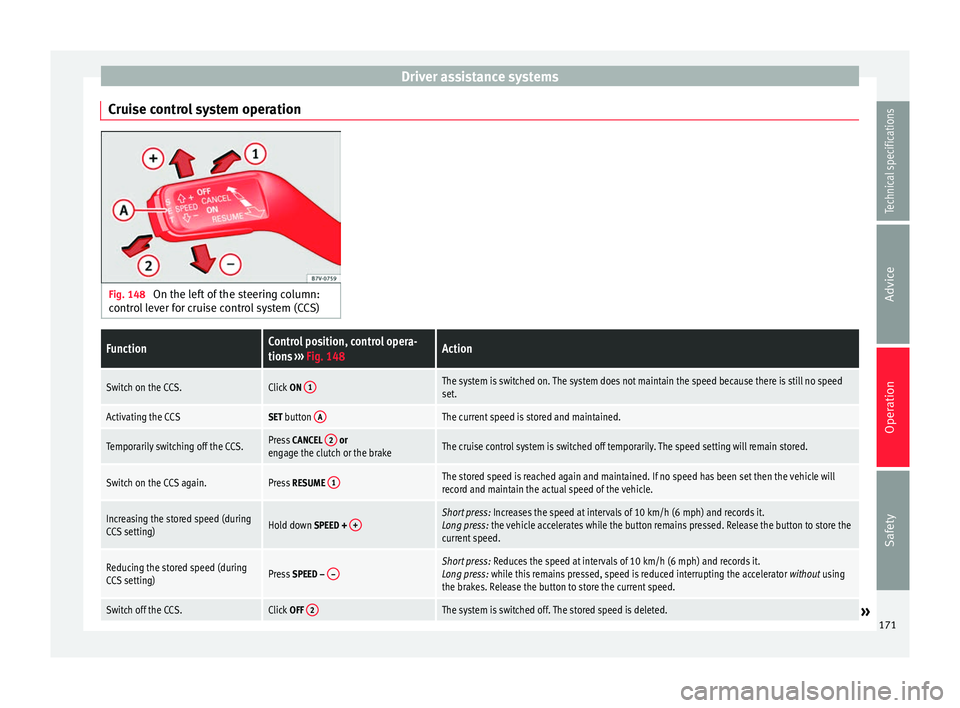
Cruise control system operation Fig. 148
On the left of the steering column:
control lever for cruise control system (CCS)FunctionControl position, control opera-
tions ››› Fig. 148Action
Switch on the CCS.Click ON 1The system is switched on. The system does not maintain the speed because there is still no speed
set.
Activating the CCSSET button AThe current speed is stored and maintained.
Temporarily switching off the CCS.Press
CANCEL 2 or
engage the clutch or the brakeThe cruise control system is switched off temporarily. The speed setting will remain stored.
Switch on the CCS again.Press RESUME 1The stored speed is reached again and maintained. If no speed has been set then the vehicle will
record and maintain the actual speed of the vehicle.
Increasing the stored speed (during
CCS setting)Hold down SPEED + +Short press:
Increases the speed at intervals of 10 km/h (6 mph) and records it.
Long press: the vehicle accelerates while the button remains pressed. Release the button to store the
current speed.
Reducing the stored speed (during
CCS setting)Press SPEED – –Short press:
Reduces the speed at intervals of 10 km/h (6 mph) and records it.
Long press: while this remains pressed, speed is reduced interrupting the accelerator without using
the brakes. Release the button to store the current speed.
Switch off the CCS.Click OFF 2The system is switched off. The stored speed is deleted.» 171
Technical specifications
Advice
Operation
Safety
Page 174 of 305
Operation
Travelling down hills with the CCS
When travelling down hills the CCS cannot
maintain a constant speed. Slow the vehicle
down using the brake pedal and reduce
gears if required.
Automatic off
The cruise control system (CCS) is switched
off automatically or temporarily:
● If the system detects a fault that could af-
fect the working order of the CCS.
● If you increase the stored speed by using
the accelerator for a certain time.
● if the brake or clutch pedal is depressed.
● If you change gears.
● If the airbag is triggered.
Lane Assist system* Introduction WARNING
The intelligent technology in the lane assist
system cannot change the limits imposed by
the laws of physics and by the system itself.
Careless or uncontrolled use of the Lane As-
sist system may cause accidents and injury.
The system is not a replacement for driver
awareness. ●
Always adapt your speed and the distance
to the vehicles ahead in line with visibility,
weather conditions, the condition of the road
and the traffic situation.
● Always keep your hands on the steering
wheel so you can turn it at any time.
● The lane assist system does not detect all
road markings. In some circumstances, the
poor state of the road, structures located on
it or certain objects may be mistakenly recog-
nised as road markings by the lane assist
system. In such situations, switch the lane
assist system off immediately.
● Pay attention to the instructions on the in-
strument panel display and act accordingly to
its requests.
● Always pay attention to the vehicle's sur-
roundings. Note
The lane assist system has been exclusively
developed for driving on asphalted roads. Note
If the lane assist system does not work as de-
scribed in this chapter, do not use it and con-
tact a specialised workshop. Note
If you observe any system malfunction, have
the system checked by a specialised work-
shop. Control lampsBlinks
or
lights up
Possible causeSolution
(yellow)
Lane assist system
connected but in-
active.
The system cannot
clearly detect the
lane. See
page 173,
The lane assist sys-
tem is inactive (con-
trol lamp lit in yel-
low).
(green)
Lane assist system
connected and ac-
tive.–
Several warning and control lamps light up
for a few seconds when the ignition is switch-
ed on, signalling that the function is being
verified. They will switch off after a few sec-
onds.
WARNING
Observe the safety warnings ››› in Control
and warning lamps on page 47. 172