ESP Seat Alhambra 2015 Repair Manual
[x] Cancel search | Manufacturer: SEAT, Model Year: 2015, Model line: Alhambra, Model: Seat Alhambra 2015Pages: 305, PDF Size: 5.46 MB
Page 167 of 305
Driver assistance systems
(25 mph) or close to be perpendicular parking
space at about 20 km an hour (12 mph) then
press the button
.
● The progress bar on the screen of the in-
strument panel shows a display of the rela-
tive distance to be covered.
● When the Park Assist system is turning the
steering wheel of the stopped vehicle the
symbol is also displayed. Press on the
brake pedal so that the steering can turn with
the vehicle at a standstill and thus reduce the
number of manoeuvres.
● A “suitable” parking space length is at
least 1.1 m greater than the length of the ve-
hicle.
● If the results of the park assist system are
not as good after changing the wheels, the
system must memorise the perimeter of the
new wheels. This process is performed auto-
matically while the vehicle is in motion. To
help this process, turn slowly (at less than
20 km/h [12 mph]), e.g. in an empty car park. Leaving a parking space using the
Park Assist system
Driving off
● Switch on the engine.
● Press button . When the function is ena-
bled, the button ››› Fig. 141 will light up.
● Ap p
ly the turn signal for the side on which
you want to leave the parking space. ●
Select reverse gear.
● Follow the instructions given by the park
assist system.
● When the next indication appears, release
the steering wheel ››› in Parking using the
park assist system on page 164 :
The system
w
ill move the steering wheel! Observe the sur-
rounding area.
● Observe the surrounding area and acceler-
ate carefully at a maximum of 7 km/h
(4 mph).
● The park assist system is only
responsible
for moving the steering wheel during the ma-
noeuvre.
The driver applies the accelerator,
the clutch, the gears and the brake.
● When it is possible to leave the parking
space, the Park Assist system will stop. Take
control of the steering and when traffic condi-
tions permit, leave the parking space.
Automatic stoppage of the manoeuvre
The park assist system stops the manoeuvre
in the event of one of the following:
● Driving faster than 7 km/h (4 mph).
● The driver moves the steering wheel.
● A sliding door is opened. To restart the ma-
noeuvre, close the sliding door and press the
button again.
● There is a system malfunction (system tem-
porarily unavailable). ●
The ASR system is switched off or the ASR
or ESC is working. WARNING
The steering wheel turns quickly automatical-
ly when leaving a parking space using the
park assist system. Placing your hand be-
tween the steering wheel spokes could lead
to injuries. Park Assist brake operation
The Park Assist system helps the driver by
braking automatically. Automatic braking
does not relieve the driver of responsibility
for controlling the accelerator, brake and
clutch
››› .
Braking to avoid damage at excess speed
It is possible that the system operates the
brakes to reduce excess speed. The parking
manoeuvre can then continue. The brakes
will intervene during each parking process.
Braking to minimise damage
When approaching an obstacle, the vehicle
may brake automatically. In certain circum-
stances (e.g. storm, detection of ultrasounds,
vehicle status, load, inclination), the Park As-
sist system may stop the vehicle completely
before an object. »
165
Technical specifications
Advice
Operation
Safety
Page 168 of 305
Operation
● Press the foot brake ››› !
Following the intervention of the brakes, the
Park Assist will stop. WARNING
Despite the assistance provided by the park
assist system, do not run any risks when
parking. The system is not a replacement for
driver awareness.
● Always be ready to brake.
● Automatic brake intervention will end after
1.5 seconds approximately. Following auto-
matic intervention of the brakes, stop the ve-
hicle yourself. Rear Assist system*
Introduction The camera fitted to the rear lid helps drivers
during parking or reversing manoeuvres. The
camera image and certain orientation points
generated by the system are indicated on the
factory-fitted radio or navigation system
screen.
Two types of location point (modes) can be
selected:
● Mode 1: reverse parking perpendicular to
the road (e.g. in a car park). ●
Mode 2 : reverse parking parallel to the
c urb
.
The mode can be changed by pressing the
button on the radio or navigation system
screen. Only the mode to which the points
can be changed will be displayed. WARNING
Use of the camera to calculate the distance
from obstacles (people, vehicles, etc.) is inac-
curate and may cause accidents and severe
injuries.
● The camera lens expands and distorts the
field of vision and displays the objects on the
screen in a different, vague manner.
● Some objects may not be displayed or may
not be very clear (e.g. very thin posts or fen-
ces), due to the resolution of the monitor or if
the light is dim.
● The camera has blind spots in which obsta-
cles and people are not detected.
● Keep the camera lens clean and clear of
snow and ice. Do not cover it. WARNING
The intelligent technology in the rear assist
system cannot change the limits imposed by
the laws of physics and by the system itself.
Careless or uncontrolled use of the rear assist
system may result in severe injuries and acci-
dents. The system is not a replacement for
driver awareness. ●
Adjust your speed and driving style to visi-
bility, road, traffic and weather conditions.
● Always keep a close eye on the area around
the vehicle and always look towards where
you are parking. The display shows the path
of the rear end of the vehicle using the cur-
rent steering angle. The front of the vehicle
turns more in comparison with the rear.
● Do not be distracted from the traffic when
looking at the screen.
● Always observe the area around the vehi-
cle, as the cameras do not always detect chil-
dren, animals or objects.
● The system might not show all areas clear-
ly.
● Only use the rear assist system when the
boot hatch is completely closed. CAUTION
● The camera only displays 2D images on the
screen. Due to the lack of depth, it might be
difficult or impossible to recognise protrud-
ing objects or cracks in the road.
● The cameras may not always be able to de-
tect objects such as thin rails, fences, posts
and trees, etc. This could result in damage to
your car. 166
Page 175 of 305
Driver assistance systems
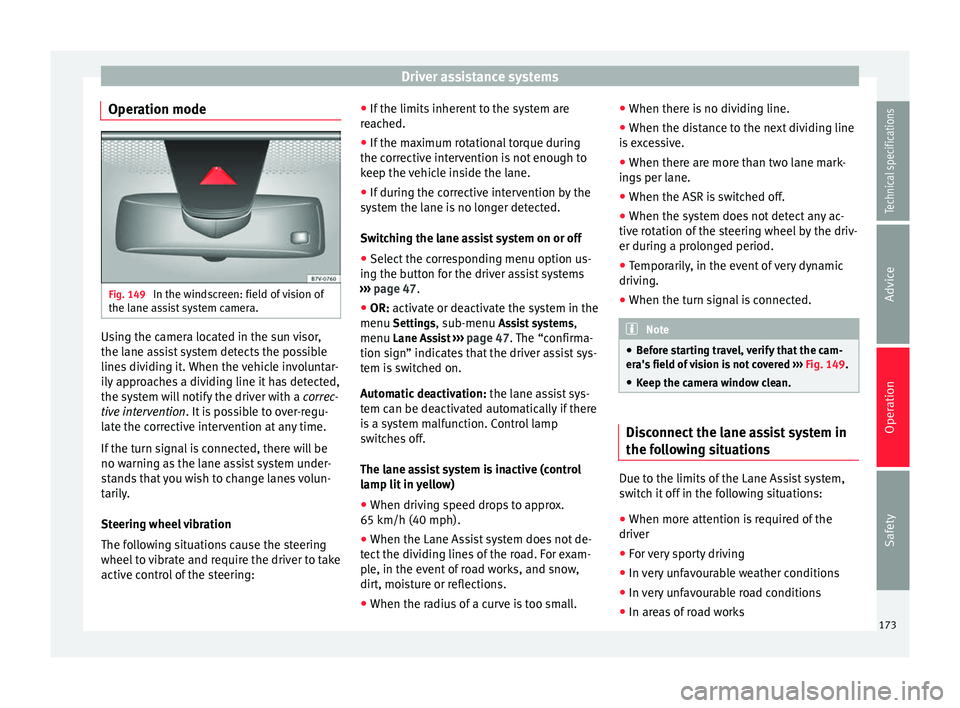
Operation mode Fig. 149
In the windscreen: field of vision of
the lane assist system camera. Using the camera located in the sun visor,
the lane assist system detects the possible
lines dividing it. When the vehicle involuntar-
ily approaches a dividing line it has detected,
the system will notify the driver with a
correc-
tive intervention . It is possible to over-regu-
l at
e the corrective intervention at any time.
If the turn signal is connected, there will be
no warning as the lane assist system under-
stands that you wish to change lanes volun-
tarily.
Steering wheel vibration
The following situations cause the steering
wheel to vibrate and require the driver to take
active control of the steering: ●
If the limits inherent to the system are
reached.
● If the maximum rotational torque during
the corrective intervention is not enough to
keep the vehicle inside the lane.
● If during the corrective intervention by the
system the lane is no longer detected.
Switching the lane assist system on or off
● Select the corresponding menu option us-
ing the button for the driver assist systems
››› page 47.
● OR: activate or deactivate the system in the
menu Setting
s, sub-menu Assist systems ,
menu Lane Assist ››› page 47. The “confirma-
tion sign” indic
ates that the driver assist sys-
tem is switched on.
Automatic deactivation: the lane assist sys-
tem can be deactivated automatically if there
is a system malfunction. Control lamp
switches off.
The lane assist system is inactive (control
lamp lit in yellow)
● When driving speed drops to approx.
65 km/h (40 mph).
● When the Lane Assist system does not de-
tect the dividing lines of the road. For exam-
ple, in the event of road works, and snow,
dirt, moisture or reflections.
● When the radius of a curve is too small. ●
When there is no dividing line.
● When the distance to the next dividing line
is excessive.
● When there are more than two lane mark-
ings per lane.
● When the ASR is switched off.
● When the system does not detect any ac-
tive rotation of the steering wheel by the driv-
er during a prolonged period.
● Temporarily, in the event of very dynamic
driving.
● When the turn signal is connected. Note
● Before starting travel, verify that the cam-
era's field of vision is not covered ››› Fig. 149.
● Keep the c
amera window clean. Disconnect the lane assist system in
the following situations
Due to the limits of the Lane Assist system,
switch it off in the following situations:
● When more attention is required of the
driver
● For very sporty driving
● In very unfavourable weather conditions
● In very unfavourable road conditions
● In areas of road works
173
Technical specifications
Advice
Operation
Safety
Page 176 of 305
Operation
Sign Assist* Introduction Sign Assist can help the driver with informa-
tion on speed limits or if overtaking is pro-
hibited at that moment. The traffic signs and
additional information detected by the sys-
tem is represented in the dash panel display
and in the visual presentation of the naviga-
tion system map.
Applicable countries:
Sign Assist is accepted in the following coun-
tries:
Andorra, Belgium, Denmark, Germany, Fin-
land, France, Ireland, Italy, Liechtenstein,
Luxembourg, Monaco, Netherlands, Norway,
Austria, Poland, Portugal, San Marino, Swe-
den, Switzerland, Spain, Czech Republic, Uni-
ted Kingdom, Vatican City.
WARNING
The traffic signs and instructions shown by
Sign Assist may differ from the current traffic
situation.
● The signs and highway code rules always
take precedence over the instructions and
display of Sign Assist.
● Adjust your speed and driving style to visi-
bility, road, traffic and weather conditions. ●
The system cannot always detect or cor-
rectly show all the traffic signs. WARNING
The traffic sign detection is not a replacement
for driver awareness.
● Adverse conditions of visibility, darkness,
snow, rain and fog can cause the system not
to show the traffic signs or to show them er-
roneously. CAUTION
● If old mapping data is used in the naviga-
tion system, this may cause the traffic signs
to be shown incorrectly.
● In the route points mode (navigation by
route points) of the navigation system, Sign
Assist is only partly available. Indication on display
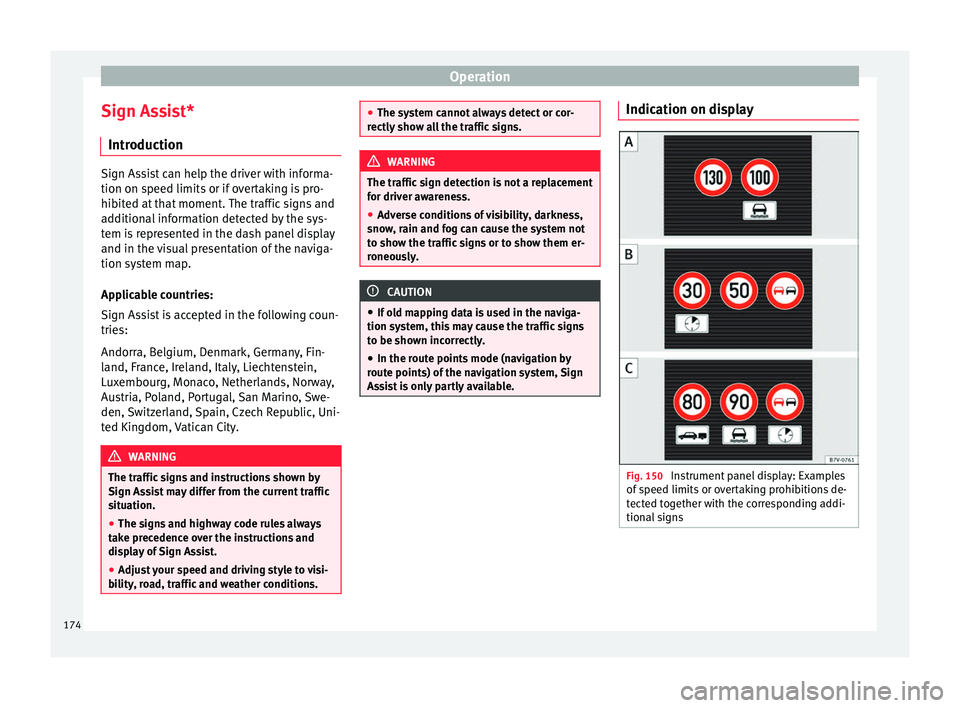
Fig. 150
Instrument panel display: Examples
of speed limits or overtaking prohibitions de-
tected together with the corresponding addi-
tional signs 174
Page 177 of 305
Driver assistance systemsDisplay text of
Sign Assist on
the instrument
panelCause and solution
Error: Sign AssistSystem fault.
Have the system checked by a
specialised workshop.
Sign Assist: Clean the
windscreen!The windscreen is dirty in the
area of the camera.
Clean the windscreen.
Sign Assist: only
partly available at the
moment.No data is being transmitted
from the navigator.
Connect the navigator and in-
sert the navigation data medi-
um.
ALTERNATIVELY: Sign Assist is
not supported in the country in
which you are driving at this
time. WARNING
If the warning lamps and messages are ignor-
ed, the vehicle may stall in traffic, or may
cause accidents and severe injuries.
● Never ignore the warning lamps or text
messages.
● Stop the vehicle safely as soon as possible. CAUTION
Failure to heed the control lamps and text
messages when they appear may result in ve-
hicle faults. Operation mode
Sign Assist does not work in all countries.
This must be taken into account when travel-
ling abroad.
Display of traffic signs
Speed limits or overtaking prohibitions to-
gether with the corresponding additional
signs are shown on the instrument panel dis-
play
››› Fig. 150. Depending on the naviga-
tion sy s
tem installed in the vehicle, traffic
signs will be shown as above and also in the
navigation system's map display.
When Sign Assist is connected, the vehicle
records the traffic signs with a camera in the
base of the interior rear vision mirror. After
checking and evaluating the information
from the camera, the navigation system and
the current vehicle data, up to three valid
traffic signs are displayed in conjunction with
the corresponding additional signs. The traf-
fic sign that is currently valid for the driver is
shown first, in the left side of the screen. A
traffic sign of only limited validity,
e.g. 90 km/h
(56 mph) is shown second, to-
gether with the additional sign “if the road is
wet”. If the vehicle's rain sensor detects rain
during travel, the traffic sign valid at this mo-
ment will move to the first position along the
additional sign “if the road is wet”.
The permanent display on the instrument
panel screen is shown as you pass the real traffic signs. The signs for entering and leav-
ing towns activate the display of the usual
speed limits for that country on roads in
populated areas and national highways, even
if the speed is not limited by an actual traffic
sign.
The end of a prohibition or limitation is not
displayed. If you exceed the speed limits
shown, a warning will not appear. The system
does not detect areas with little traffic. The
current legal provisions apply.
Connection and disconnection
● Connect or disconnect the assist system in
the Settings menu in the SEAT information
system ››› page 47.
● OR: press the button for the driver assist
sy s
tems on the main beam lever.
Trailer
Connect or disconnect the secondary display
for speed limits and overtaking bans that ap-
ply to trailers (trailer mode) in the Settings
menu in the SEAT information system
››› page 47.
175
Technical specifications
Advice
Operation
Safety
Page 178 of 305
Operation
Tiredness detection
(recommendation to take a
break) Introduction WARNING
Do not let the extra convenience afforded by
the tiredness detection function tempt you
into taking any risks when driving. When
making long trips, conveniently long breaks
must be taken.
● The driver is responsible for determining
their capacity to drive.
● Never drive when tired.
● The system does not always detect the
tiredness of the driver. Please read the infor-
mation provided in the section ››› page 176,
Limited operation.
● In some s it
uations the system may incor-
rectly interpret an intended manoeuvre as a
sign of tiredness of the driver.
● In the event of the an episode called “mi-
crosleep” at the wheel, a strong warning is
not in place!
● Observe the indications on the display of
the instrument panel and act in accordance
with them. Note
● The tiredness detection function has only
been designed for driving on motorways and
wide roads.
● If there is a fault in the system, refer to a
Specialised workshop to have the system in-
spected. Function and operation
Fig. 151
On the instrument panel display:
tiredness detection symbol The tiredness detection function registers the
behaviour of the driver at the wheel at the
beginning of a journey and, using this, evalu-
ates the tiredness. This is continually com-
pared with the current behaviour at the
wheel. If the system detects that the driver is
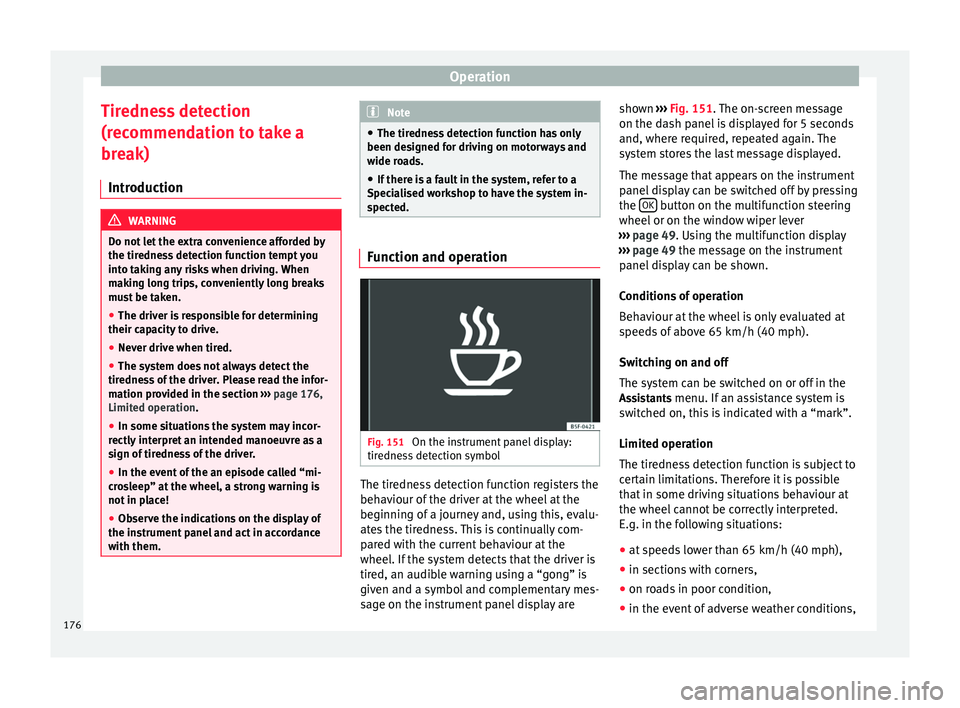
tired, an audible warning using a “gong” is
given and a symbol and complementary mes-
sage on the instrument panel display areshown
››› Fig. 151 . The on-screen message
on the d a
sh panel is displayed for 5 seconds
and, where required, repeated again. The
system stores the last message displayed.
The message that appears on the instrument
panel display can be switched off by pressing
the OK button on the multifunction steering
wheel or on the window wiper lever
››› page 49 . Using the multifunction display
› ›
› page 49 the message on the instrument
panel
display can be shown.
Conditions of operation
Behaviour at the wheel is only evaluated at
speeds of above 65 km/h (40 mph).
Switching on and off
The system can be switched on or off in the
Assistants menu. If an assistance system is switched on, this is indicated with a “mark”.
Limited operation
The tiredness detection function is subject to
certain limitations. Therefore it is possible
that in some driving situations behaviour at
the wheel cannot be correctly interpreted.
E.g. in the following situations:
● at speeds lower than 65 km/h (40 mph),
● in sections with corners,
● on roads in poor condition,
● in the event of adverse weather conditions,
176
Page 180 of 305
Operation
Elements of the tyre monitoring
indicatorTyre monitoring indicator with button.
See ››› page 179.
Control lamp on the instrument panel.
SET button on the centre console.
Monitoring the tread of all tyres using ABS sensors
(indirect measurement).
Adjustable medium and full-load tyre pressures.
Button to update the system when the tyre pressure is
changed. Control lamp
Lights
up or
flashesPossible causeSolution
The tyre pressure
of a wheel has
dropped consider-
ably in relation to
the pressure set
by the driver
››› page 179.
Stop the vehicle!
Reduce your speed im-
mediately! Stop the ve-
hicle safely as soon as
possible. Avoid sud-
den manoeuvres and
braking!
Check all tyres and
pressures. Replace any
damaged tyres.
Lights
up or
flashesPossible causeSolution
System malfunc-
tion.
Consult a specialised
workshop if the tyre
pressure is correct and
the lamp remains lit af-
ter switching the igni-
tion off and back on
again. Have the sys-
tem checked there.
Several warning and control lamps light up
for a few seconds when the ignition is switch-
ed on, signalling that the function is being
verified. They will switch off after a few sec-
onds.
WARNING
Observe the safety warnings ››› in Control
and warning lamps on page 47. WARNING
When the tyres are inflated at different pres-
sures or at a pressure that is too low then a
tyre may be damaged resulting in a loss of
control of the vehicle and a serious or fatal
accident.
● If the warning lamp lights up, stop im-
mediately and check the tyres.
● If the tyres are inflated at different pres-
sures or if a tyre pressure is too low, this will
increase tyre wear, negatively affecting vehi- cle stability and increasing braking distan-
ces.
●
If tyres are inflated at different pressures or
a tyre pressure is too low, a tyre may be dam-
aged and burst resulting in a loss of control
of the vehicle.
● The driver is responsible for ensuring that
all of the vehicle tyres are correctly inflated
to the right pressure. The recommended tyre
pressure is indicated on the label ››› Fig. 175.
● The ty r
e monitoring system can only oper-
ate correctly if all of the tyres are inflated to
the correct pressure when cold.
● Driving with tyres at the wrong pressure
can damage them and result in an accident.
Ensure that the tyre pressures of all the tyres
correspond to the vehicle load.
● Before starting a journey, always inflate
tyres to the correct pressure.
● If tyre pressure is too low then the tyre is
subject to greater forces and it may be heated
to such an extent that the tread can rupture
and the tyre will burst.
● With an overloaded vehicle at high speed,
the tyres can overheat and burst resulting in
a loss of vehicle control.
● Tyre pressures which are too high or too
low reduce the useful life of the tyre, affect-
ing vehicle performance.
● If a tyre has not been “punctured” and does
not have to be changed immediately, drive to
the nearest specialised workshop at a moder-
ate speed and have the tyre checked and in-
flated to the correct pressure. 178
Page 183 of 305
Towing bracket device
Bumper mounted tow hitch
Never fit a tow hitch or its attachments to the
bumper. A tow hitch should never interfere
with the bumper performance. Do not modify
the exhaust system and brake system. Regu-
larly check the tow hitch to ensure it is firmly
fitted.
Engine cooling system
Driving with a trailer increases the load on
the engine and cooling system. The cooling
system should always have sufficient coolant
and to be able to cope with the vehicle and
trailer.
Electric trailer brake
If the trailer has its own braking system,
please note the relevant legal requirements.
The trailer braking system should never be
connected to the vehicle braking system.
Trailer cable
Always use a cable between the vehicle and
the trailer ››› page 183 .
T r
ailer rear lights
The rear lights of a trailer must fulfil the cor-
responding standards ››› page 183.
Never connect the trailer's rear lights directly
to the vehicle electric system. In case of any
doubt about the electrical connection of the trailer, ask a specialised workshop. SEAT rec-
ommends visiting a technical service.
Wing mirrors
When the field of vision behind the trailer
cannot be seen using the standard wing mir-
rors of the towing vehicle, additional wing
mirrors are required according to the legal re-
quirements of each country. The wing mirrors
must be fitted before driving and must pro-
vide a sufficient field of vision behind.
Trailer electricity consumption
Never exceed the specifications:
DevicesMaximum power
Side lights and rear lights50 Watts
Turn signal (each side)54 Watts
Brake lights (total)84 Watts
Reversing lights (total)42 Watts
Rear fog light42 Watts
WARNING
If the tow hitch is badly fitted or unsuitable,
the trailer may separate from the vehicle
causing an accident with serious consequen-
ces. CAUTION
● If the rear lights of the trailer are not cor-
rectly connected, the vehicle electronics may
be damaged.
● If the trailer absorbs excessive electric cur-
rent, the vehicle electronics may be dam-
aged.
● Never connect the trailer's electric system
to the electrical connections of the rear lights
or any other power sources. Only use suitable
connections for providing electric current to
the trailer. Note
● Towing a trailer places additional demands
on the vehicle. At SEAT, we recommend addi-
tional services between the normal inspec-
tion intervals if the vehicle is used frequently
for towing a trailer.
● In some countries, an additional fire extin-
guisher is required if the trailer weight is
more than 2500 kg 181
Technical specifications
Advice
Operation
Safety
Page 186 of 305
Operation
If the system detects that a trailer has been
connected electrically, the electrical equip-
ment on the trailer will receive voltage
through this connection (pins 9 and 10). Pin
9 has a permanent live. This powers, for ex-
ample, the trailer's interior lighting. Electrical
devices such as a fridge in a caravan only re-
c eiv
e electrical power if the engine is running
(through pin 10).
The earth wires, pin 3 and pin 13, should not
be connected to each other to avoid over-
loading the electrical system.
If the trailer has a 7-contact connector , you
will need to use an adapter cable. In this case
the function corresponding to pin 10 will not
be available.
Trailer cable
Always secure the trailer cable to the towing
vehicle correctly. Leave a little bit of slack in
the cable for turning. However, ensure that
the cable does not rub off the ground while
driving.
Trailer rear lights
Check the trailer rear lights to ensure they
work correctly and remain legal. Ensure that
the trailer does not use more than the maxi-
mum power ›››
page 181. Tr
ailer connected to the anti-theft alarm:
● When a vehicle comes from the factory fit-
ted with an anti-theft alarm and tow hitch.
● When the trailer is connected to the vehicle
using the socket.
● When the vehicle and trailer electrical sys-
tems work correctly and are not damaged.
● When the vehicle is locked using the vehi-
cle key and the anti-theft alarm is turned on.
When the vehicle is locked, the alarm is trig-
gered when the electrical connection be-
tween the vehicle and the trailer is removed.
Always turn off the anti-theft alarm system
before connecting or disconnecting a trailer.
Otherwise, the tilt sensor may erroneously
activate the alarm.
Trailer with rear LED lights
For technical reasons, trailers fitted with rear
LED lights cannot be connected to the anti-
theft alarm system.
When the vehicle is locked, the alarm does
not trigger if the electrical connection with
the trailer is cut if it has rear light with light-
emitting diodes. WARNING
Erroneous or unsuitable connection of elec-
tric cables may supply energy to the trailer
causing an anomaly in the vehicle electronics that could result in an accident with serious
consequences.
●
All work on the electrical system must be
carried out only by a specialised workshop.
● Never connect the trailer's electric system
to the electrical connections of the rear lights
or any other power sources. CAUTION
Do not leave the trailer connected to the vehi-
cle when parked; places on its support wheel
or its supports. For example, when changing
the load or a puncture, the vehicle will be
pushed up or down. The force acting on the
tow hitch and the trailer could damage the
vehicle or the trailer. Note
● In the event of a fault in the vehicle or trail-
er electrical system or in the event of prob-
lems with the anti-theft alarm system, have
the system checked by a specialised work-
shop.
● If the trailer accessories use energy from
the power socket when the engine is stop-
ped, the battery will be discharged.
● For technical reasons, trailers fitted with
rear LED lights cannot be connected to the
anti-theft alarm system.
● If the vehicle battery is running low, the
electrical connection with the trailer is auto-
matically cut. 184
Page 188 of 305
Operation
slow down the vehicle. Otherwise, the brak-
ing system could overheat and fail.
● The vehicle centre of gravity and handling
change because of the trailer load and be-
cause of the increased combined mass of the
vehicle and trailer.
● If the towing vehicle is empty and the trail-
er loaded then the load distribution is incor-
rect. If you must travel in these conditions,
drive carefully and reduce your speed accord-
ingly.
Hill starts with a trailer
Depending on the hill and the gross com-
bined weight, it is possible that the com-
bined vehicle and trailer move backwards
slightly when starting.
For a hill start with a trailer, proceed as fol-
lows:
● Press and hold the brake pedal.
● Press the button once to turn off the
electric parking brake ››› page 137.
● Press and hold the button to hold the
vehicle and trailer combination using the
parking brake.
● With a manual gearbox: press the clutch
pedal to the floor.
● Engage first gear or the gear range D
››› page 143, Changing gear .
● Rel
ease the brake pedal. ●
Move off slowly. To do this, gently release
the clutch pedal (for manual gearbox).
● Release the button only when the en-
gine provides sufficient power to move the
vehicle and trailer combination. WARNING
Jerking the trailer in an unsuitable manner
could cause loss of vehicle control with the
subsequent serious consequences.
● Driving with a trailer and transporting
heavy or a large objects will change the vehi-
cle handling and braking distances.
● Anticipate traffic and be extremely cau-
tious. Brake early.
● Adjust your speed and driving style to visi-
bility, road, traffic and weather conditions.
Reduce your speed, especially on steep hills.
● Accelerate gently and carefully. Avoid brus-
que manoeuvres and sudden braking.
● Always take the following precautions seri-
ously. Reduce your speed immediately if you
observe the trailer rocking from side to side.
● Never try to stop the “snaking” by increas-
ing speed.
● Always take the speed limits for vehicles
with and without trailers in each country into
account. Stabilising the vehicle and trailer
combination
Stabilisation of the vehicle and trailer combi-
nation is an extension of the electronic sta-
bility control (ESC) and helps, with the assis-
tance of the trajectory control, to reduce trail-
er “snaking”.
Stabilisation of the vehicle and trailer combi-
nation is active when the ESC
indicator on
the d a
sh panel remains lit for about two sec-
onds more than the ABS indicator.
Requirements for stabilising the
vehicle/trailer combination
● An original tow hitch is fitted by the manu-
facturer or a compatible model is retrofitted.
● The ECS is switched on. The warning lamp
on the dash panel is not lit.
● The trailer is connected to the vehicle using
the power socket.
● It travels faster than 60 km/h (37 mph).
● The maximum drawbar load is used.
● The trailer must have a fixed drawbar.
● Trailers with brakes must be equipped with
a mechanical inertia brake. WARNING
Do not let the extra safety afforded by the
stabilisation system tempt you into taking
any risks when driving. 186