radio Seat Alhambra 2016 Owner's Manual
[x] Cancel search | Manufacturer: SEAT, Model Year: 2016, Model line: Alhambra, Model: Seat Alhambra 2016Pages: 324, PDF Size: 5.93 MB
Page 28 of 324
The essentials
Windscreen wipers and window wiper
b l
a
de Fig. 44
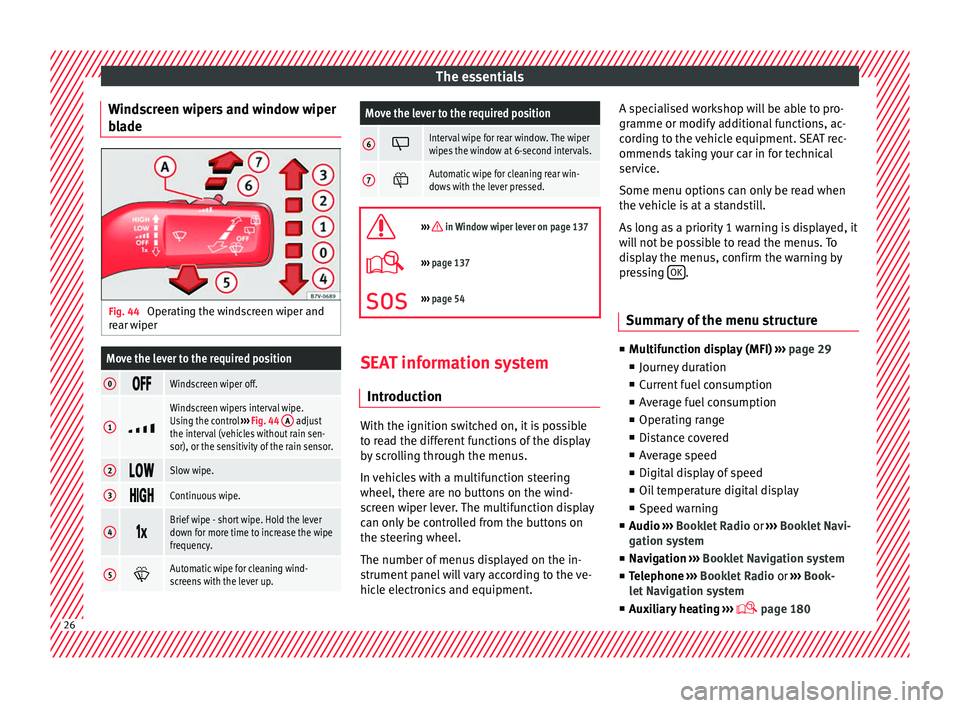
Operating the windscreen wiper and
r e
ar w
iper
Move the lever to the required position
0 Windscreen wiper off.
1
Windscreen wipers interval wipe.
Using the control
››› Fig. 44 A adjust
the interval (vehicles without rain sen-
sor), or the sensitivity of the rain sensor.
2 Slow wipe.
3
Continuous wipe.
4
Brief wipe - short wipe. Hold the lever
down for more time to increase the wipe
frequency.
5
Automatic wipe for cleaning wind-
screens with the lever up.
Move the lever to the required position
6 Interval wipe for rear window. The wiper
wipes the window at 6-second intervals.
7
Automatic wipe for cleaning rear win-
dows with the lever pressed.
››› in Window wiper lever on page 137
›››
page 137
››› page 54 SEAT information system
Intr oduction With the ignition switched on, it is possible
t
o r
e
ad the different functions of the display
by scrolling through the menus.
In vehicles with a multifunction steering
wheel, there are no buttons on the wind-
screen wiper lever. The multifunction display
can only be controlled from the buttons on
the steering wheel.
The number of menus displayed on the in-
strument panel will vary according to the ve-
hicle electronics and equipment. A specialised workshop will be able to pro-
gramme or modify
additional functions, ac-
cording to the vehicle equipment. SEAT rec-
ommends taking your car in for technical
service.
Some menu options can only be read when
the vehicle is at a standstill.
As long as a priority 1 warning is displayed, it
will not be possible to read the menus. To
display the menus, confirm the warning by
pressing OK .
Summary of the menu structure ■
Mu ltif
unction display (MFI) ››› page 29
■ Journey duration
■ Current fuel consumption
■ Average fuel consumption
■ Operating range
■ Distance covered
■ Average speed
■ Digital display of speed
■ Oil temperature digital display
■ Speed warning
■ Audio ›››
Booklet Radio or ›››
Booklet Navi-
gation system
■ Navigation ›››
Booklet Navigation system
■ Telephone ›››
Booklet Radio or ›››
Book-
let Navigation system
■ Auxiliary heating ›››
page 18026
Page 30 of 324
The essentials
Using the menus on the instrument
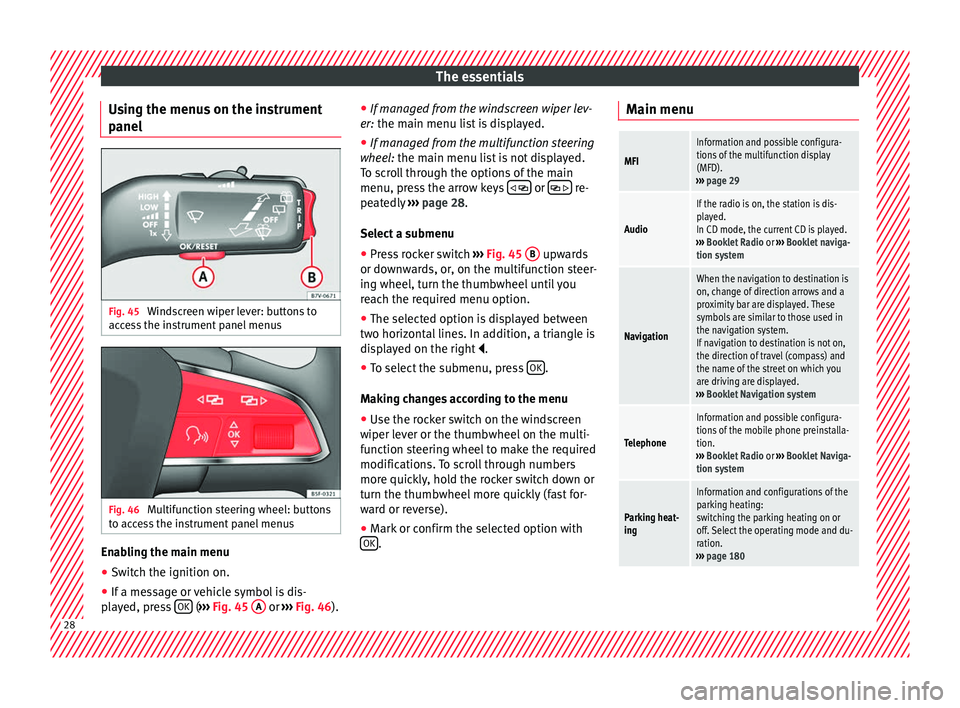
p anel Fig. 45
Windscreen wiper lever: buttons to
ac c
e
ss the instrument panel menus Fig. 46
Multifunction steering wheel: buttons
t o ac
c
ess the instrument panel menus Enabling the main menu
● Switch the ignition on.
● If a message or vehicle symbol is dis-
p l
a
yed, press OK (
››
› Fig. 45 A or
››
› Fig. 46 ).●
If managed fr
om the windscreen wiper lev-
er: the main menu list is displayed.
● If managed from the multifunction steering
wheel:
the main menu list is not displayed.
To scroll through the options of the main
menu, press the arrow keys or
re-
pe at
edly
››› page 28.
Select a submenu ● Press rocker switch ›››
Fig. 45 B upwards
or do wn
w
ards, or, on the multifunction steer-
ing wheel, turn the thumbwheel until you
reach the required menu option.
● The selected option is displayed between
two horizont
al lines. In addition, a triangle is
displayed on the right .
● To select the submenu, press OK .
M ak
in
g changes according to the menu
● Use the rocker switch on the windscreen
wiper lev
er or the thumbwheel on the multi-
function steering wheel to make the required
modifications. To scroll through numbers
more quickly, hold the rocker switch down or
turn the thumbwheel more quickly (fast for-
ward or reverse).
● Mark or confirm the selected option with
OK .Main menu
MFI
Information and possible configura-
tions of the multifunction display
(MFD).
››› page 29
Audio
If the radio is on, the station is dis-
played.
In CD mode, the current CD is played.
››› Booklet Radio or ››› Booklet naviga-
tion system
Navigation
When the navigation to destination is
on, change of direction arrows and a
proximity bar are displayed. These
symbols are similar to those used in
the navigation system.
If navigation to destination is not on,
the direction of travel (compass) and
the name of the street on which you
are driving are displayed.
››› Booklet Navigation system
Telephone
Information and possible configura-
tions of the mobile phone preinstalla-
tion.
››› Booklet Radio or ››› Booklet Naviga-
tion system
Parking heat-
ing
Information and configurations of the
parking heating:
switching the parking heating on or
off. Select the operating mode and du-
ration.
››› page 180 28
Page 35 of 324
The essentials
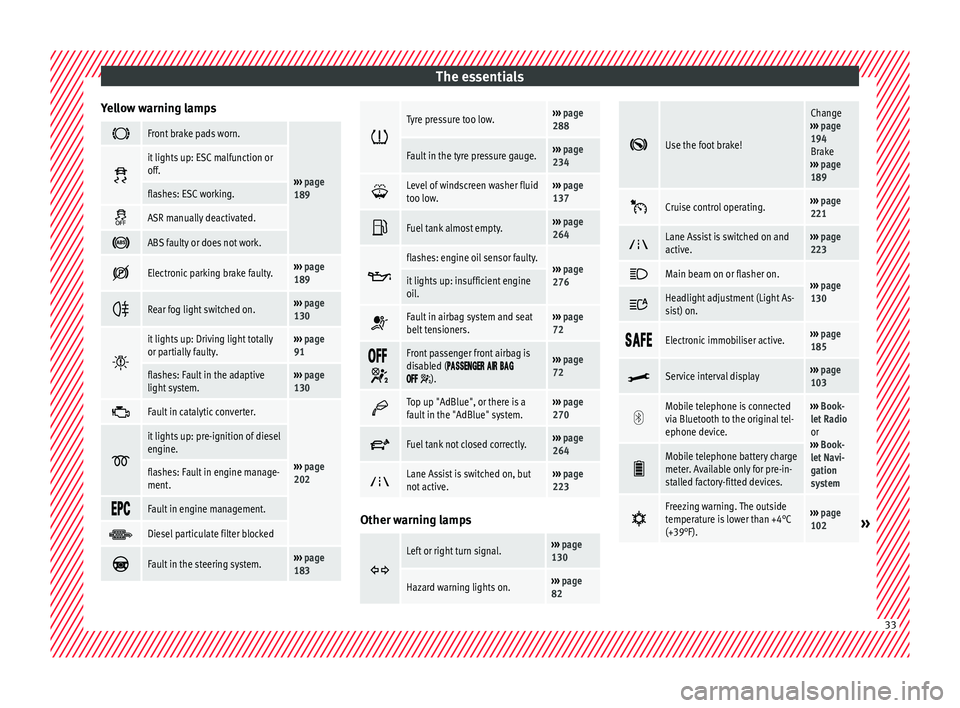
Yellow warning lamps Front brake pads worn.
›››
page
189
it lights up: ESC malfunction or
off.
flashes: ESC working.
ASR manually deactivated.
ABS faulty or does not work.
Electronic parking brake faulty.›››
page
189
Rear fog light switched on.›››
page
130
it lights up: Driving light totally
or partially faulty.›››
page
91
flashes: Fault in the adaptive
light system.››› page
130
Fault in catalytic converter.
›››
page
202
it lights up: pre-ignition of diesel
engine.
flashes: Fault in engine manage-
ment.
Fault in engine management.
Diesel particulate filter blocked
Fault in the steering system.›››
page
183
Tyre pressure too low.›››
page
288
Fault in the tyre pressure gauge.››› page
234
Level of windscreen washer fluid
too low.›››
page
137
Fuel tank almost empty.›››
page
264
flashes: engine oil sensor faulty.›››
page
276it lights up: insufficient engine
oil.
Fault in airbag system and seat
belt tensioners.›››
page
72
Front passenger front airbag is
disabled (
).
››› page
72
Top up "AdBlue", or there is a
fault in the "AdBlue" system.›››
page
270
Fuel tank not closed correctly.›››
page
264
Lane Assist is switched on, but
not active.›››
page
223 Other warning lamps
Left or right turn signal.›››
page
130
Hazard warning lights on.››› page
82
Use the foot brake!
Change
››› page
194
Brake
››› page
189
Cruise control operating.›››
page
221
Lane Assist is switched on and
active.›››
page
223
Main beam on or flasher on.›››
page
130 Headlight adjustment (Light As-
sist) on.
Electronic immobiliser active.›››
page
185
Service interval display›››
page
103
Mobile telephone is connected
via Bluetooth to the original tel-
ephone device.›››
Book-
let Radio
or
››› Book-
let Navi-
gation
system
Mobile telephone battery charge
meter. Available only for pre-in-
stalled factory-fitted devices.
Freezing warning. The outside
temperature is lower than +4°C
(+39°F).›››
page
102» 33
Page 101 of 324
General instrument panel
Operation
Gener a
l
instrument panel
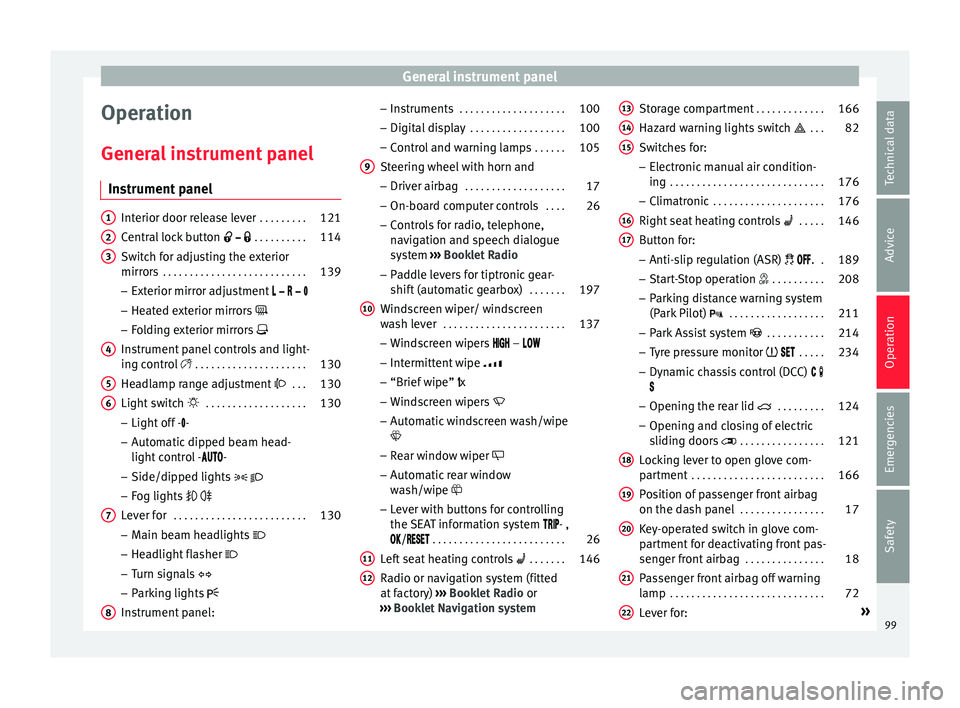
Instrument panel Interior door release lever
. . . . . . . . .121
Central lock button . . . . . . . . . . 114
Switch for adjusting the exterior
mirror s . . . . . . . . . . . . . . . . . . . . . . . . . . . 139
– Exterior mirr or a
djustment
– Heated exterior mirrors
– Folding exterior mirrors
Instrument panel controls and light-
ing control . . . . . . . . . . . . . . . . . . . . . 130
Headlamp range adjustment . . . 130
Light switch . . . . . . . . . . . . . . . . . . . 130
– Light off - -
– Aut
omatic dipped beam head-
light control - -
– Side/dipped lights
– Fog lights
Lever for . . . . . . . . . . . . . . . . . . . . . . . . . 130
– Main beam he
adlights
– Headlight flasher
– Turn signals
– Parking lights
Instrument panel:
1 2
3
4
5
6
7
8 –
Ins
truments . . . . . . . . . . . . . . . . . . . . 100
– Digit
al di
splay . . . . . . . . . . . . . . . . . . 100
– Contro
l and warning lamps . . . . . .105
Steering wheel with horn and
– Driver airbag . . . . . . . . . . . . . . . . . . . 17
– On-bo
ard c
omputer controls . . . .26
– Contro
ls for radio, telephone,
navigation and speech dialogue
system ››› Booklet Radio
– Paddle levers for tiptronic gear-
shift (automatic gearbox) . . . . . . .197
Windscreen wiper/ windscreen
wash l
ever . . . . . . . . . . . . . . . . . . . . . . . 137
– Wind s
creen wipers –
– Intermittent wipe
– “Brief wipe” x
– Windscreen wipers
– Automatic windscreen wash/wipe
– Rear window wiper
– Automatic rear window
wash/wipe
– Lever with buttons for controlling
the SEAT information system - ,
/ . . . . . . . . . . . . . . . . . . . . . . . . . 26
Left seat heating controls . . . . . . . 146
Radio or navigation system (fitted
at fact
ory) ››› Booklet Radio or
››› Booklet Navigation system
9
10
11
12 Storage compartment
. . . . . . . . . . . . .166
Hazard warning lights switch . . . 82
Switches for:
– Electr
onic
manual air condition-
ing . . . . . . . . . . . . . . . . . . . . . . . . . . . . . 176
– Climatr
onic . . . . . . . . . . . . . . . . . . . . . 176
Right seat heating controls . . . . . 146
Button for:
– Anti-slip r
egulation (ASR) . .189
– Start
-Stop operation . . . . . . . . . .208
– Park in
g distance warning system
(Park Pilot) . . . . . . . . . . . . . . . . . . 211
– Park As
sist system . . . . . . . . . . . 214
– Tyr
e pressure monitor . . . . .234
– Dyn
amic chassis control (DCC)
– Opening the rear lid . . . . . . . . .124
– Opening and clo
sing of electric
sliding doors . . . . . . . . . . . . . . . . 121
Locking lever to open glove com-
par tment . . . . . . . . . . . . . . . . . . . . . . . . . 166
P
osition of passenger front airbag
on the dash p
anel . . . . . . . . . . . . . . . . 17
Key-operated switch in glove com-
partment
for deactivating front pas-
senger front airbag . . . . . . . . . . . . . . .18
Passenger front airbag off warning
lamp . . . . . . . . . . . . . . . . . . . . . . . . . . . . . 72
L ev
er for: »
13 14
15
16
17
18
19
20
21
22
99
Technical data
Advice
Operation
Emergencies
Safety
Page 108 of 324
Operation
Communications and multi-
medi a
St eerin
g wheel controls*
General information The vehicle includes a multifunction module
from wher
e it
is possible to control the audio,
telephone and radio/navigation functions
without needing to distract the driver.
There are two versions of the multifunction
module:
● Audio version, to control the available au-
dio fu nction
s from the steering wheel (Radio,
audio CD, MP3 CD, iPod ®1)
, USB 1)
).
● Audio + telephone versions o control the
avail
able audio functions from the steering
wheel (Radio, audio CD, MP3 CD, iPod ®1)
,
USB 1)
, SD 1)
) and the Bluetooth system. 1)
Depending on the vehicle equipment.
106
Page 109 of 324
Communications and multimedia
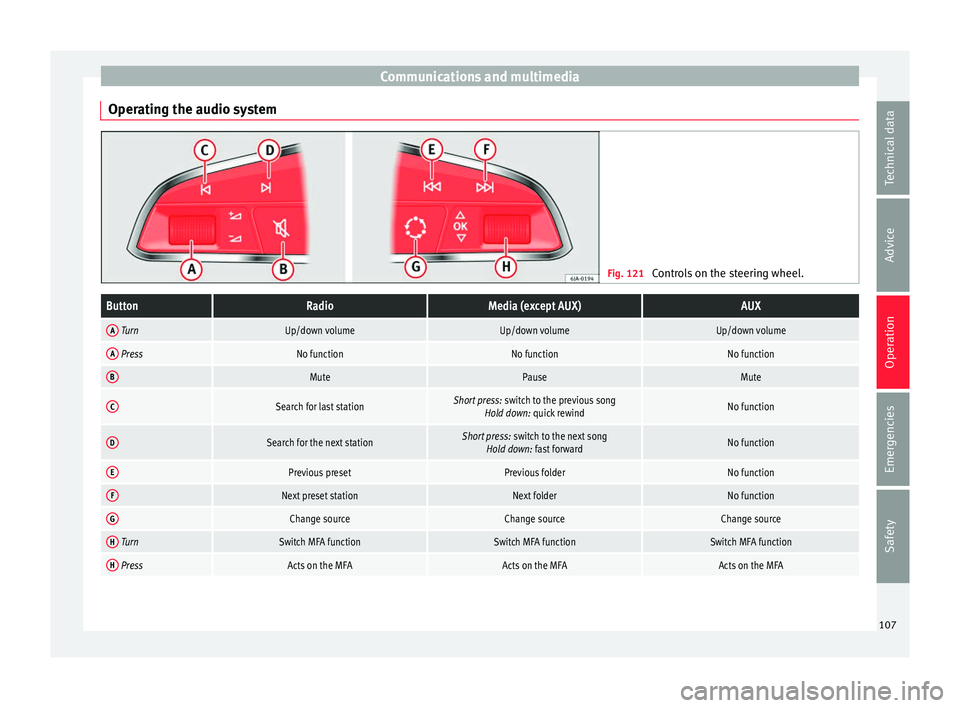
Operating the audio system Fig. 121
Controls on the steering wheel.ButtonRadioMedia (except AUX)AUX
A TurnUp/down volumeUp/down volumeUp/down volume
A PressNo functionNo functionNo function
BMutePauseMute
CSearch for last stationShort press: switch to the previous song
Hold down: quick rewindNo function
DSearch for the next stationShort press: switch to the next song
Hold down: fast forwardNo function
EPrevious presetPrevious folderNo function
FNext preset stationNext folderNo function
GChange sourceChange sourceChange source
H TurnSwitch MFA functionSwitch MFA functionSwitch MFA function
H PressActs on the MFAActs on the MFAActs on the MFA 107
Technical data
Advice
Operation
Emergencies
Safety
Page 110 of 324
Operation
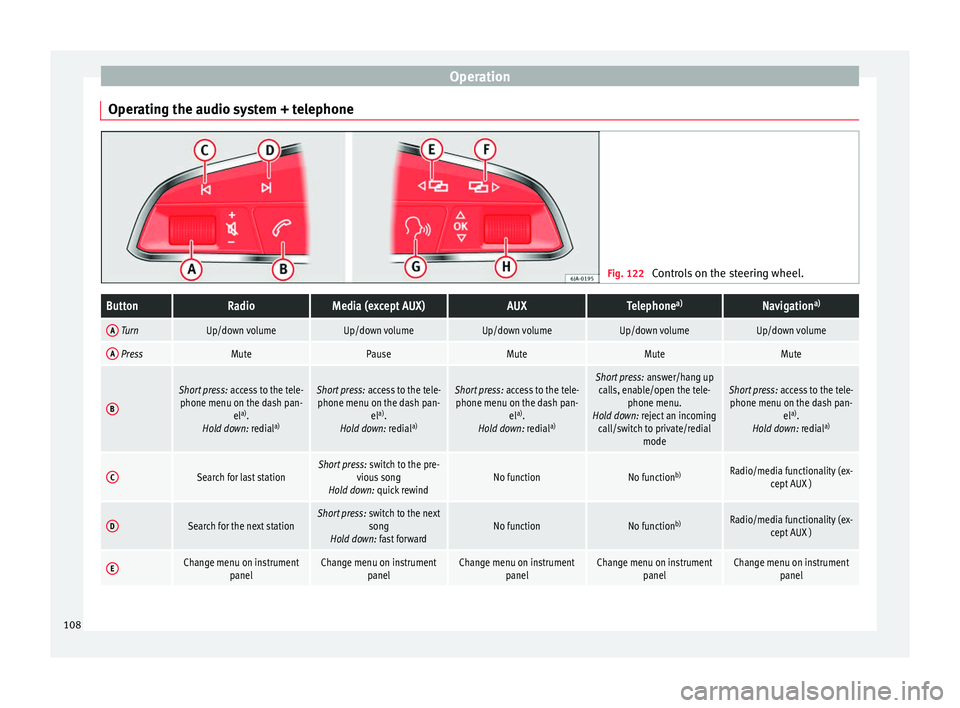
Operating the audio system + telephone Fig. 122
Controls on the steering wheel.ButtonRadioMedia (except AUX)AUXTelephone a)Navigation a)
A TurnUp/down volumeUp/down volumeUp/down volumeUp/down volumeUp/down volume
A PressMutePauseMuteMuteMute
B
Short press:
access to the tele-
phone menu on the dash pan- ela)
.
Hold down: redial a)Short press:
access to the tele-
phone menu on the dash pan- ela)
.
Hold down: redial a)Short press:
access to the tele-
phone menu on the dash pan- ela)
.
Hold down: redial a)Short press:
answer/hang up
calls, enable/open the tele- phone menu.
Hold down: reject an incoming call/switch to private/redial modeShort press: access to the tele-
phone menu on the dash pan- ela)
.
Hold down: redial a)
CSearch for last stationShort press:
switch to the pre-
vious song
Hold down: quick rewindNo functionNo function b)Radio/media functionality (ex-
cept AUX )
DSearch for the next stationShort press: switch to the next
song
Hold down: fast forwardNo functionNo function b)Radio/media functionality (ex-
cept AUX )
EChange menu on instrument panelChange menu on instrumentpanelChange menu on instrumentpanelChange menu on instrumentpanelChange menu on instrumentpanel108
Page 111 of 324
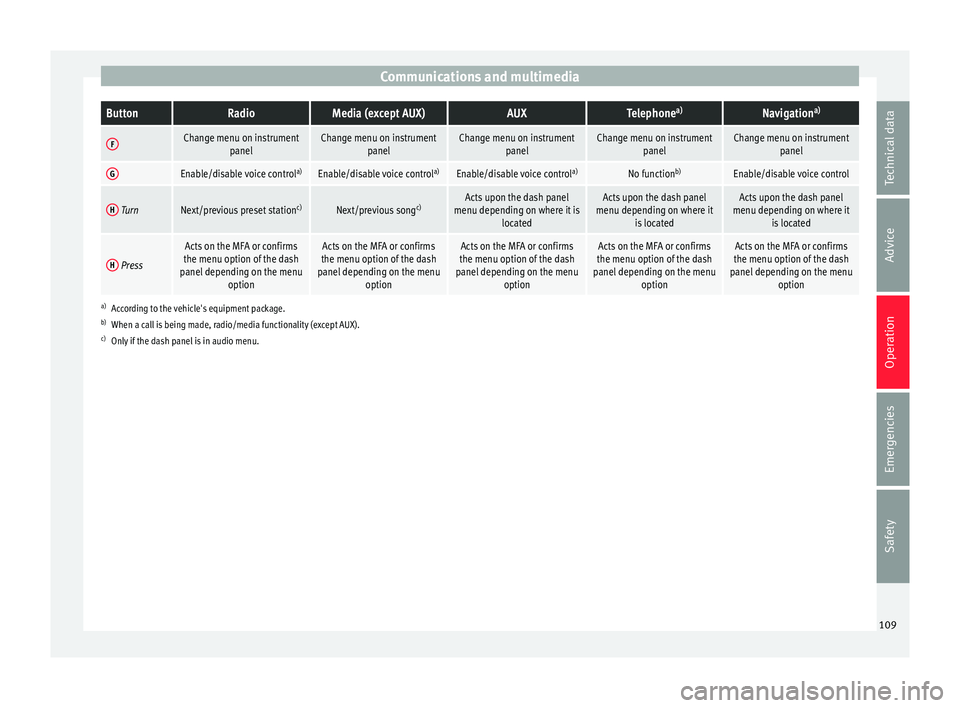
Communications and multimediaButtonRadioMedia (except AUX)AUXTelephone
a)Navigation a)
FChange menu on instrument
panelChange menu on instrumentpanelChange menu on instrumentpanelChange menu on instrumentpanelChange menu on instrumentpanel
GEnable/disable voice control a)Enable/disable voice controla)Enable/disable voice controla)No functionb)Enable/disable voice control
H TurnNext/previous preset station c)Next/previous songc)Acts upon the dash panel
menu depending on where it is locatedActs upon the dash panel
menu depending on where it is locatedActs upon the dash panel
menu depending on where it is located
H Press
Acts on the MFA or confirms
the menu option of the dash
panel depending on the menu optionActs on the MFA or confirms
the menu option of the dash
panel depending on the menu optionActs on the MFA or confirms
the menu option of the dash
panel depending on the menu optionActs on the MFA or confirms
the menu option of the dash
panel depending on the menu optionActs on the MFA or confirms
the menu option of the dash
panel depending on the menu option
a)According to the vehicle's equipment package.
b) When a call is being made, radio/media functionality (except AUX).
c) Only if the dash panel is in audio menu.
109
Technical data
Advice
Operation
Emergencies
Safety
Page 115 of 324
Opening and closing
CAUTION
All of the vehicle keys contain electronic com-
ponents. Pr ot
ect them from damage, impacts
and humidity. Note
● Only u
se the key button when you require
the corresponding function. Pushing the but-
ton unnecessarily could accidentally unlock
the vehicle or trigger the alarm. It is also pos-
sible even when you are outside the radius of
action.
● Key operation can be greatly influenced by
overl
apping radio signals around the vehicle
working in the same range of frequencies
(e.g. radio transmitters, mobile telephones).
● Obstacles between the remote control and
the vehic
le, bad weather conditions and
draining batteries can considerably reduce
the range of the remote control. Control lamp on the vehicle key
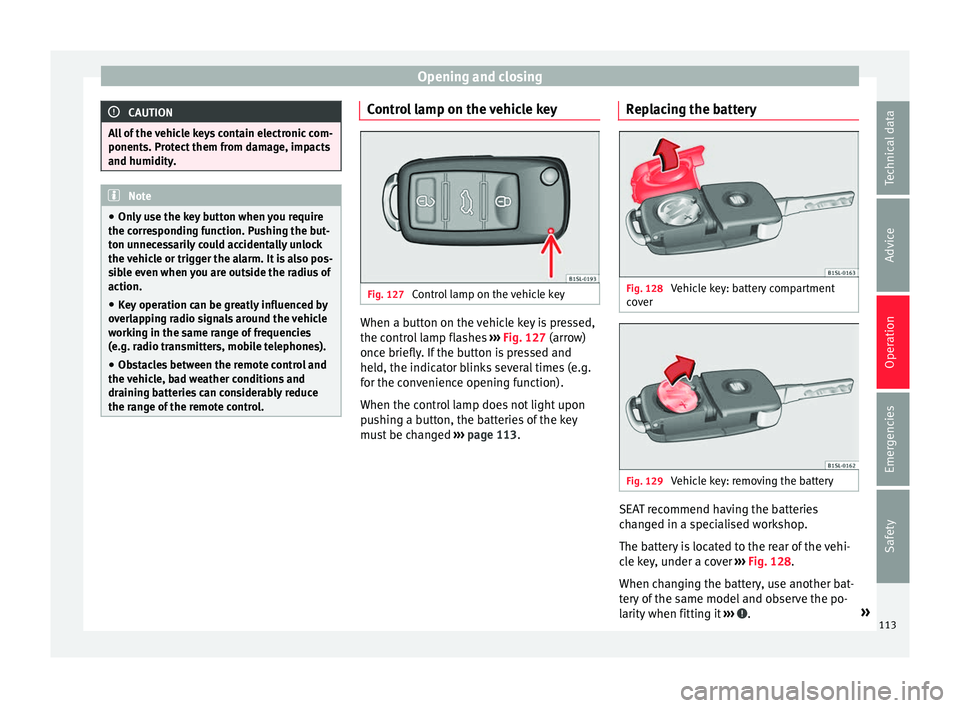
Fig. 127
Control lamp on the vehicle key When a button on the vehicle key is pressed,
the c ontr
o
l lamp flashes ››› Fig. 127 (arrow)
once briefly. If the button is pressed and
held, the indicator blinks several times (e.g.
for the convenience opening function).
When the control lamp does not light upon
pushing a button, the batteries of the key
must be changed ››› page 113. Replacing the battery Fig. 128
Vehicle key: battery compartment
c o
v
er Fig. 129
Vehicle key: removing the battery SEAT recommend having the batteries
c
h
an
ged in a specialised workshop.
The battery is located to the rear of the vehi-
cle key, under a cover ››› Fig. 128.
When changing the battery, use another bat-
tery of the same model and observe the po-
larity when fitting it ››› .
»
113
Technical data
Advice
Operation
Emergencies
Safety
Page 120 of 324
Operation
Unlocking and locking the boot hatch
When the v
ehic
le is locked, the hatch auto-
matically unlocks on opening if ››› Fig. 132
there is a valid vehicle key in the proximity.
Open or close the hatch normally
››› page 124.
After closing, the hatch locks automatically.
In the following instances, the rear lid does
not lock automatically after closing:
● If the entire vehicle is unlocked.
● If the key used last is inside the vehicle. All
vehicl
e indicator lights flash four times. The
vehicle will lock again after a few seconds if
no door or boot hatch are opened.
Locking the vehicle with a second key
If there is a vehicle key inside the vehicle and
it is locked from the outside with a second
vehicle key, the key inside the vehicle is
blocked for engine ignition ››› page 185. In
order to enable engine ignition, the button on the key inside the vehicle needs to be
pr
e
s
sed ››› Fig. 130.
Automatically disabling sensors
If the vehicle is not locked or unlocked for a
long period of time, the proximity sensor on
the passenger door is automatically disa-
bled.
If the exterior sensor on the door handle is
often activated unusually with the vehicle locked (e.g. by the branches of a bush rub-
bing ag
ainst it), all proximity sensors are dis-
abled for a time. If this only happens with the
exterior sensor on the driver's door, only this
sensor is disabled.
Sensors will again be enabled:
● After a time.
● OR: if the vehicle is unlocked with the but-
ton on the key.
● OR: if the boot is opened.
C on
venience functions
To close all electric windows, the sun roof
and electric tilting panoramic roof with the
convenience feature, keep your finger for a
few seconds on the lock sensor surface
››› Fig. 133 B located on the exterior part of
the driv er or p
a
ssenger door handle until the
windows and roof close.
Opening the doors by touching the sensor
surface on the handle takes places in accord-
ance with the settings activated on the menu
Configuration - Convenience
››› page 26. CAUTION
The sensor surfaces on the door handles
cou l
d engage if hit with a water jet or high
pressure steam if there is a valid vehicle key
in the nearby area. If at least one of the win-
dows is open and the sensor surface B on one of the handle permanently activates, all
windo
w
s will close. If the water jet or steam
is briefly moved away from the sensor sur-
face A on one of the handles and then poin-
ted at it
again, all the windows will probably
open ››› page 118, Convenience functions. Note
● If the v
ehicle battery has little or no charge,
or the vehicle key battery is almost or entire-
ly out of charge, it is likely that the vehicle
will not be able to be lock or unlocked with
the Keyless Access system. The vehicle can
be unlocked or locked manually ››› page 89.
● If there is no valid key inside the vehicle or
the syst
em fails to detect one, a warning will
display on the dash panel screen. This could
happen if any other radio frequency signal in-
terferes with the key signal (e.g. from a mo-
bile device accessory) or if the key is covered
by another object (e.g. an aluminium case).
● If the sensors are very dirty, e.g. have a lay-
er of sa
lt, how the sensors on the door han-
dles operate may be affected. If this is the
case, wash the vehicle ››› page 253.
● If the vehicle is equipped with an automatic
gearbo
x, it may only be locked in the gear
stick is in position P. 118