ECU Seat Alhambra 2017 Owner's Guide
[x] Cancel search | Manufacturer: SEAT, Model Year: 2017, Model line: Alhambra, Model: Seat Alhambra 2017Pages: 320, PDF Size: 6.88 MB
Page 85 of 320
Self-help
especially in accidents causing serious in-
jury
.
● M
ake sure that the vehicle tools are stored
safely
in the luggage compartment. WARNING
Unsuitable or damaged vehicle tools can
c au se injur
y or accidents.
● Never work with inappropriate or damaged
tool
s. Note
After use, return the jack to its initial position
us in
g the handle in order to securely store it
in the vehicle. Components
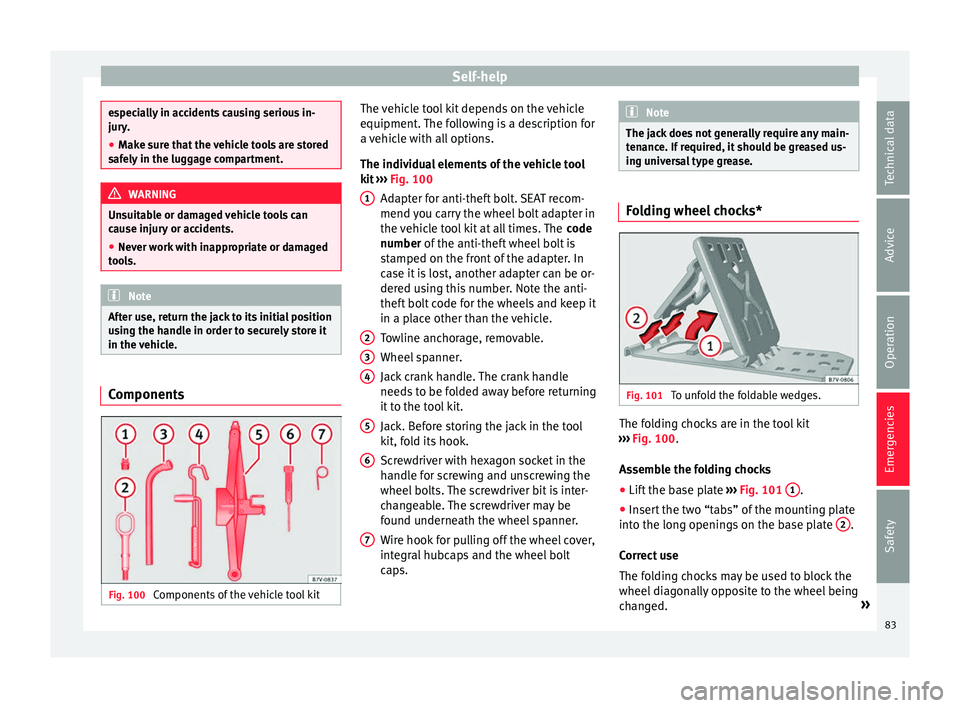
Fig. 100
Components of the vehicle tool kit The vehicle tool kit depends on the vehicle
equipment
.
The f
ollowing is a description for
a vehicle with all options.
The individual elements of the vehicle tool
kit ››› Fig. 100
Adapter for anti-theft bolt. SEAT recom-
mend you carry the wheel bolt adapter in
the vehicle tool kit at all times. The code
number of the anti-theft wheel bolt is
stamped on the front of the adapter. In
case it is lost, another adapter can be or-
dered using this number. Note the anti-
theft bolt code for the wheels and keep it
in a place other than the vehicle.
Towline anchorage, removable.
Wheel spanner.
Jack crank handle. The crank handle
needs to be folded away before returning
it to the tool kit.
Jack. Before storing the jack in the tool
kit, fold its hook.
Screwdriver with hexagon socket in the
handle for screwing and unscrewing the
wheel bolts. The screwdriver bit is inter-
changeable. The screwdriver may be
found underneath the wheel spanner.
Wire hook for pulling off the wheel cover,
integral hubcaps and the wheel bolt
caps.
1
2
3
4
5
6
7 Note
The jack does not generally require any main-
ten anc
e. If required, it should be greased us-
ing universal type grease. Folding wheel chocks*
Fig. 101
To unfold the foldable wedges. The folding chocks are in the tool kit
› ›
›
Fig. 100.
Assemble the folding chocks
● Lift the base plate ›››
Fig. 101 1 .
● Insert the two “tabs” of the mounting plate
int o the lon
g openin
gs on the base plate 2 .
C orr
ect
use
The folding chocks may be used to block the
wheel diagonally opposite to the wheel being
changed. »
83
Technical data
Advice
Operation
Emergencies
Safety
Page 98 of 320
Emergencies
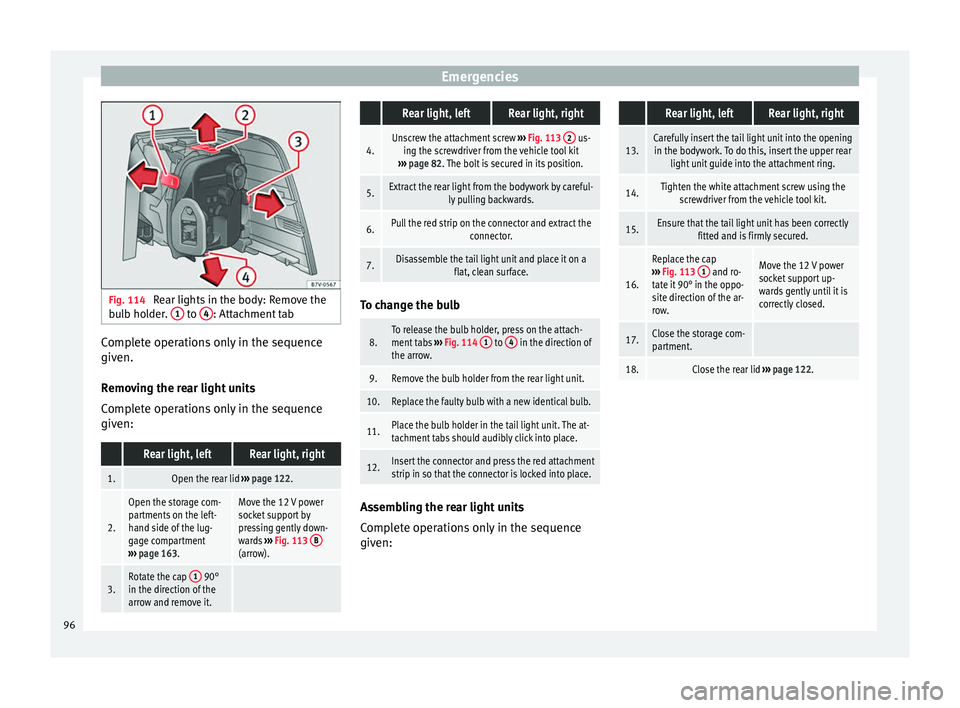
Fig. 114
Rear lights in the body: Remove the
b u
l
b holder. 1 to
4 : Attachment tab
Complete operations only in the sequence
giv
en.
R emo
ving the rear light units
Complete operations only in the sequence
given:
Rear light, leftRear light, right
1.Open the rear lid ››› page 122.
2.
Open the storage com-
partments on the left-
hand side of the lug-
gage compartment
››› page 163.Move the 12 V power
socket support by
pressing gently down-
wards ››› Fig. 113 B
(arrow).
3.Rotate the cap 1 90°
in the direction of the
arrow and remove it.
Rear light, leftRear light, right
4.Unscrew the attachment screw ››› Fig. 113 2 us-
ing the screwdriver from the vehicle tool kit
››› page 82. The bolt is secured in its position.
5.Extract the rear light from the bodywork by careful-
ly pulling backwards.
6.Pull the red strip on the connector and extract the connector.
7.Disassemble the tail light unit and place it on aflat, clean surface. To change the bulb
8.To release the bulb holder, press on the attach-
ment tabs
››› Fig. 114 1 to 4 in the direction of
the arrow.
9.Remove the bulb holder from the rear light unit.
10.Replace the faulty bulb with a new identical bulb.
11.Place the bulb holder in the tail light unit. The at-
tachment tabs should audibly click into place.
12.Insert the connector and press the red attachment
strip in so that the connector is locked into place. Assembling the rear light units
C
omp
l
ete operations only in the sequence
given:
Rear light, leftRear light, right
13.Carefully insert the tail light unit into the opening in the bodywork. To do this, insert the upper rear light unit guide into the attachment ring.
14.Tighten the white attachment screw using the screwdriver from the vehicle tool kit.
15.Ensure that the tail light unit has been correctly fitted and is firmly secured.
16.
Replace the cap
››› Fig. 113 1 and ro-
tate it 90° in the oppo-
site direction of the ar-
row.Move the 12 V power
socket support up-
wards gently until it is
correctly closed.
17.Close the storage com-
partment.
18.Close the rear lid ››› page 122. 96
Page 117 of 320

Opening and closing
Locking and unlocking the vehicle
w ith K
eyl
ess Access Fig. 131
Keyless Access locking and ignition
sy s
t
em: in the proximity of the car. Fig. 132
Keyless Access locking and ignition
sy s
t
em: sensor surface A for unlocking in-
s ide the door h
andl
e and sensor surface Bfor locking on the exterior of the handle.
Keyless Access is a key-free locking and igni-
tion sy
s
t
em to unlock and lock the vehicle
without actively using its key. For this, only a valid vehicle key is required to be in an area
near
››
› Fig. 131 the vehicle and one of the
sensor surfaces to be touched on the door
handles ››› Fig. 132.
General information
If a valid key is located in the proximity of the
car ››› Fig. 131, the Keyless Access lock and
ignition system gives the key entry as soon
as one of the sensor surfaces on the door
handles is touched or the push button on the
boot hatch is operated. The following fea-
tures are then available without having to
use the vehicle key actively:
● Keyless-Entry: unlocking of the vehicle with
the handle
s on the four doors or the button
located on the boot hatch.
● Keyless-Go: engine ignition and driving. For
this t
o occur, there has to be a valid key in-
side the vehicle and the ignition push button
needs to be pressed ››› page 182.
● Keyless-Exit: unlocking of the vehicle with
one of the four door h
andle.
The central locking and locking systems oper-
ate in the same way as a normal locking and
unlocking system. Only the controls change.
Unlocking the vehicle is confirmed with a
double flash of the indicator lights; locking
by a single flash. The vehicle will lock again after a few sec-
onds if
you unlock the vehicle but fail to open
any door or boot hatch.
Unlocking and opening the doors (Keyless-
Entry)
● Grip the door handle. In doing this, the
sensor sur
face ››› Fig. 132 A (arrow) is
t ouc
hed on the h
andle and the vehicle un-
locks.
● Open the door.
On vehic
les without a "safe" system: locking
and unlocking doors (Keyless-Exit)
● Switch the ignition off.
● Close the driver's door.
● Touch the surface sensor B onc
e (arrow)
on the door h andl
e. The door being operated
must be closed.
On vehicles with a "safe" security system:
locking and unlocking doors (Keyless-Exit)
● Switch the ignition off.
● Close the driver's door.
● Touch the surface sensor B onc
e (arrow)
on the door h andl
e. The vehicle locks with
the "safe" security system ››› page 117. The
door being operated must be closed.
● Touch the sensor surface B twic
e (arrow)
on the door h andl
e to lock the vehicle with-
out the "safe" security system ››› page 117. »
115
Technical data
Advice
Operation
Emergencies
Safety
Page 119 of 320
Opening and closing
"Safe" security systemFunctionNecessary operations
Locks the vehicle with
the "Safe" security sys-
tem.Press the button once on
the vehicle key.
Locks the vehicle with-
out the "Safe" security
system.
Press the button twice on
the vehicle key.
Touch the Keyless Access
close and ignition lock sensor
surface located on the exteri-
or part of the door handle
twice ››› page 115.
Press the central locking but-
ton on the driver door
once. Depending on the vehicle, when disabling
the ignition, a w
arnin
g on the d
ash panel
screen may display stating that the "safe" se-
curity system is activated ( Lock SAFE or
SAFELOCK ).
Disabling the "safe" security system
The "safe" security system may be disable in
one of the following ways:
● Press the button on the vehicle key
twic e
.
● T
ouch the Keyless Access close and igni-
tion lock sen
sor surface located on the exteri-
or part of the door handle twice ››› page 115. ●
Switc
h the ignition on.
● Press the ignition push button of the
Keyle
ss Access lock and ignition system.
When the “safe” security system is disabled,
the following needs to be taken into account:
● The vehicle can be opened and unlocked
from the ins
ide using an inside door handle.
● The anti-theft alarm is activated.
● The vehicle interior monitoring system and
the anti-tow sy
stem are disabled. WARNING
Careless use of the “Safe” security system
can c au
se serious injury.
● Never leave anybody inside the vehicle if it
has
been locked using the key. When the
"Safe" security system is activated, doors
cannot be opened from the inside!
● When the doors are locked, it is difficult to
get t
o passengers in the vehicle interior in
case of an emergency. Passengers could re-
main trapped inside and unable to unlock the
doors in case of an emergency. Anti-theft alarm
The anti-theft alarm makes it more difficult to
br
e
ak
into the vehicle or steal it.
The anti-theft alarm is automatically turned
on when the vehicle is locked with the key. When does the system trigger an alarm?
The anti-theft al
arm siren will be triggered for
about 30 seconds accompanied by optical
warning signals for about five minutes when
the vehicle is locked and the following unau-
thorised actions are taken:
● When the door is mechanically unlocked
usin
g the vehicle key without turning the ig-
nition within the following 15 seconds.
● A door is opened.
● The bonnet is opened.
● The rear lid is opened.
● When the ignition is switched on with a
non-authorised k
ey.
● When the vehicle battery is disconnected.
● When there is movement inside the vehicle
(vehicl
es with interior monitoring).
● When the vehicle is towed (vehicles with
anti-tow sy
stem)
● When the vehicle is lifted (vehicles with an-
ti-tow sy
stem).
● Transporting the vehicle on a ferry or by
railr
oad (vehicles with an anti-tow system or
interior monitoring).
● Unhitch a trailer connected to the anti-theft
alarm ››
› page 234.
How to turn OFF the alarm
Unlock the vehicle with the unlocking button
on the key or turn on the ignition with a valid »
117
Technical data
Advice
Operation
Emergencies
Safety
Page 134 of 320
Operation
opened and when the “Coming home” or
“L e
av
ing home” function is switched on. If
the equipment includes the light sensor, the
lighting around the exterior mirrors only
comes when it is dark. Note
● The time tak en f
or the headlights to go off
can be changed in the Lights & Visibil- ity menu and the function can be switched
on or off ›››
page 26.
● When the “Coming home” function is on, if
the vehic
le door is opened there is no audible
warning signal to advise that the light is still
on. Hazard warning lights
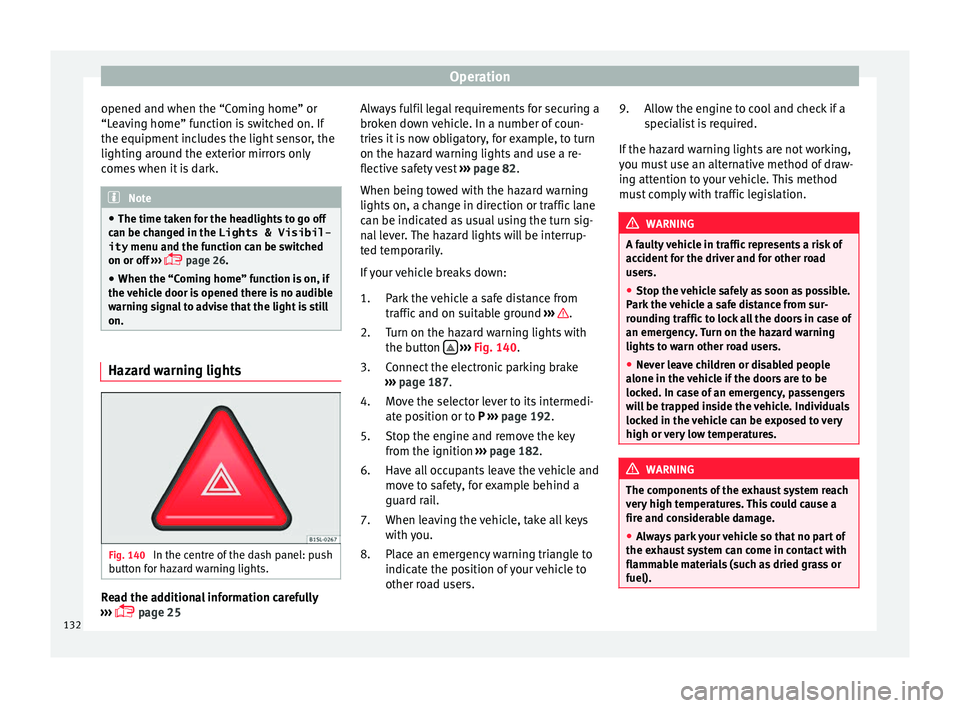
Fig. 140
In the centre of the dash panel: push
b utt
on f
or hazard warning lights. Read the additional information carefully
› ›
›
page 25 Always fulfil legal requirements for securing a
broken do
wn vehicle. In a number of coun-
tries it is now obligatory, for example, to turn
on the hazard warning lights and use a re-
flective safety vest ››› page 82.
When being towed with the hazard warning
lights on, a change in direction or traffic lane
can be indicated as usual using the turn sig-
nal lever. The hazard lights will be interrup-
ted temporarily.
If your vehicle breaks down:
Park the vehicle a safe distance from
traffic and on suitable ground ››› .
T urn on the h
az
ard warning lights with
the button
› ›
› Fig. 140
.
Connect the electronic parking brake
››› page 187.
Move the selector lever to its intermedi-
ate position or to P ››› page 192.
Stop the engine and remove the key
from the ignition ››› page 182.
Have all occupants leave the vehicle and
move to safety, for example behind a
guard rail.
When leaving the vehicle, take all keys
with you.
Place an emergency warning triangle to
indicate the position of your vehicle to
other road users.
1.
2.
3.
4.
5.
6.
7.
8. Allow the engine to cool and check if a
speci
alist is required.
If the hazard warning lights are not working,
you must use an alternative method of draw-
ing attention to your vehicle. This method
must comply with traffic legislation. WARNING
A faulty vehicle in traffic represents a risk of
acc ident
for the driver and for other road
users.
● Stop the vehicle safely as soon as possible.
Park the
vehicle a safe distance from sur-
rounding traffic to lock all the doors in case of
an emergency. Turn on the hazard warning
lights to warn other road users.
● Never leave children or disabled people
alone in the v
ehicle if the doors are to be
locked. In case of an emergency, passengers
will be trapped inside the vehicle. Individuals
locked in the vehicle can be exposed to very
high or very low temperatures. WARNING
The components of the exhaust system reach
ver y
high temperatures. This could cause a
fire and considerable damage.
● Always park your vehicle so that no part of
the exhau
st system can come in contact with
flammable materials (such as dried grass or
fuel). 9.
132
Page 144 of 320

Operation
Adjustment of the head restraints Fig. 150
A: Adjust the head restraints with no
po s
s
ibility of lengthways direction adjust-
ment; B: Adjust the head restraints with
lengthways direction adjustment Fig. 151
Adjust the head restraints in the sec-
ond or third r o
w of seats Read the additional information carefully
› ›
›
page 15
All seats are equipped with a head restraint.
Adjusting height
● Raise the head restraint in the direction of
the arrow or lo
wer it ››› Fig. 150 or ››› Fig. 151
1 with the button pressed
››
›
in Removing
and in s
t
alling the head restraints on
page 144.
● The head restraint must engage securely in
position.
There are three possible positions
on the second row of seats and two possible
positions on the third row of seats.
Adjusting the front head restraints
● Push the head restraint forward in the di-
rection of the arr
ow or backward ››› Fig. 150
1 B w
ith the button pressed. ●
The hea d r
estraint must engage securely in
position.
Correct adjustment of head restraints
Adjust the head restraint so that its upper
edge is at the same level as the top of your
head, or as close as possible to the same lev-
el as the top of your head and under no cir-
cumstances below eye level. Keep the back
of your neck as close as possible to the head
restraint.
Adjusting the head restraint for short people
Lower the head restraint completely, even if
your head is below its upper edge. When the
head restraint is at its lowest, it is possible
that a small gap remains between it and the
seat backrest.
Adjusting the head restraint for tall people
Raise the head restraint completely.
142
Page 145 of 320

Seats and head restraints
Removing and installing the head re-
s tr
aint
s Fig. 152
A: Fitting the head restraints with no
po ss
ibility of lengthways direction adjust-
ment; B: Fitting the head restraints with
lengthways direction adjustment Fig. 153
Fitting the head restraints in the sec-
ond or third r o
w of seats All seats are equipped with a head restraint.
R
emo
v
ing the front head restraints in vehi-
cles without the lengthways direction ad-
justment of the head restraints
● If necessary, adjust the seat backrest so
that the he
ad restraint can be fitted.
● Push the head restraint up as far as it will
go ››
› .
● Pull out the head restraint pressing the but-
t on c
omp
letely ››› Fig. 152 1 A.
Fittin g the fr
ont
head restraints in vehicles
without the lengthways direction adjustment
of the head restraints
● Correctly place the head restraint into the
guides on the se
at backrest and insert it.
● Completely press the button 1 A and p
ush
the he a
d restraint downwards. ●
Adjust
the head restraint according to the
correct seat position and secure it
››› page 142.
Removing the front head restraints in vehi-
cles with the lengthways direction adjust-
ment of the head restraints
● If necessary, adjust the seat backrest so
that the he
ad restraint can be fitted.
● Push the head restraint up and backward
as f
ar as it will go ››› .
● Place a flat object, e.g. a plastic card 2 B,
on both s ide
s
between the seat backrest cov-
er and the end protector of the seat backrest
retaining bar and unlock the retaining bars
with a little pressure.
● Completely pull out the head restraint.
Fitting the front
head restraints in vehicles
with the lengthways direction adjustment of
the head restraints
● Pull out the two retaining bars from the
head r
estraint as far as possible.
● Correctly place the head restraint into the
guides on the se
at backrest and insert it.
● Push the head restraint down as far as pos-
sibl
e until the two retaining bars are secured.
● Adjust the head restraint according to the
correct
seat position and secure it
››› page 142. »
143
Technical data
Advice
Operation
Emergencies
Safety
Page 149 of 320

Seats and head restraints
Initialising the seat position memory
The po s
ition memor
y system must be restar-
ted if, for example, the driver seat has been
changed.
Restarting deletes all memories and assign-
ments for the seat with position memory. The
memory buttons can then be reprogrammed
and the vehicle keys re-assigned.
● Open the driver door and do not get into
the vehic
le.
● Operating the seat settings from outside
the vehic
le.
● Move the angle of the seat backrest com-
plet
ely forwards.
● Release the control to set the angle and
then pres
s again until an audible warning is
heard. Note
The front passenger side exterior mirror auto-
matic a
lly changes from the position stored
for reversing as soon as the vehicle moves
forward at a speed of at least 15 km/h
(9 mph) or when the gear selection lever is
changed to a position other than R. Convenient entry function for the third
r
o
w of
seats Fig. 158
Second row of seats: convenient en-
tr y
f
unction controls The outer seats of the second row can be fol-
ded t
o m
ak
e it easier to get in and out of the
third row of seats.
Folding down the second row seats
● If necessary, open the belt loop and wind
up the seat belt
by hand.
● If necessary, remove the side head restraint
of the inte
grated child seat ›››
page 78.
● If necessary, raise the armrests.
● Remove any objects located in the footwell
of the second r
ow of seats, where applicable
››› .●
Pu sh the he
ad restraint down as far as it
will go ››› page 57.
● Push the lever ›››
Fig. 158 1 forwards and
f o
l
d the backrest of the rear seat. This seat
folds forward completely ››› and can still
be mo v
ed f
urther forward.
● Always take care when entering and leav-
ing the v
ehicle ››› .
R epo
s
itioning the seat in the second row
● Lift the backrest of the rear seat in an up-
right pos
ition. The entire seat folds back-
wards ››› .
● Make sure that the rear seat is securely en-
g ag
ed so th
at the seat belts can provide
proper protection in the rear seats. The red
mark ››› Fig. 158 2 should no longer be visi-
b l
e ›
›› in Folding down rear seats to create
lo a
d s
pace on page 154.
Emergency exit function
If the lever ››› Fig. 158 1 does not work, e.g.
af t
er an ac
cident, the seats on the second
row can be folded forwards from the third row
to allow vehicle occupants of the third row of
seats to get out of the vehicle ››› .
● Pull the handle ››
›
Fig. 158 3 back and
f o
l
d the backrest of the rear seat. The com-
plete rear seat folds forward ››› .
»
147
Technical data
Advice
Operation
Emergencies
Safety
Page 152 of 320
Operation
WARNING
The centre armrest may limit the freedom of
mov ement
of the driver's arm and cause a se-
rious accident.
● Keep the centre armrest compartments
closed whi
le the vehicle is in motion.
● The centre armrest is not designed for chil-
dren to s
it on! Sitting in this incorrect posi-
tion can cause severe injuries. Transport and practical
equipment
T r
an
sporting objects
Introduction Always transport heavy loads in the luggage
comp
ar
tment and place the seat backs in a
vertical position. Always use the anchors pro-
vided with suitable rope to secure heavy ob-
jects. Never overload the vehicle. Both the
carrying capacity as well as the distribution
of the load in the vehicle affect driving be-
haviour and braking ability ››› .
WARNING
Unsecured or incorrectly secured objects can
cau se seriou
s injury in case of a sudden ma-
noeuvring or breaking or in case of an acci-
dent. This is especially true when objects are
struck by a detonating airbag and fired
through the vehicle interior. To reduce the
risks, please note the following:
● Secure all objects in the vehicle. Always
keep equipment and he
avy objects in the lug-
gage compartment.
● Always secure objects with suitable rope or
sling
s so that they cannot enter the areas
around the front or side airbags in case of
sudden braking or an accident. ●
Alw a
ys ensure that objects inside the vehi-
cle cannot move into the area of the airbags
while driving.
● While driving, always keep object compart-
ments c
losed.
● Remove all objects from the front passen-
ger seat
when it is folded down. When the
seat backrest is folded down, it presses on
small and light objects and these are detec-
ted by the weight sensor on the seat; this
sends false information to the airbag control
unit.
● While the backrest of the front passenger
seat i
s folded, the front airbag must remain
disabled and the PASSENGER AIRBAG OFF light on.
● Objects secured in the vehicle should never
be plac
ed in such a way as to make passen-
gers sit in an incorrect position.
● If secured objects occupy a seat, this seat
should not
be occupied or used by anyone. WARNING
The driving behaviour and braking ability
ch an
ge when transporting heavy and large
objects.
● Adjust your speed and driving style to visi-
bility
, road, traffic and weather conditions.
● Accelerate gently and carefully.
● Avoid sudden braking and manoeuvres.
● Brake early. 150
Page 153 of 320
Transport and practical equipment
Transporting a load Secure all objects in the vehicle
● Distribute the load throughout the vehicle,
on the roof and in a tr
ailer as uniformly as
possible.
● Transport heavy objects as far forward as
poss
ible in the luggage compartment and
lock the seat backs in the vertical position.
● Secure luggage in the luggage compart-
ment with s
uitable straps on the fastening
rings ››› page 152.
● Check the headlight adjustment
›› ›
page 128.
● Use the suitable tyre pressure according to
the load bein
g transported. Read the tyre in-
flation information label ›››
page 284.
● For vehicles with a tyre pressure indicator,
chan
ge the vehicle load status ›››
page 231. CAUTION
Objects on the shelf could chafe against the
wir e
s of the heating element in the heated
rear window and cause damage. Note
Please note the information about loading a
trai l
er ››› page 234 and the roof carrier sys-
tem ››› page 161. Driving with the rear lid open
Driving with the rear lid open creates an addi-
tional
ri
sk. Secure all objects and secure the
rear lid correctly and take all measures possi-
ble to reduce toxic gases from entering the
vehicle. WARNING
Driving with the rear lid unlocked or open
cou l
d cause serious injuries.
● Always drive with the rear lid closed.
● Secure all objects in the vehicle. Loose
items c
ould fall out of the vehicle and injure
other road users or damage other vehicles.
● Drive particularly carefully and think
ahead.
● A
void sudden manoeuvres and braking giv-
en that thi
s could cause an uncontrolled
movement of the open rear lid.
● When transporting objects that protrude
out of the lug
gage compartment, indicate
them suitably. Observe legal requirements.
● If objects must project out of the luggage
compar
tment, the rear lid must never be used
to “secure” or “attach” objects.
● If a baggage rack is fitted on the rear lid, it
should be r
emoved before travelling with the
rear lid open. WARNING
Toxic gases may enter the vehicle interior
when the re ar lid i
s open. This could cause
loss of consciousness, carbon monoxide poi-
soning, serious injury and accidents.
● To avoid toxic gases entering the vehicle al-
way
s drive with the rear lid closed.
● In exceptional circumstances, if you must
drive with the r
ear lid open, observe the fol-
lowing to reduce the entry of toxic gases in-
side the vehicle:
– Close all windows and the sliding sun-
roof.
– Turn off the air recirculation for the heat-
ing and air conditioner.
– Open all of the air outlets in the dash
panel.
– Turn the heating fan and heater to the
highest level. CAUTION
An open boot hatch changes the length and
height of the
vehicle. Driving with the vehicle loaded
For the best handling when driving a loaded
v
ehic
l
e, note the following:
● Secure all objects ›››
page 151.
● Accelerate gently and carefully. »
151
Technical data
Advice
Operation
Emergencies
Safety