lock Seat Alhambra 2017 Manual Online
[x] Cancel search | Manufacturer: SEAT, Model Year: 2017, Model line: Alhambra, Model: Seat Alhambra 2017Pages: 320, PDF Size: 6.88 MB
Page 159 of 320
Transport and practical equipment
● Hook in the net
p
artition on the rear right-
hand side roof support by pressing on the
rod.
● Secure the net partition hooks into the
strap
s in the front of the boot ››› Fig. 167 then
tighten the belts.
Installing the net partition behind the front
seats
● Hook in the net partition on the front left-
hand side r
oof support ››› Fig. 167. To do this,
guide the rod from up to down.
● Hook in the net partition on the rear right-
hand side r
oof support by pressing on the
rod.
● Secure the hooks of the net partition to the
attachment
rings in the left and right hand
side footwells on the second row of seats
then tighten the straps.
Removing the net partition
● Loosen the net partition straps.
● Release the net partition hooks from the
rings
››› Fig. 167.
● Unhook the net partition on the right-hand
side roof
support ››› Fig. 167 by pressing on
the rod.
● Unhook the net partition from the left-hand
side roof
support. Folding in the net partition
●
Press on the release button ›››
Fig. 166 2 and bend the rod
A in the direction of the
arr o
w w
ith the release button pressed.
● Press on the release button ›››
Fig. 166 3 and bend the rod
B in the direction of the
arr o
w w
ith the release button pressed.
● Store the net partition securely in the vehi-
cle. WARNING
Loose objects in the vehicle interior can be vi-
ol ently
thrown in case of a sudden manoeu-
vre or braking and especially in accidents
causing serious injury.
● Ensure that the rods are correctly locked in
plac
e.
● Even when the net partition is correctly fit-
ted, ob
jects must be secured.
● When driving with the net partition, no pas-
senger
s should be behind it. Fastening rings*
Fig. 168
In the luggage compartment: fasten-
in g rin
g
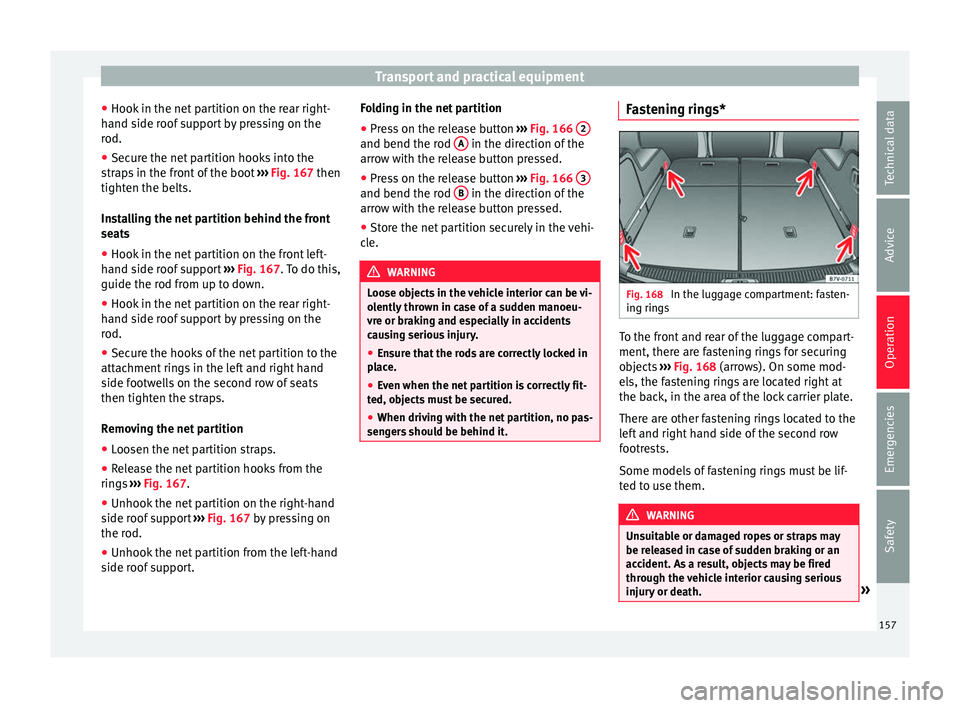
s To the front and rear of the luggage compart-
ment, ther
e ar
e f
astening rings for securing
objects ››› Fig. 168 (arrows). On some mod-
els, the fastening rings are located right at
the back, in the area of the lock carrier plate.
There are other fastening rings located to the
left and right hand side of the second row
footrests.
Some models of fastening rings must be lif-
ted to use them. WARNING
Unsuitable or damaged ropes or straps may
be rel e
ased in case of sudden braking or an
accident. As a result, objects may be fired
through the vehicle interior causing serious
injury or death. » 157
Technical data
Advice
Operation
Emergencies
Safety
Page 166 of 320

Operation
(Sun)glasses case in the roof console Fig. 175
On the roof console: sunglasses
s t
or
age compartment. To open, pr
ess and release the button
› ›
› Fig. 175 (arrow).
To close, press the cover upwards until it
clicks into place.
To ensure the interior monitoring works cor-
rectly, the (sun)glasses case must be closed
when the vehicle is locked ››› page 118. Storage compartment in the roof con-
sole Fig. 176
On the roof console: storage com-
p ar
tment To open pr
ess the button and release it
› ›
› Fig. 176.
To close, press the storage compartment up-
wards until it clicks into place.
To ensure interior monitoring works properly,
the storage compartments must be closed
when the vehicle is locked ››› page 118. Compartment on the instrument pan-
el*
Fig. 177
Storage compartment on the dash
p anel The storage compartment on the instrument
p
anel
m
ay have a cover.
To open, press the button on the cover
››› Fig. 177 (arrow).
To close, press the cover down until it clicks
into place.
164
Page 168 of 320
Operation
Glove compartment Fig. 181
Glove compartment Fig. 182
Glove compartment open Opening and closing the glove compartment
Un
loc
k
the glove compartment where neces-
sary. The glove compartment is locked when
the key slot is vertical.
Pull the lever to open ››› Fig. 181.
Press the cover upwards to close.Vehicle wallet compartment
The glove c
ompartment is designed to store
the vehicle documentation.
The vehicle on-board documentation wallet
should always be kept in the glove compart-
ment. Insert it crosswise in the glove com-
partment.
Glove compartment cooling
There is an air vent ››› Fig. 182 A on the rear
p anel
so th
at cooled air from the air condi-
tioner (this must be connected) is fed into
the glove compartment. Turn the air vent to
open and close it. WARNING
The risk of serious injuries in the event of an
acc ident
during a sudden braking manoeuvre
or turn is increased if the glove compartment
is left open.
● Keep the glove compartment closed while
the vehic
le is in motion. CAUTION
For structural reasons, some model versions
wi l
l have gaps behind the glove compartment
into which small objects may fall. This could
lead to strange noises and damage to the ve-
hicle. You should therefore not keep very
small objects in the glove compartment. Storage compartments in the rear
f
ootw
el
l* Fig. 183
Storage compartments in the foot-
w el
l
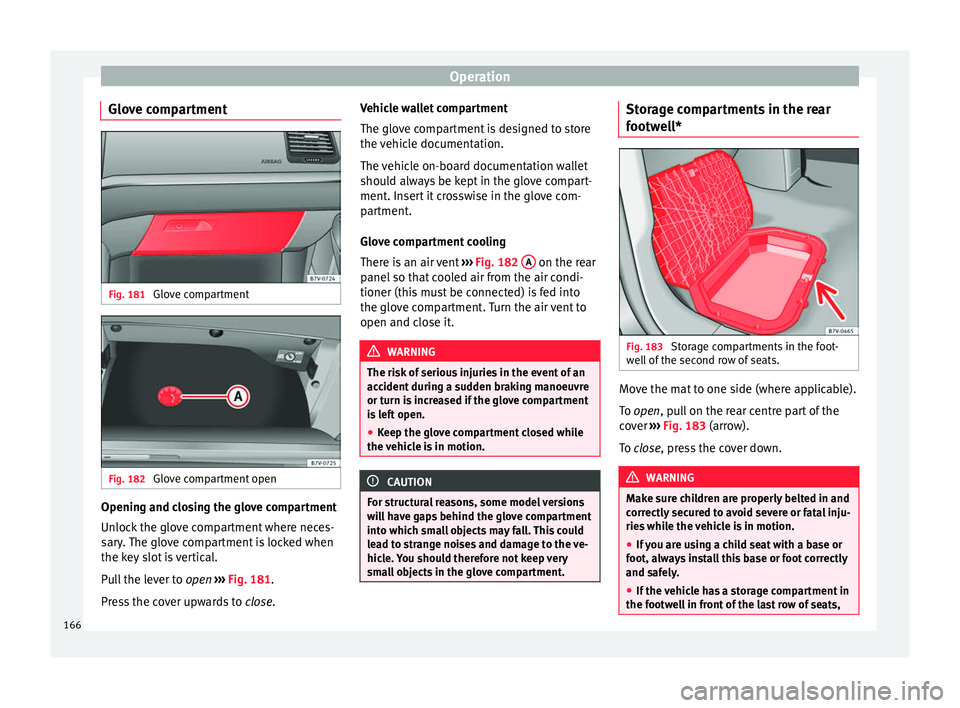
of the second row of seats. Move the mat to one side (where applicable).
T
o
open
, pull on the rear centre part of the
cover ›››
Fig. 183 (arrow).
To close, press the cover down. WARNING
Make sure children are properly belted in and
corr ectly
secured to avoid severe or fatal inju-
ries while the vehicle is in motion.
● If you are using a child seat with a base or
foot, alw
ays install this base or foot correctly
and safely.
● If the vehicle has a storage compartment in
the footwel
l in front of the last row of seats,166
Page 170 of 320

Operation
Other storage compartments Fig. 187
In the luggage compartment: Side
s t
or
age compartment Fig. 188
Other compartments in the boot
floor . Side compartments in the luggage compart-
ment
Ther
e ar
e other c
ompartments ››› Fig. 187 1 and
2 in the side of the boot. To open the
c omp
ar
tment 1 , turn the catch clockwise. To
open the c omp
ar
tment 2 , lift the cover.
C omp
ar
tment 1 houses the factory fitted
CD
c h
an
ger. The compartment lid 1 can safely
s t
or
e the tray support covers.
Compartments in the boot floor
More storage compartments can be found in
the boot floor.
FunctionNecessary operations
Open the rear com-
partment ››› Fig. 188
4
:
Lift the rear of the boot floor
using the handle.
Keeping the rear com-
partment open: Move the hook at the rear
right of the boot and hook the
boot floor onto it ››› page 152.
Closing the compart-
ment: Push back the hook and
push the rear of the boot floor 4
down. Other storage compartments:
● in the centre console, front and rear.
● in the door trims, front and rear.
● Coat hooks on the centr
al
door pillars and
on the rear roof handles. ●
Bag hook in the lug
gage compartment
››› page 152. WARNING
Clothing hung on the coat hooks could re-
strict the driv
er's view and lead to serious ac-
cidents.
● Hang the clothes from the hooks so that
driver's
view is not restricted.
● The coat hook is suitable for light items of
clothing. Nev
er place heavy, hard or sharp
objects in the bags. CAUTION
Keep the CD changer compartment closed
whil e the
vehicle is in motion to reduce vibra-
tions that could damage the changer. Note
The first aid kit is located in the rear left com-
par tment
of the luggage compartment. Drink holders
Intr oduction Bottle holders
Ther
e i
s
a bottle holder in the open compart-
ments in the driver and front passenger
doors and in that of the sliding door.
168
Page 174 of 320
Operation
12 volt power socket
The 12 v
o
lt power socket will only work with
the ignition on.
Using electrical appliances with the engine
stopped and the ignition switched on will
drain the battery. Therefore, electrical devi-
ces connected to the power socket can only
be used when the engine is running.
To prevent voltage variations from causing
damage, switch off the electrical consumer
connected to the 12 volt power socket before
switching the ignition on or off and before
starting the engine.
12 volt power sockets can be found in the fol-
lowing locations in the vehicle:
● Compartment in the centre of the centre
conso
le.
● Compartment in the front centre console.
● Storage compartment in the front central
armres
t.
● Rear centre console ›››
Fig. 193.
● At the rear right of the luggage compart-
ment.
230 V
olt Euro power socket*
The power socket only works when the en-
gine is running ››› .
C onn e
cting an electrical appliance: plug the
device into the power socket as far as possi-
ble to unlock the built-in childproof lock. The current only flows when the childproof lock is
unloc
ked.
LED on the power socket ››› Fig. 194
Steady green light:The childproof lock is un-
locked. The power socket can
now be used.
Flashing red light:There is some kind of fault
(e.g. disconnection due to ex-
cess current or temperature). Heat protection
The 230
V
o
lt Euro power connector converter
switches off automatically when a certain
temperature is exceeded. This disconnect
prevents overheating in the event of an in-
crease in power consumption of the connec-
ted appliance and where the atmospheric
temperature is too high. The inverter will
switch on again automatically after it has
cooled down. Appliances that are switched
on and connected to the power socket will
start up again. Therefore, switch off all elec-
trical appliances connected to the power
socket when the current converter switches
off due to overheating. WARNING
High voltage in the electrical installation!
● Liquids must not be spilt over the power
sock et
. ●
Do not p lug a
dapters or extension cords in-
to the 230 Volt Euro power connector. Other-
wise, the built-in child safety device will
switch off and the connector will become live.
● Do not plug current conductors such as a
knitting needle int
o the 230 Volt Euro power
connector. CAUTION
● Alw a
ys follow the operating instructions for
the appliances to be connected!
● Never exceed the maximum power rating as
this c
ould damage the vehicle's general elec-
trical system.
● 12 volt power socket:
– Only u
se accessories with approved elec-
tromagnetic compatibility according to
current regulations.
– Never power the socket.
● 230 Volt Euro power socket:
– Do not plug in dev
ices or connectors that
are too heavy (e.g. a transformer) into the
power socket.
– Do not connect lamps which contain a ne-
on tube.
– Only plug appliances with a voltage that
matches the power socket voltage into
the power socket.
– Where devices have with a high start-up
current, surge protection prevents them
from switching on. In this case, unplug 172
Page 176 of 320
Operation
Note
● When the coo lin
g system is turned off, air
coming from the outside will not be dried. To
avoid fogging up the windows, SEAT recom-
mends leaving the cooler (compressor) on. To
do this, press the A/C button. The button
lamp shou l
d light up.
● If the humidity and temperature outside the
vehicl
e are high, condensation can drip off
the evaporator in the cooling system and
form a pool underneath the vehicle, this is
completely normal and there is no need to
suspect a leak.
● Keep the air intake slots in front of the
winds
creen free of snow, ice and leaves to en-
sure heating and cooling are not impaired,
and to prevent the windows from misting
over. Controls
Read the additional information carefully
› ›
›
page 36
To switch a function on or off, press the ap-
propriate button. Press the button again to
switch off the function.
The LED on each control lights up to indicate
that the respective function of a control has
been switched on.
Some Climatronic controls may also be on
the air conditioner control panel located in
the rear centre console. These controls are used to make the appropriate settings for the
rear se
ats. Note
● Not a l
l Climatronic buttons are operational
in REAR mode.
● The REAR button is locked in defrost mode.
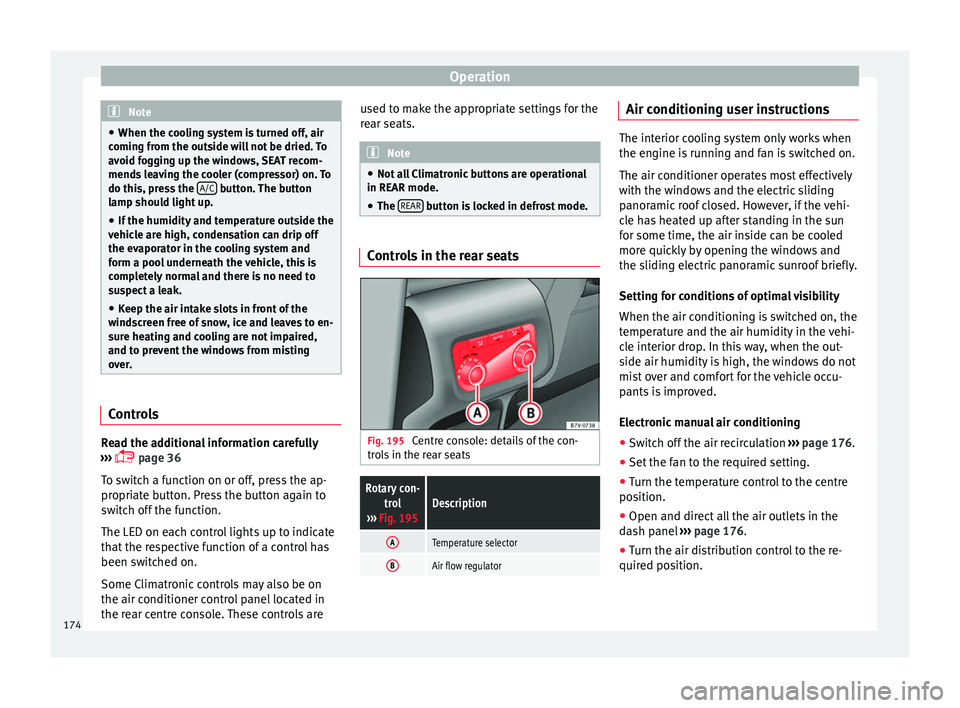
Controls in the rear seats
Fig. 195
Centre console: details of the con-
tr o
l
s in the rear seats
Rotary con-
trol
››› Fig. 195Description
ATemperature selector
BAir flow regulator Air conditioning user instructions
The interior cooling system only works when
the engine i
s
running and fan is switched on.
The air conditioner operates most effectively
with the windows and the electric sliding
panoramic roof closed. However, if the vehi-
cle has heated up after standing in the sun
for some time, the air inside can be cooled
more quickly by opening the windows and
the sliding electric panoramic sunroof briefly.
Setting for conditions of optimal visibility
When the air conditioning is switched on, the
temperature and the air humidity in the vehi-
cle interior drop. In this way, when the out-
side air humidity is high, the windows do not
mist over and comfort for the vehicle occu-
pants is improved.
Electronic manual air conditioning
● Switch off the air recirculation ››
›
page 176.
● Set the fan to the required setting.
● Turn the temperature control to the centre
position.
● Open and dir
ect all the air outlets in the
dash p
anel ›››
page 176.
● Turn the air distribution control to the re-
quired pos
ition.
174
Page 181 of 320
Air conditioning
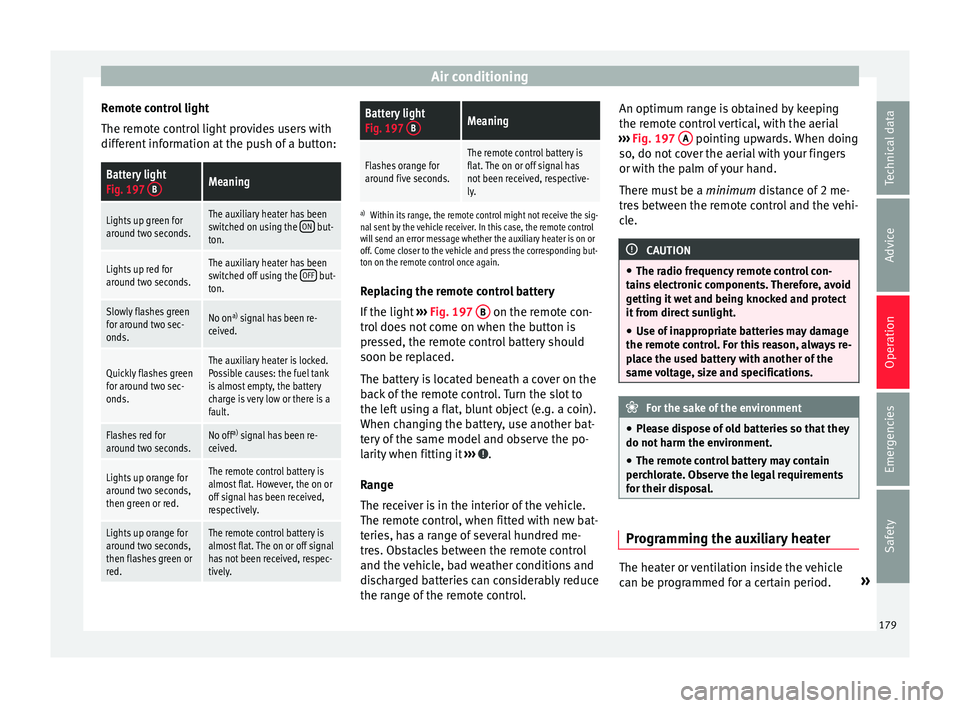
Remote control light
The r emot
e c
ontrol light provides users with
different information at the push of a button:
Battery light
Fig. 197 BMeaning
Lights up green for
around two seconds.The auxiliary heater has been
switched on using the ON but-
ton.
Lights up red for
around two seconds.The auxiliary heater has been
switched off using the OFF but-
ton.
Slowly flashes green
for around two sec-
onds.No on a)
signal has been re-
ceived.
Quickly flashes green
for around two sec-
onds.The auxiliary heater is locked.
Possible causes: the fuel tank
is almost empty, the battery
charge is very low or there is a
fault.
Flashes red for
around two seconds.No off a)
signal has been re-
ceived.
Lights up orange for
around two seconds,
then green or red.The remote control battery is
almost flat. However, the on or
off signal has been received,
respectively.
Lights up orange for
around two seconds,
then flashes green or
red.The remote control battery is
almost flat. The on or off signal
has not been received, respec-
tively.
Battery light
Fig. 197 BMeaning
Flashes orange for
around five seconds.The remote control battery is
flat. The on or off signal has
not been received, respective-
ly.
a)
Within its range, the remote control might not receive the sig-
nal sent by the vehicle receiver. In this case, the remote control
will send an error message whether the auxiliary heater is on or
off. Come closer to the vehicle and press the corresponding but-
ton on the remote control once again.
Replacing the remote control battery
If the light ›››
Fig. 197 B on the remote con-
tr o
l
does not come on when the button is
pressed, the remote control battery should
soon be replaced.
The battery is located beneath a cover on the
back of the remote control. Turn the slot to
the left using a flat, blunt object (e.g. a coin).
When changing the battery, use another bat-
tery of the same model and observe the po-
larity when fitting it ››› .
R an
g
e
The receiver is in the interior of the vehicle.
The remote control, when fitted with new bat-
teries, has a range of several hundred me-
tres. Obstacles between the remote control
and the vehicle, bad weather conditions and
discharged batteries can considerably reduce
the range of the remote control. An optimum range is obtained by keeping
the remote c
ontrol vertical, with the aerial
››› Fig. 197 A pointing upwards. When doing
so , do not
c
over the aerial with your fingers
or with the palm of your hand.
There must be a minimum distance of 2 me-
tres between the remote control and the vehi-
cle. CAUTION
● The ra dio fr
equency remote control con-
tains electronic components. Therefore, avoid
getting it wet and being knocked and protect
it from direct sunlight.
● Use of inappropriate batteries may damage
the remote c
ontrol. For this reason, always re-
place the used battery with another of the
same voltage, size and specifications. For the sake of the environment
● Ple a
se dispose of old batteries so that they
do not harm the environment.
● The remote control battery may contain
perch
lorate. Observe the legal requirements
for their disposal. Programming the auxiliary heater
The heater or ventilation inside the vehicle
c
an be pr
ogr
ammed for a certain period. »
179
Technical data
Advice
Operation
Emergencies
Safety
Page 183 of 320
Driving
If the battery charge is low, the auxiliary heat-
er w i
l
l switch off automatically or will not
even switch on. This avoids problems when
starting the engine.
● The heater will switch on just once each
time. The timer wi
ll also have to be switched
back on every time it is required. Note
● Noise w i
ll be heard while the auxiliary
heater is running.
● When the air humidity is high and the out-
side temper
ature low, the heating system
may evaporate condensation from the auxili-
ary heater. In this case, steam may be re-
leased from underneath the vehicle. This is
completely normal and there is no need to
suspect a fault!
● If the auxiliary heater runs several times
over a pr
olonged period, the vehicle battery
may run flat. To re-charge the battery, drive
the vehicle for a long distance. As a general
rule, drive for as much time as the auxiliary
heating was working. Driving
Ad dr
e
ss
Introduction The power steering is not hydraulic but elec-
tromec
h
anical. The advantage of this steer-
ing system is that it disposes of hydraulic
tubes, hydraulic oil, the pump, filter and oth-
er components. The electromechanical sys-
tem saves fuel. While a hydraulic system re-
quires oil pressure to be maintained, electro-
mechanical steering only requires energy
when the steering wheel is turned.
With the power steering system, the assisted
steering function automatically adjusts ac-
cording to the vehicle speed, the steering tor-
que and the wheel turning angle. The power
steering only works when the engine is run-
ning. WARNING
If the power steering is not working then the
st eerin
g wheel is much more difficult to turn
and the vehicle more difficult to control.
● The power steering only works when the
engine is
running.
● Never allow the vehicle to move when the
engine is
switched off.
● Never remove the key from the ignition if
the vehic
le is in motion. The steering may lock and it will not be possible to turn the
st
eerin
g wheel. Control and warning lamps
It lights up red
Power steering faul-
ty.The steering system should be
checked by a specialised work-
shop as soon as possible.
It lights up yellow
Power steering op-
eration reduced.The steering system should be
checked by a specialised work-
shop as soon as possible.
If, after restarting the engine and
driving for a short distance, the
yellow warning lamp no longer
comes on, it will
not be necessa-
ry to take the vehicle to a speci-
alised workshop.
The vehicle battery
was disconnected
and has been recon-
nected.Drive for a short distance at
15-20 km/h (9-12 mph).
Flashes red
Fault in the steering
column electronic
lock.
Do not drive on!
Seek professional advice.» 181
Technical data
Advice
Operation
Emergencies
Safety
Page 184 of 320
Operation
It flashes yellow
Steering column de-
viation.Gently turn the steering wheel to
and fro.
Steering wheel not
unlocked or locked.Remove the key from the ignition
and then switch the ignition
back on. Check the messages
displayed on the instrument
panel at the same time.
Do not drive on, if
the steering
column remains locked after the
ignition has been switched on.
Seek specialist assistance. Several warning and control lamps light up
f
or a f
ew sec
onds when the ignition is switch-
ed on, signalling that the function is being
verified. They will switch off after a few sec-
onds. WARNING
Observe the safety warnings ›››
in Control
and warnin g l
amps on page 105. Information on the steering
Steering column electronic lock
V
ehic
l
es with Keyless Access: the steering
column locks when the driver's door is
opened and the ignition is switched off.
Therefore, the vehicle should be at a stand-
still and, where applicable, the selector lever
in position P. If the driver door is opened before the igni-
tion is sw
itched off, the steering column elec-
tronic lock is activated via the ignition key or
the sensor built into the door handle.
Steering column mechanical lock
To prevent theft, we recommend you lock the
steering before leaving the vehicle.
Please engage steer-
ing lockUnlocking the steering
Parking the vehicle
››› page 187.Turn the steering wheel
slightly to release the
steering lock.
Remove the key from the
ignition.Insert the key in the igni-
tion lock.
Turn the steering wheel
slightly until you hear the
steering lock.Hold the steering wheel in
this position and switch
on the ignition. Electromechanical power steering
W
ith the po
w
er steering system, the assisted
steering function automatically adjusts ac-
cording to the vehicle speed, the steering tor-
que and the wheel turning angle. The power
steering only works when the engine is run-
ning.
You should remember that you will need con-
siderably more power than normal to steer
the vehicle if the power steering is not work-
ing correctly or not at all. Counter steering assistance system
The count
er steering assistance system helps
the driver in critical situations. Additional
steering power helps the driver when counter
steering. WARNING
The counter steering assistance system com-
bined w ith E
SC helps the driver to steer the
vehicle in critical driving conditions. At all
times, it is the driver who steers the vehicle.
The counter steering system does not steer
the vehicle. Stopping and starting the en-
gine
Intr oduction Immobiliser display
When an in
v
alid k
ey is used or in the event of
a system fault, or Immobiliser on is
displayed on the instrument panel. The en-
gine cannot be started.
Pushing or towing
For technical reasons, the vehicle must not
be push- or tow-started. Jump starting is pref-
erable.
182
Page 185 of 320
Driving
WARNING
Turning off the engine while driving will make
st op
ping the vehicle difficult; this could even
result in the loss of control causing an acci-
dent with serious consequences.
● The assisted braking and steering systems,
the airbag sys
tem, seat belts and certain
safety equipment are only active while the
engine is running.
● The engine should only be switched off
when the vehic
le is at a standstill. WARNING
While the engine is running or starting it
cou l
d help reduce the risk of serious injury.
● Never start or leave the engine running in
poorly v
entilated or closed spaces. Exhaust
gas contains carbon monoxide, a toxic, col-
ourless and odourless gas. Carbon monoxide
can cause people to lose consciousness. It
can also cause death.
● Never leave the vehicle unattended if the
engine is
running. The vehicle could move off
suddenly or something unexpected could
happen resulting in damage and serious in-
jury.
● Never use start boosters. Cold start sprays
coul
d explode or increase the engine speed
unexpectedly. WARNING
The components of the exhaust system reach
ver y
high temperatures. This could cause a
fire and considerable damage.
● Always park your vehicle so that no part of
the exhau
st system can come in contact with
flammable materials (such as wood, leaves,
dried grass, spilled fuel, etc.).
● Do not apply additional underseal or anti-
corro
sion coatings to the exhaust pipes, cata-
lytic converter, heat shields or the diesel par-
ticulate filter. Ignition lock
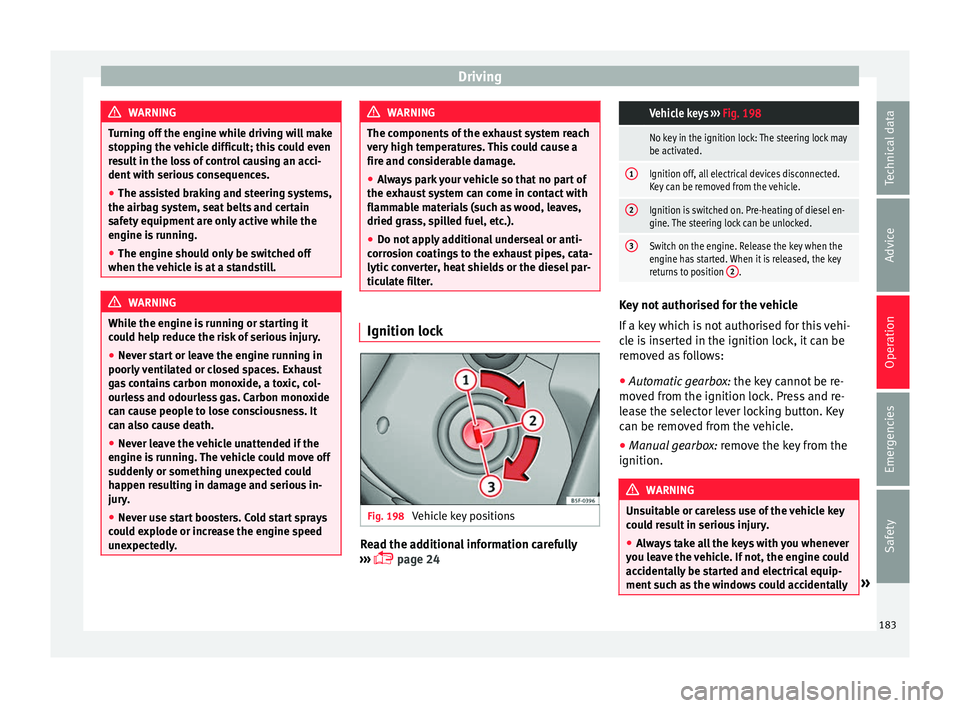
Fig. 198
Vehicle key positions Read the additional information carefully
› ›
›
page 24
Vehicle keys
››› Fig. 198
No key in the ignition lock: The steering lock may
be activated.
1Ignition off, all electrical devices disconnected.
Key can be removed from the vehicle.
2Ignition is switched on. Pre-heating of diesel en-
gine. The steering lock can be unlocked.
3Switch on the engine. Release the key when the
engine has started. When it is released, the key
returns to position 2
. Key not authorised for the vehicle
If
a k
ey
which is not authorised for this vehi-
cle is inserted in the ignition lock, it can be
removed as follows:
● Automatic gearbox: the key c
annot be re-
moved from the ignition lock. Press and re-
lease the selector lever locking button. Key
can be removed from the vehicle.
● Manual gearbox: remov
e the key from the
ignition. WARNING
Unsuitable or careless use of the vehicle key
cou l
d result in serious injury.
● Always take all the keys with you whenever
you le
ave the vehicle. If not, the engine could
accidentally be started and electrical equip-
ment such as the windows could accidentally » 183
Technical data
Advice
Operation
Emergencies
Safety